


Would you like to create a separate page for blog posts in WordPress?
By default, WordPress displays your blog posts on the home page. However, if you are making a business website or simply want to customize your homepage, then you may want a separate page for your blog section.
In this article, we will show you two ways to create a separate page for blog posts in WordPress.
Why Display Blog Posts on a Separate Page?
The home page is the front page of your WordPress website and the first page your visitors see. By default, WordPress shows your most recent posts on your home page, and that makes sense if you are running a blog.
But it’s not always ideal for small business websites. You will probably want a more engaging home page that tells users about your business, products, and services, lets them know how to contact you, and boosts your sales conversion.
Now, if you also want to run a blog on your website, then you will need to provide another page where visitors can go to read your posts.
Having said that, we will show you how to easily create a separate page for blog posts in WordPress.
In this tutorial, we have discussed two methods, and you can use the links below to jump to the method of your choice. Keep in mind that the second method is the simplest and offers the most customization:
Video Tutorial
If you’d prefer written instructions, then just keep reading.
Method 1: Creating Separate Pages for Blog Posts in WordPress
You can create a separate page for blog posts using the default settings in WordPress.
However, this method takes a little more work than Method 2 and does not offer as many customization options.
Creating a Separate Home Page and Blog Page
First, you will need to create two separate pages in WordPress to use as your home page and blog page.
You don’t need to add any content to those pages, and you can name them anything you like. For instance, some business websites use ‘News’ for their blog page.
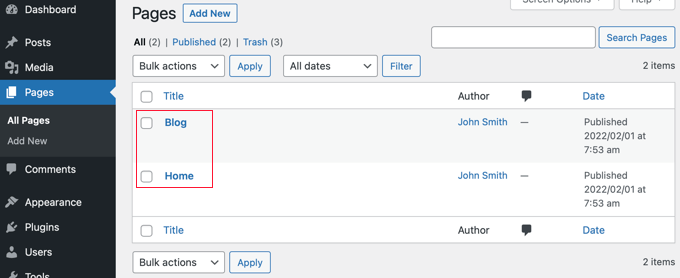
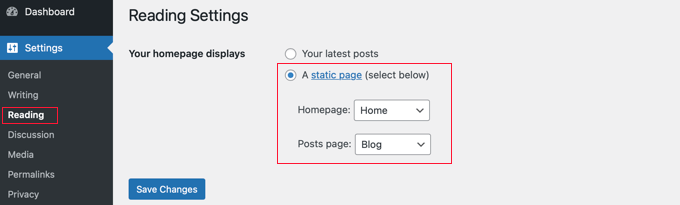
Once you have created those pages, visit the Settings » Reading page in the WordPress admin area.
Now, under the section labeled ‘Your homepage displays’, you need to click on the button for ‘A static page’.
After that, you can select the Home and Blog pages you created earlier. You should then scroll down and click the ‘Save Changes’ button.
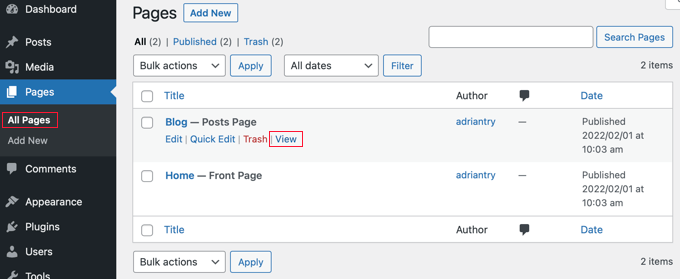
Now, when you navigate to the Pages » All Pages screen from the WordPress dashboard, you will see that the Home page is labeled ‘Front Page’ and the Blog page is labeled ‘Posts Page’.
Go ahead and click on the ‘View’ link under the Blog page to preview it.
The appearance of these pages depends on your WordPress theme, and you may wish to configure these settings.
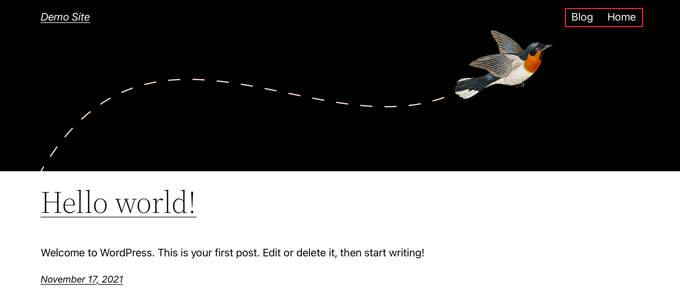
For example, if your theme has a navigation menu, then you will notice that WordPress has automatically added the new Blog and Home pages. If not, then refer to our beginner’s guide on how to add a navigation menu in WordPress.
Customizing Your Home Page
So far, your new home page is blank. Now it’s time to add information about your business, products, and services and let your visitors know how they can contact you.
You can learn how to do that in our guide on how to create a custom home page in WordPress. In Method 1, we show you how to use the block editor to add cover images, columns, tables, text and media, galleries, and more.
You’ll also find lots of creative customization ideas in our guide on how to edit a WordPress home page easily and effectively.
Customizing Your Blog Page
If you’re happy with the way your blog page looks, then your job is finished.
However, if you are currently using a block-based theme, then you can also customize your blog page by visiting the Appearance » Editor screen from the WordPress dashboard.
Once you are there, select the ‘Pages’ option from the left column in the full site editor.
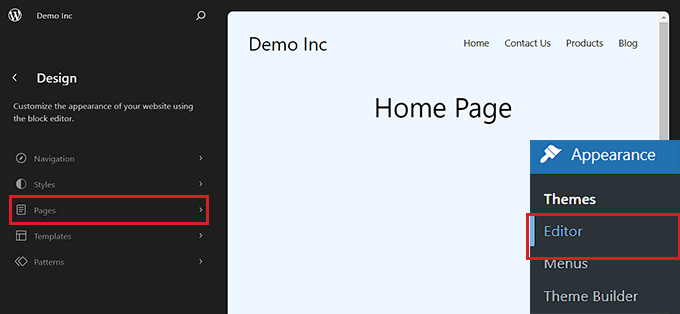
This will open a list of all the pages on your website in the left column.
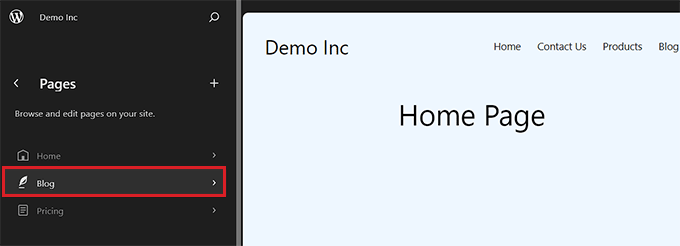
From here, select the ‘Blog’ page option and then click on the page preview on the right to start customizing your blog page.
You can now click on the add block ‘+’ button in the top left corner of the screen and add blocks of your choice to the page.
Additionally, you can change the background, text, or link color on your blog page by clicking on the ‘Styles’ icon at the top right corner of the screen.
This will open a block panel on the right from where you can click the ‘Typography’ tab to change text color, the ‘Colors’ tab to change background color, and the ‘Layout’ tab to configure your blog page’s dimensions.
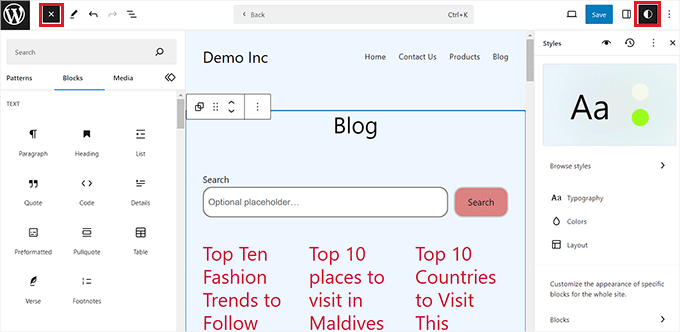
Once you are done, don’t forget to click the ‘Save’ button at the top to store your settings.
Now, you can visit your WordPress blog page to see how it looks.
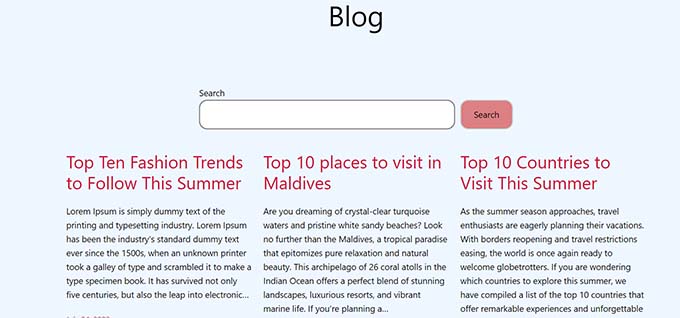
However, if you are using a classic theme, then you will need to use Method 2 instead to customize your blog post page.
Method 2: Creating a Customized Page for Blog Posts With a Drag & Drop Builder (Recommended)
A theme builder plugin allows you to easily create a custom WordPress theme without any code. That includes the ability to create and customize a separate page for blog posts.
Installing the SeedProd Theme Builder
First, you need to install and activate the SeedProd plugin. For more details, see our step-by-step guide on how to install a WordPress plugin.
SeedProd is the best drag-and-drop WordPress page builder for businesses, bloggers, and website owners. It also has a theme designer that allows you to easily customize your blog page and much more.
You can read our complete SeedProd review for more details.
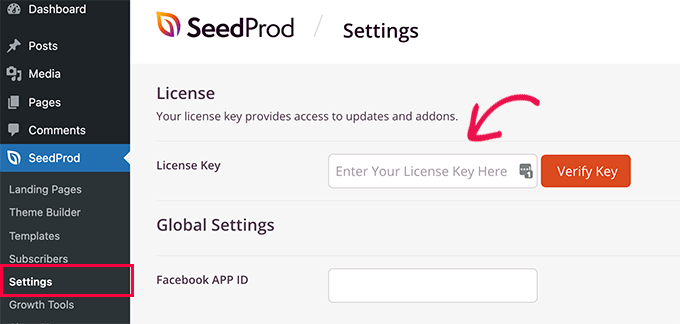
Upon activation, visit the SeedProd » Settings page to enter your license key. You can find this information in your account on the SeedProd website.
After that, it’s time to create a custom WordPress theme. This is much simpler than it sounds.
Creating a Custom WordPress Theme
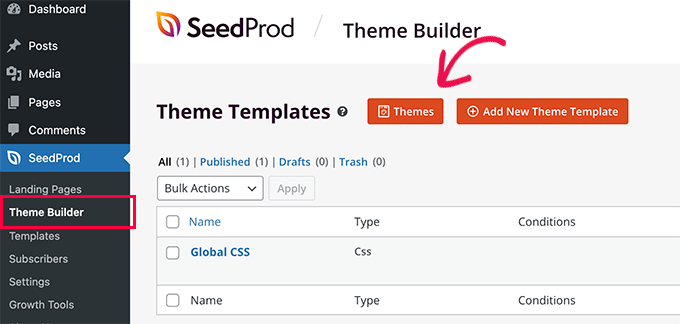
First, you need to visit the SeedProd » Theme Builder page. Here, you’ll use one of SeedProd’s ready-made themes as a starting point. This will replace your existing WordPress theme with a new, custom design.
You can do that by clicking the ‘Themes’ button.
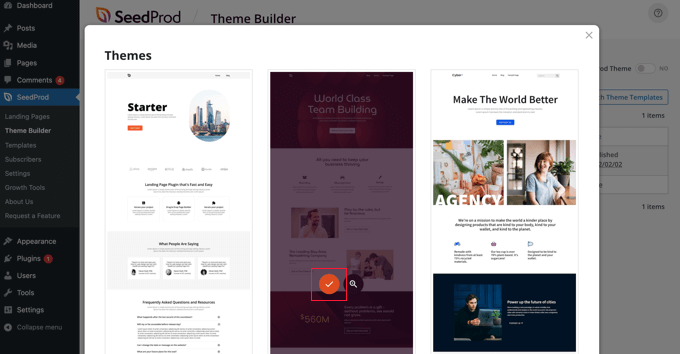
You will now be shown a list of professionally designed themes that are designed for different types of websites.
For example, there are templates called ‘Modern Business’, ‘Marketing Agency’, and ‘Mortgage Broker Theme’.
Have a look through the options and select one that best matches your needs by clicking the checkmark icon.
Once you have chosen a theme, SeedProd will generate all the theme templates, including one for your blog index and one for your home page.
These are not just empty pages but come set up with attractive layouts and placeholder content that’s easy to customize.
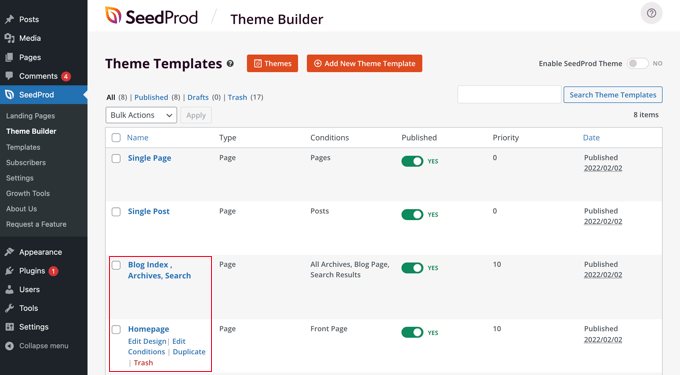
In this tutorial, we will show you how to customize the home page and blog index templates.
You might also like to customize the other templates. To learn how to do that, see our beginner’s guide on how to easily create a custom WordPress theme.
Customizing Your Home Page
Once you have generated your theme templates, you can edit them using the SeedProd theme builder. We will start with the Homepage template.
Simply click the ‘Edit Design’ link under the homepage to get started.
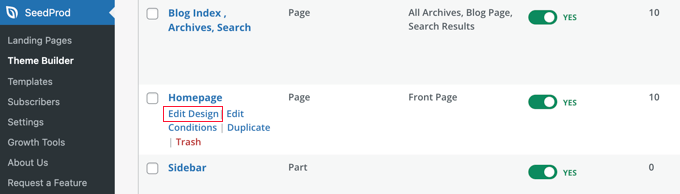
This will launch the template file in the SeedProd theme builder.
This simple drag-and-drop builder will show a live preview of your page to the right and a block toolbar on the left.
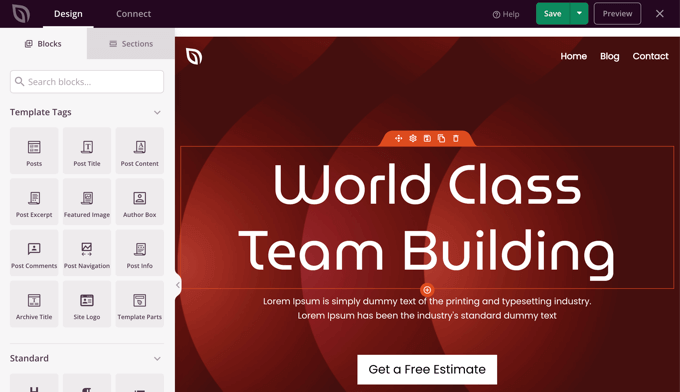
You can customize any block by clicking on it, dragging blocks up and down with your mouse, and adding new blocks to the page.
We’ve written a complete guide on how to create a custom home page in WordPress. Simply scroll down to Method 2 to learn how to customize your home page using SeedProd.
Customizing Your Blog Page
The SeedProd theme builder also provides plenty of ways to customize your blog index page.
Get started by clicking the ‘Edit Design’ link under the page.
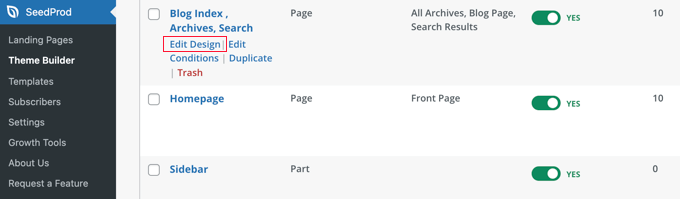
You will see the same preview pane on the right and the toolbar on the left. You can customize the blog page the same way you did with the home page.
For example, when you click on the headline, you will be able to see all of its settings. You can edit the text, change the alignment and font size, and more.
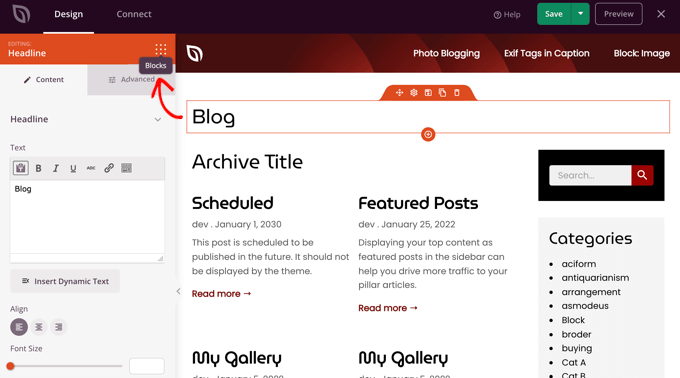
Once you’ve finished, you’ll need to click on the ‘Blocks’ icon to return to the toolbar.
The SeedProd theme builder offers additional Template Parts blocks, such as a Posts block, which displays a list of your blog posts.
The Posts block has already been added to the blog index template for you, and in this template, the block displays your posts in two columns. We can change this to a single column.
Simply click on the Posts block and then change the ‘Columns’ setting to 1.
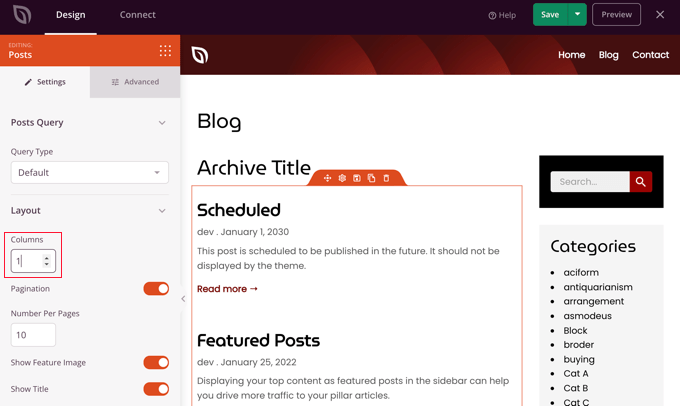
The layout will immediately change to a single column.
As you scroll down the Posts block settings, you’ll find toggle switches that let you choose whether or not to display the post’s feature image and title. You can also choose which header tag to use for the post title.
There are also options for displaying different post metadata. You can toggle the date modified, author, date and time published, and the comment count.
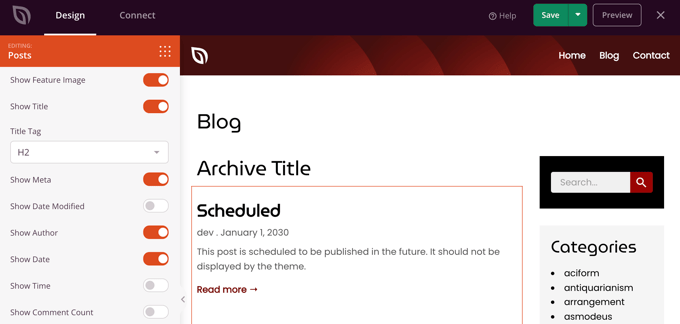
Here are a few more ways that you can customize your blog index:
- You can filter the index by post type, category, tag, or author.
- The sort order of the posts can be changed.
- You can choose how many posts are displayed on a page.
- You can toggle the post excerpt and customize its length.
Once you have finished customizing your blog page, make sure you click the ‘Save’ button at the top of the screen. Then, you can return to the list of templates by clicking the ‘X’ icon.
Enabling the SeedProd Theme
Once you have finished customizing the theme templates, you will need to publish the new custom theme.
Simply toggle the ‘Enable SeedProd Theme’ setting to the ‘YES’ position.
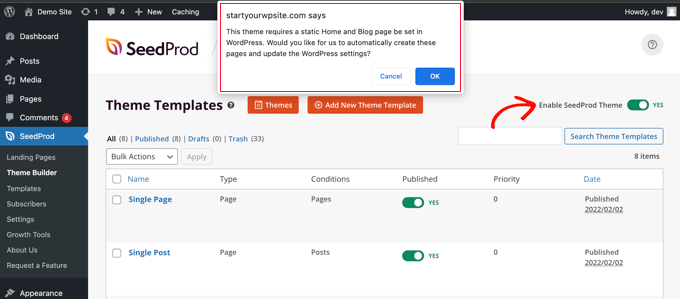
You will immediately see a notification that the WordPress Home and Blog page settings need to be changed. When you click the ‘OK’ button, these settings will be changed for you.
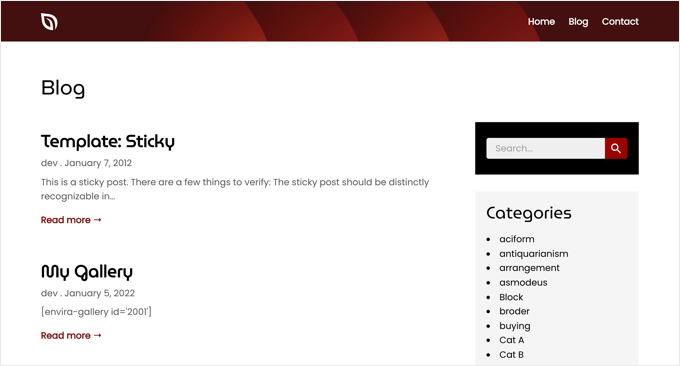
You can now visit your website to view your new home page and blog page. This is how the blog index page looks on our demo site.
Bonus: Display Your Recent Posts in WordPress
Once you have created a separate blog page, you can still show some recent posts on your home page to encourage users to explore more of your site.
To do this, open your homepage in the WordPress block editor. Once you are there, click the ‘Add Block’ button at the top left corner of the screen to open the block menu.
From here, simply add the ‘Latest Posts’ block to the page. Once you do that, you can customize the list of recent posts to display post excerpts, author names, and dates according to your liking.
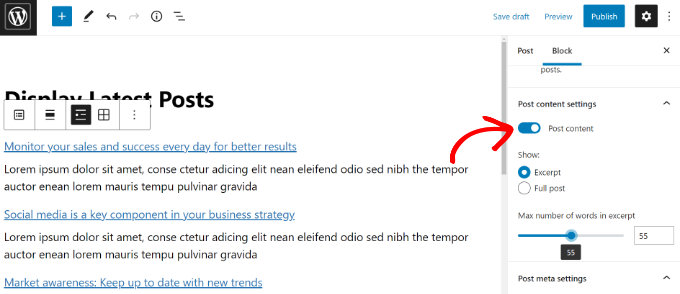
Finally, click the ‘Publish’ button at the top to store your settings. Now, some of your recent posts will still be displayed on the home page to ensure that users spend more time on your website.
For more information, you can see our tutorial on how to display recent posts in WordPress.
We hope this tutorial helped you learn how to create a separate page for blog posts in WordPress. You may also want to learn how to choose the best WordPress hosting or check out our list of the best live chat software for small businesses.
If you liked this article, then please subscribe to our YouTube Channel for WordPress video tutorials. You can also find us on Twitter and Facebook.





Syed Balkhi says
Hey WPBeginner readers,
Did you know you can win exciting prizes by commenting on WPBeginner?
Every month, our top blog commenters will win HUGE rewards, including premium WordPress plugin licenses and cash prizes.
You can get more details about the contest from here.
Start sharing your thoughts below to stand a chance to win!
Ismet Fitri says
I would love if wpbeginner would share how you design your archive page. It looks so cool! Seeking for some help from your awesome team!
WPBeginner Support says
For the moment we use our theme which is custom designed but for easy ways to customize your theme you can take a look at page builders like the ones we list in our article below!
https://www.wpbeginner.com/beginners-guide/best-drag-and-drop-page-builders-for-wordpress/
Admin
Steven Baldwin says
Followed your instructions for creating static homepage and blog posts. However, when I made the changes in the settings>reading I forgot to click on homepage. Hence, no static homepage, can I correct this so I have a separate page from my blogs.
Thank you
WPBeginner Support says
If we understand the question correctly, you should be able to go back into your settings and set your static home page so your blog posts are on a separate page.
Admin
John says
Hi, what if i have multiple archive post pages? but wordpress only has 1 post page to assign. Which one do i assign? or shall i leave it blank?
WPBeginner Support says
Your posts archive page would list every post on your site. If you wanted to separate by category, you can add links to the category in your menu and WordPress will generate an archive page for that category.
Admin
Tracey says
Struggled to combine static pages and a blog. Couldn’t find a clear how to – until now. Finally fixed it. Thanks!
WPBeginner Support says
Glad our guide could help
Admin
Gwyneth Llewelyn says
Much, much easier than I thought. Thank you so much!
WPBeginner Support says
Glad our guide was helpful
Admin
Mirta says
Nice guide and thanks for help!
Now I managed my blog as I wanted to!
WPBeginner Support says
Glad our guide was helpful
Admin
Bernice says
My WordPress site is not displaying my blog posts on the blog page… Even after I set the blog page to post page… Please help..
WPBeginner Support says
The most common reasons would be you would either need to clear your caching or check with your specific theme’s support to see if there is a theme-specific setting hiding the posts.
Admin
Ron Gladden says
Much appreciated, I wasn’t asking google the right question but finally, I found your blog and solved my problem in 1 minute that I was working on for 2 hours. Thanks!
WPBeginner Support says
Glad our guide could help
Admin
Chris says
THANK YOU! Somehow my blog page stopped populating posts and I found that all I had to do was update my Reading settings to make my blog page my posts page. Thanks!
WPBeginner Support says
Glad our guide was helpful
Admin
Sandi says
Thanks it’s very helpful. But can you make the post slug following the blog?
for example.my blog post will be example.com/blog
can we make the new post and show the slug like this “example.com/blog/new-post” instead of “example.com/new-post” ?
WPBeginner Support says
You would set that up in your permalinks which we cover in our guide below:
https://www.wpbeginner.com/wp-tutorials/how-to-create-custom-permalinks-in-wordpress/
Admin
Odysseas says
Hi, I want my subdomain which is a blog to be added to the bottom menu.
WPBeginner Support says
To do that you would want to create a custom menu and add that as a menu widget for what it sounds like you’re wanting to do.
Admin
Sheetal Pawar says
if i am Posting 10 blogs per page then how can i distinguish between 2 post i mean how can i add the border so that the user will understand where the 2nd post starts
WPBeginner Support says
Your theme’s styling should style the title of the post and some themes add separators for you.
Admin
Rachelle Partee says
Hello!! How do you have different posts on different pages? For example I would like to have the blog page and a photography page with different posts.
WPBeginner Support says
You could either use category pages like we do to separate our posts:
https://www.wpbeginner.com/beginners-guide/how-to-add-navigation-menu-in-wordpress-beginners-guide/
Another option would be to create a custom post type for your photography:
https://www.wpbeginner.com/wp-tutorials/how-to-create-custom-post-types-in-wordpress/
Admin
Chip says
I am building a site in which I would like blog posts to go to one page, and podcasts go to another page.
Is that possible?
Thanks.
WPBeginner Support says
You could create categories and add those categories to your menu which would add posts from those specific categories to those pages. Another more complex option would be to create a custom post type for your podcasts:
https://www.wpbeginner.com/wp-tutorials/how-to-create-custom-post-types-in-wordpress/
Admin
Tracey M Edwards says
I have my Blog set as a Blog page. I’m having difficulty with the padding around the graphic for my Blog. When I move the slider on Blog Title Style, nothing changes around the graphic.
Thank you!
Tracey
WPBeginner Support says
For the styling of your site, we would first recommend reaching out to the support for your specific theme to see if they have a built-in option for what you’re wanting or if it is a hiccup with the theme itself.
Admin
Liton Biswas says
I followed all the steps. I created two pages. One is for home and another is for blog.
After that I went to setting > reading and set those pages properly. My home page is showing properly but the post page isn’t show my posts.
WPBeginner Support says
You would want to ensure your posts are published and you’ve cleared any caching on your site for the most common reasons
Admin
Review Dunk says
I am posting my new blog in my WordPress site but it doesn’t show in the blog site
WPBeginner Support says
If the posts are published then you may want to try clearing your cache as well as the other recommendations in our guide below:
https://www.wpbeginner.com/wp-tutorials/how-to-fix-wordpress-website-not-updating-right-away/
Admin
Taylor Mills says
Is there a way to have the blog posts listed on the home page AND the blog page??
WPBeginner Support says
You could use one of the methods in our article below for what you’re wanting:
https://www.wpbeginner.com/wp-tutorials/how-to-display-recent-posts-in-wordpress
Admin
daniel says
the problem is that when I configure the homepage settings to static homepage some of my built in theme features are not displaying such as my homepage slider which only shows if I configure settings to latest posts.
WPBeginner Support says
You would want to reach out to your theme’s support and they would be able to help with allowing that feature on other pages.
Admin
Ken says
I followed “Put The Blog Page Link to Your Website’s Navigation Menu” . All steps are right . Why i click the “blog” menu ,it comes out blank . But when i preview it on admin panel , it is ok .
WPBeginner Support says
You may want to try clearing all of your caching on your site for the most common reason for that type of issue.
Admin
Nozie says
Thank you so much you helped me in ways I can’t describe after being stuck ffor days. My problem now is that I can’t see an option to view my new Blog page as full width, which is what I’d like to do. It still shows the post plus widgets on the side.
WPBeginner Support says
You would want to check with your theme’s support to see if your theme has a full-width template.
Admin
khalid says
very good but i need to hide the homepage menu when log in to the blog page,how can i do it?
WPBeginner Support says
For what it sounds like you’re wanting, you would want to take a look at our article below:
https://www.wpbeginner.com/plugins/how-to-add-conditional-logic-to-menus-in-wordpress/
Admin
Ann says
Very helpful! Thanks a lot for making it easy for me!
WPBeginner Support says
You’re welcome
Admin
Marwa El-Agroudy says
Thank you so much for this post! It was really really helpful!
WPBeginner Support says
Glad our guide was helpful
Admin
Lloyd Adams says
Thanks very much for sharing your knowledge. I appreciate it.
Cheers.
WPBeginner Support says
You’re welcome, glad you find our guides helpful
Admin
Leng Castillo says
Hello!
I added pages on my website (like FOOD, BEACHES, TRAVEL ABROAD) but I can not transfer my blog posts from HOME (the default setting) to each individual page and make it like HOME too. Please help me with this. Thanks so much.
WPBeginner Support says
You would want to add a category to your menu if you’re wanting all of the posts from a specific category to appear on a page.
Admin
Leng Castillo says
How will I do that?
WPBeginner Support says
You would want to take a look at our article below for the specifics:
https://www.wpbeginner.com/beginners-guide/how-to-add-navigation-menu-in-wordpress-beginners-guide/
Polly says
Hi, I want to customize my blog post index page. I’ve got a different home page so i did the static page thing which worked, but the feature image on the blog index page is enormous and I’d like to reduce it. I don’t know how to reduce it. If I add the beaver builder, will this interfere with the fact I am using the Astra theme?
WPBeginner Support says
Using beaver builder should not cause a problem
Admin
Mohamad Yusli Jamani says
Hi There,
I need your favour & I got something to ask about.
I have a list of Top Menu, with HOME, ABOUT, BLOG (with sub-menus Articles, Listing) and CONTACT menu.
I want to allow my Author to write in to the sub-menus Articles, Listing page, instead of writing into HOME, how can I set it?
Thank you in advanced.
WPBeginner Support says
If you limit the author to posting in that specific category you can then limit that category from appearing on your home page following our guide below:
https://www.wpbeginner.com/plugins/how-to-hide-a-post-from-home-page-in-wordpress/
Admin
Chris says
Hello, I use my Blog posts as my main page currently and don’t have a home page.
Under Pages I have ‘Home’ (inactive), ‘About’ and ‘Contact’.
Is there a way i can create a ‘Blog’ page that will simply link to main page (which is my blog posts). i don’t wish to have a home page
WPBeginner Support says
For what you’re wanting, you would want to modify the title of your link in your menu instead of creating a brand new page
Admin
Yv says
Hi,
I created the blog page as you suggested so that I can create a static page. I like it! However, I don’t know if it’s because of a plugin that I’ve since deleted, or not, but my single blog posts aren’t showing my logo and menu. They show on the static page and on any menu page when I click on it, but they’re missing on the actual single blog posts. My blog’s title is the first thing you see at the top of the page. I need help figuring this out. Do you have any idea why?
WPBeginner Support says
We would recommend first checking the support for your specific theme as there are many different theme designs and yours may not add that for single posts.
Admin
Janet says
Is this applicable if my plan is a personal plan? Because I dont see the option of ‘reading’
WPBeginner Support says
It should still be an option in the settings in your wp-admin area. For the moment our tutorials are for self hosted versions of WordPress and you can see a comparison of the two here:
https://www.wpbeginner.com/beginners-guide/self-hosted-wordpress-org-vs-free-wordpress-com-infograph/
Admin
King Killer says
Thanks for good job!
WPBeginner Support says
You’re welcome
Admin
Susan says
If I have a blog that currently uses the default option of posts going to the front page, and I have three+ years of blog posts, can I still create and publish two pages (HOME and BLOG), select them in the dashboard correctly and have this work as described? Or is it too late if you’ve already gone down the default path?
WPBeginner Support says
Yes, you can change to having a static home page and a blog page at any point in and it would still work
Admin
Zachary says
Is it necessary to select a static page as a blog page in the Reading settings? Will it affect my SEO in any way if I were to leave that blank?
WPBeginner Support says
If you leave it blank then you would not have a page that lists your posts which would affect your SEO if your content is heavily based on posts.
Admin
Stacy says
If I’ve already been posting my blog posts to my home page and want to create a blog page how do I transfer the blog posts over? Will simply creating a new page called “blog” do that automatically?
WPBeginner Support says
No, you would need to set the posts page in your settings for it to list your posts like a blog. If you want the recent posts on a second page, you would want to check with the support for your currently active theme for if that is available.
Admin
yahaya sani says
This is really helpful and educative
WPBeginner Support says
Thank you, glad our article could be helpful
Admin
Sweta says
This is indeed so helpful.
WPBeginner Support says
Glad our guide was helpful
Admin
don hawley says
I Know i am missing something simple. I have a website and have followed the instruction on how to set up a blog page. However the blog page says “Welcome to WordPress. This is your first post. Edit or delete it, then start blogging!” great except that I can’t seem to delete it. What am I doing wrong?
WPBeginner Support says
You’re not doing something wrong, that is the default WordPress post, you should be able to log into your wp-admin area and in the Posts area is where you would delete the post
Admin
Parvathi Reddy says
In my wordpress page to assign a custom template to page there is no template option in page attributes
WPBeginner Support says
You would want to check your options in the editor that the template area is not hidden. If you are in the block editor you would find the option under the three verticle dots in your editor.
Admin
Arnolfo says
Thanks for the tutorial. I’ve set up a blog page for recent blogs but I cannot show the entire blog for the most recent blog. Seems I can only show excerpts and lists of recent blogs which link to their pages. How can I show the entire most recent blog post PLUS the links to previous blogs?
WPBeginner Support says
That would be determined by your theme. If you reach out to your theme’s support they should be able to let you know what customizations are available
Admin
Jessica Dennis says
Help – I followed the instructions in the video but now my new blog page displays my home page! Why would this be happening? I also have Elementor on my site
help!!!!!
WPBeginner Support says
Did you set both to be the same page? Your theme may also have a setting for displaying your posts on your home page so you may want to check with your theme’s support or try swapping themes to see if that resolves the error.
Admin
valentine kalu says
i have Homepage, musics page, Videos page, and so on. how can i post videos post on videos page and post musics on musics page and all the post in music and videos pages will still appear in homepage and also in video and music page.
WPBeginner Support says
For that, rather than creating pages it may be best to use WordPress’ default category pages by adding them to the menu and WordPress will list the posts in that category on the category page. We have an article showing how to add the categories to you menu here:
https://www.wpbeginner.com/beginners-guide/how-to-add-navigation-menu-in-wordpress-beginners-guide/
Admin
Christina says
Hi, i have been spending hours to learn how to add a blog to my exisitng wordpress site but nothing seems to work. A brief of my wordpress site. Our homepage consists of multiple post serving as ‘NEWS’ so not allowing any comments. We now want to add a blog to one of our menu items, anyone can help? Thanks
WPBeginner Support says
If you are already using your posts for a different option than your blog then you would need to use either a subdomain or create a custom post type. You may want to take a look at our article here:
http://wpbeginner.com/wp-tutorials/how-to-create-custom-post-types-in-wordpress/
Admin
Jim Redmond says
Hello WP Beginner,
I built a site a couple of years ago with no intention of ever adding a blog. Now I’d like to add one. Originally I built the home page “latest post” not a “static” page. Retrospectively I can clearly see the error of my ways. Is there an easy method to change things now?
I keep coming back to the conclusion I need to build the blog on a subdomain.
Any help is appreciated.
Thank you, Jim R
WPBeginner Support says
If you want to keep your home page the same while adding a blog page you could use a plugin like the shortcode plugin we recommend in our article here:
https://www.wpbeginner.com/wp-tutorials/how-to-display-recent-posts-in-wordpress/
Admin
Brian H says
I want to ad a blog page displaying 5-10 of our latest posts per page but I don’t want to lose my current home page displaying our latest posts. I’d like to be able to maintain my current categoried formal posts/articles while adding a section of running blog posts. Can I have my cake and eat it too or am o asking too much?
WPBeginner Support says
You would likely want to take a look at the plugin from our article here: https://www.wpbeginner.com/wp-tutorials/how-to-display-recent-posts-in-wordpress/
for what it sounds like you want.
Admin
Ana Ofelia says
Thank you! This was very useful and easy to understand.
WPBeginner Support says
You’re welcome, glad our article could be helpful
Admin
ukasha says
hope you doing well!
is it possible to create separates page for all separate blogs? i create a website like trip adviser know i want that my all blogs related to hotels show on hotel page and blogs related to trip packages show on package pages
and suggest me a good theme for free because this is my starting
WPBeginner Support says
For what it sounds like you’re wanting, you could create category pages to separate your content. You would add the category to your menu to get the url for the category page as we show in our article here: https://www.wpbeginner.com/beginners-guide/how-to-add-navigation-menu-in-wordpress-beginners-guide/
Admin
Nzi says
Totally saved my butt after two hours poking around and not knowing what I had broken. Thanks!
WPBeginner Support says
Glad our guide could help
Admin
Katherine Cannon says
I watched the tutorial and did what it said. Nothing appears when I click the Blog item on my menu. Where can I go for help?
WPBeginner Support says
You would want to ensure the blog item in your menu is linking to the page you set as your posts page, you have posts published, and you cleared your cache for the most common reasons for nothing appearing.
Admin
Kennix says
Hi there, I am new to WP with the free plan.
I cannot find the “Dahsboard>Appearance> Menu> ” and my screen environment is totally different from yours. Is it only available for those paid users?
Thanks, Kennix
WPBeginner Support says
Our tutorials are for WordPress.org sites, you can see the differences here: https://www.wpbeginner.com/beginners-guide/self-hosted-wordpress-org-vs-free-wordpress-com-infograph/
If you wanted a similar look to the admin area on your site then there should be a menu item to go to your wp-admin area
Admin