


Excerpts give visitors a short preview of your content, helping them quickly understand what each post is about and encouraging them to click through to read more. They’re especially helpful on blog listings, archive pages, and search results.
Displaying post excerpts can also make your site look cleaner and load faster by showing only a portion of each post. However, many WordPress themes don’t display excerpts by default, which can leave your blog pages feeling cluttered or incomplete.
At WPBeginner, we display excerpts on both our home and blog pages. This lets us highlight more posts at once and makes it easier for visitors to browse our content. Over time, we’ve also customized and optimized many WordPress themes to improve readability and performance.
In this article, we’ll show you how to easily add post excerpts to your WordPress theme.
💡Quick Answer: 3 Ways to Display Post Excerpts
If you want to quickly enable post excerpts on your WordPress site, here are the three most common methods:
- Method 1: Using Code (Classic Themes) – Best for users comfortable with minor code edits. You simply replace
the_contentwiththe_excerptin your theme files using a child theme or code snippet. - Method 2: Full Site Editor (Block Themes) – Best for users with modern block-based themes. You can drag and drop the “Post Excerpt” block directly into your archive templates via the Site Editor.
- Method 3: Theme Builder (Custom Design) – Best for users who want a completely custom look. Using a plugin like SeedProd, you can visually build your blog page and toggle “Show Excerpt” with one click.
Why Display Post Excerpts in WordPress?
By default, WordPress will show full posts on the homepage, blog page, and archive pages across your website.
However, switching to post excerpts offers several key advantages:
- Better User Experience: Excerpts let users quickly scan topics and find the content they want to read, rather than scrolling past full articles.
- Improved Site Speed: Since only a portion of each article is loaded, your pages will load much faster, which improves performance.
- Mobile Optimization: Showing full posts causes excessive scrolling, which is a poor experience for smartphone and tablet users. Excerpts solve this problem.
- Increased Engagement: By highlighting more posts upfront, you increase the likelihood that users will click through to read multiple articles, boosting your pageviews.
WordPress does have built-in support for post excerpts, but not every theme uses them.
Now, let’s show you how to display post excerpts in any WordPress theme.
How to Check if Your WordPress Theme Supports Post Excerpts
Most popular WordPress themes include a setting that lets you display post excerpts instead of the full post.
To see if your theme supports post excerpts, visit the Appearance » Customize page in the WordPress dashboard.
The location of these settings will vary depending on your WordPress theme, but you need to look for any settings labeled ‘Blog.’
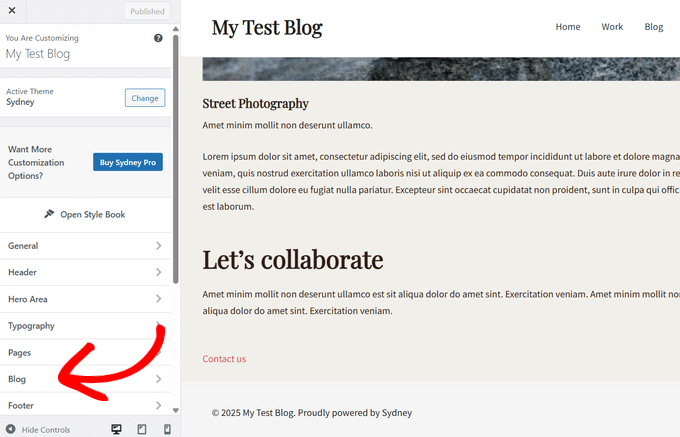
For example, if you are using the Sydney WordPress theme, then you will need to select ‘Blog’ and then click on ‘Blog Archives.’
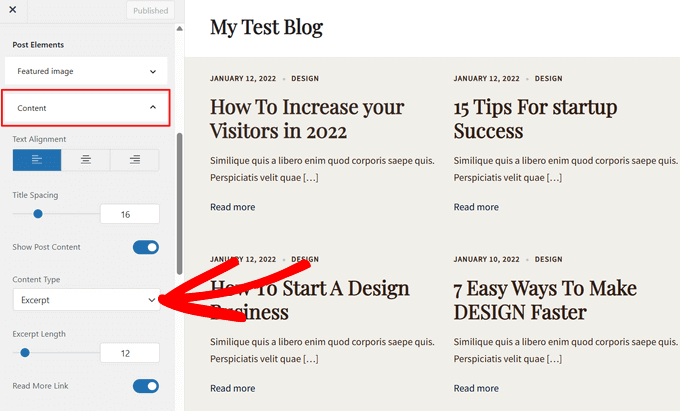
You can then scroll down to the ‘Post Elements’ section and expand the ‘Content’ tab. Once you do that, select the ‘Excerpt’ option from the dropdown menu under ‘Content Type’.
If your theme has a ‘Theme Settings’ or ‘Post General Settings’ option, then you may also be able to enable post excerpts in these sections.
Once you’ve done that, simply click on the ‘Publish’ button. Now, if you visit the blog, archive, or homepage, you should see a list of blog excerpts rather than full posts.
If your theme doesn’t have built-in support for post excerpts, then you will need to add it. Simply use the quick links below to jump to the method you want to use:
- Method 1: Add Post Excerpts to WordPress Using Code (Easy)
- Method 2: Add Post Excerpts Using the Full Site Editor (Block Themes Only)
- Method 3: Add Post Excerpts to WordPress Using a Theme Builder (Advanced)
- Bonus: Show Excerpts For Password-Protected Content
- Frequently Asked Questions About Showing Posts in WordPress
Method 1: Add Post Excerpts to WordPress Using Code (Easy)
If your WordPress theme doesn’t support post excerpts by default, then you can always add this feature manually.
Step 1: Create a Child Theme
You can edit your WordPress theme files directly, but we recommend creating a child theme instead. That way, when you update your WordPress theme, you won’t lose the changes you’ve made.
For more details, see our beginner’s guide on how to create a WordPress child theme.
Step 2: Locate the Template Files
After doing that, you will need to find the template that controls each page where you want to show post excerpts. For most themes, this will be home.php, content.php, category.php, and archive.php.
For help finding the right file, see our beginner’s guide to WordPress template hierarchy.
Step 3: Replace Content Tag with Excerpt Tag
Once that is done, simply locate the following code in each file:
<?php the_content(); ?>
Then, replace this code with the_excerpt tag:
<?php the_excerpt(); ?>
With that done, save the file and then check your website. You should now see post excerpts where the full article used to be.
Change the Default WordPress Excerpt Length
By default, WordPress will show the first 55 words of each post and then add an ellipsis (…) to show that there’s more content.
You can change this to show more or fewer words by adding code to your WordPress website. While it is possible to edit the theme files directly, this can be complicated.
A simple mistake can also cause lots of common WordPress errors and may even completely break your site.
For that reason, we recommend using WPCode. It makes it easy to add code snippets in WordPress without having to edit your theme files. That way, you can update or change your theme without losing the custom code.
Step 1: Install and Activate WPCode
First, you need to install and activate the free WPCode plugin. For more information, you can see our beginner’s guide on how to install a WordPress plugin.
Step 2: Add a New Snippet
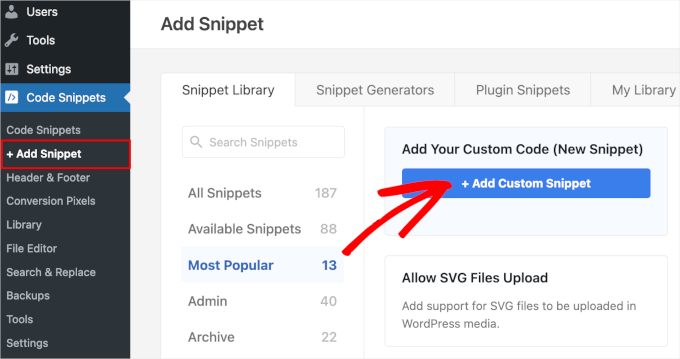
Upon activation, visit the Code Snippets » + Add Snippet page from the WordPress dashboard. Then, click on the ‘+ Add Custom Snippet’ button under the ‘Add Your Custom Code (New Snippet)’ option.
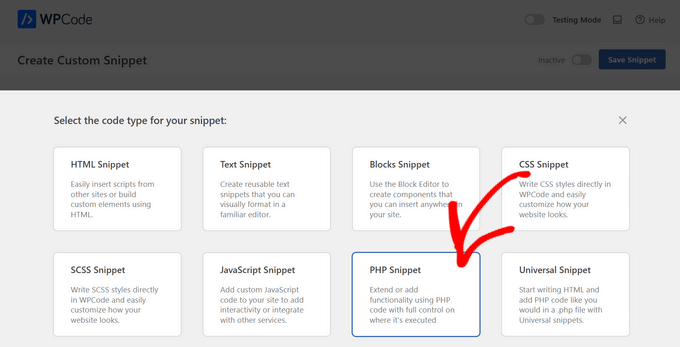
Next, you need to select the code type from the options that appear on the screen.
For this tutorial, choose ‘PHP Snippet.’
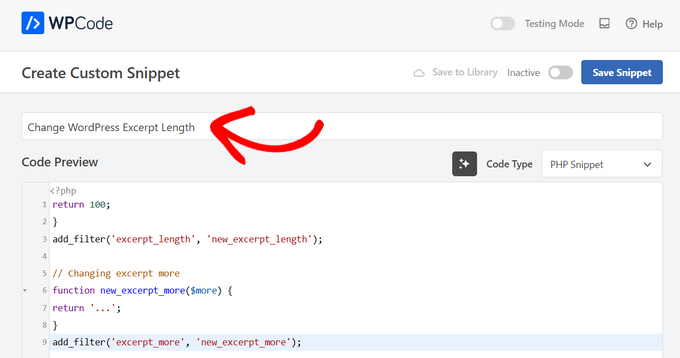
On the next screen, type in a title for the code snippet. This is just for your reference, so you can use anything you want.
Step 3: Enter the Custom Code
With that done, simply paste the following into the code editor:
return 100;
}
add_filter('excerpt_length', 'new_excerpt_length');

// Changing excerpt more
function new_excerpt_more($more) {
return '...';
}
add_filter('excerpt_more', 'new_excerpt_more');
This code changes the post excerpt length to 100 characters. You can change the ‘100’ to any number you want.
Step 4: Save and Activate the Code Snippet
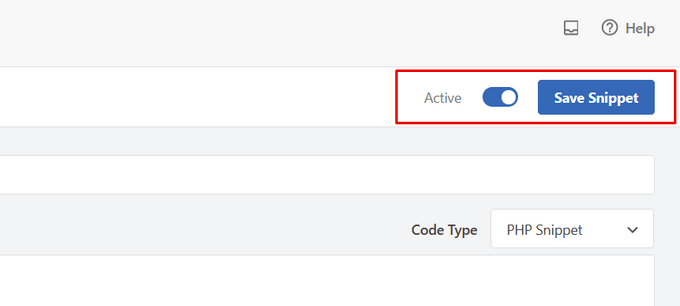
After pasting the code, toggle the switch from ‘Inactive’ to ‘Active’ in the top right corner and then click the ‘Save Snippet’ button.
For more tips on how to fine-tune your post excerpts, please see our guide on how to customize WordPress excerpts with no code.
Method 2: Add Post Excerpts Using the Full Site Editor (Block Themes Only)
If you are using one of the newer block WordPress themes, then you can add post excerpts using the full site editor.
Step 1: Open the Full Site Editor
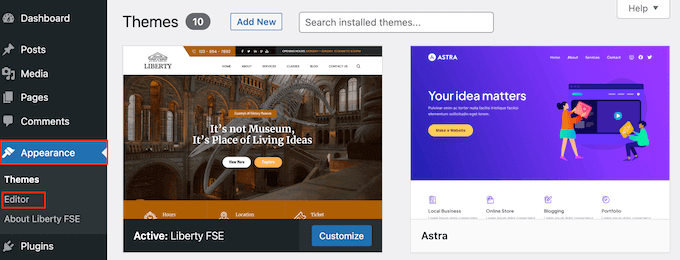
To get started, head over to Appearance » Editor in the WordPress dashboard.
Step 2: Select Templates
By default, the full site editor shows your theme’s home template, but you can add an excerpt to any template.
In the left-hand menu, simply click on ‘Templates.’
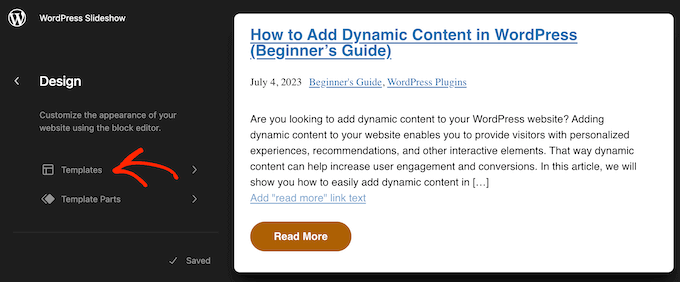
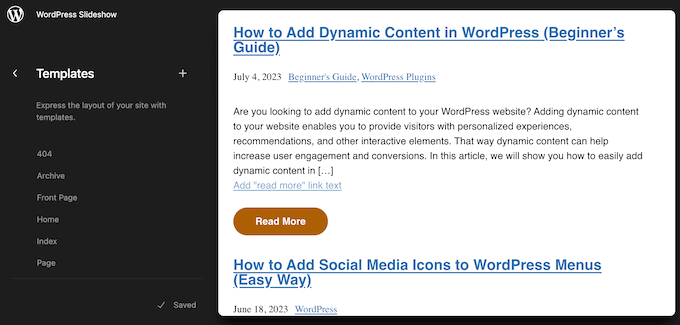
You will now see a list of all the templates that make up your WordPress theme. Depending on your theme, you may want to add excerpts to the archive, index, search, or similar template.
Simply find the template that you want to edit and give it a click.
Step 3: Edit the Template
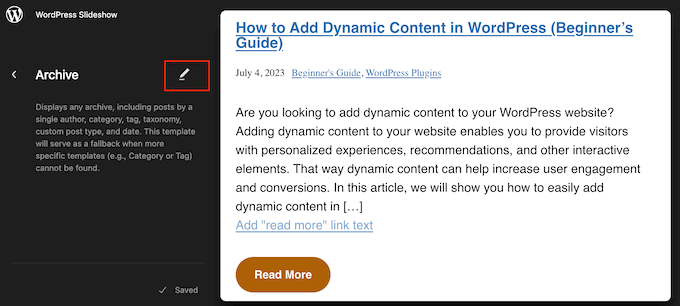
WordPress will now show a preview of this template.
To go ahead and edit the template, click on the small pencil icon.
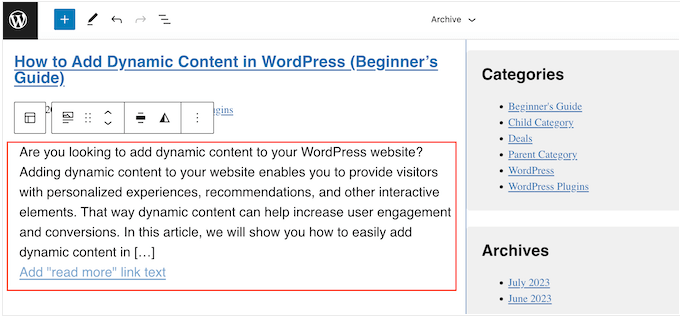
Step 4: Add the Post Excerpt Block
Now, click on the ‘+’ icon.
In the search panel that appears, type in ‘Post Excerpt.’
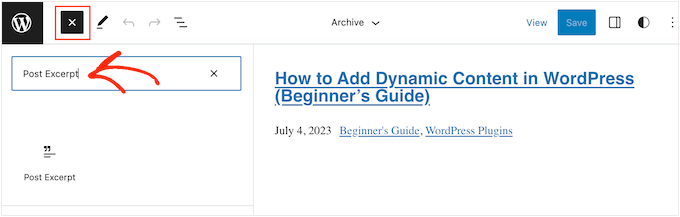
When the right block appears, drag and drop it into your layout.
You can repeat this process to add multiple post excerpts to the template.
Step 5: Customize the Block Settings
To fine-tune how the excerpt looks, just click to select the Post Excerpt block.
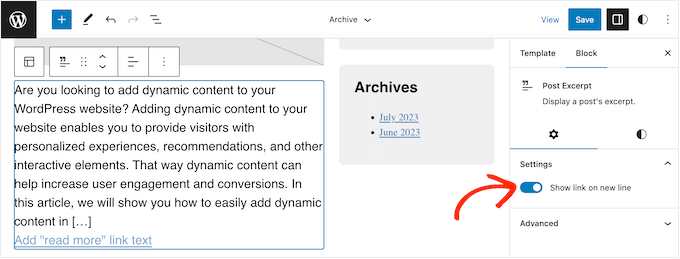
In the right-hand menu, you can start by choosing whether the ‘Read More’ link appears on the same line as the excerpt using the ‘Show link on new line’ toggle.
You can also adjust the maximum number of words displayed by changing the ‘Excerpt length’ setting in the block sidebar.
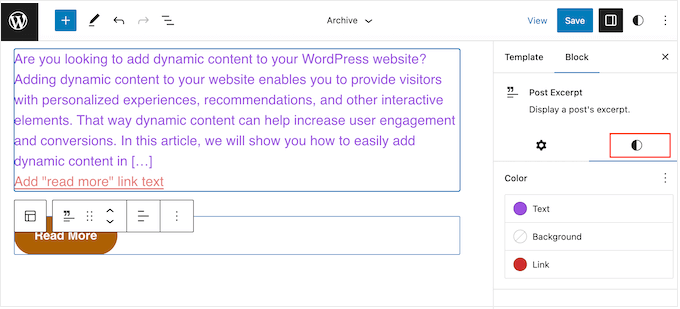
With that done, select the ‘Styles’ tab. Here, you can change the text color, add a background color, change the font size, and more.
As you make changes, the live preview will update automatically, so you can try different settings to see what looks the best.
Step 6: Save Your Changes
When you are happy with how the post excerpt is set up, click on the ‘Save’ button to make your changes live.
Do you want to show post excerpts on more pages and posts? Then, simply repeat the above steps, but this time choose a new template from the left-hand menu.
Method 3: Add Post Excerpts to WordPress Using a Theme Builder (Advanced)
If you want complete control over how the archive, blog page, homepage, and the rest of your site look, then you can create a custom theme.
This allows you to design your own pages and show excerpts anywhere on your website.
SeedProd is the best WordPress theme builder that allows you to easily create a custom WordPress theme without writing any code. It also has a ready-made Posts block that you can drag and drop onto any page.
Note: There is a free SeedProd plugin that allows you to create beautiful coming soon and maintenance mode pages, no matter your budget. However, you’ll need the SeedProd Pro or Elite plan to unlock the theme builder.
Step 1: Install and Activate SeedProd
First, you need to install and activate the SeedProd plugin. For more details, see our step-by-step guide on how to install a WordPress plugin.
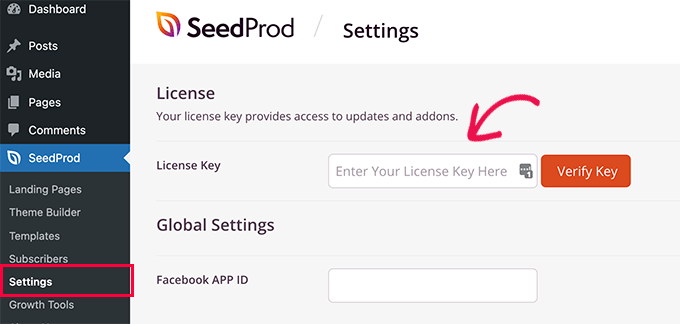
Upon activation, go to the SeedProd » Settings page and enter the plugin’s license key. You can find this information in your account on the SeedProd website.
After entering the license key, you are ready to create a custom WordPress theme using the SeedProd theme builder.
Step 2: Choose a Template Kit
First, you need to go to the SeedProd » Theme Builder page.
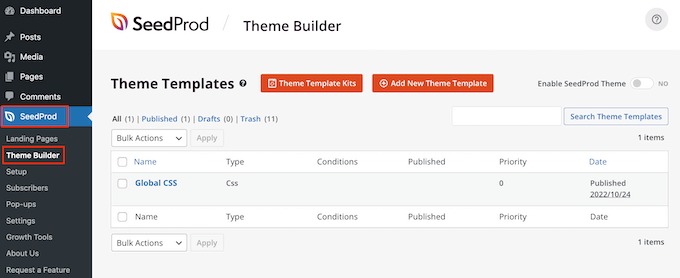
Here, you can either use one of the ready-made SeedProd site kits and templates as a starting point or manually create a template from scratch.
We recommend starting with an existing theme, as it automatically creates all the necessary template files and gives you a head start.
With that being said, click on the ‘Theme Template Kits’ button.
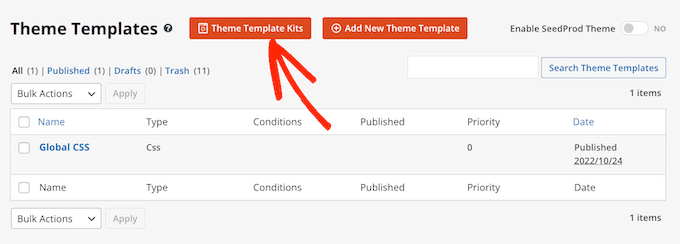
Step 3: Select a Theme
You can now choose any of the available templates.
All of these themes are fully customizable, so you can fine-tune them to perfectly suit your WordPress blog or website.
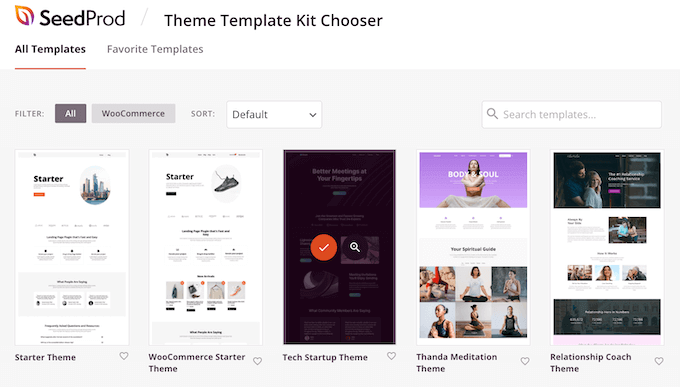
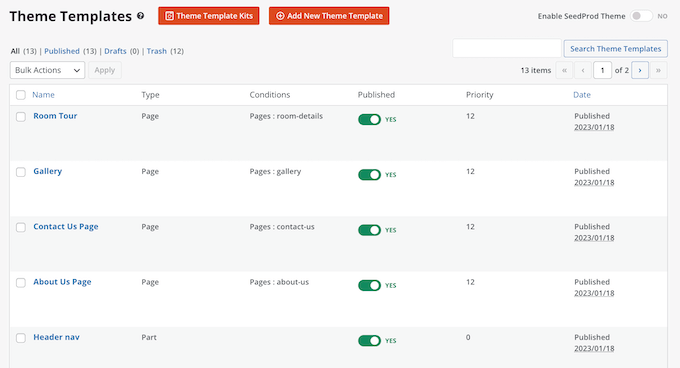
After choosing a theme, SeedProd will automatically create all the theme templates you need.
You can think of this as the draft version of your custom WordPress theme.
Step 4: Edit the Blog Template
You can now customize each template using SeedProd’s drag-and-drop editor.
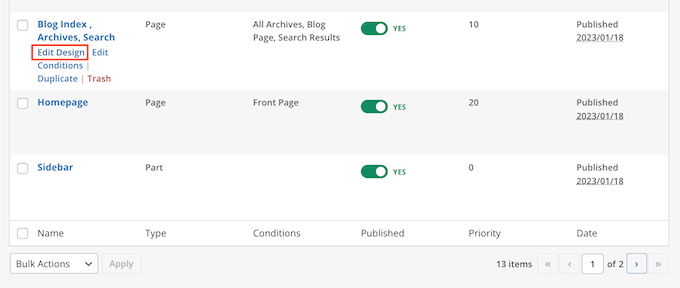
Since we want to add post excerpts to our website, hover your mouse over the template that controls your blog listing (often named ‘Blog Index, Archives, Search’) and click on the ‘Edit Design’ link when it appears.
This will load the SeedProd drag-and-drop builder.
To the right, you’ll see a preview of the template. By default, the blog page template will show the heading, archive, title, and all your posts.
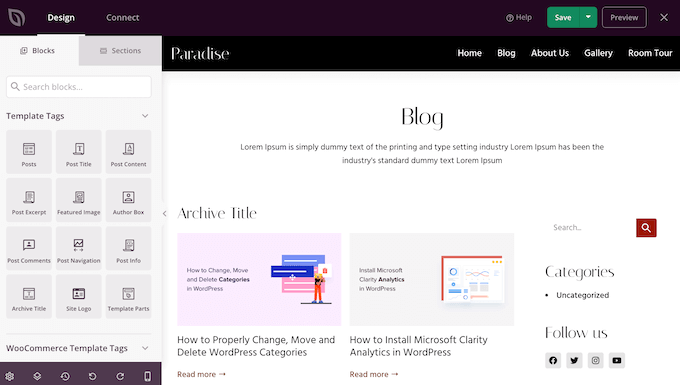
The left-hand side shows a menu with all the different blocks you can use.
You can add new blocks by dragging them onto the page and then rearrange them by dragging them up and down with your mouse.
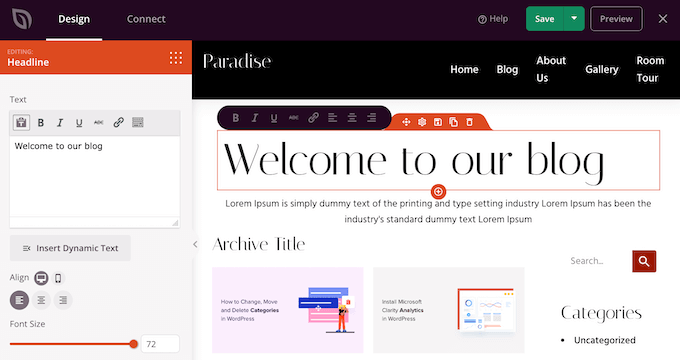
You can customize any block by clicking on it and then using the settings in the left-hand menu. When you make a change, the SeedProd preview will automatically update to show those changes in action.
Step 5: Select the Posts Block
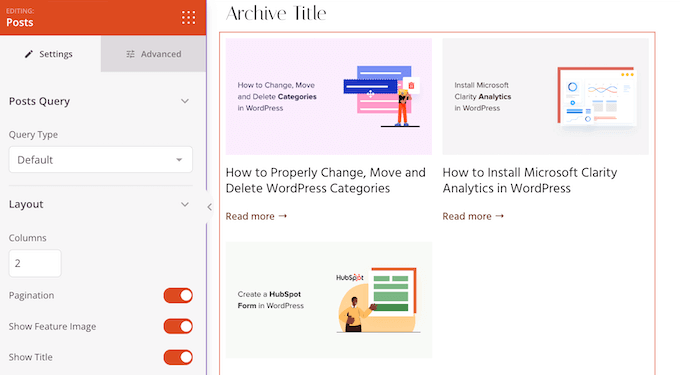
Since we want to customize the post excerpts, simply click to select the ‘Posts’ block in the live preview.
After doing that, select the content you want to show in this block using the settings in the left-hand menu.
For example, you can change the column layout, display pagination, show the featured image, and change the title tag.
Step 6: Enable the Excerpt
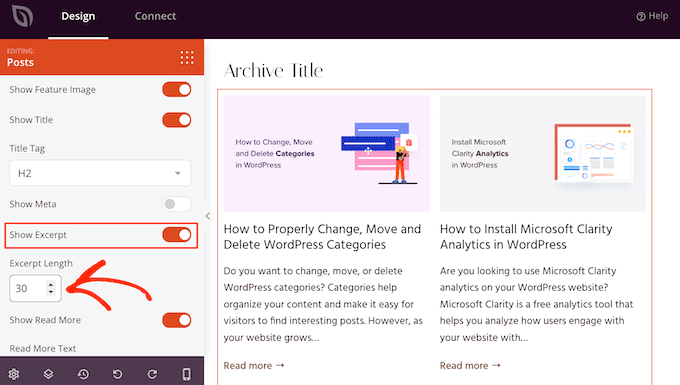
To show the post excerpt, simply click on the ‘Show Excerpt’ toggle so that it turns orange.
Once you’ve done that, you can change how many characters SeedProd shows in the excerpt by typing a new number into ‘Excerpt Length.’
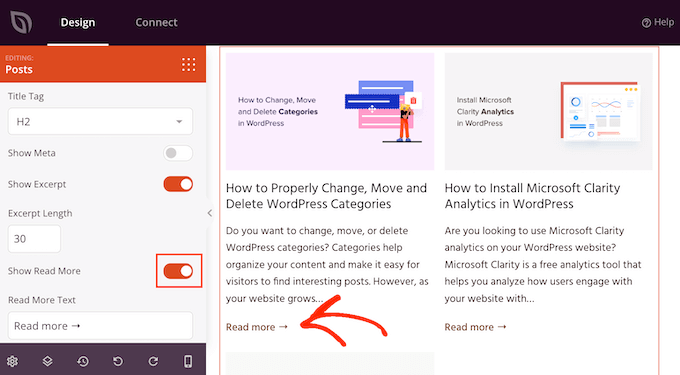
SeedProd can also add a ‘Read More’ link to each excerpt, which will encourage readers to open the full article.
You can add or remove this link using the ‘Show Read More’ toggle.
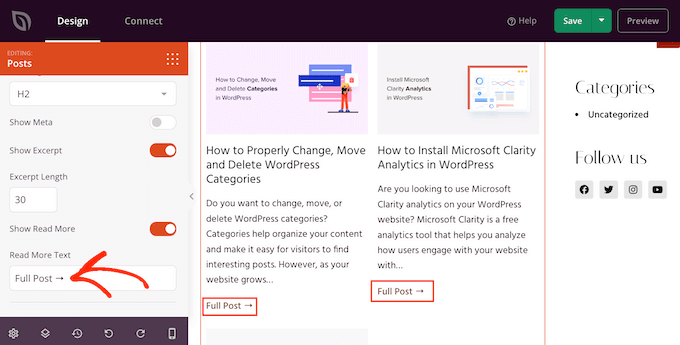
You can also replace the ‘Read More’ text with your own messaging by typing into the ‘Read More Text’ field.
Step 7: Save Your Changes
When you are happy with how the post excerpt is set up, click the ‘Save’ button in the upper right corner of your screen.
You can now customize the other SeedProd templates by going to SeedProd » Theme Builder and following the same process described above.
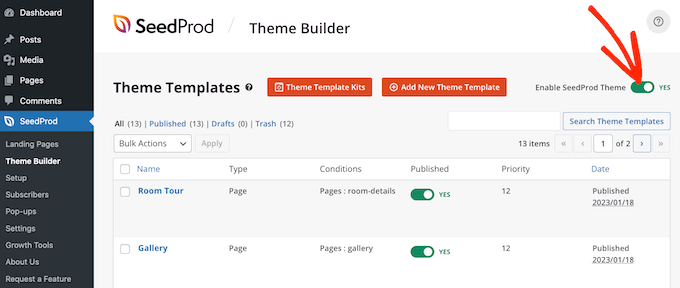
To show the post excerpts to visitors, you first need to enable your SeedProd theme. To do this, go to SeedProd » Theme Builder and then click on the ‘Enable SeedProd Theme’ toggle so that it shows ‘Yes.’
Now, if you visit any of your blog pages, you’ll see the post excerpts live.
Bonus: Show Excerpts For Password-Protected Content
If you have a membership site, then you may have some content that is unavailable for the general audience. However, it is still a good idea to show an excerpt for your password-protected content.
This can intrigue users and encourage them to buy your subscriptions to get access to exclusive content on your website.
You can easily do this using Restrict Content Pro, which is a popular content protection plugin. Upon activation, simply open a post of your liking in the WordPress block editor where you can add an excerpt for it from the block panel.
After that, you can configure the restriction settings from the dropdown.
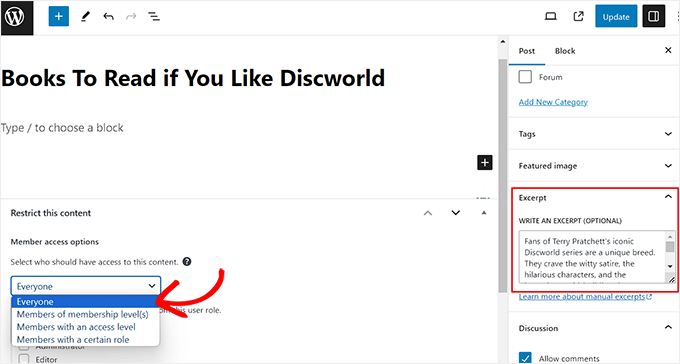
Finally, publish the post and then visit your WordPress site.
Here, the users will be able to see the post excerpt and title for the restricted content just like any other post. However, the content itself will be hidden from the audience.
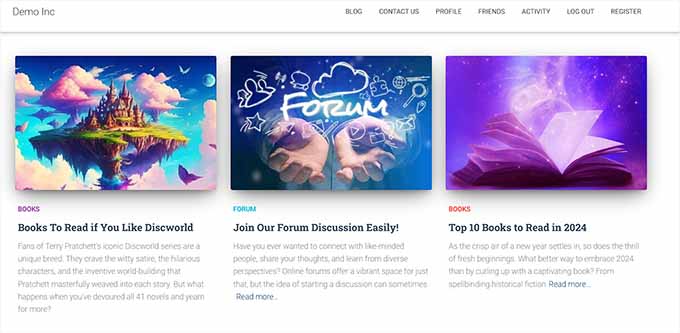
For detailed instructions, you can also see our tutorial on how to show an excerpt of a password-protected post in WordPress.
Frequently Asked Questions About Showing Posts in WordPress
Here are some questions our readers have frequently asked about showing posts and their excerpts in WordPress:
How to display excerpts in a WordPress page?
You can display post excerpts on any WordPress page using the built-in ‘Latest Posts’ block. Simply add the block to your page, then in the block settings panel, toggle the ‘Post content’ option and select ‘Excerpt’ to show a summary instead of the full article.
How to preview a post in WordPress?
To preview a post, click the ‘Preview’ link located in the top-right corner of the content editor. You can then select ‘Preview in new tab’ to see exactly how your post and its excerpt will look to visitors on desktop, tablet, or mobile before you publish it.
How to display popular posts in WordPress?
The easiest way to display popular posts is by using a plugin like MonsterInsights. It automatically tracks which articles get the most traffic and displays them in a ‘Popular Posts’ widget or block, helping you keep visitors engaged with your best content.
For more information, see our tutorial on displaying popular posts in WordPress.
How to display recent posts in WordPress?
You can display recent posts anywhere on your site using the ‘Latest Posts’ block or the ‘Recent Posts’ widget. Once added, you can customize the display settings to include the post date, featured image, and a short excerpt to entice readers to click.
To get started, check out our beginner’s guide on how to display recent posts in WordPress.
How to display specific posts in WordPress?
To display specific posts, you can use the ‘Latest Posts’ block and filter the results by a specific category or tag. For more advanced control, visual builders like SeedProd allow you to manually select specific post IDs to create a curated list of content.
We hope this article helped you learn how to display post excerpts in WordPress themes. You may also want to see our guide on how to create interactive images in WordPress and our expert picks for the best WordPress full site editing themes.
If you liked this article, then please subscribe to our YouTube Channel for WordPress video tutorials. You can also find us on Twitter and Facebook.


hamid
i want show excerpts in posts under title, is it possible?
WPBeginner Support
You should be able to add that but the excerpt is normally a summary of the article or the start of the article so it is not always the most useful thing to include in your articles.
Admin
Manasi
for the plane these this is what worked for me – Go to the home page and clkick edit. Go to the block editor and click on the block – Blog Posts. You will seea setting which states ‘post control settings’
There you can enable or disable the show excerpt setting
WPBeginner Support
Thanks for sharing where you found your settings
Admin
Dicado
Hi thanks for this. I don’t have those files in my child theme. If I just go ahead and do this in my parent theme, won’t it be erased if there is an update?
WPBeginner Support
Correct, if you place it in your parent theme and the parent theme is updated your changes would be lost
Admin
Shawn
Thanks for this post – I used this back in 2016 and again today in 2019!
WPBeginner Support
Glad our recommendations can continue to be helpful
Admin
John
Thanks for this post. I also want to ask for help on how to add padding around excerpt. I have added border lines around my excerpt; the problem is the excerpt is touching the borderlines. How do I add padding around the excerpts, preventing it from touching the borderlines? Thanks in advance.
Atul Jagtap
Hi their,
I am using ‘Enlightenment’ theme but I have a problem that in my post I can’t see the short Post Excerpt ie it’s come blank. And this happened only with ‘Enlightenment’ this theme. Because same code I am using in other theme is working fine. So is anybody give me solution on this?
WPBeginner Support
Hey Atul,
Please contact your theme developer and they will be able to help you.
Admin
Sara Pedersen
Hello
I have custom excerpt in the excerpt box for each post. They are a photo link. This has worked for several years and the photo is at the top of the post with the post link below. Suddenly the last 2 posts the excerpt photo is not posting. Any tips to fix this?
Siddhesh
Hi,
I can locate index.php and categories.php in my theme folder but i dont find the mentioned syntax. How do i fix this?
-Siddhesh
Francesco
Hi, maybe my question will sound silly to you but… I never installed Wordpress on a server/host, I just suscribed and got the .wordpress.com domain, everything was automatic. So, how can I access these files? I read in the comments about the FTP protocol, which I am familiar with, but who gives the information to enter in the domain with that?
And while we’re at it, do you suggest to install wordpress by yourself (online I see there are a lot of tutorials and seems easy to do) or continuing as I am doing on the .wordpress.com domain? Maybe one day I will buy the premium and have a direct domain, but besides that, are there any advantages in terms of functionality in installing manually?
WPBeginner Support
Hi Francesco,
Please see our guide on the difference between self hosted WordPress.org vs free WordPress.com blog.
Admin
Joseph Dabon
Very simple, huh! But where can I find these? – index.php file, archive.php file, and category.php
Javier
Hi, you can find those files using a FTP account.
When you get in to your server files, get in into this route:
wp-content/themes/ your-theme-name /
And you will find the files
Tolu
Hi there,
My theme doesn’t support excerpts on the homepage, i’ve enabled excerpts on the blog post and its still not showing on the homepage, i’m not a php pro so i don’t know my way around it.
Any help would be appreciated.
Sreeharsh
Hi, My theme doesn’t support excerpts in the posts page.
Can you please help me to enable it to display under my page title.
Thank you.
WPBeginner Support
Please take a look at our guide on how to customize WordPress excerpts (no coding required).
Admin
javad
hi
my theme have excerpts option and i enabled it
and i want to show my post images above this excerpts on index,php
i used Auto Post Thumbnail and Featured Image plugins
but i dont know code to show Thumbnail above the posts
Dorine Ogutu
Hello, I am a beginner and I am using the Nucleare theme. I can’t find the index.php file. Please help.
Desparate
Constantine
You will need to open either the terminal or your cPanel (if you’re using a shared host and it provides this feature), find your wordpress directory, and under the directory there’ll be a folder called “wp-content”, then enter “themes”, and then find the one folder that the name is your currently using one.
If you’re using a terminal,
type
cd /…/…/wp-content/themes/
and use cd to enter your themes folder that’s where your index.php lies. “…” here means your previous directory of your wordpress root directory, you will need to find that yourself and figure out what it is first you installed your wordpress on your server.
Not sure if this helps since it’s been awhile, i’m a newbie myself so hope it might help you and others.
Chris
I’ve just updated to a responsive theme and all the posts were in excerpt form. From reading this column I was able to change them to full content. What I’d really like is to have my current post in full content mode, so my followers see it as soon as they get on my site, and the older posts in excerpt form, so that the site loads more quickly. Is this possible? Thanks for your help!
James
@Chris, I’m trying to do the same thing. Did you figure this out (how to show the latest post in full mode, and the rest as “excerpts”)?
mohammad
hi. i have problem with Excerpt in my site:
please help me
gazi
thanks a lot
Nikul
how to set excerpt_length in template default page
Puneet Bhalla
Great post , just shares the required solution. Thanks.
Gaurav
I am using custom excerpts from wordpress. It is displayed on my home page. But it is not displayed on my original post. I want to display this excerpt just before my actual post with different font styles and font colour.
Is there a way to do that ?
pase
Trying to display a list blog excerpt summary after the blog introduction. Created a custom template for the blog front page. How can I call the blog excerpt summary page from the custom template?
Drew
you know there’s a plugin that can resolve this. with ANY tutorials, it’s never 100% clear because there are files or scripts that are different or not available…pending multi-site install or single-site install etc etc. even with your simple instructions, i couldn’t find the proper tag to replace…so i just downloaded a plugin and 1 minute later…fixed.
Sanwo
Hey Drew, what plugin did you download?
Sorin
For me was in wp-content/themes/theme/post.php where theme is my theme name. Thanks alot!
WPBeginner Staff
put it right before
orline.Cecilia
My site crashed. The functions file for my theme does not support this.
WPBeginner Support
Did you get an error?
Admin
WPBeginner Staff
put it right before or line.
Dawn Youngs
I am working in the Organization Theme on Wordpress.com. I have managed to set up a static Home Page and a Blog Page which displays my recent posts. I have chosen the summary options for each article in my feed, but when I publish the page I see the full text of each post on my Blog Page. I have set featured images and I have Written Custom Excerpts for my pages and I want a Blog Page displays the excerpts and images with a link to the post page. How in the world do I do this? What is going on with no change between summary and full in the reading section of my settings? Is this an issue with the theme or a general problem in WordPress? I just want a clean simple page that shows a series of excepts for a weekly report, please help!
By the way, I do not know how to open my files, I cannot even find my file directory, and wonder if it is hidden from me because I am in .com and not hosting the site myself like in .org?
WPBeginner Support
Please see the difference between WordPress.com and self hosted WordPress.org.
Admin
Rahul
I have used experts for some of my posts but i found a problem, special signs like,”! are not rendering properly and there’s some utf-8 problem… can you guys conform whether its a WordPress problem or my hosting. Though the problem only causes in my excerpts (summary) but the article with “are opening up fine” and can be read properly. If its a WordPress issue please let us know if there’s any solution to it.
Thanks,
RAHUL
Kouami Sessou
I wanted to use excerpt for “summary” or short description for my posts..
It doesn’t work, when excerpt is not available for the post.
http://www.yeswefoot.com/
Looking for a plugin
Stefan
Many thanks for the write up!
Helped me out a lot!
Seth
I am using the twentythirteen template. None of the files mentioned have “the_content” in them. Also, there is no longer a “loop.php” file. (I only want my archives – tag and category to have the excerpt).
This is what I see in the archives.php and category.php:
Changing ‘content’ to ‘excerpt’ also doesn’t seem to do the trick.
WPBeginner Support
Seth Twenty Thirteen uses content templates you will find the loop in content.php.
Admin
Imoteda
whenI change it in content.php, I can no longer see the full posts on any pages. Clicking on the continue reading link gives me the same excerpt
Jenn
I’m having the same issue. I successfully changed the_content to the_excerpt. This makes my blogroll successfully show the excerpt instead of the full post. However, when I click into a post, only the excerpt is shown. Is there a way to modify the single.php file to guarantee the entire post content is displayed when viewing a single post? Any advice is really appreciated!
Yaz
Thanks, but how do I get it to show an image too?
WPBeginner Support
you can use
<?php the_post_thumbnail(); ?>>in your template.Admin
Celina
I think I’ve been looking for this very answer. My blog shows only excerpt (summary) or the featured image- never both. Where does this code go, please?
Celina
Where exactly does this go, please? I’m looking in content.php, but I don’t know where exactly. Thank you.
lester
finally . . . . FINALLY !!
i FINALLY found an answer to a problem with wordpress.
for the love of God and flowers and good food and wine!
thank you !! thank you !! thank you !!
Daniel Z
Thanks! This worked like a gem in the inStyle theme by Elegant Themes. I actually had to edit the code in home.php, but thanks for leading me in the right direction.
Trenton Miller
This is great, it’s working for me now. I would like to have the images that I have at the beginning of blog posts that I inserted via HTML, not the Featured Image method. On the blog posts where the image is within the first 55 characters, or whatever you set it to, how can I get it to appear? Is there something extra to add into functions.php?
Editorial Staff
Automatic excerpts do not show HTML elements. You have two options. Either write a custom excerpt using the excerpts field in your write panel. If you don’t see it, then look at the top right hand corner “Screen Options”. The other option is to use the_content, and utilize the more tag.
Admin
Caroline
Ouuch – thanks for your comment. I was searching for hours for this information. Such simple but well hidden if you don’t know how to add individual excerpts. Was looking to change the php files but did not dare for missing experience. All set now, thanks again.
Dr. Erika
This is AWESOME. Seriously thank you wpbeginner for all your articles.
Any idea of how to add pictures to the displayed excerpts?
Dr. Erika
(nevermind, I figured it out)
Bridget
OMG dude, thank you so much for this! I literally spent like 45 minutes trying to figure this out with an elegant theme, only to find that your solution took about 12 seconds. Gahh! Oh well, all is well that ends well! Thanks!
Sudip
The excerpt box is not appearing on my PC. Please help me.
Deepak
Hye Sudip,
Open any post to edit. On the top of it you will find the screen option. Click on that , then you will see so many options there. Then go to the excerpt option , check on that option. Then below the title and content box, you can see the excerpt box .You can write your excerpt content there.
Jay Madisson
Hi,
Im just wondering, where can I find the (Open your index.php file, archive.php file, and category.php file.)? Sorry for being a noob in HTML
Cheers,
Jay MAdisson
Editorial Staff
It would be in your /wp-content/themes/themename/ folder.
Admin
Jay Madisson
Hi, Im using Easel Theme, I opened index.php and archive.php but I could not find the code

Jerry
I’m sorry, are we speaking here of files that reside on my computer? I thought the whole blog was done online. I have no software for Wordpress on my computer. I have not downloaded anything. What am I missing? Does one have to know HTML code to blog?
Rich
Hello, I’m using the 2010 theme on the blog and it didn’t change to when I replaced content with the word excerpt. Is it something I’m leaving out??
Editorial Staff
Did you change the loop.php?
Admin
Emma
I am using the new twenty twelve theme to base a child theme on and cannot get excerpts to work at all. I looked in all the files you suggest above, but cannot find
in any of them. Similar to Heather I have imported my blog from blogger too…
There also doesn’t seem to be a loop.php file
Help!
Editorial Staff
The twenty twelve theme uses content.php and various variations of those.
Admin
Emma
Thanks for this – I changed entry-content in content.php to
and it has worked!
The problem I have now is how to get the excerpt text to wrap around the thumbnail, which I would like to float either right or left.
Any ideas?
Thanks
Erin
Maybe you can help me here. There is no in any of the files you listed above; index.php, archive.php, or category.php. This is the closest thing that I see (from my index.php file).
Can I change something in this code or add some new code?
Editorial Staff
If none of those files exist, that means you are using a child theme. You will have to utilize the hooks in the parent theme framework. We don’t write tutorials specific for theme frameworks.
Admin
Chris
I’m using the twentyeleven theme and “the_content” does not appear in any of the three files mentioned. I’m stumped.
Editorial Staff
Look in the loop.php file.
Admin
HemantKokcha
I am trying to get excerpt but i cant get excerpt by both of your method so tell me correctly how wll i get excerpt in traction theme.
wpbeginner
@HemantKokcha There is only one method… changing the_content to the_excerpt… The other function is to controlling excerpt length and the excerpt read more. If its not showing in your theme, then perhaps try contacting the theme author. Because this is the only way of doing it.
wpbeginner
@clwdk You would need to change the loop.php file for the archive.
clwdk
Hi there,
I am using the newest version of the twenty ten theme and am not sure where to change the <?php the_content(); ?> to <?php the_excerpt(); ?>. There is nothing in the index.php as far as I can see. Am I overlooking something? Thanks for any help you can give me.
CARL
wpbeginner
@Ibadullah You have to add this code in your theme’s functions.php file. It should work perfectly fine because this is the way to do it, and we are doing it on our site.
Ibadullah
@wpbeginner@Ibadullah I am saying when I add the number in post excerpt – I just see the same number on main page. such as I type 50 in the post excerpt field it show Category name : APPLE and instead of content it show number 50
wpbeginner
@Ibadullah That is the whole point of this article.
Ibadullah
It keep showing me the number I add in post excerpt instead of post content!
nescafespk
http://games-masti.com/
This is very nice trick and thanks for help us and thanks for the whole team of the word press team
nescafespk
<a href=”http://www.games-masti.com” title=”Play Online Games”>Play Online Games</a>
This is very nice trick and thanks for help us and thanks for the whole team of the word press team
Carl
Great – thanks. Was looking for a simple solution. How do you include a Read more… link after the excerpt also though?
Editorial Staff
https://www.wpbeginner.com/wp-tutorials/how-to-display-a-read-more-link-in-wordpress-excerpts/ << Try this article.
Admin