


Do you want to display a list of related posts on your WordPress website and prefer to use code rather than a plugin?
At WPBeginner, we often stress the importance of engaging your audience and keeping them exploring your content. One effective strategy we’ve seen used across countless successful WordPress sites is displaying related posts.
When visitors to your blog have finished reading an article they are interested in, offering a list of related posts will keep them engaged and help them find new content to read.
In this article, we will show you how to display related posts with WordPress using code, with no plugin required.
Why Show Related Posts in WordPress?
When your WordPress blog starts to grow, it can become more difficult for users to find other posts on the same topic.
Displaying a list of related content at the end of each blog post is a great way of keeping your visitors on your website and increasing pageviews. It also helps improve the visibility of your most important pages by displaying your best content where people can easily find it.
If you’re not familiar with code, then you will find it simpler to choose one of the many WordPress related post plugins that can display related posts without code.
But, if you’ve ever wondered whether you can display related posts without using a plugin, we’ll share two different algorithms you can use to generate related posts with thumbnails using code alone:
📍 Note: If you wish to show a thumbnail with each related post, then make sure you first add a featured image to those posts.
Method 1: How to Show Related Posts in WordPress by Tags
One efficient way to locate related content is to look for other posts that share the same tags. Tags are often used to focus on the specific details contained in a post.
With that in mind, you may wish to go ahead and add some common tags to the posts you want to relate to each other. You can enter them in the ‘Tags’ box in the WordPress editor.
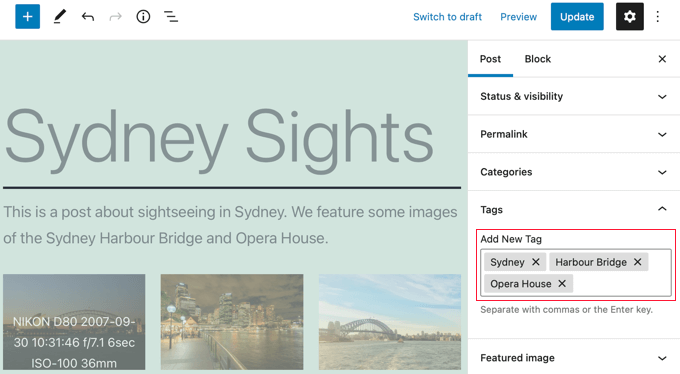
After you have added tags to your posts, the next thing to do is to add the following code snippet to your theme’s single.php template.
If you need help adding code to your site, then refer to our guide on how to paste snippets from the web into WordPress.
$orig_post = $post;
global $post;
$tags = wp_get_post_tags($post->ID);
if ($tags) {
$tag_ids = array();
foreach($tags as $individual_tag) $tag_ids[] = $individual_tag->term_id;
$args=array(
'tag__in' => $tag_ids,
'post__not_in' => array($post->ID),
'posts_per_page'=>5, // Number of related posts that will be shown.
'ignore_sticky_posts'=>1
);
$my_query = new wp_query( $args );
if( $my_query->have_posts() ) {

echo '<div id="relatedposts"><h3>Related Posts</h3><ul>';

while( $my_query->have_posts() ) {
$my_query->the_post(); ?>

<li><div class="relatedthumb"><a href="<?php the_permalink()?>" rel="bookmark" title="<?php the_title(); ?>"><!--?php the_post_thumbnail(); ?--></a></div>
<div class="relatedcontent">
<h3><a href="<?php the_permalink()?>" rel="bookmark" title="<?php the_title(); ?>"><!--?php the_title(); ?--></a></h3>
<!--?php the_time('M j, Y') ?-->
</div>
</li>
<!--?php }
echo '</ul--></ul></div>';
}
}
$post = $orig_post;
wp_reset_query();
This code looks for tags associated with a page and then runs a database query to fetch pages with similar tags.
Where should you place the code? That depends on your theme, but in most cases, you should be able to paste the code into your theme’s single.php template after the main post and right above the comments section.
If you are using the Twenty Twenty-One theme as we are on our demo site, then a good place to paste the code is in the template-parts/content/content-single.php file after the header and just after <?php the_content();.
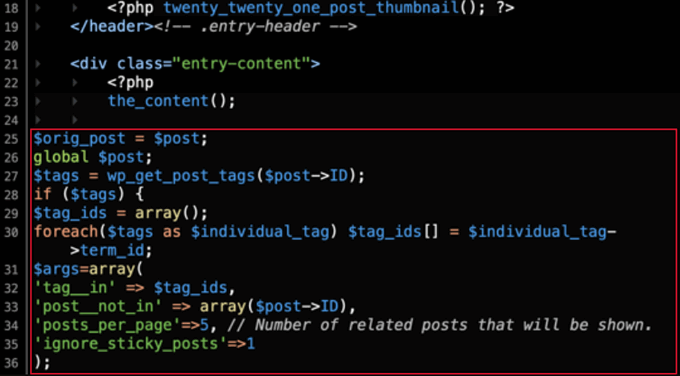
This will automatically display related content on any WordPress post.
You’ll need to change the styling and appearance of your related posts to match your theme by adding custom CSS.

Tip: Instead of editing your theme files, which could break your website, we recommend using a code snippets plugin like WPCode.
WPCode makes it safe and easy to add custom code in WordPress. Plus, it comes with ‘Insertion’ options that let you automatically insert and execute snippets in specific locations on your WordPress site, such as after a post.
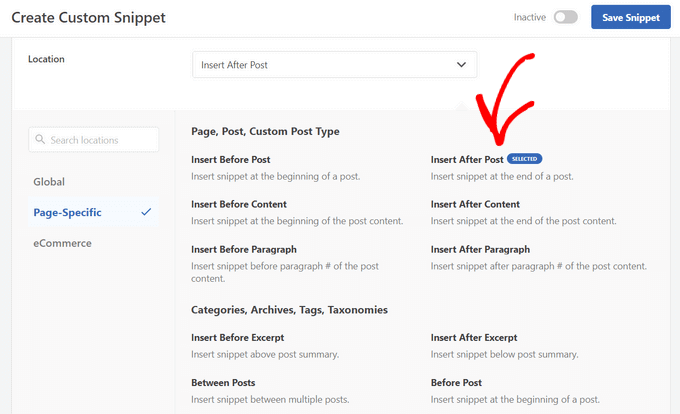
For more details, see our guide on how to add custom code in WordPress. You can also check out our detailed WPCode review to learn more about the plugin.
Method 2: How to Show Related Posts in WordPress by Category
Another way to display related content is to list posts that are in the same category. The advantage of this method is that the list of related posts will almost never be blank.
Like Method 1, you need to add a code snippet to your theme’s single.php template or in a code snippets plugin like WPCode. For more details, refer to Method 1 and our guide on how to add custom code in WordPress.
$orig_post = $post;
global $post;
$categories = get_the_category($post->ID);
if ($categories) {
$category_ids = array();
foreach($categories as $individual_category) $category_ids[] = $individual_category->term_id;
$args=array(
'category__in' => $category_ids,
'post__not_in' => array($post->ID),
'posts_per_page'=> 2, // Number of related posts that will be shown.
'ignore_sticky_posts'=>1
);
$my_query = new wp_query( $args );
if( $my_query->have_posts() ) {
echo '<div id="related_posts"><h3>Related Posts</h3><ul>';
while( $my_query->have_posts() ) {
$my_query->the_post();?>

<li><div class="relatedthumb"><a href="<?php the_permalink()?>" rel="bookmark" title="<?php the_title(); ?>"><!--?php the_post_thumbnail(); ?--></a></div>
<div class="relatedcontent">
<h3><a href="<?php the_permalink()?>" rel="bookmark" title="<?php the_title(); ?>"><!--?php the_title(); ?--></a></h3>
<!--?php the_time('M j, Y') ?-->
</div>
</li>
<!--?php }
echo '</ul--></ul></div>';
}
}
$post = $orig_post;
wp_reset_query();
Now you will see a list of related content at the bottom of each post.
If you want to change the styling and appearance of your related pages, then you will need to add custom CSS to match your theme.
Expert Guides on Related Posts in WordPress
Want to learn more about displaying related posts in WordPress? Check out these helpful tutorials on related posts:
- How to Display Related Posts in WordPress (Step by Step)
- How to Display Related Posts by Same Author in WordPress
- How to Display Recent Posts in WordPress
- How to Display Recent Posts From a Specific Category in WordPress
- How to Add Inline Related Posts in WordPress Blog Posts
- How to Display Random Posts in WordPress
- How to Show Related Pages in WordPress
We hope this tutorial helped you learn how to display related posts with thumbnails in WordPress without plugins. You may also want to learn how to track visitors to your WordPress site, or check out our list of 24 tips to speed up your website.
If you liked this article, then please subscribe to our YouTube Channel for WordPress video tutorials. You can also find us on Twitter and Facebook.





Jiří Vaněk
Related posts are an amazing way to attract users to more content on your website. After reading several of your articles on this topic, I finally understood the power of this feature and implemented it on my 404 page. Now, instead of showing the content that no longer exists, it offers alternatives and similar articles to my users. This has greatly reduced my website’s bounce rate. Thank you not only for this article but also for the other articles you’ve written on this topic. They have helped me improve my 404 page.
WPBeginner Support
Glad to hear our content was helpful
Admin
kabir bairwa
I was trying to correct WordPress-related posts but it was not happening when I saw this code and I used this code in my WordPressfile so now my WordPress-related posts coming properly
WPBeginner Support
Happy to hear our guide could help you!
Admin
Jennifer
Is there a way to have related post based on the post title. I do not have tags and my categories really don’t do the trick since there is no distinction between them.
This would be of great help if you had a code to show related content based on the post title.
aman
I want code to display random posts and pages with thumbnail
WPBeginner Support
You would want to take a look at our guide below:
https://www.wpbeginner.com/wp-tutorials/how-to-display-random-posts-in-wordpress/
Admin
karan4official
Instead of using <? use <?php everywhere
WPBeginner Support
Thank you for your feedback, this article should currently be using the php version everywhere
Admin
Motahar Hossain
Thank you for your nice post.
Here “ignore_sticky_posts” should be used instead of “caller_get_posts”. Because “caller_get_posts” is deprecated.
WPBeginner Support
Thanks for pointing that out, we’ll be sure to look into updating the article
Admin
Frank
Can you direct me as to where to add what categories I would like to limit the related posts to?
WPBeginner Support
This method limits the posts to the category the post is in. To limit the categories you would need to create an if statement to exclude certain categories.
Admin
Greg
Is it possible where there are more than X related posts by category that are related that you can randomise say 3 posts?
WPBeginner Support
While it is possible, it would require adding far more to this, you may want to look into a plugin for that type of customization.
Admin
Akiode obasanjo
No CSS is added
luigi
Hi, is it possible to limit them by date? Show only those of the last year?
Luis
I found a way to make the smaller thumbnails, but it shows them in a column and not horizontally. How can this be modified?
Luis
The script is working well. The only problem I have is that the thumb-nails are very large. Would there be some way to make them smaller?
WPBeginner Support
Hi Luis,
It uses the default post-thumbnail size. You can create a new thumbnail size and then use it in the code like this:
1-click Use in WordPress
Admin
Ana
how to do for create a shortcode for this code, I created the function but I do not know how to return the print to the page.
Musarrof
Why I’m facing this problem. syntax error, unexpected end of file
Please help me.
Mike
Hello,
I’m a beginner in WorldPress.
I’d like to show Related Posts.
In the main menu I have Category A, and in Category A – Subcategories A, B and C. The posts are in Category A, but they can also be present in all 3 Subcategories.
When choosing one of the Related Posts something goes wrong and the posts from the initially chosen Subcategory don’t show correct anymore.
Anthony Reese
Thanks for the tutorial. This was incredibly useful and worked like a charm!
pawan singh
Hi Admin, Very informative article. I like your site because of simplicity and straightforwardness. All articles are to the point but when it comes to sharing the knowledge of code you become too technical. Just ignore the fact that much of the visitors are not coding expert. Wouldn’t it be much better if you just add 2or 3 more lines in your explanation to make it complete and easily understandable to all. Anyway, great article But I want to know which code or plugin is Wpbeginner using?
Ahmad
really helpful, thanks !
Tracy
what really sucks about your articles is you never actually say HOW to do something. It’s all well and good to tell me to put code into my single.php, but as a beginner I don’t know what that is or where to find it. You might want to think about putting this kind of critical information into your articles instead of assuming we know what it means, or that we have surfed every one of your articles to figure it out.
Victor Siyaya
I Agree. I have no idea where to paste this code too.
Rose
Thanks for the great post, very useful. I came across an error in the code so wanted to share in hope it may be useful for others in the future. The error was:
WP_Query was called with an argument that is deprecated since version 3.1.0! “caller_get_posts” is deprecated. Use “ignore_sticky_posts” instead.
So I simply replaced it and it worked fine. I am also using namespacing so I needed to change WP_Query to \WP_Query plus I changed the order of the below:
global $post;
$orig_post = $post;
Thanks again
Rose
sanjeev Kumar
sir
I am using the code of categories working properly but one thing is when on home page same category of 2 or 3 post then the link show balack but i want to show to show category which is next post
Luan
Hi,
Thanks for your post. I added the code in content-single.php and it worked. However, it displays as 1 column not 3 columns like your example. Could you please help me on this? I want my related posts to be displayed in 1 row, 3 columns. Thanks so much.
Claudio
Hello!
The first link on Aditional Sources, is broken.
Thank you by the code.
WPBeginner Support
Hi Claudio,
Thank you for notifying us. We have removed the broken link.
Admin
Abhijit Badgujar
Hi,
I have a ‘Related post’ option from my wordpress theme and i am already using it. I have displayed 6 posts after the content. The problem is, it only shows 3 related posts and next three can be seen when you slide it horizontally. I don’t want that option, i want the site to display all 6 posts outright. Can you tell me how to do it?
Gyuricza Laszlo
Hello,
Your guidance was amazing but how can i exclude a specific category from the related posts in order to not display it?
Thank you, in advance!
Sincerely,
LAszlo Gyuricza
WPBeginner Support
You can try one of the related posts plugins.
Admin
Tuta
Hi Syed. How do I style it?
WPBeginner Support
Hi Tuta,
You can use #relatedposts .relatedthumb and .relatedcontent selectors in your CSS to style it.
Admin
Dev Rathore
How to Display All Post List in one Page
Suraz
How to Show Related Post It In two Columns Like here in WPBeginner??
Tom
Nice solution but not definitive for my exigence. Infact the mean problem is that this code sort the related posts from the most recent in the same category or tags. The result is that when you browse inside a category/tag you’ll always display the same few last posts, limiting hardly the older posts of your site. That’s a right conclusion? Please if you tried it share your opinion!
Joy
1. After ‘caller_get_posts’=>1 put a comma(,)
2. Hit enter button [next line]
3. Add ‘orderby’=>’rand’
You are done. Now related posts will be shown randomly. Thank you.
Zane DeVault
This code works great. I was wondering if you could explain what this part of the code does?
$orig_post = $post;
global $post;
…
$post = $orig_post;
I think I have a grasp on what the rest is doing, but this is throwing me for a loop.
Thanks for all your great content!
may nghe len
Let me ask the Code Related Posts by Category posted in public places. thank you
atiq
in Twentyfifteen default theme where should i insert this code in single.php file? If i inserted above the endwhile; it shows syntax error, unexpected ‘endwhile’ and if i inserted below the endwhile; but above the endif; it shows syntax error, unexpected ‘endif’
Any solution for this?
Thanks
Mohammad Kazemi
You must use ‘<?php' not '<?'
atiq
in Twentyfifteen default theme where should i insert this code in single.php file? If i inserted above the enwhile; it shows syntax error, unexpected ‘endwhile’ and if i inserted below the enwwile but above the endif; it shows syntax error, unexpected ‘endif’
Any solution for this?
Thanks
Marcel Tripoux
Hi! Great post!
Is there a way to combine both option, in order to call related tags only in the current category ?
Bambang
my single.php layout :
//the_content bla bla bla code here
//Copy paste Related Posts by Tags code here
//comments_template bla bla bla code here
——————————-
the result i got error :
Parse error: syntax error, unexpected ‘endwhile’ (T_ENDWHILE) in …
——————————-
after i change ” <? } " to " <?php } " it worked,
just sugestion, maybe it better if you put complete php open tag
thanks
Alex
Works perfect. How to exclude the definite tag from Related Posts by Tags? I mean how to change the code when algorithm would find other posts with any one of the tag (except tag 595 for instance) that the current post has and will list them.
Mohammad
Thanks for the great code
It works great but you didn’t address any css codes for a more beautiful look for this section. Can you please do this? I’m newbie to coding and I tried some codes but they didn’t work. In your codes there is:
echo ‘Related Posts’;
but in some similar codes I found in other resources there is:
and in css some codes like this:
.relatedposts {
font-size: 12px;
width: 640px;
}
.relatedposts h3 {
font-size: 20px;
margin: 0 0 5px;
}
will get that a nice look but it didn’t work with your code.
Thanks
Muthu
Dear collegue this is an error am getting while pasting this code on single.php file.kindly tell me exacctly where should i paste this code.
Parse error: syntax error, unexpected end of file in C:\xampp\htdocs\beingusefull\wp-content\themes\TechPlus\single.php on line 78
WPBeginner Staff
That will depend on your individual theme and template. You need to add the conditional tag after the WordPress loop begins. After this line:
<?php if ( have_posts() ) : while ( have_posts() ) : the_post(); ?>Jenny
I got that error too and this is my updated code:
ID);
if ($tags) {
$tag_ids = array();
foreach($tags as $individual_tag) $tag_ids[] = $individual_tag->term_id;
$args=array(
‘tag__in’ => $tag_ids,
‘post__not_in’ => array($post->ID),
‘posts_per_page’=>5, // Number of related posts that will be shown.
‘caller_get_posts’=>1
);
$my_query = new wp_query( $args );
if( $my_query->have_posts() ) { ?>
Related Posts
have_posts() ) : $my_query->the_post(); ?>
<a href="” rel=”bookmark” title=””>
<a href="” rel=”bookmark” title=””>
wiyono
When the post i share on facebook, the thumbnail getting from related post, can i get the thumbnail from the main page? thx
Lacey Tech Solutions
If you’re using Yoast’s WordPress SEO plugin you can specify the thumbnail URL under the social tab for the post. If the social tab isn’t shown then you need to click the Yoast SEO link in the WordPress admin menu then click “Social”. In the social page tick the option for, “Add Open Graph meta data” and save. Go back into your post and you can specify the thumbnail image you want to use when the post is shared. If you don’t implicitly set the post image the user has the option of selecting any image that appears on the page, which is why your recent post images are being pulled in when you share the article link.
Gretchen Louise
Any thoughts on how much of a database/server load this would be on a large self-hosted site? Looking for a related posts alternative now that #nRelate is no longer available.
WPBeginner Staff
Use conditional tag if (is_single()) on the first line of the code.
vipul
can you tell where and how?
Rachael
This doesn’t work in the single.php for me, b/c related posts show up at the very bottom of the page. It works with loop.php but then they also show up on the homepage – any ideas on a fix so it just shows in single posts and not the homepage?
kate // always craving //
Hi, I must be the only one who is not doing this correctly. My theme supports featured images, I added this code before the comments within the single.php file. Any tips on exactly where to input in the code?
Keyko Sakura
All the codes I find never work. Or they don’t change anything on my page or they display an error message. I don’t know what else to do!
Mason Coulter
Is there a way to add pagination to the related posts query? I cant seem to get pagination to work on a secondary query within single.php. Thanks!
Tom K.
Hello , i want to ask , is there way to make , that related posts would be by category and tags in one place? Thanks.
Jonas
My thumbnails are too big, help. How can you limit the related posts thumbnails?
WPBeginner Support
You probably need to regenerate thumbnails.
Admin
Jonathan
Is there a way to choose a single category (let’s call it Brands) and then have it display related posts only affiliated with the child categories under Brands? So, the hierarchy for the cats would be Brands > JCPenny. I want to only show related posts for JCPenny. But, that child category could be different per post. So if a post uses a different child category it’ll show related posts for that child cat. Can this code be modified to handle that somehow?
Jonathan
OH! I think I’ve got it. I just added ‘parent’ => ‘the cat id number’, to the args and I think that did it.
Jonathan
wait… no, that didn’t work
Miro
Hi, thanks for the code, but instead of grabbing the featured image as a thumb, can i grab instead the first image in my posts? Thanks
WPBeginner Support
This sounds like a nice post idea, we will cover it soon in a new article. Thanks for the feedback.
Admin
Miro
It would be great if you guys would make a post on it. Thank you very much and will be waiting. Hope that you can kindly post here a notification once you made the post so we know.