


Do you want to create a custom single post template in WordPress?
Custom single post templates allow you to use different layouts for your individual blog posts. Many WordPress themes come with a few different page templates, and you can also create your own if needed.
In this article, we’ll show you how to easily create custom single post templates in WordPress. We’ll share multiple methods, so you can choose one that works best for your needs.
When Do You Need a Custom Single Post Template?
Sometimes you may want a different look and feel for certain posts on your WordPress website. For instance, you may want to use a different layout for featured articles or stories in a particular category.
This is where you need a custom single post template in WordPress.
By default, WordPress uses the single post template based on the WordPress template hierarchy. All themes come with a single.php template, and this is used by default for all of your single posts.
Some themes may also include additional templates or layout choices that you can use.
It is very much like creating a custom page template. Most WordPress themes also come with page templates that you can use while editing a post or page in WordPress.
Having said that, let’s take a look at how to easily create custom single post templates in WordPress. We’ll show you multiple methods, so you can use the one that works best for you.
- Creating single post templates using the block editor
- Creating custom single post templates using SeedProd
- Using theme settings to create single post layouts
- Manually creating custom single post templates with code
- Creating custom single post templates by category
- Creating custom single post templates for specific authors
Creating Single Post Templates Using the Block Editor
This method does not really create a post template and is limited in flexibility. However, it is the easiest way to save your own single post layouts and then reuse them.
The default WordPress block editor comes with a built-in feature that allows you to save and reuse blocks. One such reusable block is the group block.
The group block allows you to put several blocks and entire post layouts into one group. You can then save this group block and reuse it in your other posts.
Let’s take a look at how to use the group block to save your custom post templates.
First, you need to create a new post in WordPress. After that, simply add a group block to the content area.
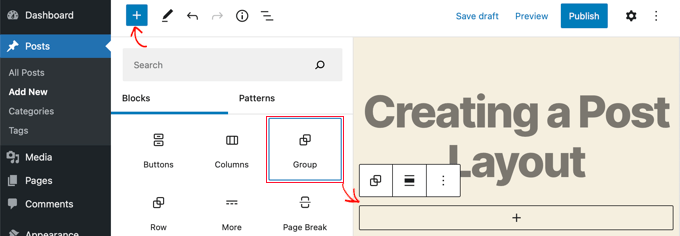
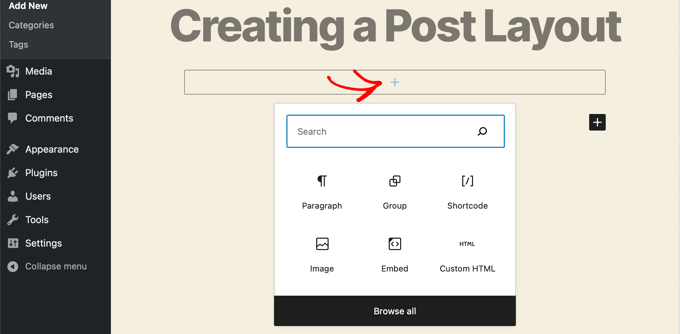
Now you can start adding blocks into the group block to create a single post layout for your WordPress blog.
You can add any blocks you want including columns, media and text, cover images, and more.
Once you are satisfied with the layout you have created, you need to take your mouse up and select the group block.
Simply click on the three-dot menu icon and then select the ‘Add to Reusable blocks’ option.
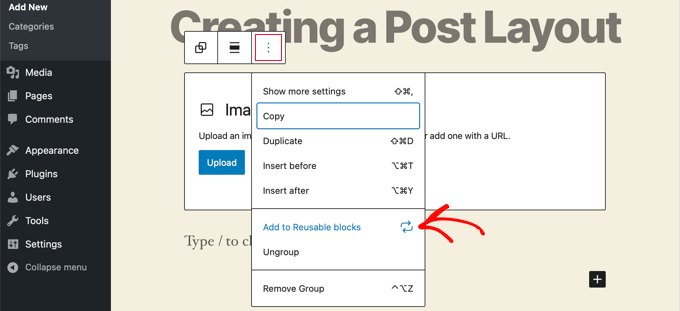
Next, you need to provide a name for the reusable block and then click on the Save button. WordPress will now save your reusable block including all the blocks inside the group block.
You can then edit any existing post on your website or create a new one. On the post edit screen, simply click on the add new block button and look for your saved block under the ‘Reusable’ tab.
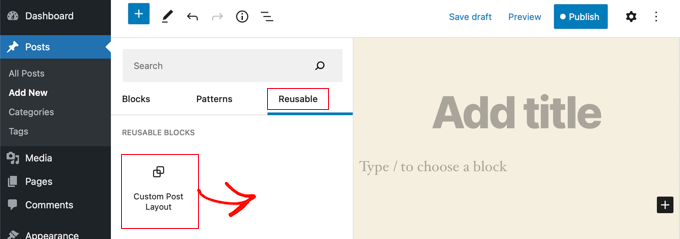
Add the block to your post and WordPress will load your entire group block with all the blocks and settings as you saved them.
This method allows you to save your custom layouts. However, it does not allow you to change how your theme handles single posts.
If you would like greater flexibility, then continue reading the next step.
Creating Custom Single Post Templates Using SeedProd
The easiest way to create a custom single post template is by using SeedProd. It’s the best WordPress website builder plugin and can create beautiful website layouts and custom templates without writing any code.
You can use SeedProd’s drag-and-drop builder to create a fully custom WordPress theme, including custom single post templates.
The first thing you need to do is install and activate the SeedProd plugin. For more details, see our step by step guide on how to install a WordPress plugin.
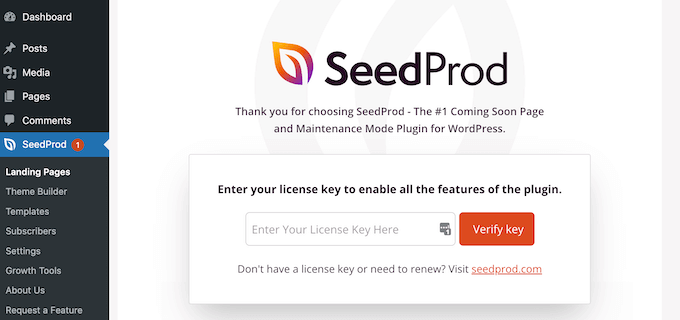
Upon activation, you need to enter your license key. You can find this information under your account on the SeedProd website.
After that, it’s time to create a custom WordPress theme. This is much simpler than it sounds.
Creating a Custom WordPress Theme
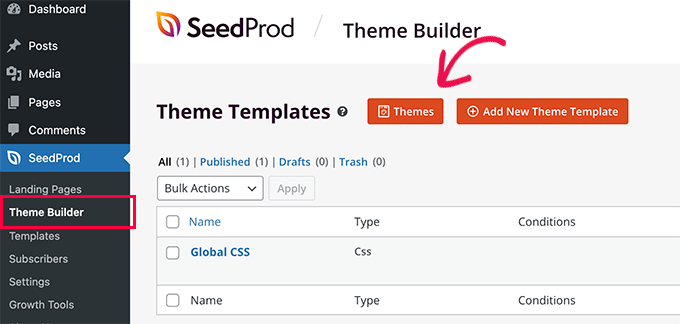
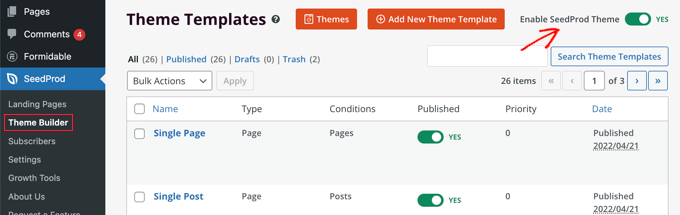
First, you need to head over to the SeedProd » Theme Builder page. Here, you’ll use one of SeedProd’s ready-made themes as a starting point. This will replace your existing WordPress theme with a new, custom design.
You can do that by clicking the ‘Themes’ button.
You will be shown a list of professionally designed themes that are designed for different types of websites. For example, there are templates called ‘Modern Business’, ‘Marketing Agency’, and ‘Mortgage Broker Theme’.
Take a look through the options and select one that best matches your needs by clicking the checkmark icon.
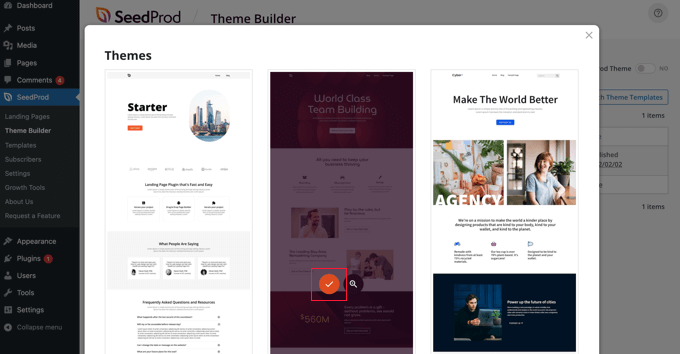
Once you have chosen a theme, SeedProd will generate all the theme templates you need, including one for single pages and another for single posts.
Each template comes set up with attractive layouts and placeholder content that’s easy to customize.
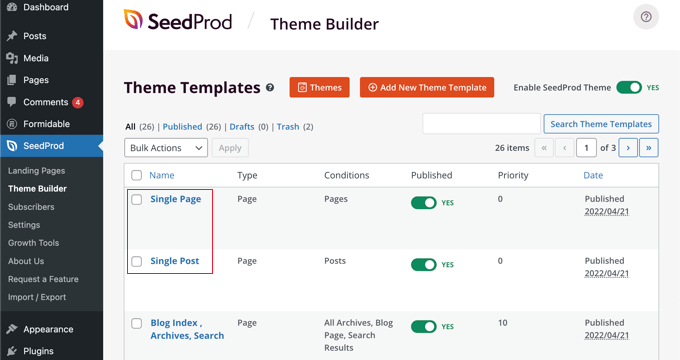
To learn more about creating a theme with SeedProd, see our guide on how to easily create a custom WordPress theme without any code.
Customizing the Default Single Post Template
SeedProd makes it easy to customize the default ‘Single Post’ template using a drag and drop page builder.
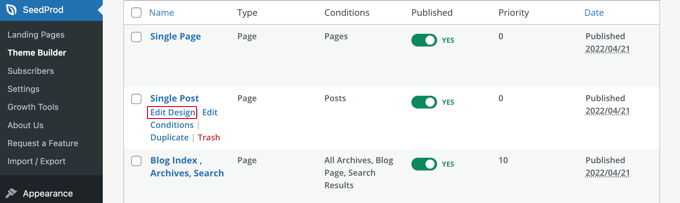
Simply click the ‘Edit Design’ link found under the template. This will open your post template in SeedProd’s visual editor.
SeedProd’s visual editor has a 2 column layout. On the left, you’ll find blocks and sections that you can add to your design. And on the right is a preview of the template where you can see your changes in real-time.
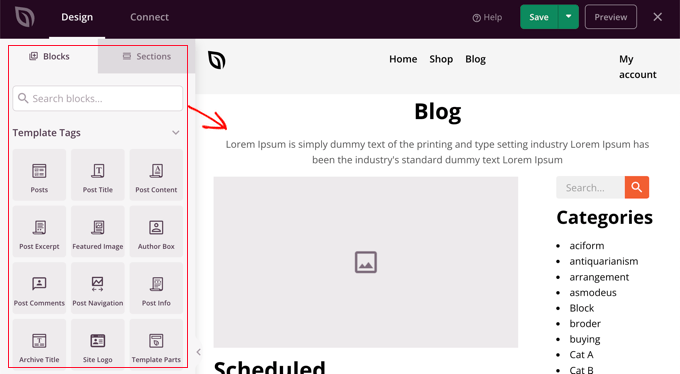
It’s also easy to customize the layout of your post template. Simply click on any block to see its settings in the left column.
For example, if you click on the post title, then you’ll be able to see its settings. Now you can change the alignment, font size, heading level, and more.
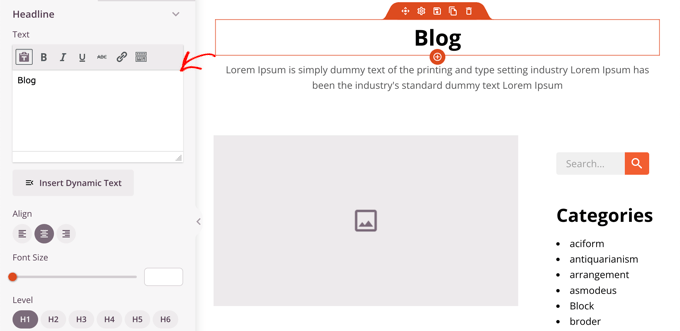
Clicking the Advanced tab lets you change font colors, spacing, and other styles.
You can add additional blocks by dragging them from the left column into the preview column. SeedProd uses template tags to pull in dynamic content like post titles, featured images, comments, and more. This lets you add content to the template without having to edit each post individually.
For example, you can add a Posts block at the end of your post content. This will display recent posts that your visitors may wish to read when they finish the current post. This block will be shown automatically on all posts using this template.
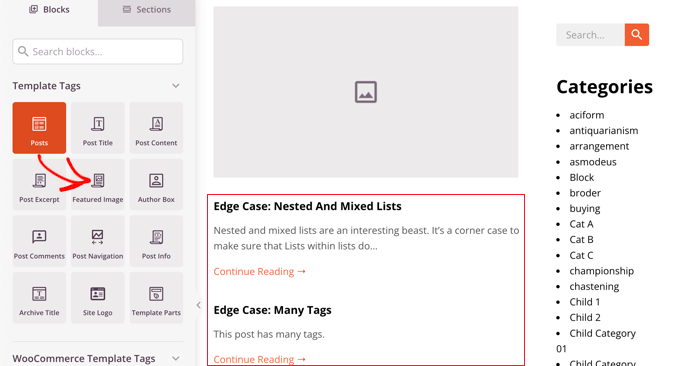
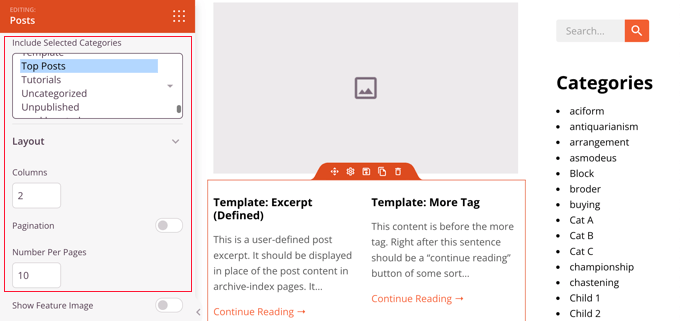
Next, you can change the settings of the Posts block to customize the content that is shown.
For example, you can display content from specific categories, use a two-column layout, and change the number of posts that are shown.
Feel free to spend time experimenting with different blocks and exploring their settings.
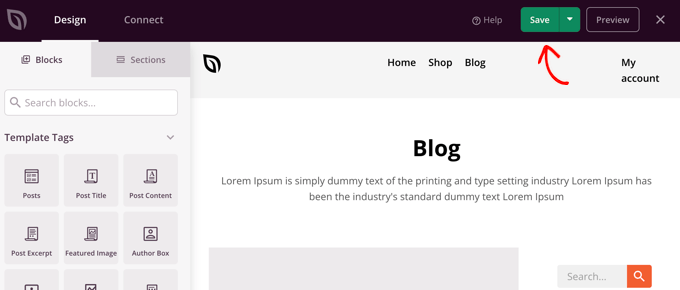
After creating something you’d like to use as your post template, it is time to save it by clicking the green ‘Save’ button in the top right corner. After that, you can close the SeedProd visual editor by clicking the ‘X’ close icon.
You can customize the rest of your WordPress theme in the same way. But if you need a little help, then refer back to our step-by-step guide on how to create a custom WordPress theme with SeedProd.
When you’re happy with how everything looks, make sure the ‘Enable SeedProd Theme’ switch is toggled to the on position. Your WordPress site will now use your SeedProd theme and custom single post template.
Using Theme Settings to Create Custom Single Post Layouts
Many popular WordPress themes come with built-in settings to customize the appearance of your single post template.
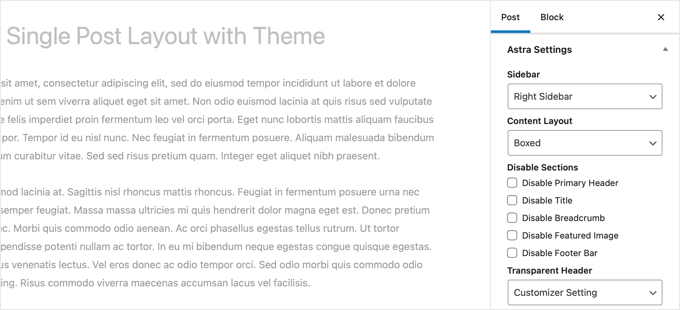
If your theme supports these settings, then you’ll be able to find them on the post edit screen. The options available may change depending on the theme you are using.
For instance, the Astra theme offers customization options when editing a single post. Using these options, you can change sidebars, hide headers, title, menus, and more.
On the other hand, many of the top WordPress themes come with ready-to-use templates that you can use.
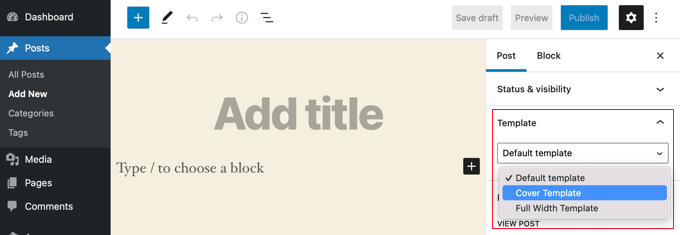
If your theme includes single post templates, then you will find them under the ‘Template’ or ‘Post Attributes’ panel while editing a post.
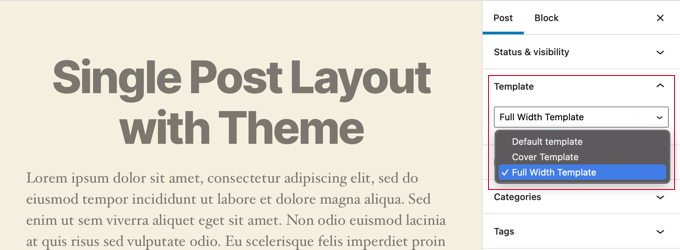
These templates are complete layouts that you can use with no configuration required.
Manually Creating Custom Single Post Templates With Code
This method is a bit advanced as it requires you to edit theme files, copy and paste code, and optionally add custom CSS. If you haven’t done this before, then check out our tutorial on how to copy and paste code in WordPress.
First, you need to open a plain text editor on your computer like Notepad and paste the following code inside it:
<?php
/*
 * Template Name: Featured Article
 * Template Post Type: post, page, product
 */

 get_header();  ?>
This code defines a new template called ‘Featured Article’ and makes it available for post, page, and product post types.
You should save this file as wpb-single-post.php on your desktop. Next, you need to add the template to your WordPress site. To do that, you need to use an FTP client to upload the file to your current theme folder.
Now you can log in to your WordPress admin area and create or edit a post. Scroll down a little on the post edit screen, and you will notice a new ‘Template’ panel or ‘Post Attributes’ meta box with an option to select the template.
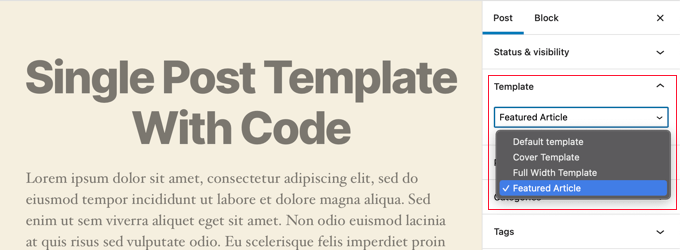
You will see your ‘Featured Article’ custom template listed there.
Right now your template is essentially empty so selecting it will simply display a white screen.
Let’s fix this.
The easiest way to do that is by copying the code from your theme’s single.php file and using it as a starting point. You’ll have to open the single.php file and then copy everything after the get_header() line.
Next, you need to paste this code at the end of your wpb-single-post.php file. Now you can save this file and upload it back to your server.
However, this will look exactly the same as your current single post template. You can now start making changes to your custom single post template.
You can add your own custom CSS classes, remove sidebars, create a full width template, or anything you want.
Creating Custom Single Post Templates by Category
Would you like to use a custom single post template based on categories? For example, you can give posts in the travel category a different layout to posts in the photography category.
You can do that using either the SeedProd Theme Builder or code.
Creating Custom Single Post Templates by Category Using SeedProd
Earlier we covered how to customize the SeedProd Theme Builder’s default single post template. But it doesn’t stop there. With SeedProd you can add as many custom post templates as you like, such as a different layout for every post category.
To add a new single post template, just click the ‘Duplicate’ link under the original post template. A new template called ‘Single Post – Copy’ will be created and added to the top of the theme templates page.
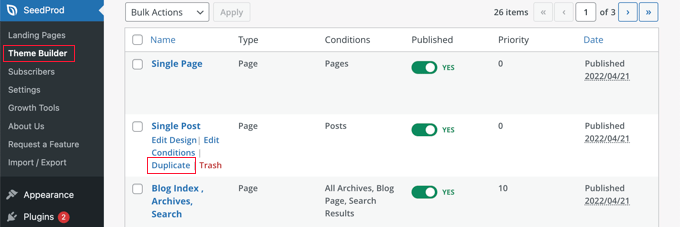
You can customize the new template in the same way you customized the default Single Post template earlier. Simply click the template’s ‘Edit Design’ link and make any changes you like using SeedProd’s visual editor.
When you’ve finished customizing the template, you will need to add some conditions so that SeedProd will know which posts should use this template. In this case, we want it displayed when viewing posts within a single category.
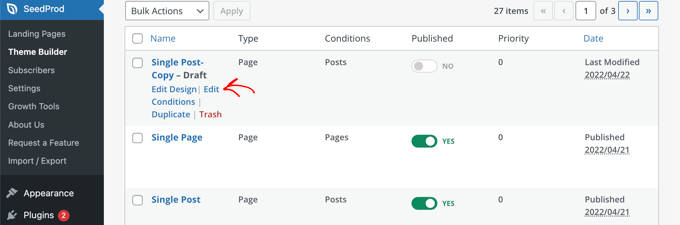
You can do that by clicking the template’s ‘Edit Conditions’ link and a new window will pop up.
Here you can give the template a name and priority. The default Single Post template has a priority of 0, so make sure you give this template a higher priority so it will be displayed on matching categories.
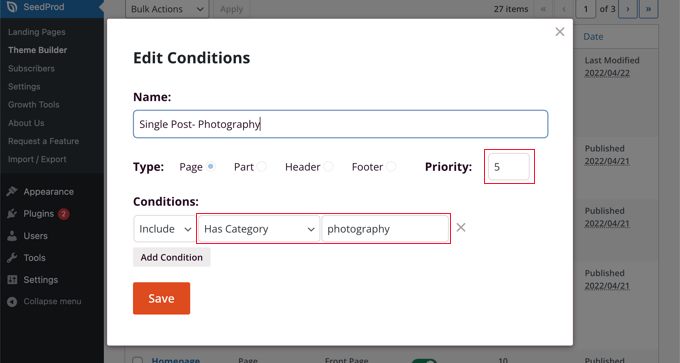
Under ‘Conditions’, select ‘Has Category’ from the second drop down menu, then type the name of the category in the last field. For example, if you only want posts from the photography category to use this layout, then type ‘photography’.
When you’re finished, click the ‘Save’ button and now this template will be used for all posts in the matching category.
This is the easiest way to create multiple custom post templates in WordPress. It doesn’t require any knowledge of code and won’t accidentally mess up any theme files.
Creating Custom Single Post Templates by Category Using Code
This is another method for those who are comfortable adding code to their theme files.
First, you need to add this code to your theme’s functions.php file or a code snippets plugin.
/*
* Define a constant path to our single template folder
*/
define(SINGLE_PATH, TEMPLATEPATH . '/single');

/**
* Filter the single_template with our custom function
*/
add_filter('single_template', 'my_single_template');

/**
* Single template function which will choose our template
*/
function my_single_template($single) {
global $wp_query, $post;

/**
* Checks for single template by category
* Check by category slug and ID
*/
foreach((array)get_the_category() as $cat) :

if(file_exists(SINGLE_PATH . '/single-cat-' . $cat->slug . '.php'))
return SINGLE_PATH . '/single-cat-' . $cat->slug . '.php';

elseif(file_exists(SINGLE_PATH . '/single-cat-' . $cat->term_id . '.php'))
return SINGLE_PATH . '/single-cat-' . $cat->term_id . '.php';

endforeach;
}
This code first checks to see if WordPress is requesting a single post. If it is, then it tells WordPress to look for the template in the /single/ folder of your WordPress theme.
Now you need to add template files defined by this code.
Connect to your WordPress hosting using an FTP client or File Manager in cPanel and go to /wp-content/themes/your-theme-folder/.
Inside your current theme folder, you need to create a new folder called ‘single’. Next, you need to open this folder and create a new file inside it. Go ahead and name this file single-cat-{category-slug}. Replace {category-slug} with your actual category slug.
For example, if you have a category called ‘News’, then you will create single-cat-news.php file. If you have a category called ‘Travel Tips’, then create a template single-cat-travel-tips.php, and so on.
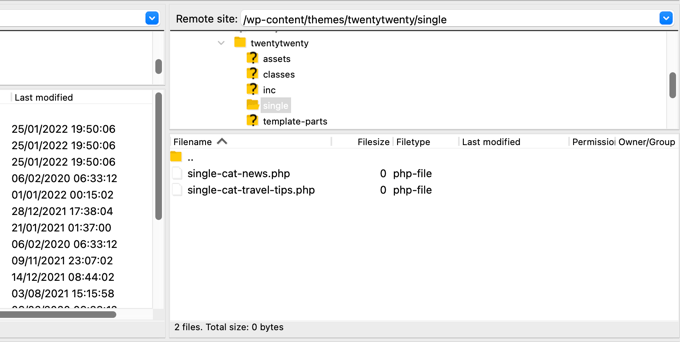
Now, these template files will be totally empty. As a starting point, you can copy the contents of your single.php file from your theme folder and paste them inside each of these templates. After that, you’ll need to edit these templates to make your desired changes.
Once you’re done, you can go to your website and view a post. It will use the template that you have created for the category where this post is filed.
Now let’s suppose you have a post filed in two categories News and Travel Tips. WordPress will automatically show the template for ‘News’ because it appears first in alphabetical order.
On the other hand, if you filed a post in a category and didn’t create a template for that category, then WordPress will fall back to the default single.php template of your theme.
Creating Custom Single Post Templates for Specific Authors
Let’s suppose you want posts written by a specific author to look different on your website. You can do that using code by following the same technique we showed for categories.
First, you need to add this code to your theme’s functions.php file or a code snippets plugin.
/**
* Define a constant path to our single template folder
*/
define(SINGLE_PATH, TEMPLATEPATH . '/single');

/**
* Filter the single_template with our custom function
*/
add_filter('single_template', 'my_single_author_template');

/**
* Single template function which will choose our template
*/
function my_single_author_template($single) {
global $wp_query, $post;

/**
* Checks for single template by author
* Check by user nicename and ID
*/
$curauth = get_userdata($wp_query->post->post_author);

if(file_exists(SINGLE_PATH . '/single-author-' . $curauth->user_nicename . '.php'))
return SINGLE_PATH . '/single-author-' . $curauth->user_nicename . '.php';

elseif(file_exists(SINGLE_PATH . '/single-author-' . $curauth->ID . '.php'))
return SINGLE_PATH . '/single-author-' . $curauth->ID . '.php';

}
Next, you should connect to your website using FTP or cPanel file manager in cPanel and then go to /wp-content/themes/your-theme-folder/. If you haven’t already created a folder called /single/ inside it, then go ahead and create it now.
Inside this folder, you need to create a template using the author’s username in the template name. For example, single-author-johnsmith.php.
This template will be empty, so you can copy and paste the contents of your theme’s single.php template and use it as a starting point.
You can now visit your website to view a post created by a specific author. It will use the template you created.
We hope this article helped you learn how to create custom single post templates in WordPress. You may also want to learn how to track website visitors to your WordPress site, or see our list of must have WordPress plugins to grow your site.
If you liked this article, then please subscribe to our YouTube Channel for WordPress video tutorials. You can also find us on Twitter and Facebook.




Syed Balkhi says
Hey WPBeginner readers,
Did you know you can win exciting prizes by commenting on WPBeginner?
Every month, our top blog commenters will win HUGE rewards, including premium WordPress plugin licenses and cash prizes.
You can get more details about the contest from here.
Start sharing your thoughts below to stand a chance to win!
allah ditta says
i want to create a post template like wpbeginer is it possible?
WPBeginner Support says
If there is part of our design you like you could recreate that on your site.
Admin
Jasmine says
I am getting this message when I try to use the code:
Warning: call_user_func_array() expects parameter 1 to be a valid callback, function ‘my_single_template’ not found or invalid function name.
Any ideas as to why?
WPBeginner Support says
You would want to ensure you properly copied the entire code, we have a guide that may be able to assist below:
https://www.wpbeginner.com/beginners-guide/beginners-guide-to-pasting-snippets-from-the-web-into-wordpress/
Admin
Iulian says
All good but it breaks the default single.php.
In other words this “On the other hand, if you filed a post in a category and didn’t create a template for that category, then WordPress will fallback to the default single.php template of your theme.” is not working.
Any solution?
WPBeginner Support says
You may need to reach out to your theme’s support to ensure there isn’t a different template that you are running into. For understanding what we mean you may want to take a look at our article below:
https://www.wpbeginner.com/wp-themes/wordpress-template-hierarchy-explained/
Admin
Thomas says
Hi, I am trying to follow the step:
Open the single.php file and then copy everything after the get_header() line.
Under:
Manually Creating Custom Single Post Templates in WordPress
However, I don’t have any “get_header()” function in that file.
WPBeginner Support says
Your specific theme may have some unique coding, we would recommend reaching out to the support for your specific theme and they should be able to assist.
Admin
bob says
Thanks for this. All my auto generated files (author, not found etc) are using my site template then putting a white section with white text on thepage. its also starting at the top of the page (so its white text on a white background mostly hidden behind a page header)
I believe your article will help me sort this mess out.
Thank you
WPBeginner Support says
Our article should help and if you reach out to your theme’s support they may be able to assist as well
Admin
Jojo says
I cannot find the template option in Beaver Builder.
WPBeginner Support says
The templates should still be found under the top right section in the content panel
Admin
John says
Am I correct in thinking that once you create a custom post template php file, for it to work as a template, you still need to code the php file, as there is no way to save a new post as a template. Is this correct?
Thank you for your help.
WPBeginner Support says
That is correct, for changing the template unless you are using a page builder there is not a method to set it up without coding.
Admin
Ali Jahani says
Hi
wpbeginner is veryyyyyyyyyy good
thanks for publish best article
WPBeginner Support says
Glad you like our content
Admin
Gregory says
This is a awesome tutorial about WP custom post page.
Thanks about your help.
WPBeginner Support says
You’re welcome, glad you found our tutorial helpful
Admin
Haripal Reddy says
Hello Author,
I followed the steps as you mentioned. I have CPT albums. single-albums.php copied same code to other file wpb-single-albums.php and added template code like /*
* Template Name: custom template
* Template Post Type: albums
*/
and changed some required changes. But after selecting this template in edit post but it displays default one (single-albums.php) page.
How can i fix this please help
WPBeginner Support says
You may want to check the current working template to ensure you have the post type correct
Admin
Alice says
Thanks for your great post. I have 2 questions: Are single post templates the same with custom post type templates? If the are different, can you show me how to create a custom post type template?
WPBeginner Support says
They can be different if you want but if you create on specifically for the post type, otherwise WordPress will default to the post template. You would want to take a look at our article here: https://www.wpbeginner.com/wp-themes/wordpress-template-hierarchy-explained/
Admin
aziz says
hello
than you for the post
i did everything and worked like i wanted.
but i had a small problem
after adding the code to function.php single.php stopped showing data
is there anything i can do?
WPBeginner Support says
You would need to create the folder as we explain after the code in the article
Admin
Binesh says
Hi, Thanks for your Tutorial…
As per your tutorial I have created a custom Post type. But now I am facing an issue with comment. While submitting the comment it redirected to search…
Pls suggest a solution for this..
Thanks in Advance
WPBeginner Support says
If its redirecting you to a 404 page, you would want to take a look at our troubleshooting article here: https://www.wpbeginner.com/wp-tutorials/how-to-fix-wordpress-posts-returning-404-error/
Admin
Mike says
Hello.
I’m using this & enjoying it greatly!
However, I’m finding the following warning in my error logs around this code:
[warn] mod_fcgid: stderr: PHP Warning: Use of undefined constant SINGLE_PATH – assumed ‘SINGLE_PATH’ (this will throw an Error in a future version of PHP)
Any thoughts on how to fix that?
Your snippet starts with “define(SINGLE_PATH,…” so I’m not sure what else to do here.
WPBeginner Support says
That error is saying it wants SINGLE_PATH to be surrounded by single quotes (”) which you can do for that warning
Admin
Jojo says
So I followed your steps and its working for the new category slug single page but not for the default single.php.
How can I get this to work? Perhaps the default single.php path is wrong?
Thanks!
WPBeginner Support says
If you wanted to edit the default single.php file then you would first want to create a child theme: https://www.wpbeginner.com/wp-themes/how-to-create-a-wordpress-child-theme-video/
and then you could edit your single.php file without worrying about the changes being removed when you create your own single.php.
Admin
Jagdish says
I’m one of your silent readers, thoroughly love your blog <3
WPBeginner Support says
Thank you, glad you’ve been enjoying our content
Admin
Hil says
Hi,
I am overthinking this but…if I want every blog post to look the same, do I just create the Layout (I use Divi theme), use the above first method (make a new version of single.php named properly) and choose that every time I want to create a post? That simple?
Also, to add the custom CSS, do you add to the php file, and how? Where within it do you add it? How should it look? That’s the part that I haven’t yet found any reference on how to do. Can you do an example based on just having every blog post look one way?
Thank
WPBeginner Support says
Blog posts should use the single.php by default and look the same that way but you can create a custom post template if you wanted to modify the look. For custom CSS you would want to take a look at our article here: https://www.wpbeginner.com/plugins/how-to-easily-add-custom-css-to-your-wordpress-site/
Admin
Malgorzata says
Hi, thanks dfor great tutoriasl. It is working amazing but not for new categories, which doesnt have special template. Unfortunatley it is not getting the code from default single.php file. I will appreciate some help how to make it work.
Christopher Krohn says
Fantastic tutorial. Thanks!
STEVE says
Hi, Thanks for the tutorial!
I have a question. How would we apply custom CSS that would only effect the Posts pages?
Thanks
TRAVIS says
What if you want to make your new template the default for everything. So that anytime a post is created it is automatically selected as the default template?
Jarrod says
Just put the code for the template you want to create into single.php.
Jae says
I bet there are plugins that you can use to do the job without the hassle of coding and child themes. It would’ve been great if you’d researched and shared that in this post too.
Mahbub says
@JAY why not u done that on ur own?
peyman says
I use your method but I can’t set custom css for this posts.
for example in function.php when I check is_page_template(‘single-cat-news’) the statement not getting true and my custom css for this kind of post not running. what should I do in this case?
Bikram says
True.
I’m also having this problem. The full-width template works well for post and pages but when it comes to custom post type, the CSS codes don’t work and goes back to normal page size without a sidebar.
I’m having a hard time finding a solution to that problem.
Mike says
Need some additional help with this…
Following the instructions on this page (along with the small modifications noted within my comments on 12/2/17 and 12/12/17), I’ve been able to get this working reliably.
HOWEVER, I’ve run into the issue where using this method to call a custom template does not seem to get registered with the call of body_class classes.
For example, if I set a custom template on a page (where I’m using WordPress’ “Template” drop-down within the “Page Attributes” sidebar in the editing view – then the body_classes that are output would include that template name.
Such as:
<body class="page-template-my_custom_template page page-id-2..."But, using this method, the body classes just return:
<body class="page-template-default page page-id-2..."Any idea on how to ensure the body classes reflect a custom single post template?
Mike says
Here’s the answer (for my theme, at least – your experience may vary).
Adding the following to [b]functions.php[/b] did the trick for me:
add_filter('body_class','add_category_to_single'); function add_category_to_single($classes) { if (is_single() ) { global $post; foreach((get_the_category($post->ID)) as $category) { // add category slug to the $classes array, starting with 'category-'... $classes[] = "category-$category->category_nicename"; } } // return the $classes array return $classes; }Dzungx Corn says
I created a single-cat-news.php file for “News”. My “News” category has two child: “Camera” and “Smartphone”. The post in “Smartphone” display in single-cat-news.php (S after N in alphabet), but the post in “Camera” display in default single.php (C before N in alphabet). I want post in “Camera” display in single-cat-news.php, what must I do? I selected both “News” and “Camera” for my post.
Sarmad Gardezi says
Im viewing your Blog from last 2 years. I explored whole web to find this but i got the correct working code from here i just love your Blog keep it up
Mike says
When using this approach to specify a custom post template for a single post within a specific category, I was finding that WordPress was NOT defaulting back to single.php in instances where a single-cat-WHATEVER.php file didn’t exist for a specific category.
I fixed this by adding the following line before the end of the function:
elsereturn SINGLE_PATH . '/single.php';
So that, this code:
/**
* Checks for single template by category
* Check by category slug and ID
*/
foreach((array)get_the_category() as $cat) :
if(file_exists(SINGLE_PATH . '/single-cat-' . $cat->slug . '.php'))
return SINGLE_PATH . '/single-cat-' . $cat->slug . '.php';
elseif(file_exists(SINGLE_PATH . '/single-cat-' . $cat->term_id . '.php'))
return SINGLE_PATH . '/single-cat-' . $cat->term_id . '.php';
endforeach;
}
Became this:
/**
* Checks for single template by category
* Check by category slug and ID
*/
foreach((array)get_the_category() as $cat) :
if(file_exists(SINGLE_PATH . '/single-cat-' . $cat->slug . '.php'))
return SINGLE_PATH . '/single-cat-' . $cat->slug . '.php';
elseif(file_exists(SINGLE_PATH . '/single-cat-' . $cat->term_id . '.php'))
return SINGLE_PATH . '/single-cat-' . $cat->term_id . '.php';
else

return SINGLE_PATH . '/single.php';
endforeach;
}
Does this seem like the right approach? Or, is there something else that I may have done to break the default functionality?
Mike says
Thank you for this clear ‘how to.’
One note: for those of us using a CHILD THEME, I’ve found that changing…
define(SINGLE_PATH, TEMPLATEPATH . ‘/single’);
to:
define(SINGLE_PATH, get_stylesheet_directory() . ‘/single’);
(within the “Define a constant path to our single template folder” section) ensures that child theme’s directory is checked for single templates instead of the parent theme’s directory.
This may also be the reason that it’s not working for some of the other commenters above.
Good luck, everyone!
Stephanie Lewis says
Thank you so much for your help! I was wondering why it kept pointing me back to the parent theme instead of the child theme.
Ashley says
I cannot get this to work for me, the template never shows in the post editor even after clearing my cache.
Olayinka says
Thank you for this article.
I will want to know how I can further customise the layout of this single custom post template, like placing an image in the post before the content and in the footer.
oussama says
Hi,
I need to change the order of 3 things in the post page which they are in the bottom of the article:
1-a pagination plugin.
2-an ad.
3-social share icons.
I want to make them in the following order (vertically):
1-the ad
2-the social share icons
3-the pagination plugin
How can I do that please?
Linda Holiner says
Thank you for your great tutorials. I am having trouble with this one. I added the code to my functions.php but I’m not getting the single post template. Do I need to make a call to the function or does WordPress do that? Is there some way I can debug the function?
I just want posts of a particular category to display differently when you link to them.
Taufiq Mahmud says
I wanted to make a custom post page where registered user of my site can able to post without using wordpress’s default post.php
Pierrick says
Hi! Thank you for this tutorial, but I’m quite new to web design and I started creating a whole wordpress theme. Everything works fine on my website, but I am trying to make it possible to add pages that all use a template I created, (like the page of a product in a catalogue) but I have no idea how to do that. I first tried to do so by creating a page template in which I put loops that display the content of an article or a page, such as its title, its text and the values of some custom fields. To do so I used a query_posts, but it requires to put the post’s or page’s id with “page_id=” or “p=”, which means the template is for one specific page, and I would have to create a template for each new page I add to this catalogue , and precising the id of the page/post manually in it, while what I wanted was to create a single template for all the pages of the catalogue…
So while doing my research to find a solution, I found your article, and I tried to create a post using the new single post template, but no matter which template I select in the list, when I go to the url of the post it displays my home page… I’m probably doing everything wrong, and I’m not even sure I understood what a single post is and if it’s really what I need… I would really appreciate it if you could give me some clues on what I should do to solve my problem, or if there’s some tutorial somewhere that could help me…
Thank you,
Pierrick.
WPBeginner Support says
Hi Pierrick,
We are not sure we understand your problem completely. However, if you just want to create a template to be used by any page then custom page template is the right approach. Since you want users to be able to see any page, this means you don’t need to use query_posts, your loop will begin with the standard
1-click Use in WordPress
Admin
alex says
Hi,
I have a local setup with WP 3.7.x and Template Post Type: post, page, product is not available.
How can i create seperate caterory php files for each post category???
single-{slug}.php
category-{slug}.php
all doesn’t seem to work
Any tips?
Mark says
I have set this up to work with categories, however when I select a post that does not have a category it fails to pick up the default template and does not display the post. I suspect my theme may be at fault. How would I hard code the single.php in the parent directory as the default to use if no category template exists ?
Works perfectly if I copy the single.php into the /single/single-cat-name.php file but I don’t want 40+ duplicate files.
Eric Besso says
first copy single.php to the /single folder
then include this code right before the endforeach;
else
return SINGLE_PATH . ‘/single.php’;
Garikai Dzoma says
This has been a great help to me.
Lyssie says
This is exactly what I was looking for, thank you for spelling this out so simply! It leaves me with a question though: I removed my sidebar but now there’s just an empty space where it used to be. How can I stretch the main content section to cover the entire space? Thanks again!
WPBeginner Support says
Hi Lyssie,
That’s because your theme has defined content area width relative to the sidebar. You need to use inspect tool to find out which CSS class your conntent-area uses and then adjust by adding custom CSS to make it full width.
.page-template-full-width .content-area { width: 100%; margin: 0px; border: 0px; padding: 0px; } .page-template-full-width .site { margin:0px; }1-click Use in WordPress
Please see our guide on how to create full width page in wordpress
Admin
Lyssie says
Thanks for the fast response! This was very helpful! Now, if I see:
div id=”primary” class=”content-area”>
when I use the inspect tool, which is the class my content area uses?
Lyssie says
Oops, that didn’t come out right.
div id=”primary” class=”content-area”
main id=”main” class=”site-main” role=”main”
article id=”post-4773″ class=”post-4773 post type-post status-draft format-standard hentry category-travel-2″
div id=”featured-image”
/div
WPBeginner Support says
Hi Lyssie,
Your theme uses content-area class to define the content block’s width. You should be able to see its width when using the inspect tool.
Joe Yee says
That’s a great article and should helps a no-coder person like me. Customization of template would be something scary that you might break the theme altogether. Do you recommend make the custom template on a child theme or is it okay to do it right on the theme. Thanks a bunch.
WPBeginner Support says
Hi Joe,
You will not be changing any of your theme’s existing files. Instead, you will be creating a new file. If anything goes wrong you can simply delete the template and your site will be back to normal.
Yes creating a child theme is the recommended best practice.
Admin
Danielle says
When I put the file in my child theme, I see it in the drop down box but it doesn’t actually apply.