


Do you want to hide the title of a WordPress widget in your sidebar or footer?
WordPress widgets make it easy to add dynamic content to your theme, such as recent comments or your most popular posts. However, if you need to hide the widget title, then you’ll typically need to write custom CSS or HTML.
In this article, we will show you how to easily hide the widget title in WordPress.
Why Hide Widget Title in WordPress?
Depending on your WordPress theme, your site may display widget titles by default. For example, many themes show the title in their sidebars.
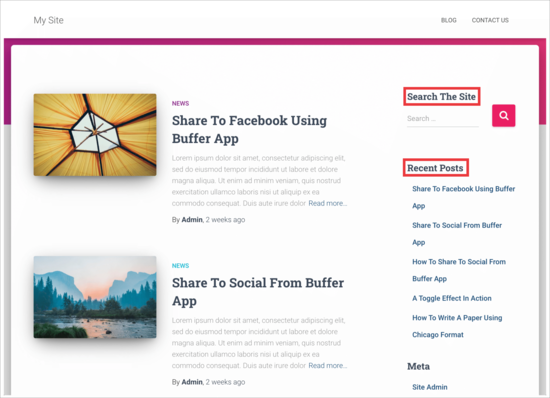
However, sometimes the widget title may not fit with your site’s design. Some widget titles are also unnecessary, as the widget’s content speaks for itself. In this way, titles can take up precious onscreen space on your website, blog, or online store.
While it is possible to add custom styles to WordPress widgets or even use the visual editor to create your own widgets, there are quicker and easier ways to remove the title. That being said, let’s see how you can make this simple change.
Video Tutorial
If you prefer written instructions, just keep reading. Simply use the quick links below to jump straight to the method you want to use:
Method 1: Using the Full Site Editor (Block-Enabled Themes Only)
The easiest way to hide the widget title is by using the full site editor. This allows you to customize any WordPress widget, including removing the title.
However, this method only works with block-based themes like Hestia Pro. If you are not using a block-enabled theme, then you will need to use method 2 instead.
To get started, head over to Themes » Editor in the WordPress dashboard.
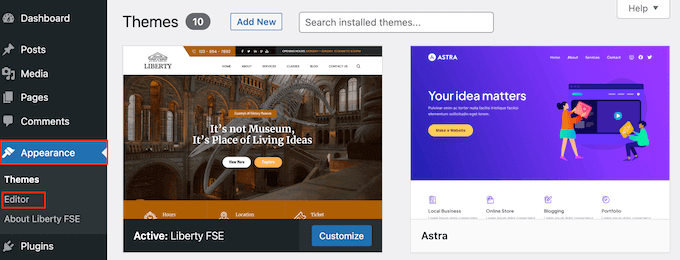
By default, the full site editor shows your theme’s home template, but you can add widgets to any template or template part, such as the header or footer.
You can even add widgets to areas of your site that you can’t edit using the standard WordPress content editor. For example, you can use the full site editor to improve your 404 page template.
To see all the available options, select ‘Templates.’
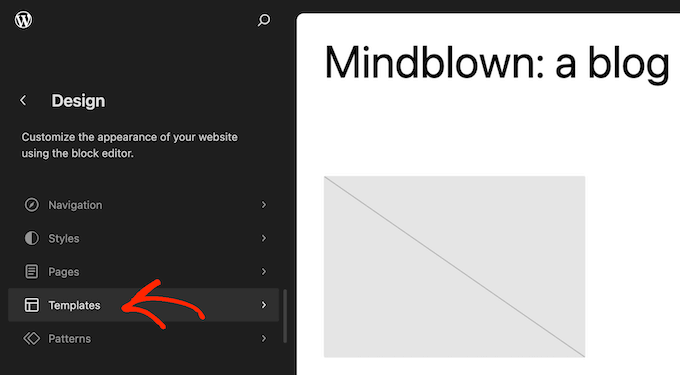
You can now click on the template or template part where you want to remove a widget’s title or add a new widget.
As an example, we will add a Latest Post widget to the homepage sidebar, but the steps will be the same no matter what template and widget you choose.
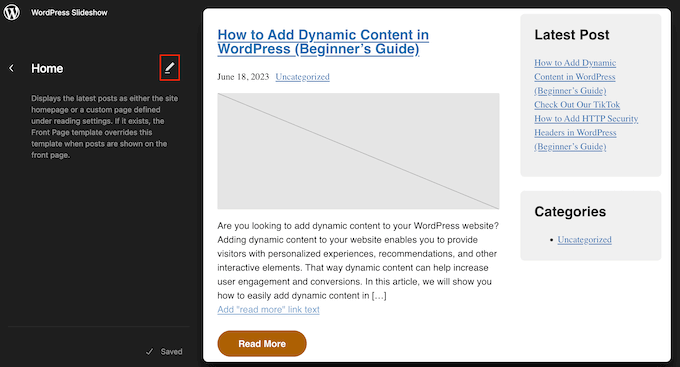
After choosing a template or template part, WordPress will show a preview and a description. To go ahead and edit this layout, click on the pencil icon.
If you want to add a new widget, then click the blue ‘+’ icon in the top left corner. You can then type in the name of the widget you want to add and drag and drop the right widget onto your template.
For more detailed instructions, please see our guide on how to add and use widgets.
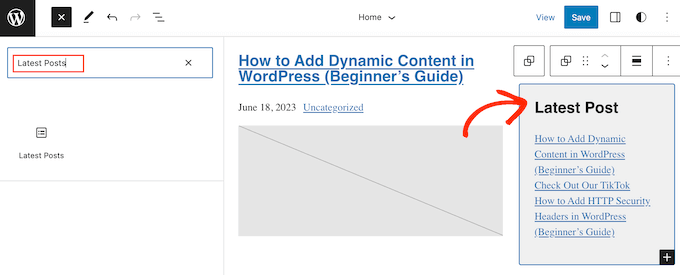
To remove the widget’s title, simply click to select the title in the editor.
You can now delete all the text or replace it with your own custom messaging.
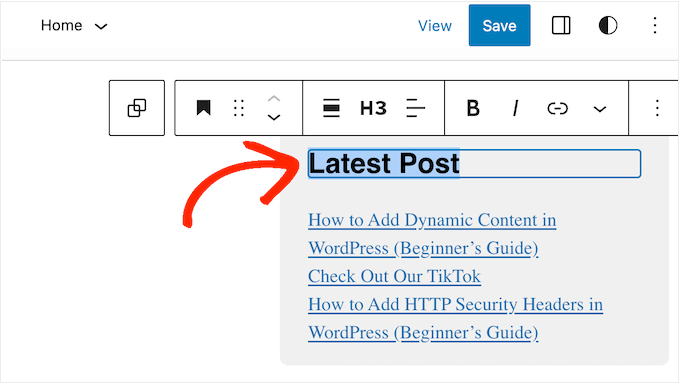
To hide the title for other widgets, simply repeat the same steps.
When you are happy with how the template looks, just click on ‘Save’.
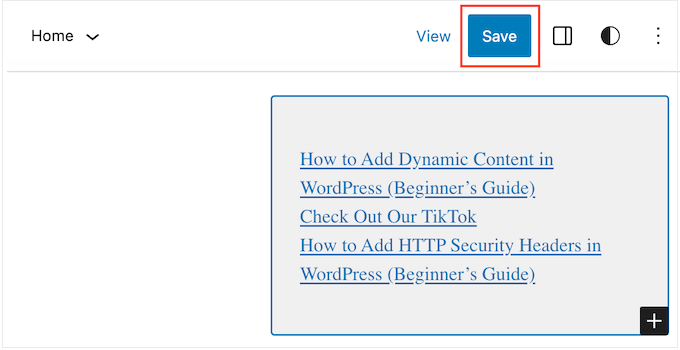
Now, if you visit your WordPress website, you will see the widget title has disappeared.
Method 2: Using the Widget Options Plugin (No Full Site Editor Required)
If you are not using a block-enabled theme, then you can hide the widget title using the Widget Options plugin. This is a complete widget-management plugin that lets you customize your widgets and even show or hide widgets on specific WordPress pages.
For more details, please see our complete guide on how to install a WordPress plugin.
Once the plugin is activated, you need to head over to Appearance » Widgets. Next, drag and drop a widget to your sidebar or any other widget-ready area on your site.
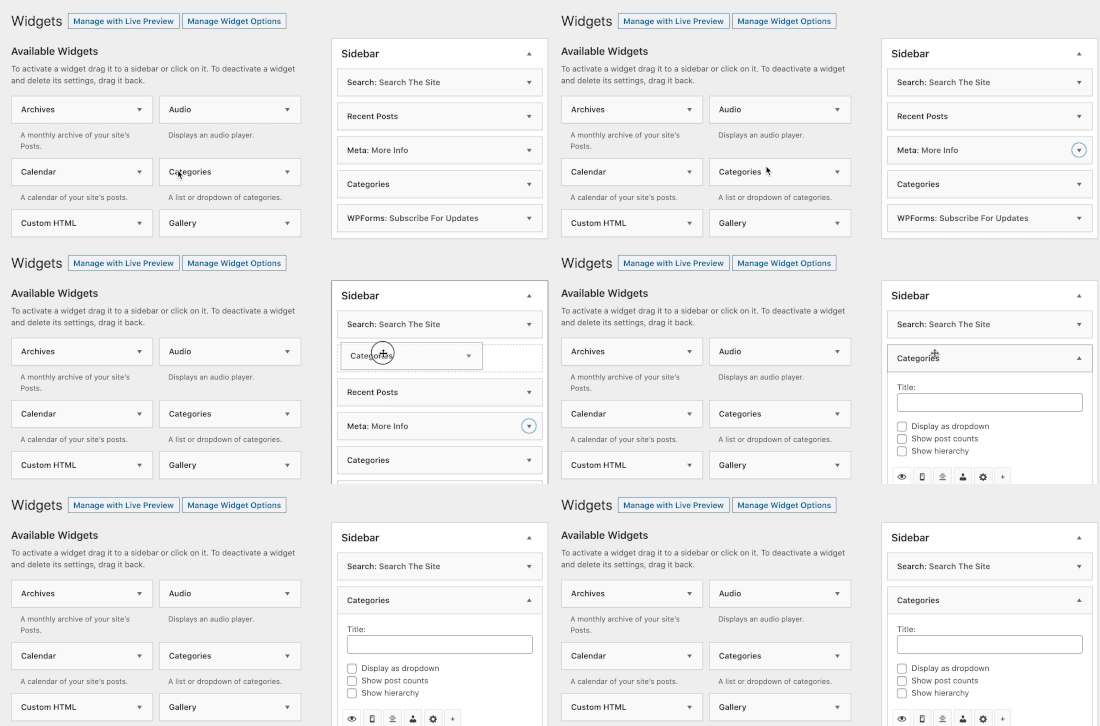
In this example, we are going to remove the widget title from the Search widget, but the steps will be largely the same no matter what widget you are working with.
Just be aware that you may see different widget options and titles depending on your WordPress theme.
Simply click the arrow next to the widget’s title to see all the settings for that widget.
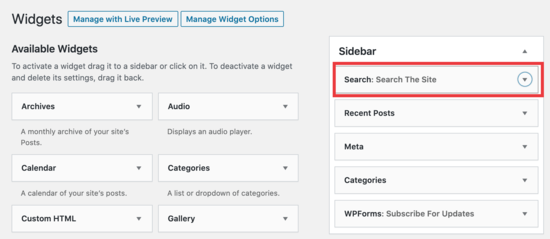
In the expanded settings, click on the cog icon.
Then, select the following box: ‘Check to hide widget title’.
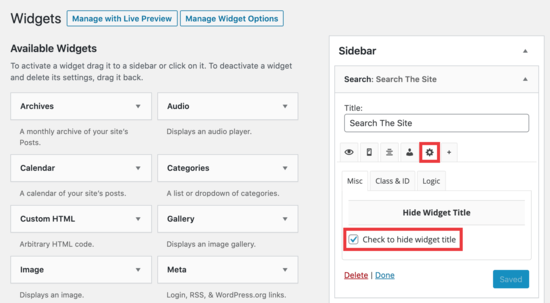
After that, go ahead and click on the ‘Save’ button to store your changes.
Simply repeat these steps to customize any widget on your website. After that, you can visit your WordPress blog to see the new widgets in action.
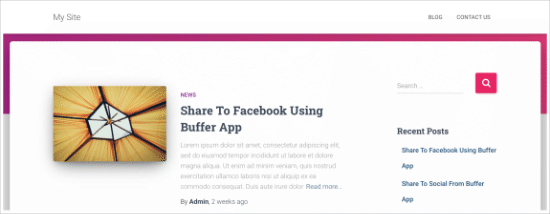
We hope this article helped you learn how to easily hide widget titles in WordPress. You may also want to check out our expert picks for the most useful widgets, or see our guide on how to hide a WordPress widget on mobile.
If you liked this article, then please subscribe to our YouTube Channel for WordPress video tutorials. You can also find us on Twitter and Facebook.




Jiří Vaněk
When I hide the widget title, is there a way to make the margins smaller?
WPBeginner Support
For that you would need to use Inspect element to modify your CSS:
https://www.wpbeginner.com/wp-tutorials/basics-of-inspect-element-with-your-wordpress-site/
Admin
Jiří Vaněk
Ok, so I need to find the CSS class of widget and make for this special CSS via theme editor or WP Code. Thanks for answer. Now its make sense.
Joe
I would urge caution to avoid using plugins for relatively simple edits. Keep in mind that the more dependency you have on plugins the more work it is to manage and troubleshoot when things go wrong.
Additionally, plugins affect the performance of your WP site and adds overhead, so use only when you need to.
If you are looking to hide the widget title you can try this approach by adding the CSS to your theme’s custom CSS or to the .css file found in WP.
Here’s an example, I used in a Divi theme blog:
.et_pb_sidebar_0.et_pb_widget_area .widgettitle {display:none;}
Hope this helps.
WPBeginner Support
Hi Joe,
We have discussed this in our article on How many WordPress plugins should you install on your site.
Admin
Willie
Good day.
I added ! to all my Widgets.
The writing is now gone, but i am left with “Block” where the writing was.
How do i remove these blocks?
regards
Willie
H0NEYL00PS
If you want to remove a title from a specific widget and you don’t want to download a plugin just to do it, add something like this into your themes’ CSS wherever relevant;
.last is obviously optional, relative to what you’re working on – as is ‘custom-header’ (points to the specific widget I was working with). If in doubt, Right Click > Inspect Element.
Bonita
It only removes the title, but not the styling associated with it. Even thouth the text is no longer there, I can still see the title underline and the spacing that is applied to it. How do I remove this completely?
Laurie
Doesn’t work for all widgets, such as Google AdSense, still searching for a solution.
Felipe
Do you know how can i do this manually, without a plugin?
WPBeginner Support
It is not a very neat solution but should work:
function remove_widget_title() { $titleNew = ""; return $titleNew; } add_filter ( 'widget_title', 'remove_widget_title' );1-click Use in WordPress
Admin
Jerdison
I am trying to remove all of my widget titles. The function you suggested did not remove them.
Scott
Great post! Additionally, in a related topic, to also hide page and post titles in singular views there is a Hide Title Plugin as well. http://wordpress.org/extend/plugins/hide-title/
Ibrahim
Wow! Thank you, Scott, for mentioning this plugin. I’ve been searching for more than a week now for something like this. Thank you.
Alan Hughes
What is the code? I’m not trying to install an entire plugin just for this.
Kathy Henderson-Sturtz
Yeah! Wishes do come true. Just installed the Remove Widget Titles on 2 sites (running latest WordPress, Thesis 1.8.5 on one and Genesis/Prose on other) and works like a charm. Oh, the power of a single !
Just a little concerned that no updates on this widget since 2011.
Editorial Staff
Probably doesn’t need to be updated
Admin
Gautam Doddamani
thanks for this i was in need of such a plugin some years ago..i was tweaking up my site and wanted to hide the title…for some reason it was not hiding for a plugin, then i just edited some code using plugin editor and it stopped showing…this is a very good tool and will make the job of hiding title easy!
Cheers,
Gautam
Trenton Miller
This is a very useful tip, thanks! Now, is there an easy way to make a widget title into a link? I wish you could just add code into the widget title area, but Wordpress doesn’t allow it.
Editorial Staff
Try using either one of these plugins:
http://wordpress.org/extend/plugins/widget-title-links/screenshots/
http://wordpress.org/extend/plugins/linkable-title-html-and-php-widget/
Admin
Rich Owings
If you leave the Title area blank it will do this without a plugin.
Editorial Staff
Yes, but then you don’t know which widget is there because your title area is blank. Specially if you have multiple widgets in that widget area without titles.
Admin