


Adblockers are popular software that blocks advertisements on the internet. They are available as add-ons for all top browsers and mobile apps, as well as a dedicated browser. However, they can hurt your revenue if you rely on ads to make money online.
As a team of marketers, we understand the pain that ad blockers can cause to your advertising earnings. We’ve even had our campaigns affected by ad-blocking tools in the past. That’s why we are here to teach you simple ways to detect and politely request that users disable them.
In this article, we will show you how to detect AdBlock users in WordPress and share ways to bypass the software.
What Is Adblock, and How Does It Hurt Website Owners?
Adblock Plus and other adblocking software allow users to automatically detect and block advertisements on WordPress websites.
While Adblock brings an ad-free experience to users, it can hurt bloggers and website owners who rely solely on ad revenue.
Research published by Global Web Index shows that adblocker usage has increased over the past few years. Nearly 30% of internet users have some kind of adblocking software installed on their devices.
Adblocking is a serious problem affecting many websites, particularly blogs that rely on advertisements as their primary source of revenue.
What Should You Do About Adblock as a Publisher?
There are several measures that website owners can take to handle visitors using adblockers.
1. The Do-Nothing Approach
As the name says, you can do nothing about users with Adblock. You just learn to live with the revenue loss for the sake of happy users.
2. The Passive Approach
You can nicely ask your users to whitelist your website with a promise of quality content and non-obtrusive ads. However, there is no way to know how effective this request will be.
Another alternative is to create a membership website with paid subscription plans. You can promote paid plans as an ad-free experience with additional content and features.
Reddit is a great example of this approach with its ad-free Reddit Premium plan.

3. The Aggressive Approach
In this approach, you simply block access to your website for all users with Adblock enabled. If they want to view your content, then they must disable Adblock.
For example, if you visit Rotten Tomatoes, then you will see a popup that asks you to turn off your adblocker to view its content.
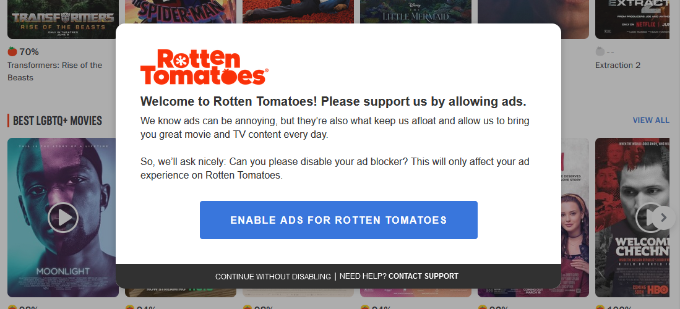
This kind of anti-Adblock approach is rather aggressive, and it will turn away users from your site. Studies show that 77% of Adblock users leave websites with Adblock walls.
So, it’s best to use the passive approach that we mentioned earlier.
How to Detect Adblock Users in WordPress
Before you can request Adblock users to whitelist and support your website, you need to be able to detect these users. Luckily, there are plenty of ways to do that in WordPress.
We will show you a few different methods, and you can choose the one that best suits you:
Method 1: Detect and Target Adblock Users With OptinMonster (Recommended)
One of the best ways to detect Adblock users and show them targeted messages is by using OptinMonster.
It is the best lead generation and conversion optimization software on the market. It helps you convert website visitors into subscribers and customers, grow your email list, get more leads, and boost conversions.
OptinMonster has a built-in ad-blocking detector that allows you to show targeted campaigns to users with ad-blocking software installed on their devices. This includes popular software like AdBlock, AdBlock Plus, uBlock Origin, and more.
First, you will need to sign up for an OptinMonster account. You will need at least their Growth plan to access the Adblock targeting.
Simply visit the OptinMonster website and click the ‘Get OptinMonster Now’ button to get started.
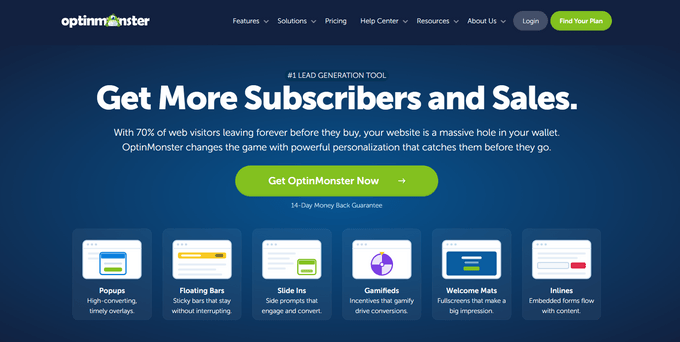
Once you have signed up, you can head to your WordPress site to install and activate the free OptinMonster plugin. For more details, see our step-by-step guide on how to install a WordPress plugin.
This plugin acts as a connector between your website and OptinMonster.
Upon activation, you will see the welcome screen and setup wizard in your WordPress dashboard. Simply click the ‘Connect Your Existing Account’ button to continue.
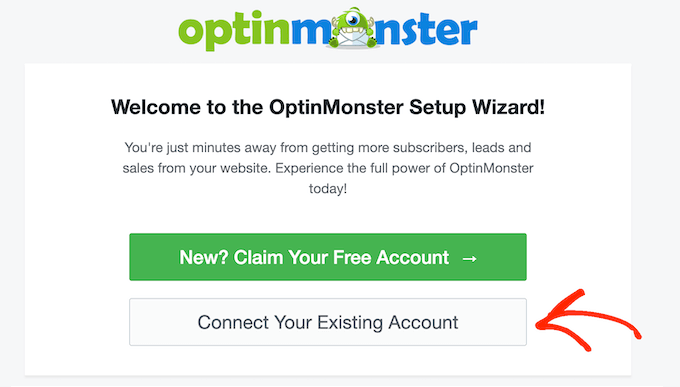
Next, you will need to connect your WordPress site with OptinMonster.
When a new window opens, go ahead and click the ‘Connect to WordPress’ button.

Now, you are ready to create a campaign and detect Adblock users.
Simply head to OptinMonster » Campaigns from the WordPress admin area and click the ‘Create Your First Campaign’ button.
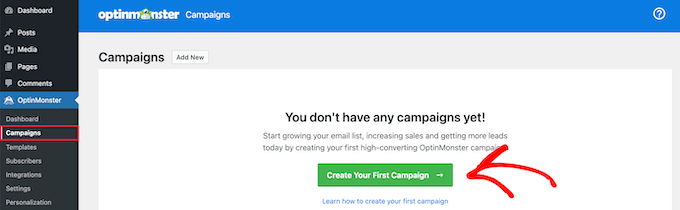
This will open the OptinMonster campaign builder.
First, you will need to choose a campaign type. If you want to take the passive approach, then you can use the lightbox popup campaign type.
On the other hand, if you want to aggressively lock out Adblock users, then you can use the fullscreen campaign type instead.
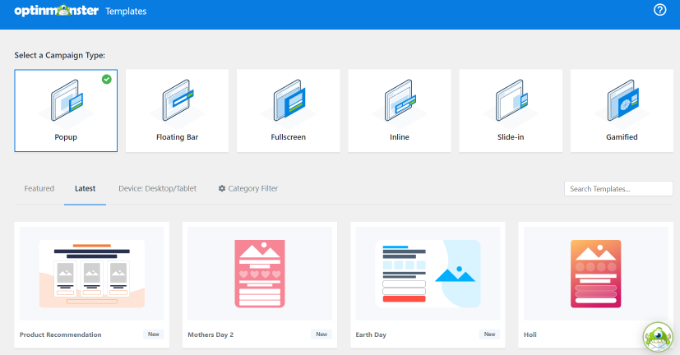
After choosing a campaign type, you will also need to select a template. OptinMonster offers beautiful pre-built templates for different campaign types. You can easily choose one and edit it according to your needs.
For this tutorial, we are using the ‘Target’ theme, but you can choose a different template.
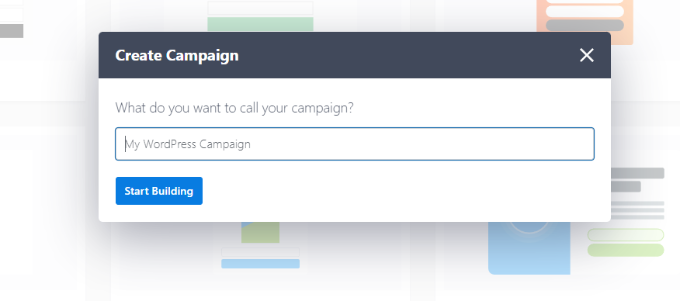
Now, you will be asked to choose a title for your campaign. Once you have entered a name, just click the ‘Start Building’ button.
Next, you will see the drag-and-drop campaign builder. OptinMonster offers multiple options to customize your popup.
You can select different blocks from the menu on your left and add them to your template. For instance, there are blocks to add images, videos, buttons, countdown timers, text, and more.
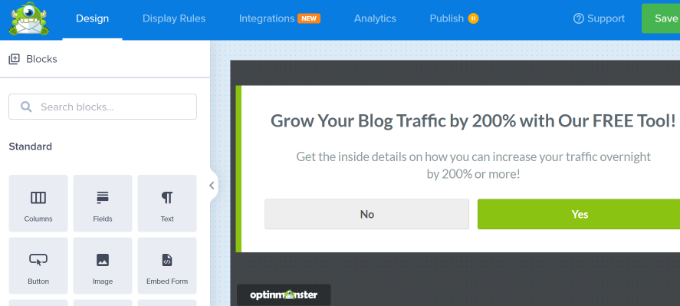
After that, you can simply click on any element in the template to edit it.
You can click on the text to add your own copy.
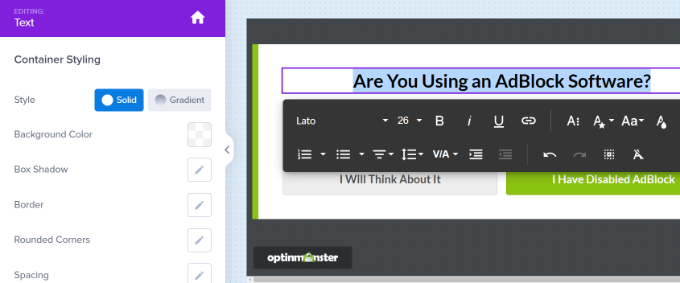
Next, you can also edit the text and action for the campaign buttons. For example, we have changed the Yes button to ‘I have disabled AdBlock’ and the No button to ‘I will think about it’.
You can also choose what action will take place once a user clicks the button. Simply click the ‘Button Click Action’ dropdown menu from the left panel and choose the action.
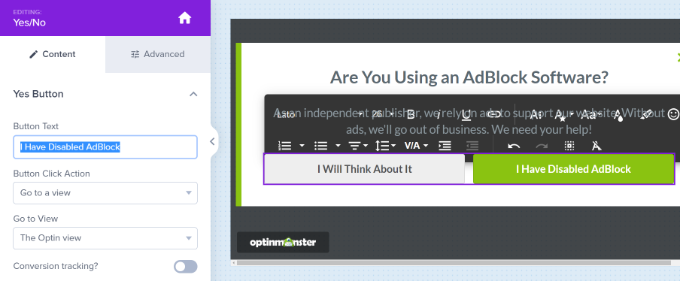
For instance, when a user clicks the ‘I Have Disabled AdBlock’ button, then we want to show the Success view.
Next, you can click the ‘Success’ tab at the bottom of the campaign builder and edit the view. We edited the text to show a thank you message.
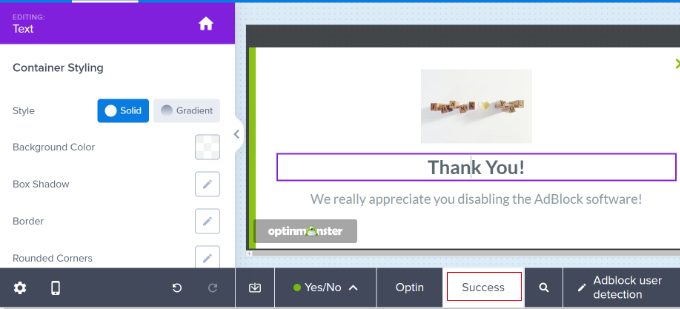
After that, you need to click on the ‘Display Rules’ tab. This is where you can select when and where your campaign will appear.
OptinMonster offers powerful display rules. By default, it will show the campaign when a user spends 5 seconds or more on your WordPress blog.
However, you will need to select the ‘Ad-Blocker Targeting’ rule.
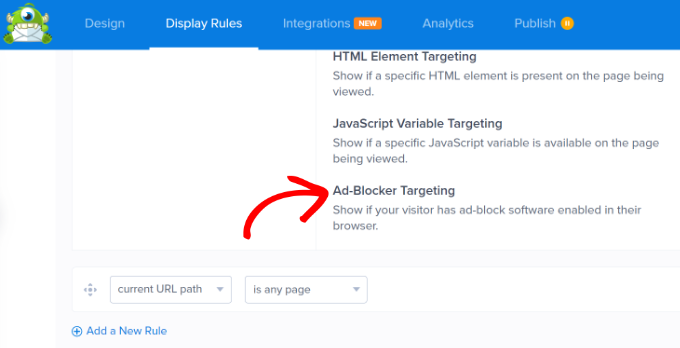
After that, you can show the campaign when the ad blocker is enabled on a user’s browser.
Next, make sure that the current URL path is set to any page. This setting will display the popup on all pages of your website.
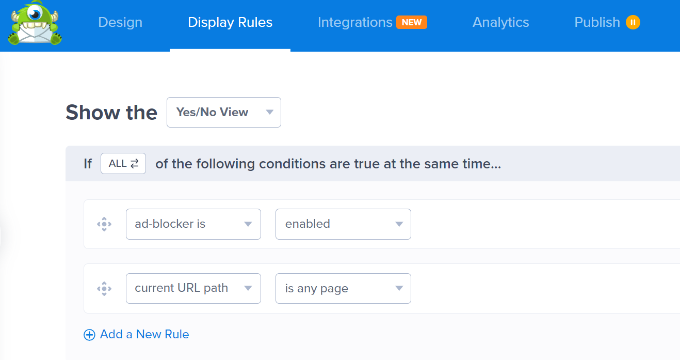
Once you have set up the display ruler, just click on the ‘Done? Go To Actions’ button to continue.
You will now be asked to select the default view. When the popup appears on a user’s screen, you can show a MonsterEffect and play sound effects.
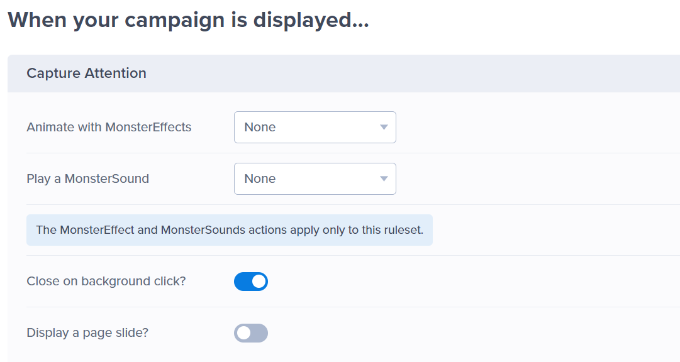
If you scroll down, you’ll see more campaign settings.
For instance, you can change the cookie settings and select when to show the campaign again to different users.
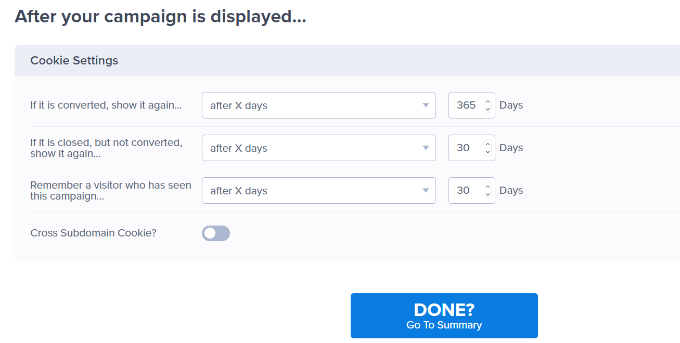
Your Adblock campaign is almost ready. Let’s publish it to make it available on your website.
Simply switch to the ‘Publish’ tab in the builder and change the Publish Status to ‘Publish’.
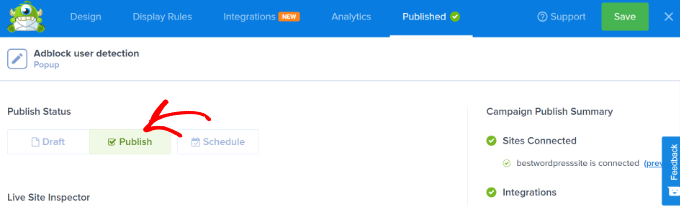
You can now click the ‘Save’ button at the top and close the campaign builder.
On the next screen, you will see the WordPress Output Settings for the campaign. To make your campaign live, simply click the ‘Status’ dropdown menu and change it from ‘Pending’ to ‘Published’.
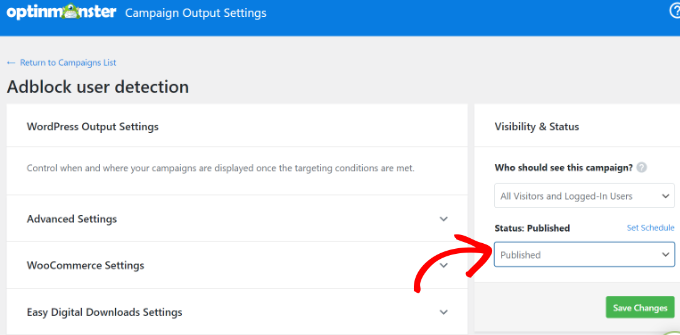
When you are done, go ahead and click the ‘Save Changes’ button.
That’s all. Your adblocker check campaign is now live on your WordPress website.
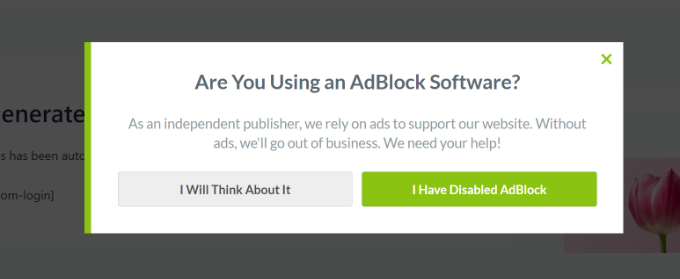
You can test out your campaign by installing the AdBlock extension in your browser and visiting your website. You will see a popup asking users to support your website by disabling the Adblock software.
Method 2: Target Adblock Users With AdSanity
AdSanity is one of the best ad management plugins for WordPress. It has a paid ‘Adblock Detection’ add-on that allows you to detect users with ad-blocking software and restrict their access to your website until they disable adblocking.
First, you need to install and activate the AdSanity plugin and its Ad Block Detection add-on. For more details, see our step-by-step guide on how to install a WordPress plugin.
Upon activation, you must visit the AdSanity » Settings page and click on the ‘Licenses’ tab.
Next, you can enter the license keys for the AdSanity core plugin and the Ad Block Detection add-on. You can easily find these license keys in your account area.
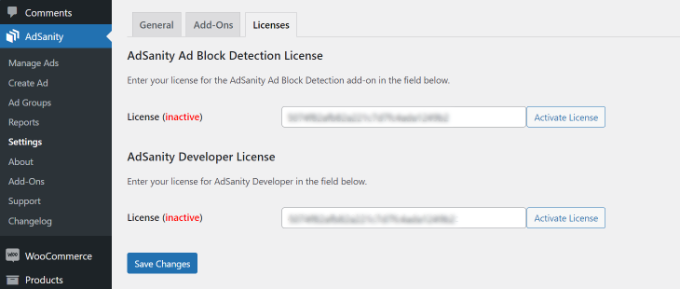
After entering the license, click the ‘Activate License’ and ‘Save Changes’ buttons.
Next, you can switch to the ‘Add-Ons’ tab in the AdSanity settings.
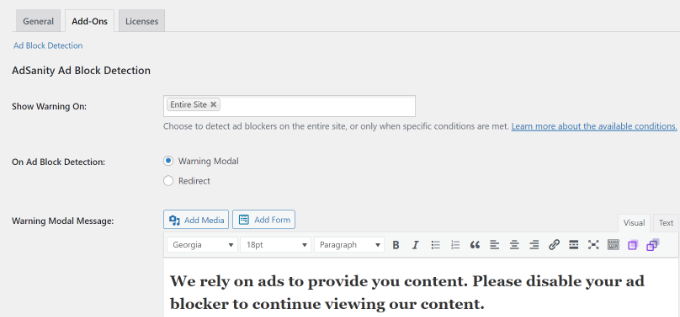
AdSanity allows you to detect Adblock on posts and pages. You can show a warning popup to Adblock users with your custom message, or you can redirect them to a custom page.
Both methods are aggressive and require users to disable Adblock to continue browsing your site.
When you are happy with the settings, make sure to click the ‘Save’ button. AdSanity will now display the warning message to Adblock users on your website.
Method 3: Detect Adblock Users With CHP Ads Block Detector
If you are looking for a free way to detect Adblock users, then you can try this method.
First, you will need to install and activate the CHP Ads Block Detector plugin. For more details, see our step-by-step guide on how to install a WordPress plugin.
Upon activation, head over to the Adblock page to configure the plugin settings.
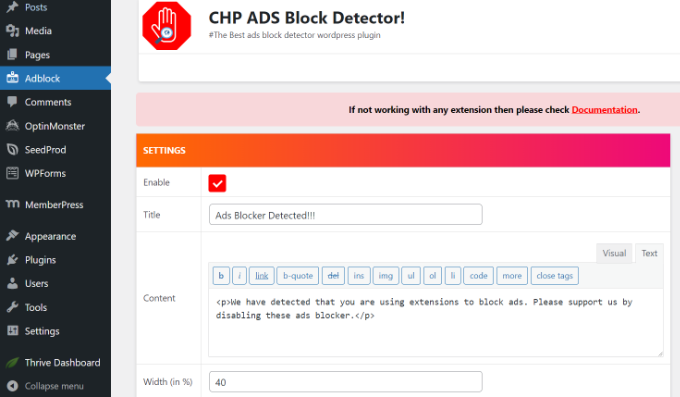
The plugin allows you to show a custom message to Adblock users. You can edit the title and message that will appear on your website.
Plus, you also have the option to display the close button. If you want to use an aggressive approach, then you can hide the close button and force users to disable their adblockers.
Don’t forget to save your settings. You can now visit your website with the AdBlock extension installed on your browser to test the plugin.
Bonus: Diversify Your Revenue Streams
Internet users are finding more ways to block ads across the internet. Fighting ad-blocking software can be tiring and a neverending fight to recover lost revenue.
One thing to consider is changing the way you make money on your website. Finding new ways to monetize your content will give you the freedom to rely less on ads and build a sustainable business in the long run.
Research shows that privacy, security, and bad user experience are the most common complaints among Adblock users. You can address these complaints by adapting different monetization methods that address those issues.
Here are a few ways publishers can make money and not rely on ads.
1. Affiliate marketing
Affiliate marketing is one of the most common ways to earn money from your content. You can recommend products and services to your users and earn a commission when users make a purchase using your affiliate link.
There are plenty of plugins and tools for affiliate marketers that will help you get started. For more details, see our beginner’s guide to affiliate marketing.
2. Selling Direct Ads
If you are serving ads through a third-party advertising network like Google AdSense, then you have limited control over ads, privacy, and the CPC.
Selling ads directly to advertisers allows you to ensure privacy, limit tracking, and control what you get paid.
WordPress ad management plugins like AdSanity allow you to serve your own ads as well. You can use hosted images on your own websites for ads and easily bypass most adblocking software.
Tip: Don’t wrap your ads around HTML elements with CSS classes like ads, advertisement, promo, etc. This is how AdBlocking software detects and blocks ads.
3. Sponsored Content
Consider allowing advertisers to sponsor content on your website. You can write content about their product or service and even include an affiliate link to get a referral commission. You can also accept user-submitted posts directly on your website.
4. Premium Content
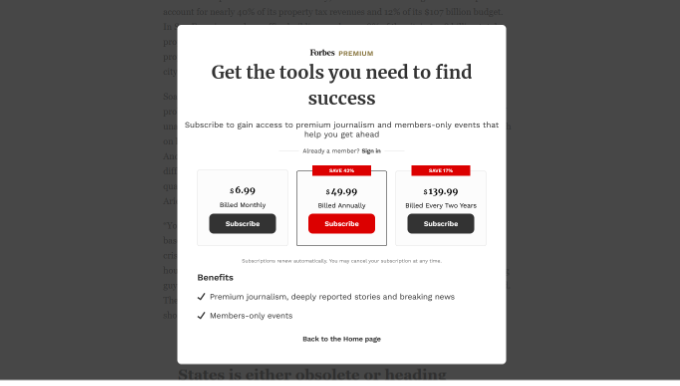
Another helpful strategy used by many online publications is premium content. You can adapt a pay-per-view model, create membership plans, sell online courses, or simply restrict pages to paid users.
For more ways to diversify your website’s revenue, take a look at our guide on different ways to make money online from your website and some easy-to-start new online business ideas.
We hope this article helped you learn how to detect AdBlock users in WordPress. You may also want to see our guide on how to create an email newsletter and our expert picks for the best email marketing services to grow your business.
If you liked this article, then please subscribe to our YouTube Channel for WordPress video tutorials. You can also find us on Twitter and Facebook.





Mrteesurez
This is incredible, I now understand why people ask users to disable ad blocker upon visiting. It’s hard to let go for someone relying heavily on ads for revenue and not all contents are fit to be premium or for subscription, I see it a best approach to ask them disable the ads to continue using the website.
If your website has quality contents, people will be disable ad blocker in order to access it. They will just let go of their adblocker for a while.
Jiří Vaněk
Unfortunately, it’s a double-edged sword. I had AdSense ads on my website and was also monitoring user behavior. To increase AdSense revenue, I implemented ad-blocker protection. Unfortunately, the effect was worse than I expected. Many people chose to leave the site rather than disable their ad blocker, which significantly increased my bounce rate. This, in turn, doesn’t help Google to index the site well. As a result, I eventually abandoned this method and instead put a donate button at the end of the article. Those who want to can leave a donation, those who don’t get the content for free in exchange for ads, and if someone uses an ad blocker, I don’t restrict them because it turned out to be counterproductive. But that’s just my view on the matter.
Ralph
I plan on opening big portal type website that will earn money for me mainly from affiliate marketing and ads. More from ads honestly.
I understand both sides.
Website owners can’t work without income from advertising but users hate ads. However popup telling me I’m adblock user just makes me leave the website.
Agressive approach is a big NO-NO for me. I feel like passive do nothing as people almost never agree.
I think the best way is do-nothing. Who will see ads then will see ads, who use blocker, will not.
Owner will still earn money. Maybe less but this can be complemented by affiliate marketing.
After all, is better to have returning viewer, that may let us earn something, than not have one at all.
WPBeginner Support
That is certainly an option that you can go with, there is nothing wrong with using your preferred method
Admin
Jiří Vaněk
It’s more of a contemplation whether to restrict users with ad blockers or leave them be. On one hand, it can lead to revenue loss from ads, while on the other hand, if I restrict users with ad blockers, it might increase the bounce rate and reduce time spent on the website, as those users might leave. This, in turn, could negatively impact metrics, leading Google to believe that my content is of low quality because people often leave quickly. However, they might be leaving just due to content being blocked by ad blockers.
Cezar
And if i only want to know how many of my readers use addblock ? i don`t want to show them any warning/etc.. i only need to know how many users use ads block
Tom
Nothing is a bigger turn off for me than a site that tells me I’m using an Adblocker. I know I’m using an ad blocker. You mentioned Forbes in a recent comment – I’ll say this. I used to frequent Forbes’ site a lot until they prevented me from viewing content completely for my ad blocker. I can find that same information somewhere else within seconds with a click of my Back button back to Google. I’ve never been back to Forbes since and I’m sure I’m not the only one. The Internet is too vast for me to deal with turning my ad blocker off in order to view a site. I can google a new one ten times quicker.
Ad revenue has to be minimal at best these days. It’s no longer 1998… I feel like the best blogs and websites leverage tactics that offer me, the viewer, MUCH more value – like an email list, and they’ll get tons more cash out of their viewers that way because they are offering something of value to someone so it’s win win. Looking at a commercial on the sidebar is a waste of my time.
Just my two cents. I run some ads on some of my blogs and I’ve done well with them but I feel like there are smarter ways to keep my blogs up and running going forward =)
Doug Sparling
Perhaps this post should be updated to reflect changes at Forbes, who no longer use the “Agressive Approach.”
WPBeginner Support
Hi Doug,
They still use the aggressive approach and will not allow users to access content until they disable AdBlock.
Admin
Doug Sparling
Not to beat a dead horse, but I can access Forbes’ text content with either AdBlock or UBlock enabled, which is different from how it used to be. (It may be different for video content, though.) I work for a company that like many, relies on ad revenue, so this is one of those issues I watch closely. We have chosen to offer premium content to offset any decline in ad revenue and haven’t blocked the blockers.
Arta
This plugin doesn’t work. even their own demo doesn’t work. The plugin was updated a month ago though :-s
DLZanetti
Locking visitors and allow only logged in users?
For visitors appear the message:
AdBlock detected, disable or register.
After you log in, the message no longer appears.
Is it possible to do that?
Thank you. Excellent plugin!
WPBeginner Support
Hi,
Yes, this can be done. For example, with OptinMonster you can add a popup and then under display rules show it to users who are not logged in.
Admin
Jim Wilson
Both sides are right and both sides are wrong.
Businesses cannot survive without advertising and they sure as hell can’t survive on “donations” alone. To suggest otherwise is just being ridiculous.
Certainly, if marketing IDIOTS didn’t create such extremely obnoxious and annoying advertising schemes, ad blocking software would be a lot less popular.
People HATE going to a web site that throws up a centered window and darkens the screen so the content cannot be viewed UNLESS the ad is clicked or acknowledged! It is also ridiculous that one should be forced to view a commercial longer than 10 seconds to see content that should only take a minute to read or view. Idiot advertisers have brought this on themselves.
And, yes, there are sites that may infect your computer with malware HOWEVER such protection is a job for ANTIVIRUS software, NOT ad block software. You can be infected by a site running NO advertising. Duh!
On the other hand, the “99%” fails to consider that plenty of sites run legitimate, passive, sidebar-oriented marketing schemes that put the job of drawing attention on the ad creator without annoying the hell out of everyone.
Either way, whoever runs a site that detects and/or prevents visitors running ad block software is absolutely within their right to do so. Advertising pays the bills for some of the most popular sites on the Internet. Blocking ads while viewing content is the SAME as STEALING.
The world doesn’t work for free. Don’t like it? Too effing bad. It’s the truth.
Jakob
“Blocking ads while viewing content is the SAME as STEALING.”
Totally wrong… and a business that relies on advertising to make a profit should instead focus on selling a product that people will actually pay for.
Ankit
Pretty helpful article. Easy to understand. Helped me to impress my visitors with a cute pic for unblocking adblocker
Seva Petrov
Haven’t heard about this plugin but I am using a simple code shared by to display my affiliate ads to ad block users.
Which one is better? Plugin or direct code.
WPBeginner Support
Plugin, because then plugin author can keep updating it with new blocking techniques and they automatically get applied on your site when you update the plugin.
Admin
J Munce
Two options I am considering (because adblock-blocker plugins seem to be able to be blocked by adblock). If anyone can provide code for these, it would be appreciated. Our site is already free and ads unobtrusive. All Adblock does is deny our hardworking writers any chance of earning any income.
1. Conditional statement. IF ad not displayed, don’t show page / use alternate css / show massive image that blocks page)
2. CSS. Two options in CSS. If ad displayed, fine. If ad not displayed, display a massive image (which blocks page).
3. Wrap content in script of the ad.Two options I am considering (because adblock-blocker plugins seem to be able to be blocked by adblock). If anyone can provide code for these, it would be appreciated. Our site is already free and ads unobtrusive. All Adblock does is deny our hardworking writers any chance of earning any income.
1. Conditional statement. IF ad not displayed, don’t show page / use alternate css / show massive image that blocks page)
2. CSS. Two options in CSS. If ad displayed, fine. If ad not displayed, display a massive image (which blocks page).
3. Wrap content in script of the ad.Two options I am considering (because adblock-blocker plugins seem to be able to be blocked by adblock). If anyone can provide code for these, it would be appreciated. Our site is already free and ads unobtrusive. All Adblock does is deny our hardworking writers any chance of earning any income.
1. Conditional statement. IF ad not displayed, don’t show page / use alternate css / show massive image that blocks page)
2. CSS. Two options in CSS. If ad displayed, fine. If ad not displayed, display a massive image (which blocks page).
3. Wrap content in script of the ad.
Bob
Sorry, but until you folks figure out a way to stop the hijackers, block the popups that interfere with browsing, or watching a video legally acquired, I am going to continue to black as much as I possibly can. Find another way to earn money. We do not feel sorry for you.
Gary
Bob, why don’t you stop going to the websites that people worked hard to create then? You didn’t write any of the content for them yet you want to deny them any type of earning from said content?
You want someone to write hours, days, months of content for you to enjoy for free… but you want to block their only point of revenue for this? You want someone to pay to rent their VPS or shared hosting, pay for the domains, pay for royalty free graphics to use on the website… but don’t want them to earn any of it back?
“We do not feel sorry for you” – Of course not, you’re probably too to figure out how much work it takes make a website or the content on it.
Yoqi
I do agree with Bob. The problem here is NOT the fact that ads are used to earn money, but the fact that ads are overwhelmingly ABUSED by many sites, used for hijacking, introduce viruses and/or gather personal data about browsing habits without people’s concern. Not to mention that in many cases they are obtrusive and plain annoying. Ever tried YouTube without an ad blocker? You will be FORCED to watch a several-second video ad practically EVERY TIME you want to watch someone’s video, and you can’t even skip it: you HAVE TO WAIT until it plays 80..90% of it! I should be charging Google for my time lost! Ever tried a popular download site? You will get dozens of identically-looking download buttons which all of them lead to downloading a virus or an adware, and only one directs you to the desired destination. And so on…
So… stop about complaining ad-blockers and start thinking why they exist in the very first instance. And moreover, you gotta be stupid: you want to get traffic in order to be able to pay your internet bills, yet you start blocking users. Be sure they will never return! Even if they disable the ad-blocker, something already tells them that the CONTENT is of little (if any) importance, as you are obviously giving more preference to the ADs!
And above all: ad-blocking is a RIGHT.
Fred
It is much easier for users to hide ads than for the entire industry to develop advertising ethics.
Gea Vox
Unless you can guarantee that your advertisers are 100% SAFE and HONEST, and unless they STOP using adverts that gum-up my system with their bandwidth-hungry content, WE will SKIP your websites and REPORT HEN+M as unsafe by every means possible!
The 99%
Gea Vox
Hear! Hear!
i find that the best way to earn revenue with a website is to be open and straight-up with people and ask them to either BUY products or services or DONATE to help maintain the website.
Adverts are a vehicle for FRAUD and PHISHING!
See it > Report it as Unsafe > Block It > Tell people on Social media to AVOID IT!
JOB DONE!
The 99%
Artem Russakovskii
Be careful about using plugins like this one that don’t rely on JS to make the decision. I.e. if you are using a cache plugin, you’ll end up showing the wrong thing to the wrong people.
ratnesh
@WPBeginner
this is really unique way of detecting adblock users and requesting them to whitelist our blog.
thanks for this fresh and unique post.
I have downloaded this plugin and I will use it on my all blogs.