


Are you trying to discover how much traffic a website gets? Whether you want to check your own site’s performance or analyze a competitor’s strategy, you need the right tool for the job.
The challenge is that many website traffic checkers promise accurate data, but not all tools measure the same things. Some give you exact analytics for websites you own, while others estimate traffic for any site on the web.
Choosing the wrong tool means making decisions based on incomplete or misleading data.
In this guide, I’ve tested and reviewed the best website traffic checker tools, free and paid, so you can find the right one for your needs.
TL;DR: A website traffic checker is a tool that shows how many visitors a site receives, where they come from, and which pages perform best.
Tools fall into two categories: direct analytics tools (Google Search Console, MonsterInsights) show exact data for websites you own, while competitor analysis tools (Semrush, SimilarWeb) estimate traffic for any site on the web.
Quick pick: Use AIOSEO if you want traffic analysis and SEO management inside WordPress, Semrush for in-depth competitor research, and MonsterInsights to see your own Google Analytics data without leaving WordPress.
Website Traffic Tool Comparison Chart
Are you in a hurry? We’ve put together a quick comparison chart of the best website traffic tools so you can find the right one at a glance. Below, you can easily compare my top picks, what each tool is best used for, and whether they offer a free version to help you get started.
| # | Tool | Best For | Pricing | Free Version |
|---|---|---|---|---|
| 🥇 | All in One SEO | Own site traffic analysis + SEO management inside WordPress | From $49.60/year | ✅ |
| 🥈 | Semrush | All-in-one competitor research + advanced traffic data | $139/month | ✅ |
| 🥉 | SimilarWeb | Competitor website traffic estimates + traffic source breakdown | $199/month | ✅ |
| 4 | Google Search Console | Own site + Google search performance | Free | ✅ |
| 5 | Ubersuggest | Beginner-friendly + competitor site estimates | $29/month | ✅ |
| 6 | SEO PowerSuite | All-in-one + Bing/Yahoo/YouTube tracking | $299/year | ✅ |
| 7 | Serpstat | All-in-one SEO platform + digital marketers | $50/month | ✅ |
| 8 | Ahrefs | Competitor sites + SEO professionals | $129/month | ✅ |
| 9 | MonsterInsights | Own site Google Analytics data inside WordPress | From $99.50/year | ✅ |
You can use these quick links to navigate through the article:
Why Should You Check Your Website Traffic?
Checking your website stats lets you easily see how your website is performing. By regularly tracking your site’s visitors, you will learn where your site currently stands and what you can do to improve.
Here are some of the most important reasons to monitor your website traffic on a regular basis:
- Understand where visitors come from. Traffic reports break down your audience by source: organic search, social media, direct visits, referrals, and more. Knowing which channels send the most visitors helps you focus your marketing efforts where they matter.
- See which content is working. Analytics show you which pages and posts get the most traffic, how long visitors stay, and where they leave. This tells you exactly what your audience finds valuable.
- Measure the impact of your marketing. Whether you’re running a social campaign, publishing new content, or building backlinks, traffic data shows whether those efforts are actually bringing real results.
- Identify problems early. A sudden drop in traffic can signal a technical issue, a Google algorithm update, or lost rankings. Catching it early gives you the best chance to recover before it causes lasting damage.
I recommend scheduling weekly checks of your website traffic so you can spot trends and respond to changes before they become bigger problems.
Why Should You Check Your Competitor’s Website Traffic?
Analyzing competitor traffic is like looking through a window into their strategy. When you can see which pages on a competitor’s site drive the most traffic, which keywords they rank for, and where their visitors come from, you can use that information to strengthen your own approach.
Here are the key reasons to check competitor traffic regularly:
- Discover content gaps. If a competitor is getting significant traffic from a topic you haven’t covered, that’s an opportunity to create better content and capture some of that audience.
- Find keyword opportunities. Competitor traffic reports often reveal keywords you haven’t targeted yet. If a competitor ranks well for a term that’s relevant to your business, that’s a keyword worth pursuing.
- Understand traffic source strategies. Does your competitor get most of their traffic from social media, email, or organic search? Knowing their strongest channels helps you prioritize your own traffic-building efforts.
- Benchmark your growth. Comparing your traffic trends against a competitor’s over time gives you context for whether your growth is strong, lagging, or on pace with the market.
Keep in mind that competitor traffic tools provide estimates, not exact figures.
Because these tools don’t have access to your competitor’s private Google Analytics, they calculate these estimates using massive databases of search volume and anonymous user browsing panels. The data is useful for spotting patterns and identifying opportunities.
Why Trust WPBeginner?
WPBeginner is the largest free WordPress resource site, founded in 2009 by Syed Balkhi. Our mission is to provide free WordPress tutorials and resources to help non-techy small business owners and bloggers build and grow their websites.
Our editorial team has over a decade of hands-on experience with WordPress, SEO tools, and analytics platforms. We use many of these tools on our own sites, which means our recommendations come from real-world use, not just feature lists.
We am not paid to recommend any of the tools in this article. When we include affiliate links, we only recommend tools I’ve tested and would use ourselves.
My goal is to help you find the right tool for your situation, which is why I include honest pros, cons, and clear guidance on who each tool is best for.
1. All in One SEO for WordPress (AIOSEO)
All in One SEO is the best website traffic checker for WordPress users because it combines traffic analysis and full SEO management in one place.
Used by over 3 million websites, it’s one of the oldest WordPress SEO plugins, built in 2007. Its Search Statistics feature pulls Google Search Console data directly into your WordPress dashboard so you never need to leave your site to monitor performance.
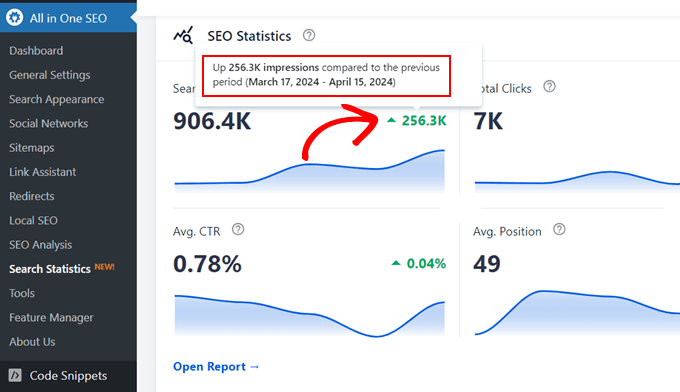
The Search Statistics dashboard gives you a clear view of which pages are gaining rankings, which are declining, and which keywords are driving clicks.
The Winners and Losers report automatically groups your content by performance trends, so you can act on the right pages without manually digging through data.
Additionally, the Content Decay analysis identifies posts whose rankings have been sliding over time, something most website owners only discover months after the drop has already happened.
AIOSEO also includes a Keyword Rank Tracker that monitors up to 100 keywords simultaneously and shows position changes over time, all sourced from your connected Google Search Console data.
For WordPress site owners thinking ahead to AI search visibility, AIOSEO’s LLMs.txt Generator creates a standardized file that helps AI crawlers like ChatGPT, Perplexity, and Gemini discover and correctly index your site content.
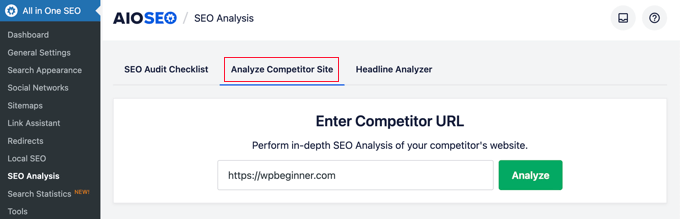
Beyond traffic analysis, AIOSEO handles on-page SEO (TruSEO scoring across 70+ real-time factors), schema markup, XML sitemaps, redirects, and broken link checking. Its SEO Analysis tool lets you analyze any competitor URL’s on-page strategy directly from inside WordPress.
Users consistently praise how accessible AIOSEO makes professional SEO. On G2, it holds a 4.8/5 rating from over 200 reviews — the highest Ease of Setup score in its category.
One reviewer summed it up:
“What I like most about AIOSEO is how easy it makes SEO management, even for non-experts. The interface is very intuitive and well organized, and the setup wizard helps you configure everything correctly from the beginning.”
WordPress.org reviewers give it 4.7/5 across more than 5,000 reviews.
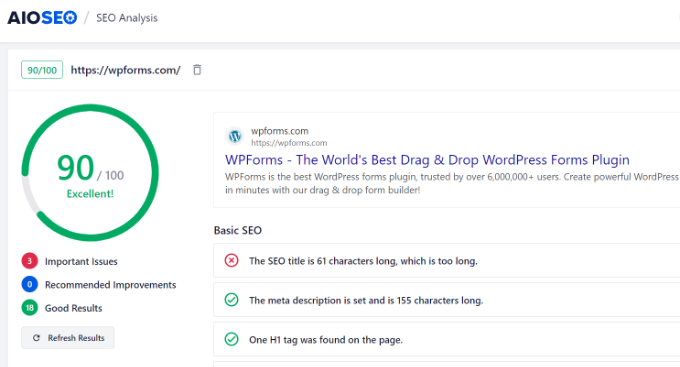
Search Statistics, Keyword Rank Tracker, and Content Decay analysis all require the Elite plan. Basic on-page SEO features are available on lower-tier plans and a free Lite version is available on WordPress.org. You can read about our hands-on experience in our complete AIOSEO review.
Pros of All in One SEO:
- Search Statistics pulls GSC data into WordPress, no tab switching required
- Keyword Rank Tracker monitors up to 100 keywords with full position history
- Content Decay and Winners/Losers analysis surfaces ranking problems automatically
- LLMs.txt Generator helps AI tools discover and cite your content
- Competitor on-page analysis via built-in SEO Analysis tool
- G2 4.8/5 from 200+ reviews; WP.org 4.7/5 from 5,000+ reviews
Cons of All in One SEO:
- Search Statistics and Keyword Rank Tracker require the Elite plan
- Only shows your own site’s traffic — for competitor estimates, pair with Semrush or SimilarWeb
- Renewal pricing is higher than first-year promotional pricing
Why I recommend All in One SEO: AIOSEO is my top pick for WordPress site owners who want traffic monitoring and full SEO management without leaving WordPress.
The Search Statistics dashboard, Keyword Rank Tracker, and Content Decay analysis give you everything you need to monitor your own site’s performance and act on ranking changes quickly, all inside your WordPress admin.
2. Semrush
Semrush is one of the most powerful all-in-one SEO platforms available, and its Traffic Analytics feature makes it one of the best tools for checking any competitor’s website traffic.
Simply enter a competitor’s URL and Semrush pulls up a detailed breakdown of their estimated traffic, including monthly trends, traffic by country, and which keywords are driving the most visits.
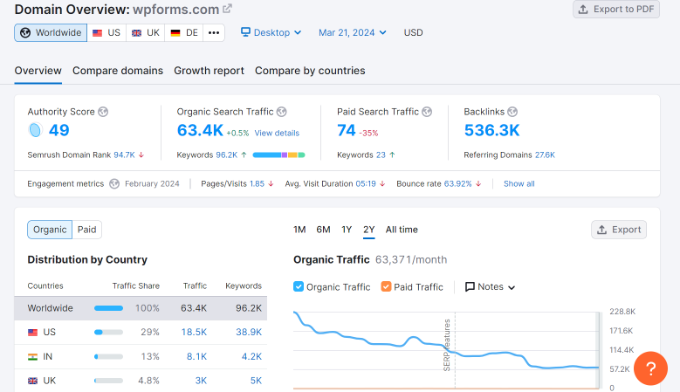
The Traffic Analytics dashboard gives you a high-level view of a competitor’s website performance including estimated monthly visits, unique visitors, pages per visit, average visit duration, and bounce rate.
You can compare up to 5 domains side by side in the same report, which makes benchmarking your site against multiple competitors straightforward.
One standout feature is Bulk Traffic Analysis, which lets you analyze multiple competitor URLs in a single report instead of running them one at a time. For content marketers and SEO professionals who need to map out an entire competitive landscape, this saves significant time.
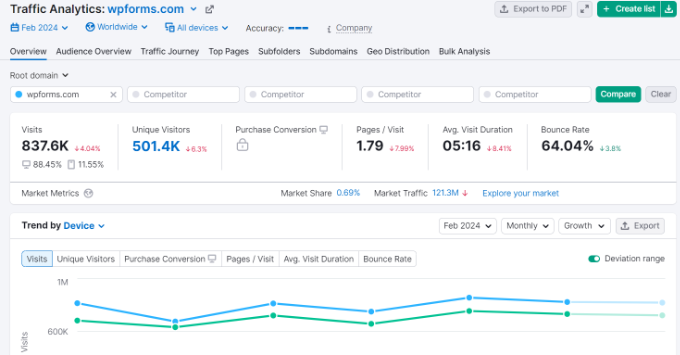
Semrush also goes well beyond traffic checking. It’s a complete SEO toolkit covering keyword research, backlink analysis, site audits, rank tracking, and content optimization. If you need one platform that handles both traffic analysis and broader SEO work, Semrush covers it all.
Semrush holds a 4.5/5 rating on G2, with users most often citing the depth of competitor keyword data and the Traffic Analytics dashboard as standout features.
We’ve written a detailed Semrush review if you want to learn more about all its features. You can also use our Semrush coupon code to take advantage of the free premium trial.
Pros of Semrush:
- Detailed traffic estimates including visits, traffic sources, and top keywords
- Compare up to 5 competitor domains side by side
- Bulk Traffic Analysis for reviewing multiple sites at once
- Complete SEO toolkit beyond just traffic data
- G2 4.5/5 with strong reviews for competitor keyword research
Cons of Semrush:
- Traffic data is estimated, not exact — treat as directional
- Feature-heavy interface can feel overwhelming for beginners
- Plans start at $139/month, one of the more expensive options on this list
- No real-time traffic data
Why I recommend Semrush: Semrush is my top pick for competitor traffic research. If you need to understand exactly which keywords drive a competitor’s traffic, how their traffic breaks down by country, or how multiple competitors compare side by side, Semrush provides the most detailed and comprehensive data available.
3. SimilarWeb
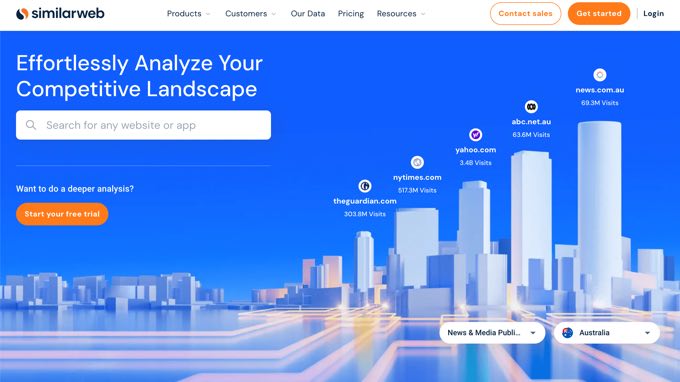
SimilarWeb is one of the best tools for checking competitor website traffic because it goes beyond organic search to give you a complete picture of where a site’s visitors come from.
Enter any URL and you’ll get a traffic overview report that covers estimated visits, bounce rate, pages per visit, and average visit duration, plus a detailed breakdown of traffic sources across direct, referral, search, social, and display channels.
What sets SimilarWeb apart from keyword-focused tools like Semrush is its emphasis on traffic source analysis.
You can see exactly what percentage of a competitor’s traffic comes from paid keywords versus organic search, which social platforms drive the most visits, and which referring websites send the most traffic their way.
This makes it particularly valuable for identifying traffic channels you haven’t fully explored yet.
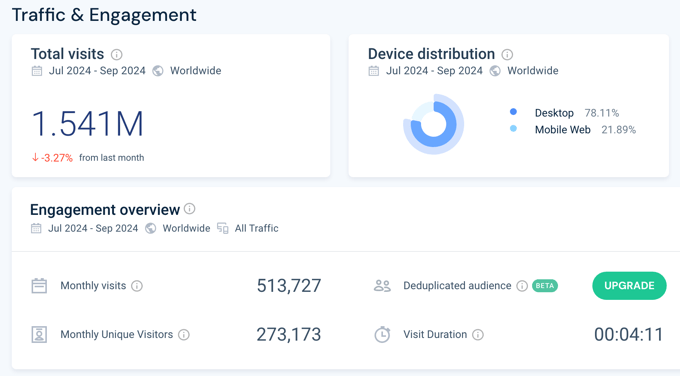
SimilarWeb also provides audience data including demographic information and interest categories. You can identify your competitors’ top traffic-driving pages and compare up to 5 sites simultaneously.
The free version gives a meaningful preview of the data, though most of the detailed reporting requires a paid plan.
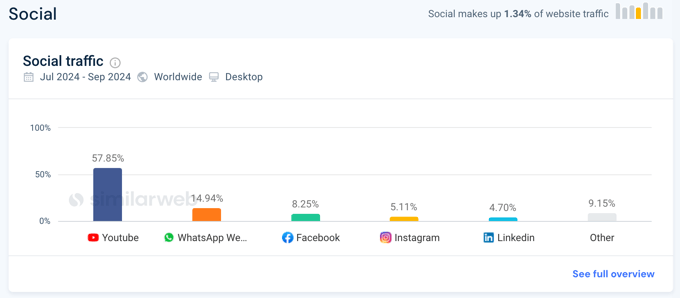
Pros of SimilarWeb:
- Comprehensive traffic source breakdown across all channels, not just organic search
- Audience demographics and interest data
- Compare up to 5 competitors side by side
- Beginner-friendly interface with clear visual reports
Cons of SimilarWeb:
- Traffic data is estimated, not exact
- Free version is limited — most detailed data requires a paid plan
- Paid plans start at $199/month, making it one of the pricier options
- No real-time traffic data
Why I recommend SimilarWeb: SimilarWeb is the best choice when you want to understand a competitor’s full traffic mix rather than just their organic search performance.
Its traffic source breakdown across direct, referral, social, search, and display channels makes it particularly useful for identifying channels your competitors are winning that you haven’t fully tapped.
4. Google Search Console
Google Search Console is a free tool from Google that shows you exactly how your site performs in Google Search. Unlike the competitor analysis tools above, Google Search Console shows you actual data, not estimates, for your own site’s search traffic.
The Performance report is where most of the traffic insight lives. It shows you total clicks, total impressions, average click-through rate, and average position in Google Search results, broken down by query, page, country, device, and date.
You can see exactly which search queries bring visitors to your site, which pages rank for those queries, and how your rankings have changed over time.
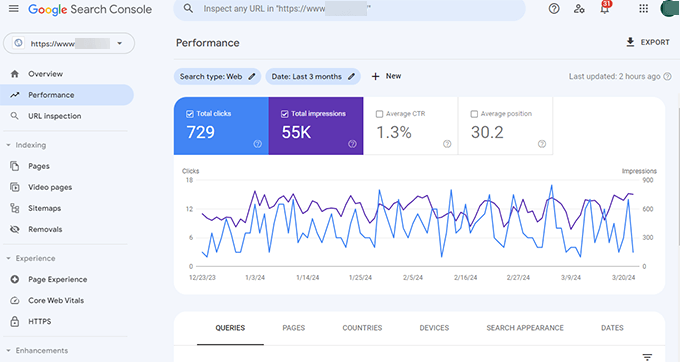
Google Search Console also handles the technical side of search: you can check which pages Google has successfully indexed, identify crawl errors, submit new content for indexing, and monitor your Core Web Vitals scores.
You can easily add your WordPress site to Google Search Console using AIOSEO, which also connects GSC data to your WordPress dashboard so it all appears inside your admin area without logging into GSC separately.
Pros of Google Search Console:
- Exact Google search data — not estimates
- Completely free with a Google account
- Shows which keywords, pages, and queries drive your search traffic
- Integrates with AIOSEO to show GSC data inside WordPress
- Covers indexing, Core Web Vitals, and technical SEO alongside traffic
Cons of Google Search Console:
- Only shows your own site’s traffic — no competitor data
- Data typically has a 2–3 day delay
- Only retains 16 months of historical data
- Interface can feel complex for newer users
Why I recommend Google Search Console: Every website owner should set up Google Search Console. It’s free and gives the most accurate view of how your site performs in Google Search.
I recommend it as a starting point for all site owners, regardless of which other tools you use. Pair it with Google Analytics or MonsterInsights to get the full picture of your site’s traffic.
5. Ubersuggest
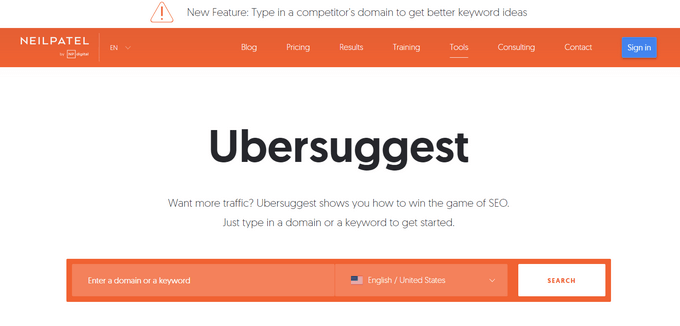
Ubersuggest by Neil Patel is one of the most beginner-friendly website traffic tools on this list.
Its Traffic Analyzer feature lets you enter any website URL and get a breakdown of its estimated organic traffic over time, including monthly organic traffic estimates, organic keyword rankings, and top-performing pages.
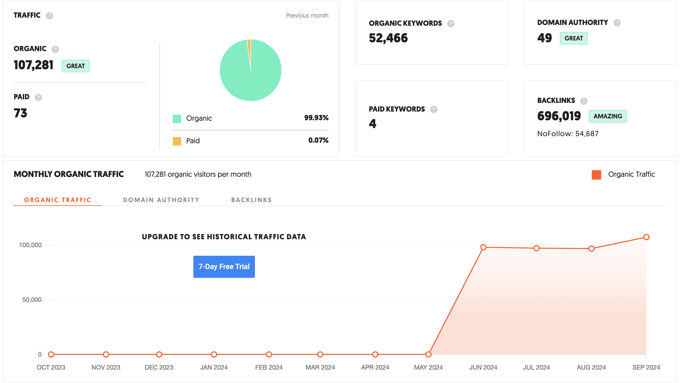
The interface is intentionally simple, which makes Ubersuggest a good choice for small business owners and bloggers who want competitor insights without navigating the complexity of tools like Semrush or Ahrefs.
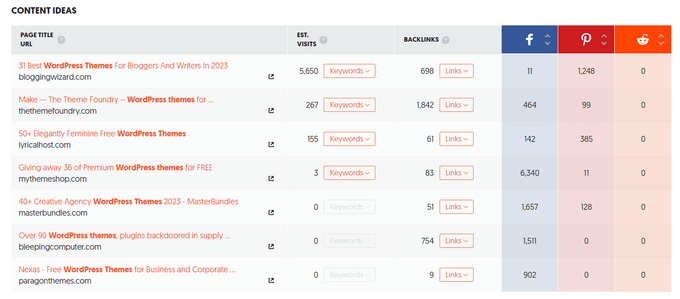
Beyond traffic data, Ubersuggest also surfaces content ideas based on competitor top pages and provides backlink data and social share metrics.
The free version is functional but limited to three months of data. Premium plans start at $29/month, making Ubersuggest one of the most affordable paid options on this list.
Pros of Ubersuggest:
- Simple, intuitive interface — great for beginners
- Traffic overview with keyword data and top pages
- Content idea suggestions based on competitor top pages
- Affordable at $29/month — one of the lowest prices on this list
Cons of Ubersuggest:
- Traffic data is estimated, not exact
- Limited advanced features compared to Semrush or Ahrefs
- Free version only shows 3 months of historical data
Why I recommend Ubersuggest: Ubersuggest is a solid starting point for beginners who want competitor traffic insights at an affordable price.
If you’re new to SEO tools and don’t need the depth of Semrush or Ahrefs, Ubersuggest delivers the core data you need — estimated traffic, top keywords, and top pages — in a straightforward interface.
6. SEO PowerSuite
SEO PowerSuite is a desktop-based SEO toolkit made up of four applications: Rank Tracker, Website Auditor, SEO Spyglass, and LinkAssistant.
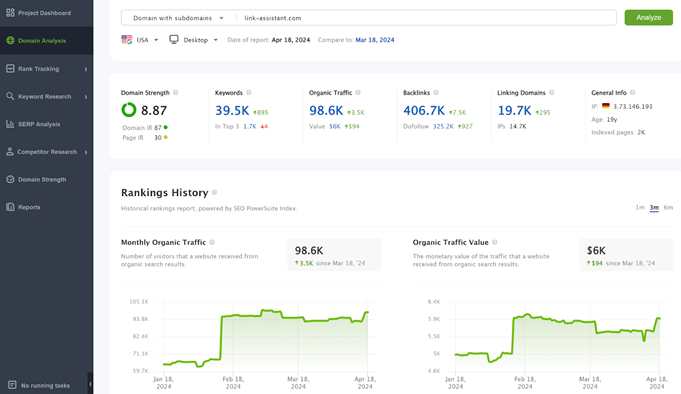
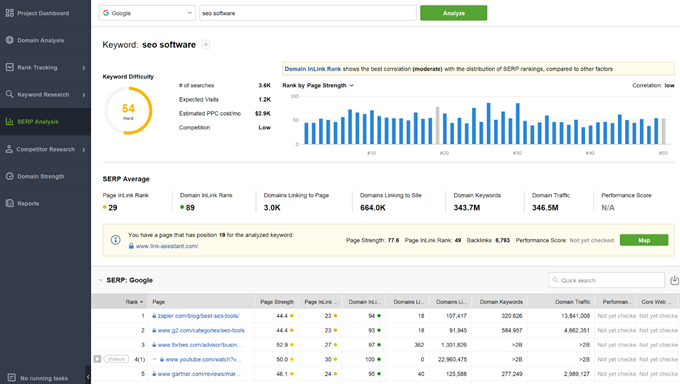
For traffic checking purposes, Rank Tracker is the primary tool. Its Domain Analysis dashboard provides estimated traffic data alongside keyword rankings and SERP analysis.
Where SEO PowerSuite stands out is its support for search engines beyond Google. Rank Tracker lets you pull traffic and ranking data from Bing, Yahoo, and even YouTube, which is useful for sites that rely on non-Google search traffic.
It also supports unlimited keywords and unlimited projects, which gives it good value for agencies managing multiple client sites.
Because it’s desktop software, SEO PowerSuite stores your data locally rather than in the cloud. This can be an advantage for privacy, but it means your data isn’t accessible from multiple devices without a cloud connection. Paid plans start at $299/year.
Pros of SEO PowerSuite:
- Covers Bing, Yahoo, and YouTube in addition to Google
- Unlimited keyword monitoring and projects
- Comprehensive SEO toolset — rank tracking, site auditing, backlinks, link building
- Good value for agencies managing multiple sites
Cons of SEO PowerSuite:
- Desktop-only software — not accessible from any device
- No real-time traffic data
- Feature complexity can be overwhelming for beginners
- Paid plans start at $299/year
Why I recommend SEO PowerSuite: SEO PowerSuite is the right choice for sites that need to track rankings and traffic across search engines beyond Google, particularly Bing, Yahoo, and YouTube.
Its desktop-based approach and flat annual pricing also make it well suited for agencies with multiple client projects and unlimited keyword tracking needs.
7. Serpstat
Serpstat started as a keyword research tool and has grown into a comprehensive website analysis platform.
Its traffic analysis feature shows estimated monthly visitor averages, organic and paid keyword traffic data, high-traffic page identification, and ranking trend information for any website you enter.
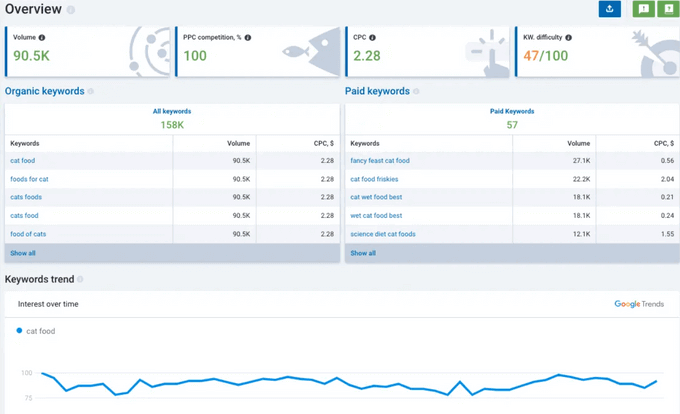
Serpstat is positioned as a more affordable alternative to Semrush and Ahrefs, with paid plans starting at $50/month. It covers keyword research, backlink analysis, site auditing, and rank tracking in addition to traffic estimation
This makes it a solid all-in-one option for digital marketers and SEO professionals who want broad functionality at a lower price point.
The interface can feel dense for users who are new to SEO tools, but experienced marketers generally find the data depth worth the learning curve.
Pros of Serpstat:
- Comprehensive SEO toolkit — traffic, keywords, backlinks, audits, rank tracking
- More affordable than Semrush or Ahrefs at $50/month
- Organic and paid keyword traffic data
- Competitor analysis built into all reports
Cons of Serpstat:
- Traffic data is estimated, not exact
- Interface can feel overwhelming for beginners
- No real-time traffic information
Why I recommend Serpstat: Serpstat is a good pick for digital marketers who want Semrush-level functionality at a lower price point.
If you need keyword research, traffic analysis, and backlink data in one platform but can’t justify Semrush’s pricing, Serpstat delivers comparable depth at a significantly lower monthly cost.
8. Ahrefs
Ahrefs is a professional-grade SEO tool that crawls over 8 billion web pages daily and indexes more than 200 million websites.
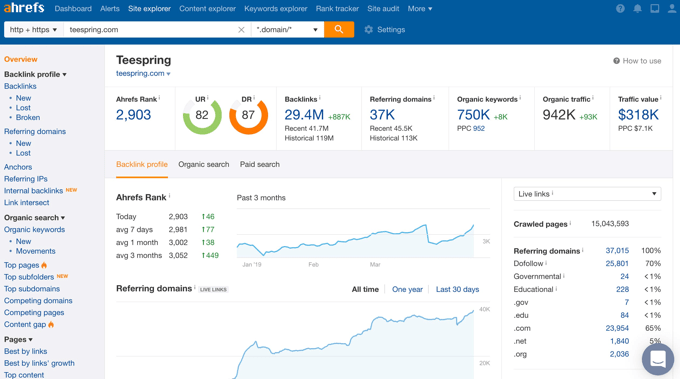
Its Site Explorer feature lets you enter any domain and see an estimated organic search traffic overview, the keywords driving that traffic, and which pages perform best, along with domain authority and backlink data.
The traffic overview report can be filtered by timeframe (last 30 days, year, or all-time), which makes it easy to spot long-term growth trends or sudden traffic changes. You can also compare multiple domains simultaneously to benchmark your site against competitors.
Ahrefs is particularly strong for understanding competitor backlink profiles alongside their traffic, which is useful if you’re building a link acquisition strategy.
If you run your own WordPress site, Ahrefs offers a free Webmaster Tools option that gives you access to more detailed data for domains you verify, including full keyword rankings and backlink reports.
The free tier is limited but genuinely useful for site owners who want Ahrefs-quality data without the full subscription.
Pros of Ahrefs:
- Extensive database — 8 billion+ pages crawled daily
- Compare multiple competitor domains in one report
- Strong keyword research capabilities alongside traffic data
- Free Webmaster Tools tier for your own verified site
- User-friendly interface despite the depth of data
Cons of Ahrefs:
- Traffic data is estimated, not exact — organic search only
- Advanced features can be complex for beginners
- Paid plans start at $129/month
- No real-time traffic data
Why I recommend Ahrefs: Ahrefs is the strongest choice for SEO professionals who need both competitor traffic data and backlink intelligence in one place.
Its database depth and the combination of traffic analysis with link research makes it especially valuable for sites focused on link-building as a growth strategy.
9. MonsterInsights
MonsterInsights is the most popular Google Analytics plugin for WordPress, used by over 3 million websites including Microsoft, Yelp, and PlayStation.
It allows you to easily set up Google Analytics in WordPress and then shows your analytics data directly inside your WordPress dashboard, no coding and no Google Tag Manager required.
Where GA4’s own interface can feel overwhelming for non-technical users, MonsterInsights brings the same data into clean, easy-to-read reports inside your WordPress admin.
It surfaces 10+ built-in reports covering traffic sources, top content, audience demographics, real-time visitors, and site speed, all without leaving WordPress.
As one G2 reviewer put it:
“Everything is on the WordPress dashboard itself, there’s no need to login [to Google Analytics].”
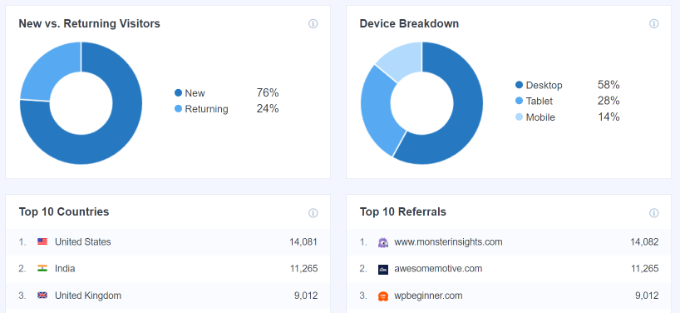
The Pro plan unlocks the features that matter most to content and eCommerce sites.
eCommerce tracking automatically configures GA4 Enhanced eCommerce for WooCommerce and Easy Digital Downloads. This tracks revenue, top products, cart abandonment, checkout abandonment, and customer journeys with no manual GA4 setup required.
Additionally, Forms tracking records which forms on your site are submitted and how often, with no code required.
The Google Search Console integration also pulls your GSC keyword rankings into the same WordPress dashboard, so you can see both your analytics and your search performance in one place.
MonsterInsights is particularly well suited for WordPress site owners who want real Google Analytics data, not estimates, without the complexity of the GA4 interface.
It’s also popular for client reporting: give clients a WordPress dashboard login and they can check their own stats without needing GA4 credentials.
WordPress.org users give it 4.5/5 from over 3,000 reviews. A typical reviewer said:
“Stats Made Simple. Reports look clean and simple. I can quickly check key data without taking extra steps.”
G2 reviewers consistently praise the setup speed and how it makes GA4 accessible for non-technical teams. For more details on our experience with the tool, see our full MonsterInsights review.
The Plus plan starts at $99.50 per year for one site and covers standard traffic reports, scroll tracking, and email summaries. For eCommerce tracking, forms tracking, and Search Console integration, you’ll need the Pro plan at $199.50 per year (up to 5 sites).
A free Lite version is available on WordPress.org with basic GA4 connection only.
Pros of MonsterInsights:
- Google Analytics data directly inside WordPress — no tab switching to GA4
- 5-minute OAuth setup wizard, no coding required
- Automatic eCommerce tracking for WooCommerce and Easy Digital Downloads (Pro)
- Forms tracking and Google Search Console integration (Pro)
- Client-friendly: clients view stats in WordPress without GA4 credentials
- WP.org 4.5/5 from 3,000+ reviews
Cons of MonsterInsights:
- eCommerce, forms, and GSC features require the Pro plan ($199.50/year)
- Annual billing only — no monthly payment option
- 14-day refund window (shorter than the 30-day standard at many competitors)
- Only shows your own site’s data — does not estimate competitor traffic
Why I recommend MonsterInsights: MonsterInsights is the best option for WordPress site owners who want Google Analytics data without ever having to log into GA4.
Its WordPress dashboard integration, straightforward setup, and eCommerce tracking capabilities make it the ideal choice for bloggers, online stores, and agencies who need real traffic data in a simple, accessible format.
What Is the Best Tool for Checking Website Traffic?
There’s no single best tool because the right choice depends on what kind of traffic you’re trying to check. Here’s how to decide quickly:
- You run a WordPress site and want to monitor your own traffic alongside SEO – AIOSEO (Elite plan) gives you Search Statistics, Keyword Rank Tracker, and Content Decay analysis all inside your WordPress dashboard.
- You want Google Analytics data in WordPress without the GA4 complexity – MonsterInsights connects GA4 to your WordPress admin and adds eCommerce tracking, forms tracking, and GSC integration (Pro plan).
- You want to research a competitor’s traffic – Semrush or SimilarWeb. Semrush is stronger for keyword-level data; SimilarWeb is stronger for traffic source breakdowns and audience insights.
- You want free, accurate data for your own site’s search performance – Google Search Console is free, Google-sourced, and the most accurate view of how your site performs in Google Search.
- You want privacy-first tracking without cookies – See the Honorable Mentions section below for Cloudflare Web Analytics and Microsoft Clarity.
Our top three picks overall: AIOSEO for WordPress site owners who want traffic data and SEO management in one plugin, Semrush for anyone who needs detailed competitor research and keyword-level traffic data, and MonsterInsights for site owners who want the full power of Google Analytics presented simply inside WordPress.
Honorable Mentions: Other Tools to Consider
The 9 tools above cover the most common use cases for checking website traffic. But depending on your situation, these additional options are worth knowing about:
Microsoft Clarity (Free)
Microsoft Clarity is a free behavior analytics tool from Microsoft that adds heatmaps and session recordings to your site. Unlike the tools above, Clarity focuses on what visitors do once they arrive: where they click, how far they scroll, and where they drop off.
It’s GDPR-friendly, cookieless by default, and integrates with Google Analytics 4. If you want to understand traffic quality (not just quantity) at no cost, Clarity is the best free option available.
Cloudflare Web Analytics (Free)
Cloudflare Web Analytics is a privacy-first, cookieless analytics tool that doesn’t use client-side tracking scripts.
If you’re concerned about GDPR compliance or want to move away from cookie-based tracking altogether, Cloudflare provides pageview counts, traffic sources, and basic performance metrics with no cookies and no personal data collection. It’s free for all Cloudflare users.
Looker Studio (Free)
Looker Studio (formerly Google Data Studio) is a free data visualization tool from Google that lets you combine data from multiple sources — most usefully, Google Analytics 4 and Google Search Console — into a single shareable dashboard.
If you already use both GA4 and GSC but find switching between them frustrating, Looker Studio solves that by pulling both datasets into one view. It has a learning curve but is free and highly customizable.
FAQs About Website Traffic
Are you still looking for more information? Learning how to analyze website stats can bring up a lot of questions, especially if you are new to running a WordPress site.
To help you out, we’ve answered some of the most frequently asked questions our readers have about checking website traffic below! 👇
What is website traffic?
Website traffic refers to the number of visitors and visits a website receives during a specific time period. It’s typically measured through metrics like pageviews (total pages loaded), unique visitors (individual people), and sessions (individual browsing visits).
Traffic can come from many sources including organic search, paid ads, social media, direct visits, and referring websites.
Why should I monitor my website traffic?
Monitoring your website traffic helps you understand who your audience is, which marketing channels are working, which content resonates with visitors, and where you have opportunities to improve.
Without regular traffic monitoring, you’re making decisions about your site without the data to back them up. Most site owners benefit from reviewing their traffic at least once a week.
Are competitor traffic estimates accurate?
Third-party competitor traffic tools provide useful estimates but not exact figures. Tools like Semrush and SimilarWeb use proprietary algorithms to model traffic based on keyword rankings, search volume data, and clickthrough rate estimates.
The numbers are directional and useful for identifying trends and comparing sites, but they shouldn’t be treated as precise measurements. Using two or more tools and looking at trends rather than specific numbers gives you the most reliable picture.
How often should I check my website traffic?
For most sites, a weekly review is the right timing. It’s frequent enough to catch problems early but not so frequent that you’re reacting to normal day-to-day fluctuations.
eCommerce sites and sites running active ad campaigns benefit from daily checks. Monthly reviews are appropriate for low-traffic sites or when you’re not actively running campaigns.
Can I check website traffic for free?
Yes. Google Analytics and Google Search Console are both completely free and provide highly accurate data for your own website.
For competitor website traffic, most tools offer a limited free tier. Semrush, SimilarWeb, Ahrefs, and Ubersuggest all let you run a small number of free lookups per day.
The free versions are enough to get a general sense of competitor traffic, though detailed reporting typically requires a paid plan.
How can I increase my website traffic?
The most sustainable way to increase website traffic is through search engine optimization (SEO). This involves publishing high-quality content that targets keywords your audience searches for, building backlinks from other websites, and making sure your site is technically sound.
Beyond SEO, social media, email marketing, paid advertising, and referral traffic from other sites all contribute. Check out our guide on how to increase your blog traffic for actionable strategies.
Do I need both Google Analytics and Google Search Console?
Yes, they measure different things and work best together. Google Search Console shows how your site performs in Google Search: which keywords bring visitors, your ranking positions, and whether Google can crawl and index your pages correctly.
Google Analytics shows what visitors do once they’re on your site: which pages they read, how long they stay, where they come from beyond Google, and whether they complete goals like purchases or signups.
Using both gives you a complete picture that neither tool provides alone. If you want both datasets inside your WordPress dashboard without logging into either platform separately, MonsterInsights integrates with both.
Which free tool is best for monitoring AI traffic in 2026?
Google Analytics 4 is the best free starting point. You can create a custom channel group in GA4 to capture referral traffic from AI tools like ChatGPT (chat.openai.com), Perplexity (perplexity.ai), and Gemini (gemini.google.com).
Once configured, this channel appears in your Acquisition reports alongside organic search and social traffic.
For monitoring whether your brand is being mentioned in AI-generated responses, even when those mentions don’t generate a click, tools like Otterly track your AI search visibility across the major platforms.
Additional Resources on Website Traffic in WordPress
I hope this article helped you learn how to check your website traffic. You might also like to see these additional resources:
- How to Track Website Visitors to Your WordPress Site
- How to Do an SEO Competitor Analysis in WordPress
- How Much Traffic Can WordPress Handle?
- How to Increase Your Blog Traffic
- How to Double Your SEO Traffic in 6 Months (With Case Studies)
- How to Drive 10,000 Extra Site Visitors a Month (Case Study)
- WordPress Plugins That Will Quickly Help You Get More Traffic
If you liked this article, then please subscribe to our YouTube Channel for WordPress video tutorials. You can also find us on Twitter and Facebook.



Jiří Vaněk
This is a very informative article. I have a blog and, of course, like everyone else, I have a lot of competition. It’s good to know what makes the competition better and why, for example, their website has more traffic. I’ve tried several tools mentioned in the tutorial and am starting to get a much better overview of how competing websites operate. It’s quite an advantage to have this information. Personally, I find Semrush really excellent; its only major downside is the price. It’s quite expensive, but I understand the cost considering everything it can analyze.
Dennis Muthomi
To get a well-rounded view of competitor website traffic, I use both SEMRush and SimilarWeb. And am glad you have inncluded them.
Using these two tools allows me to cross-check traffic data and get a more accurate estimate of their traffic.
But for my own website’s analytics, I rely on MonsterInsights to view key metrics directly in my WordPress dashboard.
I also regularly check Google Analytics itself to tweak my setup and dig deeper into the data.
Jiří Vaněk
Semrush is truly a great tool, but its drawback, especially for small bloggers, is its price—it’s really expensive, and those with a smaller budget can’t afford it. Otherwise, I agree with you about Monster Insights; it’s an excellent plugin that also taught me how to work with the metrics provided by Google Analytics. I also use Microsoft Clarity. It’s a service similar to Google Analytics but from Microsoft. I find it, unlike Google, very user-friendly and especially great for beginners who prefer simpler data like what Monster Insights offers.
Moinuddin Waheed
Semrush is too costly to be affordable by the beginner bloggers though it has some of the most advance tracking tools. it is good idea to have awarenes about the competitors websites so that we can always try to improve our blogs and websites.
other platforms are equally good and those with lite access have limited access to these services.
However when we increase our blog revenue and want to scale these are the must have tools.
Jiří Vaněk
Exactly. I tried Semrush for free, and I was absolutely impressed by its features. I was able to find backlinks, traffic, and keywords. It’s probably the most advanced tool I know, but as you mentioned, it’s extremely expensive. It’s worth it when you have multiple websites and can fully take advantage of its potential. For a single blog that’s more of a hobby, it’s a very costly tool. It’s a shame you can’t just pay for the specific tools you need, which would make it more affordable.
Md Jakaria Habib
Yes I need your all topics instantly.
Erin Brown
This has been helpful. Thanks for sharing this
Gerald Jacobs
Isn’t it nice to find all these analytics choices in one convenient article? I have been researching this independently. You have put together many days of research in one understandable, comprehensive package. Everything one could want is here! Thanks Syed!
Gerald Jacobs
Lee
Thanks for this great info. I can see I have a lot of studying to do. Really appreciate the insights and suggestions.