


I have used SiteGround for more than a decade, and WPBeginner itself runs on SiteGround’s cloud platform. That gives me a behind-the-scenes look at how their servers handle real traffic, which no throwaway test site can match.
In July 2026, I tested SiteGround the same way I tested 14 other WordPress hosting companies, with an identical WordPress site on a custom domain, the same tools, and the same checklist.
This SiteGround review will show you the real numbers from my rigorous speed test using industry-standard benchmarking tools.
Quick Answer – Is SiteGround Worth It?
Yes, SiteGround is worth it if you want a host where a real human answers the phone at any hour. It scored 75 out of 100 on our WPBeginner Score, which places it 4th out of our 7 recommended hosts.
In our hosting speed test, SiteGround showed content in 608 ms, faster than the 659 ms median of the popular hosts we tested. It is also one of the few budget hosts we tested that includes 24/7 phone support on every plan.
Their StartUp plan costs $2.99 per month for the first year. It offers a balance of affordability, high-performance, and beginner-friendly tools to build your website.
SiteGround at a Glance
| SiteGround Test Summary (July 2026) | |
|---|---|
| WPBeginner Score | 75 / 100 |
| Speed (LCP) | 608 ms |
| Global response time | 369 ms average across 6 regions |
| Uptime | 99.96% over a 30-day monitoring window |
| Pricing | From $2.99/mo with our link, renews at $17.99/mo |
| Support | 24/7 live chat, phone, and tickets on every plan |
| Best for | Site owners who want the most complete support |
You can see how SiteGround ranks against all the hosts I tested in our best WordPress hosting comparison, which uses the same data as this review.
About SiteGround
SiteGround started in Sofia, Bulgaria in 2004 and now hosts more than 3 million domains with a team of over 500 people. Its hosting runs on Google Cloud infrastructure with 11 data centers across North America, Europe, Asia, and Australia.

We host WPBeginner and several of our partner sites on SiteGround’s enterprise cloud platform. Even so, I did not let our own history with the company influence this review, and the verdict below comes from what my hosting speed test actually measured.
Pros and Cons of SiteGround
Pros
- The most complete support of the budget hosts we tested – 24/7 chat, phone, and tickets on every plan
- Runs on the Google Cloud platform with built-in caching and the Speed Optimizer plugin
- Daily backups on every plan, with up to 30 copies kept – the deepest backup retention of the hosts we tested
- Free domain for the first year, free CDN, free SSL, and email hosting on all plans
- 608 ms LCP in our speed test, faster than the 659 ms median of the hosts we tested
- Proven on real websites – WPBeginner and several of our partner sites run on SiteGround’s cloud platform
Cons
- The steepest renewal jump of our budget picks – the $2.99 intro price rises to $17.99 per month after the first term
- The entry StartUp plan covers 1 website, 10 GB of storage, and around 10,000 visits a month
- Slower under sustained load than the fastest hosts we tested – a 129 ms P95, where Hostinger held 21 ms
- Staging and Ultrafast PHP start on the GrowBig plan, not on StartUp
How I Tested SiteGround (Methodology)
I used the same testing protocol for every hosting company in our comparison. I set up an identical WordPress site with a default theme and test content, including images, on a custom domain.
Then I ran the same four tests – GTmetrix for speed and LCP, k6 for stress with 50 virtual users at the same time, a response-time test from 6 global regions, and 30 days of UptimeRobot monitoring.
Those four tests make up the performance side of the WPBeginner Score, which counts for 80% of the total. Each test carries a set weight, so no single lucky number can carry a host.
The other 20% of the score comes from value. For that part I look at what the plan really costs and gives you in return, including the intro price, the renewal price, how many sites and how much storage you get, the plan limits, and the quality of support.
SiteGround’s 75 is an honest number. It reflects good speed and response results, a weaker number under sustained load, and a value grade that the renewal price holds down.
The full methodology, the exact weights, and every host’s raw numbers are in our best WordPress hosting guide.
SiteGround Performance Test Results
Below you can find my full SiteGround speed test results.
Speed Test – 608 ms LCP
Largest Contentful Paint (LCP) measures how quickly the main content of a page appears. It is the speed number Google’s Core Web Vitals care about most.
My SiteGround test site showed an LCP of 608 ms, and the full page loaded in 1.1 seconds.
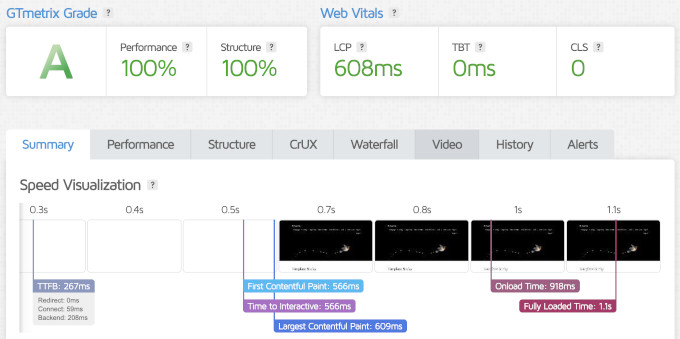
That is a strong result for a shared plan. The median LCP of the popular hosts I tested was 659 ms, so SiteGround came in ahead of the pack.
The fastest hosting company in our tests, Levamo, loaded in 358 ms. So SiteGround is not the speed champion, but it is comfortably in the faster half of our data.
Server Response Time – 369 ms Global Average
Speed test tools load the whole page with images included, but that’s only one part of the performance. To see raw server speed, I also measured time to first byte (TTFB) from data centers in 6 regions around the world.
SiteGround averaged 369 ms across the 6 regions.
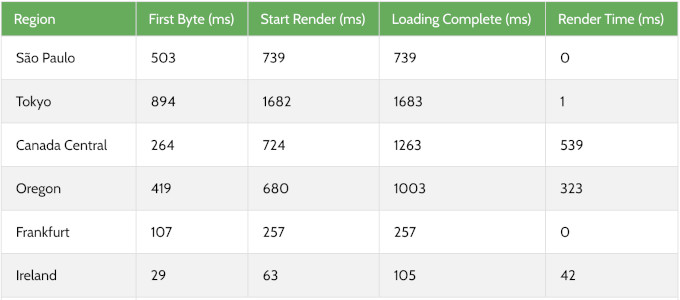
Response times were good in North America and Europe. South America and Japan were slightly slower, which is normal when the test site sits far from those regions.
If your audience is global, then turn on SiteGround’s included CDN. It serves your content from locations closer to your visitors and closes most of that gap.
Stress Test – 129 ms P95 With 50 Virtual Users
To see how a host behaves under a traffic spike, I sent 50 virtual users to the test site with k6 by Grafana Labs and recorded the P95 response time.
SiteGround’s response time fluctuated a bit during the test, but it did not fail a single request and held a P95 response time of 129 ms.
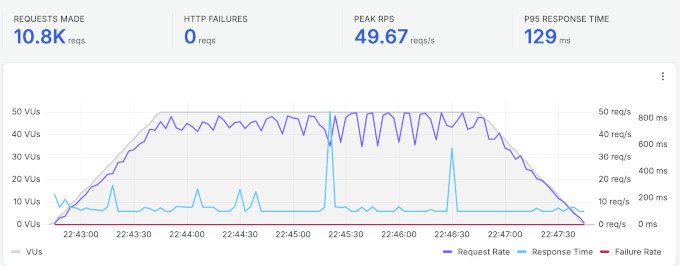
A 129 ms P95 means the site stayed fast for visitors even during the spike, and zero failed requests is the result that matters most for a real site.
At the same time, the fastest hosts we tested held lower numbers under the same load, and Hostinger recorded a 21 ms P95. If sustained heavy traffic is your main concern, the comparison table below shows how the similarly priced hosts stack up.
Uptime – 99.96% Over 30 Days
I monitored the SiteGround test site with UptimeRobot, checking every 5 minutes. Over the 30-day window, it recorded 99.96% uptime with one incident of 15 minutes.
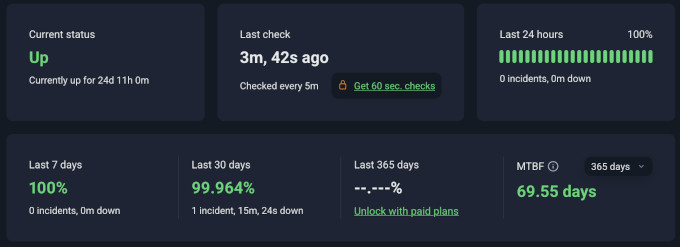
Most hosting companies promise 99.9% uptime, and SiteGround stayed above that promise in our window. One 15-minute issue in a month is a small miss, but I would rather show you the exact number than round it up.
Our own longer track record backs this up. WPBeginner has run on SiteGround’s cloud platform for years, and reliability has never been the reason we thought about leaving.
How SiteGround Compares to Other Hosts We Tested
The speed test numbers on their own do not give you the full picture. Here is how SiteGround performed compared to other similarly priced hosts from our comparison, all tested with the identical setup.
| Host | LCP | Global response | Uptime | Intro / renewal | WPBeginner Score |
|---|---|---|---|---|---|
| SiteGround | 608 ms | 369 ms | 99.96% | $2.99 / $17.99 | 75 / 100 |
| Hostinger | 659 ms | 227 ms | 100% | $2.69 / $10.99 | 88 / 100 |
| Bluehost | 933 ms | 599 ms | 100% | $2.99 / $9.99 | 69 / 100 |
| DreamHost | 986 ms | 658 ms | 100% | $1.99 / $7.99 | 64 / 100 |
The WPBeginner Score weighs performance at 80% and value at 20%. SiteGround’s 75 reflects exactly what you see above. It beats Bluehost and DreamHost on every speed metric, while its renewal price and entry limits keep the value side of the score down.
To see the full rankings, and the raw data for every host we tested, check out our best WordPress hosting guide.
SiteGround’s Infrastructure and Technology
Most other SiteGround reviews skip what’s under the hood of their platform, and I believe it’s worth highlighting.
Google Cloud platform – SiteGround runs on the Google Cloud network with distributed SSD storage. That is the same class of infrastructure many expensive managed hosts use, and it is part of why our speed numbers came in ahead of the median.
Server stack – each account runs in its own Linux container with a mix of Apache and NGINX on top, so a problem on one account stays isolated from everyone else. An in-house system checks server status every half second, and human engineers watch the infrastructure around the clock.
Caching – every plan gets all three levels of SiteGround’s SuperCacher. It caches static files and dynamic pages out of the box, and you can switch on Memcached for database queries.
Their free Speed Optimizer plugin controls caching, image optimization, and lazy loading inside WordPress. The servers also run Brotli compression, which produces files up to 20% smaller than gzip.
PHP and databases – SiteGround manages your PHP version for you and updates it automatically once a new release is stable. Its custom MySQL setup is tuned for busy sites, and GrowBig and higher add SiteGround’s Ultrafast PHP, which they say cuts time to first byte by up to 30%.
Data centers – SiteGround has 11 data centers across North America, Europe, Asia, and Australia, and you choose your location during signup. I recommend picking the one closest to your audience.
CDN and security – SiteGround’s in-house CDN caches your content on more than 170 edge locations, and every plan includes free SSL, a custom web application firewall, and AI anti-bot protection. Their free Security Optimizer plugin adds login protection and malware scanning.
Backups – SiteGround backs up your site daily, keeps up to 30 copies, and stores them off-site across multiple data centers. That is the deepest backup retention of the hosts we tested, and it comes on every plan.
AI tools – every account includes SiteGround AI Studio with 20,000 free monthly tokens, plus a built-in AI agent that can update content, manage plugins, and make bulk changes on your WordPress site from a chat.
SiteGround Hosting Plans and Pricing
SiteGround offers shared, managed WordPress, WooCommerce, and cloud hosting. For most readers of this review, the shared WordPress plans are the relevant ones.
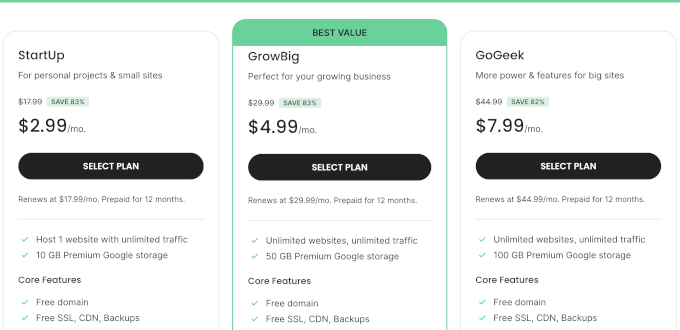
- StartUp – 1 website, 10 GB storage, and capacity for around 10,000 visits a month. $2.99 per month for the first 12-month term with our link, renews at $17.99 per month. You still get the free domain, daily backups, the CDN, and email hosting even on this tier.
- GrowBig – unlimited websites, 50 GB storage, and capacity for around 100,000 visits a month. Starts at $4.99 per month, renews at $29.99. This tier adds staging, on-demand backups, and SiteGround’s Ultrafast PHP setup.
- GoGeek – unlimited websites, 100 GB storage, and capacity for around 400,000 visits a month. Starts at $7.99 per month, renews at $44.99. It adds Git integration, white-label tools for client work, more server resources, and priority support.
SiteGround treats those visit numbers as a reference point rather than a hard limit. The real constraint at each tier is server resources. StartUp allows 200,000 files (inodes), GrowBig 400,000, and GoGeek 600,000, with more CPU allowance at each step up.
All plans include a free domain for the first year, free SSL, SiteGround’s CDN, email hosting, daily backups, and the custom Site Tools control panel. All plans also come with a 30-day money-back guarantee.
My honest advice is to treat GrowBig as the real SiteGround plan, and StartUp as a trial of the platform. The staging tool and Ultrafast PHP on GrowBig are the features you will miss first as your site grows.
Free and Paid Hosting Addons
SiteGround’s headline price is honest, but a few extras start free and later become paid. Knowing these up front will save you surprise charges.
- Free domain – free for the first year on .com, .us, .org, and .net registrations, then it renews at the standard domain rate. If you cancel within the 30-day guarantee window, the domain registration itself is non-refundable. This is fairly standard practice across all shared hosts that offer a free domain.
- Domain privacy – free for the first year on supported domain extensions, then it renews at an extra yearly cost. Again, most shared hosts handle privacy the same way.
- Renewal prices – all three plans renew well above the intro price ($17.99, $29.99, and $44.99 per month). Renewal jumps are common across the shared hosting industry, so sign up for a longer term to lock the intro rate for longer.
- StartUp plan caps – the entry plan limits your account to 200,000 files, where GrowBig allows 400,000 and GoGeek 600,000. Staging and Ultrafast PHP also start on GrowBig, so plan for that tier if you run anything image-heavy.
- Email limits – email accounts are unlimited, but they share up to 10 GB of storage taken from your plan’s disk space, and sending caps at 400 emails per hour on StartUp and GrowBig (800 on GoGeek). A newsletter with real volume belongs on a dedicated email service anyway.
- Refund rules – the 30-day money-back guarantee covers the shared hosting plans but not domain registrations.
SiteGround Support
This is where SiteGround really stands out. Every plan includes 24/7 support from real humans through live chat, phone, and tickets, which is the most complete support lineup of the budget hosts we tested.
Most hosts at this price stick to chat only. Being able to call a real person at 3 am is the reason I suggest SiteGround to anyone who gets nervous handling tech on their own.

There is also an AI-powered assistant inside the Site Tools dashboard that resolves common questions instantly, plus hundreds of well-organized tutorials and video walkthroughs. One honest note – SiteGround does not offer support over email, so you will go through chat, phone, or tickets.
My support opinion here comes from years of real use, not a test ticket. WPBeginner and several of our partner sites run on SiteGround’s cloud platform, and their technical team has been rock-solid whenever we needed help at scale.
Who Should Use SiteGround and Who Should Look Elsewhere
Choose SiteGround if you want hosting with a real safety net. The 24/7 phone, chat, and ticket support on every plan, the Google Cloud platform, and daily backups with 30 kept copies make it the pick for a business site where you want expert help one call away.
Look elsewhere if the long-term price is your deciding factor, since Hostinger renews at $10.99 per month against SiteGround’s $17.99. The same goes if you want the simplest possible first-site start (Bluehost installs WordPress for you at signup), or you run a high-traffic eCommerce site that needs top performance under load, where Levamo led our tests (see our full hosting comparison).
Final Verdict – Is SiteGround the Right Choice for You?
SiteGround is perfect for site owners who want premium managed-style hosting with the most complete support at a budget entry price. It is the host we trust with WPBeginner itself, and it has earned that trust over more than a decade of use.
My verdict – if you want a host where help is one call away, visit SiteGround and start on the StartUp plan, then move to GrowBig as your site grows. If price or raw speed under load is your deciding factor, our best WordPress hosting comparison shows which host won each category on the same tests.
FAQs About SiteGround
1. What are the disadvantages of SiteGround?
Based on our tests, the main ones are the renewal price (the $2.99 intro rises to $17.99 per month after the first term), the entry plan limits (1 website, 10 GB storage, and around 10,000 visits a month), and a slower result under sustained load than the fastest hosts we tested (129 ms P95). Staging and Ultrafast PHP also start on the GrowBig plan rather than on StartUp.
2. Is SiteGround worth the renewal price?
It depends on what you value. At renewal, StartUp costs more than Bluehost ($9.99) or Hostinger ($10.99), and what you get for the difference is the Google Cloud platform, daily backups with 30 kept copies, and phone support on every plan.
I believe that trade is worth it for a business site that wants a human on call. If your goal is the lowest long-term bill, then pick a longer initial term to delay the renewal, or choose a cheaper host.
3. Is SiteGround better than Bluehost?
On our identical July 2026 tests, SiteGround was faster than Bluehost on every metric. It showed content in 608 ms against Bluehost’s 933 ms, and its global response time was 369 ms against 599 ms.
Bluehost counters with a cheaper renewal ($9.99 against $17.99 per month) and 10 websites on its entry plan, where SiteGround gives you one. Our SiteGround vs Bluehost comparison goes deeper.
4. Is SiteGround better than Hostinger?
It depends on your priority. SiteGround showed content faster in our speed test (608 ms against Hostinger’s 659 ms) and is the only one of the two with phone support.
Hostinger held up better under sustained load (a 21 ms P95 against SiteGround’s 129 ms), renews cheaper at $10.99 per month, and gives you 3 websites on its entry plan. That mix is why Hostinger scored 88 on our WPBeginner Score against SiteGround’s 75.
5. Can SiteGround handle high traffic?
In our stress test with 50 concurrent users, SiteGround held a 129 ms P95 response time with zero failed requests. That is a solid result, though slower than the fastest hosts we tested under the same load.
The StartUp plan is rated for around 10,000 visits a month, so a growing site should plan on GrowBig or GoGeek. For even bigger sites, SiteGround’s cloud platform is the proven step up, and it is what WPBeginner itself runs on.
6. Does SiteGround offer a free domain name?
Yes, SiteGround currently includes a free domain name for the first year with all of its hosting plans. You can register a .com, .us, .org, or .net domain at no extra cost during signup, and it renews at the standard rate after year one.
7. Where are SiteGround’s servers located?
SiteGround has 11 data centers on multiple continents, including the United States, Europe (Madrid, London, Frankfurt, Paris, and Eemshaven), Singapore, and Sydney. You choose a server location close to your audience when signing up, and the hosting runs on Google Cloud infrastructure.
8. Does SiteGround use cPanel?
No, SiteGround no longer offers cPanel and instead built its own control panel called Site Tools. In my experience it is faster and easier to use than cPanel, and it keeps day-to-day tasks like email, SSL, and backups in one place.
9. Which SiteGround plan should I get?
We recommend starting with their StartUp plan if you run one small site, and moving to GrowBig when you need staging, more storage, or more than one website. Upgrading later takes a few clicks, so there is no reason to overbuy on day one.
WPBeginner users get an exclusive discount of up to 83% with our SiteGround coupon.
Changelog
- August 2026 – Rebuilt the review around our July 2026 test data (speed tested July 23, response time July 24, 30-day uptime window). Added the WPBeginner Score, the comparison table against similarly priced hosts, the infrastructure section, and the pricing fine print with current renewal rates.
We hope this review helped you with your WordPress hosting research and helps you choose the right WordPress host for your needs. You may also want to see our pick of must-have WordPress plugins for business websites.
If you have any questions or feedback about my SiteGround review, please send me a message. I love hearing from our readers.
Also you can scroll below to read real SiteGround user reviews from other business owners from around the world.
Milan
Extremely attentive and helpful. Could not have asked for a better experience
Kelly Mckay
Today’s support was awesome. I was really helped out of a big issue which occurred om site. Thank you so much.
sayan
I am fully satisfied with their technical support and the way they solve issues very promptly with complete details and screenshot which is very helpful.
Thank you.
Frank Zegers
I had a great helpdesk experience with siteground chat. Quick respons. Friendly moderator. This is an example of how a helpdesk chat should work!
Jamie Richards
This is 2nd review for these guys. I am somewhat of a new SiteGround user. I’ve had my primary website with them for about a month now. I moved to here from Godaddy because I got tired of how slow my website ran. No matter how lean I made it, it ran like crap. So I moved to SiteGround and saw an INSTANT difference. I’m so happy with the performance. I’m VERY happy with the support team. Every time I’ve had an issue it’s been resolved in a very timely manner. I’m more and more impressed each time I have an issue. If you’re reading this wondering if SiteGround is a good hosting company, specifically, Managed WordPress, then look no further. Make a home here. I plan to. I have a lot of stuff I have to move over, but I know in the long run it will be worth it!
Tom Blubaugh
Excellent service.
Imad Bakir
Support is great, I’m a little disappointed about Inodes limit thing. since it is barely enough for a mgento store.
Shawn
SiteGround’s tech support is extremely helpful… Very prompt, courteous and willing to go above and beyond. Way to go!!! A+++
Mian Shahzad Raza
Well, I can’t ask for more, I was struggling with my WordPress website transfer but the SG staff did it professionally. And I am amazed by the speed of my WordPress website now, previously I had to wait for 10 to 15 seconds for a page to load even in the admin dashboard. Now everything is super fast.
James
Great assistance. Quick and friendly…
Recommended.
Gary Porter
Very Fast Customer Support!
Vibhav Singh
Always great support. Quick, efficient and friendly.
Shannon
Vladislav saved my sanity by enabling me to recover my email messages. I really appreciate the help – I just migrated from Bluehost after a very frustrating year with them and honestly was wondering if I’d made a mistake coming to Siteground after following Siteground blog post instructions for a cpanel transfer of messages only to learn the approach is no longer supported by you. And it was too late to go back to Bluehost for an imap transfer given the Bluehost site has been completely decommissioned. Fortunately I had already uploaded the message files to Siteground and Vladislav was able to retrieve them and make them accessible. I’m really really happy!
George Larson
My second contact in a few days, both very satisfying. This time, my issue was simple, self-inflicted, and the agent responded and fixed my problem in less than three minutes.
Nathan Wiens
Gabriel was extremely helpful and professional, and resolved my issue quickly and efficiently. I highly recommend Siteground for their technology and superior support!
Michele
Amazing SiteGround!!! Super suggested professional and accurate.
Super suggested. Thanks
Lis Christensen
Absolutely top notch customer service & tech support! Svetoslav was quick, efficient, and extremely helpful in explaining the process and resolving my questions. Five stars all the way!
Marc Woodard
Alexander I. is the bomb. Give that man a raise. Helped resolve my issue very timely. Thank you very much site ground customer service folks. Love the support.
Peter Parsons
OMG i was trying to click click a review and click 3 stars and the page changed i would give him 10 if i could it was seriously the best service i have ever had amazing and so helpful.
I am going to be using siteground because of him omg i am sorry i clicked 3 i wish i knew how to change it i was trying to click leave a review and the button is under the middle of the starts
I cannot thank you enough i am super impressed by you. what a legend
Kathy Jones
She was great, engaging, and eager to be helpful. Her personality came thru her chat. Very knowledgable and I was really stressing. I had messed up and was really upset. She handled the situation like a pro that she is and I am so pleased.
She should receive acknowledgment for a job well done from a needy person. My website can go forward now thanks to her.
I am so happy I am with SiteGround.
Ganesh Billa
overall the support is great.
i am very happy.
Nikos
Stivan was pretty awesome and really took your support to the top-level today! He understood my problem and brought me back from the dead! He really saved me from having a heart attack! Thanks a million!
Jake
Customer service is fantastic! A rep was willing to stay on chat with me for over an hour to walk me through the entire setup process. Bravo!
Chris D
With the quick and accurate support from Stanimir from Siteground, my problem was resolved and I was able to get back to running my business in very quick time. I really do value and appreciated the support from Siteground. I feel like I use the support team too often, but they are always gracious in the care and support. Thanks Siteground Support Team.
Steven Hallman
Perfect Support! Very knowledgeable support team.
Highly recommended!
Peg Perry
I just asked a series of questions about Wordpress security and the best combination of resources and plugins to use for speed and safety. Response was fast, accurate and clearly explained.
I’ll be implementing the solution shortly and I am confident it will work the first time thanks to the help from SiteGround.
I always get great assistance from SiteGround. Thanks again!
Ashhok
Excellent support provided by Siteground team as always.
Chukumekso Okolocha
She was quite organized with finding a solution to my challenge. Moreover, she was warm and welcome.
Stephen Pricer
Alexander was a fantastic help. I’ve been having a reoccurring issue and he is trying to ensure that it is taken care of especially since I am on the precipous of doing a full launch for my business. I appreciate all of your help. Thanks
Michael Jenkins
Great service. After i raised the ticket the first person came back quickly, didnt solve the query but without prompting or escalating one of the supervisors, Miroslav Andreev spotted my ticket and took a look himself as he thought it was strange. He managed to resolve the issue. I am most impressed!
Ahsan
Really Nice and understanding person, love his cooperativeness
Graham Hobbs
Had two problems tonight and two different support reps helped me out in no time at all.
Siteground has to be the best Hosting company I have ever dealt with.
Great staff. Extremely polite and knowledgable.
I recommend Siteground to all and sundry.
CAFFEEIN
Excellent service
hilary
excellent, polite and helpful.
josh toth
great hosting and quick customer service !
Keith Davis
Antonio corrected my issue quickly and professionally.
Martín Ortega Granella
Gencho saved my day! great support
thanks!
Stella
Amazing help!! I truly appreciate!
Rama
I am really impressed with Siteground support. The guys are well informed about the issue, always available in few mins.
Sam Eschweiler
Thank you very much Petar, very patient, very helpfiuul
Richard
Gave me the info I needed quickly and showed screenshots which helped. Thanks!
Mohamed Ali
I had a chat with your agent Miladen (I might have spelt wrong, sorry) on a billing issue and he was highly professional and efficient, at the same time very helpful.
Thank you,
Mohamed Ali
Vicki McCay
Aleksander was awesome. Took my problem and got me going in less than 20 minutes. Thanks so much.
OLUGU MOSES
I am overwhelmed for the great and wonderful assistance and guides given to me by one of the customer care assistant, the way he guided me throughout the process of correcting my account that was having problem, and immediately all were fantastic, i appreciate Sitegroung for providing their clients with a wonderful customer care assistant, they are so fantastic.
Noor M
The hosting and response time is excellent. The support is responsive with various channels to contact. Worth every cent of the paid amount. Go-Geek is the plan to look for if you are looking for all bells and whistles.
Stephen Scoggins
Always professional quick and committed
Erika
Martin was amazing. He quickly assisted me with changing my MX records and made the process painless and easy.
Md Kamrul Hasan
My site was infected by malware. But I did not know what to do. Siteground warned me to suspend my account if I did not remove malware from my hosting site. But when I checked I saw many files were infected by malware. I am not technically sound. Instead of go for a paid service I request them to solve it on behalf of me for free.
They response my request. And after some time they removed all malware from my site. So if I give them thanks, it will not be enough for their work.
Best of Luck Siteground, I am loving your service.
Hector Rodriguez
Excellent customer service from Sitegrownd
Marc Woodard
Radostin P. is the bomb. Give him a raise. Very profession… knows his stuff.