


I have used SiteGround for more than a decade, and WPBeginner itself runs on SiteGround’s cloud platform. That gives me a behind-the-scenes look at how their servers handle real traffic, which no throwaway test site can match.
In July 2026, I tested SiteGround the same way I tested 14 other WordPress hosting companies, with an identical WordPress site on a custom domain, the same tools, and the same checklist.
This SiteGround review will show you the real numbers from my rigorous speed test using industry-standard benchmarking tools.
Quick Answer – Is SiteGround Worth It?
Yes, SiteGround is worth it if you want a host where a real human answers the phone at any hour. It scored 75 out of 100 on our WPBeginner Score, which places it 4th out of our 7 recommended hosts.
In our hosting speed test, SiteGround showed content in 608 ms, faster than the 659 ms median of the popular hosts we tested. It is also one of the few budget hosts we tested that includes 24/7 phone support on every plan.
Their StartUp plan costs $2.99 per month for the first year. It offers a balance of affordability, high-performance, and beginner-friendly tools to build your website.
SiteGround at a Glance
| SiteGround Test Summary (July 2026) | |
|---|---|
| WPBeginner Score | 75 / 100 |
| Speed (LCP) | 608 ms |
| Global response time | 369 ms average across 6 regions |
| Uptime | 99.96% over a 30-day monitoring window |
| Pricing | From $2.99/mo with our link, renews at $17.99/mo |
| Support | 24/7 live chat, phone, and tickets on every plan |
| Best for | Site owners who want the most complete support |
You can see how SiteGround ranks against all the hosts I tested in our best WordPress hosting comparison, which uses the same data as this review.
About SiteGround
SiteGround started in Sofia, Bulgaria in 2004 and now hosts more than 3 million domains with a team of over 500 people. Its hosting runs on Google Cloud infrastructure with 11 data centers across North America, Europe, Asia, and Australia.

We host WPBeginner and several of our partner sites on SiteGround’s enterprise cloud platform. Even so, I did not let our own history with the company influence this review, and the verdict below comes from what my hosting speed test actually measured.
Pros and Cons of SiteGround
Pros
- The most complete support of the budget hosts we tested – 24/7 chat, phone, and tickets on every plan
- Runs on the Google Cloud platform with built-in caching and the Speed Optimizer plugin
- Daily backups on every plan, with up to 30 copies kept – the deepest backup retention of the hosts we tested
- Free domain for the first year, free CDN, free SSL, and email hosting on all plans
- 608 ms LCP in our speed test, faster than the 659 ms median of the hosts we tested
- Proven on real websites – WPBeginner and several of our partner sites run on SiteGround’s cloud platform
Cons
- The steepest renewal jump of our budget picks – the $2.99 intro price rises to $17.99 per month after the first term
- The entry StartUp plan covers 1 website, 10 GB of storage, and around 10,000 visits a month
- Slower under sustained load than the fastest hosts we tested – a 129 ms P95, where Hostinger held 21 ms
- Staging and Ultrafast PHP start on the GrowBig plan, not on StartUp
How I Tested SiteGround (Methodology)
I used the same testing protocol for every hosting company in our comparison. I set up an identical WordPress site with a default theme and test content, including images, on a custom domain.
Then I ran the same four tests – GTmetrix for speed and LCP, k6 for stress with 50 virtual users at the same time, a response-time test from 6 global regions, and 30 days of UptimeRobot monitoring.
Those four tests make up the performance side of the WPBeginner Score, which counts for 80% of the total. Each test carries a set weight, so no single lucky number can carry a host.
The other 20% of the score comes from value. For that part I look at what the plan really costs and gives you in return, including the intro price, the renewal price, how many sites and how much storage you get, the plan limits, and the quality of support.
SiteGround’s 75 is an honest number. It reflects good speed and response results, a weaker number under sustained load, and a value grade that the renewal price holds down.
The full methodology, the exact weights, and every host’s raw numbers are in our best WordPress hosting guide.
SiteGround Performance Test Results
Below you can find my full SiteGround speed test results.
Speed Test – 608 ms LCP
Largest Contentful Paint (LCP) measures how quickly the main content of a page appears. It is the speed number Google’s Core Web Vitals care about most.
My SiteGround test site showed an LCP of 608 ms, and the full page loaded in 1.1 seconds.
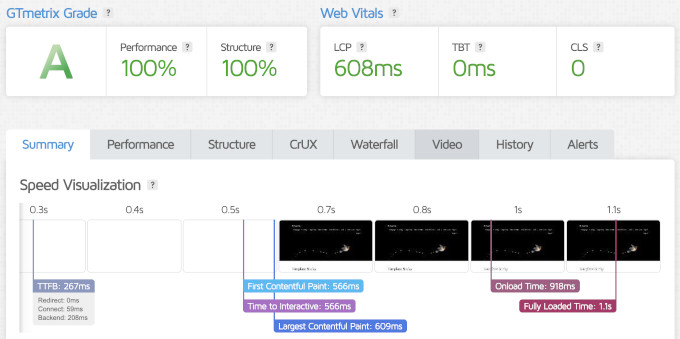
That is a strong result for a shared plan. The median LCP of the popular hosts I tested was 659 ms, so SiteGround came in ahead of the pack.
The fastest hosting company in our tests, Levamo, loaded in 358 ms. So SiteGround is not the speed champion, but it is comfortably in the faster half of our data.
Server Response Time – 369 ms Global Average
Speed test tools load the whole page with images included, but that’s only one part of the performance. To see raw server speed, I also measured time to first byte (TTFB) from data centers in 6 regions around the world.
SiteGround averaged 369 ms across the 6 regions.
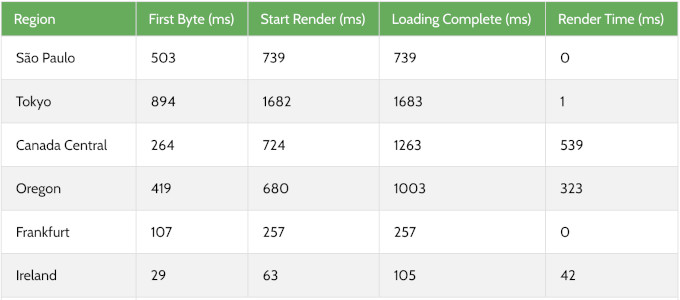
Response times were good in North America and Europe. South America and Japan were slightly slower, which is normal when the test site sits far from those regions.
If your audience is global, then turn on SiteGround’s included CDN. It serves your content from locations closer to your visitors and closes most of that gap.
Stress Test – 129 ms P95 With 50 Virtual Users
To see how a host behaves under a traffic spike, I sent 50 virtual users to the test site with k6 by Grafana Labs and recorded the P95 response time.
SiteGround’s response time fluctuated a bit during the test, but it did not fail a single request and held a P95 response time of 129 ms.
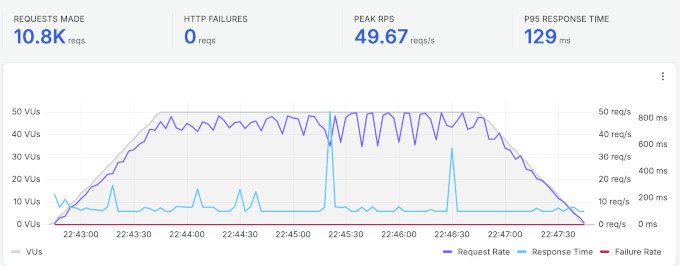
A 129 ms P95 means the site stayed fast for visitors even during the spike, and zero failed requests is the result that matters most for a real site.
At the same time, the fastest hosts we tested held lower numbers under the same load, and Hostinger recorded a 21 ms P95. If sustained heavy traffic is your main concern, the comparison table below shows how the similarly priced hosts stack up.
Uptime – 99.96% Over 30 Days
I monitored the SiteGround test site with UptimeRobot, checking every 5 minutes. Over the 30-day window, it recorded 99.96% uptime with one incident of 15 minutes.
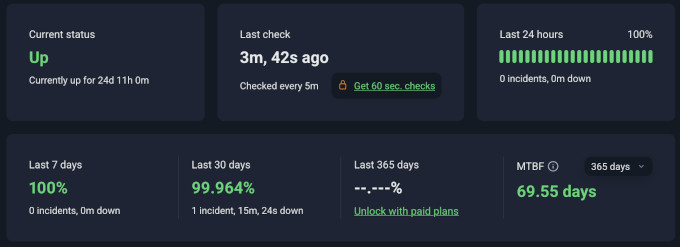
Most hosting companies promise 99.9% uptime, and SiteGround stayed above that promise in our window. One 15-minute issue in a month is a small miss, but I would rather show you the exact number than round it up.
Our own longer track record backs this up. WPBeginner has run on SiteGround’s cloud platform for years, and reliability has never been the reason we thought about leaving.
How SiteGround Compares to Other Hosts We Tested
The speed test numbers on their own do not give you the full picture. Here is how SiteGround performed compared to other similarly priced hosts from our comparison, all tested with the identical setup.
| Host | LCP | Global response | Uptime | Intro / renewal | WPBeginner Score |
|---|---|---|---|---|---|
| SiteGround | 608 ms | 369 ms | 99.96% | $2.99 / $17.99 | 75 / 100 |
| Hostinger | 659 ms | 227 ms | 100% | $2.69 / $10.99 | 88 / 100 |
| Bluehost | 933 ms | 599 ms | 100% | $2.99 / $9.99 | 69 / 100 |
| DreamHost | 986 ms | 658 ms | 100% | $1.99 / $7.99 | 64 / 100 |
The WPBeginner Score weighs performance at 80% and value at 20%. SiteGround’s 75 reflects exactly what you see above. It beats Bluehost and DreamHost on every speed metric, while its renewal price and entry limits keep the value side of the score down.
To see the full rankings, and the raw data for every host we tested, check out our best WordPress hosting guide.
SiteGround’s Infrastructure and Technology
Most other SiteGround reviews skip what’s under the hood of their platform, and I believe it’s worth highlighting.
Google Cloud platform – SiteGround runs on the Google Cloud network with distributed SSD storage. That is the same class of infrastructure many expensive managed hosts use, and it is part of why our speed numbers came in ahead of the median.
Server stack – each account runs in its own Linux container with a mix of Apache and NGINX on top, so a problem on one account stays isolated from everyone else. An in-house system checks server status every half second, and human engineers watch the infrastructure around the clock.
Caching – every plan gets all three levels of SiteGround’s SuperCacher. It caches static files and dynamic pages out of the box, and you can switch on Memcached for database queries.
Their free Speed Optimizer plugin controls caching, image optimization, and lazy loading inside WordPress. The servers also run Brotli compression, which produces files up to 20% smaller than gzip.
PHP and databases – SiteGround manages your PHP version for you and updates it automatically once a new release is stable. Its custom MySQL setup is tuned for busy sites, and GrowBig and higher add SiteGround’s Ultrafast PHP, which they say cuts time to first byte by up to 30%.
Data centers – SiteGround has 11 data centers across North America, Europe, Asia, and Australia, and you choose your location during signup. I recommend picking the one closest to your audience.
CDN and security – SiteGround’s in-house CDN caches your content on more than 170 edge locations, and every plan includes free SSL, a custom web application firewall, and AI anti-bot protection. Their free Security Optimizer plugin adds login protection and malware scanning.
Backups – SiteGround backs up your site daily, keeps up to 30 copies, and stores them off-site across multiple data centers. That is the deepest backup retention of the hosts we tested, and it comes on every plan.
AI tools – every account includes SiteGround AI Studio with 20,000 free monthly tokens, plus a built-in AI agent that can update content, manage plugins, and make bulk changes on your WordPress site from a chat.
SiteGround Hosting Plans and Pricing
SiteGround offers shared, managed WordPress, WooCommerce, and cloud hosting. For most readers of this review, the shared WordPress plans are the relevant ones.
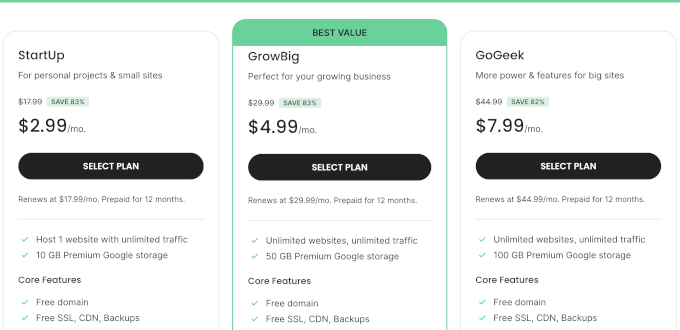
- StartUp – 1 website, 10 GB storage, and capacity for around 10,000 visits a month. $2.99 per month for the first 12-month term with our link, renews at $17.99 per month. You still get the free domain, daily backups, the CDN, and email hosting even on this tier.
- GrowBig – unlimited websites, 50 GB storage, and capacity for around 100,000 visits a month. Starts at $4.99 per month, renews at $29.99. This tier adds staging, on-demand backups, and SiteGround’s Ultrafast PHP setup.
- GoGeek – unlimited websites, 100 GB storage, and capacity for around 400,000 visits a month. Starts at $7.99 per month, renews at $44.99. It adds Git integration, white-label tools for client work, more server resources, and priority support.
SiteGround treats those visit numbers as a reference point rather than a hard limit. The real constraint at each tier is server resources. StartUp allows 200,000 files (inodes), GrowBig 400,000, and GoGeek 600,000, with more CPU allowance at each step up.
All plans include a free domain for the first year, free SSL, SiteGround’s CDN, email hosting, daily backups, and the custom Site Tools control panel. All plans also come with a 30-day money-back guarantee.
My honest advice is to treat GrowBig as the real SiteGround plan, and StartUp as a trial of the platform. The staging tool and Ultrafast PHP on GrowBig are the features you will miss first as your site grows.
Free and Paid Hosting Addons
SiteGround’s headline price is honest, but a few extras start free and later become paid. Knowing these up front will save you surprise charges.
- Free domain – free for the first year on .com, .us, .org, and .net registrations, then it renews at the standard domain rate. If you cancel within the 30-day guarantee window, the domain registration itself is non-refundable. This is fairly standard practice across all shared hosts that offer a free domain.
- Domain privacy – free for the first year on supported domain extensions, then it renews at an extra yearly cost. Again, most shared hosts handle privacy the same way.
- Renewal prices – all three plans renew well above the intro price ($17.99, $29.99, and $44.99 per month). Renewal jumps are common across the shared hosting industry, so sign up for a longer term to lock the intro rate for longer.
- StartUp plan caps – the entry plan limits your account to 200,000 files, where GrowBig allows 400,000 and GoGeek 600,000. Staging and Ultrafast PHP also start on GrowBig, so plan for that tier if you run anything image-heavy.
- Email limits – email accounts are unlimited, but they share up to 10 GB of storage taken from your plan’s disk space, and sending caps at 400 emails per hour on StartUp and GrowBig (800 on GoGeek). A newsletter with real volume belongs on a dedicated email service anyway.
- Refund rules – the 30-day money-back guarantee covers the shared hosting plans but not domain registrations.
SiteGround Support
This is where SiteGround really stands out. Every plan includes 24/7 support from real humans through live chat, phone, and tickets, which is the most complete support lineup of the budget hosts we tested.
Most hosts at this price stick to chat only. Being able to call a real person at 3 am is the reason I suggest SiteGround to anyone who gets nervous handling tech on their own.

There is also an AI-powered assistant inside the Site Tools dashboard that resolves common questions instantly, plus hundreds of well-organized tutorials and video walkthroughs. One honest note – SiteGround does not offer support over email, so you will go through chat, phone, or tickets.
My support opinion here comes from years of real use, not a test ticket. WPBeginner and several of our partner sites run on SiteGround’s cloud platform, and their technical team has been rock-solid whenever we needed help at scale.
Who Should Use SiteGround and Who Should Look Elsewhere
Choose SiteGround if you want hosting with a real safety net. The 24/7 phone, chat, and ticket support on every plan, the Google Cloud platform, and daily backups with 30 kept copies make it the pick for a business site where you want expert help one call away.
Look elsewhere if the long-term price is your deciding factor, since Hostinger renews at $10.99 per month against SiteGround’s $17.99. The same goes if you want the simplest possible first-site start (Bluehost installs WordPress for you at signup), or you run a high-traffic eCommerce site that needs top performance under load, where Levamo led our tests (see our full hosting comparison).
Final Verdict – Is SiteGround the Right Choice for You?
SiteGround is perfect for site owners who want premium managed-style hosting with the most complete support at a budget entry price. It is the host we trust with WPBeginner itself, and it has earned that trust over more than a decade of use.
My verdict – if you want a host where help is one call away, visit SiteGround and start on the StartUp plan, then move to GrowBig as your site grows. If price or raw speed under load is your deciding factor, our best WordPress hosting comparison shows which host won each category on the same tests.
FAQs About SiteGround
1. What are the disadvantages of SiteGround?
Based on our tests, the main ones are the renewal price (the $2.99 intro rises to $17.99 per month after the first term), the entry plan limits (1 website, 10 GB storage, and around 10,000 visits a month), and a slower result under sustained load than the fastest hosts we tested (129 ms P95). Staging and Ultrafast PHP also start on the GrowBig plan rather than on StartUp.
2. Is SiteGround worth the renewal price?
It depends on what you value. At renewal, StartUp costs more than Bluehost ($9.99) or Hostinger ($10.99), and what you get for the difference is the Google Cloud platform, daily backups with 30 kept copies, and phone support on every plan.
I believe that trade is worth it for a business site that wants a human on call. If your goal is the lowest long-term bill, then pick a longer initial term to delay the renewal, or choose a cheaper host.
3. Is SiteGround better than Bluehost?
On our identical July 2026 tests, SiteGround was faster than Bluehost on every metric. It showed content in 608 ms against Bluehost’s 933 ms, and its global response time was 369 ms against 599 ms.
Bluehost counters with a cheaper renewal ($9.99 against $17.99 per month) and 10 websites on its entry plan, where SiteGround gives you one. Our SiteGround vs Bluehost comparison goes deeper.
4. Is SiteGround better than Hostinger?
It depends on your priority. SiteGround showed content faster in our speed test (608 ms against Hostinger’s 659 ms) and is the only one of the two with phone support.
Hostinger held up better under sustained load (a 21 ms P95 against SiteGround’s 129 ms), renews cheaper at $10.99 per month, and gives you 3 websites on its entry plan. That mix is why Hostinger scored 88 on our WPBeginner Score against SiteGround’s 75.
5. Can SiteGround handle high traffic?
In our stress test with 50 concurrent users, SiteGround held a 129 ms P95 response time with zero failed requests. That is a solid result, though slower than the fastest hosts we tested under the same load.
The StartUp plan is rated for around 10,000 visits a month, so a growing site should plan on GrowBig or GoGeek. For even bigger sites, SiteGround’s cloud platform is the proven step up, and it is what WPBeginner itself runs on.
6. Does SiteGround offer a free domain name?
Yes, SiteGround currently includes a free domain name for the first year with all of its hosting plans. You can register a .com, .us, .org, or .net domain at no extra cost during signup, and it renews at the standard rate after year one.
7. Where are SiteGround’s servers located?
SiteGround has 11 data centers on multiple continents, including the United States, Europe (Madrid, London, Frankfurt, Paris, and Eemshaven), Singapore, and Sydney. You choose a server location close to your audience when signing up, and the hosting runs on Google Cloud infrastructure.
8. Does SiteGround use cPanel?
No, SiteGround no longer offers cPanel and instead built its own control panel called Site Tools. In my experience it is faster and easier to use than cPanel, and it keeps day-to-day tasks like email, SSL, and backups in one place.
9. Which SiteGround plan should I get?
We recommend starting with their StartUp plan if you run one small site, and moving to GrowBig when you need staging, more storage, or more than one website. Upgrading later takes a few clicks, so there is no reason to overbuy on day one.
WPBeginner users get an exclusive discount of up to 83% with our SiteGround coupon.
Changelog
- August 2026 – Rebuilt the review around our July 2026 test data (speed tested July 23, response time July 24, 30-day uptime window). Added the WPBeginner Score, the comparison table against similarly priced hosts, the infrastructure section, and the pricing fine print with current renewal rates.
We hope this review helped you with your WordPress hosting research and helps you choose the right WordPress host for your needs. You may also want to see our pick of must-have WordPress plugins for business websites.
If you have any questions or feedback about my SiteGround review, please send me a message. I love hearing from our readers.
Also you can scroll below to read real SiteGround user reviews from other business owners from around the world.
Jim Howard
Got a quick response and resolution to my problem. Excellent. Thanks!
Ahmed
Magadelna from site ground is very professional, efficient, calm, cool, and helped me through my billing issue, I really was lucky to chat with her today
thanks siteground and thanks Magadelna
Takyu Leung
I appreciate very much your calm approach to help restore the last best copy of my website. I went from panic to relieved. Thanks again.
Chad Sugar
Amazing support! cant say enough about them and their support … within 10-15 min you have a response and 90% fixed if you explained correctly the 1st time your issue
Susan Kotch
Aleksander was fantastic! Much appreciated all he did for me!
Roy Hanner
Antonio went directly to the issue and resolved my problem, great customer service.
David Miron
Dimitar was very helpful and answered all of my questions satisfactorily. His help allowed me to purchase a service from Siteground (even though) I am already a satisfied customer.
Faviola
The agent was very helpful and understanding of my major concerns and was able to assist me with my problems and committed to fixing them and resolving my issues and concerns!
Webscaper
Always helpful when you need assistance, great hosting service and speed tools. Quality and dedication your web presence requires. I always try to move client hosting to Siteground – it makes my job so much easier.
Jennifer Yarden
Martin was very helpful with the issue I had.
I would like to suggest that in the future when a site is transferred to SiteGround from another server, you routinely ask the customer to ensure the domain name is pointing to SIteGround.
Matthew Turley
Petar P, one of your tech’s that actually know their stuff, after 5 phone calls on/off to support this was the only tech that managed to solve my problem.
Marc Williams
Antonio was excellent help! the professionalism and quick response time was phenomenal! This website has the best customer support! 5 stars for overall support!
Shirleyann Soltys
I am not an IT person by trade (I’m the Financial Controller), but have taken over part of the IT function of our small business due to a downsizing. I had a simple, but incredibly important question about our SSL. Nikola answered it quickly and completely. My concerns were completely wiped away in a few short keystrokes! I feel that I am in good hands and will not hesitate to reach out with further questions when they come up!
Rob Lawrence
After many months of banging my head against the impenetrable wall of “technical service tickets” I finally threw in the towel and moved from my current host to SiteGround. The transition was seamless and the support was immediate and spot on. A simple question in chat was answered to perfection AND I was offered a link to a clarifying article related to the FTP program I used. Service beyond expectations. Just the best.
Patricia Maffissoni
Maksim saved my day
He was very kind and showed me everything I need help with.
Thank you again!
Simon Hough
I spoke to Liliya S who was very helpful when it came to my billing questions. She understood all my issues and the communication was excellent
Kathie
Nikola immediately zeroed in on my problem and offered not only to fix it for me, but to explain how I could do it correctly the next time.
Very helpful and kind.
Casey
As always excellent and patient help from the siteground team. I have spoken with 4 different people over the last 2 days and they have all been very helpful. This is why I continue to use siteground, the support.
Rajsmith Basu
they r good ….i needed help and explanations they did …..i am thankful to them
C. Perry
Very helpful, concise and supportive – just what was needed; all within six minutes.
Anja Verhaar
Very kind and patient. I have learned a lot from it.
Cam Hutchins
Fast and efficient as usual. Love Siteground!!!
Jerome
Always a good reception from IVAN great service
Rui Martins
Siteground’s support and services are the best.
Ashley McIsaac
I’ve had incredible customer service every time I’ve required assistance with my hosting/domain over the past two years. You may have to be a little patient sometimes during an online chat, but I’d say no more than a few minutes in between responses, maybe 5 on a busy day. I just keep in mind that they are also likely helping other people as well, but the quality of their training shows. Great job on the customer service end everyone.
Lior Talmor
Nikola H. is just – GREAT!!!
I’ve never had such great support, ever! WOW!
Taylor Moore
As always excellent tech support, this is why i use SiteGround!
Yong
Prompt speedy responses. Also very knowledgeable. So far every support request has been great. Kudos to the Siteground team.
Ray Smith
Swift answer to my pre-sales question. Very happy.
Kay Edstene
As always, great service.
Brandon
Really helpful and quick support. Very impressed!!! Had a problem with WP ALL Import and timeouts… Thanks a lot!
Diane Hutt
Customer Service is fantastic from Siteground.
Adriaan
Great experience and super friendly and quickly finished issues from my email
Yasmin
These Guys ROCK!! @ sitegorund
Grant Sinclair
Great service as usual. SiteGround always does a great job at supporting their customers.
Jeremy Dale
Velizar quickly and efficiently sorted out my problem. Thank you!
Gabbie @ DGX
We have recommended Site Ground to new web clients for a couple of years. I’ve recently needed support for a couple of site issues and a new site and the online support has been great as usual. Thank you.
Rob Lawrence
Absolutely needed and got technical hand holding in making a decision to move from current hosting firm to a new one. Clarity of answers and immediate understanding of a complex (to me) situation was a help in moving forward.
Ian Gordon
Excellent assistance – very much appreciated. Concise and very fast response.
Vincenzo Romano
Servizio veloce e professionale, gentili e cortesi. Grazie.
william cockayne
she was very polite and professional
Mark Garland
Siteground support is excellent. I highly recommend Siteground based on the speed and support provided. Thank you.
Anup Kumar
great support
Jesse Lopez
Siteground proves itself again as an amazing host. After messing up a new domain install, customer service came to the rescue within minutes. Thanks
Benedict M
Excellent customer service fro siteground. They might be expensive but if you need great customer service, 99.99 percent uptime and easy to use features such as one click installs etc, then this is the hosting service for you.
Paul Bishop
Excellent support as always – quick from start to finish and make’s SiteGround the only host I could consider using.
hattan
great support
O.Greene
Dimitri P fix my website very quickly after reporting the issue of not loading he was very helpful in seeing that the task is complete in full and make sure that all was well.
Jernej Doles
Excellent support and excellent hosting. Highly recommended.
Wendy
Excellent customer service every time – always very helpful!