


I’ve tested a lot of web hosts, but DreamHost stood out to me for one simple reason: it offers no-nonsense WordPress hosting that works well for DIY users.
If you prefer figuring things out yourself but still want reliable support behind the scenes, there’s a lot to like here.
When I first signed up, I wasn’t sure what to expect. But after setting up a live WordPress site, running real stress tests, and pushing it through traffic spikes, I was honestly surprised by how stable and responsive the platform was.
In this review, I’ll walk you through what I tested, where DreamHost shines, where it still falls short, and who I think it’s best suited for. I’ll also share some behind-the-scenes performance data that most hosting reviews skip.
My Verdict on DreamHost
After putting DreamHost through speed tests, stress tests, and uptime monitoring, I think it’s one of the best value options for WordPress users who don’t need hand-holding.
It’s affordable, reliable, and surprisingly capable. You just need to be comfortable using a custom control panel instead of cPanel.
It’s not perfect. You won’t get instant phone support, and the entry-level email accounts are only free for 3 months.
But DreamHost makes up for it with daily backups, a generous 97-day refund policy, and performance that held up even under load.
If you want flexible pricing, solid uptime, and a low-maintenance way to host your WordPress site, DreamHost is worth a closer look.
| ⭐ Rating: | 4.8 out of 5 |
| 📈 Best For: | DIY WordPress users, bloggers, and startups looking for budget-friendly hosting |
| 🔥 What Stands Out: | 97-day refund policy, NVMe storage, daily backups, custom control panel |
| 💡 Pro Tip: | The ‘Web Hosting Growth’ plan offers a great balance of resources for growing websites. |
If you’re curious how I tested DreamHost and why I trust these results, the following sections break down everything I did and what I found.
My Hosting Evaluation Criteria
For this review, I didn’t rely on marketing pages or affiliate hype. I signed up for a real DreamHost plan, installed WordPress, and ran a full round of hands-on performance tests.
Here’s what I focused on to evaluate DreamHost for WordPress users:
- Ease of Use: I explored their custom control panel and dashboard to see if they are beginner-friendly, especially for users moving from cPanel.
- Speed and Reliability: I ran speed tests with Pingdom and GTmetrix, and did uptime monitoring and global response-time tests to simulate real-world conditions.
- Stress Testing: Using K6, I simulated up to 50 concurrent visitors to see how well their servers hold up under traffic spikes.
- Support Experience: I tested DreamHost’s live chat, ticket system, and knowledge base to evaluate how quickly and effectively they handle real support questions.
- Pricing Breakdown: I compared their web hosting and managed WordPress plans to see which offers the best value and where the hidden trade-offs lie.
This way, everything in this review is based on real use, not just what sounds good on paper.
Why You Can Trust WPBeginner 🧡
Why You Can Trust WPBeginner
At WPBeginner, we’ve spent the last 17+ years reviewing and recommending WordPress hosting providers based on real testing, not sponsored fluff or marketing hype.
We run performance benchmarks, interact with support teams, and set up live WordPress sites so you can see how a host performs under real conditions. You can learn more about our editorial process here.
This DreamHost review is based on actual testing, site setup, speed data, and support conversations. Everything here is designed to help you make the most informed decision possible.
Bottom line: I found DreamHost to be fast and reliable. They have flexible hosting plans and friendly technical support.
That being said, let’s get into the detailed DreamHost review so that you can compare the test results and make up your mind.
About DreamHost

DreamHost is a web hosting company that was founded in 1997 by four college friends in California. That makes it one of the few independent hosting companies still going strong after more than two decades.
Today, DreamHost powers over 1.5 million websites worldwide, including more than 750,000 WordPress installs.
I hosted my personal website on DreamHost for a very long time. What I love most about DreamHost is its focus on simplicity.
They’ve built their own custom control panel instead of using cPanel. While it takes a minute to adjust, it actually feels cleaner once you get used to it.
They’re also a certified carbon-neutral host and part of the U.S. Green Chamber of Commerce. This is a nice bonus if sustainability matters to you.
While they offer everything from monthly-shared to cloud to managed WordPress hosting, I could tell right away that DreamHost is built for self-starters. If you like having control without needing constant support, this host will feel like home.
DreamHost Pros and Cons
After testing DreamHost, here are its biggest strengths and areas for improvement:
✅ What I Like
- 97-day money-back guarantee: That’s one of the most generous refund windows in hosting. It gives you time to really test things out without pressure.
- Free domain + privacy: You get domain registration and WHOIS privacy included, with no hidden upsells like some other hosts.
- Daily backups included: Even the entry-level web hosting plan backs up your site automatically every day.
- NVMe SSD storage and unmetered bandwidth: My test site loaded quickly, even before I enabled caching or a CDN.
- Clean, custom control panel: Once I got used to it, DreamHost’s dashboard was easier to use than I expected. Everything’s in one place.
❌ What I Don’t Like
- No phone support by default: You can request a callback, but it costs extra and isn’t instant. Live chat works, but it’s not always ideal.
- Limited free email: Email accounts are only included for free for the first 3 months on their web hosting plans.
- Learning curve for the panel: If you’re used to cPanel, DreamHost’s custom panel takes some time to get used to.
- U.S.-based data centers only: This might slightly increase latency for international traffic without a CDN.
DreamHost Performance Tests
Performance is always one of the most significant deciding factors for me when choosing a host, especially for WordPress sites. To see how DreamHost stacks up, I ran a series of speed, response time, and stress tests using a live demo site built with WordPress.
Here’s what I found.
Speed Test Results
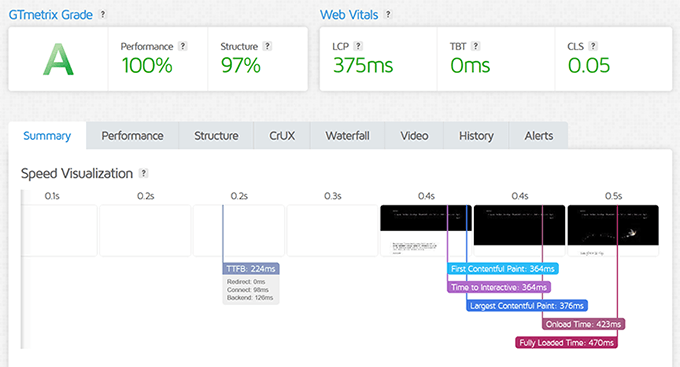
I ran a GTmetrix test on a fresh WordPress install hosted with DreamHost. The results were strong: fully loaded in just 470ms, with a Largest Contentful Paint (LCP) of 375ms and no layout shifts or blocking time at all.
GTmetrix gave DreamHost a performance grade of 100%, and the structure scored 97%. That’s excellent, even before any speed optimization or caching tweaks.
That’s the kind of head start I love to see when launching a new site.
Stress Testing (K6 by Grafana Labs)
I used K6 to simulate up to 50 virtual users hitting the site at once. This is the kind of surge you’d expect during a promotion or product launch.
To really understand how DreamHost holds up, I tested both with and without caching enabled.
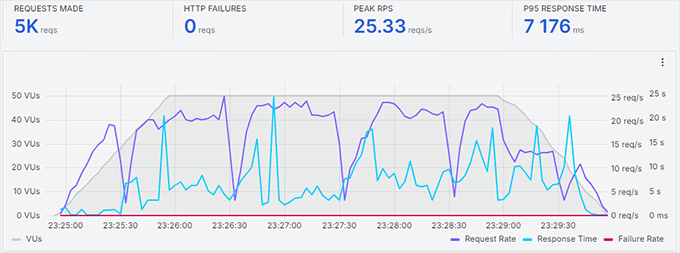
With caching turned off, response times fluctuated as more users joined.
The site stayed up, but you could see it struggling a bit, which is common when caching isn’t active.
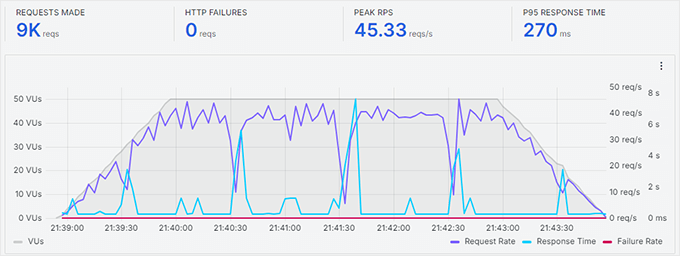
As soon as I enabled DreamHost’s built-in caching, the results improved dramatically. The site handled 6,600 total requests with an average response time of just 270ms.
There were no slowdowns or failed requests. Enabling caching is a must if you’re planning to use DreamHost for a blog, small business website, or online store.
Server Response Time
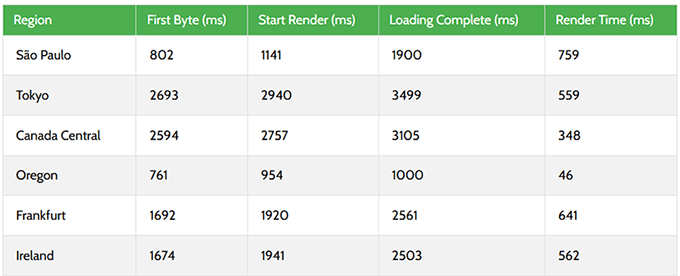
I also tested global response time using PageSpeedPlus to simulate visits from different locations. DreamHost’s U.S. server in Oregon performed extremely well, completing the full load in just 1 second with a 46ms render time.
Performance stayed solid across North America and Europe, with Canada and Frankfurt staying under 3 seconds. The only noticeable slowdown came from Tokyo and Canada Central, but those could be improved with a CDN.
I recommend Cloudflare’s free CDN, which also includes a built-in cloud firewall for improved website security.
Uptime Monitoring
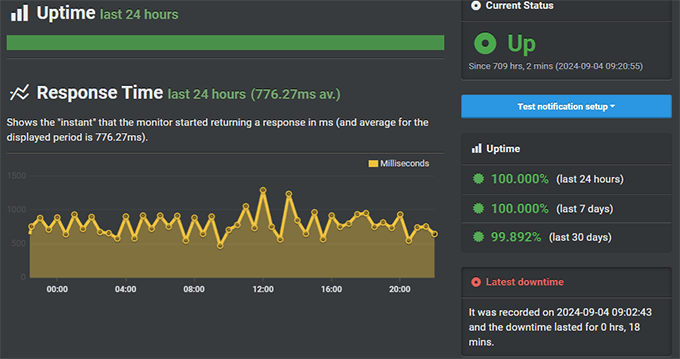
During my review period, I ran 24/7 uptime monitoring to catch any outages, even short ones. I’m happy to report that DreamHost delivered strong results: 99.82% uptime over a 30-day window.
There was one short outage totaling about 18 minutes, but the server recovered quickly. That’s still a reliable track record for web hosting, especially when paired with their built-in backup tools for peace of mind.
Features and Ease of Use
Instead of using cPanel like most other hosts, DreamHost built their own custom dashboard. I’ll admit, I was skeptical at first.
But after using it for a few days, I found it surprisingly clean and easy to navigate.
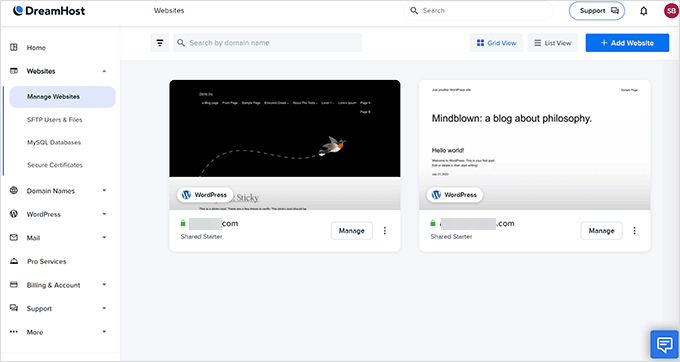
I could manage everything in one place without dealing with a cluttered interface. This included websites, domains, email accounts, databases, and backups.
It might not have every advanced toggle that cPanel users are used to, but it covers the essentials well.
- One-click WordPress install: It only took me about 60 seconds to launch a clean WordPress site.
- Free domain + privacy: DreamHost includes a domain name and WHOIS privacy with all plans.
- Daily backups: I use Duplicator to back up all my WordPress websites. However, it’s still good to know that there is an additional daily backup stored by the hosting provider.
- Built-in caching (for WordPress): This made a big difference in my performance tests. It’s included for free.
- Custom control panel vs. cPanel: I didn’t miss cPanel. DreamHost’s panel felt faster and more streamlined.
If you’re switching from another host or just getting started, DreamHost makes it easy to manage your site without needing a developer. Everything you need is in one place, and nothing feels overly complicated.
DreamHost Plans and Pricing
DreamHost offers a variety of hosting plans, but the two I focused on during testing were their Web Hosting and Managed WordPress (DreamPress) plans. Both come with solid features, but the right one depends on how much performance and flexibility you need.
Every plan includes NVMe SSD storage, free SSL, and daily backups. New site owners also get a free domain for the first year with yearly plans, which is a nice perk.
Web Hosting
This is the most budget-friendly option and is great for beginners, small blogs, and new projects. These plans are best when paid annually, but monthly options are available.
| Plan | Web Hosting Launch | Web Hosting Growth | Web Hosting Scale |
|---|---|---|---|
| Price (First Year) | $2.99/month | $3.99/month | $9.99/month |
| Websites | 25 | 50 | 100 |
| Monthly Visits | ~40,000 | ~200,000 | ~400,000 |
| Storage | 25 GB NVMe | 50 GB NVMe | 100 GB NVMe |
| 20 Mailboxes (Free 3 mo.) | 40 Mailboxes (Free 3 mo.) | 60 Mailboxes (Free 3 mo.) |
The Web Hosting Growth plan is marked “Most Popular” and is the best starting point for most users. It provides enough resources to handle growing traffic and gives you the flexibility to host up to 50 websites.
Keep in mind that email is only free for the first three months. After that, it becomes a paid add-on starting at $1.99 per mailbox per month or $19.99 per mailbox per year.
Managed WordPress Hosting (DreamPress)
If you’re building a growing site that needs better speed, security, or staging tools, then DreamPress is worth looking at. It’s a fully managed WordPress hosting plan that’s over 5x faster than their web hosting.
It comes with:
- Automatic WordPress core updates
- Pre-installed SSL and private IP (great for eCommerce)
- SSD storage, unmetered bandwidth, and caching built in
- One-click staging and daily on-demand backups
- Unlimited CDN and Jetpack Professional on higher-tier plans
| Plan | Visitors/Month | Storage | Price (Monthly) |
|---|---|---|---|
| DreamPress | ~100,000 | 30 GB SSD | $16.95/month |
| DreamPress Plus | ~300,000 | 60 GB SSD | $24.95/month |
| DreamPress Pro | ~1 million+ | 120 GB SSD | $71.95/month |
If you want a hosting plan that takes care of the technical stuff for you, DreamPress is a nice upgrade. It’s especially helpful for online stores or high-traffic sites that need extra stability.
Bonus Tip 💡: WPBeginner readers get a special discount on web hosting or 16% off DreamPress with our exclusive DreamHost coupon. Click here to apply it automatically.
Just remember: DreamHost’s best prices are for the first term. Renewal rates are higher, so it’s smart to lock in the longest billing cycle you can comfortably afford.
DreamHost Customer Support Experience
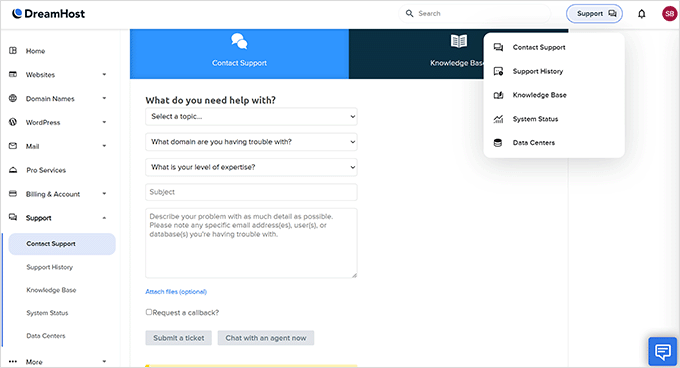
I tested DreamHost support using both live chat and tickets, just like I would if something broke on a real site. Overall, the support team was friendly and helpful, though there are a few trade-offs to know about.
✅ What I Like
- 24/7 availability: You can reach them anytime via live chat or email ticket.
- Award-winning support: DreamHost won both the 2025 Stevie Gold and Globee® Awards for service excellence.
- Helpful knowledge base: Their tutorials are easy to follow and cover most topics.
- Positive user feedback: Many users praise their fast response times and friendly staff.
❌ What Could Be Better
- No phone support by default: You can request a callback, but it’s paid and not in all plans.
- Email response time: Some replies can take up to one or two hours.
- Mixed reviews: A few users report issues with slow resolutions or trouble reaching support during busy hours.
In my experience, chat was the best option. I usually got connected to a human within 2-5 minutes, and they explained things clearly without copy-paste scripts.
Tickets were slower, but they were still answered within an hour. If your issue is urgent, go with chat first.
If you ever need hands-on help, DreamHost also sells professional services for site management, SEO, and development. It’s a nice add-on if you’re running a business site or just want extra peace of mind.
DreamHost’s support is solid if you’re okay with chat and email. But if you prefer phone calls and fast escalations, that’s something to consider before signing up.
Final Verdict: Should You Use DreamHost?
After using DreamHost for years and then testing it thoroughly again for this review, I’m genuinely impressed with the value they offer. It’s a great fit for WordPress users who want control without things feeling complicated.
Performance was solid across the board. My site stayed fast and stable, even under load, and their daily backups and custom dashboard made management feel simple.
DreamHost isn’t trying to be flashy. Instead, they focus on reliability, privacy, and offering good tools at a fair price. They mostly deliver on that promise.
Who is it for: If you’re a DIY website owner, blogger, or small business with a WordPress site, DreamHost is a strong choice. Their support team is helpful, and the knowledge base is packed with tutorials if you like solving things on your own.
DreamHost delivers a fast, affordable, and well-supported WordPress experience for most users, especially if you’re okay working through chat and email.
Want to give it a try? Click here to get started with DreamHost and save with our exclusive deal.
Here is a quick summary of our DreamHost review:
| DreamHost Review Summary | |
|---|---|
| Performance grade | A |
| Average load time | 1.69 s |
| Average response time | 255 ms |
| Free domain | Yes |
| Free SSL | Yes |
| 1-click WordPress | Yes |
| Support | Live Chat / Knowledge base |
| Start with DreamHost | |
DreamHost Coupon 🏷️
WPBeginner users get an exclusive discount on web hosting and a free domain with our DreamHost coupon code. You can also get a 16% discount on managed WordPress hosting with our DreamPress coupon code.
All you have to do is click on this link to purchase it. The discount will be auto-applied.
Frequently Asked Questions About DreamHost
The following are some of the most frequently asked questions about DreamHost from our users.
Is DreamHost a good host?
Yes, DreamHost is a good host for any type of starter WordPress website. They offer great features, a rock-solid platform, and fast servers at an affordable cost.
Their quality of service and pricing are on par with Hostinger, Hosting.com, HostGator, GoDaddy, and Bluehost.
Does DreamHost use cPanel?
No, DreamHost does not use cPanel. Instead, they have built their custom control panel that has all the management features you’ll find in cPanel.
You can easily manage MySQL databases, change PHP versions, access one-click WordPress installers, manage SSH and FTP access, and more.
Which is better, Bluehost or DreamHost?
Bluehost and DreamHost offer similar features, and they are both good hosting providers. However, Bluehost has an edge in terms of performance and fast customer support.
Which is better, DreamHost vs SiteGround?
If you were comparing DreamHost vs. SiteGround based on web hosting prices, then DreamHost is better. However, if you were comparing DreamPress managed hosting vs SiteGround, then SiteGround offers a lot more value for better pricing.
DreamHost and SiteGround used to be similar, but recently, SiteGround has significantly improved its web hosting platform. However, they have also increased their pricing by 2x, so the comparison isn’t fair anymore.
Where are DreamHost servers located?
DreamHost servers are located in the United States. Its data centers are in Ashburn, Virginia, and Hillsboro, Oregon, and its headquarters are in Brea, California.
Can I Install WooCommerce on DreamHost?
Yes, you can easily install WooCommerce on DreamHost web hosting and VPS plans.
Ready to start with DreamHost? Get a special discount on your DreamHost plan by clicking here to sign up for DreamHost. The discount will be auto-applied.
Bob Newell
I’ve been with Dreamhost for almost 5 years. Their pricing does go up by about a factor of 3 when renewing after the initial term, but they did negotiate a little when I said I would go elsewhere.
But I stay on because they have what I need: free SSL certs, SSH and SFTP access, and decent performance and uptime. And when it comes to support they get my praise. I very seldom need technical support but as an example, one time I was getting obscure errors in my CMS. I tracked it down to a server misconfiguration. When I reported it they instantly knew what I was talking about and fixed it in under 24 hours. Very few webhosts provide such expertise and service.
Denise
I use DreamHost and they have been great. Even though, I’m a total “newbie” and learning Wordpress they make maintenance super understandable and explain things clearly. When I sent an email support ticket it was answered within the 24-hour period, not just a response saying they received my email, but the actual answer to my question along with some suggestions that helped me tremendously. They knew I was a newbie, and they were friendly, professional, and eager to help.
Jon Andresen
Dreamhost has been great for me for 20+ years BUT…
they just lost my entire web site – my entire public presence in my community – and their backups apparently only go back a week. Don’t go on vacation or you may not have a business when you get back!
They have been useless in getting my site back up. I had 3 separate backup options going on and they can’t find anything to backup over a week old. NOT a happy camper!
Marc Reeves
Just switched over to DreamHost for 6 website I take care of and it was great. They have a great front end to manage the transfer process and the dashboard is fantastic. I would say their tech support is great but I wouldnt know. Their transfer process works so well I didn’t have to call once. 10 out of 10.
Peter N
Their livechat system is 24/7 now. Rarely does it go offline, but they tell you in their status page in advance.
Samuel
Nice, It’s A Good One
Tyler W.
Dreamhost is great until you try to cancel. Their automated system does not let you cancel and then they try to charge you to close your account. No wonder the prices are so low to start.
Peter N
This is not true, their cancellation is a 4-step process. Takes 3 minutes to complete and if your balance is $0 you pay nothing to close the account. From what I am seeing, the only time you have to pay to cancel, is when you received a free domain registration credit from the service plan you chose. Imo, it is fair for them to charge you for the free domain registration if you cancel the service that provided it.
Ed Lehmann
This is a great company. I’ve been using them for 9 years for a number of small web sites. They have been fantastic for someone who isn’t super web savvy. Plus you only pay an annual fee for as many sites as you want (I’m sure you wouldn’t use this feature if your site got 50,000 hits a day). I just started learning Wordpress and again they have been excellent in their help. Also, I use them for my domain name management as they don’t inundate you with extra fees and ads.
John F
Dreamhost tech support is bad. Well, not just bad- non-existent. Many emails, no response. And you cannot call them on the tel-e-phone!
Michael
Simply awful. The only available support is so-called “24/7 in-house support”, which in the Dreamhost reality means you’ll get an answer on your question / problem in a few DAYS over email. And if their reply wasn’t completely clear, wait a few days for another reply. This company lives in some sort of parallel universe, where everything is extremely slow and inefficient. Literally the worse web-hosting experience in many years.
Michelle
I haven’t purchased web hosting with anyone yet, but I want to share that DreamHost offers 1 free shared hosting plan for non-profit, charitable organizations registered in the US as 501(c)(3) organizations.
I thought this was a great offering, and I like the idea of joining a company that assists non-profits. The company is also dedicated to being as “green” as possible.
Eunice
I absolutely love this service! I am a novice at setting up and updating websites but DreamHost makes it easy. If you have a question about anything, you get a response with the answer within 24 hours. I recommend this to all my friends and family who are starting a business and need a website.
Ava Sonnenthal
Love this service! As a newbie, they made it very accessible, clearly stating each process step by step. They have integrity, and the set up with Wordpress works beautifully!
Haven’t had any issues. Glad I went with Dreamhost!
Warren
AMAZING service. I had even canceled my plan and they still PROMPTLY helped me get access in order for me to migrate my site to another host. Very good customer service. I just wish they had a plan to suit my needs better. I’d still be a customer.
Jeff Herzbach
I have ten wordpress sites on dreamhost, and plans for several more. They are a stellar hosting service, with unlimited domains for one hosting account.
Their support has always been timely and accurate. I recommend them without hesitation.
Eli E
Fast response, personable message, instantly cleared up my confusion over a message from you guys. So glad YOU handle my hosting and domain reg.
Danny Winslow
We recently changed our hosting to Dreampress and are very glad that we did. Their plans and service are the best that we have found in our 15 years experience.
Tina
Terrible service. I was very surprised. We connected and then nothing. They kept me waiting but didn’t ever try to let me know what they were doing. I finally disconnected. It was a very easy question.