


Is your WordPress website loading as fast as it could be? Speed is vital for keeping visitors happy and ranking high in search results.
If your site feels sluggish, the underlying connection protocol might be the bottleneck. That is where HTTP/2 comes in to speed things up.
At WPBeginner, we optimize our server stack constantly to ensure our pages load instantly for millions of readers. HTTP/2 is a big part of that performance strategy.
In this article, we will explain what HTTP/2 is and how you can enable it to boost your WordPress speed and performance.
What Is HTTP/2?
HTTP/2 is the revised version of the original HTTP protocol. It was developed by the Internet Engineering Task Force (IETF) and is based on an experimental SPDY protocol developed by Google.
HTTP (Hypertext Transfer Protocol) is like a language that allows computers to talk to each other on the internet. It’s how information gets sent back and forth when you use websites or apps.
When you visit a WordPress website, your web browser sends a message called a ‘request’ to the server that stores the website. The request asks for specific information, like the page’s text, images, or videos.
Tip: See our article on how WordPress works behind the scenes for more details.
The server receives the user’s request and sends back a response. This response is like a package containing the information the user asked for. It includes things like the text you see, the pictures you look at, or even the videos you watch on the website.
HTTP 0.9 was first launched in 1991. A significant revision to that, HTTP 1.1, was published in 1999, and most websites ran on that until 2015 when the HTTP/2 protocol was launched.
HTTP/2 is supported by all modern web server software (e.g., Apache, Nginx, Litespeed, etc.) and browsers, though many websites still run on HTTP 1.1 if they do not have an SSL certificate installed.
The IETF has also released HTTP/3, which is even faster. However, HTTP/2 remains the essential standard for the modern web. If a visitor’s network cannot connect via HTTP/3, their browser will rely on HTTP/2 to ensure the site still loads quickly.
What Is the Difference Between HTTP2 and HTTP?
The HTTP 1.1 protocol sent data requests without prioritization. This means if a website has a reference to a JavaScript file in the head, it will load before any other content.
This makes a website appear slower to users, who cannot see the content they expect to see.
HTTP/2 uses a single connection to send multiple files at once (multiplexing). Think of HTTP 1.1 like a supermarket with only one checkout lane open. Customers have to wait in a long line. HTTP/2 is like opening multiple checkout lanes so everyone gets through instantly.
The HTTP/2 protocol also uses compression for HTTP headers and multiplexing, which further improves page load performance.
The newer protocol also comes with Header Compression (HPACK). This reduces the size of data being transferred between the server and your browser, making everything load faster.
To summarize, HTTP/2 is faster than HTTP 1.1 and significantly improves your WordPress speed and performance.
What Do You Need to Use HTTP/2 in WordPress?
First, you need a hosting company offering the latest server software with HTTP/2 support. You’ll also need to install an SSL certificate on your WordPress website.
Most of the top WordPress hosting companies already use cutting-edge web server software.
We recommend using Bluehost, which uses the latest Apache web server software with HTTP/2 support enabled by default.
Luckily, the folks at Bluehost are offering WPBeginner users an exclusive discount with a free domain name and SSL certificate.
Other hosting companies we recommend include SiteGround, Hostinger, and WP Engine. They all offer free SSL certificates and the latest server software with HTTP/2 support.
How to Enable HTTP/2 in WordPress
The only requirement to enable HTTP/2 support in WordPress is installing an SSL certificate.
Technically, the protocol itself doesn’t require encryption. However, modern browsers (like Chrome, Firefox, and Safari) will not use HTTP/2 unless your site has an SSL certificate. So, practically speaking, SSL is required.
If your website uses SSL, your URLs will have the https:// prefix like this:
https://wpbeginner.com
Visiting your website will also show a padlock icon in the browser’s address bar.

If your website does not use an SSL certificate, you can ask your WordPress hosting provider to install it for you.
Need more help? See our tutorial on how to move from HTTP to HTTPS in WordPress.
Once you have enabled SSL, your WordPress website will almost certainly be served via HTTP/2 protocol.
Testing HTTP/2 Support for Your Website
There are two ways to test whether your WordPress website is serving pages via HTTP/2.
First, you can visit the KeyCDN Tools’ HTTP/2 Test page and enter your website’s URL. This free online tool will then tell you whether your website supports HTTP/2.
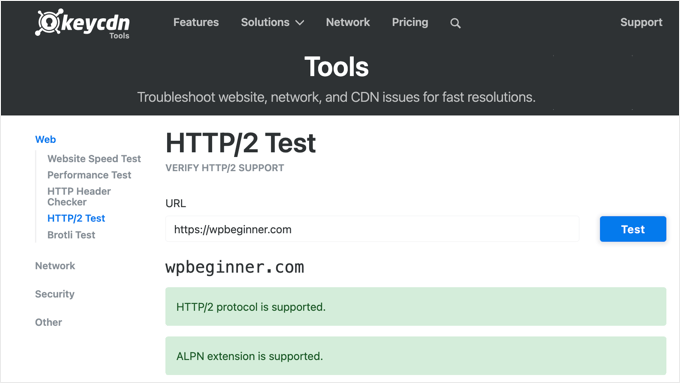
Another effective way to check if your website serves pages on HTTP/2 is using the standard Chrome Developer tools.
Simply open a new browser window in Google Chrome and visit your website. Then, right-click anywhere on the page and select ‘Inspect’ to open the developer tools.
Now you need to click on the ‘Network’ tab. You may need to reload the page to see the data appear.
Look at the ‘Protocol’ column. If you see ‘h2’ listed there, it means your website is serving pages using the HTTP/2 protocol.
Frequently Asked Questions About HTTP/2 and WordPress
Here are some of the most common questions we get about HTTP/2 and how it works with WordPress. These answers will help you understand the technical details and implementation process better.
1. Do I need to do anything special to enable HTTP/2 on my WordPress site?
No, you don’t need to install any plugins or make code changes. The only requirement is having an SSL certificate installed on your website. Once you have HTTPS enabled, your hosting provider’s server software will automatically serve your site using HTTP/2 protocol. Most modern hosting companies like Bluehost, SiteGround, and WP Engine already support HTTP/2 by default.
2. Will HTTP/2 slow down my website if I have an older hosting provider?
HTTP/2 won’t slow down your website, but older hosting providers might not support it at all. If your hosting company uses outdated server software, your site will continue running on HTTP/1.1. However, we recommend upgrading to a modern hosting provider that supports HTTP/2, as this will significantly improve your site’s performance and loading speed.
3. Can I use HTTP/2 without an SSL certificate?
Technically, HTTP/2 doesn’t require SSL, but all major browsers (Chrome, Firefox, Safari, Edge) only support HTTP/2 over HTTPS connections. This means without an SSL certificate, your visitors won’t benefit from HTTP/2’s speed improvements. Getting an SSL certificate is essential for HTTP/2 to work properly.
4. How much faster will my WordPress site be with HTTP/2?
Studies show that websites using HTTP/2 can load up to 20% faster than those using HTTP/1.1. The actual speed improvement depends on your site’s complexity and the number of files it loads. Sites with many images, CSS files, and JavaScript files will see the biggest performance gains because HTTP/2 can load multiple files simultaneously.
5. Is HTTP/2 compatible with WordPress caching plugins?
Yes, HTTP/2 works perfectly with all popular WordPress caching plugins like WP Rocket, W3 Total Cache, and WP Super Cache. In fact, using HTTP/2 together with caching plugins will give you even better performance results. The caching plugins optimize your files, while HTTP/2 delivers them more efficiently to your visitors.
6. Is HTTP/2 still necessary now that HTTP/3 exists?
Yes, absolutely. While HTTP/3 is the newest and fastest version, it operates differently (using QUIC/UDP). Some corporate networks or firewalls block this traffic. In those cases, the browser automatically falls back to HTTP/2. Think of HTTP/2 as the reliable high-speed foundation that ensures your site is fast for 100% of your visitors, not just some of them.
Additional Resources
We hope this article helped you learn about HTTP/2 and how to enable it in WordPress. You may also want to see our other guides to improve your website performance.
- How to Properly Move WordPress from HTTP to HTTPS
- The Ultimate Guide to Boost WordPress Speed & Performance
- How to Choose the Best WordPress Hosting
- Best WordPress Caching Plugins to Speed Up Your Website
- Why You Need a CDN for Your WordPress Blog
If you liked this article, then please subscribe to our YouTube Channel for WordPress video tutorials. You can also find us on Twitter and Facebook.


Samuel
Thank for this article. while I have known that http/2 is more secured because of the presence SSL, I have often wondered the difference between HTTP and HTTP2. This article make the difference clear to me. I just realised that I was stucked on the outdated knowledge of http sending data in top to bottom order which of course you have made me realised that http2 is far effecient in its multiplexing and prioritizing nature of sending that. This revelation will greatly improved how i design my code for improved UX and faster web application henceforth. This article is making me to want to relearn http 2 technology in detail. Thanks so much.
David Lim
There are many factors that can be optimized to speed up our site. This is one such factor. I appreciate your writing.
THANKGOD JONATHAN
I was on the fence about enabling HTTP/2 on my site, but this article convinced me to give it a try. The explanation of the benefits was clear and concise, and the steps for enabling it were easy to follow. Thanks!
Jiří Vaněk
Thanks for the guide. I have my own server, and as a newcomer, I had to do everything myself. Many things were new to me, like HTTP/1 and HTTP/2, creating SSL certificates using Certbot, and much more. I must say, these and many other guides helped me, especially at the beginning, to set up the server properly and make everything work as it should.
WPBeginner Support
Happy to hear our guide was one of the ones to help you
Admin
Ralph
I used the http2 website and it says: “This server supports http/2” just like in your screen in the guide.
But I don’t understand. Does it mean it is already on http2? Or is it only ready and I should do something to enable http2?
WPBeginner Support
It likely is but if you wanted to be extra certain you would use the other method to confirm that you are using HTTP/2
Admin