


Figuring out how to host a website can feel a bit too technical for new users. But we’re here to let you know that these days, there’s not much technical stuff involved.
Web hosting is basically where your website’s files are stored so visitors can access them online. It’s like renting space on the internet for your site.
In this guide, we’ll show you exactly how to host a website, step by step. From selecting a reliable web host to making your site live, we’ve simplified the process for beginners.
By the end, you’ll have a fully hosted website and the knowledge to manage it with confidence.
Quick Answer: How Do You Host a Website?
To host a website, sign up with a web hosting provider like Bluehost, pick a domain name, and install WordPress. Most hosts handle the technical setup for you, so you can have your site live in under 30 minutes.
What Does It Mean to Host a Website?
When you host a website, you’re basically renting space on a special computer called a server. This server stores all your website files and makes sure people can access your site from anywhere in the world.
These servers run a specific kind of software called a web server. Its job is to handle visitor requests and send back the right web page to their browser. This is kind of like a super-efficient online librarian.

This might sound like a lot of tech talk. But here’s the good news: you don’t need to manage any of this yourself.
Thousands of companies out there handle all the complicated server stuff for you. They make it as easy as signing up for an account and uploading your site.
Even the biggest names on the internet, like Netflix (hosted on Amazon servers) and PayPal (which uses cloud services from providers like Google Cloud), rely on professional hosting infrastructure instead of running their own servers at home.
Sure, a few tech giants like Google, Microsoft, and Amazon manage their own servers. But for most businesses (including us), partnering with a web hosting company is the smart choice.
What Do You Need to Host a Website?
You will need the following two things to host a website:
- Web hosting service provider
- Domain name
Web hosting service providers offer you ready-to-use web servers to host your website. They take care of all the technical stuff and provide website owners with easy-to-use tools to manage their hosting.
Now, how do users reach your self-hosted website? This is where domain names come in.
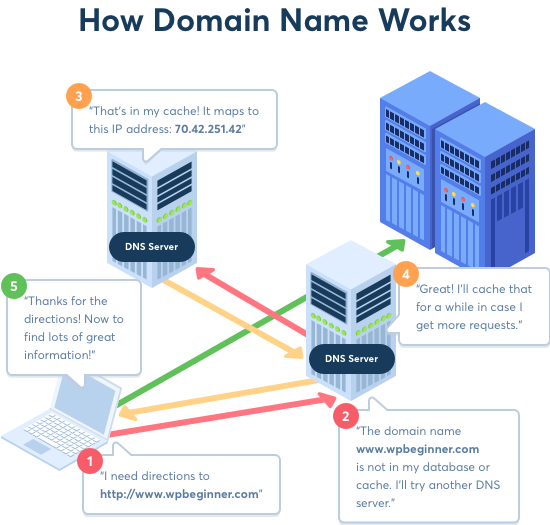
A domain name is the address of your website that people type in the browser to visit your website. For example, wpbeginner.com will bring you to this website.
Basically, a domain name is a human-friendly way to connect users’ browsers to the website server associated with that domain name. To learn more, see our guide on what a domain name is and how domains work.
You can purchase a domain name from one of these top domain registrars. These are companies licensed to sell domain name registrations.
To understand the relationship between your web host and domain, see our guide on the difference between web hosting and domain names.
Note: Later in this article, we will show you how to get a domain name for free.
But first, let’s look at different types of web hosting plans and evaluate which would be the right fit to host your website.
Types of Website Hosting Services
Not all websites are the same. Some are smaller and have low traffic, while others are larger, with more content and visitors.
A smaller website requires fewer resources, such as disk space and bandwidth. On the other hand, a larger and more popular website will need more resources to run efficiently.
Website hosting companies provide different types of hosting offers designed to address specific website needs. Here are some of the most common hosting options.
| Hosting Type | Starting Price | Best For | Key Feature |
|---|---|---|---|
| Shared Hosting | $2.99/mo | Blogs, small business sites | Most affordable, easy setup |
| VPS Hosting | $4.99/mo | Growing sites, eCommerce | Dedicated resources, more control |
| Managed WordPress | $2.99/mo | Popular blogs, memberships | Hands-off updates and backups |
| Dedicated Hosting | $79.99/mo | Enterprise, high-traffic sites | Full server, maximum performance |
1. Shared Hosting
A shared hosting service is suitable for small websites, blogs, and small businesses that are just starting out.
They can keep their costs down by allowing multiple websites to share the same server resources. This makes hosting your website affordable.
Pricing: Most shared hosting plans start as low as $2.99 per month during promotional periods. Regular pricing typically ranges from $9.99 to $11.99 per month after the initial term. You’ll also need a domain name, which typically costs around $14.99 per year.
Suitable for: Starting a new blog or small business website.
Our recommended shared hosting providers are: Bluehost and Hostinger.
To learn more, see our guide on the truth about the best shared web hosting.
2. VPS Hosting
VPS (Virtual Private Server) hosting is the perfect next step when your website outgrows shared hosting, giving you more power and flexibility to handle growing traffic.
Think of it like this: shared hosting is like renting a dorm room where you share resources with everyone. VPS hosting is more like renting a private apartment in a building — you still share the building, but you get your own space, privacy, and dedicated resources.
With VPS hosting, your website gets its own virtual space on a server. You won’t be affected by what other websites are doing, and you can handle bigger spikes in traffic.
This makes VPS a smart choice for websites that are growing fast or need more flexibility than shared hosting can offer.
Pricing: Starting from $4.99/month
Best for: Medium-sized businesses, popular blogs, and eCommerce stores.
Our recommended VPS hosting company is: Hostinger.
To learn more, see our article about when you need VPS hosting for your site.
3. Managed WordPress Hosting
Managed WordPress hosting is a specialized hosting service made specifically for WordPress. It is like a concierge service for your WordPress website.
On a managed hosting platform, the hosting company takes care of updates, backups, and caching of your website. This allows you to focus on creating content and growing your business.
Pricing: Starting from $2.99 per month (SiteGround) to $35 per month (Rapyd Cloud)
Suitable for: Popular blogs, business websites, and membership websites.
Our recommended managed WordPress hosting providers are: SiteGround and Rapyd Cloud.
For more details, see our article explaining when you really need managed WordPress hosting.
4. Dedicated Hosting
A dedicated server hosting gives you the entire server dedicated to your own website. You get all the resources of the server, advanced tools for server management, the ability to install your own software, and even your own operating system.
You’ll be managing your own server, which may require some technical skills. It is an advanced option for larger websites that need high performance to tackle higher traffic volume.
Pricing: Starting from $79.99 per month
Suitable for: Enterprise-level businesses, hugely popular websites, and eCommerce stores.
Our recommended Dedicated hosting companies are SiteGround or HostGator.
Note: We use SiteGround custom dedicated servers to host the WPBeginner website.
Choosing the Right Plan to Host a Website
Step 1: Assess Your Website Needs
As you can see, all the different hosting plans have different server configurations and pricing. You’ll need to choose a plan that suits your needs and budget.
At WPBeginner, we recommend users start with a low-cost shared hosting plan and then upgrade as their business grows.
This allows you to save money and only pay for the services that you actually need. See our tips on the cost of building a website for a breakdown of all the costs and how you can save a ton of money when starting out.
Step 2: Pick a Hosting Provider and Sign Up
Shared hosting plans start from $2.99 per month (paid annually) and $14.99 for a domain name.
Note: In addition to hosting and domain fees, you might also want to budget for optional expenses like premium WordPress themes, plugins, marketing tools, or custom email services. For more details, see our article on the costs of building a website.
Now, if you are just starting out, then this is still a significant investment.
Luckily, Bluehost has agreed to offer our users a discount on hosting and a free domain name. Basically, you’ll be able to get started for $2.99/month (introductory pricing for the first term).
They are one of the largest hosting companies in the world and an officially recommended WordPress web hosting provider. They offer a free SSL certificate and great customer support.
For other shared hosting plans, see our comparison of the best hosting companies.
Step 3: Set Up Your Website
Once you have signed up for a hosting account, the next step is to create your website. For detailed instructions, see our guide on how to make a website.
Why You Shouldn’t Host a Live Website on Your Computer
Running a live website from your personal computer is risky and unreliable. You’d be responsible for everything — hardware, software, security, and uptime — and a single mistake can take your site down or expose your network to hackers.
- Security risks: Exposing your home computer to the internet opens the door to malware, data theft, and network attacks.
- Zero reliability: Your site goes offline every time your computer shuts down or your internet connection drops.
Many beginners wonder if they can host their website directly from their own computer. While it’s possible, it’s not practical or safe for most users.
Here are some of the problems you’ll face if you try to self-host a public website:
- You need to install and configure a web server like Apache or Nginx, plus PHP, MySQL, and other software.
- Your site will only stay online if your computer is turned on 24/7 with a stable, fast internet connection.
- You need a static IP address from your internet provider, which usually costs extra. A static IP is a permanent, unchanging Internet address that your computer uses so others can access your site reliably.
- You’ll have to manage router settings like port forwarding to allow outside traffic to reach your site.
- There’s no built-in backup system, so you’ll need to handle data backups and security updates yourself.
- Exposing your home computer to the internet increases the risk of malware, data theft, and network attacks.
These are the same problems that even advanced developers try to avoid. That’s why most websites, including popular ones like PayPal and Netflix, use trusted hosting providers instead of hosting their own servers.
We strongly recommend using a professional web hosting company. They take care of the technical setup, performance, backups, and security for you. This way, you can build your site with peace of mind and focus on growing your business or blog.
Frequently Asked Questions
What is the easiest way to host a website for beginners?
The easiest way is to sign up with a shared hosting provider like Bluehost. They install WordPress automatically and give you a simple dashboard to manage everything. Plans start at $2.99/month with a free domain name.
How much does it cost to host a website?
Shared hosting starts at $2.99/month during promotional periods. You’ll also need a domain name (about $14.99/year). After the first term, hosting renews at $9.99 to $11.99/month. See our guide on website costs for a full breakdown.
What is the difference between a domain name and web hosting?
A domain name is your website’s address (like wpbeginner.com), while web hosting is the server space where your files live. You need both for a website. Learn more in our guide on the difference between domain names and hosting.
Can I host a website for free?
Yes, some providers offer free website hosting, but they usually show ads on your site, limit traffic, and restrict features. For a serious website, we recommend investing in paid hosting for better performance and control.
When should I upgrade from shared hosting to VPS or managed hosting?
Upgrade when your site regularly gets high traffic, loads slowly despite optimization, or needs more server resources. VPS hosting starts at $4.99/month with Hostinger. See our article on when you need VPS hosting.
We hope this article helped you learn how to host your website. You may also want to see our guide on how to get a free business email address and a free business phone number for your website.
If you liked this article, then please subscribe to our YouTube Channel for WordPress video tutorials. You can also find us on Twitter and Facebook.





munashe
can I host a website on my own computer
WPBeginner Support
We have a section in the article covering specifically that
Admin
Moinuddin Waheed
Great explanation for all the queries related to hosting, domain name and how they are related to each other, how to make purchase decisions, separate or combined and in what terms they are related and they are different.
I have not fully understood about the concept of self hosting?
is it that we can have our own server without the need to buy and host there and it will be accessible to all via internet?
or is it something else?
WPBeginner Support
You are correct, we cover some of what to keep in mind with self hosting in the article to think before using that instead of paying a hosting provider.
Admin
Sam
Well, you really put down the idea of self hosting which I think is the wrong take. You should give more confidence for those who want a small 1 page website but need greater customisation than the ‘site builders’ provide.
Html and CSS can be powerful by themselves.
WPBeginner Support
Thank you for sharing, we do not mean to put self hosting in a negative light for everyone, it is mainly a warning that it is not a beginner-friendly task to self host a site which is why we very much recommend a hosting provider for most people.
Admin
Tom
You sort of neglected to discuss the following, which you mentioned in the “Disadvantages of hosting a website yourself” section:
“You will need to purchase a static IP address from your internet service provider, which will cost you extra.”
Maybe you could explain this a little.
WPBeginner Support
For more on static IP Addresses, we would recommend taking a look at our glossary page below:
https://www.wpbeginner.com/glossary/ip-address/
Admin
Sehnoor
You made it easy to choose a reliable web hosting. Thanks!
WPBeginner Support
Glad we could assist
Admin
Bharat Taxi
Marvelous work!. Blog is brilliantly written and provides all necessary information I really like this site. Thanks for sharing this useful post.Thanks for the effective information.
WPBeginner Support
Thank you, glad you like our tutorials
Admin