


Want to start an affiliate program on your WordPress site? You can either build and manage your own program with a WordPress plugin, or join an affiliate network that handles much of the infrastructure for you.
The first option gives you more control and predictable costs. Affiliate networks, on the other hand, can put your program in front of an existing pool of potential affiliates. The tradeoff is that you’ll typically pay a recurring fee and give the network a percentage of your sales.
In this guide, I’ll compare the best affiliate tracking and management software for WordPress so you can pick the right path for your budget and workflow.
My Verdict: Best Affiliate Tracking and Management Software
If you are in a hurry, here’s a quick look at the top picks, along with the job each one does better than the rest.
| # | Plugins | Best For | Pricing |
|---|---|---|---|
| 🥇 | AffiliateWP | Screening affiliate applications with AI before you approve them. | $149.50/yr. |
| 🥈 | Easy Affiliate | Paying a whole affiliate roster in one click through PayPal. | $99.60/yr. |
| 🥉 | RewardsWP | Rewarding existing customers for referring friends, without creating an entire affiliate program. | Free + $71.55/yr. |
| 4 | SliceWP | Launching a working affiliate program at no cost. | Free + $169/yr. |
| 5 | Awin | Recruiting from a ready-made pool of publishers instead of finding affiliates yourself. | $49/month + 3.5% per transaction |
Understanding the Two Types of Affiliate Software
Self-hosted plugins, such as AffiliateWP or Easy Affiliate, run directly inside your WordPress dashboard. They give you complete ownership over your data, branding, and commission structures for a predictable annual fee.
The main drawback to this approach is that you’re responsible for finding and onboarding your own promotional partners.
The alternative is an affiliate network like Awin. These are external platforms that directly connect you to a pool of marketers.
These networks handle tracking, reporting, and payouts automatically. However, they also charge a monthly platform fee and take a cut of every sale. They tend to suit brands who want to scale quickly, and don’t mind paying extra for it.
How I Test And Review Affiliate Tracking And Management Software
Different businesses have different goals when choosing affiliate software.
Some want to reach a wider audience using a complete affiliate network like Awin, while others go with self-hosted tools like AffiliateWP to maintain full control over their data, branding, and commissions.
While testing each tool, I kept these different needs in mind. That meant considering a small store launching its first affiliate program, a digital product seller managing everything in-house, and an established business scaling a setup it already runs.
Here’s what I focused on:
Ease of Setup – I looked at how simple it was to get started with each solution. Self-hosted tools usually take a few quick steps inside the WordPress dashboard. Network-based platforms handled most of the technical setup for you, although they often require an approval process before going live.
Affiliate Reach – I checked how easily vendors could find active affiliates. Networks offer instant access to a large existing pool of partners. By contrast, self-hosted plugins require you to handle your own outreach and build an affiliate team from scratch.
Customization and Control – I tested how flexible each tool was when it comes to branding, commission rules, and overall program settings. Self-hosted tools give you complete freedom over your program rules, while networks are more restrictive but handle most of the technical management for you.
Automation and Tracking – I reviewed how well each tool managed tracking accuracy, affiliate payouts, and reporting. Self-hosted options typically integrate directly with popular eCommerce tools like WooCommerce and Easy Digital Downloads. Meanwhile, networks provide built-in fraud prevention along with automated payouts.
Scalability and Cost – I compared long-term pricing models to see what works best as your program grows. Networks often charge ongoing transaction fees on every sale, but self-hosted plugins charge a flat yearly fee without taking a cut of your revenue.
Let’s take a look at the best affiliate management solutions for WordPress.
1. AffiliateWP – Fully Self-Hosted Affiliate Program
| Pros | ✅ Stores every visit, referral, and commission in your own WordPress database ✅ Integrates with WooCommerce, Easy Digital Downloads, MemberPress, and WPForms ✅ Pays affiliates in 90+ countries straight to their bank accounts ✅ Reports referrals and earnings in real time for both you and your affiliates ✅ Handles unlimited affiliates without taking platform fees from your sales |
| Cons | ❌ Runs on your own hosting, so busy programs may need a hosting upgrade ❌ Leaves recruiting to you, because there’s no built-in affiliate network ❌ Needs a US or UK Stripe account with Global Payouts enabled before you can pay affiliates to their bank |
| Pricing | Starts at $149.50/year for one site. There’s no free version. |
| Best For | Screening affiliate applications with AI before you approve them. |
AffiliateWP is my top pick because it is purely a WordPress plugin rather than an external service. Every affiliate, visit, and commission lives inside your own database. This means you maintain complete control over your data and branding, without any platform taking a cut of your sales.
AffiliateWP’s most impressive feature is its AI-assisted application review. The AI evaluates incoming affiliate applications, provides a recommendation to accept or reject each applicant, and explains its reasoning.
You retain final approval, and you can customize the evaluation rules in your settings to match your personal criteria.
The AI tool operates on a credit system. Personal license plans ($149.50/year) include 30 credits to get you started.
If you get lots of applications, then you can purchase additional review credits at $4.99/month, for 30 additional reviews.
To learn more about its features, take a look at our AffiliateWP review.
My Experience
When I tested AffiliateWP on a real WordPress site, I found it very beginner-friendly. The setup didn’t take long, and I could start tracking affiliates quickly.
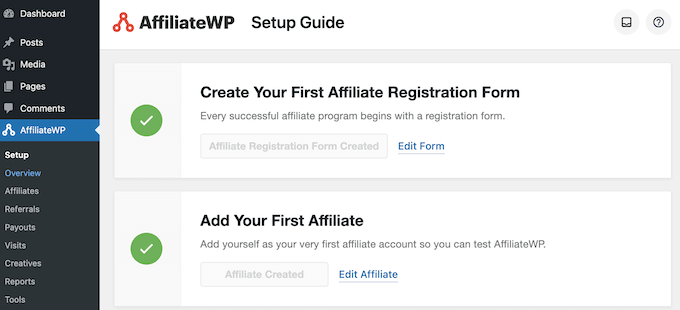
I liked how everything stayed inside the WordPress dashboard. I could check performance, track clicks and referrals, and view reports without switching tools.
Approving affiliate applications and managing payouts also felt straightforward. The 1-click payout option made the process even smoother during testing.
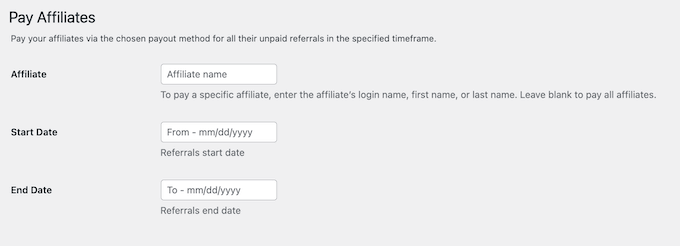
Bank payouts stand out as AffiliateWP’s biggest advantage over alternative tools. Affiliates simply enter their banking details on a secure page hosted by Stripe and receive payments in their local currency across 90+ countries. They don’t even need to create a Stripe account of their own.
Even as I explored more features, the interface stayed easy to navigate. I didn’t feel overwhelmed, even with multiple settings available.
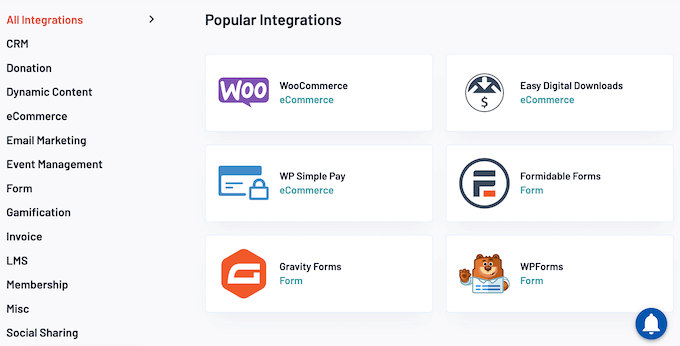
For more advanced use, I can see how useful features like custom commissions, referral tracking, and coupon codes would be. AffiliateWP’s integrations with WooCommerce, Easy Digital Downloads, MemberPress, and WPForms also worked smoothly during my testing.
However, there are two drawbacks worth knowing. Firstly, you’ll need a US or UK Stripe account with Global Payouts switched on.
Secondly, Stripe’s processing and currency conversion fees come out of your own balance rather than the affiliate’s commission. This means your actual cost per payout will be slightly higher than the flat commission rate you agreed to pay the affiliate.
To get started, see our tutorial on how to create a referral program in WordPress.
Why I recommend AffiliateWP: If you want to run and manage an affiliate program for your website all by yourself, then AffiliateWP is my top pick.
Get started with the AffiliateWP plugin!
2. Easy Affiliate – Affiliate Program With Fraud Protection

| Pros | ✅ Runs the whole affiliate program from your WordPress dashboard ✅ Pays a whole affiliate roster in one click through PayPal, or exports a mass payment file ✅ Tracks clicks, referrals, and sales in real time, with multiple commission levels ✅ Detects fraud automatically and flags self-referrals before you pay out (Plus plan and above) ✅ Integrates with WooCommerce, MemberPress, Easy Digital Downloads, and PayPal |
| Cons | ❌ No free trial or free version ❌ Leaves recruiting to you, because there’s no built-in affiliate network ❌ Fraud detection and multi-level commissions are only available on the Plus plan and higher ❌ Pays through PayPal rather than direct bank transfer, which limits affiliates in countries PayPal doesn’t support |
| Pricing | Starts at $99.60/year for one site. Fraud detection and multi-level commissions start on the Plus plan at $149.60/year. |
| Best For | Paying a whole affiliate roster in one click through PayPal. |
Easy Affiliate is one of the most beginner-friendly affiliate tracking plugins for WordPress. It is built by the team behind MemberPress, so it works particularly well if you are already running a membership site.
Easy Affiliate provides everything you need to run a self-hosted affiliate program without relying on third-party platforms or complicated integrations.
One thing worth checking before you buy is which plan you actually need. The $99.60 Basic plan covers core tracking, payouts, and the affiliate dashboard. However, the automatic fraud detection and multi-level commissions are only available on the Plus plan ($149.60/year) and higher.
For more information, see our Easy Affiliate review.
My Experience
When I tested Easy Affiliate, I liked that I could manage the entire program directly from the WordPress dashboard. It kept things simple and easy to control.
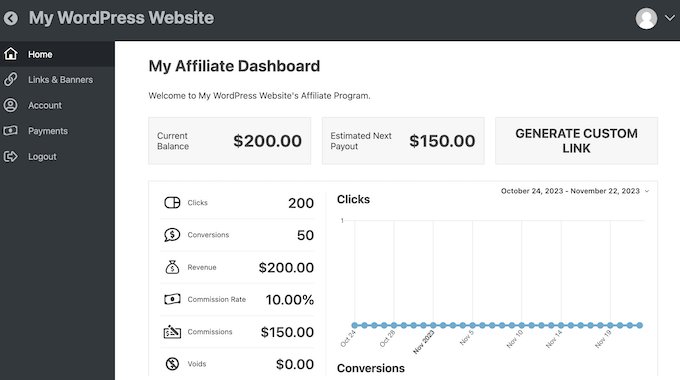
I could track clicks, referrals, and sales in real time. Managing affiliate applications and setting commission rules also felt straightforward.
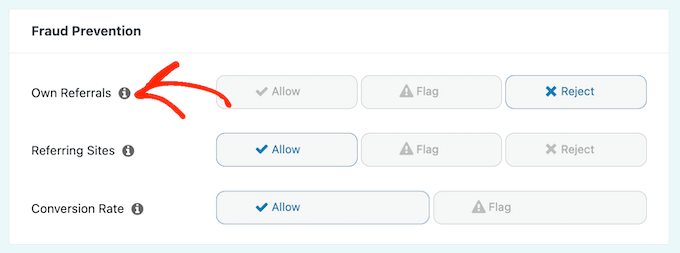
I found the built-in fraud detection particularly useful. It flagged suspicious activity, which gave me more confidence when handling payouts.
The plugin worked smoothly with tools I already use, like WooCommerce, MemberPress, PayPal, and major email marketing services. That would make it easy to connect the affiliate program to your existing store or membership site without extra setup work.
Just be aware that there’s no free version or free trial, so you can’t try before you buy.
Why I recommend Easy Affiliate: If you’re looking for a self-hosted affiliate program to track and manage your referrals, this is a great solution.
The built-in 1-click PayPal payouts mean you can pay an entire month of affiliate commissions with just a few clicks, and without having to export any spreadsheets or transfer funds manually.
Get started with the Easy Affiliate plugin!
3. RewardsWP – Turn Customers Into Referrers
| Pros | ✅ Enrolls customers automatically after they buy, so there’s no application process to manage ✅ Gives every customer a referral link and a widget so they can share easily ✅ Rewards referrers with fixed discounts in the free version, or percentage discounts in the premium upgrade ✅ Integrates with both WooCommerce and Easy Digital Downloads ✅ Runs alongside AffiliateWP, so customer referrals and a professional affiliate program can operate together |
| Cons | ❌ Tracks referrals from your own customers only, so it won’t help you recruit outside promoters ❌ Offers fewer controls than a dedicated affiliate platform, with no commission tiers or payout scheduling |
| Pricing | Free version available on WordPress.org. Paid plans start at $71.55/year for one site. |
| Best For | Rewarding existing customers for referring friends, without running an entire affiliate program. |
RewardsWP is a refer-a-friend plugin for WordPress that turns your existing customers into promoters.
Rather than running a traditional affiliate program, it rewards customers for bringing in new buyers. This makes it a good option for store owners who want to grow through word-of-mouth marketing.
For more information, please see our complete RewardsWP review.
My Experience
Straight away, I liked how quickly I could set up a working refer-a-friend program without dealing with complex affiliate dashboards.
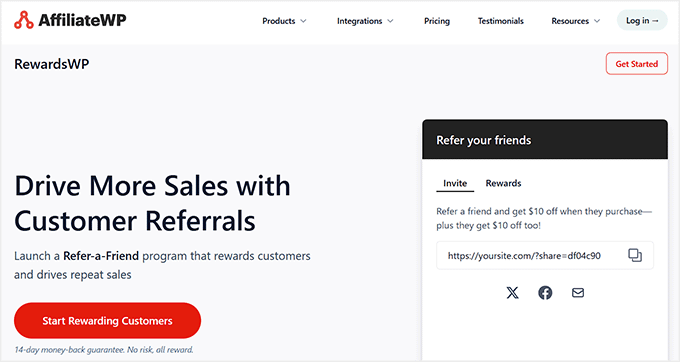
The plugin enrolls customers automatically after purchase. It also provides a built-in widget where customers can copy their link, share it, and track their rewards in real time.

The reward setup is flexible, although the available options will vary depending on your plan.
The free RewardsWP plugin lets you offer fixed discount rewards. However, you’ll need to upgrade to a premium plan to offer percentage discounts, free gifts, or separate incentives for the referrer and their friend.

Customers can share their referral link through social media or email using pre-built templates. This removes friction and encourages more sharing.

To get started, see our step-by-step guide on setting up a WooCommerce rewards program.
Why I recommend RewardsWP: If you want to reward existing customers for referrals rather than manage professional affiliates, RewardsWP is a great, lightweight solution. It focuses specifically on turning happy buyers into brand advocates through word-of-mouth marketing.
Keep in mind that RewardsWP is not meant to replace tools like AffiliateWP or Easy Affiliate. Instead, it acts as a bonus option to boost sales through organic customer referrals.
Get started with the RewardsWP plugin!
4. SliceWP – Launch a Affiliate Program for Free
| Pros | ✅ Tracks referral visits and generates real commissions ✅ Creates the affiliate account, registration, and password reset pages for you during setup ✅ Blocks affiliates from earning commission on their own purchases by default ✅ Signs up unlimited affiliates with no cap and no transaction fees |
| Cons | ❌ The free version only records manual payments ❌ The free version shows an upgrade prompt instead of charts on the Reports screen |
| Pricing | Lite version of SliceWP available on WordPress.org. Pro starts at $169/year for one site. |
| Best For | Launching a working affiliate program at no cost. |
SliceWP lets you launch a WordPress affiliate program without paying for a premium plugin upfront. Its free version includes all the essential features you need to track referral visits, calculate commissions, and provide partners with a dedicated account dashboard.
This is a risk-free way to test whether affiliates will actually promote your products, before you invest in an annual license. However, the free version doesn’t handle direct affiliate payouts inside WordPress, so you’ll need to process those payments manually unless you upgrade to a premium SliceWP plan.
My Experience
I installed the free version of SliceWP on a WordPress site running WooCommerce.
Straight away, I was impressed by the setup process. Running the wizard created three published pages for me: Affiliate Account, Affiliate Registration, and Affiliate Reset Password.
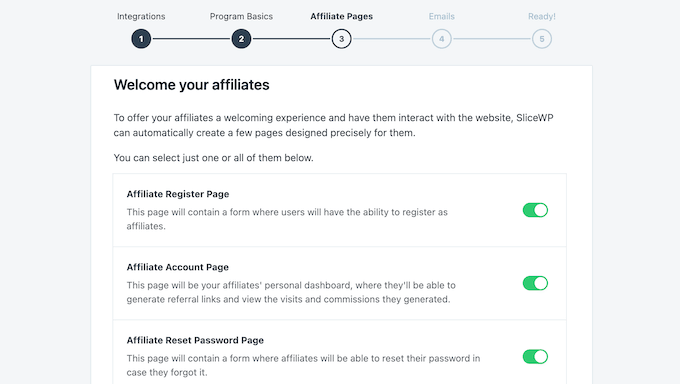
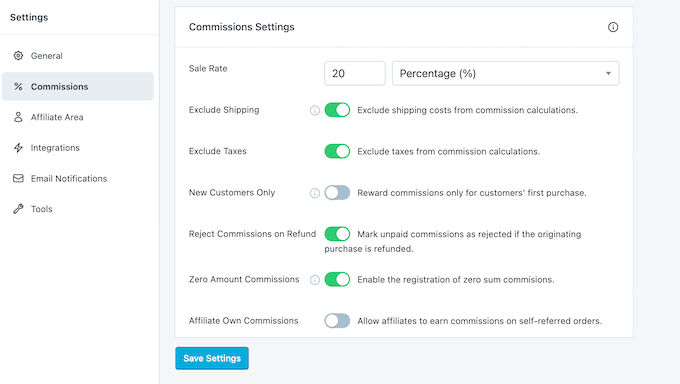
The affiliate login form is built directly into the account page rather than sitting on a separate page. The default settings are sensible, starting with a commission rate of 20% of the order value with shipping and tax excluded.
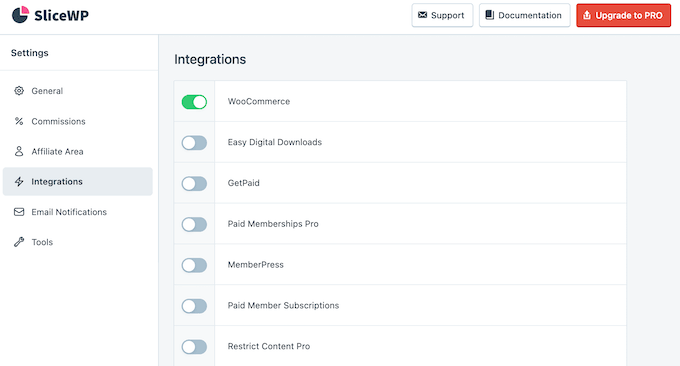
However, before running your first test order, make sure to switch on your store under SliceWP » Settings » Integrations.
On a fresh install, every integration is turned off by default. My first referred order produced no commission and showed no warning to explain why, which is an easy setting to miss.
Once I’d enabled WooCommerce, the tracking worked as expected.
Visiting a referral link recorded the landing page, referring site, and timestamp, then set a 30-day tracking cookie.
There is another setting you need to watch out for.
When I refunded my test order, the affiliate’s commission remained payable because the setting to reject unpaid commissions on refunded orders is turned off by default under SliceWP » Settings » Commissions.
If you leave this setting disabled, you risk paying commissions on orders you’ve already refunded.
Although the core plugin is free, it does have some limitations.
Firstly, it has no built-in payout options, so you’ll need to pay affiliates manually via PayPal or bank transfer and record those payments manually.
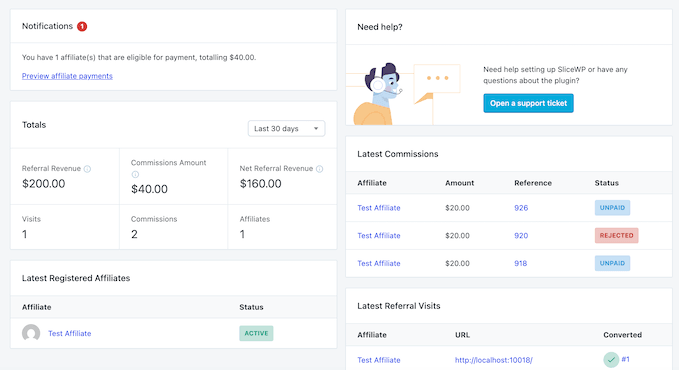
Secondly, while SliceWP lists basic visits, commissions, and registered affiliates, it hides detailed performance charts and deep analytics behind a paywall.
If you want to compare free options side by side first, see our guide to the best WooCommerce affiliate plugins.
Why I recommend SliceWP: This is a great starting point if you want to test an affiliate program before investing in a premium plugin. The free version of SliceWP tracks real referrals and calculates commissions without costing a cent.
However, you will need to pay affiliates manually and rely on basic text lists rather than detailed performance graphs unless you invest in a paid license.
Get started with the SliceWP plugin!
5. Awin – Tap Into a Global Affiliate Network

| Pros | ✅ Opens up a large global network of publishers who are already looking for programs to join ✅ Runs as a fully hosted platform, with no plugin or server maintenance on your side ✅ Tracks referrals and reports on commissions automatically ✅ Processes affiliate payments for you through its own system ✅ Supports multiple campaigns and advertiser accounts |
| Cons | ❌ Requires approval before you can join the network ❌ Charges a monthly platform fee plus 3.5% of every transaction ❌ Locks you into a three month minimum term with 14 days’ cancellation notice ❌ Gives you less control over branding and commission rules than a self-hosted plugin |
| Pricing | Awin Access starts at $49/month + 3.5% tracking fee on each transaction. |
| Best For | Recruiting from a ready-made pool of publishers instead of finding affiliates yourself. |
Awin is a global affiliate marketing network that connects merchants with thousands of publishers worldwide. It handles tracking, reporting, and payments via its own platform.
Since Awin works as a fully managed network, you do not need to build or maintain your own affiliate system. Instead, you focus on managing relationships and campaigns.
My Experience
Awin’s biggest strength lies in its instant reach. It connects you to a massive pool of affiliates, so you don’t need to build a network from scratch. This removes a lot of the time-consuming manual work typically associated with recruiting a new partner.
The tracking and reporting system felt solid during testing, and clearly showed my performance data and campaign results.
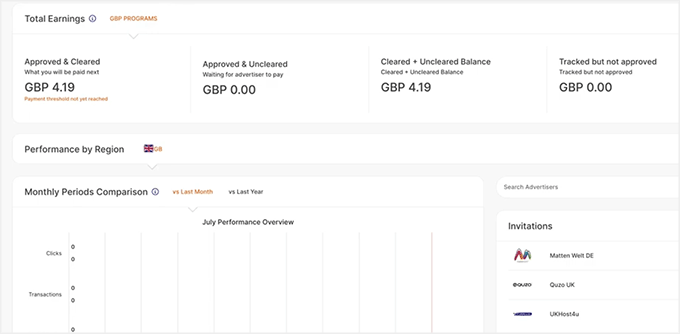
I also found the payment handling convenient since everything is processed through the Awin platform.
However, the costs do stack up quickly. In addition to the $49/month platform fee, Awin takes a 3.5% tracking fee on each transaction. Because you pay this fee on top of your standard affiliate commission, network platform costs can quickly reduce your profit margins.
Why I recommend Awin: If you want fast access to a large, established affiliate network, Awin is a great option. It works best for growing businesses that want to scale quickly and prefer automated platform management over manual recruitment.
Which Affiliate Tracking Software Should You Choose?
Choosing the right affiliate software comes down to your overall budget and how much you want to handle manually.
That said, here’s how to select the best fit for your store:
- If you want a professional self-hosted program – Choose AffiliateWP for seamless experience. Plus, you can send payments directly to affiliate bank accounts.
- If you’d rather not recruit affiliates at all – Go with Awin. It gives you immediate access to an established network of publishers, in exchange for a fixed monthly platform fee and a transaction percentage on referred sales.
- If your own customers are your best promoters – Use RewardsWP. It turns buyers into brand advocates by rewarding them for referring friends. This allows you to boost sales without setting up an entire affiliate network. You can also run RewardsWP alongside AffiliateWP if you decide to expand into both channels later.
Frequently Asked Questions About Affiliate Tracking Software
When should I choose a WordPress plugin vs. an affiliate network?
You should choose a WordPress plugin like AffiliateWP or Easy Affiliate if you want complete control over your program. You pay one predictable yearly fee, and the platform never takes a cut of your revenue.
Do affiliate plugins still track referrals if someone uses an ad blocker?
In most cases, yes, because self-hosted plugins run on your own domain rather than relying on a third-party tracking platform.
Plugins like AffiliateWP and Easy Affiliate generate a first-party cookie stored directly by your website. Standard ad blockers mainly block third-party domains and known external tracking scripts. This means your self-hosted referral tracking usually passes right through undetected.
As a fallback, you can set up coupon tracking.
Assigning each affiliate a unique discount code ties the transaction directly to them at checkout without relying on cookies, scripts, or URL parameters. It bypasses browser restrictions completely while offering added protection against forced clicks and common affiliate marketing scams.
How do I recruit affiliates if I use a self-hosted plugin?
Building a self-hosted affiliate program means taking charge of your own recruitment. You can start by emailing your most loyal customers and newsletter subscribers to see if they want to partner with you.
You can also build a dedicated ‘Affiliate Program’ page on your site and place a link to it in your website footer. Finally, consider reaching out directly to bloggers, influencers, and content creators who would be a good fit for your brand.
If you don’t want to manage a full affiliate program, you can also use a simpler refer-a-friend system like RewardsWP. It automatically rewards your existing customers for referring new buyers, so you don’t need to recruit affiliates separately.
I hope this article helped you find the best affiliate tracking software for your WordPress site. You may also want to see our step-by-step guide on how to easily add an affiliate program in WooCommerce.
If you liked this article, then please subscribe to our YouTube Channel for WordPress video tutorials. You can also find us on Twitter and Facebook.


Dennis Muthomi
I’ll personally go for AffiliateWP because of integration with Easy Digital Downloads. That’s a plus for me.
jamiesbw
is there an affiliate program with little or no setup fees that works on the basis of commission for sales made.