


Would you like for users to invite their friends to become members of your WordPress site?
People trust recommendations from people they know. That makes personal invitations a great way to increase the number of registered users of your social network or membership site.
In this article, we will show you how to allow your users to invite their friends to register in WordPress.

Why Allow Users to Invite Their Friends?
If you are looking for an easy and cost-effective way to add new users to your membership site or WordPress social network, then allowing your existing users to invite their friends is one of the most effective strategies.
This kind of word-of-mouth advertising works really well because it uses social proof, so it’s very common on almost all popular registration sites.
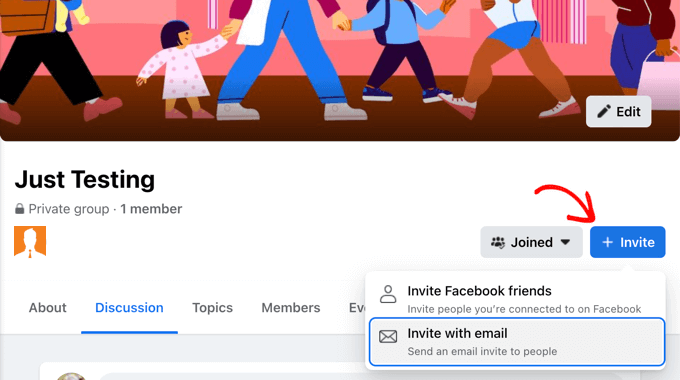
For example, Twitter users can invite their followers to join a community, and on Facebook, they can invite friends to join a group.
If you make money from your website, such as offering paid memberships or selling products in an online store, then you can also pay your users to promote your website by creating a referral or affiliate program.
With that being said, let’s take a look at how to allow your users to invite their friends to register in WordPress.
This is what we’ll cover in this article:
- Method 1: Adding a Simple Invitation Form to Any WordPress Website
- Method 2: Allowing Users to Invite Friends to Your BuddyPress Site
- Other Ways to Grow Your Registered Users
Method 1: Adding a Simple Invitation Form to Any WordPress Site
The easiest way to allow your users to invite their friends to your website is to add a simple invitation form to your sidebar. However, this method will not allow you to track which invitations were responded to.
What if you need to track invitations? If you have a BuddyPress site, then you should follow Method 2 below. If you have an online store or membership site, then we recommend you create a referral or affiliate program instead.
For the simple invitation form, we’ll use WPForms Lite because it’s free and easy to use. However, the premium version of WPForms will store all form entries in your WordPress dashboard after they are submitted. This will let you more easily see how many invitations have been sent and who they were sent to.
The first thing you need to do is install the Contact Forms by WPForms plugin. For more details, see our step by step guide on how to install a WordPress plugin.
Creating the Invitation Form
Once the plugin is activated, you can create your invitation form by navigating to the WPForms » Add New page. Here you can give your form a name, and then click the ‘Create Blank Form’ button.
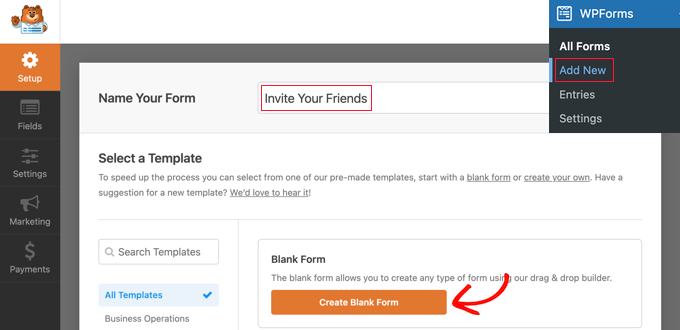
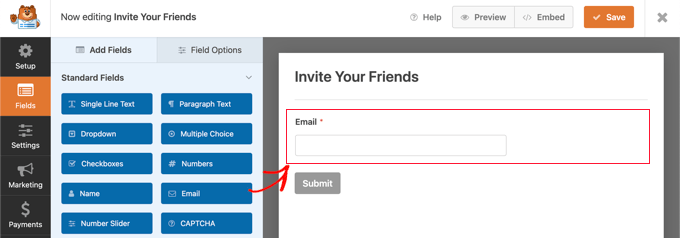
This will open the WPForms drag and drop form builder. You will see a preview of the form on the right, and this is currently blank. You’ll also see a list of form fields on the left.
You need to locate the Email form field and drag it onto the form.
Next, you need to configure the Email field.
When you click on the field, its settings will be displayed on the left.
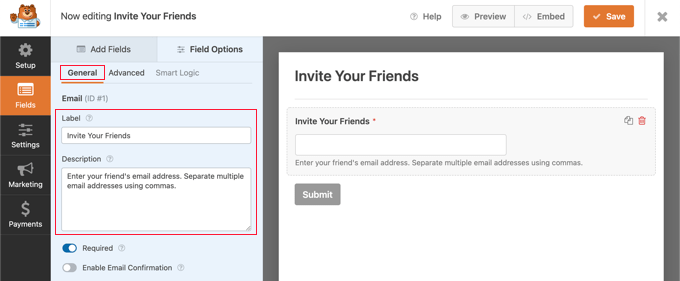
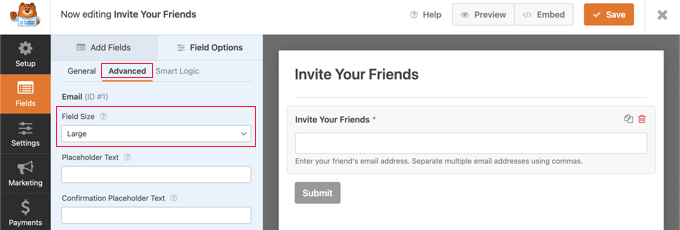
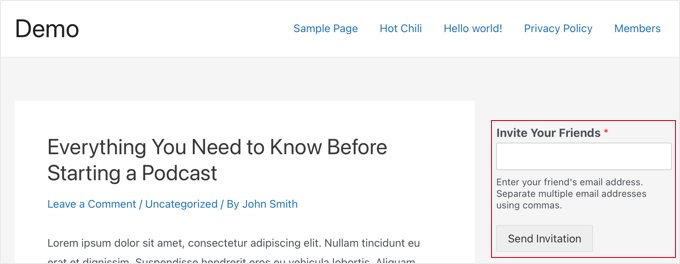
Here you should change the label to ‘Invite Your Friends.’ After that, you can add a description that will be displayed under the field. This should let your users know what to enter, such as, ‘Enter your friend’s email address. Separate multiple email addresses using commas.’
Now you can configure the field so that it’s displayed across the full width of the sidebar. Simply click on the Advanced tab and then select ‘Large’ from the Field Size dropdown menu.
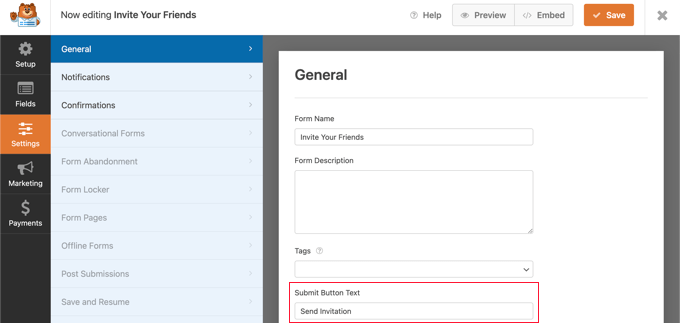
You’ll find more settings by navigating to Settings » General. For example, you can also change the label on the button to something more helpful.
In the Submit Button Text field, simply type ‘Send Invitation.’
Composing the Invitation Email
Next, you’ll need to head over to Settings » Notifications and set up the invitation email. This will be a confirmation email sent after form submission.
You can use smart tags to automatically fill in the details of the user filling in the form as well as the information they submitted on the form. You’ll find a complete list of smart tags on the WPForms website.
In the ‘Send To Email Address’ field, you need to enter the email address that was submitted in the form. When you click the ‘Show Smart Tags’ link, a list of available fields will be displayed. Simply click on the ‘Invite Your Friends’ field.
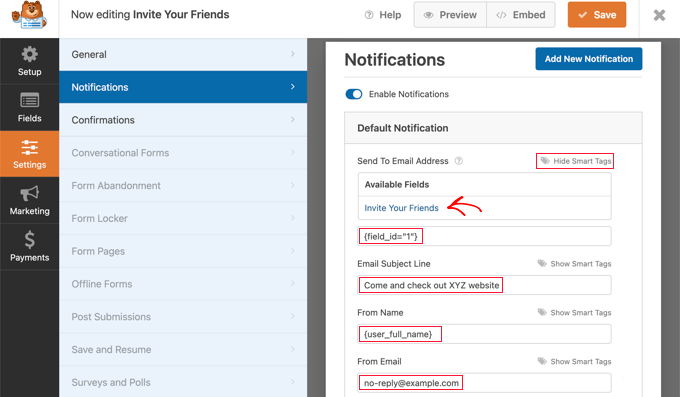
You should type in the email subject line you wish to use. After that, you can enter the user’s full name in the ‘From Name’ field by entering the smart tag {user_full_name}.
It’s important that you choose the correct ‘From Email’, or your invitations may be sent to the spam folder. Make sure that the domain name used in the email address matches your WordPress blog.
For example, if your website’s URL is www.example.com, then the email address should look like john@example.com.
That means you shouldn’t enter the user’s email address in the ‘From Email’ field. Instead, you can use {admin_email}, which is the default setting. Alternatively, if you are concerned about your admin email receiving spam, then you can use an email address that doesn’t exist, such as no-reply@example.com.
Next, you should scroll down to the ‘Reply-To Email Address.’ Here you can enter the user’s email address using the smart tag {user_email}. Then, if the person who was invited replies to the email, it will be sent to the user who invited them.
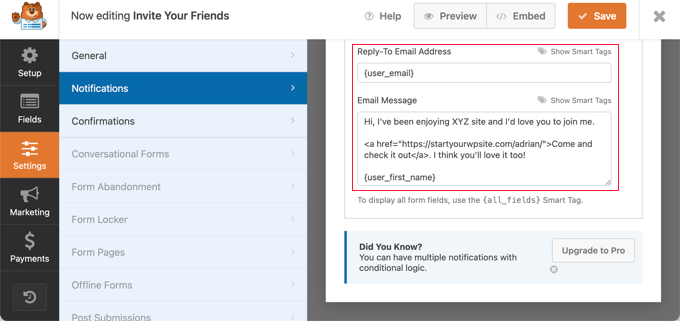
Finally, you need to compose the invitation message you wish to send in the ‘Email Message’ field. We recommend you keep it short and casual. You can use smart tags in the message, such as ending the email with the user’s name by entering {user_first_name}.
You will need to add a link to your website. This link could take the invited person to your home page or a user registration page.
Better still, you can link to a landing page that clearly explains the features and benefits of your website.
Creating a Confirmation Message for Form Submission
Now you should navigate to Settings » Confirmations. Here you can compose a brief message that’s displayed to the user after they invite their friends.
You should leave the Confirmation Type as ‘Message’ and then type a brief thank you message in the Confirmation Message field.
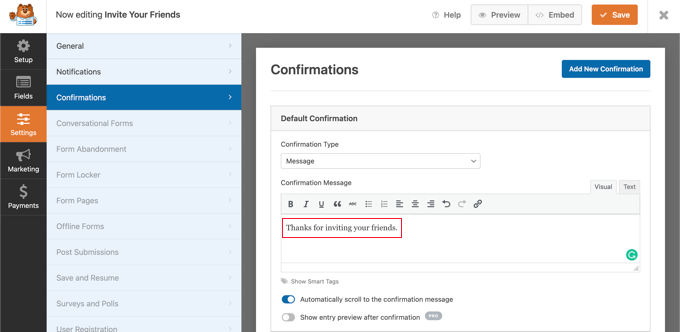
Now that you have finished the setup of your invitation form, make sure you click the orange Save button at the top of the screen to store the settings. Once you’ve done that, you can click the ‘X’ button to close the WPForms editor.
Adding the Invitation Form to Your WordPress Site
All you need to do now is add the form to your website’s sidebar or another widget-ready area. You’ll need to head over to the Appearance » Widgets page in the WordPress admin area.
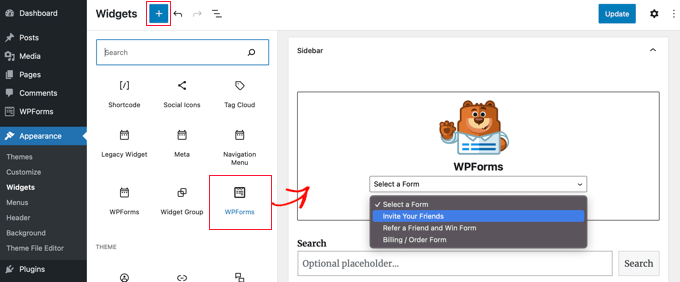
Once there, you should locate the WPForms block and drag it onto your sidebar. For more details, see our guide on how to add and use widgets in WordPress.
After that, you need to select the ‘Invite Your Friends’ form from the Select a Form dropdown. Don’t forget to click the Update button to store your settings.
Now you can visit your website to see the simple invitation form in action.
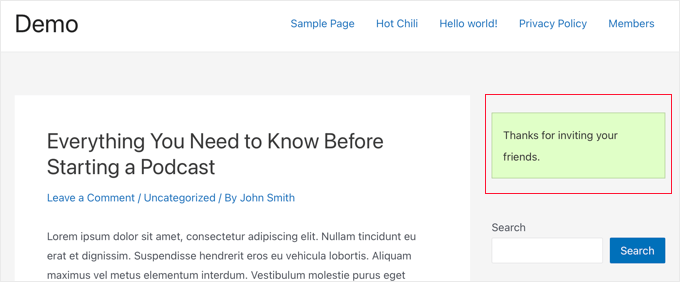
When a user sends an invitation using the form, the thank you confirmation message is displayed in place of the form.
Note: If the invitation emails are not received, then see our guide on how to fix WordPress not sending email.
Method 2: Allowing Users to Invite Friends to Your BuddyPress Site
BuddyPress is a sister project of WordPress.org that turns your WordPress site into a social network, allowing you to build your own online community.
It allows you and your users to create groups, and each group can have its own members and activity streams. Users can join these groups and invite others, but only if they are already members of your site.
If you use BuddyPress and want to let your users send invitations to their friends who haven’t yet signed up, then you’ll need to install the Invite Anyone plugin. For more details, see our step-by-step guide on how to install a WordPress plugin.
Upon activation, you should navigate to Settings » Invite Anyone to configure the plugin. On the ‘General Settings’ tab, you can customize the email message that is sent when someone is invited to register on your site.
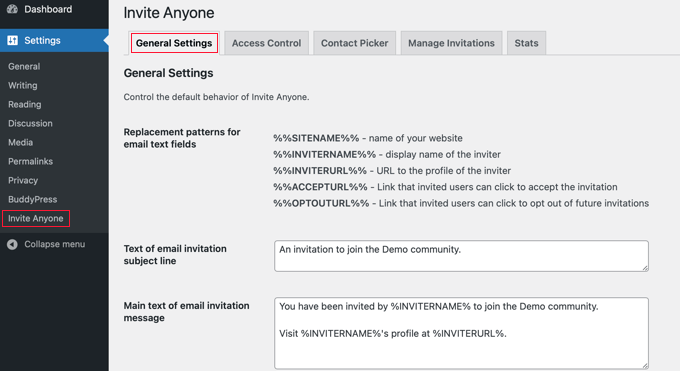
There are plenty of customization options for the email subject, body, and footer. You can also allow your users to customize the email before it is sent, limit the number of emails that can be sent at one time, and more.
If you like, you can also place limits on who can send invitations to your site. For example, you may not want new users to be able to invite their friends right away. This will discourage spammers who want to set up fake accounts.
To set up these limits, you need to click the ‘Access Control’ tab at the top of the page, and then select the ‘A limited set of users’ option.
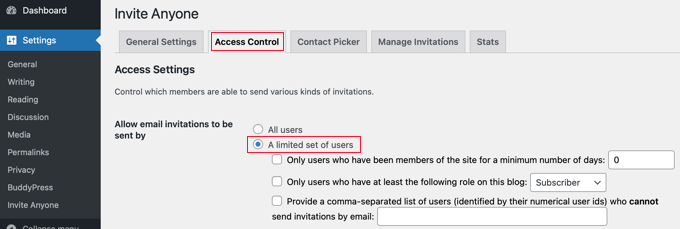
Now you will see three checkboxes that let you decide which users can send invitations.
You can limit invitations to users who have been members of your site for a minimum number of days, or to those who have a certain member role. You can also ban specific users from being able to send invitations by typing a list of user IDs separated by commas.
Once you are happy with these settings, you will need to scroll to the bottom of the page and click the ‘Save Changes’ button to store your settings.
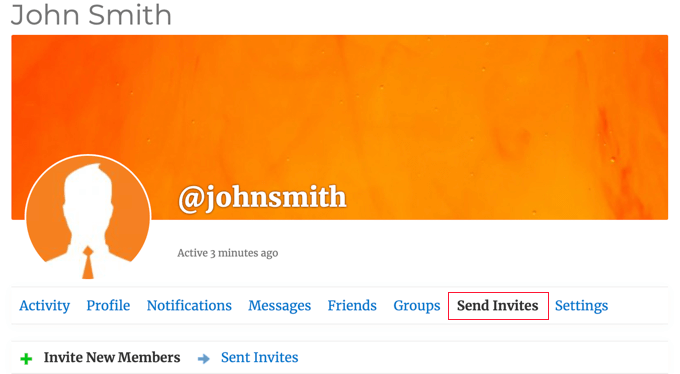
Now your users will be able to send invitations to their friends, directly from their own profile page just by clicking the ‘Send Invites’ tab.
After that, they simply type up to five email addresses in the first text box, and if you allow them, they can customize the email message that will be sent.
If the user belongs to any BuddyPress groups, then they can also check any groups they think their friends might be interested in once they join your site.
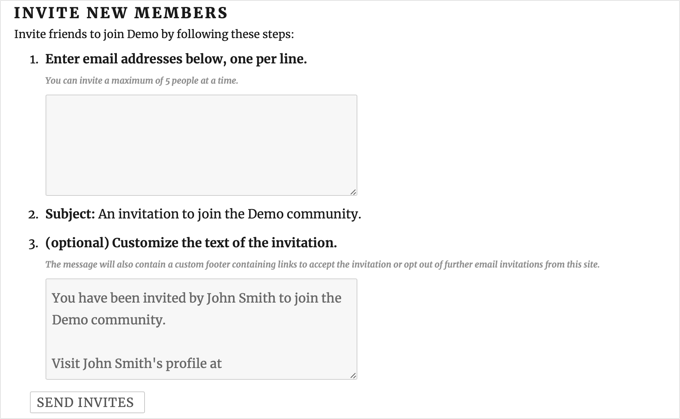
Finally, your users need to click the ‘Send Invites’ button at the bottom of the page. After that, the plugin will send the invitations to their friends to register on your website.
Note: If your website is having trouble sending emails from your website, then see our guide on how to fix WordPress not sending email issue.
Once the invitations are sent, the user can see the status of all of their sent invitations.
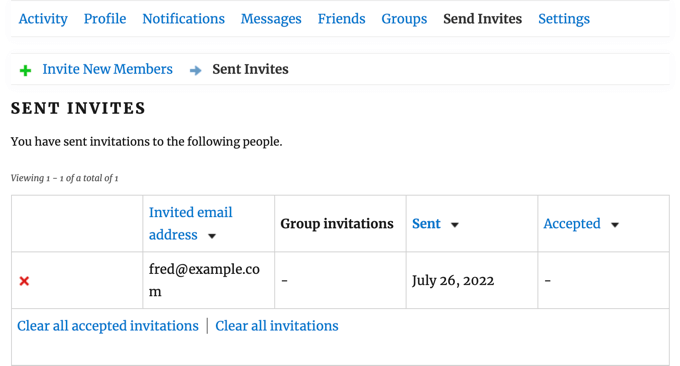
They can clear individual invitations from the list by clicking the red ‘X’ button. They can also clear accepted invitations or all invitations by clicking the links at the bottom of the list. These actions will not cancel the invitations, but simply clear them from the list.
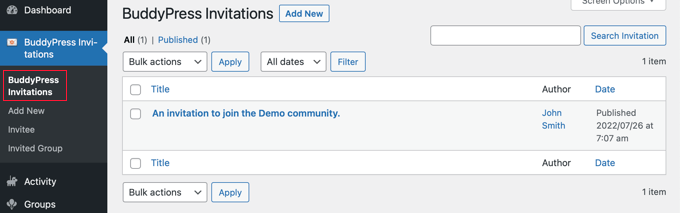
As the site administrator, you can keep track of invitations sent by all users by navigating to the BuddyPress Invitations » BuddyPress Invitations page in your WordPress admin area.
Other Ways to Grow Your Registered Users
Now that your users can invite their friends, let’s have a look at some other ways you can encourage more users to visit your website and sign up.
Luckily, using WordPress gives you access to incredibly powerful tools to grow your business.
- OptinMonster is the best lead generation and conversion optimization tool on the market. It allows you to easily increase your email subscribers, create mobile popups, and make a high converting sales funnel.
- All in One SEO is the best WordPress SEO plugin. It allows you to optimize your content for search engines without any technical skills.
- SeedProd is the best WordPress page builder and theme builder plugin. It lets you easily create a beautiful landing page or custom theme.
- WPForms is the best WordPress form builder on the market. Besides creating an invitation form, you can use it to add a custom login page and sign-up form to your site.
- MonsterInsights allows you to easily track your website performance using Google Analytics. It shows beginner friendly reports so you can track website visitors and set up eCommerce tracking.
Need more recommendations? See our list of must have WordPress plugins for all websites.
We hope this tutorial helped you learn how to allow users to invite their friends to register on your WordPress website. You may also want to learn how to create an email newsletter the right way, or check out our list of the best GoDaddy alternatives.
If you liked this article, then please subscribe to our YouTube Channel for WordPress video tutorials. You can also find us on Twitter and Facebook.




Syed Balkhi says
Hey WPBeginner readers,
Did you know you can win exciting prizes by commenting on WPBeginner?
Every month, our top blog commenters will win HUGE rewards, including premium WordPress plugin licenses and cash prizes.
You can get more details about the contest from here.
Start sharing your thoughts below to stand a chance to win!
Cornelius says
How do you change the sent from wordpress@
WPBeginner Support says
For changing the from message, you would want to take a look at our article below:
https://www.wpbeginner.com/plugins/how-to-change-sender-name-in-outgoing-wordpress-email/
Admin
chanda says
After users click send invitation… the when continues to turn and never stops. How can this be fixed?
WPBeginner Support says
You would need to reach out to the plugin’s support for that issue, we will look into updating this article when we are able.
Admin
Arlene says
How to customize the invitation url send %inviteurl%?
WPBeginner Support says
For customizing the URL you would want to check with the plugin’s support for the options available
Admin
Kingsley says
The plug in is nice, but for some reason, when i try to invite two different people, it sends two (2) emails to the last email address i entered, and no email is sent to the first
Shreya says
This is really helping one. I am searching for it. Thanks for share.
Arihant says
Hey Can you share a plugin that can automatically import contacts from gmail, yahoo, facebook, etc & invite them.
Because i think hardly anyone would remember email address.
And even if they did, no one is wanting to write them down one by one.
Editorial Staff says
It would be a good add-on for this plugin. We don’t know of any plugin that does that.
Admin