


Do you want to allow users to save posts as favorites in WordPress?
By adding this feature, your members and users can bookmark their favorite posts, or any content they want to read later.
In this article, we will show you how to allow users to add favorite posts in WordPress by creating a bookmark button.
Why Allow Users to Add Favorite Posts in WordPress?
Growing your traffic with new visitors is important, but just as important is getting those visitors to stay on your site, engage with your content, and return to read more.
On a typical site, over 70% of visitors will never return. That’s why smart website owners start an email newsletter and use other tactics to get more repeat visitors.
If you run a website that allows user registration, such as a membership site or online store, then one good way to get your users to return is to allow them to favorite blog posts.
When your users can keep a list of their favorite content, they have a reason to keep revisiting your site and renewing their membership.
Plus, you can show all your visitors the most popular posts on your WordPress website to keep them engaged and reading more.
With that in mind, let’s see how to allow users to add favorite posts on your WordPress blog.
How to Allow Users to Add Favorite Posts in WordPress
Before a visitor can favorite a post, they must be able to create an account for your website.
If you don’t already have this set up, then there are a few different ways to do it. You can create a WordPress membership site if you’d like to monetize your site by creating premium content for members only. Or you could simply allow user registration on your WordPress site with default user roles and capabilities.
Once you’ve enabled user registration, you’re ready to add a ‘favorite’ button to your site.
The easiest way to add a bookmark feature is by using the CBX Bookmark & Favorite plugin. This plugin lets you add a bookmark button to your posts, pages, or custom post types.

To start, you’ll need to install and activate the CBX Bookmark & Favorite plugin. If you need help, then please see our guide on how to install a WordPress plugin.
Once the plugin is activated, you can easily add a bookmark button to your site.
The CBX Bookmark and Favorite plugin has a block that allows you to add a bookmark button to a particular page or post. This is useful if you want to control exactly what content your members can favorite, so we’ll be covering the block method towards the end of the post.
However, adding a button to every single page and post can take a lot of time and effort particularly if you’ve already published lots of content.
With that in mind, you may want to configure the plugin to automatically add a bookmark button to all your pages, posts, or pages and posts.
To add the bookmark button automatically, head over to CBX Bookmark » Setting.
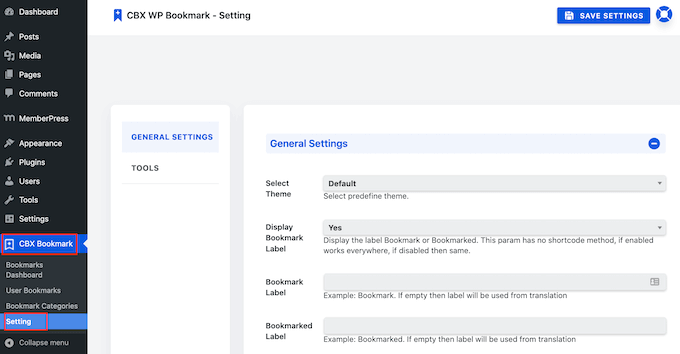
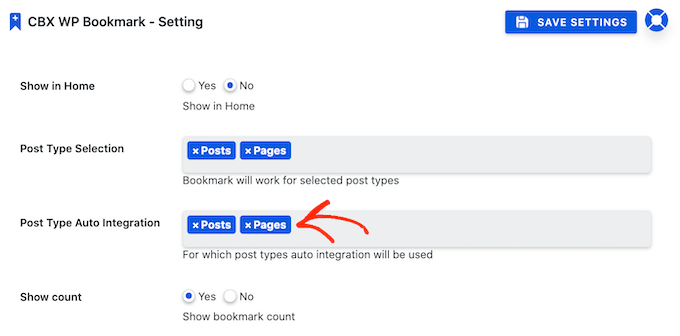
On this screen, scroll to the Post Type Selection section.
You can now click on the field to open a dropdown showing all of the different content where you can add a bookmark button.
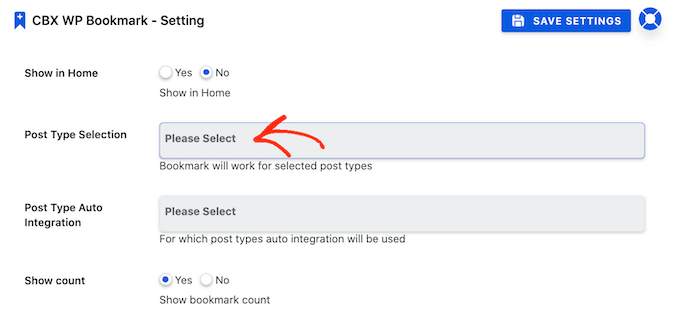
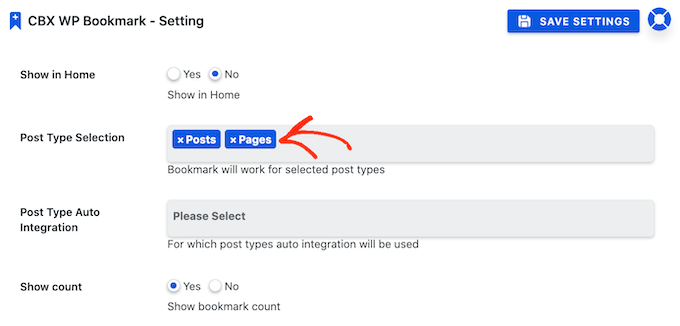
Simply click on the different content types where you want to add the button.
In the following image, we’re letting our members favorite any page or post.
Once you’ve done that, you’ll need to enable the plugin’s auto integration feature. This will add a bookmark button to the different content types in the ‘Post Type Selection’ field.
To do this, click on the field next to ‘Post Type Auto Integration.’ You can then click to select all of the different content types where you want to add a bookmark button.
After that, the next step is choosing whether the bookmark button will appear above your website’s content or below the content.
In the following image, you can see an example of how the bookmark button will look when displayed above the post content.
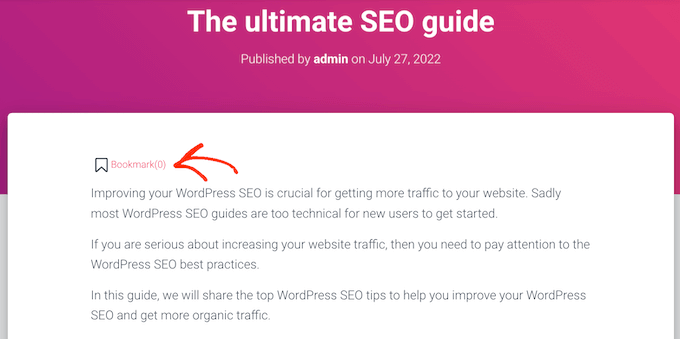
This makes it easy for users to quickly bookmark a post that they plan to read later.
Another option is to show the bookmark button below the post’s content.
A visitor who reaches the end of a post has typically read some, or all of the post content. If they enjoyed that content, then they can use this button to favorite the post so they can easily re-read it later.
Once you’ve decided whether to add the button before or after the post’s content, open the ‘Auto Integration’ dropdown. You can now click on either ‘Before Content’ or ‘After Content.’
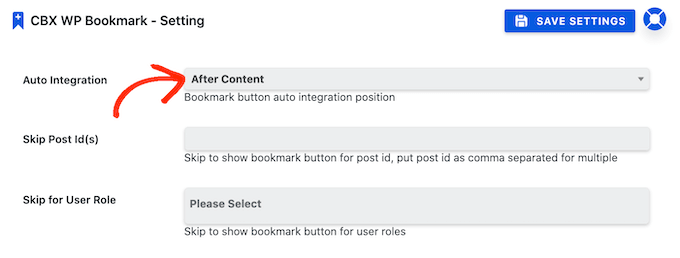
This page has some other settings that allow you to change the label that’s used for the bookmark button, add a button to your archive page, and make other important changes.
These settings are all fairly self-explanatory so you may want to spend some time looking through them. When you’re happy with the changes you’ve made, it’s time to publish your new bookmark buttons.
To do this, simply click on the Save Settings button. Now when you visit your website, you will see a new bookmark button on your pages and posts.
How to Add a Favorites Button to Any WordPress Post or Page
Another option is to add a bookmark button to specific pages, posts, or custom post types using the block editor.
This can take a lot of time especially compared to adding the bookmark buttons automatically. However, it does let you control exactly where the button appears on your website. For example, you could create a ‘favorite’ button in the middle of a post’s content.
To create the bookmark button using a block, simply open the page or post where you want to add the button. Then, click on the ‘+’ icon.
In the popup that appears, type ‘CBX Bookmark Button’ to find the right block.
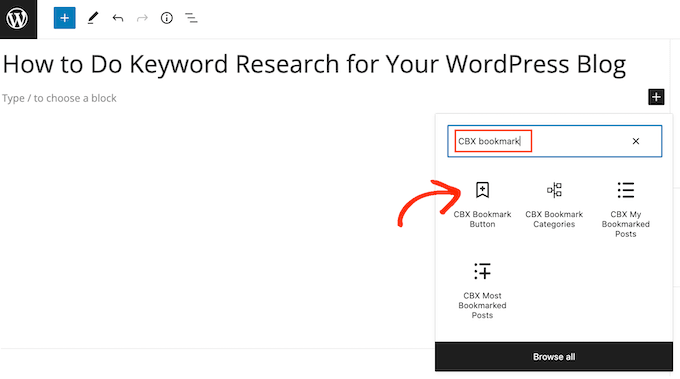
Then simply click on ‘CBX Bookmark Button’ to add the block to your page or post. There are a few different CBX blocks, so make sure you click on the right one.
By default, this block shows a bookmark button and the number of users who have favorited the page or post.
People are more likely to read a post if it seems popular, so this number can be a form of social proof.
However, if your site is new, very few people may favorite your posts. A bookmark button that shows very low numbers can make you seem unpopular.
For this reason, you may want to hide the number until more people engage with your website’s content.
To do this, click on the ‘CBX Bookmark Button’ block. Then in the right-hand sidebar toggle ‘Show Count’ from blue (active) to grey (disabled).
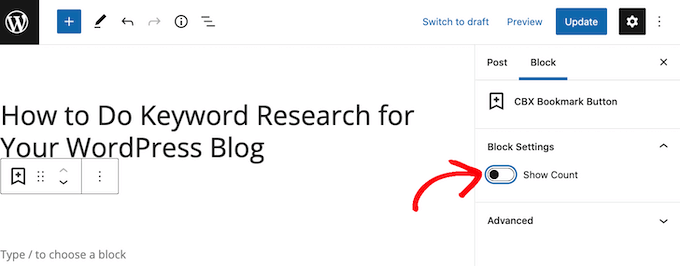
You can now go ahead and update or publish the page as normal.
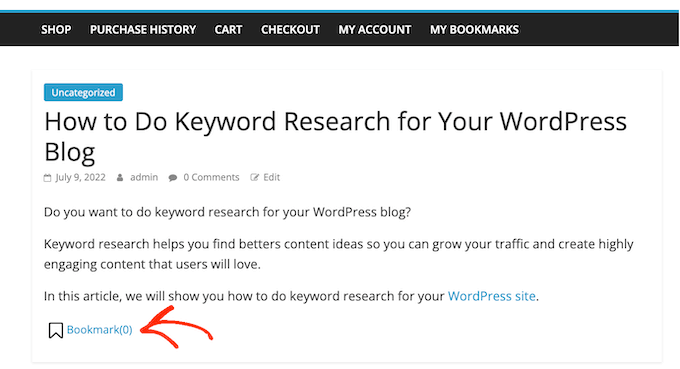
Once you’ve done that, you will see the button live on your website.
How to Add a List of Favorite Categories to your WordPress Website
Users can organize their bookmarked content by adding it to different categories. This will make it easier for users to revisit a particular post, even if they’ve bookmarked dozens of pages and posts.
For example, if you’ve created an online store using WooCommerce, then customers might use categories to create multiple wishlists such as ‘party supplies’ or ‘holiday clothes.’
Users can either create a new category or add the page to an existing category.
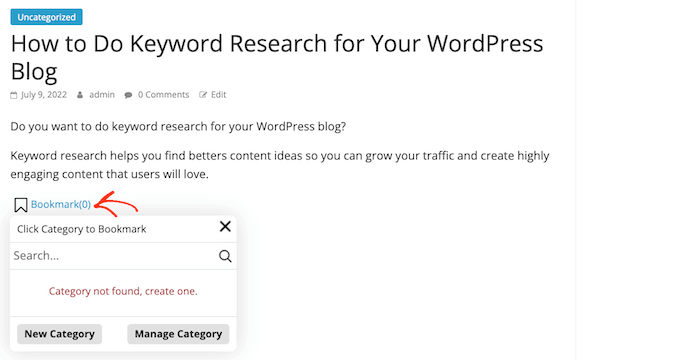
The CBX Bookmark & Favorite plugin even has two special blocks that let you show the user’s categories on your website.
The ‘CBX Bookmark Categories’ block shows all the different categories that the visitor has created. The user can then click on a category to see all the posts they’ve bookmarked within that category.
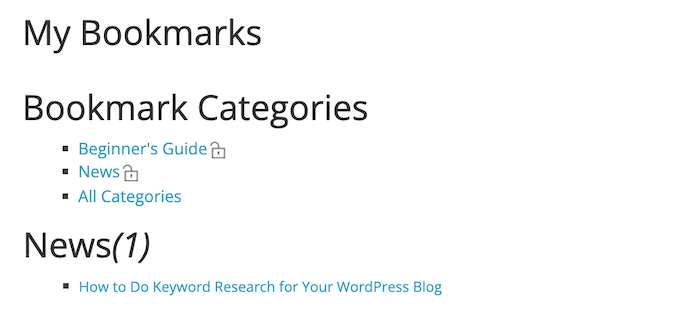
You can add this block to any page or post but it’s a good idea to make sure it’s easy to find. For this reason, you might create a new My Bookmarks page and then add this page to your navigation menu.
Another option is to add the ‘CBX Bookmark Categories’ block to your membership pages. If you’re using MemberPress to power your membership site or online store, then MemberPress creates a My Account page automatically.
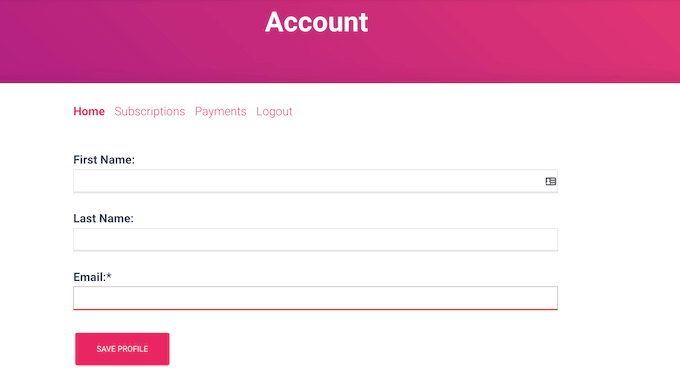
You can add the ‘CBX Bookmark Categories’ block to this My Account page.
In this way, your members can easily revisit any posts that they’ve favorited.
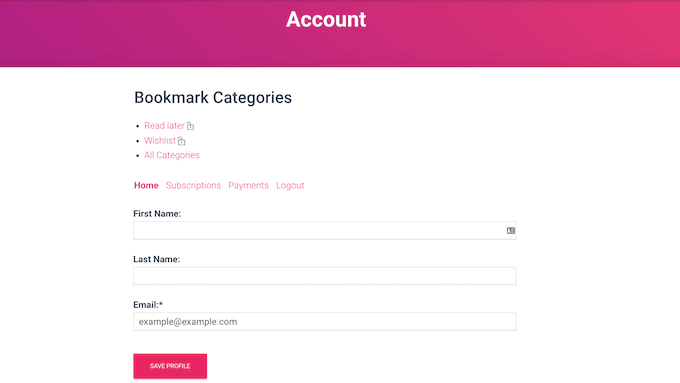
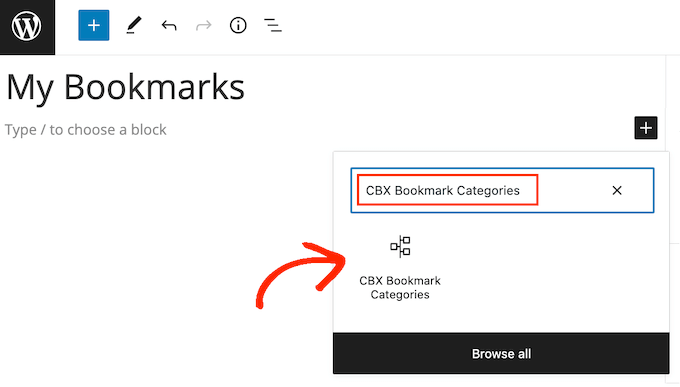
To add a ‘CBX Bookmark Categories’ block to a page or post, simply click on the ‘+’ button.
You can then type in ‘CBX Bookmark Categories’ and click on the right block when it appears.
Then, just save or update your WordPress page as normal.
Another option is to show the user’s bookmarked posts as a list. To do this, click on the ‘+’ button and search for ‘CBX My Bookmarked Posts.’
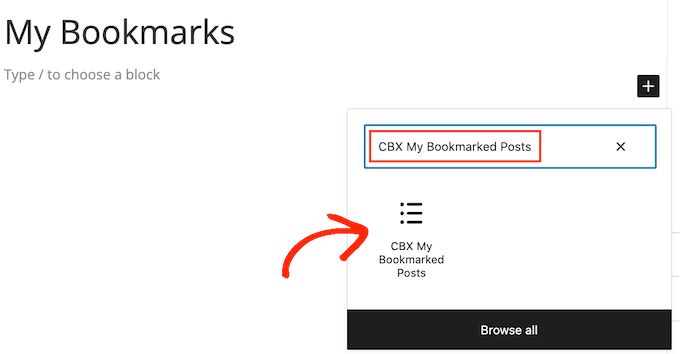
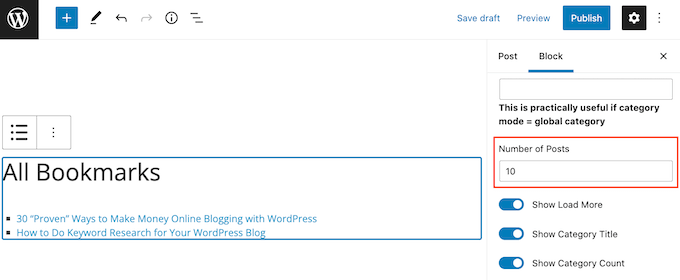
By default, the ‘CBX My Bookmarked Posts’ block will show 10 posts that the visitor has marked as their favorite.
To show more or less posts, just click on the ‘CBX My Bookmarked Posts’ block in the post editor. You can then type a new number into the ‘Number of Posts’ field.
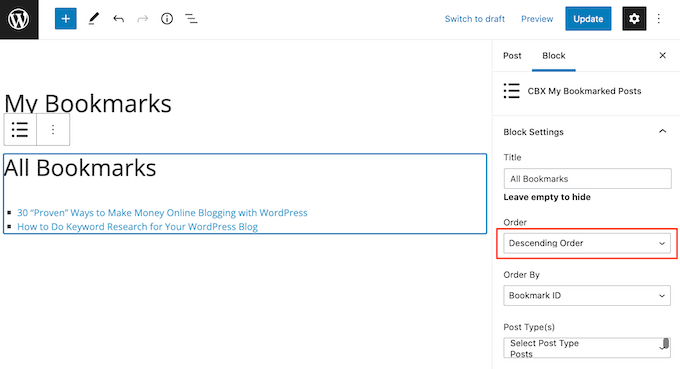
The default setting is ‘Descending Order,’ which shows the most recently favorited posts at the top of the list.
Want to show the most recently bookmarked posts at the bottom of the list instead? Simply open the ‘Order’ dropdown and click on ‘Ascending Order.’
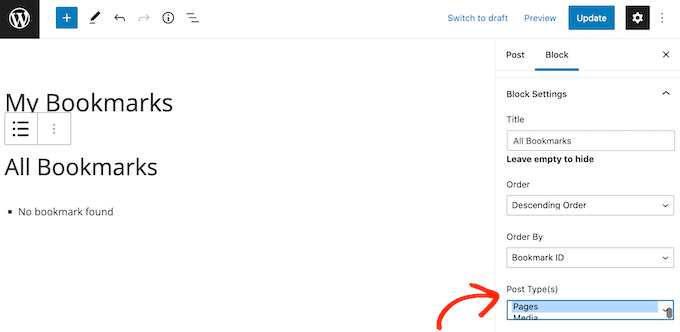
Additionally, this block will show bookmarked content for all post types by default.
If you prefer, then you can show bookmarked content for a specific post type, such as pages or media. To do this, simply find the ‘Post Type(s)’ section and click on the type of content that you want to show.
When you’re happy with how the block is set up, you can either publish or update the page.
How to Show Your WordPress Site’s Most Frequently Bookmarked Posts
FOMO means that we are more likely to try things that we see other people recommending, buying, using, or reading.
With that in mind, you may want to show a list of your site’s most-bookmarked pages.
This can make users want to find out why this content is so popular with other members of the community, which can get you more pageviews. For example, many news aggregator websites have a ‘Most Popular Stories’ section.
It can also encourage visitors to become members by showing that your site has an active community with lots of interesting content.
To add the list to your site, simply open any page, post, or widget-ready area. Then, go ahead and click on the ‘+’ button and type in ‘CBX Most Bookmarked Posts.’
You can then click to add the block to your site.
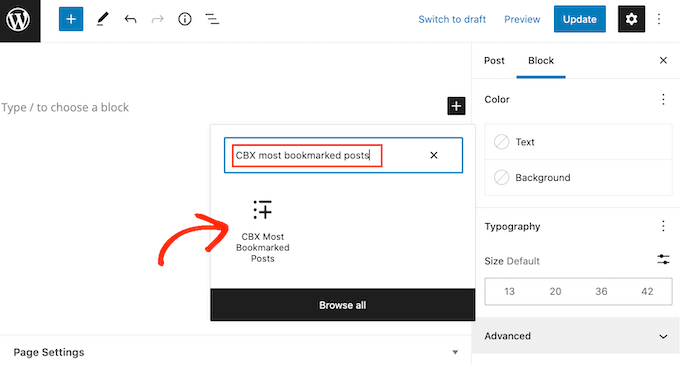
After adding the block, you can customize it by following the same process described above.
You can also change the ‘Duration’ of the list. For example, it can show the most frequently bookmarked posts for the last day or even for a full year.
Choosing a shorter duration typically means that the list will change more frequently. This is a great way to keep members coming back to your site to check out the latest content.
To select a timeframe, simply open the ‘Duration’ dropdown and click the time period that you want to pull posts from.
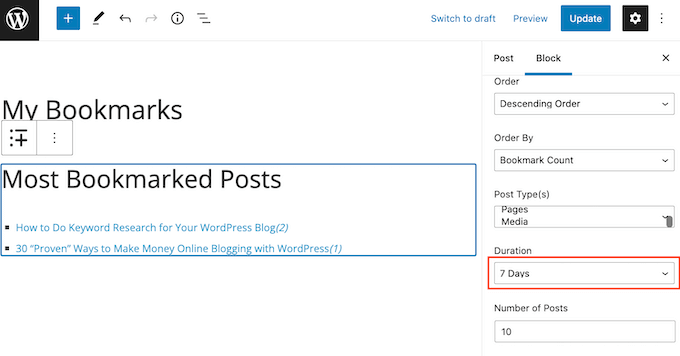
When you’re happy with how the block is set up, don’t forget to save your changes by publishing or updating the post.
Now if you visit your site, you’ll see a list of your site’s most frequently bookmarked content.
How to Monitor Your Audience’s Favorite Posts
Once you’ve added some bookmark buttons to your website, it’s smart to monitor how members use those buttons.
This can help you identify content that’s getting the most user engagement. You can then look for similar products and add them to your affiliate site to try to get even more engagement and sales.
To start, you can see a list of all the different categories that members have created by going to CBX Bookmark » Bookmark Categories.
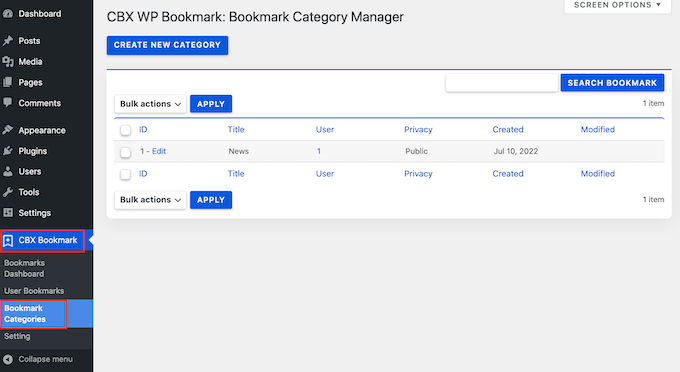
If lots of people use similar categories, then it suggests this type of content is popular with your users. You may be able to increase your blog traffic and keep your members engaged by creating more of this type of content.
You can also see all the posts that users have bookmarked by going to CBX Bookmark » User Bookmarks.
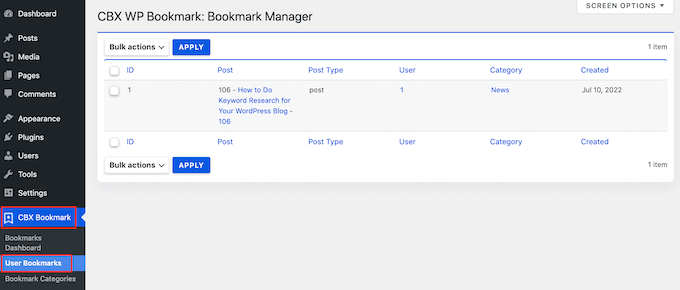
If lots of people favorite the same post, then you should create more of this type of content.
We hope this article helped you learn how to allow users to add favorite posts in WordPress. You may also want to check out our guide on how to create a contact form and the best AI chatbots for your website.
If you liked this article, then please subscribe to our YouTube Channel for WordPress video tutorials. You can also find us on Twitter and Facebook.





Syed Balkhi says
Hey WPBeginner readers,
Did you know you can win exciting prizes by commenting on WPBeginner?
Every month, our top blog commenters will win HUGE rewards, including premium WordPress plugin licenses and cash prizes.
You can get more details about the contest from here.
Start sharing your thoughts below to stand a chance to win!
Globasource says
Thanks a lot for sharing this blog. Really nice and fresh content. All the information is helpful for us.
WPBeginner Support says
You’re welcome, glad you like our content
Admin
Fede Bcc says
Hello,
please, is the “WP Favorite Posts” plugin still updated and supported? I read comments from various people that it is not being updated anymore. If that’s the case, could you please suggest any alternative plugin for user favourite/bookmarking?
Many thanks!
Kind regards,
Fede
Reza says
I have a big problem with it!
when I deselect a post after refresh the page, it come back!
remove not work at all!
daf says
Hi,
I am using this wp-favorite post plugin, and it is finely working. I used the shortcode to show the favorited post into a seperate page. I want to show the count of favorited post in that perticular page.
Is there any method to get the count of Favorited post .??
Huzan says
Hi,
I would like to know if there is a way where in the homepage of my website can be customized based on a users likes/dislikes. The categories he likes their posts should come right at the top.
Looking for a solution.
parteet says
Can you tell me about the WordPress site Designing. I wanna design my site
Matus says
Could you please make a tutorial how to correctly add a hreflang to WordPress?
Hope you’ll reconsider my request.
WPBeginner Staff says
It can, but you will have to make some changes to the plugin which we don’t recommend/
john says
Hello, is that the plugin works with pages ?
jimario says
Will this also work with user profiles. For example, i want my site to allow some users to be able to view a list of other viewers profile pages. On those pages, they won’t be able to edit the other users’ profiles, but they will be able to favorite them–at least that’s what I’m trying to accomplish. Will your method work?
WPBeginner Support says
No, we think you are looking for something quite different this method will probably not work for that.
Admin
Seth says
What plugin do you recommend to get this feature? I tried “GD MyList” and “Favorites” plugins and neither gives the option to see other users lists.
jimario says
Is it possible to have user profiles also saved as favorites? If I give access to users to view profiles of other users, I’d like those users to be able to Favorite any other user profile that they view using this plugin. is this possible using the method you described in your article?
ALEXANDRA says
Hi, is there any way to create few sites for users, for example:
– Add to favorites,
-Add to currently reading,
-Add to watchlist etc
and create specific pages for all this options?
WPBeginner Support says
Yes it is possible to create profile pages with tabs where users can see their favorites, currently reading, watchlist, etc. However, if you want to do that we would recommend using a membership plugin.
Admin
Ayush says
Nice plugin and tip brother, I installed it and worked super-fine.
And i was wondering if there’s a way I can show what posts a particular user favorites in user’s profile, I mean a user can indeed see what posts he/she likes but is there a way a user can see what posts other user favorites ?
Jane says
i just installed it and it worked fine
I have one question. Is it possible when you show all your favorites that you get image of the article/item/blog you liked also? Orelse you have to remember it by the name.
Then i would be sooo happy
(i am newbie in wordpress, so i am not a geek on codes.. i hope its possible to install something so it just work?)
Editorial Staff says
Yes it is possible, but you would have to edit a few codes. wpfp-page-template.php << Look at this file in the plugin's folder. You would basically have to recreate this query in your custom page template. Sorry, it sounds a bit overwhelming, but that is what is needed.
Admin
Jane says
Ok – thanks for the reply. I have been looking for a nice theme where its already done, but with no luck. I am not good enough myself, when it comes to make coding from scratz..
Cory says
I was able to show the content of my post by adding the_content to the template.
Cory says
If you’re having issues with being able to favorite a post and it never shows in your favorites page, try this solution: http://wordpress.org/support/topic/custom-post-type-24?replies=10
worked perfectly for me!
kenny says
This plugin is not functioning at all I installed it and activated it but my server respond with fatal error whoever is a developer of this plugin should get rid of it and stop putting low grades on WordPress awsome plugins.
Abigail Gorton says
I think this is one of thoie plugins we could politely call ‘delicate’. It has an awesome features list and when it works it is just great but it is obviously NOT working on every theme / relaease / server and it is not playing nicely with other plugins.
I really want this functionality. When I first installed it, it was up and running immmediately. When I tried to configure it a bit, it broke. When I uninstalled it, I found that the uninstall was not clean and complete – it was no longer showing in my admin panel, or through standard FTP, but when I did ‘show hidden files’ on FTP it showed up. This is so wrong – shoulda uninstalled when it claimed to form admin and should not be hidden.
So I deleted the hidden files but when I reinstalled the plugin, some of my settings were still as configured which suggest I was not able to fully remove it form my server. So wrong.
I have tried deleting and reinstalling multiple times and cannot get it back to clean.
So I am one of the 50% for whom it does not work, which is a shame as it looke pretty good for the 5 minutes it was up on my site.
Ubaidullah Butt says
When I used “{{wp-favorite-posts}}” for showing up all favorite posts on a page, There was nothing except “Clear Favorites” link. Can anybody help me with this. Thanks in advance.
Editorial Staff says
Did you favorite any post? If not, then do that first and the page will update itself.
Admin
Tito says
Hi, I’m currently have this problem and yup I’ve favorited numerous posts and still nothing. Any ideas? The support forum is all but dead unfortunately
Cheers
Cory says
I have the same issue. Favorited a bunch of posts. they dont show in the favorites page. did you fix it?
Data says
Hoping this will help someone else having this same issue – as mentioned below, you have to have posts favorited already for the page to display anything.
If you have marked something as a favorite and it isn’t showing up, it is likely because you are favoriting a page or custom post type, not a post of type “post.”
If you want to favorite “page” types, or any other custom post type (ex: recipes on a cooking site), then you’ll need to make a simple edit to the wpfp-page-template.php file.
Around line 23 you should see a comment on supporting other post types (page, custom types, etc.).
Uncomment this line: $qry[‘post_type’] = array(‘post’,’page’);
That should do it for adding “page” to the types allowed to be favorited.
If you have other custom types you can add them to that array, or in place of something else, like:
$qry[‘post_type’] = array(‘recipe’,’page’);
Milan says
Thanks a lot. The post is very helpful.
Guillermo Santiago says
The WP Favorite Posts plugin Sucks. It is also deprecated and not functioning properly with wordpress 3.2 up. Do your homework.
Editorial Staff says
The article was written in March. We have the plugin running on sites using 3.4.2 and it is working. Perhaps you should do your homework.
Admin
Pranjal says
Though, it words good but that Gif loading image is continuously showing wherever, I had implemented. And also there’s no support from the developer of this plugin
Jared says
I also used this plugin for a client project a few months back and it worked just fine – despite the voting.
Kyle Suss says
Any idea if this works for custom post types?
wpbeginner says
@Kyle Suss Not sure if it does, but if it doesn’t, it wouldn’t be very hard to make that customization.
frachmadin says
Hi, thanks for this great post. I am currently using GD Star Rating plugin on my blog. Do both have the same or different functions? I am interested to try using the WP Favorite Posts plugin. Thank you.