


Do you want to add an author’s photo in WordPress?
By default, most WordPress themes show the author’s gravatar as their profile picture. However, authors may want to replace this gravatar with another image.
In this article, we will show you how to add an author’s photo in WordPress.

When Do You Need to Add an Author’s Photo in WordPress?
If you run a multi-author WordPress site, then you may decide to add an author info box in WordPress posts. These author bio boxes typically show the author’s profile photo, a brief bio, and link to their website or social profiles.
By default, most WordPress themes use the person’s Gravatar as their author photo. However, sometimes you may prefer to use a different image for the author photo.
As a WordPress website owner, you may even have rules about the kind of photos you want to show in your author bio boxes. For example, maybe you require your authors to use a professional headshot.
If the author’s Gravatar doesn’t meet your rules, then you may want to edit their profile and upload an image that better suits your WordPress blog.
With that in mind, let’s see how you can add an author’s photo in WordPress.
How to Add an Author’s Photo in WordPress
The easiest way to add an author photo in WordPress is by using the PublishPress Authors plugin. This plugin lets authors edit their own profile and author photo by adding a new ‘Author Profile’ area to their WordPress dashboard.
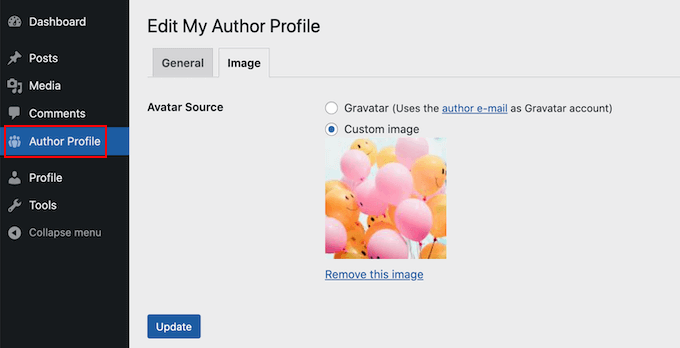
It also gives site admins the power to edit the author’s profile, including changing their photo.
First, you’ll need to install and activate the PublishPress Authors plugin. If you need help, then please see our guide on how to install a WordPress plugin.
Upon activation, head over to Authors » Settings. You can then go ahead and click on the ‘Display’ tab.
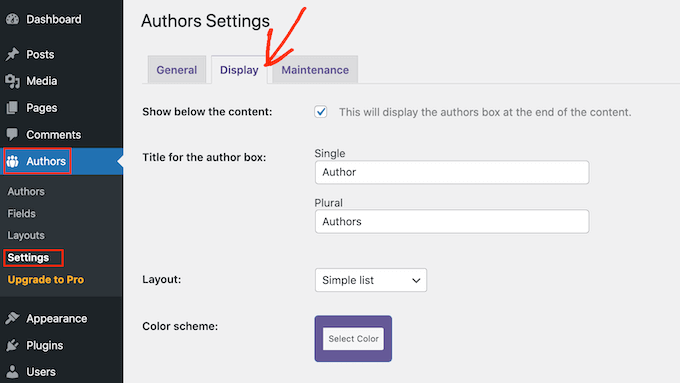
Once you’ve done that, open the ‘Layouts’ dropdown and choose a layout that includes an author photo.
The default layout is ‘Boxed.’ This shows the author’s information in a box, complete with their author photo.
The ‘Centered’ layout is similar to boxed, but with all of the author’s information centered inside the author bio box.
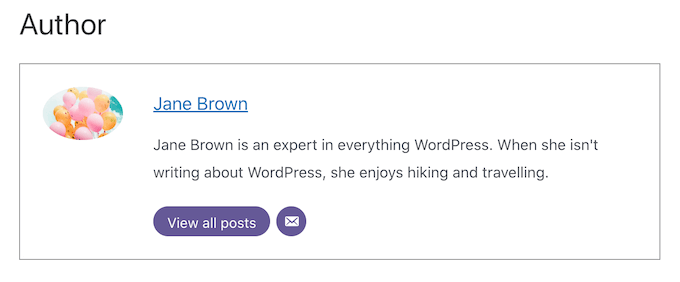
‘Inline with avatar’ and ‘Simple List’ are both layouts that include space for an author photo. Here’s an example of the Simple List layout.

Just be aware that those two layouts don’t have space for a bio. Even if the author has added a bio, it won’t be shown on your website.
After choosing your layout, click on the ‘Save Changes’ button. You can now visit your website to see the author’s photos on your WordPress posts and pages.
Anyone who has registered on your site with the Author role will now be able to upload a photo using the ‘Author Profile’s settings in their WordPress dashboard.
How To Change an Author’s Photo in WordPress
As an admin, you can also use PublishPress Authors to change any of the individual author photos that appear on your website. This is useful if an author chooses a photo that isn’t a good fit for your site.
To change an author’s photo, simply go to Authors » Authors.
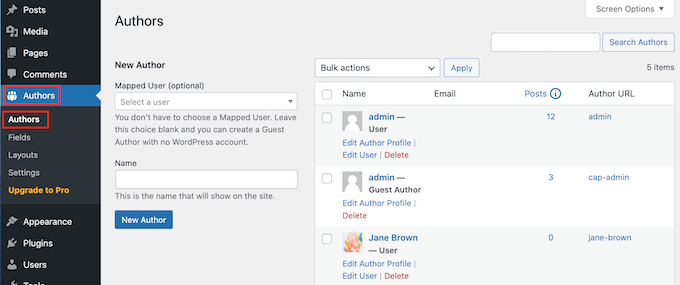
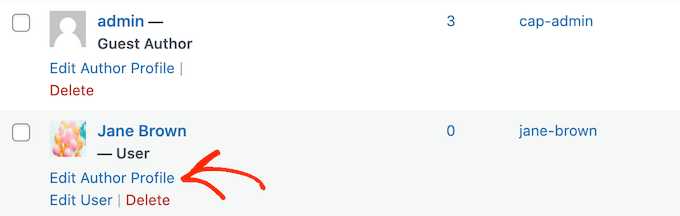
You will now see a list of all the authors who are registered with your WordPress blog.
From here, you can click on an author’s ‘Edit Author Profile’ link.
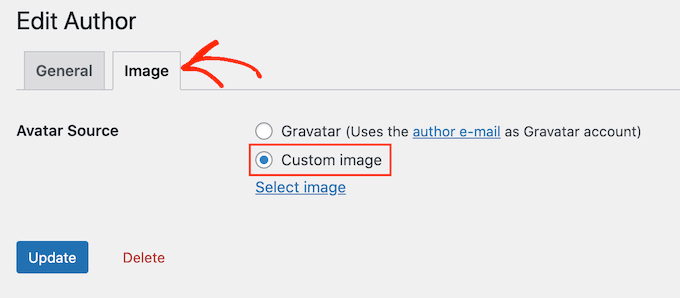
Then, just click the ‘Image’ tab.
By default, PublishPress will try to find a gravatar that’s linked to the author’s email address. To use a different author photo, click on the ‘Custom image’ radio button.
Once you’ve done that, click on ‘Select Image.’ You can now choose any image from your WordPress media library, or upload a new image.
Then, just click on the ‘Update’ button.
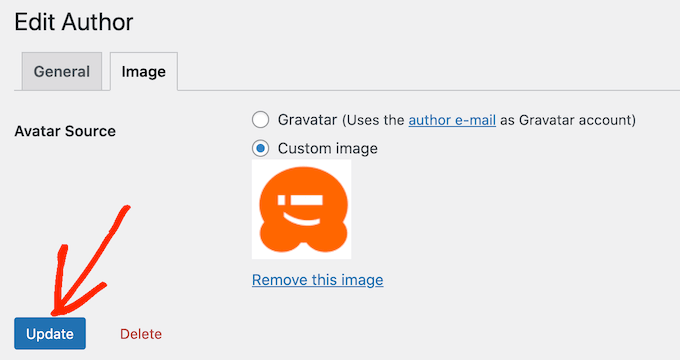
Your website will now use this new image as the author’s photo.
PRO TIP: If you like this tool, we recommend checking out the entire suite of PublishPress plugins. They offer a lot of really powerful tools that can help you produce the best content possible.
We hope this article helped you learn how to add an author’s photo in WordPress. You can also go through our comparison of the best WordPress membership plugins, or see our expert guide on how to install Google analytics in WordPress.
If you liked this article, then please subscribe to our YouTube Channel for WordPress video tutorials. You can also find us on Twitter and Facebook.





Syed Balkhi says
Hey WPBeginner readers,
Did you know you can win exciting prizes by commenting on WPBeginner?
Every month, our top blog commenters will win HUGE rewards, including premium WordPress plugin licenses and cash prizes.
You can get more details about the contest from here.
Start sharing your thoughts below to stand a chance to win!
Arshad says
Always got a perfect solution! Thumbs Up..
WPBeginner Support says
Glad to hear our guide was helpful!
Admin
Rachel says
I have followed these steps, but there is still no option to add a profile pic – it just shows the ‘blank’ image and no button to ‘add image’.
Any ideas?
WPBeginner Support says
You would want to reach out to the plugin’s support if the add image option is not available and they should be able to assist.
Admin
Amanda Don Williams says
Thanks…. awesome plugin very easy to use…
WPBeginner Support says
Glad you like our article
Admin
Aditya says
Hi, i have a user registration page on which user registers as a contributor. Then he/she can submit blogs for moderation. However, on that registration page i want users to add their photos mandatorily so we don’t have to rely on them adding it later from their profiles or do the task ourselves.
WPBeginner Support says
To set a requirement like that, you would want to take a look at our article here: https://www.wpbeginner.com/plugins/how-to-create-a-custom-user-registration-form-in-wordpress/
Admin
Sébastien says
How to show avatar on the frontpage? This method only show on the loaded pages.
WPBeginner Support says
If you are displaying your posts on your home page instead of a static home page then you would need to reach out to the support for your specific theme to edit the theme’s template
Admin
Helen says
Thank you! Been trying to work this out for ages!!
WPBeginner Support says
Glad our tutorial could help
Admin
Tony says
If anyone else is wondering why your photo isn’t showing up in author bio, it may be because there’s also separate settings for the plugin itself. You have to check the box that says, “display author avatars”. At first all I did was went to the author settings and uploaded the photo not realizing that there was extra settings for the plugin itself.
Alexander says
awesome resource….my picture appeared in a twinkle of an eye.thank you very much
Jason says
Doesn’t seem to show my picture. It uploads and shows in the Author page in Word Press but not showing on the actual site. Help!
nestor fuhr says
after proving a dozen plugin…. this is the only that works correctly. Thank you
Adey Jones says
I am using this plugin on a site that also uses co-authors plus as some posts are written by 2 people, but this plugin only allows 1 author image to display, how can I amend the userphoto_the_author_photo() to display both authors images in 1 post?
Tim says
Hey, just wanted to add that there’s a function for exactly that:
<?php echo get_avatar( get_the_author_meta( 'ID' ), 32 ); ?>
32 being the size of the image but that’s optional. If you only want to add a picture of the author, this function seems better than a plugin.
Source: https://codex.wordpress.org/Function_Reference/get_avatar#Return_Values
Constantin Colac says
Thanks mate. I was actually surprised people go for a plugin instead of a function..
You get some good karma from me
Ryan says
Is there a way around having to deal with Gravatar.com or whatever? It seems crazy it isn’t just a built in feature of WordPress.
Simon Green says
Just use gravatar! Tried this plug-in and was not satisfied. I don’t want the author photo pasted everywhere that there’s a post, multiple times on the site. No good.
Keith Agnew says
Awesome Plugin. Worked perfect immediately. Thanks!!!
Raj Kumar says
Thanks, but can we do it without any plugin?
Keme Kenneth says
Simple Local Avatars is working fine for me. Thanks all.
Yoopd says
Thank you!!!
heny astuti says
it works..tx
Juan Manuel says
Hello!
Thanks for sharing this info. However I am not sure if this is what I need. When I write a post on my website (http://juanmacarlupu.com.ar/blogdetraduccion) at the end of each post it says: “This article was written by: Juan Manuel Macarlupu Peña” and a default picture and mi bio. I have tried everything on earth (or that’s what I think) and I cant change that default picture. Can you help me with that?
I would reaaaaaally appreciate it.

Editorial Staff says
It might be easier to just use Gravatar – https://www.wpbeginner.com/beginners-guide/what-is-gravatar-and-why-you-should-start-using-it-right-away/
Admin
Juan Manuel says
I think it goes without saying that it worked!
Thank you sooooo much!!!
Regards,
Kat says
Hi
Can you help, I had this plugin working fine on a test site but not on the live site – the user pictures appear in the user back-end but not on the post or author pages?
Does anyone have any ideas why this would happen?
thanks
Kat
Editorial Staff says
Extremely hard to tell without looking at the site.
Admin
Shonda Rogers says
So I have to download the plugin to get the image to show on google searches, am I correct? I have everything else setup and linked with google+ profile, email verification etc. I was thinking the image would show up from my google+ profile. But it sounds like I need the WP plugin as well. Can you please confirm?
Editorial Staff says
No, this is for WordPress itself. If you want to show author picture next to google search results, then you need this article:
https://www.wpbeginner.com/wp-tutorials/how-to-get-googles-verified-authorship-for-your-wordpress-blog/
Admin
Nida's Beauty Bag says
Is there any way that a non wordpress user can use an image while commenting on my blog??? whenever people comment on my blog , if they are non-wordpress user no display picture is shown
Editorial Staff says
Most WordPress themes come with Gravatar support. If your users are signed up with Gravatar, then their picture will show up. Like your picture did in this comment.
https://www.wpbeginner.com/beginners-guide/what-is-gravatar-and-why-you-should-start-using-it-right-away/
Admin
Joey says
A better and more updated plugin: Simple Local Avatars (search wordpress plguin reposiroty)
No need of editing any files.
Ken says
Joey, that plugin you posted is useless and very broken. The User Photo plugin is the best one out there right now and works perfectly!
kuyax says
joey is the best, it’s working perfectly…
thanks dude…
Emilio says
Thanks Joey! Simple Local Avatars was awesome! For anyone downloading this plugin, there plugin settings are not in the “settings” or “tools” section. Just upload the plugin and go to the “Users” section. The upload form will be in the users information where you put the bio, email, and other social media contact info.
Nadir says
Thanks Joey, it works… perfect… saved me from frustration
Jennifer says
Thank you! It realy works fine!
Sham says
The image is not displaying in all user lists. Can any one help ?
wpbeginner says
@Sham You have to make sure that you have the php code to display the image in your template.
caspian says
We have a theme that has a registration/profile page on the front end. any idea on how to add the upload image option to the front end? thanks.
ushackers says
really helpful post
ArsalanTosifi says
Hi
I have successfully uploaded user photo plugin. Successfully imported image. But image does not display. What is missing?
Rahoof PM says
@ArsalanTosifi me also have the same problem.
wpbeginner says
@Rahoof PM @ArsalanTosifi You do not have the code in your theme to display it. You have to add the user photo code. Click on the plugin page, they have the code there.
Ruth Martin says
Hi!
Thank you for this post and plugin! I have been searching for something and am so happy to have found my answer!
Thanks again!
Ruth M
Brian says
Any idea on how to integrate this with bbpress discussions?
thanks
Editorial Staff says
Nope. We haven’t really looked into bbPress yet.
Admin
Aaron says
Hi,
I have about 200 jpeg photossaved, and I would like to put them in the userphoto folder and have them become that person’s photo, and the user can come back and change it if they wish. I tested this out by placing a photo admin.jpeg in the folder, but it did not take effect. do you know how I can do a mass upload of photos for userphoto?
Thanks,
Aaron
Editorial Staff says
You can’t just FTP stuff because the value is also stored in the database. It is better to ask all your editors to add the pictures by themselves.
Admin
Omaha Homes says
Yeah this is nice good wp plugin to share author’s picture.
TeShadow says
Thankyou for this Useful plugin
Rick says
Thank you for highlighting this plug-in.
Luke Jones says
Thank you, this is one thing that has stressed me out.