


Every WordPress installation comes with the Akismet plugin pre-installed, but it’s not activated by default. So, many people often ask us what Akismet is and whether you need to activate it on your WordPress website.
It is a spam filtration plugin for WordPress created by Automattic. From our experience, we recommend the plugin for anyone looking to protect their site from spammy comments. The best part is that Akismet learns from its mistakes and improves its process.
In this article, we will explain what Akismet is and why you should start using it right away.
What Is Akismet?
Akismet is a comment spam filtering service for WordPress. Automattic is the company behind Akismet, which was founded by WordPress co-founder Matt Mullenweg.
Akismet goes through your blog comments and filters out spam using its algorithms. The algorithm learns from its mistakes and the actions taken by other websites.
For example, when several websites start reporting similar-looking content as spam, then Akismet will learn to identify that kind of content as spam in the future.
Today, Akismet has caught more than 554 billion spam comments, and the number is still growing.
Why You Should Use Akismet?
On popular WordPress websites, the number of spam comments could get as high as 85%. This means that out of every 100 comments, only 15 are legitimate.
Besides that, comment moderation is a time-consuming task. You would have to spend countless hours filtering spam comments manually.
This is where Akismet can save you hours. The WordPress plugin will automatically catch spam comments before they land in your moderation queue as pending. This allows you to focus your energy on moderating comments by real users.
When a comment is marked as spam by Akismet, it will not show the Awaiting Moderation notice like you normally see with other comments. Instead, it will automatically move them to the spam folder.
Now, let’s look at how you can configure Akismet on your website.
How to Set Up Akismet in WordPress
The first thing you’ll need to do is install and activate the Akismet Spam Protection plugin for WordPress. For more details, please see our guide on how to install a WordPress plugin.
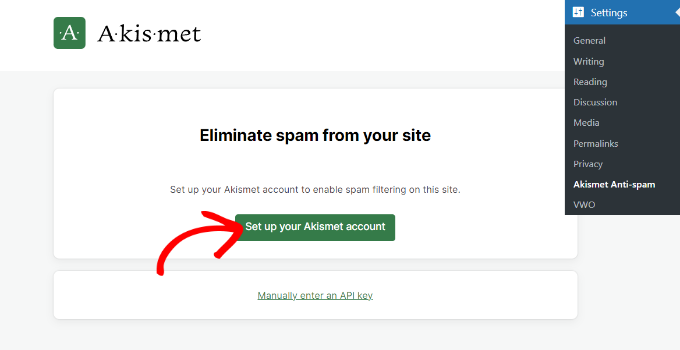
Upon activation, you can navigate to Settings » Akismet Anti-Spam from your WordPress dashboard. Next, go ahead and click the ‘Set up your Akismet account’ button.
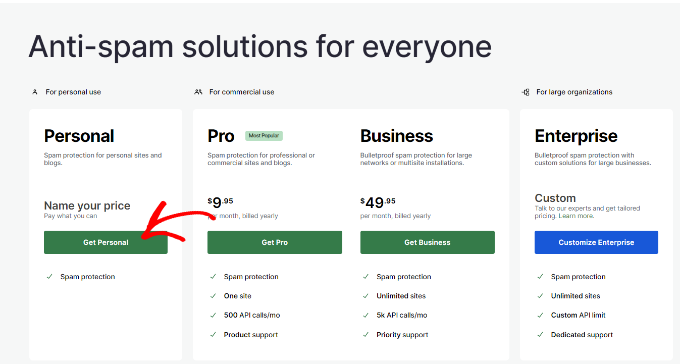
Now, a new tab or window will open in your browser, and you’ll see the Akismet pricing page. Akismet offers free and premium pricing plans.
If your site is not for commercial purposes, like it doesn’t run ads, then you can choose the Personal plan. Otherwise, you’ll need to select one of the commercial plans.
For the sake of this tutorial, we will be using the Personal plan.
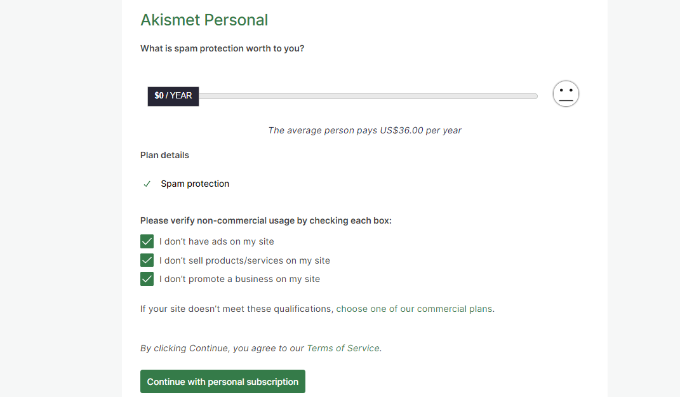
By default, the price will be set to $36 per year. However, you can move the pricing slider under ‘What is Akismet worth to you’ to any price from 0 to $120 per year.
Aside from that, Akismet will also ask you to check the boxes to say you are not running ads, selling products and services, or promoting a business on your site.
On the next screen, you’ll need to complete the checkout process along with choosing a price you want to pay for your account.
Once that’s done, simply click the ‘Complete Checkout’ button.
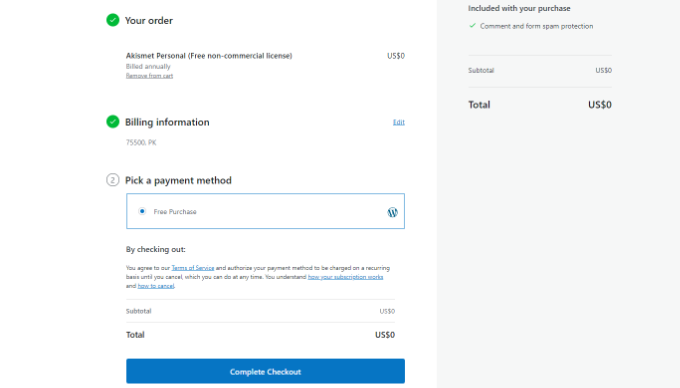
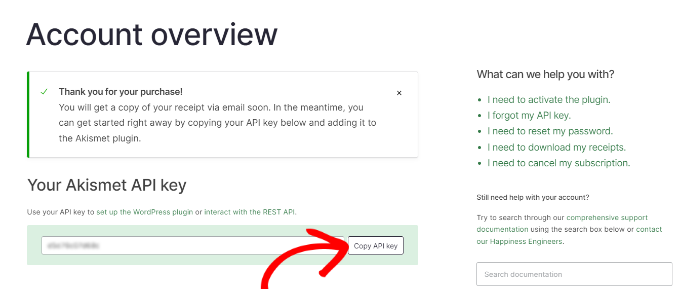
Next, you’ll see the Akismet API key that you’ll need to enter on your website.
Go ahead and copy the key.
To complete the configuration, you can head back to your site’s WordPress dashboard and navigate to the Settings » Akismet Anti-Spam page.
Now go ahead and click the ‘Manually enter an API key’ button.
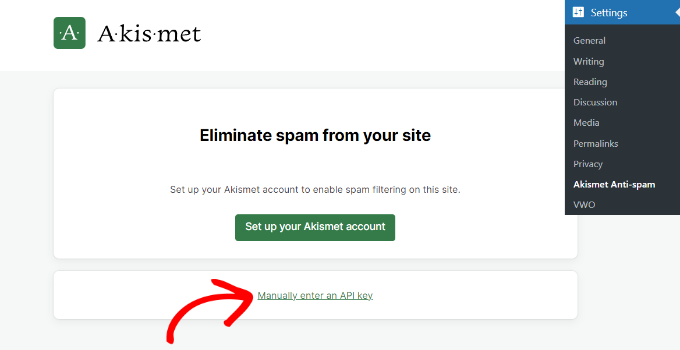
When you click the button, a new field will appear where you’ll need to enter the API key.
Once the API key is connected, Akismet will start protecting your website from spam comments.
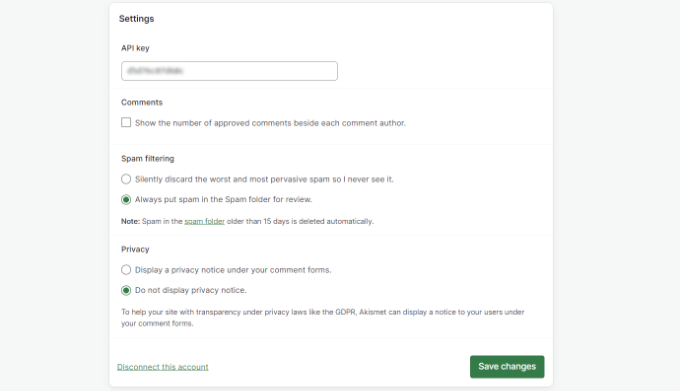
You can also tweak the settings in Akismet. For instance, the plugin lets you display the number of approved comments beside each comment author, review spam comments, or automatically discard them and show a privacy notice under comment forms.
When you’ve made the changes, go ahead and click the ‘Save Changes’ button.
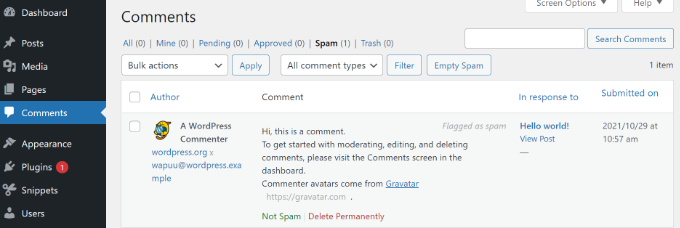
Next, you can review spam comments by navigating to Comments from your WordPress dashboard and then selecting the ‘Spam’ tab.
If you feel that a legitimate comment has been marked as spam, then you can simply click the ‘Not Spam’ button under the comment.
You can also permanently delete comments or click the ‘Empty Spam’ button to clear the spam folder.
We hope this article helped you learn what Akismet is and why you should start using it right away. You can also check our guide on how to block WordPress referrer spam in Google Analytics and how to put a stop to WordPress trackback spam.
If you liked this article, then please subscribe to our YouTube Channel for WordPress video tutorials. You can also find us on Twitter and Facebook.


Mrteesurez
Thanks for the article. Comments moderation takes time and sometimes difficult when you have more users commenting on your website that is why I see Akismet as a great tool to battle spams and catch them before landing in moderation. But I want to ask if it’s possible for the plugin to marked legitimate comments as spam, then how do we know ?
WPBeginner Support
If you think legitimate comments are being marked as spam then the best thing to do would be to manually check the spam folder for any comments that could be legitimate.
Admin
Mrteesurez
Thanks for this reply. Does that mean I still need to be checking Spam folder to confirm if no legitimate comment is marked as spam. I think this is another moderation task. How often do you suggest ?
WPBeginner Support
It is good practice to check your spam folder to be safe but how often to check would depend on how many comments your site is getting.
Mrteesurez
Thanks for the guide, I really appreciate your support and taking time to give reply.
I don’t used to get so much comments, I have decided to be checking it biweekly.
Moinuddin Waheed
This is one of the most widely known plugin among wordpress users and yet not all the users have been able to enable it and prevent spam comments.
I have witnessed this plugin with every new wordpress installations and never bothered to activate and setup due to the mindset that it would be difficult to set it up.
infact it should be activated for wpforms spam prevention to act.
Thanks for all these steps to setup the Akismat plugin and helping us know how to use it.
Jiří Vaněk
Many people don’t activate Akismet because the pricing option stops them. Until today, I thought Akismet was a paid plugin and wouldn’t work without payment. So, I always chose Google’s reCAPTCHA, thinking it was free. It was only after reading this article that I found out, after several years, that Akismet can be activated for free. I think this is the main reason why people don’t use Akismet as much, despite it being installed by default with WordPress. Many people discard it right away along with the Hello Dolly plugin.
Mrteesurez
I completely relate to this! I also avoided activating Akismet for years because I thought it required a paid subscription. Even I used to delete it immediately I found it in my newly WordPress installation.
This misunderstanding probably leads many users to overlook Akismet, even though it’s a powerful tool against spam. Although I can’t really say mine was a misunderstanding as they have asked me several times to pay when I wanted to set it up for the first time.
It’s great that this article cleared that up, it’s definitely worth giving Akismet a try, especially since it’s so easy to set up.
Egbah Ikpomwosa Andrew
I just want to say thank you for this information. Initially one would be happy seeing 50000 comments in the comment box, but Askimet surely helps you to identify real comments. Nice write-up.
WPBeginner Support
You’re welcome, glad you liked our guide
Admin
Jamal Aezaz
I have created my first WordPress blog. as of your step by step guide. i’ve activated Akismet plugin. but I can’t see Akimest Stats in my Wordpress dashboard menu. there are only two options Home and Updates.
WPBeginner Support
They may have modified the plugin’s interface since this article was created, we’ll certainly take a look
Admin
Lydia
I have it and I was just looking at the date as of today it hasn’t been updated in two months…that to me is a very long time for a plugin not to update.
This is why I was searching for something better.
WPBeginner Support
If you feel that that is too long between updates you can certainly look for a plugin you would prefer. As a word of warning, not all plugins need constant updates so the updated date is not always the best indicator of quality
Admin
Scott Ramadge
Hi
This may be a silly question but now that I beleive I have this downloaded on my wordpress.com site will this mean that inappropriate language is stopped from being posted in the comments section of my blog(that is once I actually write a blog) Or do I need a seperate thing to stop profanity and if so can you suggest somthing for Wordpress.com as all I seemed to find was things for wordpress.org.
thanks
WPBeginner Support
Hi Scott,
Akismet will block spam comments containing links to bad websites, comment bots, and many more. It may not consider profanity as spam. The best way to filter that out is by turning on comment moderation for all comments on your website.
Admin
Dhiraj Thapa
Thanks to you, now i am using Akismet anti-spam. I got spam comments during the initial days of my blogging few months ago and I didnt know about that.
Dhiraj
Daniel Cornelius
I am trying to activate Akismet. I have an kismet key, but I don’t know what to do with it.
Sandeep Kumar
Thank very much for this information.
Shumaila
it is not free any more
WPBeginner Support
Hi Shumaila,
It is still free. It is set to select your own price model. You can select your price to be zero when signing up.
Admin
Alex
I just activated this on my blog but there’s no Stats. Anywhere. The plugin is activated and it has just two options and that’s all. Is that ok…? Or what?
Bikas Gurung
I got 5K+ comment everyday with 90% above spam and automated pingback system into my blog. At first I was glad thinking that my blog is having higher amount of traffic but later I found that they are spam while tracing with Akistmet Plugin recommend by you. Thank you so much. Anyway, which captcha plugin are best, please give me some hints.
Sanjiv
Do I need to install the Akismet plugin if I haver blocked all comments on my site?
In other words, I do not allow comments on my site.
Hoping for a reply
Thank you
WPBeginner Support
No you don’t need Akismet then.
Admin
KAIZER
It is really helpful as I have just started using Wordpress.
John Rajesh
What are the Pros and Cons of Akismet Plugin?
Jeffrey
If my web doesn’t have comment and registeration section, do I still need Akismet?
WPBeginner Support
No.
Admin
kalpesh
HI Admin, I have one doubt is it a paid version or available for free of cost??
WPBeginner Support
It is available for free and optionally if you like it you can choose to pay for it.
Admin
Ralph Musgrave
Akismet is a pain in the whatsit. It keeps classifying me as spam.
WPBeginner Support
On WPBeginner Akismet didn’t mark you as spam
Admin
KristiGarrett
What does Akismet look like to the user? Can they sign in using multiple options (Disqus, Facebook, Twitter, Google+) like you do here?
WPBeginner Staff
Akismet is a spam filtering system not a commenting system. It works in the backgrouns and not visible to your users.
RW
Akismet is an awesome plugin. I do agree with some of the other posters here that it’s worth pointing out that it is not free. The Editors point out that it’s free for personal, non-business blogs, but I don’t believe the majority of your readers are interested in personal, non-business websites.
I was saddened when Akismet went the paid route, but I understand. It’s a great plugin if you have the budget for it…
John Brinkley
What does the ‘Filter’ button do between ‘Show all comments’ dropdown box and ‘Empty Spam’ button?
Justagurlinseattle
This Akismet is marking almost every reply I write as spam.
It is getting rather frustrating. I see that they like to keep a running count as to how
much spam it is blocking, however, if 8 out of 10 of my replies are being marked as spam,
this is a highly inflated number of comments that are not spam.
I tried using my wordpress account to log in and make my comments, this did not work,
so I tried logging in via my Twitter account, this also did not work.
The Admins inform me that they are not able to retrieve my comments.
Can you help me???
any suggestions as to what I should do????
any suggestions as to how the Admins of that blog can release my comments????
WPBeginner Support
Contact Akismet support. Your comment is not marked spam for no reason. For example, if you comment on example.com and a moderator thinks that your comment is spammy and marks it as spam. Then your future comments on example.com will automatically go to spam. Until an admin or moderator on example.com looks into spam and unmarks your comment.
Admin
Dineen Miller
I made a query at the Akismet site but didn’t get an answer so maybe you can answer my question? I’m looking at the Pro plan for my site but I want to know if commenters will be required to answer some kind of security question. Is this standard on Akismet? A feature we can turn on or off? Or does this plug in work completely in the background of the site? Thank you!
WPBeginner Support
It works completely in the background.
Admin
Abdullah Munir
Its not free which was worth mentioning.
Editorial Staff
It’s free for personal blog users.
Admin
Abdullah Munir
Yes, but do you really think that it would provide that professional level service for spamming?
Debra
if it is free why do I have to give Credit Card info? It says an amount I will have to pay next year, am I committed to that, what if I don’t like it.
WPBeginner Support
Hi Debra,
You don’t need to pay anything if you don’t want to. On the pricing page, select ‘Name your price’ option and then slide your price to $0.
Betsy
Does it bother anyone else that Wordpress.com and Wordpress.org are used interchangeably? I’m trying to figure out if Akismet works with Wordpress.com but all I can find is that it’s a plugin available for .org. Meanwhile, you need to register in .com to get an API account. I have a blog through wordpress.com but since they don’t allow plugins, I can’t figure out how or if Akismet runs on Wordpress.com. Does anyone have the answer to this? Am I missing something?
I know there is a widget that I can put on wordpress.com for Akismet but all it does is allow you to show it on your sidebar but it doesn’t actually do anything. Very frustrating!
Editorial Staff
WordPress.com automatically runs Akismet. But if you want to register an API, there are more than one ways available now. You can go to the official Akismet site to apply for an API. Furthermore, you can also register a WordPress.com account without a blog, and get an API as well.
WordPress.org although, the plugin must be enabled for it to run. It does not run by default like WordPress.com site does.
Admin
Matt
Its not free, though, which is important to mention.
Ethan
There’s some changes with akismet. Now you can actually apply directly from akismet website.
http://akismet.com/personal/
Ryan
83% spam seems low to me. I would have guessed mid to upper 90s for the percentage of spam comments. But that would just be a guess and Akismet has the data to back it up.
I’m always amazed how many people don’t know about Akismet when they setup a blog. Almost seems like it should be on by defaults and signing up for an API key should be part of the process setting up a new blog.
Editorial Staff
Yeah even though Akismet comes bundled with WordPress, Many bloggers continue to ignore it because they do not know how to get this API.
Admin
Caitlin Dundon
The thing that is currently confusing me is that I switched from wordpress.com to wordpress.org and I downloaded the plugin – but when I go to the Askimet site it asks for my wordpress.com login…which I still have, but I am not using that blog anymore since I am now selfhosted…Will that key still work with my selfhosted blog?
Editorial Staff
This is a recent change that they made. The answer to your question is yes it will still work.
Tim Live Chat
Fighting spam is a must. My previous company has a forum. Guess PHPBB is too popular, we need to spend several hours per day to clean up the spam posts.
Sergej Müller
Please test anti-spam bee – the simple antispam plugin for wordpress. It’s easy.
Jamie
Is this comment about another product an example of SPAM since this feed is about Askimet?
If it is, should ASKIMET have caught it?
When is something considered SPAM?
WPBeginner Support
Hi Jamie,
No it wasn’t spam.
Admin