


Have you ever noticed that your WordPress site feels fast for you, but slow for someone halfway across the world? That lag can frustrate readers and quietly hurt your engagement and credibility.
Building a successful blog isn’t just about great content. It’s about making sure every visitor has a fast, smooth experience no matter where they are.
That’s where a Content Delivery Network, or CDN, comes in. We’ve been using Cloudflare CDN at WPBeginner for years to deliver content quickly to visitors everywhere, not just locally. It’s a small setup with a surprisingly big impact on speed and user experience.
In this guide, we’ll explain why CDNs are essential for WordPress, share the benefits we’ve seen firsthand, and give you practical tips to help every visitor enjoy a faster, more reliable site.
![Why Do You Need a CDN for Your WordPress Blog? [Infographic]](https://www.wpbeginner.com/wp-content/uploads/2011/04/why-you-need-CDN-for-your-WordPress-blog-og-1.png "Why Do You Need a CDN for Your WordPress Blog? [Infographic]")
Infographic
To find out what a CDN is, simply click on the image above to view the infographic. You can also continue reading our article for written details.
Note: Just to clarify, a CDN is something you use in addition to having a web hosting account because it helps speed things up.
A CDN does not replace a web hosting account, as you still need to have a hosting provider like SiteGround or Bluehost.
What Is a CDN?
CDN stands for Content Delivery Network. In simple terms, it’s a way to make your WordPress site load faster, no matter where your visitors are.
We’ve seen the difference it makes when readers from Europe or Asia can browse our site just as quickly as those nearby.
Without a CDN, every visitor has to download your site’s files from a single server, often far away. That can slow things down.
A CDN solves this by storing copies of your content on servers all over the world, so visitors load your site from the server closest to them. We found that this simple change noticeably improves speed, even during traffic spikes.
We know this might sound technical, so let’s break down exactly how this works and why it matters for your WordPress blog.
How Does a CDN Work?
Here’s what happens when someone visits your WordPress blog without a CDN. Their browser has to download everything from your web host’s single server location.
Whether you’re using Bluehost, SiteGround, or Hostinger, that server sits in one physical location, such as Houston, Texas.
This creates two major problems: First, visitors from Australia or Europe have to wait for data to travel thousands of miles. Second, when you get popular and traffic spikes, that single server in Texas can get overwhelmed, causing your WordPress website to slow down or even crash.
A CDN solves this by creating a network of servers worldwide. When you enable a CDN, it automatically stores copies of your static content (images, stylesheets, JavaScript files) on dozens of servers across different continents.
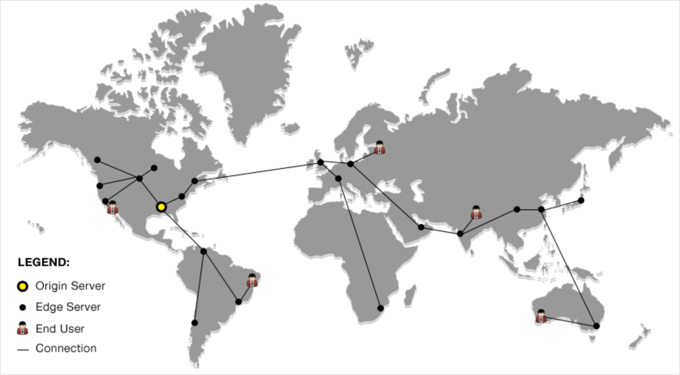
Now, when someone visits your site, the CDN automatically serves your content from the server closest to them. So if your main server is in Houston, but a visitor is browsing from London, they’ll get your images and CSS files from a server in the UK instead of across the Atlantic.
As a result, your pages load dramatically faster for everyone, regardless of where they’re located.
But speed is just the beginning. Let’s explore the specific benefits a CDN brings to your WordPress blog and why we consider it essential for any serious website.
Why Do You Need a CDN for Your WordPress Blog?
We’ve found that adding a CDN can make a noticeable difference in your site’s speed and reliability. It doesn’t just help technically; your visitors notice it too. Here are the main benefits we’ve seen when using a CDN:
- Faster Page Loads – One of the first things we noticed after enabling a CDN was how quickly pages loaded, even for visitors far from our server. Speed matters, and your readers feel it immediately.
- Less Risk of Crashes – When traffic spikes, a single server can get overwhelmed. A CDN spreads the load across multiple servers, making your site more stable. We appreciate not having to worry about sudden downtime during busy periods.
- Better User Experience – Faster sites keep readers engaged. We saw bounce rates drop and pageviews increase after using a CDN. Your visitors can browse more pages without frustration.
- SEO Benefits – Google favors faster sites, so a CDN can help your WordPress SEO. We’ve seen modest improvements in rankings for some posts after improving speed with a CDN.
Which Is the Best CDN for WordPress?
There are plenty of WordPress CDN services to choose from, and we’ve tried a few ourselves. In our experience, Bunny.net strikes a great balance between speed, global coverage, and affordability. Their servers are spread around the world, so your visitors get fast load times no matter where they are.
If you want a CDN that also protects your site, we like Cloudflare. It combines a fast CDN with a WordPress firewall, helping block attacks while keeping pages speedy. We’ve found it particularly useful for sites that get a lot of traffic or need extra security without complicated setup.
For those who want something simple, Envira CDN is perfect. It’s designed specifically for images, so they load quickly without any complicated configuration. We installed it in minutes, flipped one switch, and noticed immediate improvements in page speed — zero hassle.
Frequently Asked Questions About WordPress CDNs
If you’re still unsure how a CDN fits into your WordPress setup, these quick answers will help clear things up. We’ve gathered some of the most common questions readers ask about CDNs and how they can improve your website’s speed, performance, and reliability.
1. Do I really need a CDN for my WordPress site?
If your audience is spread across multiple countries or even different regions, a CDN can make a huge difference. It helps your website load faster for visitors no matter where they are, reduces server strain, and provides a smoother user experience. Even smaller blogs can benefit from improved performance and reliability.
2. Is a CDN the same as web hosting?
No. A CDN works alongside your web host, not as a replacement. Your hosting provider stores your website’s main files, while the CDN makes copies of your static content and serves them from servers closer to your visitors. You still need reliable hosting from providers like Bluehost or SiteGround.
3. How much does a CDN cost for WordPress?
Many CDN services offer free or affordable plans. For example, Cloudflare provides a free plan suitable for most small to medium websites, while Bunny.net offers low-cost options with global coverage. Paid plans typically add extra features like advanced security or image optimization.
4. Will a CDN improve my SEO?
Yes. Since Google uses page speed as a ranking factor, a faster site can help improve your search engine rankings. A CDN reduces load times, which improves user experience and can lower your bounce rate — both signals search engines reward.
5. Is it hard to set up a CDN on WordPress?
Not at all. Most CDN providers offer WordPress plugins or step-by-step guides to make the setup process simple. For example, you can follow our guide on how to set up Cloudflare CDN in WordPress to get started in just a few minutes.
6. Which CDN is best for beginners?
If you’re new to CDNs, Cloudflare is a great choice for beginners because it’s easy to set up and includes security tools. For those who want faster image delivery with minimal configuration, Envira CDN is another excellent option.
Additional Resources About WordPress Performance
We hope that this article helped you learn why you need a CDN for your WordPress blog. You may also want to see some other guides related to WordPress performance:
- The Ultimate Guide to Boost WordPress Speed & Performance
- How to Speed up WooCommerce Performance
- Important Metrics to Measure on Your WordPress Site
- How to Properly Run a Website Speed Test
- How to Use GTmetrix Plugin to Improve WordPress Site Performance
- Fastest WordPress Hosting (Performance Tests)
- Best WordPress CDN Services (Compared)
- How to Setup Cloudflare Free CDN in WordPress (Step by Step)
If you liked this article, then please subscribe to our YouTube Channel for WordPress video tutorials. You can also find us on Twitter and Facebook.


Jiří Vaněk
Great article. I use Cloudflare’s CDN for both speed and protection against DDoS attacks. Speed is crucial for me when it comes to CDN. During website testing, the impact of the CDN was really noticeable, and by that, I mean significantly. I have users from all over the world, so it’s essential for me that they receive information from a server located in their country. Otherwise, you explained the principle of CDN excellently. There were some minor details I didn’t know, even though I use a CDN. Now, at least, I understand how it all works in detail.
Dennis Muthomi
I’m actually planning to migrate my WordPress site to a new hosting provider soon. I’m wondering…will my CDN keep my site up and running during the transition, or will things go offline until the migration is complete? I’d love to minimize any downtime, so if you’ve got any tips
WPBeginner Comments
You would have to set up the CDN for the new hosting provider.
Mrteesurez
Thanks for this explanation, actually I didn’t know what CDN is actually is and how it works but this guide has explained it in details. Thanks.
I want to ask: Does using wp super cache, total cache is sufficient for CDN features.
WPBeginner Comments
Plugins like WP Super Cache run on the website’s server, and are not a CDN.
Jiří Vaněk
A cache plugin by itself is not a CDN. A cache plugin stores data on the origin server but doesn’t send data to servers abroad within a CDN network. However, some advanced cache plugins do offer their own CDN network provided by the plugin developer, which is usually a paid service. Alternatively, you can use a free CDN, like Cloudflare, and then connect a cache plugin that supports it. Plugins like WP Rocket and WP Fastest Cache can do this. I recommend trying Cloudflare’s CDN, which is free at the basic level, and connecting your existing cache plugin to it. The difference, especially in speed, is really noticeable.
Kam
Thanks for this helpful article.
I am with Bluehost and recently I selected CDN and noticed that my website was loading much faster. But, some users could not access my website as the following message came up:
ERR_SSL_UNRECOGNIZED_NAME_ALERT
I got Bluehost to revert back to my original setting. Is their a way around this?
WPBeginner Support
You would want to reach out to BlueHost’s support and they should be able to assist.
Admin
Abdullah
Hello
will I be losing all my blog posts if I changed my host from Hostgator to CDN network?
WPBeginner Support
No, you wouldn’t lose your posts when using a CDN
Admin
Chittar
So far following great. Just have to work on it.
Thanks for the fluid writing!
WPBeginner Support
Glad you like our writing
Admin
Syed Mujtaba
you have told all about max cdn, where is Cloud fare?
WPBeginner Support
Hi Syed,
Please checkout how to setup Cloudflare free CDN in WordPress.
Admin
Jim Boult
Thank you for clarifying the purpose of a CDN. A very straightforward and easy to understand explanation. wpbeginner is a great resource and I’m starting to appreciate your value to the Wordpress community!
Gagan
Can you please compare some Free CDN service for low traffic site which can’t afford services like MAX CDN. Cloudflare, Incapsula and Amazon are offering free cdn but don’t know which one to choose.
Jen Street
Yes I would be interested in the comparison between Free CDN and MAX CDN. Thanks
Erwin
Thanks for interesting post.
If I understand it correctly CDN is useful for websites with international orientation, but not for websites with a national user base. I am located in the Netherlands (small country), and my website is focusing on people in the Netherlands. Am I correct that CDN is not going to improve loading speed for my customers?
Valerie
If a CDN is serving static content, why would one *also* need server-side and client-side caching?
Syams
Please, advice me about free CDN Cloudflare. It is useful enough? or better not install it?
Kawsar
If you expect to get 2/3 k user maximum per day you never need CDN. It do not improve any performance . just choose a good hosting and fast theme.
Swati
Thank’s for this article .it was easy to understand. I just wanna know how much does it cost .the basic price. I am from India.
Venkatweetz
How to implement CDN for the website which have SSL certificate?
Weedney Desmornes
I have a MacBook Air and I do not want to overload it with files and downloads because the MacBook Air is not designed for that. Is there any way I can begin a website without overloading my computer?
Rb
Yes there is, start at least with a proper webhoster, not your laptop and slow internet upload…
Ishaan Mehta
hey..i wanna use cloudflare..
but they require to changes nameservers..will it cause any problems to d original hosting if i point domain nameserver details to cloudflare, n not to hostgator? or it will just work out automatically..? i m using wordpress 4.4.2 btw..plz reply..i need ur help!
WPBeginner Support
If added correctly, these DNS changes should not affect your hosting at all.
Admin
Krishnandu Sarkar
Can I increase Default Cache Time to 12 month in MaxCDN? As the images, css, js that I have will never change. Yes I may add more images as I add more posts. But existing ones will be same as usual forever.
TiffanyBaumgartn
thank you for useful recommendations and basically very good info
shailaja
I registered cloudflare cdn to my . but all static files are not hosting by cloudflare. why any cloudflare settings is require.
Fatt Kay
The CDN is too expensive though…
Fritz
Fatt Kay, CloudFlare is free.
To WPBeginner: “Why You Need a CDN for your WordPress Blog” is not a question and should not have a question mark. “What the heck is a CDN” is a question and should have a question mark. Nit-picky? Maybe, but mistakes like this are jarring to some of us, and detract from the value of your content.
Brandon
No it’s not. MaxCDN starts at $9 / per month.
Germain
so i think i going to singup with justhost.com and i saw that them had a global cdn my question is if anyone know if that service its automatically activated or not?
Natasha
Learn something new everyday. My head hurts but I’ll keep pressing forward.
Alex Mega
How much total bandwidth would you recommend to purchase? Where could I find out how much bandwidth we go through on a regular basis. I mean traffic wise I’m sure it depends on location of users. So as a company that may see 100,000 page views/50k visitors or more a month is 100GB of bandwidth enough?
Lazy Sapper
I have been using Cloudflare for CDN. But unfortunately, I don’t see decline in the consumption of CPU resources.
Syed Balkhi
Just updated the article.
To answer your question: No CDN does not replace a hosting account. It works with your hosting provider to balance the load and speed things up. You still need a web hosting provider.
Andy Morris
Still didn’t answer the most basic question. Will I still need a Host Account if I get a MaxCDN account or is it a type of hosting account?
Naval
What do you think about this cdn speed test tool at spooster.com? Should I follow their recommendation if I choose to go for a free solution?
WPBeginner Support
We have not tried it so we can’t say.
Admin
Mark
I would recommend going with high quality hosting with your own static IP address and reliable hosting/page refresh rates before using CDN.
It’s my understanding that Google ranks sites based on their geographic targeting. Google seems to be focused on providing the best rankings for the smaller businesses in their local markets. This also improves Google’s advertising revenue by having many more sites competing for the same category advertising keywords.
Larger companies are able to have multiple websites in multiple geographical locations and can more easily globally dominate ranking categories.
It’s not clear to me that CDN provides a valuable multiple geographical location presence?
Please comment on how CDN would improve say… your UK search engine ranking (UK visitor traffic) for example if your geographic target was the US?
Thanks.
William V.
Great overview on what a CDN is and how it works.
I just wanted to add one note… CDNs don’t only accelerate the delivery of static content, but also dynamic content (any content generated in real time by the origin server— e.g. applications) as well. Dynamic content is not cachable, but CDNs can speed up the request and returns from the server through a series of proxy servers/nodes strategically placed around the world… basically creating a more direct route for the data packets to travel through. Traditional internet protocols require that data packets travel through more connecting points, which delays the arrival of data packets… making it slower to load on the client.
Cheers,
Tanveer
interesting. could you share some link that talks more about this?
Ryan Williams
Not sure this is right. I’ve conducted tests with every major CDN out there, and in all cases it’s significantly slower accessing uncacheable dynamic pages rather than just going to the origin server directly.
However, it is true that dynamic pages can too benefit from a CDN. The key is to use a CDN that allows almost instant purging, so you have it cache everything and then your application can send a ‘purge’ request to the CDN when it knows an update has occurred (e.g. new post or comment). Of course, this requires specific integration.
Sander
Actually, if the majority of the page is loaded via CDN content, and the dynamic part of the page is loaded via AJAX, a CDN could considerably increase the speed of a true dynamic page. Obviously, after the page is loaded, a CDN would not help increase the speed of the next AJAX load. But to an uninformed user, the feel of the website would be generally quicker with a CDN than without a CDN.
Pritush
Now wordpress offers free CDN with Jetpack plugin.. how efficient is that compared to paid CDN like maxcdn ?
WPBeginner Support
We will probably do a comparison in some article. However, we would still recommend MaxCDN. Installing jetpack in self-hosted WordPress requires you to connect your WordPress site to WordPress.com and many users don’t want to do that. Also Photon just serves images it calls itself image acceleration and editing service, not a CDN.
Admin
Hemant Aggarwal
Your website was down because of HostGator’s server issue. Does any CDN provides caching of web pages too?
Editorial Staff
Cloudflare seems to offer something along that line, but we haven’t tried it.
Admin
Alan
Hi, can you tell me if the servers all over the globe have static pages and you update a static page, how long does it take for the servers to update that page? Can you force and update of static pages, and how do you do that? Thanks
Forever Long
Hello,
I can see this blog entry is a few months old now, however I have just completed building a site on Wix and its sole purpose is e-commerce hopefully on a global scale. Problem is however we have noticed for a while that the website was sluggish during building and still is after going premium and adding more bandwidth. Can MaxCDN solve our problems? Wix only ever gives out canned responses such as “you must compress images” and “please disable the auto rotate function from your slideshow” this is aggravating to say the least. this is the website in question
would be really grateful for your thoughts and assistance i’ve spoke to MaxCDN and they said they can help, however you never know whether its a sales pitch?
Editorial Staff
Yes they can help.
Admin
Jen Street
I have created a few sites using Wix, including my own portfolio site. I offer it to clients who want a very simple site with few updates that is cheap. I plan on moving my own site to WordPress. After learning to create in WP, although with each theme it’s like having to relearn how that specific theme operates, I highly recommend WordPress and find it to be my preferred platform to develop websites from.
David
Just wondering, can your use two CDNs at once, like MAXCDN and Cloudflare?, what are the consequences? is it feasible?
Editorial Staff
It is possible. However cloudflare requires you to change your DNS to them which is something you may or may not want.
Admin
Raulnayak
I am with MaxCDN too and I am loving it..Thanks for this wonderful post!!
TechZoomOrg
Hi. I am using CloudFlare & WP Total Cache. Now, can we still get maxCDN working for the same site? Will it make a significant difference?
What would you differentiate & suggest for people using CloudFlare for their WP sites.
Eager to explore more. Thanks
wpbeginner
@TechZoomOrg If you are using CloudFlare then you don’t really need MaxCDN. From our understanding it is an either / or solution.
Raulnayak
@wpbeginner Actually,Cloudflare doesnt affect the website as much as MaxCDN, I would recommend that you use both MaxCDN as well as cloudflare and it will be very fast!!
PR_Luv
So in relation to this, how is a VPS used and applicable?
Great post!
@PR_Luv
wpbeginner
@kath.gamboa First of all the idea is that CDN service will not go down because they have so many datacenters across the globe. But lets imagine the worst and say that if it does go down, then all you have to do is go into your W3 Total Cache plugin, and turn off CDN for that time. All of your content will then be served directly from your server.
Remember, you never upload any content directly to the CDN servers. You always upload it to your web hosting server, and CDN simply mirrors it.
kath.gamboa
What happens when the CDN service goes down? Does that mean that the website’s static content will be inaccessible as well? If yes, are there ways to revive the website when the CDN service goes down?
PeterApalais
Okay how does it work. I am with hostgaor. I want faster page loads etc. I personally live in Australia. So there is is delay because of that huge big distance the information has to travel. Okay for someone who lives next to the server in the USA, but not ideal for here in OZ.
1. Does MaxCDN have a server here in Australia?
2. What about Amazon S3, do they have a server in Australia?
3. Does anyone?
4. Does the CDN have copies off everything that is on my website. So like the HTML files as well? If so, maybe a work around for me would be to get a web host based here in Australia. This will allow fast loading here, then use the CDN for the rest of the world.
5. So I guess, if I am browsing from the England, will it pull everything from the England server, and nothing from the hostgator server back in the US??
Peter
Raulnayak
@PeterApalais I think yes,its der In sydney or its being planned.. See here, http://www.maxcdn.com/features/network/ .. I would recommend MaxCDN because they charge on pay-as-you go basis i.e as $ 40 per 1TB of data… Amazon is costly. It mirrors the whole website and creates cache or the websites so in the event that the server is down,the website doesnt go offline.. I personally use it for my http://www.allcancook.com
AstroGremlin
Thanks for the reply! CDN may well be in my future. @wpbeginner
wpbeginner
@AstroGremlin Doesn’t matter how big the site is, CDNs will help regardless. But if the small site is your personal site, then it is probably not worth you having the CDN.
Raulnayak
@wpbeginner Actually,the best part of MaxCDN is that it doent matter how big or small your website is, It has a wonderful pay-as-you go plan where you have to renew only when you are done using the 1 TB you bought.. So if the 1 Tb doesnt get used up even after 2 years, its fine,the plan will go on…
AstroGremlin
I notice that the rate one pays depends on volume (which seems very fair). But how can I tell how many gigs my blog is serving up? Also, does CDN makes sense for a really low traffic site?
On caching: I tried W3 but it was causing conflicts. I switched to Supercache and haven’t looked back.
archon810
WP-SuperCache works great with MaxCDN, that’s what I use.
Peter
Hi,
I have a question, is there any alternative plugin to use with WordPress and MaxCDN other than w3totalcache ?
w3totalcache is causing some memory problems on my VPS server ?
Jason H
WP-Super Cache is a bit simpler to use that W3 Total Cache and has a tab to configure Origin-Pull CDNs. Otherwise, you can use another plugin in conjunction for Push CDNs but I would recommend Origin-Pull be a requirement of the CDN you go with.
Bob
I on a bluehost shared server and was thinking about paying extra for a static ip address – would a static ip address increase my website speed?
But now reading this I wonder if I should bypass the static ip address and just go for a CDN solution instead?
I have done all the minifying, caching, etc, so did assume the next step was a static ip address. But perhaps it is really a cdn solution that I need?
Editorial Staff
Go with the CDN solution.
Admin
Raulnayak
A VPS or a cloud server is always safer and faster than a shared server..
Andrea Barghigiani
Hi there!
I am using CloudFlare (https://www.cloudflare.com/) a CDN service that says will help me up speeding my website only by changing my DNS.
Do you have any advice on how to set up W3 Total Cache to work with the CloudFlare? What do you think about it?
Thanks for the answers!
Editorial Staff
No advice. Cloudflare should have a tutorial for integration.
Admin
Raulnayak
Cloudflare automatically integrates itself as a cdn..You dont need to setup W3 Total Cache to work with cloudflare..
Peter
@Editorial Staff | Well i setup this using: https://www.wpbeginner.com/plugins/how-to-install-and-setup-w3-total-cache-for-beginners/
I don’t want to change w3totalcache becasue the implementation of CDN was very simple and it has many goodies inside. One plugin to rule them all. Before that i use WP Super Cache.
I am still confused what happaned to my VPS but like i wrote my ideas are over.
Raulnayak
@Editorial Actually WP super cache is better and setting it up is almost the same as W3 total cache..
Rajesh
I am using sub-domain as cdn. like cdn.namase.com and I am using W3 total cache.