


Have you ever noticed that your WordPress site feels fast for you, but slow for someone halfway across the world? That lag can frustrate readers and quietly hurt your engagement and credibility.
Building a successful blog isn’t just about great content. It’s about making sure every visitor has a fast, smooth experience no matter where they are.
That’s where a Content Delivery Network, or CDN, comes in. We’ve been using Cloudflare CDN at WPBeginner for years to deliver content quickly to visitors everywhere, not just locally. It’s a small setup with a surprisingly big impact on speed and user experience.
In this guide, we’ll explain why CDNs are essential for WordPress, share the benefits we’ve seen firsthand, and give you practical tips to help every visitor enjoy a faster, more reliable site.
![Why Do You Need a CDN for Your WordPress Blog? [Infographic]](https://www.wpbeginner.com/wp-content/uploads/2011/04/why-you-need-CDN-for-your-WordPress-blog-og-1.png "Why Do You Need a CDN for Your WordPress Blog? [Infographic]")
Infographic

To find out what a CDN is, simply click on the image above to view the infographic. You can also continue reading our article for written details.
Note: Just to clarify, a CDN is something you use in addition to having a web hosting account because it helps speed things up.
A CDN does not replace a web hosting account, as you still need to have a hosting provider like SiteGround or Bluehost.
What Is a CDN?
CDN stands for Content Delivery Network. In simple terms, it’s a way to make your WordPress site load faster, no matter where your visitors are.
We’ve seen the difference it makes when readers from Europe or Asia can browse our site just as quickly as those nearby.
Without a CDN, every visitor has to download your site’s files from a single server, often far away. That can slow things down.
A CDN solves this by storing copies of your content on servers all over the world, so visitors load your site from the server closest to them. We found that this simple change noticeably improves speed, even during traffic spikes.
We know this might sound technical, so let’s break down exactly how this works and why it matters for your WordPress blog.
How Does a CDN Work?
Here’s what happens when someone visits your WordPress blog without a CDN. Their browser has to download everything from your web host’s single server location.
Whether you’re using Bluehost, SiteGround, or Hostinger, that server sits in one physical location, such as Houston, Texas.
This creates two major problems: First, visitors from Australia or Europe have to wait for data to travel thousands of miles. Second, when you get popular and traffic spikes, that single server in Texas can get overwhelmed, causing your WordPress website to slow down or even crash.
A CDN solves this by creating a network of servers worldwide. When you enable a CDN, it automatically stores copies of your static content (images, stylesheets, JavaScript files) on dozens of servers across different continents.
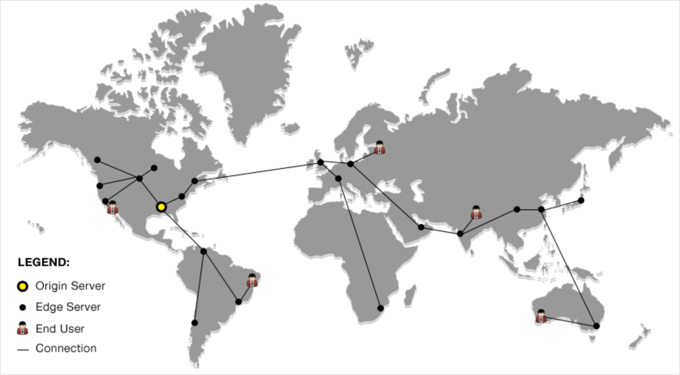
Now, when someone visits your site, the CDN automatically serves your content from the server closest to them. So if your main server is in Houston, but a visitor is browsing from London, they’ll get your images and CSS files from a server in the UK instead of across the Atlantic.
As a result, your pages load dramatically faster for everyone, regardless of where they’re located.
But speed is just the beginning. Let’s explore the specific benefits a CDN brings to your WordPress blog and why we consider it essential for any serious website.
Why Do You Need a CDN for Your WordPress Blog?
We’ve found that adding a CDN can make a noticeable difference in your site’s speed and reliability. It doesn’t just help technically; your visitors notice it too. Here are the main benefits we’ve seen when using a CDN:
- Faster Page Loads – One of the first things we noticed after enabling a CDN was how quickly pages loaded, even for visitors far from our server. Speed matters, and your readers feel it immediately.
- Less Risk of Crashes – When traffic spikes, a single server can get overwhelmed. A CDN spreads the load across multiple servers, making your site more stable. We appreciate not having to worry about sudden downtime during busy periods.
- Better User Experience – Faster sites keep readers engaged. We saw bounce rates drop and pageviews increase after using a CDN. Your visitors can browse more pages without frustration.
- SEO Benefits – Google favors faster sites, so a CDN can help your WordPress SEO. We’ve seen modest improvements in rankings for some posts after improving speed with a CDN.
Which Is the Best CDN for WordPress?
There are plenty of WordPress CDN services to choose from, and we’ve tried a few ourselves. In our experience, Bunny.net strikes a great balance between speed, global coverage, and affordability. Their servers are spread around the world, so your visitors get fast load times no matter where they are.
If you want a CDN that also protects your site, we like Cloudflare. It combines a fast CDN with a WordPress firewall, helping block attacks while keeping pages speedy. We’ve found it particularly useful for sites that get a lot of traffic or need extra security without complicated setup.
For those who want something simple, Envira CDN is perfect. It’s designed specifically for images, so they load quickly without any complicated configuration. We installed it in minutes, flipped one switch, and noticed immediate improvements in page speed — zero hassle.
Frequently Asked Questions About WordPress CDNs
If you’re still unsure how a CDN fits into your WordPress setup, these quick answers will help clear things up. We’ve gathered some of the most common questions readers ask about CDNs and how they can improve your website’s speed, performance, and reliability.
1. Do I really need a CDN for my WordPress site?
If your audience is spread across multiple countries or even different regions, a CDN can make a huge difference. It helps your website load faster for visitors no matter where they are, reduces server strain, and provides a smoother user experience. Even smaller blogs can benefit from improved performance and reliability.
2. Is a CDN the same as web hosting?
No. A CDN works alongside your web host, not as a replacement. Your hosting provider stores your website’s main files, while the CDN makes copies of your static content and serves them from servers closer to your visitors. You still need reliable hosting from providers like Bluehost or SiteGround.
3. How much does a CDN cost for WordPress?
Many CDN services offer free or affordable plans. For example, Cloudflare provides a free plan suitable for most small to medium websites, while Bunny.net offers low-cost options with global coverage. Paid plans typically add extra features like advanced security or image optimization.
4. Will a CDN improve my SEO?
Yes. Since Google uses page speed as a ranking factor, a faster site can help improve your search engine rankings. A CDN reduces load times, which improves user experience and can lower your bounce rate — both signals search engines reward.
5. Is it hard to set up a CDN on WordPress?
Not at all. Most CDN providers offer WordPress plugins or step-by-step guides to make the setup process simple. For example, you can follow our guide on how to set up Cloudflare CDN in WordPress to get started in just a few minutes.
6. Which CDN is best for beginners?
If you’re new to CDNs, Cloudflare is a great choice for beginners because it’s easy to set up and includes security tools. For those who want faster image delivery with minimal configuration, Envira CDN is another excellent option.
Additional Resources About WordPress Performance
We hope that this article helped you learn why you need a CDN for your WordPress blog. You may also want to see some other guides related to WordPress performance:
- The Ultimate Guide to Boost WordPress Speed & Performance
- How to Speed up WooCommerce Performance
- Important Metrics to Measure on Your WordPress Site
- How to Properly Run a Website Speed Test
- How to Use GTmetrix Plugin to Improve WordPress Site Performance
- Fastest WordPress Hosting (Performance Tests)
- Best WordPress CDN Services (Compared)
- How to Setup Cloudflare Free CDN in WordPress (Step by Step)
If you liked this article, then please subscribe to our YouTube Channel for WordPress video tutorials. You can also find us on Twitter and Facebook.



Jiří Vaněk
Great article. I use Cloudflare’s CDN for both speed and protection against DDoS attacks. Speed is crucial for me when it comes to CDN. During website testing, the impact of the CDN was really noticeable, and by that, I mean significantly. I have users from all over the world, so it’s essential for me that they receive information from a server located in their country. Otherwise, you explained the principle of CDN excellently. There were some minor details I didn’t know, even though I use a CDN. Now, at least, I understand how it all works in detail.
Dennis Muthomi
I’m actually planning to migrate my WordPress site to a new hosting provider soon. I’m wondering…will my CDN keep my site up and running during the transition, or will things go offline until the migration is complete? I’d love to minimize any downtime, so if you’ve got any tips
WPBeginner Comments
You would have to set up the CDN for the new hosting provider.
Mrteesurez
Thanks for this explanation, actually I didn’t know what CDN is actually is and how it works but this guide has explained it in details. Thanks.
I want to ask: Does using wp super cache, total cache is sufficient for CDN features.
WPBeginner Comments
Plugins like WP Super Cache run on the website’s server, and are not a CDN.
Jiří Vaněk
A cache plugin by itself is not a CDN. A cache plugin stores data on the origin server but doesn’t send data to servers abroad within a CDN network. However, some advanced cache plugins do offer their own CDN network provided by the plugin developer, which is usually a paid service. Alternatively, you can use a free CDN, like Cloudflare, and then connect a cache plugin that supports it. Plugins like WP Rocket and WP Fastest Cache can do this. I recommend trying Cloudflare’s CDN, which is free at the basic level, and connecting your existing cache plugin to it. The difference, especially in speed, is really noticeable.
Kam
Thanks for this helpful article.
I am with Bluehost and recently I selected CDN and noticed that my website was loading much faster. But, some users could not access my website as the following message came up:
ERR_SSL_UNRECOGNIZED_NAME_ALERT
I got Bluehost to revert back to my original setting. Is their a way around this?
WPBeginner Support
You would want to reach out to BlueHost’s support and they should be able to assist.
Admin
Abdullah
Hello
will I be losing all my blog posts if I changed my host from Hostgator to CDN network?
WPBeginner Support
No, you wouldn’t lose your posts when using a CDN
Admin
Chittar
So far following great. Just have to work on it.
Thanks for the fluid writing!
WPBeginner Support
Glad you like our writing
Admin
Syed Mujtaba
you have told all about max cdn, where is Cloud fare?
WPBeginner Support
Hi Syed,
Please checkout how to setup Cloudflare free CDN in WordPress.
Admin
Jim Boult
Thank you for clarifying the purpose of a CDN. A very straightforward and easy to understand explanation. wpbeginner is a great resource and I’m starting to appreciate your value to the Wordpress community!
Gagan
Can you please compare some Free CDN service for low traffic site which can’t afford services like MAX CDN. Cloudflare, Incapsula and Amazon are offering free cdn but don’t know which one to choose.
Jen Street
Yes I would be interested in the comparison between Free CDN and MAX CDN. Thanks
Erwin
Thanks for interesting post.
If I understand it correctly CDN is useful for websites with international orientation, but not for websites with a national user base. I am located in the Netherlands (small country), and my website is focusing on people in the Netherlands. Am I correct that CDN is not going to improve loading speed for my customers?
Valerie
If a CDN is serving static content, why would one *also* need server-side and client-side caching?