


At some point, every website owner needs to redirect an old URL, whether they’ve deleted a post, changed its URL, or moved it somewhere else.
Without a proper redirect in place, all those outdated links send visitors directly to a 404 error page. Search engines eventually drop that page from their results as well, which means you lose the organic search traffic that URL had already earned.
In this article, I’ll compare the best WordPress redirect plugins based on my own testing, so you can pick the right one for your site.

Quick Overview: 7 Best WordPress Redirect Plugins
| # | Plugin | Best For | Free Redirects | Pricing |
|---|---|---|---|---|
| 🥇 | 404 to 301 | Sorting and fixing a backlog of 404 errors | ✅ | 100% free |
| 🥈 | All in One SEO | Moving a whole domain or merging two sites | ❌ | Redirects from $49.50/yr (full-site redirects from $199.50/yr) |
| 🥉 | Redirection | Rules that fire only for certain visitors | ✅ | 100% free |
| 4 | 301 Redirects | Picking targets from a dropdown | ✅ | Free (paid upgrade available) |
| 5 | Rank Math | Matching URL groups without regex | ✅ | Free (Pro plan available) |
| 6 | Yoast SEO Premium | Redirects created the moment a slug changes | ❌ | $118.80/yr |
| 7 | Safe Redirect Manager | Adding no database query per request | ✅ | 100% free |
How I Tested and Reviewed WordPress Redirect Plugins
I installed each plugin on a real test site, set up live redirects, and intentionally broke URLs to see how effectively each tool caught them.
Here are the factors I considered when evaluating these plugins:
- 🔀 Redirect types and URL matching – I checked which status codes each plugin can send, and whether it can match groups of URLs using regular expressions, often shortened to regex.
- 🔍 404 detection – I tested whether each plugin logs missing URLs as people land on them, and how easily you can turn those log entries into active redirects.
- ⚡ Where the redirect runs – Some plugins process redirects inside WordPress, while others write rules directly to your web server. I noted which method each tool uses, since server-level redirects run faster while WordPress-level redirects offer better reporting.
- 💰 What is genuinely free – Several of these plugins lock basic features behind a paywall. I tested the free version of every tool to confirm exactly what you get without paying for anything.
- 🧭 Ease of use for beginners – I prioritized plugins where setting up a redirect requires just two fields and a single click, without forcing you to understand complex server configurations.
Over the last 17 years of building WordPress websites and businesses, we have moved domains, merged sites, and retired thousands of URLs. That hands-on experience has taught us what really matters when a link stops working.
You can read more about how we research and test plugins in our editorial guidelines.
1. 404 to 301 – Best for Managing a 404 Backlog
| 404 to 301 Pros | ✅ Every feature ships in the free plugin, with no license key and no paid add-ons ✅ Groups repeat 404 requests into a single row with a hit counter, so the log stays readable ✅ Builds a redirect straight from a logged 404 error, without leaving the screen |
| 404 to 301 Cons | ❌ Its regex and prefix rules strip the trailing URL path ❌ Redirects run inside WordPress rather than at your web server |
| Pricing | Free version available. Every feature is included, with no paid tier |
| Best For | Sites that have collected broken URLs over years of publishing and need to work through them in order |
404 to 301 is our top pick because it handles two SEO tasks in a single free plugin. It logs every missing URL requested by visitors and search crawlers, then lets you create a 301 redirect for that exact page right from the log interface.
My Experience
The log screen is where this plugin stands out. It records every missing URL request alongside referrer data, IP addresses, user agents, and timestamps.
The plugin automatically combines repeat requests for the same broken URL into a single entry with an active hit counter. This keeps repeat hits from security bots and crawlers to one row each, so genuine broken links from real visitors stay visible and easy to prioritize.
Each entry also carries a status of open, ignored, or fixed. Combined with the URL grouping, that turns the log into a work queue you can clear in order, which is exactly what you need after a migration.
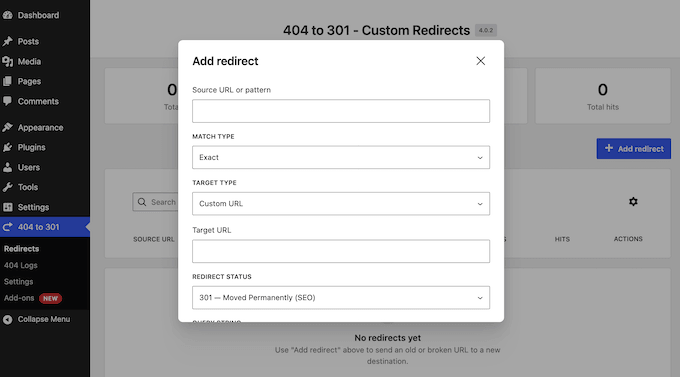
When setting up redirects, 404 to 301 supports exact path matching, URL prefixes, and regular expressions to catch groups of related URLs simultaneously. Supported HTTP status codes include 301, 302, 307, 410 (for permanently deleted content), and 451 (for legal removals).
For post-migration cleanups, enable automatic email notifications to receive alerts as soon as 404 errors cross a specified threshold.
If you need more monitoring options, see our guide on how to get email alerts for 404 errors in WordPress.
To maintain compliance with privacy regulations, 404 to 301 can mask logged visitor IP addresses. Developers can also manage redirects in bulk via WP-CLI (a command-line tool for developers) or the WordPress REST API.
↩️ Why I Recommend 404 to 301: For most WordPress sites, broken links arrive one at a time over years of publishing rather than all at once.
404 to 301 is built specifically for that pattern. It lets you convert logged errors into redirects from a single screen, and it handles the entire task without forcing a paid upgrade.
2. All in One SEO for WordPress – Best for Moving a Whole Domain

| All in One SEO Pros | ✅ Prompts you to create a redirect automatically when a slug changes or content is deleted ✅ Handles full site redirects and Site Aliases, so every old path lands on its own match during a domain move ✅ Can write rules to Apache, NGINX, and LiteSpeed instead of running them inside WordPress |
| All in One SEO Cons | ❌ 404 tracking, full-site redirects, and Site Aliases need the Pro plan ❌ Web server redirects bypass PHP, which switches off hit tracking and logging |
| Pricing | Free version available, but the Redirection Manager starts at $199.50/year (Pro) |
| Best For | Site owners handling a domain move or a site merge who want redirects and a full SEO toolkit in one plugin |
All in One SEO is the plugin we use on our own websites, and its built-in Redirection Manager is how we manage URL changes.
My Experience
What separates AIOSEO from standalone redirect tools is its proactive link tracking.
Rather than waiting for a site visitor to land on a broken link, AIOSEO monitors changes in real time. The moment you update a published post slug or delete a page, the plugin prompts you to create an automatic redirect.
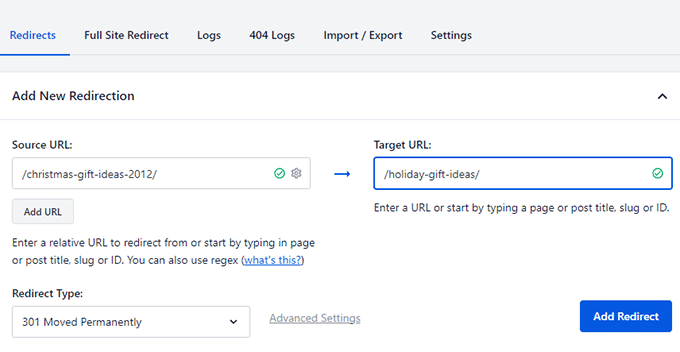
This catches broken links at the exact moment they are created rather than weeks later. At the same time, the built-in 404 monitoring screen tracks any missing URLs that arrive from outside the editor. Detailed hit logs show you how often each redirect fires.
Domain-level management is another key feature that sets AIOSEO apart.
Its Site Aliases feature points secondary domains or subdomains directly to matching URLs on your main site. This is essential when merging two websites or moving to a new domain.
You also get regular expression and wildcard matching, bulk CSV importing, and scheduled redirects that automatically expire on a set date.
When configuring your redirects, you can choose where the redirect logic executes:
- PHP Method (Default) – Processes the redirect inside WordPress, providing complete hit logging and detailed reporting.
- Web Server Method – Writes rules directly to configuration files read by Apache, NGINX, or LiteSpeed before WordPress loads. This reduces server overhead. However, because the request bypasses PHP entirely, AIOSEO cannot track hit counts and disables the Logs tab.
For a deeper look at these server environments, see our comparison guide on Apache vs. NGINX vs. LiteSpeed.
The Redirection Manager is included in the Pro plan at $199.50 per year and higher. There is also a free version of All in One SEO, although it doesn’t include the Redirection Manager.
↩️ Why I Recommend All in One SEO: If you need an SEO plugin, choosing one with a built-in redirect manager saves you from managing a second plugin and dashboard. This is why we use AIOSEO across our own sites, and its Site Aliases feature remains our go-to solution for domain migrations.
For a complete overview of features, see our full All in One SEO review, or read our breakdown of why we switched from Yoast to AIOSEO.
3. Redirection – Best for Conditional Redirect Rules

| Redirection Pros | ✅ Completely free, with no premium tier and no locked features ✅ Conditional rules based on login status, browser, referrer, cookie, IP address, or header ✅ Exports rules directly to Apache .htaccess or NGINX rewrite files |
| Redirection Cons | ❌ Logging creates a database row for every request, so you need to set a retention window yourself ❌ The conditional matching options can be overwhelming if you only need a couple of simple redirects |
| Pricing | Free |
| Best For | Sites that need a redirect to apply to some visitors and not others, without paying for the privilege |
Redirection runs on over 2 million WordPress sites, and it has no premium tier at all. Every feature is free.
My Experience
Redirection matches nearly every feature found in premium tools. You get full regular expression support, rule groups for site organization, CSV imports and exports, individual hit counters on every redirect, and a complete 404 error log.
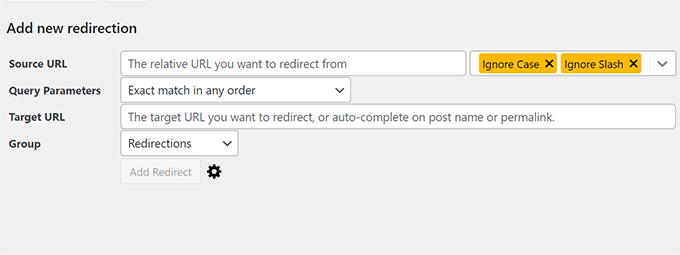
Its conditional redirect rules are the standout feature.
You can configure redirects to trigger based on specific conditions, such as user login status, browser type, traffic referrers, cookies, IP addresses, or HTTP headers. For example, you can send logged-out visitors to a new landing page while logged-in team members still see the original page.
Redirection can also export your rules into an Apache .htaccess file or an NGINX rewrite file. Apache reads the .htaccess file on every request, so rules placed there run before WordPress loads.
If you haven’t edited this file before, check out our guide on how to fix the WordPress .htaccess file first.
Just be aware that by default Redirection logs every redirected request and 404 error as a new database row, and automated bots scanning non-existent URLs can make that table grow fast.
Setting a short log retention window or selecting ‘No Logs’ in the plugin settings stopped that during my testing.
↩️ Why I Recommend Redirection: It provides the same level of control, matching the conditional redirect capabilities of premium tools. Just configure the log retention window as soon as you install Redirection to avoid any performance problems.
4. 301 Redirects – Best for Picking Targets From a Dropdown

| 301 Redirects Pros | ✅ Pick destinations from a dropdown of your own content instead of typing raw URLs ✅ A single screen of source and destination pairs, with nothing else to learn ✅ Includes CSV importing and exporting, plus 404 logging, in the free version |
| 301 Redirects Cons | ❌ No regular expression or wildcard matching in the free version, so every URL needs its own rule ❌ Full 404 logs, automated link scanning, and typo correction require a paid upgrade |
| Pricing | Free version available. The paid upgrade adds wildcards, regular expressions, and the full log |
| Best For | Small business sites retiring a handful of pages, where a typo in a URL is the likeliest thing to go wrong |
301 Redirects is the right choice if you need to fix a few URLs without navigating a complex plugin. It gives you a single screen where you match old URLs to new ones.
My Experience
During testing, the destination picker was the standout feature.
Rather than manually typing a web address and risking a typo, you select the target destination directly from a dropdown menu of your existing pages, posts, custom post types, and archives.
This prevents silent redirect failures caused by mistyped target URLs, which produce no visible errors when saved.
The free version supports 301, 302, and 307 redirects, preserves query strings across redirected links, logs 404 errors via a custom dashboard widget, and supports bulk importing and exporting.
For a small business site managing a handful of retired pages, 301 Redirects covers all the essentials.
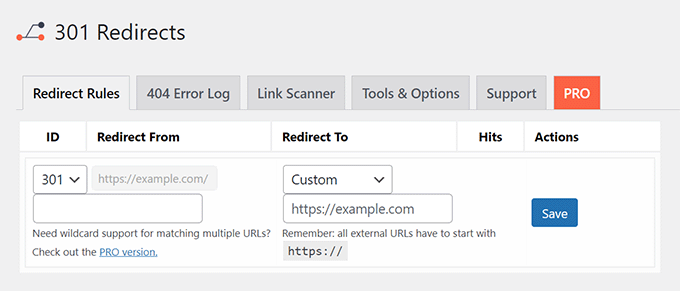
However, the free version lacks regular expression or wildcard matching, so each URL needs its own individual rule.
If you need to move a group of URLs under a single rule, Redirection lets you do that for free.
↩️ Why I Recommend 301 Redirects: The destination picker makes it almost impossible to configure a broken redirect target. When you only need to fix a few pages, that peace of mind matters far more than an extensive list of advanced features you will never use.
5. Rank Math – Best for Matching URLs Without Regex

| Rank Math Pros | ✅ The full Redirections module is free, with no paid upgrade needed to create a redirect ✅ Five URL matching options, including a ‘contains’ rule that works without regular expression syntax ✅ Includes a free 404 Monitor module and rule exports to .htaccess or NGINX |
| Rank Math Cons | ❌ Features stay hidden until you switch on Advanced Mode and enable the module ❌ Automatic .htaccess syncing and 404 log exporting are locked behind the paid version ❌ Only practical if Rank Math is already your primary SEO plugin |
| Pricing | Included in the free version of Rank Math. Paid plans add .htaccess syncing and log exports |
| Best For | Catching every URL that contains a given word, without learning regular expression syntax |
Rank Math powers over 4 million WordPress sites, and its free version includes a built-in Redirections module. If you already use Rank Math for SEO, you have a capable redirect manager built right into your dashboard.
My Experience
The module is toggled off by default and hidden until you enable Advanced Mode in the Rank Math dashboard. Once enabled, the Redirections option appears on your Modules screen.
When creating redirects, source URLs can be matched using five criteria: Exact, Contains, Starts With, Ends With, and Regex.
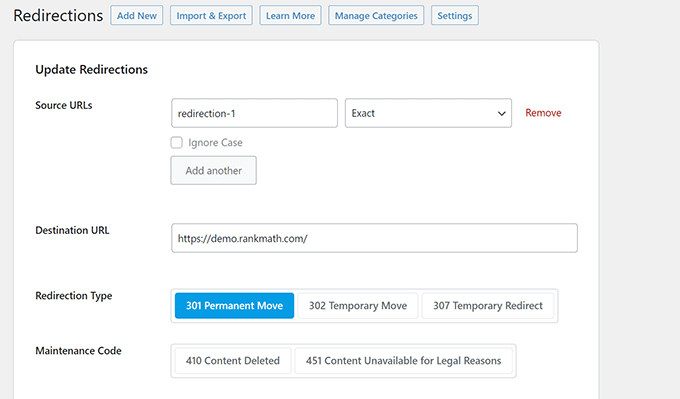
The Contains matching option is useful for everyday URL fixes. It targets any incoming link containing a specific word or string. Writing regex patterns usually requires looking up coding syntax, but the ‘Contains’ rule gives you that same bulk-matching power using straightforward language.
The free module supports 301, 302, and 307 temporary or permanent redirects. It also uses 410 and 451 HTTP status codes to tell search engines to remove dead URLs from their index.
A separate 404 Monitor module logs missing URLs requested by visitors. Bulk actions allow you to activate, deactivate, or delete groups of redirect rules at once. You can also manually export your rules to .htaccess or NGINX configuration files for free.
However, you’ll need a paid license if you want to access automatic .htaccess file syncing or 404 log exports.
If you are deciding between SEO solutions, see our side-by-side comparison of Rank Math vs. AIOSEO.
↩️ Why I Recommend Rank Math: Installing a standalone redirect plugin is unnecessary if your existing SEO plugin already handles the job. If you currently run Rank Math, turn on the Redirections module before looking at separate plugins.
6. Yoast SEO Premium – Best for Redirects Created at the Source

| Yoast SEO Premium Pros | ✅ Prompts you to create a redirect the moment you move or delete content ✅ Creates the redirect automatically whenever you update a URL slug ✅ Premium bundles the Local SEO, Video SEO, and News SEO plugins |
| Yoast SEO Premium Cons | ❌ The free Yoast SEO plugin has no redirect manager, so there is no free tier for this feature ❌ No 404 monitoring, so broken URLs from outside the editor go unnoticed |
| Pricing | $118.80/year. No free tier for redirects |
| Best For | Multi-author sites that want the redirect made when the slug changes, with no log to audit afterwards |
Yoast SEO Premium takes a different approach from other plugins by preventing broken URLs before they happen.
My Experience
Every time you delete or move a page, Yoast prompts you to select what happens to the old URL. If you update a slug, the plugin automatically creates the redirect for you. As a result, old web addresses never break, so you don’t need to hunt down 404 errors in a log weeks later.
The dedicated Redirects screen supports 301, 302, 307, 410, and 451 HTTP status codes.
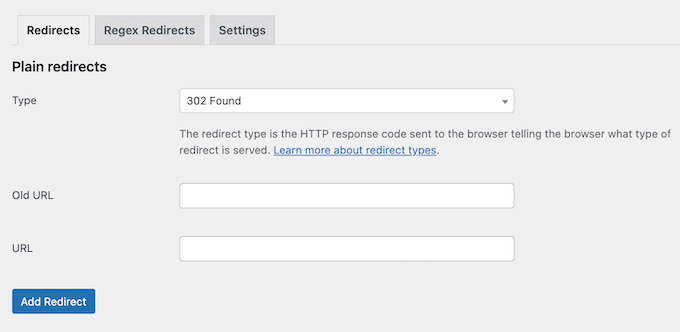
For bigger jobs, Yoast supports regular expression redirects to move groups of URLs with matching patterns under a single rule. You can also manage redirects in bulk via CSV by exporting your rules, editing them in a spreadsheet, and re-uploading the file.
The major drawback is that the free Yoast SEO plugin does not include a redirect manager. You’ll need to invest in a premium license to access these features.
Yoast does not monitor or log 404 errors. Broken links originating outside the post editor will not appear anywhere inside the plugin interface. To monitor those, you’ll need to pair Yoast with a 404 logging plugin like 404 to 301, covered above, or find broken links inside your own posts with Broken Link Checker.
↩️ Why I Recommend Yoast SEO Premium: Preventing broken URLs before they happen takes far less work than hunting down errors in log files later. Yoast is built around this proactive approach.
7. Safe Redirect Manager – Best for Adding No Database Queries

| Safe Redirect Manager Pros | ✅ Redirects are stored as a custom post type and cached, so they add no database query per request ✅ No request logging at all, which keeps the database from growing over time ✅ Full regular expression and wildcard support, plus WP-CLI for version-controlled redirects |
| Safe Redirect Manager Cons | ❌ No 404 log, hit counts, or reporting, so you need a separate tool to find broken URLs ❌ Limited to 1,000 redirects by default |
| Pricing | 100% free, with no paid tier |
| Best For | High-traffic publishers who already know which URLs need redirecting and want no reporting overhead at all |
Safe Redirect Manager comes from 10up, a web agency that builds for high-traffic digital publishers. Everything about the plugin reflects that enterprise origin, including the features it deliberately leaves out.
My Experience
Safe Redirect Manager stores each redirect as a custom post type.
The plugin loads the full list once and caches it, so high-traffic sites do not look up redirects in the database on every visit.
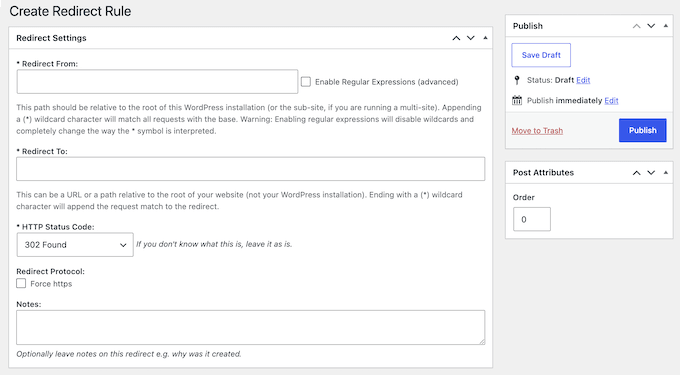
Safe Redirect Manager handles complex redirects through simple rules. Checking the Regex option enables pattern matching, while adding an asterisk creates a wildcard rule to move entire groups of URLs at once.
There is no request logging of any kind, which is a conscious design choice. 10up’s documentation highlights 404 error logging as a source of performance overhead in other redirect tools.
Developers also get full WP-CLI support, so you can create and manage redirects from the command line or include them directly in deployment scripts. The plugin imposes a default cap of 1,000 redirects to protect site performance, though you can adjust this limit using the srm_max_redirects code filter.
The downside is straightforward. With no dashboard reporting, 404 error tracking, or hit counters, you must already know which URLs require redirects before setting them up. If you don’t have that list, then pair this plugin with a tool like Broken Link Checker.
↩️ Why I Recommend Safe Redirect Manager: When every database query affects your server’s performance, leaving out dashboards and logs can be a benefit rather than a drawback.
Safe Redirect Manager is the only plugin on this list that treats redirects as lightweight site infrastructure rather than an analytics tool.
FAQs About WordPress Redirects
What is the best free redirect plugin for WordPress?
404 to 301 is the best overall free redirect plugin. It combines a full-featured redirect manager with an integrated 404 error log, so you can find missing links and fix them directly from the log interface.
If you already have an all-in-one SEO plugin, use its built-in redirect manager instead of adding a second plugin. That is why we use All in One SEO on our own websites.
For step-by-step instructions on managing dead links, see our detailed guide on how to track 404 pages and redirect them.
Should I use a plugin or server-level redirects?
Choosing between plugin-level and server-level redirects comes down to whether you prioritize detailed tracking or site speed.
- Plugin-Level Redirects – These are processed by PHP inside WordPress. Because WordPress loads on every request, the plugin can track hit counts, generate detailed traffic logs, and offer 404 monitoring. For a typical site managing a few dozen redirects, this method works well without affecting performance.
- Server-Level Redirects – These are written directly into your Apache .htaccess or NGINX configuration file. Your web server handles the request before WordPress ever loads. This results in faster load times and reduced server strain, especially during traffic spikes or major site migrations. However, because the server bypasses PHP entirely, your plugin cannot log individual hits or track visitor data for those URLs.
You should use the plugin method when you want to monitor a handful of redirects, and server-level rules for high-traffic sites, thousands of active rules, or large site migrations.
Plugins like All in One SEO let you toggle between both methods in their settings, while Redirection and Rank Math allow you to export your rules directly to server configuration files.
What is a 301 redirect in WordPress?
A 301 redirect is a permanent HTTP status code that automatically routes visitors and search engine crawlers from an old URL to a new destination.
It is the right choice for content that has moved for good. Our beginner’s guide to creating redirects in WordPress explains when a temporary redirect is the better option.
How do I know if I need a redirect?
You need a redirect any time a URL that worked yesterday stops working today. In practice, that means deleting a post, editing a published URL, changing your permalink structure, merging two pages, or moving to a new domain.
Can too many redirects cause problems?
Yes. Pointing one redirect at another creates a redirect chain that slows the page down for every visitor and gives search engines extra hops to follow before they reach the final page. Pointing two redirects back and forth at each other creates a redirect loop that breaks the page entirely, which browsers report as the ERR_TOO_MANY_REDIRECTS error.
To avoid this, update the original redirect rule so it points straight to the final destination URL. If you encounter this error, see our complete guide on how to fix the too many redirects issue in WordPress.
Do redirects affect my SEO?
Yes. When used correctly, a 301 redirect passes the original URL’s ranking signals to the new target page, including the value of any links pointing at the old address. It also stops visitors from landing on a broken 404 page.
If you skip setting up 301 redirects, search engines will eventually drop the old address from their index, taking its ranking power and search traffic with it.
That is why our WordPress SEO audit checklist includes a redirect review.
We hope this article helped you find the best WordPress redirect plugin for your site. You may also want to see our guide on how to fix broken links in WordPress, or our expert picks of the best WordPress SEO plugins and tools.
If you liked this article, then please subscribe to our YouTube Channel for WordPress video tutorials. You can also find us on Twitter and Facebook.




THANKGOD JONATHAN
Yes, AIOSEO is the best. Because it let you manage your redirect without needing to install another plugin. Which will help you save some server space and it also comes with many SEO feature that will help you rank higher on Google.
Jiří Vaněk
When I need to perform a redirect, lately I’ve heavily relied on the rules I’ve mapped out in the .htaccess file. However, the older one gets, the more they tend to try and simplify their work, and these plugins are a great choice when, for instance, migrating to another domain and needing to oversee everything for SEO purposes.
Ahmed Omar
As expected from AIOSEO to be in the top of the good settings and needs to improve the site quality and to keep good shape
the only thing here is most of the great things included in the pro plan.
Konrad
it’s worth noting that while redirect plugins are incredibly useful, they should be used sparingly. Each redirect you add increases the load time of your website, even if only by a fraction of a second. Over time, as you add more and more redirects, this can significantly slow down your site. Therefore, it’s important to periodically review and clean up your redirects, removing any that are no longer necessary
WPBeginner Support
You’re right that its not recommended to have multiple levels of redirects when possible.
Admin
Ralph
Over the years I only changed my url few times so I redirected them in my hosting panel with 301. But once again I see All In One SEO can do this and is really ALL IN ONE. Is there something this plugin doesn’t do?
kilama
I have gone throught the list, but i wonder do these plugins give free trials before you pay
WPBeginner Support
Some of the plugins from the list have free versions where you can test out some of the features.
Admin