


Yoast SEO is widely known as a top plugin for WordPress, but it isn’t always the best choice. Many site owners look for tools that are easier to use or offer better features for less money.
We faced this exact situation at WPBeginner. After we used Yoast for a long time, we realized that we needed a tool that innovated faster and gave us more control over our content.
We eventually switched to All in One SEO, and our workflow improved immediately. Since then, I have researched and tested the top competitors to help you find the right match for your needs.
Quick Picks: Best Yoast SEO Alternatives
If you just want the answer, AIOSEO is the best overall replacement for most people leaving Yoast. If you want to stop paying for SEO entirely, then Rank Math has the strongest free version.
| Plugin | Best For | Free Version | Price |
|---|---|---|---|
| Yoast SEO (for comparison) | The plugin you’re replacing | Essentials, one keyphrase | Free, $118.80/yr per site |
| AIOSEO | Best overall Yoast replacement | Essentials, one keyphrase | Free, $49.50/yr, 10 sites $199.50 |
| Rank Math | Best free Yoast alternative | Strongest free tier here | Free, $95.88/yr, clients $299.88/yr |
| SEOPress | White-labeling for client sites | Ad-free, light on features | Free, $49/yr, unlimited sites $149/yr |
| Slim SEO | Hands-off automatic setup | Automatic basics plus redirects | Free, $59/yr, 10 sites $119 |
| Squirrly SEO | Live writing guidance | One focus page | Free, $239.88/yr for 5 sites |
| SureRank | Guided setup for simple sites | Basics, no redirects | Free, $99/yr for 10 sites |
Pricing checked October 2026. Prices are first-year rates where the vendor discounts the first year.
How I Tested the Best Yoast SEO Alternatives
I tested each plugin in five areas:
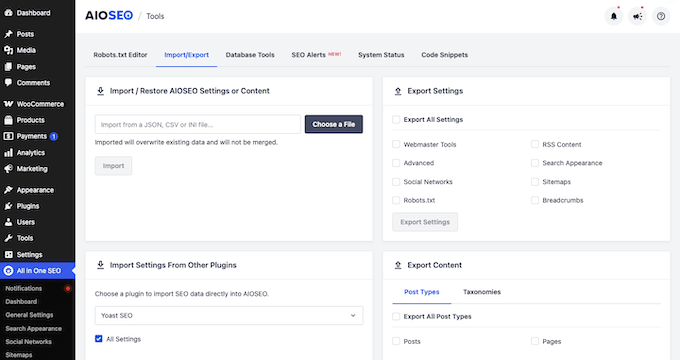
- Import Capabilities – I tested how easily each tool migrates data from Yoast SEO to ensure you don’t lose search rankings when switching. In my testing, AIOSEO imported title tags, meta descriptions, and focus keyphrases (the main search term you want a post to rank for) across all 10 test posts.
- Schema Support – I verified whether each plugin automatically adds structured data, also called schema markup, which is code that helps search engines understand your content. Without any manual configuration, AIOSEO’s free version applied six connected schema types to a standard blog post, including BlogPosting, BreadcrumbList, and Organization.
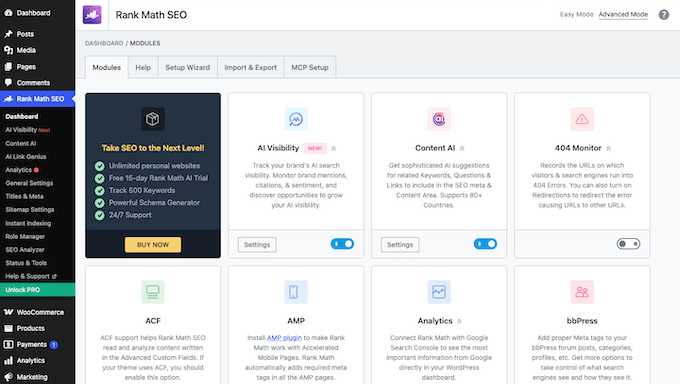
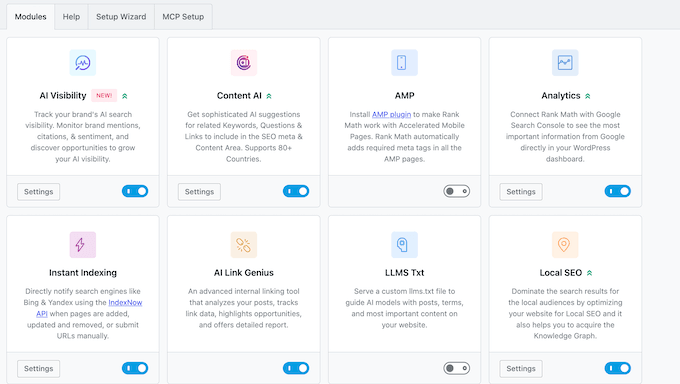
- Ease of Use – I looked for clear, beginner-friendly setup wizards that avoid complex technical jargon. For example, Rank Math’s free dashboard lists 24 separate modules, and a beginner has to decide which ones to keep.
- Feature Set and Value – I compared features included in the free versions against those locked behind paid tiers. For example, licensing 10 online stores on Yoast’s WooCommerce SEO plan costs $1,788 per year, whereas a single AIOSEO Pro license covers 10 sites for less than a quarter of that cost.
- AI Search Readiness – I compared what each plugin offers for AI search in four areas, which are AI writing help, tracking whether AI engines mention your brand, llms.txt and AI crawler controls, and whether you can run the plugin from an AI assistant. On a site we manage, we connected Claude to AIOSEO through the free WPVibe plugin, and it returned the site’s SEO health score and a list of pages sorted by TruSEO score without us opening WordPress.
Why Look for a Yoast SEO Alternative?
The two main reasons site owners leave Yoast SEO are high costs and a slow pace of innovation.
While Yoast SEO Premium now bundles Local, Video, and News SEO tools together, eCommerce store owners face an extra hurdle. To access dedicated WooCommerce features, you must purchase a separate Yoast WooCommerce SEO plan.
Yoast also charges for each site separately. For agencies and multi-site owners, these per-site fees add up quickly.
At the same time, competitor plugins have introduced modern features much faster. This includes built-in AI writing assistants, automated internal link building, and content decay tracking. This was one of the main reasons why we switched away from Yoast.
Yoast has been owned by Newfold Digital, the company behind Bluehost and HostGator, since 2021. Some site owners prefer to move away after that change.
Keep in mind that changing your SEO plugin won’t automatically boost your rankings. A plugin provides the underlying foundation, but search performance still depends on high-quality content, smart keyword targeting, and a fast, technically sound site. That said, a better plugin makes managing those tasks much easier.
You can use the quick links below to jump to each plugin review.
- AIOSEO
- Rank Math
- SEOPress
- Slim SEO
- Squirrly SEO
- SureRank
- Which Yoast Alternative Is Ready for AI Search?
- Final Verdict: Which is the Best Yoast SEO Alternative?
- FAQ
- Additional Resources for WordPress SEO
Important: You should never use two WordPress SEO plugins at the same time, as this can cause plugin conflicts and hurt your rankings. When you switch, run your new plugin’s Yoast import first, then deactivate Yoast SEO.
1. All in One SEO (AIOSEO)
All in One SEO (AIOSEO) is the best Yoast SEO alternative for most people. It delivers more features than Yoast Premium at a lower total cost. This is particularly true if you manage an online store or run multiple WordPress websites.
AIOSEO includes WooCommerce SEO on every paid tier, whereas Yoast sells WooCommerce features as a separate plan that costs $178.80 per year for each individual site.
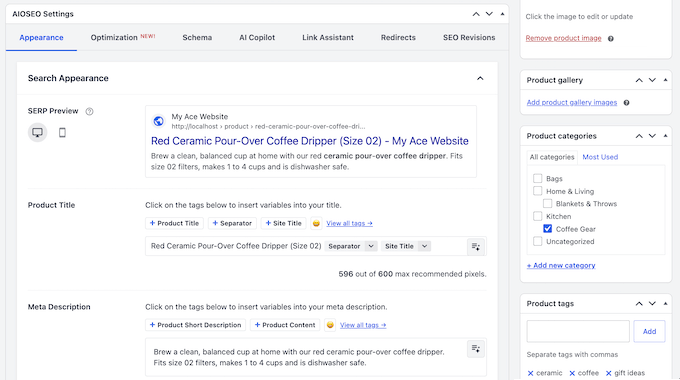
A single AIOSEO Pro license covers up to 10 websites, while Yoast needs a separate license for each one. That’s the biggest saving if you run more than one site.
AIOSEO also includes two tools that save time on everyday SEO tasks.
First, the built-in Link Assistant, available on the Pro plan, automatically scans your site for internal linking opportunities and allows you to insert contextual links without opening individual posts.
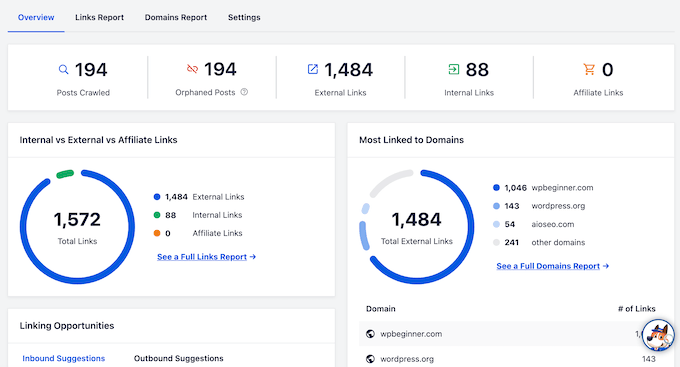
Second, AIOSEO includes a set of AI tools.
Optimize With AI rewrites a post’s SEO title and meta description in one click, and you review every change before keeping it. Every paid plan includes AI credits, and the free plugin can use the same AI tools with credits too, starting with 50 free credits.
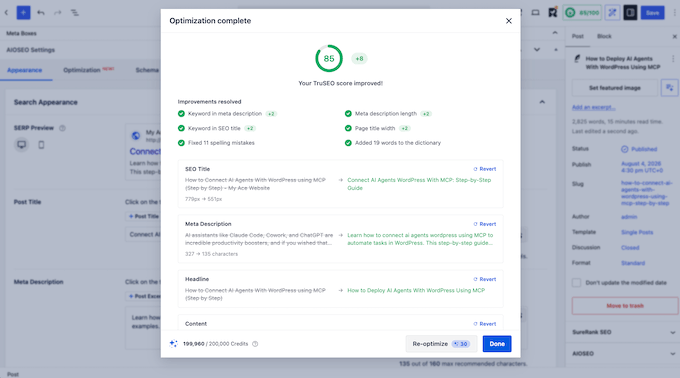
AIOSEO’s AI can also generate schema markup (code that tells search engines what your content is about) and content like FAQs and social media posts.
Finally, AIOSEO is easy for beginners to navigate. Its onboarding setup wizard detects existing Yoast installations and automatically migrates your SEO metadata.
AIOSEO’s TruSEO analysis tool, its built-in content checker, then evaluates content with a simple score out of 100 alongside an actionable checklist.
When I ran the Yoast import on my test site, AIOSEO also brought over each post’s noindex setting and custom canonical URL, and it turned Yoast’s title variables into its own Smart Tags.
What I Like About All in One SEO:
- Smart Tags, which are placeholders that fill in details like the current year, keep your titles up to date automatically.
- Bulk AI actions write SEO titles, meta descriptions, and image alt text for many posts at once.
- Creates an llms.txt file, which helps AI search tools like ChatGPT find your best content.
- Costs less than Yoast Premium, even on a single site.
What I Don’t Like About All in One SEO:
- Free plugin covers the essentials only. Advanced tools like redirects, internal link suggestions, WooCommerce SEO, and Local SEO require a paid plan.
- Features are spread across different pricing tiers, meaning Local SEO requires the Plus plan while the full redirect manager and Link Assistant require Pro.
Why I Recommend AIOSEO: If you want to move away from Yoast due to the cost, AIOSEO gives you WooCommerce SEO and automated internal linking tools, with one license covering up to 10 sites. It’s also the easiest plugin on this list for a beginner to switch to.
Pricing: You can download the free version of AIOSEO from WordPress.org. Paid plans start at $49.50 for the first year for a single site ($99 per year after that), while the Pro plan covers up to 10 sites for $199.50 for the first year ($399 per year after that).
We use All in One SEO on our own websites. To read more about our experience, see our complete All in One SEO review.
2. Rank Math
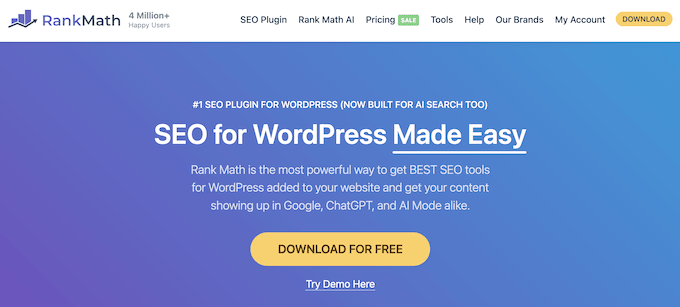
If you want to stop paying for SEO tools, then Rank Math‘s free version offers features that Yoast and AIOSEO lock behind paid plans.
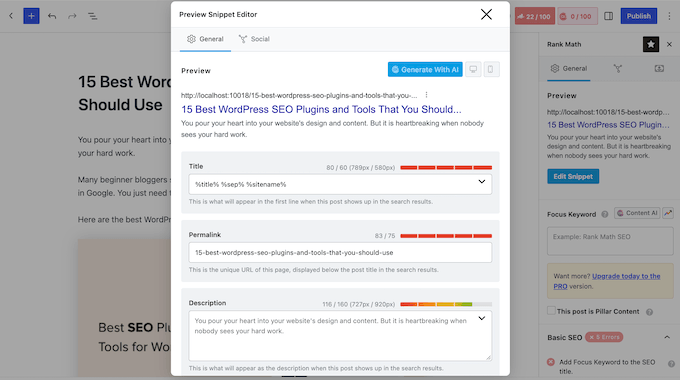
Without spending anything, you get access to a full redirection manager, a 404 monitor, which tells you when visitors land on a broken page, and internal link suggestions inside the editor.
The free version also provides basic WooCommerce support, local SEO for one location, over 16 schema types (formats that help search engines understand your content), and Google Search Console data inside your dashboard.
Rank Math is also built with a modular design. This means you can disable features you don’t need, and keep your interface clean.
Rank Math really stands out when it comes to structured data. With Rank Math Pro, you can pull schema from any webpage using its built-in ‘Import from URL’ tool. Plus, you can build custom schema without writing code.
However, by default the free version limits you to five focus keywords, which are the search terms you want a post to rank for. To add more, you’ll need to add a code filter to your site, which is a small snippet of custom code.
On top of that, Rank Math’s long list of modules and settings can overwhelm beginners. If you want something simpler, AIOSEO is the better choice.
When I activated Rank Math on my test site, it sent me straight to a screen asking me to connect a free Rank Math account. Its dashboard stayed locked until I either connected an account or skipped that step.
What I Like About Rank Math:
- Validates your markup directly against Google’s Rich Results tool.
- Displays Google URL Inspection API data so you can track crawling issues.
- Its free Role Manager lets you choose which SEO settings each team member can change.
- Adds alt text and title attributes to your images automatically.
What I Don’t Like About Rank Math:
- Free tier limits you to 5 focus keywords per post unless you insert a code filter.
- Feature-dense interface can easily overwhelm beginners.
- You must purchase the higher-tier Business plan if you want to use the plugin on client sites.
Why I Recommend Rank Math: If you want to avoid subscription fees, Rank Math is the clear winner. It includes premium-style tools like redirects and internal linking for free, as long as you’re comfortable with a busier dashboard.
To learn more, see our detailed Rank Math review.
Pricing: You can download the lite version of Rank Math for free. If you need premium features, you can upgrade to Pro for $7.99 per month, billed annually at $95.88 ($8.99 per month at renewal). To use it on client websites, you need the Business plan at $24.99 per month, billed annually at $299.88.
3. SEOPress
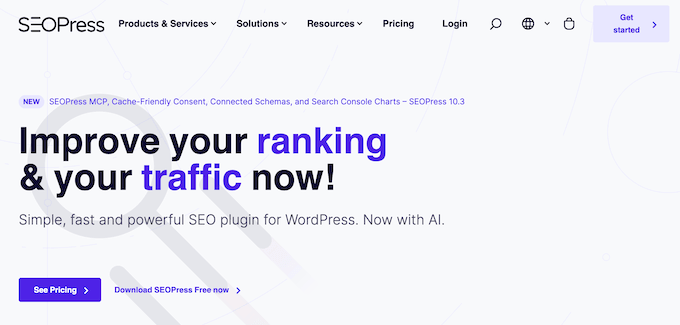
If you manage client sites or run an agency, SEOPress is designed for the way you work. It combines SEO essentials like meta titles and XML sitemaps with branding and licensing options for client work.
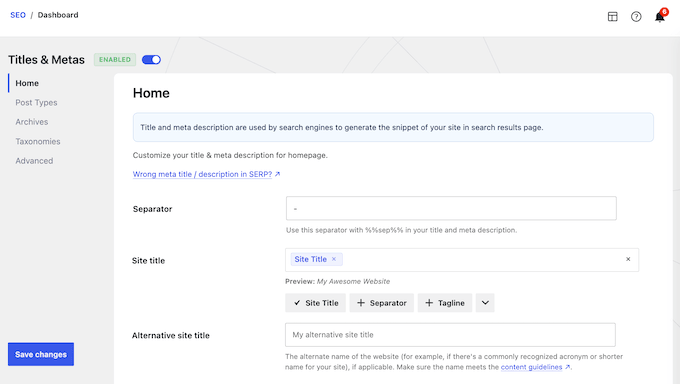
Its white-label feature lets you replace the SEOPress branding with your own logo throughout the WordPress dashboard, so clients see your brand instead of the plugin’s.
The free version also doesn’t contain any ads or sales banners in your dashboard. On top of that, the top Pro plan covers unlimited sites, so your costs stay the same as your client list grows.
SEOPress also includes a setup wizard. It creates an image sitemap for free, and SEOPress Pro adds a video sitemap to help your videos show up in search results.
If you’re switching from Yoast SEO, SEOPress has a simple import tool that moves your metadata over so you don’t lose your previous work.
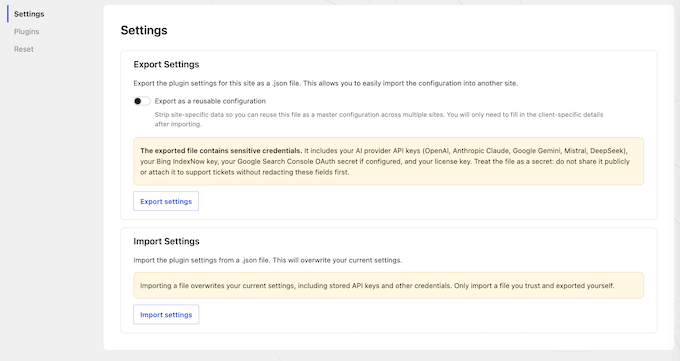
When I ran SEOPress’s Yoast import on my test site, it carried over the SEO title, meta description, focus keyword, noindex setting, and custom canonical URL for all 10 of my test posts. Yoast’s title variables kept working without any changes.
SEOPress Pro can also use AI to write titles and meta descriptions based on your page content.
What I Like About SEOPress:
- Unlimited redirects included in SEOPress Pro.
- Shows Google Search Console data right in your WordPress admin area (Pro).
- Supports many schema types like local business, product, video, and recipe schema.
- Works well with tools such as Easy Digital Downloads, AMP, and BuddyPress.
- The free version’s content analysis has no limit on target keywords per post.
What I Don’t Like About SEOPress:
- The free plugin is basic compared to AIOSEO or Rank Math. For example, you need the Pro plan just to edit your robots.txt file.
Why I Recommend SEOPress: The free plugin is fairly simple, but SEOPress Pro’s unlimited plan costs the same $149 a year no matter whether you manage 10 client sites or 100. The white-label feature lets you deliver a custom, branded SEO service to clients without having to build your own tool.
Pricing: You can download the free version of SEOPress, or SEOPress Pro costs $49/year for 1 site, $59/year for 5 sites, or $149 per year for unlimited sites.
4. Slim SEO
If you want to skip the manual setup, Slim SEO is a set-it-and-forget-it alternative to Yoast.
It automatically configures most SEO settings for you, including meta tags, XML sitemaps, schema markup (code that describes your content to search engines), and Open Graph tags, which control how your posts look when shared on Facebook and other social sites.
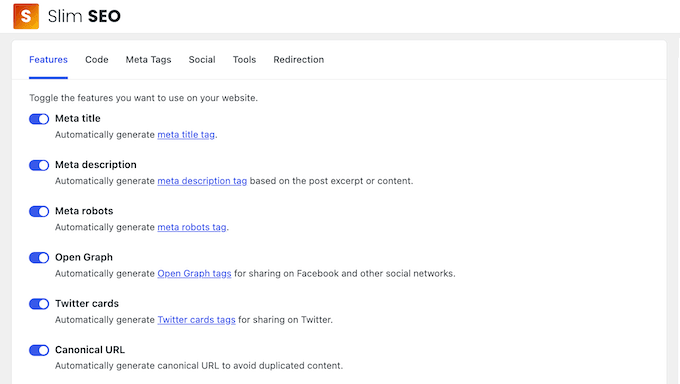
Slim SEO also includes a built-in code inserter for your header and footer, so you can add Google Analytics or tracking scripts without installing extra plugins.
The plugin also helps protect your content against scrapers by automatically showing excerpts instead of full text in your RSS feeds. It also adds a backlink to your original post to ensure you get proper credit.
Slim SEO Pro adds a visual schema builder, internal link suggestions, and broken link monitoring.
As soon as I activated Slim SEO on my test site, my posts already had Open Graph tags, a canonical link, and Article and breadcrumb schema. The XML sitemap was also live straight away.
The main difference from SureRank (number 6 on this list) is redirects. Slim SEO includes a redirect manager right in its free core plugin, while SureRank keeps redirects locked behind paid plans and focuses more on guided onboarding.
What I Like About Slim SEO:
- Redirects visitors automatically when you change a post’s URL slug.
- Includes a 404 monitor, which logs broken pages visitors try to open, plus image and Google News sitemaps for free.
- Can write meta titles and descriptions with AI, using your own OpenAI, Gemini, or Claude API key.
What I Don’t Like About Slim SEO:
- Because the plugin relies heavily on automation, you have less control over specific settings compared to AIOSEO or Yoast.
Why I Recommend Slim SEO: If you want an SEO solution you can set up once and forget about, Slim SEO is a good choice. It handles core optimization tasks automatically so you don’t have to learn complex technical SEO skills.
Pricing: The core Slim SEO plugin is free. Meanwhile, Slim SEO Pro costs $59/year for 1 site or $119/year for 10 sites.
5. Squirrly SEO
Squirrly SEO takes a hands-on approach to content optimization.
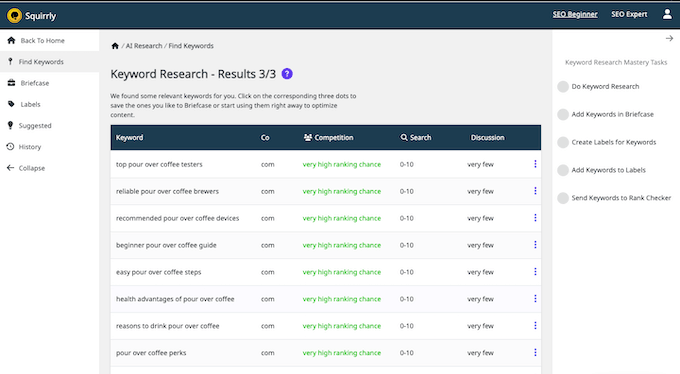
Unlike other plugins where you have to do your own research, Squirrly includes a built-in keyword research tool. It shows search volume and your chance of ranking for each keyword right inside your WordPress dashboard, helping you find the best topics to write about.
When I researched ‘pour over coffee’, Squirrly showed a search volume of 27,100 but a ‘very low ranking chance’. It also suggested 14 longer phrases with a ‘very high ranking chance’, although each one had only 0 to 10 searches.
My favorite feature is the Live Assistant.
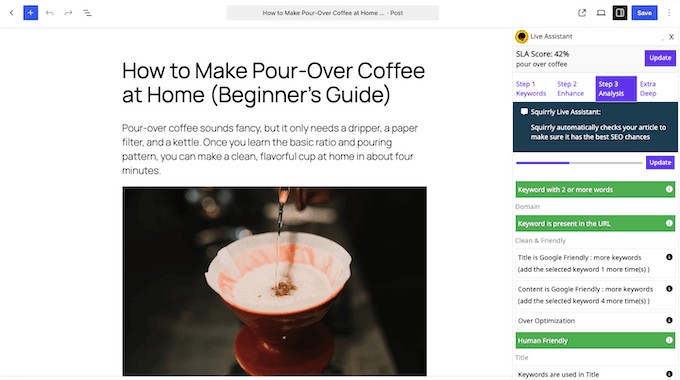
As you type your blog post, Squirrly gives you real-time feedback. Each check in its list turns green when your post passes it, and an SLA score shows your overall progress. An Over Optimization check also displays a warning if you use a keyword too often.
On my test post, the Live Assistant gave a 42% score for ‘pour over coffee’. It told me to use the keyword 4 more times in the content and once more in the title.
Squirrly also tracks your keyword rankings, generates detailed performance audits, and connects directly with Google Search Console and Google Analytics to give you a complete view of your site traffic.
When I activated Squirrly on my test site, its dashboard asked me to create a free Squirrly Cloud account with my email address before Focus Pages, GEO audits, and the other cloud tools would work.
What I Like About Squirrly SEO:
- Works alongside page builders like Divi and Thrive Architect.
- Focus Pages show why a specific page isn’t ranking and what to fix first.
- Its LLM Indexing tool submits new and updated URLs through IndexNow, which tells search engines when your content changes.
What I Don’t Like About Squirrly SEO:
- The free plan allows only one focus page and five keyword researches a month.
Why I Recommend Squirrly SEO: This is a strong option if you want an all-in-one assistant that combines keyword research, real-time writing recommendations, and performance analytics inside WordPress.
Pricing: You can get started with Squirrly SEO for free. Meanwhile, Squirrly Pro costs $19.99/month billed annually for up to 5 sites, while the Business plan costs $71.99/month for up to 7 sites.
6. SureRank
SureRank is a free, lightweight SEO plugin made by Brainstorm Force, the team behind the Astra theme. It’s built for beginners who find Yoast’s dashboard too busy and want fewer settings to learn.
The free version covers the essentials. You get SEO titles and meta description templates, XML sitemaps, schema markup (code that helps search engines understand your content), social sharing previews, a robots.txt editor, and page-level SEO checks that scan for broken links.

In my test, the page checks flagged a post title and a meta description that were too long. They also confirmed the page had image alt text, subheadings, a canonical tag, and no broken links.

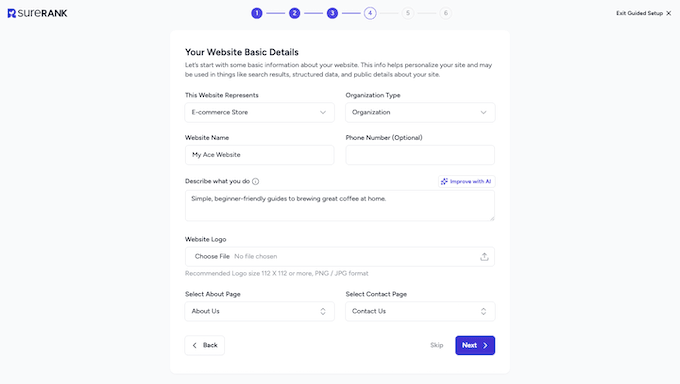
Setup takes very little effort thanks to a six-step wizard that asks about your site and social profiles, along with an automatic import step if it detects Yoast or another SEO plugin.
In my test, the six screens were a welcome page, the import, an optional AI connection, your website details, social profiles, and an email sign-up.
When I ran SureRank’s Yoast import on my test site, it brought over the title, meta description, noindex setting, and canonical URL for all 10 of my test posts. It also converted Yoast’s title variables into its own format.
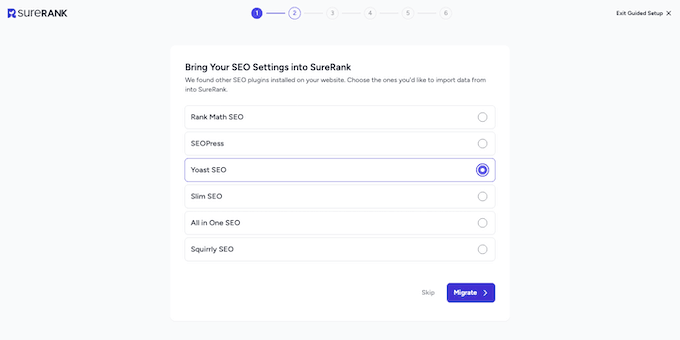
Before choosing SureRank, keep in mind that it’s the newest option on this list, so it lacks the long track record of older alternatives.
In addition, advanced features such as redirects, link management, eCommerce optimization, and built-in AI tools are only available in SureRank Pro. As a result, it’s an ideal choice for a basic blog or business site rather than an expanding online store or a multi-author website.
What I Like About SureRank:
- Its robots.txt analyzer warns you when a rule blocks something you probably want search engines to see.
- Writes alt text for your images automatically.
- Lets you export your settings and import them on another site.
What I Don’t Like About SureRank:
- Redirects, internal link management, and AI optimization tools require SureRank Pro.
- It launched in April 2025. It has far fewer reviews than the other plugins here, with 48 ratings on WordPress.org.
Why I Recommend SureRank: Choose SureRank if you want a simple, free plugin, because its setup wizard handles the basic settings for you. However, high-volume blogs and rapidly expanding online stores will reach the limits of the free features much sooner than they would with alternatives like AIOSEO or Rank Math.
Pricing: You can download the core SureRank plugin for free. SureRank Pro costs $99 for the first year for 10 sites ($149 per year after that), and the Business plan costs $179 for the first year for 500 sites ($249 after that).
Which Yoast Alternative Is Ready for AI Search?
More people now ask ChatGPT, Gemini or Google’s AI Overviews a question instead of scrolling through search results. Every plugin on this list sells features for that shift, and most of them use the same words.
Before you pay for any of them, it helps to know what Google says. Its own guide to AI search says the basics have not changed. You do not need special schema, and Google does not read llms.txt files.
An llms.txt file is a plain text list of your best pages, written for AI tools. A 2026 Ahrefs study of 137,000 websites found that 97% of these files were never requested by anyone. Treat it as a two-minute setting, not a ranking tactic.
The strongest signal for appearing in AI answers is being mentioned on other websites, and no plugin can do that for you. What a plugin can do is save you time and show you data. Here is how the six plugins compare on the three things that matter.
| Plugin | AI Writing | AI Visibility Tracking | Works From Claude or ChatGPT |
|---|---|---|---|
| Yoast SEO | Premium, 10 free tries | AI+ add-on, $358.80/yr | Yes, via Abilities API |
| AIOSEO | Free with AI credits | Free keyword reports (beta) | Yes, 13 free, 26 Pro abilities |
| Rank Math | Paid Rank Math AI plan | Paid Rank Math AI plan | Yes, free MCP server |
| SEOPress | Pro, your own API key | No | Yes, 14 free tools |
| Slim SEO | Free, your own API key | No | Yes, via Abilities API |
| Squirrly SEO | Guidance only, no writing | No | Yes, needs WordPress 6.9 |
| SureRank | SureRank AI, Pro | No | Yes, via shared MCP server |
If you want AI to write titles and descriptions without another subscription, Slim SEO and SEOPress let you plug in your own OpenAI, Gemini or Claude key, which costs cents per post. AIOSEO gives you 50 free credits to start and bundles credits into every paid plan.
If you want to know whether AI engines mention your brand, only three plugins can tell you. AIOSEO’s keyword reports query ChatGPT, Claude, Gemini, DeepSeek and Perplexity, and they are free while the feature is in beta. Rank Math sells the same kind of tracking as a separate Rank Math AI plan, and Yoast sells it as Yoast SEO AI+ for $358.80 a year.
Every plugin here except Slim SEO and SureRank will generate an llms.txt file for you, and both of those say they left it out on purpose until AI companies adopt it.
If you want to block AI crawlers, AIOSEO’s robots.txt editor has a Block AI Crawlers option, Squirrly has per-bot controls, and Yoast includes a bot blocker in Premium.
The feature that changes how you work is the last column. Every plugin here now exposes at least some of its settings to AI assistants. You can ask Claude or ChatGPT to audit or update your SEO instead of clicking through the dashboard.
In our test, we connected Claude to AIOSEO through the free WPVibe plugin. One request returned the site’s SEO health score, with 2 errors and 4 warnings, and another listed every page by its TruSEO score.
Final Verdict: Which is the Best Yoast SEO Alternative?
For most people leaving Yoast, AIOSEO is the best choice. This is especially true if you’re running an online store or own more than one website. Meanwhile, if you want to avoid recurring subscription fees, Rank Math gives you the most features for free.
Here’s a quick summary of the other top options by use case:
- For Agencies – SEOPress lets you present the plugin to clients under your own brand, with a plan that covers unlimited sites.
- For AI Search – AIOSEO shows where your brand stands across five AI engines, and your AI assistant can read and update your SEO through its built-in abilities.
- For Hands-Off Automation – Slim SEO sets up the basics automatically, so there’s almost nothing to configure.
- For Writing Guidance – Squirrly SEO gives you keyword research and real-time writing tips inside WordPress.
- For Simple Websites – SureRank offers a streamlined setup wizard and keeps your dashboard clean and uncluttered.
At WPBeginner, we use AIOSEO because it handles technical SEO tasks automatically, so we can focus on creating content.
FAQs About Yoast SEO Alternatives
1. Is All in One SEO (AIOSEO) better than Yoast SEO?
Yes, in my experience, All in One SEO is the better choice for most WordPress websites, especially online stores.
Every paid AIOSEO plan includes WooCommerce SEO tools, such as automatic product schema markup. Yoast only offers these through its separate WooCommerce SEO plan, which costs $178.80 per year for each site.
The saving grows as you add websites. A single AIOSEO Pro license covers up to 10 sites, while Yoast charges for each site separately.
2. Is Rank Math better than Yoast?
Yes, if you’re looking for a free plugin.
Rank Math’s free version offers more capabilities than Yoast’s free tool. This includes built-in redirections, a 404 error monitor, and multiple focus keywords. However, using these extra features means working with a slightly more complex dashboard.
Also, keep in mind that the free plugin limits you to five focus keywords per post by default, unless you add a custom code snippet to your site.
3. Can I use two SEO plugins at the same time?
No, you should never run two WordPress SEO plugins at the same time. Running multiple SEO tools simultaneously can create software conflicts, duplicate meta tags, and site errors that can negatively impact your search engine rankings.
When you’re ready to make the switch, install your new SEO plugin first so you can use its built-in import wizard to transfer your Yoast metadata.
Once your data is imported, deactivate Yoast SEO right away to prevent conflicts. Before you delete Yoast, check a few posts to make sure their titles and descriptions came across.
4. Which free SEO plugin is best for WordPress?
Rank Math is the best free SEO plugin for most WordPress websites. Its free version delivers more features than any other free plugin on this list. This includes a full redirection manager, a 404 error monitor, internal link suggestions, and support for over 16 schema types.
However, if you’re willing to invest in a premium solution, AIOSEO is the top paid choice. It adds Link Assistant, a complete redirect manager, and Local SEO, with a single license covering up to 10 websites.
I hope you found this article helpful. Next, I recommend going through our complete WordPress SEO guide for ranking in Google and AI Search.
If you liked this article, then please subscribe to our YouTube Channel for WordPress video tutorials. You can also find us on Twitter and Facebook.



Mohammad Hammad
I am a beginner learning SEO these days. I found it interesting that WPBeginner itself switched from Yoast to All in One SEO after using it for so long. The comparison table made the differences easy to understand for someone new like me.
My question: for a complete beginner who is just starting to learn SEO, is All in One SEO really the easiest option to begin with, or should we first learn the basics with Yoast and then switch later?
Thank you for testing all these plugins and sharing this guide.
— Mohammad Hammad, SEO Learner
WPBeginner Support
We feel it is, AIOSEO was worse for beginners originally, but over time, it has developed into a powerful plugin for beginners and professionals. There is no advantage to selecting Yoast when you are first starting unless you prefer the Yoast plugin.
We personally prefer AIOSEO.
Admin
THANKGOD JONATHAN
There are so many great Yoast SEO alternatives out there! I’m going to have to check out some of these other plugins. But for now, based on my personal experience AIOSEO is the best alternative.
Ralph
Thanks for the list of alternatives. I use Yoast on my blog and after the years I don’t think I will change it but on the new website I will use All In One SEO. You guys have so much guides and tutorials for this plugin that now I think this is the best on the market. Even free version have a lot more than yoast.
WPBeginner Support
You’re welcome
Admin
Jiří Vaněk
Thank you for the article. I use Yoast SEO on my website, and it’s true that lately I’ve been relatively dissatisfied with its features. I’ve been thinking about AIOSEO for a while now. I’m just a bit hesitant about the transition, fearing that it might somehow impact the current SEO work done on the website.
WPBeginner Support
If you decide to go through with trying, there is an importer to bring over the settings from Yoast to AIOSEO
Admin
Jiří Vaněk
Thank you for the response. Yes, I eventually decided to go with AIO SEO, and now I have the PRO plan. It works great, and my concerns about SEO were unnecessary. All the settings were transferred very easily, and AIO SEO works excellently, as evidenced by the results on Google. I am very glad I made this change, mainly thanks to you and your articles.
Mukesh Patel
Rank Math is best ever WordPress SEO plugin
WPBeginner Support
Thanks for sharing your preference
Admin