


Do you want to turn your WordPress site into a social network?
A WordPress social network allows users to sign up, connect with each other, post messages, and more. These features can create a sense of community and turn one-time visitors into loyal, long-term users.
In this article, we will show you how to easily turn your WordPress site into a social network.
Why Turn Your WordPress Site Into a Social Network?
Social networking platforms like Facebook and Twitter are some of the most popular websites in the world, and most people have multiple social networks.
In fact, according to our marketing research, the average user has accounts on over 8 social media platforms.
With that in mind, you may want to start your own social networking website.
Social features can help build a sense of community and keep people coming back to your website. For example, you might add a social network to your food blog so that readers can connect with other food lovers.
You might even create a private social network. For example, if you sell online courses, then social features allow students to connect with their classmates.
That being said, let’s see how you can turn your WordPress website into a social network.
How to Turn Your WordPress Site Into a Social Network
The easiest way to add social features to WordPress is by using BuddyPress. This free plugin has everything you need to build an online community, including allowing visitors to register on your website and create a detailed user profile.
Once they are signed up, users will be able to send messages, add other people as friends, create specialist online groups, and more.
First, you need to install and activate the BuddyPress plugin. For more details, see our step-by-step guide on how to install a WordPress plugin.
Upon activation, go to Settings » BuddyPress to configure the plugin settings.
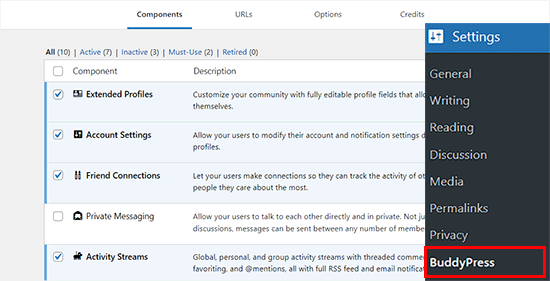
The settings page is divided into different tabs. The first tab is ‘Components,’ which shows all the BuddyPress components that are currently active on your site.
The default components should work well for most websites and WordPress blogs. However, you can activate or deactivate any component by clicking its checkbox.
If you make any changes to the default components, then don’t forget to click on ‘Save Settings’ to store your changes.
Next, switch to the ‘Options’ tab.
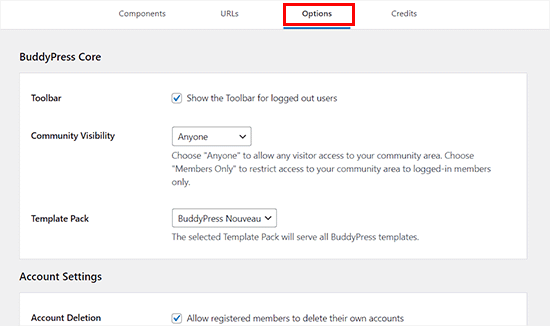
Here are all the different settings that you can turn on and off in BuddyPress. For example, you can allow users to set a custom avatar, invite other people to join the network, and more.
The default settings will work for most WordPress websites, but you can look through them and make any changes you want.
When you are happy with these settings, click on the ‘URLs’ tab.
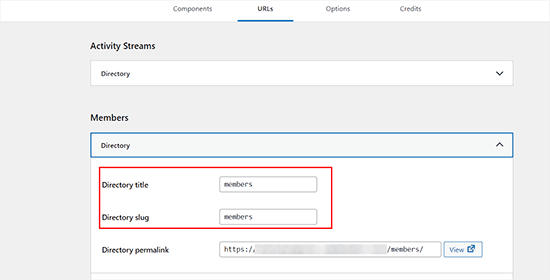
Here, you can configure the slugs and titles for the pages that will be created with BuddyPress. For instance, the plugin will create a Members page by default where it will show all the people registered on your site.
However, if you want to call the members of your site ‘users’, then you can add that slug next to the ‘Directory Slug’ option after expanding the ‘Members’ tab.
Keep in mind that you won’t be able to edit the permalinks created by the plugin.
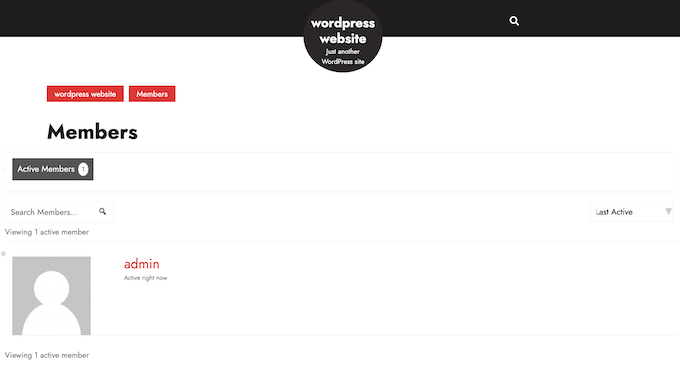
It will also create an Activity Streams page, which displays all the activity across the BuddyPress components.
This is similar to the home feed on a site like Facebook or Twitter.
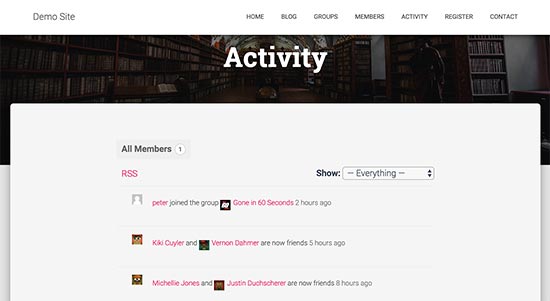
The default settings should work for most websites. However, if you want to use a different page, then simply open a dropdown and then choose that page from the list.
If you don’t see Register and Activate settings on this page, then you will need to enable user registration on your WordPress site.
When you are happy with how BuddyPress is set up, don’t forget to click on ‘Save Settings’.
Displaying BuddyPress Pages on Your Website
If you visit your website now, then you won’t see any new social features. To change this, you need to add the BuddyPress pages to your WordPress navigation menu.
Simply go to the Appearance » Menus page.
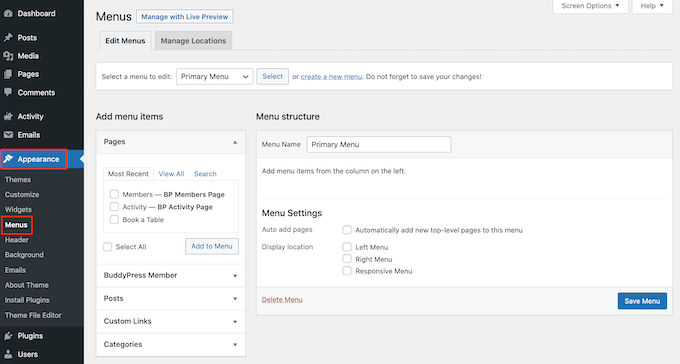
You can then open the ‘Select a menu to edit dropdown’ and choose the menu where you want to add the BuddyPress pages. This will usually be the primary menu, but you can use any menu you want. After that, click on the ‘Select’ button.
In the left-hand menu, check the box next to each BuddyPress page, such as ‘Groups’ and ‘Members’. You can then click the ‘Add to Menu’ button.
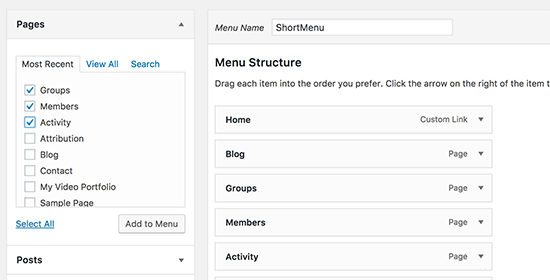
After that, you can rearrange the pages in your menu using drag and drop.
When you are happy with how the menu is set up, click on the ‘Save Menu’ button. With that done, you can visit your website to see the updated menu in action.

Pro Tip: BuddyPress works with all the best WordPress themes. It also has its own templates that you can use in case your theme doesn’t come with any built-in BuddyPress templates. If your theme doesn’t work well with BuddyPress, then you can check out our list of the best WordPress themes for BuddyPress.
Managing Your WordPress Social Network in BuddyPress
Building an online community can take a lot of time and effort. Thankfully, some tools can help you reduce the workload, especially when it comes to moderating user-generated content and combating spam.
If you have already installed Akismet, then BuddyPress will use it to block spam. However, some unwanted content may still get through.
This is where BuddyPress’s built-in tools come in.
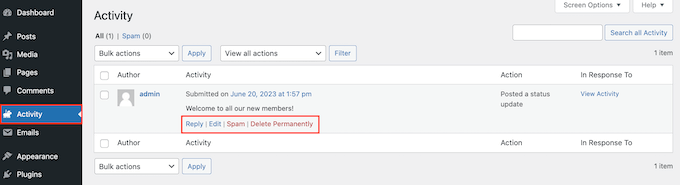
To take a look at these tools, just select Activity in the WordPress dashboard. Here, you will see all the actions that visitors have taken on your website.
If you find a suspicious or unwanted action, then hover over it and then click on either the ‘Spam’ or ‘Delete permanently’ link when it appears.
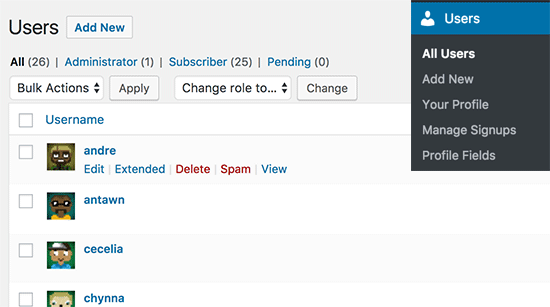
Similarly, you mark suspicious accounts as spam or remove them completely by going to the Users page.
Here, simply hover over any user and then select either ‘Delete’ or ‘Spam’.
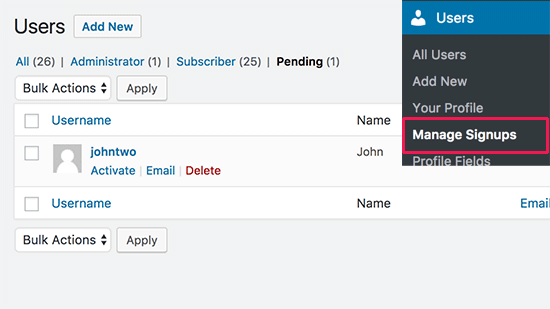
You can also manage new users by going to Users » Manage Signups.
Here, you can activate new users, resend the activation email, or delete user accounts.
Creating and Managing Groups in BuddyPress
BuddyPress allows you and your users to create groups, which act as sub-communities on your website. Each group has its own members and activity streams. Users can join these groups, invite other people, post messages, and more.
To create a new group, select Groups from the left-hand menu and then click on the ‘Add New’ button.
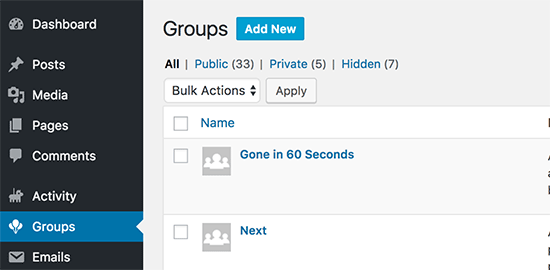
Tip: If you don’t see a Groups option, then you need to go to Settings » BuddyPress and activate the ‘User Groups’ component following the same process described above.
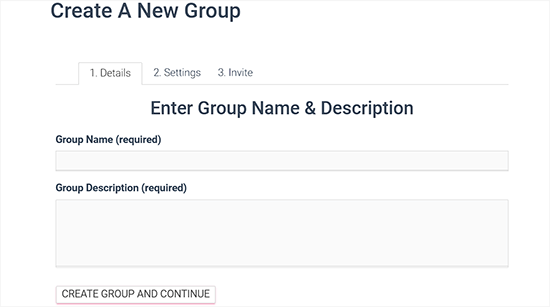
After clicking on the ‘Add New’ button, BuddyPress will take you to the ‘Enter Group Name & Description’ page.
First, you need to type in a name and description for the group. After that, click on the ‘Create group and continue’ button.
On the next page, you can choose between public, private, and hidden privacy settings.
Anyone can join a public group and make posts. Meanwhile, private groups appear in the BuddyPress groups directory, but users have to send a request to join. Only approved users can see the group’s contents.
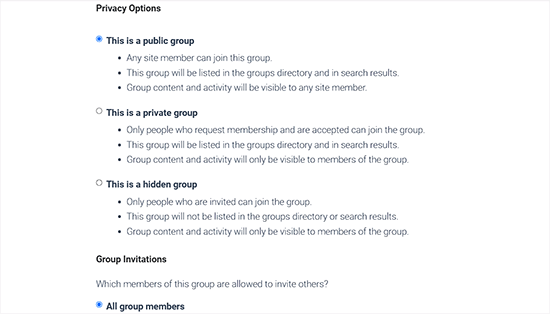
Finally, hidden groups are only visible to members. These groups won’t appear in the BuddyPress groups directory or search results.
After setting up the privacy options, click on the ‘Next Step’ button.
This will take you to the final step where you can invite some people to join the new group so that it isn’t completely empty. Just be aware that you can only invite users who you have added as friends.

When you are happy with how the group is set up, click on the ‘Finish’ button to go ahead and create the group.
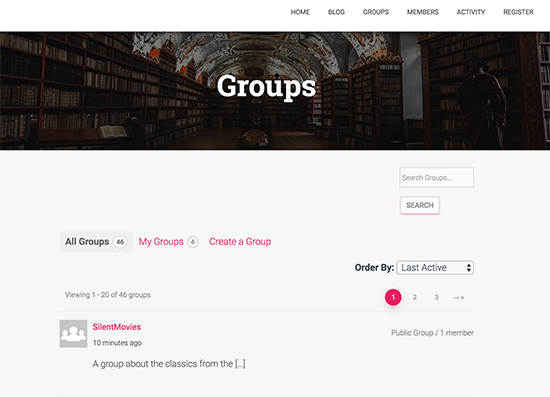
Now, users can simply visit the BuddyPress Groups page to see all the different communities they can join.
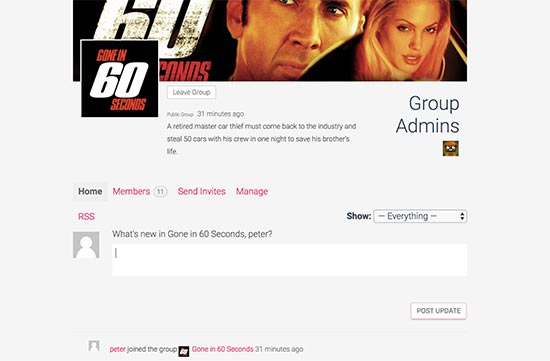
Clicking on a group name will show a page where users can join, post updates, and follow the group activity.
Pro Tip: Make sure you add the Groups page to your WordPress navigation menu, following the same process described above.
Managing Email Notifications
BuddyPress will automatically email users about new activity in their social stream. This encourages people to visit your social media or membership website and can re-engage members who were losing interest.
That being said, it’s a good idea to modify the email notifications to better match your site’s branding and tone.
To see all the default BuddyPress emails, select the Emails tab from the left-hand menu. On this screen, you will see the email title and some information about when each message will be sent to the user.
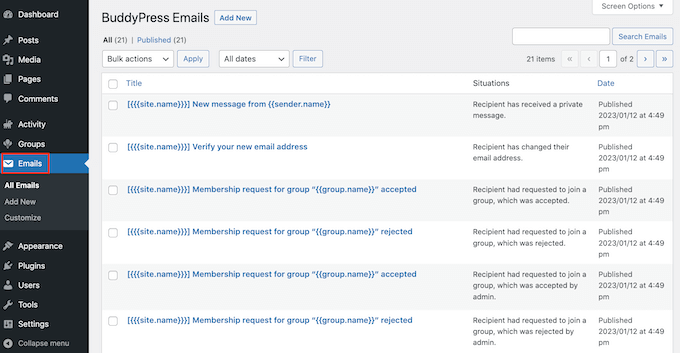
You can modify any of the default emails by hovering your mouse over it and then selecting the ‘Edit’ link when it appears.
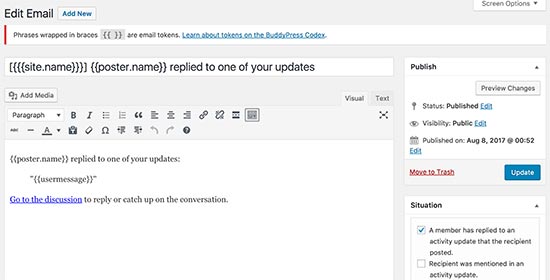
This opens an email editor, where you can change the message’s text and the action that will trigger the notification.
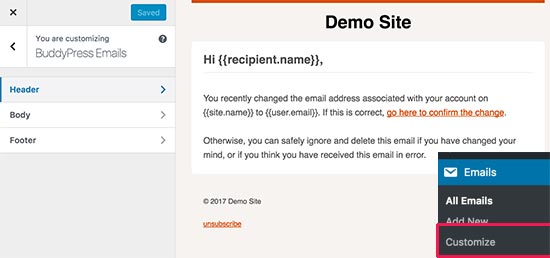
If you want to change the email colors, header, and footer areas, then go to the Emails » Customize page.
This opens a visual editor where you can change how the email looks, similar to how you edit a theme using the WordPress Theme Customizer.
After setting up these emails, you will want to make sure they land in the user’s inbox and not in the spam folder. With that in mind, we recommend using an SMTP service provider like WP Mail SMTP to improve your email deliverability rates.
For more information, please see our guide on how to fix the WordPress not sending email issue.
We hope this article helped you turn your WordPress site into a social network using BuddyPress. You may also want to see our ultimate guide on how to increase your blog traffic or see our expert picks for the best social media plugins for WordPress.
If you liked this article, then please subscribe to our YouTube Channel for WordPress video tutorials. You can also find us on Twitter and Facebook.





Syed Balkhi says
Hey WPBeginner readers,
Did you know you can win exciting prizes by commenting on WPBeginner?
Every month, our top blog commenters will win HUGE rewards, including premium WordPress plugin licenses and cash prizes.
You can get more details about the contest from here.
Start sharing your thoughts below to stand a chance to win!
Mrteesurez says
Please, can WordPress really be used to build a social network websites like Facebook and Twitter or Instagram ??
Although, I once created some like that using Anspress plugin with buddyx theme.
Let be honest, provided I used standard host like managed one or private server. Can WordPress accommodate that large type of traffics ?? or it’s totally depends non the hosting ??
WPBeginner Support says
It would depend on your site traffic but most hosts would have a plan level to help you handle most traffic.
Admin
Moinuddin Waheed says
Creating a social network of our website is an interesting idea and it would be helpful in increased traffic and engagement with the community.
I am working on an educational website where we would be providing premium content as well to students.
I want to have a discussion form page and not want to create entire website as a social network.
is there a way we can dedicate one page for discussion and make threads our of that?
So that other website activities remains intact.
WPBeginner Support says
If we understand what you’re wanting correctly, that would be a forum which we have a guide on how to create below!
https://www.wpbeginner.com/wp-tutorials/how-to-add-a-forum-in-wordpress-with-bbpress/
Admin
Chris Hechler says
Hi,
is it possible to change the background colour to a picture/image pattern? The greyish background looks kinda boring for a social platform.
WPBeginner Support says
IT would depend on the pattern you are using for the method but most if not all patterns should be able to be edited to fit your site’s design or your preferences.
Admin
Pablo says
How do I remover the wordpress bar up the website where is written “Login and Register”? Please?
WPBeginner Support says
Unless BuddyPress changes its interface, you should be able to go under Settings>BuddyPress and uncheck the “Show the Toolbar for logged out users”.
Admin
Eris says
What is the difference between BuddyPress and a membership plugin like MemberPress?
WPBeginner Support says
MemberPress would be for membership sites and things like courses while BuddyPress would be for creating a social network as we show in this post
Admin
Nigel Stratton says
Would BuddyPress be a good choice if I wanted to build a social media that also required users to be able to upload audio and video files as part of their profiles?
Thank you!
WPBeginner Support says
BuddyPress should be able to handle that but for uploading videos, you would want to take a look at our article here: https://www.wpbeginner.com/beginners-guide/why-you-should-never-upload-a-video-to-wordpress/
Admin
Tunde Sanusi (Tuham) says
As a Web Designer, am currently building a social networking site for a client of mine and we were initially using Buddypress..
However along the line, we discover the profile photo part seems like an issue as people would have to crop their photo (which is a pain) before it works
Any code on how to skip the cropping photo part?
WPBeginner Support says
You would want to reach out to BuddyPress for what customizations are available.
Admin
Antony Finney says
Some times its a pain to read what blog owners wrote but this web site is real user pleasant!
WPBeginner Support says
Glad you like our content
Admin
Onyela liberty says
Hi am from nigeria and I want to build a social network for farmers how do I go is buddypress great which other plug ins do u recommend for bp
WPBeginner Support says
You should be able to do what you are wanting with BuddyPress
Admin
John Richards says
Which theme is used along with Buddypress in the images shown here?
sergio says
I’m no expert, but I try to dig as deep as I can when using WordPRess and plugins… HAving said so, BP is great and has a lot of functionlaity extended with plugins… Perhaps too much?
I am in the (nightmarish) process of researching options to create a social network, and I can say that I ended up letting go BP to favor a little awesome one who’s giving me some pretty good results in terms of flexibility and ease of use: Ultimate Member… Maybe less extended / less features than BP (not than core BP) but it’s such a pleasure to work with!
Joshua Orekhie says
This is really great. With this plugin, I can create a successful group channel for my website. Does it comes with a pay version or free?
Dale Reardon says
Hi,
BuddyPress is a good solution for a social community but we have recently had problems when expanding its capabilities because you need so many extra feature plugins from different authors and hence conflicts and bugs arise.
We hare just in the process of moving our community over to Peepso and when you add the power of all the addon plugins it is way more powerful than BP.
If you would like us to write about our experience then let us know.
Dale.
Susan smith says
Hi Dale. Visited your website and it’s really cool.would love to know the plug in you ended up using.Thank you
Bonny says
Good day, Im based in South Africa, and in process of building a classified social media website, what will you recommend to use buddypress or Peepso.
thanks