


Have you ever created the perfect video for your audience, only to get stuck on how to get it into your WordPress blog post? It can be frustrating, and you might worry that adding videos will slow your site down or require messing with complicated code.
We add videos to our own tutorials all the time here at WPBeginner, and we’ve found the simplest ways to embed videos in WordPress. The good news is that WordPress makes this process incredibly easy, and you don’t have to be a tech expert to make it work.
In this guide, we’ll show you how to embed videos in WordPress posts, pages, and even sidebar widgets.

Why Embed Videos in Your WordPress Blog Posts?
Adding videos to your WordPress blog is a great way to capture your visitors’ attention and boost engagement and conversions.
Videos help increase the time users spend on your WordPress website, and some visitors may even prefer to watch a video rather than read written text.
Here at WPBeginner, we embed videos into our most popular WordPress tutorials.
Should You Upload Videos Directly to WordPress?
Well, you can, but we don’t recommend you do so.
Most small blogs use shared WordPress hosting accounts, and videos can take up a lot of server resources. If your video gets a lot of traffic, then your website is more likely to crash.
Secondly, you are missing out on traffic from YouTube users and other video hosting sites.
YouTube is not only the biggest video hosting site, but it is also the world’s second most popular search engine and the second most popular social network, right after Facebook.
If you don’t want to upload your videos to YouTube, then you can use other platforms like Vimeo, Jetpack Video, Wistia, and more.
For more details, see our post on why you should never upload a video to your WordPress media library.
Now, let’s walk you through how to embed videos in WordPress, step by step. Simply use the quick links below to jump straight to the method you want to use:
- Method 1: Embedding Videos in WordPress Blog Posts and Pages Using Block Editor
- Method 2: Embedding Videos in WordPress Using the Old Classic Editor
- Method 3: How to Embed Videos in WordPress Sidebar Widgets
- Method 4: Using WordPress Video Embed Plugins to Embed Videos
- Frequently Asked Questions About Embedding Videos in WordPress
- Additional Resources on WordPress Video
If you’d prefer written instructions, then just keep reading.
Method 1: Embedding Videos in WordPress Blog Posts and Pages Using Block Editor
WordPress comes with a great feature called auto-embeds, which allows your website to automatically get the embed code from popular video hosting services like YouTube, Vimeo, etc.
All you need to do is paste the video URL into the WordPress editor.
For example, you can copy the YouTube URL for a video that you want to embed.
Next, edit the WordPress post or page where you want to add the video, and simply paste the URL in the content area.
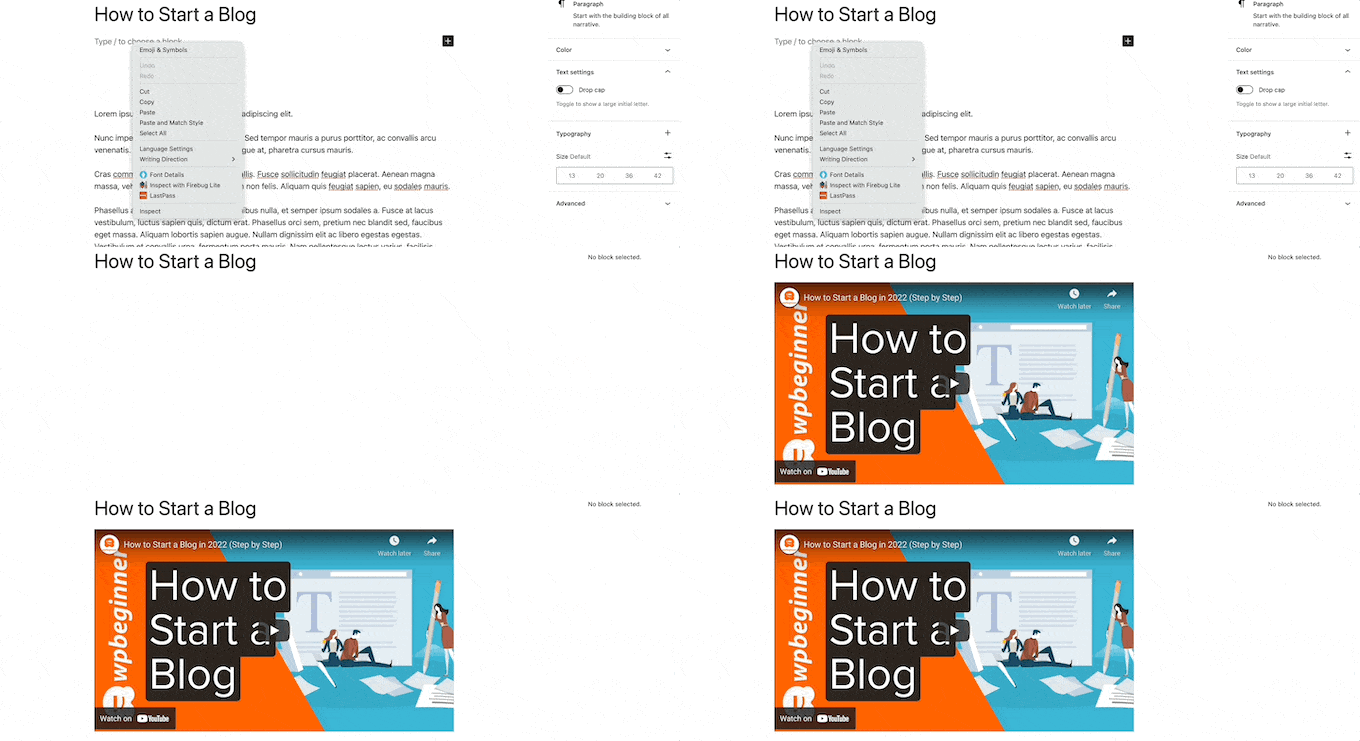
As soon as you paste the video URL, WordPress will fetch the embed code and display the YouTube video inside the content editor.
This feature is built into WordPress, so no plugins are needed.
You can now save your post by clicking the ‘Update’ or ‘Publish’ button to see the embedded video in your live post.
Wasn’t that easy?
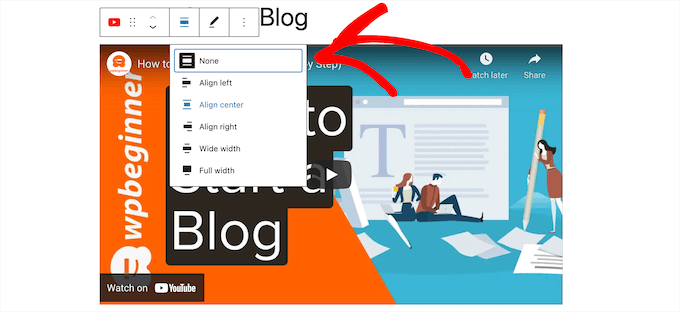
After you have added the video, you can customize its settings by clicking on the video in the editor and making changes from the popup toolbar.
You can adjust the video width, change the alignment, and more. You can also add a caption and preserve the video’s aspect ratio on mobile devices.
WordPress can only do auto-embeds for white-listed video services. For other websites, you will still have to obtain the embed code and then paste it into your blog posts.
WordPress can automatically embed content from dozens of popular websites just by pasting a link. The most common platforms for video and content sharing are supported, including:
- TikTok
- TED
- Tumblr
- Vimeo
- YouTube
Note: Embedding Facebook and Instagram content used to be supported out-of-the-box, but due to Meta’s API changes, you now need a dedicated social feed plugin (like Smash Balloon) to embed their videos.
If you’re using a different service, here is the full alphabetical list of sites that WordPress supports for auto-embeds.
Amazon
Animoto
Cloudup
CollegeHumor
Crowdsignal
Dailymotion
Facebook
Flickr
Hulu
Imgur
Instagram
Issuu
Kickstarter
Meetup.com
Mixcloud
Reddit
ReverbNation
Screencast
Scribd
Slideshare
SmugMug
Someecards
SoundCloud
Speaker Deck
Spotify
TED
Tumblr
VideoPress
Vimeo
WordPress.tv
X (formerly Twitter)
YouTube
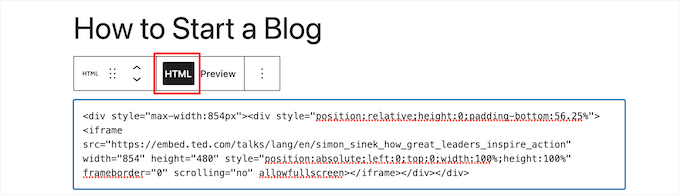
If you want to embed a video from a platform that isn’t on the auto-embed list, or if the auto-embed feature fails to work properly, don’t worry! You will just need to use the full HTML iframe embed code for the video instead.
On YouTube, click the ‘Share’ button below the video, then select ‘Embed’. You’ll see an iframe code you can copy.
Vimeo works the same way. Click the share icon on any video, then select the Embed tab to copy the code.
Once you have the code, add a Custom HTML block in the WordPress editor and paste the iframe code inside it.
To learn more, see our beginner’s guide on how to edit HTML in the WordPress code editor.
Keep in mind that embedding several videos on one page can hurt your Core Web Vitals and slow your site down. This happens because each embed simultaneously loads heavy third-party tracking scripts and video players in the background.
For a simple fix, see Method 4 below, where we cover a free plugin that only loads the video player when a visitor clicks play.
✨ Pro Tip: Once you’ve embedded your video, you can help it rank better in search results! Using a plugin like All in One SEO (AIOSEO), you can easily add Video SEO schema to your post. This tells Google more about your video, which can help you get an eye-catching video thumbnail right in the search results, boosting your traffic.
Method 2: Embedding Videos in WordPress Using the Old Classic Editor
If you are still using the WordPress Classic Editor, then the process is the same. Copy the video URL and paste it into the editor to auto-embed it.
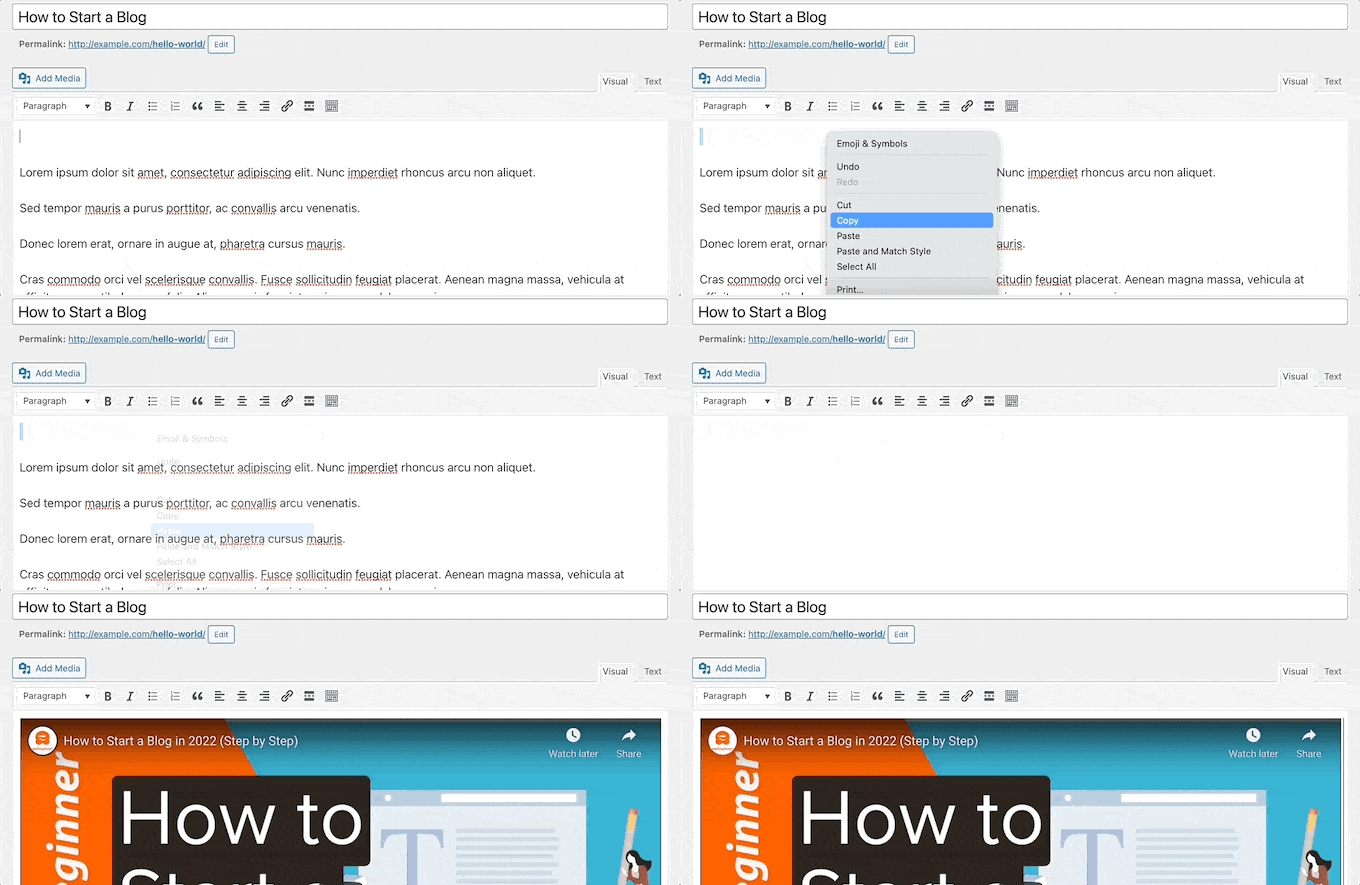
You won’t have the width adjustment and alignment options from the Block Editor. When you’re done, click ‘Update’ or ‘Publish’ to make your changes live.
Method 3: How to Embed Videos in WordPress Sidebar Widgets
Just like a WordPress post or page, you can also embed videos in WordPress sidebar widgets.
Simply go to Appearance » Widgets in your WordPress admin area and then click the ‘+’ add new block icon.
Note: If you are using a block theme, you won’t see Appearance » Widgets. Instead, go to Appearance » Editor to add video blocks to your sidebar or template areas.
Or if you are still using the Classic Widgets plugin, then you can simply add a standard ‘Text’ widget to your sidebar and paste your video URL inside it.
After that, you can search for the specific video platform you’re using, like ‘YouTube’ or ‘Vimeo,’ and add its dedicated block. This is the easiest way!
You may also see a generic ‘Video’ block. Be sure to avoid this one, as it’s for uploading video files directly to your media library, which we don’t recommend for the performance reasons we covered earlier.
Then, you can click on the block for the type of video you want to add. For example, YouTube, Vimeo, TED, and more.
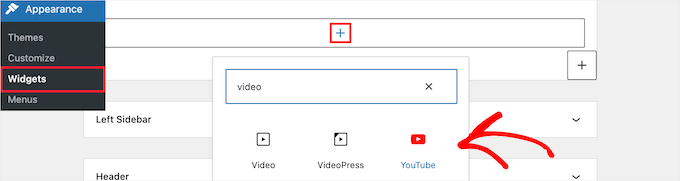
Next, you need to paste your video URL into the box, click the ‘Embed’ button, and it will automatically be added to the widget area.
Then, all you have to do is click the ‘Update’ button, and the video widget will now be live on your WordPress site.
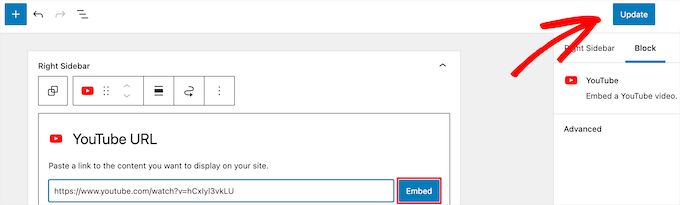
Now, you can visit your website to see the video live. The size of the video will automatically scale based on the size of your widget area.

To learn more, see our guide on how to add and use widgets in WordPress.
Method 4: Using WordPress Video Embed Plugins to Embed Videos
By default, you don’t need to use a plugin to embed videos in WordPress. However, you may want to use plugins to improve the video viewing experience on your website.
The following are a few WordPress plugins that you may want to try.
1. Smash Balloon YouTube Feed Pro

Smash Balloon YouTube Feed Pro is the best YouTube video gallery plugin for WordPress. The free version of the plugin is actively used on over 100,000 websites, making the Awesome Motive suite of Smash Balloon plugins one of the most trusted YouTube solutions in the WordPress ecosystem.
We have used it across our own websites and tested all its features. For details, see our complete Smash Balloon review.
It allows you to automatically embed all of your YouTube channel videos in a customizable gallery format. It automatically imports new videos, combines feeds, can add livestreaming functionality, embed a YouTube playlist, and more.
Plus, it includes views, likes, shares, comments, and reactions, which can help to boost your social proof.

There’s a free version of the YouTube feed plugin available that you can use to simply add your YouTube channel feed to WordPress.
To learn more, see our guide on how to show the latest videos from YouTube channel in WordPress.
You can also use the Smash Balloon YouTube feed plugin with the Social Wall plugin that combines all of your social media content from Facebook, Instagram, Twitter, and YouTube on a single WordPress page.
2. Smash Balloon TikTok Feed Pro

TikTok Feed Pro, also by Smash Balloon, is a powerful plugin that allows you to easily embed TikTok videos anywhere on your WordPress site.
When you post on your TikTok channel, it’s automatically fed to your website and displayed in a beautiful video gallery feed. You can choose from multiple feed layouts, including grid, carousel, list, and masonry.

The drag-and-drop feed editor also gives you complete control over the look of your TikTok feed. You can set the number of videos to show and customize colors, styling, spacing, and more.
In addition, it comes with helpful moderation tools to filter your videos based on a word or hashtag. Using this feature, you can create curated video feeds for different parts of your website to target specific content.
There’s also a free version of the Feeds for TikTok plugin that you can use to add a simple TikTok feed in WordPress.
See our guide on how to embed TikTok videos in WordPress for more details.
3. Envira Gallery
Envira Gallery is the best WordPress gallery plugin on the market. We have used it across some of our websites to create beautiful WordPress galleries. For more information, see our Envira Gallery review.
You can use it to easily create photo galleries in WordPress. It also comes with a Videos Addon to display beautiful and responsive video galleries.
You can create video galleries from YouTube, Vimeo, Twitch, Dailymotion, and more. You can even display YouTube playlists from your personal account, and you have the ability to start YouTube videos at a particular timestamp.
Envira is super easy to use. Simply enter your YouTube video URL, and the smart system will automatically grab the video thumbnails for you.
There is a free version of Envira Gallery available. However, you need the premium plugin to access the video galleries feature.
4. YouTube Subscribe Bar
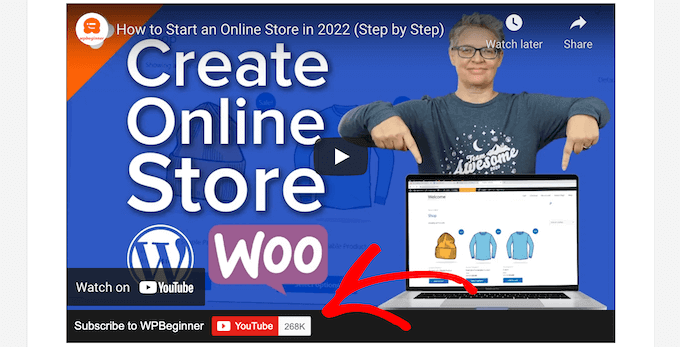
YouTube Subscribe Bar shows a YouTube subscribe button below your YouTube video embeds in WordPress. It also fetches your YouTube subscriber count to add social proof and encourage more users to subscribe to your channel.
We first created it to promote WPBeginner’s YouTube channel on this website.
Many of our users asked us to share how we did this, so we decided to release it as a free plugin. As with any free repository plugin, just make sure to verify it has been tested with your current version of WordPress before installing.
5. Lazy Load for Videos

Lazy Load for Videos solves the problem of loading video embed scripts from external websites, which has an impact on website page load speed and performance.
Instead, it only loads the embed code when the user clicks on the play button.
By the way, you won’t need this plugin if you use the Smash Balloon YouTube Feed plugin because it has built-in caching and delayed loading for the video player.
Video Tutorial
Frequently Asked Questions About Embedding Videos in WordPress
Having helped thousands of users with their WordPress sites, we’ve answered our fair share of questions about adding videos. Here are the answers to some of the most common ones we receive.
1. Why can’t I just upload videos directly to my WordPress site?
While you technically can upload videos to the media library, we strongly advise against it. Video files are very large and can consume a lot of your hosting server’s resources, which can dramatically slow down or even crash your website.
2. How do I make my embedded videos responsive on mobile devices?
The WordPress block editor makes this incredibly easy because it handles responsiveness for you! Native video blocks (like the YouTube or Vimeo block) automatically adjust the aspect ratio so your videos look perfect on desktop, tablet, and mobile devices without you needing to press any extra buttons or find hidden toggles.
3. What’s the best way to show an entire gallery of my YouTube videos?
The easiest way to display a full video gallery is with a dedicated plugin. We recommend Smash Balloon YouTube Feed Pro because it automatically pulls the latest videos from your YouTube channel and displays them in a customizable gallery on your site.
4. Will embedding multiple videos slow down my page loading speed?
Yes, embedding videos can impact your site’s performance because it has to load scripts from third-party sites like YouTube. A great solution is to use a plugin like Lazy Load for Videos, which prevents the video player from loading until a visitor actually clicks the play button.
5. Why isn’t my embedded video showing up in WordPress?
The most common cause is pasting the video URL on a line that already has other text. Make sure the URL is on its own line in the editor, with no other content on the same line.
If that doesn’t fix it, check whether the platform is on WordPress’s auto-embed list. If it isn’t, then you’ll need to use the platform’s HTML embed code instead, as explained in Method 1 above.
Additional Resources on WordPress Video
Now that you know the basics of embedding videos, you may want to check out these other helpful guides to take your video strategy to the next level.
- How to Properly Set Up Video SEO in WordPress
- Best Video Editing Software for Beginners
- How to Start a Successful YouTube Channel for Your Business
- How We Use a Video Membership Site to Grow Our Email List
If you liked this article, then please subscribe to our YouTube Channel for WordPress video tutorials. You can also find us on Twitter and Facebook.


Dennis Muthomi
Thank you for including the YouTube Subscribe Bar plugin in this article!
I’ve been wondering how WPBeginner adds that subscribe bar beneath embedded YouTube videos, and now I have my answer.
I am installing it RIGHT AWAY!
Thank you WPBeginner
Jiří Vaněk
Thanks for the block editor tutorial. I’ve been using Elementor until now and here’s a widget where you just put the URL of the video and it worked. But it’s good to know how it works in the block editor in case the website owner doesn’t want Elementor for some reason.
Pierre Gazzola
As my dementia stay the same I though I try again wordpress been away siince version 3.
However was smart enough to keep your page in my wp tab on chrome you help me so much all the time and remembering so much thank you.
From a old 70 25 at hearth :))
WPBeginner Support
Glad we can be helpful and we hope our guides continue to help you now and in the future!
Admin
sandeep
i have added YouTube video links in my WordPress blog post. now I want to remove that video link
so my question is after removing that links does it create any problem in that post indexing in google search console. because that video is appearing in video indexing page of google search console
WPBeginner Support
Unless we hear otherwise, removing a video link should not cause an issue with your post indexing.
Admin
Krystal
When I upload a video using the blocks wordpress tells me I must upgrade my account for $96/year. I’ve been using wordpress since 2012. What gives?
WPBeginner Support
If you’re being told to upgrade, you are using WordPress.com and running into a limitation. Our content is for WordPress.org. You can see the differences between the two in our article below:
https://www.wpbeginner.com/beginners-guide/self-hosted-wordpress-org-vs-free-wordpress-com-infograph/
Admin
Barry C Laminack
Hi, In case others may have the same problem I did with embedding a video from Rumble, after many trying many different things, I figured out how to do it by accident lol.
If it is your own video, use the Embed Code but only the link within the src= portion.
If it is not your video, using the “EMBED” button of the video, copy and use the “Embed IFRAME URL” link provided in the Embed pop dialog.
WPBeginner Support
Thanks for sharing that for users using that service
Admin
Dexter Rodrigues
Super stuff guys. I was struggling for 2 days with LearnDash LMS on WP and a premium European hosting provider. I used the method of Custom HTML embed and it worked just fine. It’s 3.00am in the morning where I am at and am smiling because of you :). Thanks a lot, this content is truly for a beginner like me with an erratic learning curve.
WPBeginner Support
Glad our guide was helpful
Admin
Imtiaz
I tried to upload videos from youtube, but it shows all related videos. I tried to put some restrictions also with functions like control=0, autoplay=1, ?rel=0, but none of these worked. I tried to upload videos from vimeo also, but there also related videos displayed.
Than I tired to upload videos directly from my pc, but that made my site slow.
Any suggestions how to use embeded vdeos of html from my pc.
WPBeginner Support
We do not have a recommended method for embedding a video from your home computer as a server at the moment.
Admin
monika
hi can i add food youtube videos on my wordpress food theme?……..i am serching for a food theme on wordpress that supports food videos.
thanks
WPBeginner Support
You can add videos to any WordPress theme, where you add it would determine how difficult it would be to achieve.
Admin
tuna
Thanks for the nice information…
I have a problem with url embed function in wordpress. When I add a url to embed a different post from my website ,everhting seems fine in preview mode. I mean I am seeing thumbnail and a excerpt of the post which is exactly what I want. But, when ı update the post there is only a simple link instead what is shown in preview mode. I need your help if possible.
Best Regards
WPBeginner Support
You would want to start by following our troubleshooting guide below:
https://www.wpbeginner.com/beginners-guide/beginners-guide-to-troubleshooting-wordpress-errors-step-by-step/
Admin
Samuel
I would like to have a website that is purely a Video Gallery but more like YouTube.
Do you think Plugins can do that?
Can you recommend some Plugins for me?
Thank you,
WPBeginner Support
That type of site would require more than only plugins, we would first recommend taking a look at our article below:
https://www.wpbeginner.com/beginners-guide/why-you-should-never-upload-a-video-to-wordpress/
Admin
Gaurav J
Hi. i am using embeds block to embed my YouTube video into the post. In the edit post window, I can see the video is getting embedded/I can see the preview of the video. But, once i publish the post or preview it, I could only see the link of the video and not the preview.
I am not using any plugins for embedding the videos.
Could you please help?
WPBeginner Support
You would want to start by ensuring you’re using the YouTube block. If you are then you may want to go through the troubleshooting steps in our article below:
https://www.wpbeginner.com/beginners-guide/beginners-guide-to-troubleshooting-wordpress-errors-step-by-step/
Admin
Liz
Hello,
i used to embed video on wordpress by simply past the link.
Now, Google search console detect that there are some problems in the two pages I have with video embed.
I’m talking about mobile usability.
Is there a way to fix this problem or a plugin that will fix it ?
WPBeginner Support
It would depend on how and where you added the videos from, using the YouTube embed as an example should not cause an issue unless you’re using an iframe embed that specifies width.
Admin
Luz Manalo-Cruz
I am unable to embed a YouTube video using the embed block editor (I tried both the embed block and the Youtube block). I’ve already tried pasting from the youtube studio link, from the URL in the address bar, and from the “share” button. Is there something I’m not doing right?
WPBeginner Support
You may want to try disabling your plugins to ensure this isn’t a possible conflict between one of your plugins and the embed.
Admin
JOy Halverson
I have a youtube video on my Wordpress ecommerce site – when the video ends I simply want it to end so that my customers aren’t curious to go see other videos. No “ads” for other youtube videos unrelated to my site- I seem to recall that there is some code you can put at the end of the video URL that will accomplish this. thanks
WPBeginner Support
YouTube does not offer that functionality at this time.
Admin
Naomi
Thank you for the information. May God bless you!
WPBeginner Support
You’re welcome, glad you like our content
Admin
HJK
Hi, I’ve used the embed code in the HTML editor then when I switch back to visual it appears, however when I try to preview the post the video does not show up at all.
WPBeginner Support
If it is only when trying to preview the post, you may want to try saving your draft beforehand to ensure that it is not due to the preview not being saved properly
Admin
Arpit
Really useful information. Can you please help me to know, if i add video on Wordpress post will effect on site speed or particular post speed.
WPBeginner Support
For our opinion on that, you would want to take a look at our article here: https://www.wpbeginner.com/beginners-guide/why-you-should-never-upload-a-video-to-wordpress/
Admin
Jason
“ll you need to do is paste the video URL into the WordPress editor.”
What a ie. Even putting the youtube link into the embed block doesn’t work. I wish Wordpress would stop giving incorrect directions. Nothing seems to work when it comes to putting a simple short youtube link (of my own 2 minute video into wordpress. WP? …. IDK about this.
WPBeginner Support
You may have a plugin or similar that could be preventing the embed from being added correctly, have you tried using the video block that was added with the Gutenberg/block editor?
Admin
Jeffrey Christian
I’m trying to embed a link from Vimeo but come up with the following error:
Sorry, this content could not be embedded.
There is no issue with the video, so not sure why there’s an error.
Any suggestions would be appreciated!
WPBeginner Support
If this method didn’t work, have you tried the video block to embed using that? If the error is in a Vimeo embed then the video owner may not allow embedding of the video.
Admin
Suzanne Dunaway
I cannot get this to work at ALL and I have a blog with 10,000 followers so far. Why won’t this work on my Wordpress editing page??????
WPBeginner Support
If you’re using the new block editor then there is an embed or a video block that you can use if that is the issue.
Admin
Gordana
I tried to embed url from yotube, it does work but copied video seems too large. I wanted smaller feature and I couldn’t get it smaller in no possible way. I tried same from Vimeo and was satisfied with the size. Do you have any similar experiences?
Ashley
I am pasting in the URL for our YouTube video and it does not auto embed. I did this exact process twice yesterday with no problems. Tried the embed code, logged out and logged back in but it still won’t auto embed.
Any ideas as to why this has suddenly stopped working?
David
Well what do you do when you you insert the URL, the image auto generates and then clips the rest of the paragraph instead of adjusting to fit?
Muhammad Junaid
I am using elementor to add youtube video.Secondly,does it violate copyright rule?
Civali
Please, how to set autoplay and sound off in video url?
Tyoaan Calistus
When I embed a YouTube code and add on my post, the button on click on and watch the video is usually not in the middle of the post.. How do I fix that pls?
Sejal
Hi..I copied the Youtube URL and it shows properly on the desktop version but doesnt show anything in the mobile version? Am I doing something wrong?
Suzanne Eutsler
I am embedding facebook live videos into our ministry website and am trying to figure out spacing issues. If you look at the link below, you’ll notice that underneath the video some of the text is cut off and when you look at it on an iphone you’ll notice there’s a TON of white space after each video.
HOW do I set it to be automatic that it just fits? Is there a way? I’d like it to show up correctly regardless of the pc or iphone or android etc.
HELP!!!! Please
WPBeginner Support
Hi Suzanne,
You will have to use Inspect Tool to find out CSS causing extra white space and adjust it by adding custom css.
Admin
Isaac
pls how can i post non-youtube videos on my wordpress page
Erin
Do I have to have WordPress premium to be able to do this?
Tom Minkler
What if a video is shared to Facebook from Instagram, THEN i try to put it in Wordpress post? For awhile, pasting the FB link into the visual editor was working fine, but now it just shows the link.
I don’t think those past videos that work were from Instagram, i went back and looked and one was shared from one Facebook page to another but the original doesn’t say it is from Instagram. Does it matter?
Thanks for your help.
Judy Mitchell
Perfect – thanks!
Alexander
thank you very much wpbeginner for this awsome post as usual it was so usefull
and i have another question my worpress site does not display properly on smartphones and android device what could be the problem ?
Riyaz Khan
Hi,
I want to develop a site where i am allowing users to upload the videos in their profile dynamically and same can be seen by other member, kind of facebook.
Is there any plugins for the same?
Kim
Hi WP Beginner!
First off my wordpress is a localhost. I’ve uploaded the video by adding media. (It shows up in my media library) However, when I put it in a post it starts by looking like it will play then goes black as says:
Media error: Format(s) not supported or source(s) not found
Then it gives a download link.
Is there anyway to just embed the video without giving a download link?
The video is an mp4.
Any help would be great! Thanks!
WPBeginner Support
Hi Kim,
Test your video in different browsers if it still shows error then your video file may not be encoded properly.
Admin
Hedi Putra
How to embed video on worpdress without iframe? can I use div code to embed?
Zeeshan Zafar
I have added Youtube Link in my site post but unfortunately it is not showing. I have tried many things to make it visible but no success. On load iframe load but there is nothing in the body tag of iframe.
Please Help….
JEG
I think in 4.9 you may need to add the link to the media library and then paste it from there
JEG
Sorry this is not correct. Instead I suggest you delete your post and create a new one. I was having a similar problem and that is how I fixed it.
Jennifer
I was able to embed my video from facebook live, and everything appears to be working perfectly EXCEPT there is no audio. What can I do?
Milliana
So how then do we use the embed code for ARCHIVE.ORG
WP will not let me use the Internet Archive iframe any more since it has updated.
This is a problem!
Do you have a work-around?
Thien Tam
I am using WP 4.9. and it is ok to embed audio and video from archive.org. just put the file between embed code. Like this: your video or audio link here
WPBeginner Support
Hi Thien,
Yes, it is ok to embed audio and video from archive.org.
Admin
Alex
This does not work in the category text. Is it possible also here?
ILIA
Hello! Is there a way to upload a Boomerang from my iPhone to a post on my WP blog?
Mac
Hello, I’m trying to include a video on my Wordpress post. I copy the URL (URL only, not the embed code) from my Vimeo link and paste it onto the Post Editor on its own line. It is not a hyperlink. After saving & updating the post, I go to look at the post and all I see is the text of the Vimeo url (no video). What am I doing wrong? FYI this is my own video on Vimeo; there are no privacy settings and it can be shared. Thanks.
WPBeginner Support
Hi Mac,
Try switching to a default theme and disable all plugins, see if this resolves your issue. You can also try this shortcode
1-click Use in WordPress
Admin
Vivek Darji
hello wpbegginer
how to increase Traffic on Photography site? without any content because my friend start a photography blog he was update only photos in blog how to improve that blog?
Guust
Just a note to anybody thinking of just adding videos to explain things rather than explaining with written words.
Videos with spoken explanations only are not accessible to hearing impaired people and might also be difficult for visitors to your site who do not speak the same language as the language used in the video.
And videos cannot be read by screen readers for the bling.
So make sure to add subtitles and also provide screen reader accessible content if you want or need your site to be accessible.
Cheers
Michelle
Hello,
I’ve just embed a youtube video on my wordpress site and it plays from that webpage on a desktop/leptop. However, when I access the webpage from my mobile device, when I play the video it opens it up in the Youtube app instead of staying on my website. I don’t want viewers to leave the webpage I’ve embed the video on while on mobile devices. Is there anyway to ensure viewers will not leave my site while on a mobile device and watching my video?
Hassin
is it possible that I could upload a video on my homepage. this is my wordpress blog
I want to change the video that is on the bottom of my page but I can’t change it, please help me. It is entered through Videopress
Paul Holmes
Hi Kathy,
I’m having problems with Vimeo embed codes. I have copied and pasted the Vimeo embed code onto my WEBSITE on the WORD PRESS Page but, when i click update and view changes all I see is the VIMEO Embed Code and not the VIDEO.
It isn’t showing the Video on my WORD PRESS Page just the EMBED CODE?
Look forward to your reply THAK YOU
Regards
Paul
WPBeginner Support
You can add a Vimeo video by simply entering the URL of the video page. No need to add embed code.
Admin
Kathy
I am having great difficulty getting a video to post on my WordPress blog. I’ve loaded it up to my youtube channel and then copy the URL from there. I paste into my NewPost, taking care to not have anything else on that same line. The video pops up in the edit box, but will not show on my blog when I come in from the outside, like any of you would do.
I’ve reviewed bunches of training sites that all say I am doing this correctly, and yet it won’t show. I called GoDaddy, since they are my blog host, but to no avail. They couldn’t help.
I even tried using the embed code and got the same results.
Does anyone have any suggestions?
Jeanne
Thank you for this video. Seems simple enough, but the video I want to embed in my Word Press template is from a news station’s website. It’s not on the white list and although you said we would have to use the embed code instead, you did not provide a link to how to use the embed code.