


Do you want to show your recent posts in WordPress? Displaying recent posts helps users easily discover your new content and spend more time on your site.
You can add a list of your latest posts in your sidebar, after the end of your post content, inside your post content with a shortcode, in your footer widget area, or anywhere else you like.
In this article, we will show you how to display recent posts in WordPress using a variety of different methods.
Why Add Recent Posts in WordPress?
If you have been running a WordPress blog or website for a long time, then you may have some older articles getting regular traffic from search engines and other sources.
Many of the visitors will check out the information they were looking for and leave. More than 75% of those visitors will never see your website again.
To keep users coming back to your website, you need to ensure that they spend more time on your website.
One way to do this is by showing them other recent posts that they should see. This helps users uncover more content on your website, which leads to them spending more time on your website.
As users view more pages, this gives you time to convince them to sign up for your email newsletter or make a purchase.
That being said, let’s take a look at how to easily display recent posts in WordPress using multiple methods. You can click on the quick links below to jump straight to different methods:
Video Tutorial
If you’d prefer written instructions, then just keep reading.
Method 1: Use WordPress’s Latest Posts Gutenberg Block
The WordPress block (Gutenberg) editor has a built-in block for displaying your latest posts. You can easily add this to any of the posts or pages on your site.
To use this block, simply edit the post where you want to display recent posts. On the post edit screen, you need to add the ‘Latest Posts’ block to the content area.
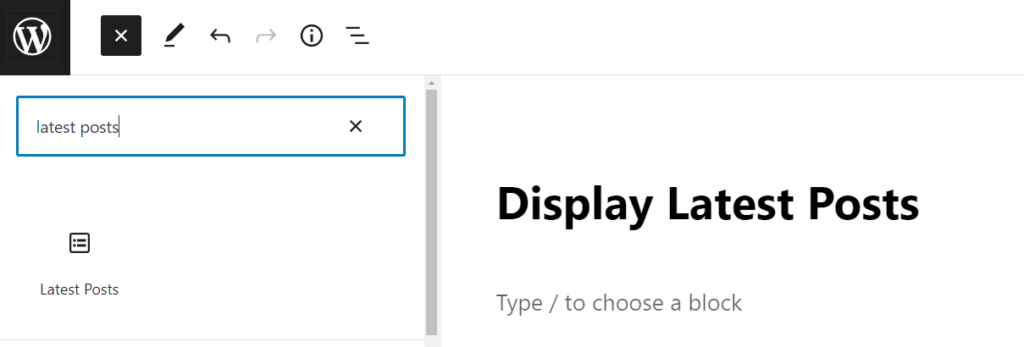
There are lots of different ways you can configure this block. By default, it just shows the post titles, but you can easily customize it.
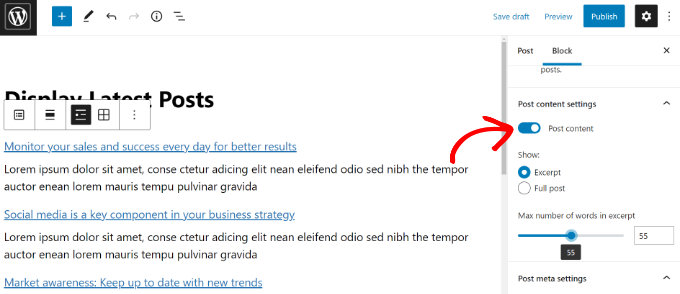
For example, you can toggle the post content on and off in the right-hand pane. This lets you choose to add post content or excerpt next to the title.
You can also customize the excerpt length, which defaults to 55 words, but you can pick any value between 10 and 100 words.
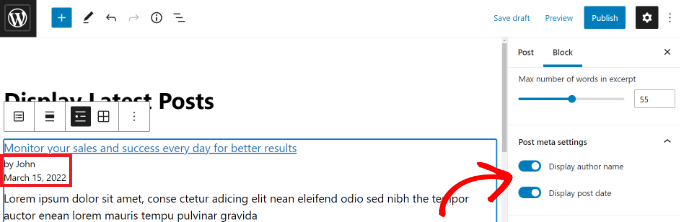
If you want, you can also display the post date and post author.
Simply enable the ‘Display post date’ and ‘Display author name’ options under Post Meta Settings.
You can also choose exactly how your posts will be displayed. You can order them differently from the default ‘Newest to Oldest’, and you can show only the latest posts from a specific category.
From the settings panel, you can also choose how many posts will be displayed. By default, the block shows 5 posts, but you can display anywhere between 1 and 100 posts.
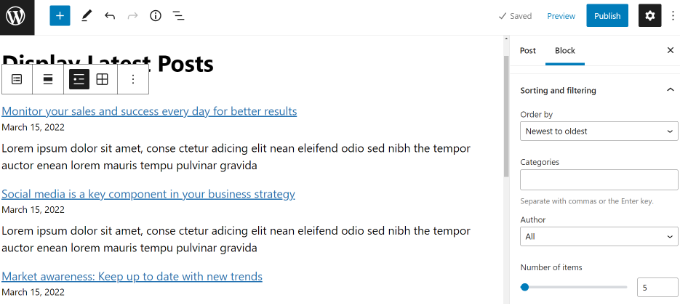
You also have the option to display your recent posts in a column grid rather than a list.
Simply select the ‘Grid view’ option on the toolbar.
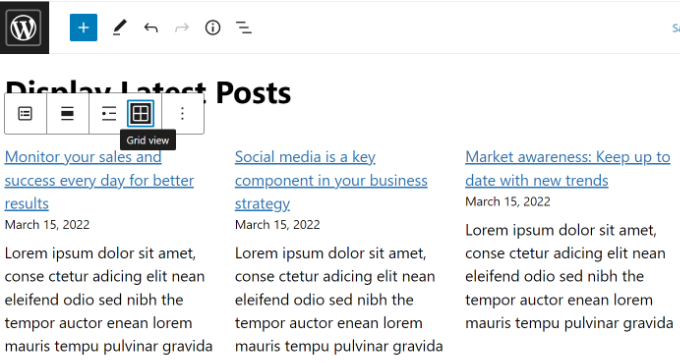
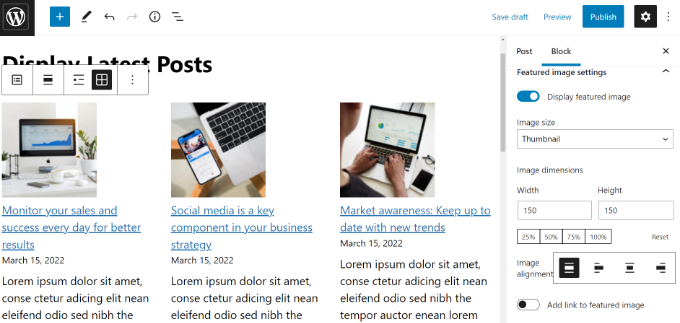
You can customize the grid using the settings on the right of the screen.
For example, you can show featured images for your posts, resize the images, and align them accordingly.
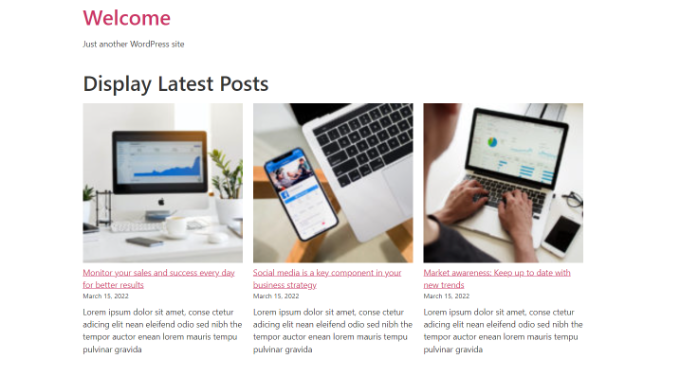
Once you are finished, you can preview the post to view it on your website.
Here’s how the finished block looks live on our test site.
Method 2: Use the WordPress Recent Posts Widget Block
What if you want to show a list of your latest posts in your sidebar instead of on a page? WordPress comes with a built-in default widget to display recent posts in your site’s sidebar or any widget-ready area.
In your WordPress dashboard, go to Appearance » Widgets and add the ‘Latest Posts’ widget block to your sidebar.
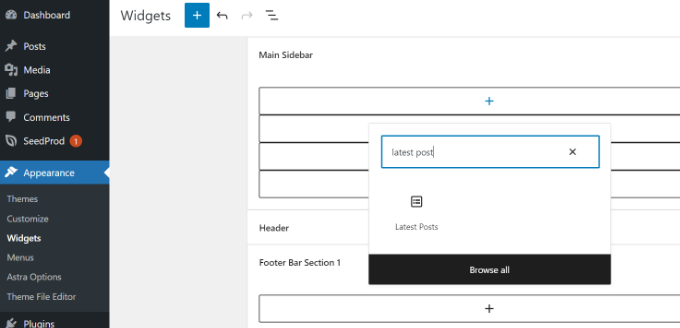
You can then customize the appearance of your recent posts in the sidebar.
For instance, WordPress lets you show post content, display post author and date, enable featured images, and sort your latest posts.
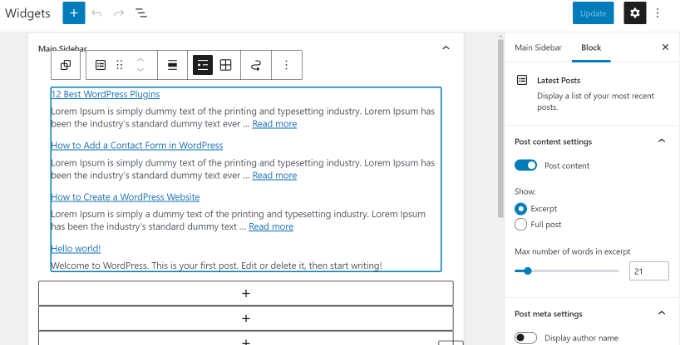
Once you are done, click on the ‘Update’ button to store your widget settings.
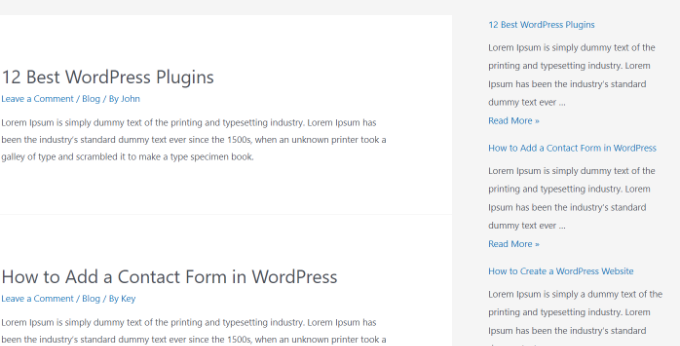
Here’s the widget live on the blog, with the title ‘New Posts’ and dates enabled:
Method 3: Use the Recent Posts Widget With Thumbnails Plugin
The built-in widget we mentioned above is quite limited.
What if you want to display thumbnails and excerpts with your recent posts? What if you’d like to only show posts from a specific category in your sidebar?
Well, that’s when the Recent Posts Widget With Thumbnails plugin comes in handy. It does a lot more than just thumbnails, and it’s free.
First, you’ll need to install and activate the WordPress Recent Posts Widget With Thumbnails plugin.
Next, go to the Appearance » Widgets page and then add the ‘Recent Posts With Thumbnails’ widget block.
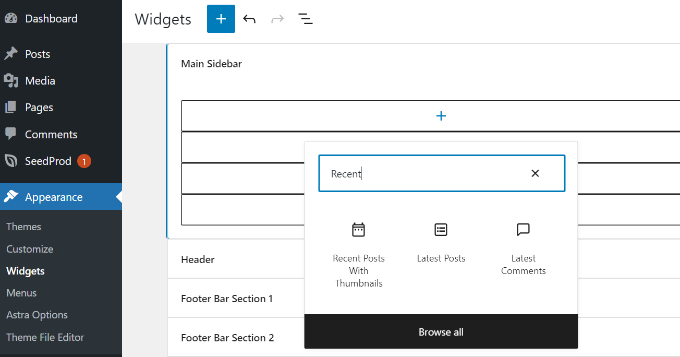
The Recent Posts With Thumbnails widget comes with a lot of options. It gives you full control over how you want to display recent posts on your WordPress site.
You can also show excerpts, show posts from specific categories, ignore sticky posts, choose the number of posts to show, display authors, and more.
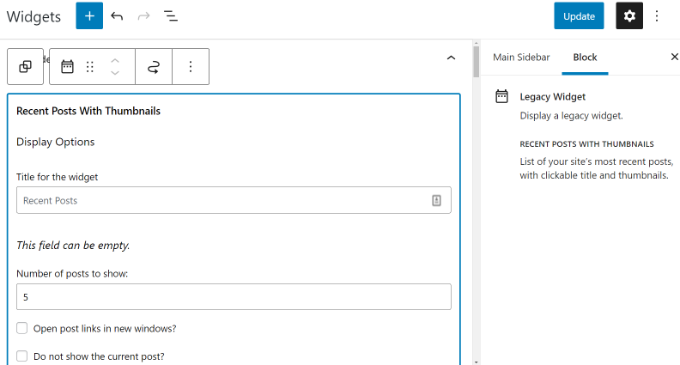
Once you are done, don’t forget to click on the ‘Update’ button to store your settings.
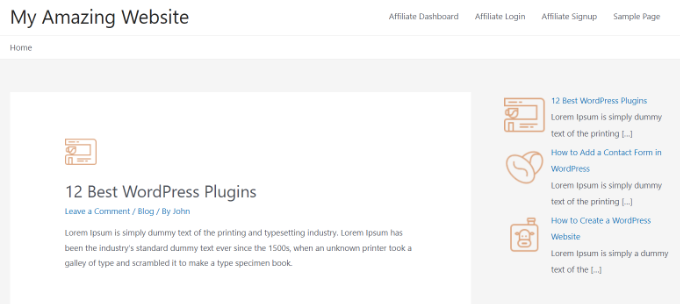
You can now visit your website to see your recent posts with thumbnails.
Method 4: Display Recent Posts Using a Shortcode
Using the ‘Latest Posts’ block is definitely the easiest way to display recent posts in WordPress posts and pages. However, if you choose to disable Gutenberg and keep the Classic editor, then you can use shortcodes instead.
First, install and activate the Relevant plugin. If you need help, then please see our guide on how to install a WordPress plugin.
It’s one of the most popular post plugins for WordPress. You get multiple options to customize the appearance of your latest posts, like editing the title, the number of posts, selecting whether you’d like to display a featured image, excerpt, post date, and more.
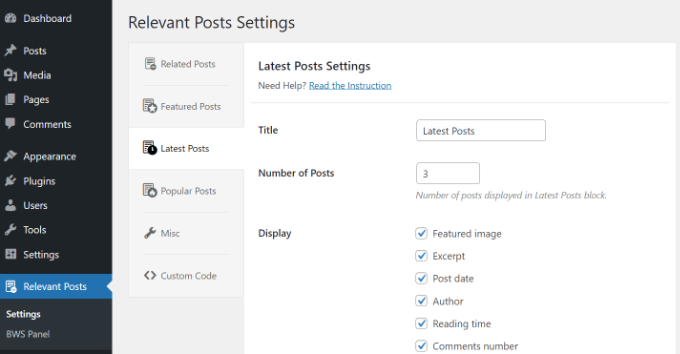
Next, simply edit a post or page where you want to display your recent posts and then use the shortcode [bws_latest_posts].
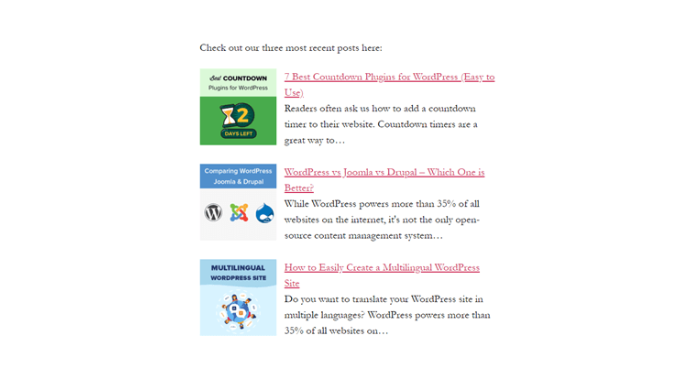
Here’s how our list of recent posts looked, using those instructions:
Method 5: Display Recent Posts Manually in WordPress
More advanced WordPress users may want to add recent posts directly to their WordPress theme files. Of course, you should use a child theme for this so that when you update your theme, you don’t lose your changes.
It’s always a good idea to create a backup before you edit your theme files. If anything does go wrong, you might want to take a look at our list of the most common WordPress errors and how to fix them.
The easiest way to manually display recent posts is to use the built-in WP_Query class. Simply add this code where you want to display the recent posts:
<ul>

<?php
// Define our WP Query Parameters
$the_query = new WP_Query( 'posts_per_page=5' ); ?>

<?php
// Start our WP Query
while ($the_query -> have_posts()) : $the_query -> the_post();
// Display the Post Title with Hyperlink
?>

<li><a href="<?php the_permalink() ?>"><?php the_title(); ?></a></li>

<li><?php
// Display the Post Excerpt
the_excerpt(__('(more…)')); ?></li>

<?php
// Repeat the process and reset once it hits the limit
endwhile;
wp_reset_postdata();
?>
</ul>
This code displays the five most recent posts with their titles and excerpts. The WP_Query class has tons of parameters that allow you to customize it in any way that you like. For more information, please refer to the WordPress developer documentation.
Expert Guides on Recommending Posts in WordPress
Now that you know how to display recent posts in WordPress, you may like to see some other articles related to promoting content to your readers.
- How to Display Popular Posts by Views in WordPress
- Best Popular Posts Plugins for WordPress (Compared)
- How to Display Related Posts in WordPress (Step by Step)
- Best Related Posts Plugins for WordPress (Compared)
- Proven Methods to Promote Old Posts in WordPress
- How to Highlight New Posts for Returning Visitors in WordPress
- How to Display Random Posts in WordPress (Easy Tutorial)
- How to Display Most Commented Posts in WordPress
- How to Display Recent Posts From a Specific Category in WordPress
- How to Increase Your Blog Traffic – The Easy Way
We hope that this article helped you learn how to display recent posts in WordPress. You might also be interested in our guide on how to create a separate page for blog posts in WordPress and our expert pick of the best drag-and-drop WordPress page builder plugins.
If you liked this article, then please subscribe to our YouTube Channel for WordPress video tutorials. You can also find us on Twitter and Facebook.




Syed Balkhi says
Hey WPBeginner readers,
Did you know you can win exciting prizes by commenting on WPBeginner?
Every month, our top blog commenters will win HUGE rewards, including premium WordPress plugin licenses and cash prizes.
You can get more details about the contest from here.
Start sharing your thoughts below to stand a chance to win!
Jiří Vaněk says
I would like to post these recents at the end of each article. But there are already more than 1000 of them. It doesn’t make sense to do it manually. Is it possible to take the php code, insert it into WPCode and use the embed code at the end of each article? Will it work like this?
WPBeginner Support says
If you wanted to you could certainly do that
Admin
Mike says
Is any way to use shortcode like [bws_latest_posts tag=”something”]?
Thanks!
WPBeginner Support says
There are some options in the plugin settings to limit the categories but at the moment the plugin does not have a modifier like that for the shortcode.
Admin
Bernie says
Thanks for lots of great advice!
I have been spending days so far, to solve a challange here:
Im using the Twenty Twenty-Three template.
Using Gutenberg.
Created a 2nd column where i would like to place a list of the latest posts by CURRENT author, incl. thumbnail, except etc.
I can only find this solution in plugins with widgets, and as far as I understand this Gutenberg thing, widgets cant be used here.
Any idea how to solve this?
WPBeginner Support says
If you are manually adding it to each post, there is a latest posts block that gives the option to limit the posts listed by author and a few other sorting options that you can use as well!
Admin
Matt says
How to enable a link to more pages/posts? The widget only says up to 100, but how to paginate etc if there are 1000 or more?
WPBeginner Support says
We do not recommend having more than 100 posts in a widget due to that being difficult for most users to read through for its space. If you are displaying that many posts we would recommend displaying it on a page or something similar.
Admin
Jack Yasgar says
When I use the WordPress Latest Posts Gutenberg Block, it displays all the texts of the posts. In the preview when I add it to the page, it looks fine, with the “Read More”, but when you actually preview or publish the page, all the text is displayed and it looks terrible. This is on Version 5.9.1. Any suggestions or is it just a bug?
WPBeginner Support says
You would want to check the settings for your widget as that should be where you can customize how your widget is displayed. If it is not following those settings then you would likely want to reach out to the support for your theme in case it is overriding your settings.
Admin
Dileepa says
Is it possible to display posts that are specific for a certain ‘Category’ as a Recent Post?
WPBeginner Support says
The simplest method would be to add a category to your menu and that would link to a category page that would list your most recent posts in that category.
Admin
Sean says
I’m using ‘Display Posts’ and love it. I run a gardening website so if a post is called ‘How to Grow Beetroot’, is there any way by using Display Posts that the only part of the title that is displayed is ‘Beetroot’?
Thank you
WPBeginner Support says
The plugin by default does not change your post titles. You would want to reach out to the plugin’s support if you wanted that functionality
Admin
Lucy says
I can’t seem to get the Read More to appear in the published version. It appears in the editor but when I publish, it is gone. I’m using Astra theme.
WPBeginner Support says
You would want to check for if you need to enable excerpts with your specific theme for it to display how you are wanting.
Admin
Hamza says
Hi, When I click on the “Read more..” on a post on Recent Posts, it does not to go to that specific post page rather it loads the home page.
Appreciate if you can help on this.
Thanks
WPBeginner Support says
It would depend on what method you are using for possible issues and solutions.
Admin
Julian says
This was really helpful thanks. Just a correction to note, in the last code snippet the comments are using // but they’re not actually in the php so they will show up if you use this code as-is.
WPBeginner Support says
Thank you for pointing that out, we’ll update the code to fix this
Admin
Michael Robinson says
Hi, I”m still lost. My posts still don’t show up on my homepage, I have content blocks set up on my homepage and using Guterberg to set up the content. When I publish the post. It does not show up on my Homepage feature posts grid. There is something I am not getting.
WPBeginner Support says
You may want to clear any caching on your site to ensure your caching is not preventing the changes from being seen.
Admin
Venkat says
My blog shows bulleted post, how do I stop it from being an unordered list, and make it in grid?
WPBeginner Support says
You can use the new latest post block and use the built-in grid option in the block’s options
Admin
Mohammed says
Hello Friends,
My query is what is the short code to display all the content of a post?!
WPBeginner Support says
It would depend on why you want to do that. If you want the entire content of a post to be visible to a user it would normally be best to link to the post you want to show so your users can read from the source.
Admin
Miracle Lawrence says
My blog shows bulleted post, how do I stop it from being an unordered list, and make it in grid?
WPBeginner Support says
For making your posts appear in a grid, you would want to take a look at our article here:
https://www.wpbeginner.com/plugins/how-to-display-your-wordpress-posts-in-a-grid-layout/
Admin
Sarah says
Hello – I am trying to figure out why the Recent Posts widget (the basic one) is excluding my most recent post. I would like that to show. Is there custom CSS I could add to make it show? or can I edit the code?
WPBeginner Support says
The most common reason for something like that would be if you have caching or similar on your site that is preventing the widget from updating, you would first want to clear your cache. We have an article on how you’re able to do so here:
https://www.wpbeginner.com/beginners-guide/how-to-clear-your-cache-in-wordpress/
Admin
WPBeginner Support says
It would depend on how you want it styled but you could create a tabber widget for what I believe you’re wanting:
https://www.wpbeginner.com/wp-tutorials/how-to-add-jquery-tabber-widget-in-wordpress/
Admin
Ata says
Thank you for the useful post.
I have a question. What if I want to display recent posts on front page categories wise. Like recent posts should appear on the front page under a particular category.
Is it possible?
Arif says
Awesome as always. When I found wpbeginner is sharing on this topic I was like . But my question is placing post widget on homepage is beneficial or it’s just easy to navigate? Can it help with seo perspective? Can it help with the ranking? Your response highly appreciated
WPBeginner Support says
Making your site easier to navigate can improve your SEO as well as making it easier for your users to continue navigating through your site.
Admin
Rajiv Dave says
Thanks for recent post articles. I was trying so much but now its so easy to work just adding adding it. Thanks for sharing
WPBeginner Support says
Glad our article was helpful
Admin
aditya tomar says
thank you so much. this helped me a lot. thank you thank you :).
:).
WPBeginner Support says
You’re welcome
Admin
Trang says
When I tried to edit the page that’s supposed to display blog posts, the editor disappears wit this notice: “You are currently editing the page that shows your latest posts”. Does anyone have this same problem as me?
WPBeginner Support says
The Blog page is automatically generated by your theme so you will not have the option to edit it directly unless you have a theme specific setting to edit it.
Admin
Nikos Tzortzis says
HI…..i just started using WP and i need some help! i want to publish articles from 3 different categories to 3 different pages.how can i make a page point to an article category?
Rob says
Is there a way to customize the way post titles are displayed? I don’t want to display the full title of the post or page, just the keywords… much like you shorten the slug for your url. Actually this is exactly what I’m looking for, to display the slug as a link, and not the entire page title. Ideas?
Bryan Free says
Great article, When I use the Recent post widget and set it to only display a category my sticky posts do not work. Have you encountered this before or know of a solution?
eyllan8547 says
Hi, thanks for this complete article.
I have a doubt, if I have my wordpress integrated with Magento, can I use magento within the short code to put the last entries in my magento house?
Mankirat Deep Kaur says
The short code to display recent posts with thumbnails does not work… only shows the posts title not the thumbnails… how to fix this.??? please reply…:(
Kevin says
Hi,
I am intending on adding the latest posts on my homepage, but I want a different section for the latest post to display on it’s own;
and another section under this designed differently for the latest posts that range from 2-5. (The 2nd, 3rd, 4th and 5th post).
What is the shortcode php for this to add to my theme template.
Many thanks.
James Gielow says
Hello,
I have post shortcode on my page:
I’ve tweaked it a little bit as follows:
[display-posts posts_per_page=”100″ include_excerpt=”false” image_size=”large” wrapper=”div” orderby=”comment_count”]
I’m noticing that the spacing in between the posts is cutting off the titles and it makes the page look sloppy. What code can I add to add a little space after each post preview?
thanks in advance!
James
WPBeginner Support says
Hi James,
You can adjust spacing between posts using CSS.
Admin
Paul says
Thanks! I was struggling with adding recent posts to a page. Your guide saved me a lot of time
Erpel says
Thank you for this tutorial!
WPBeginner Support says
You are welcome
Admin
Adam says
Love the idea, the only thing I don’t like is the display.
So it’s great how it has the thumbnail, title, excerpt, etc but the way the title and excerpt are positioned…I think they should be inline with the thumbnail, not at the bottom of it…it looks awkward and unappealing…any way to make it inline?
Kenneth says
Please help me with this
How to display recently post in a post on phone version?
Reply please… Thanks
sai says
If I am using 2 database. 1 for main site and 2nd for blog then how to add recent post on home page ?
djafa says
Hi, I put [display-posts posts_per_page=”5″ post_type=”page”] on my post, but not working, can you help how to find the problem?
Kev says
Great writeup. I want to display the recent post on a page. awahere am I suppose to paste the code?
Clark Keng says
this article can help me thank you : )
Id abdou says
gereat … thanks a lot .
PARAM says
How to show thumbnail of 1st post bigger and others smaller…..
Brad says
You could perhaps use :first-child CSS to do this.
Louise says
Hi,
Thank you for this post. Really helped a lot.
But then I have a problem. When I click on one of the recent posts – it directed me to the static page and not the post itself. Kindly help me resolved this issue. Thank you.
WPBeginner Support says
Try updating your permalink structure. Simply visit Settings » Permalinks and then click on the save changes button without changing anything.
Admin
Ellen Allard (Gluten Free Diva) says
So glad to have found you!
I’m confused – I can’t seem to get my most recent blog post to appear on my blog page. Can you advise please? Thank you so much!
best, Ellen Allard, Gluten Free Diva
Tim Zeman says
So I was able to get the 5 latest post to show in the right sidebar but when I click on a post to read it I get the following error on Home Page Oops something went wrong
How do I get the selected post to display?
John Mason says
Are links to the recent posts widget dofollow links?
Val Archer says
Hi – thanks million for this manual method, very grateful. Please can you tell me how to add a thumbnail image to it? I’m referring to the method starting:
// Define our WP Query Parameters
Rajkumar says
hello,
To display a thumbnail image u can ues
Andrew Wilkerson says
Hi Val, Hope your doing well, I was just scrolling through this article and saw your name and thought straight away I know that name! It’s a small world.
I made one of your sprouters in the late 90’s I think it would have been.
Funny thing is I was just thinking about building another one a few days ago!
Crazy how things happen sometimes!
Weird that I then just stumbled across your comment on here today in 2018 while I’m working on my website for something totally unrelated.
I remember I really enjoyed reading about your life and the move to Sth Africa, your cures for tooth aces etc. I’ll have to have another look into it all again soon when I have time, anyway just thought I’d say Hi.
Farhad says
Hello, I used the same shortcut in my site but it not show my recent posts at all, what is the probelm?
WPBeginner Support says
This article shows several ways to display recent posts, which one you tried on your website?
Admin
Marcio says
Hey, how to display recent posts from another wordpress site?
WPBeginner Support says
You can fetch them using RSS feed. Please see, how to fetch feeds in WordPress.
Admin
Joe says
Hi,
On my recent posts on the sidebar, when I click a specific post it brings me to the latest post and then displays everything. How do I get it so that when I click a specific post it only shows that post?
Thanks!
Sally says
Is there a code I can add to activate pagination using the Recent Posts Extended widget?
Currently I have my home page widgetized so I’m using the widget.
Thanks!
alin dragoescu says
Hello,
Please let me know if it’s posible to show the post list in dropdown?
Nick NEvsky says
Hi! Great plugin, thank you!
Is it possible to have the author listed, instead of the post name?
Thanks!
Jason says
The version I downloaded does not include the ability to display thumbnails…cant see the option anywhere. I am using version 0.9.9
Any clues?