


Do you want to disable the automatic formatting in WordPress posts?
By default, WordPress formats texts to replace quotes with fancy quotes and clean up the text. This prevents users from displaying code, raw text, and CSS/Javascript code examples.
In this article, we’ll show you how to disable automatic formatting in WordPress posts.
Why Disable WordPress Formatting in WordPress Posts?
WordPress comes with a built-in feature to sanitize text. This feature replaces quotes with fancy quotes, and removes other tags that may be required to display HTML, CSS, or JavaScript.
There are multiple ways to easily display code in WordPress which allows you to skip default formatting. You can check them out in our article on how to display code in WordPress.
However, some advanced users may want to completely disable WordPress auto-formatting on their websites. This would allow them to easily skip the WordPress formatting checks and display raw text on their website whereever needed.
That being said, let’s take a look at how to easily disable automatic WordPress formatting on your website. We’ll show you two methods, so you can pick the one that works best for your needs.
Method 1. Manually Disable Automatic Formatting in WordPress
This method requires you to add custom code to your WordPress website. If you haven’t done this before, then take a look at our guide on how to copy and paste custom code snippets in WordPress.
First, you’ll need to paste the following code to your theme’s functions.php file or a code snippets plugin.
function my_formatter($content) {
$new_content = '';
$pattern_full = '{([raw].*?[/raw])}is';
$pattern_contents = '{[raw](.*?)[/raw]}is';
$pieces = preg_split($pattern_full, $content, -1, PREG_SPLIT_DELIM_CAPTURE);

foreach ($pieces as $piece) {
if (preg_match($pattern_contents, $piece, $matches)) {
$new_content .= $matches[1];
} else {
$new_content .= wptexturize(wpautop($piece));
}
}

return $new_content;
}

remove_filter('the_content', 'wpautop');
remove_filter('the_content', 'wptexturize');

add_filter('the_content', 'my_formatter', 99);
We recommend adding this code using the WPCode plugin. It’s the safest and easiest way to add custom code in WordPress without editing your theme files.
To get started, you need to install and activate the free WPCode plugin. If you need help, see this guide on how to install a WordPress plugin.
Once the plugin is activated, go to Code Snippets » Add Snippet from your WordPress dashboard. Then, hover your mouse over the ‘Add Your Custom Code (New Snippet)’ option and click the ‘Use snippet’ button.
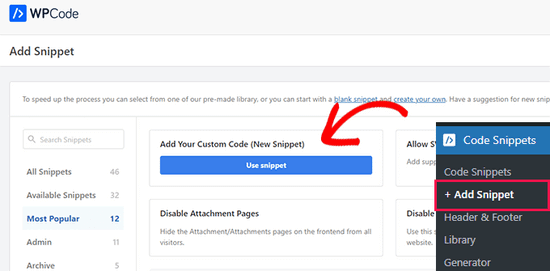
Next, you can add a title for your snippet, which can be anything to help you remember what the code is for.
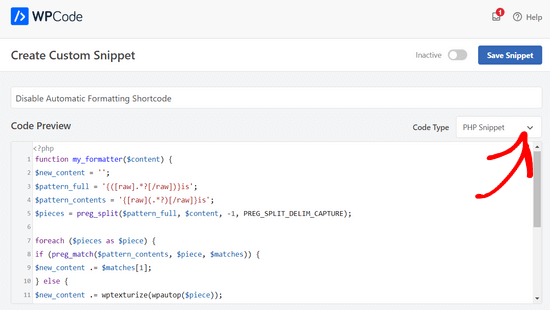
Then, simply paste the code from above into the ‘Code Preview’ box and select ‘PHP Snippet’ as the code type from the dropdown menu.
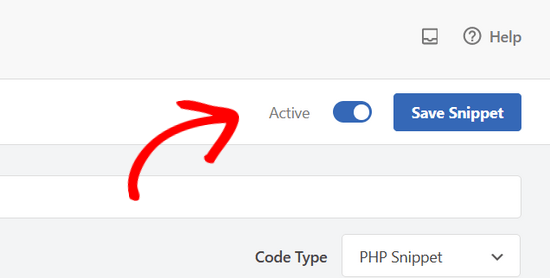
Lastly, toggle the switch from ‘Inactive’ to ‘Active’ and click the ‘Save Snippet’ button at the top of the page.
The above code tells WordPress to skip the formatting option if some text is wrapped inside the raw shortcode.
Now to add skip WordPress formatting, you need to add the HTML block to your WordPress post editor. Inside the post editor, you can add your unformatted text or code inside the raw shortcode.
[raw]Unformatted code[/raw]
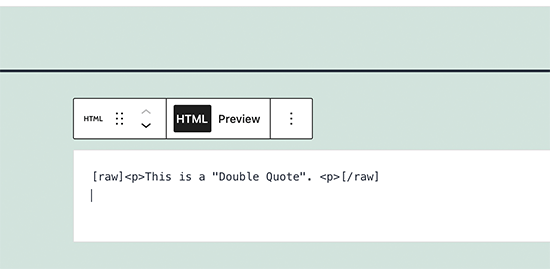
The disadvantage of this method is that it wouldn’t work very well with the block editor. Even inside the HTML block, it may behave unexpectedly.
Method 2. Disable Automatic Formating in WordPress using Plugin
This method is easier but it requires you to use the older Classic Editor plugin. The main disadvantage of this approach is that it would create a mess if you decide to start using the block editor in the future.
First, you need to install and activate the Classic Editor plugin. For more details, see our guide on how to disable block editor in WordPress.
After that, you need to install and activate the Raw HTML plugin. For more details, see our step by step guide on how to install a WordPress plugin.
After that you can create a new post or edit an existing one. On the post edit screen you need to switch to the Text mode and add your unformatted text inside the raw shortcode.
[raw]Unformatted code[/raw]
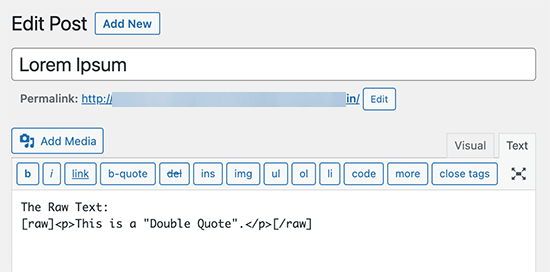
You can now publish or save your changes and preview them to see unformatted text in action.
We hope this article helped you learn how to disable automatic formatting in WordPress posts. You may also want to see our complete WordPress security guide or see our tips on improving your blog post SEO.
If you liked this article, then please subscribe to our YouTube Channel for WordPress video tutorials. You can also find us on Twitter and Facebook.





Syed Balkhi says
Hey WPBeginner readers,
Did you know you can win exciting prizes by commenting on WPBeginner?
Every month, our top blog commenters will win HUGE rewards, including premium WordPress plugin licenses and cash prizes.
You can get more details about the contest from here.
Start sharing your thoughts below to stand a chance to win!
Phil LaNasa says
Excellent! I’ve tried plugins, but they make they work globally – all pages are affected. This is a super quick fix.
Emanuele says
Nice piece of code. Made my day. Thanks for sharing.
Myrddin says
Hello,
Thanks for this tip. Kind of nice to be able to have raw scripts/html for select complex forms I am using, without having to pay attention on the remaining site.
Michael
Blair says
Im seeing this code everywhere , and I’m not so sure it’s a valid solution as it messes with a lot of other shortcodes ( if you theme is using theme ) , and it seems to add back formatting to areas in which did not have auto formatting in the first place ie : with get_the_excerpt() or something like this.
Is there not an easier way to strip away a selected area of content to be not formatted this way?
Editorial Staff says
Umm, we simply use the Syntax Highlighter to display codes. Rest of formatting is ok. Unfortunately there is no real easy way.
Admin
Karan says
This still does not take out the tags from posts/pages.
Thanks.
FAQPAL says
Excellent, this is definitely one frustrating part of WordPress.