


Do you want to display your Twitter followers count as text in WordPress?
By showing that many people follow you on social media, you can encourage visitors to trust your website. Even better, by displaying this information as text, you have the freedom to use it anywhere on your website, including inside your posts and pages.
In this article, we will show how to display your Twitter followers count as text in WordPress.

Why Display Twitter Followers Count as Text in WordPress?
You may have noticed that many popular blogs, influencers, and brands proudly show how many people follow them on social media.
If visitors see lots of people following you on social media, then they are more likely to trust your business and see you as an expert in your blogging niche.
Many of the best social media plugins allow you to show the total follower count in embedded feeds, buttons, banners, and more.
However, sometimes you may want to show the number as plain text. This gives you the freedom to add the follower count to your blog posts, footer, or anywhere else on your WordPress blog or website.
With that in mind, let’s see how you can display your Twitter follower count as text in WordPress.
Step 1: Get a Twitter API Key and Secret
To get your follower count, you will need to access the Twitter API by creating an API Key and Secret.
To get this information, head over to the Twitter Developers Portal and then click on ‘Sign up for Free Account.’
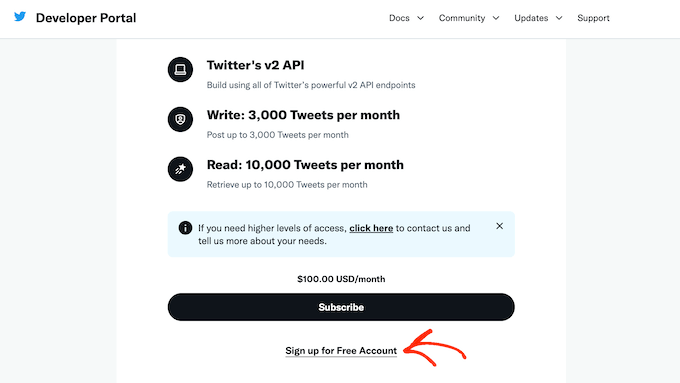
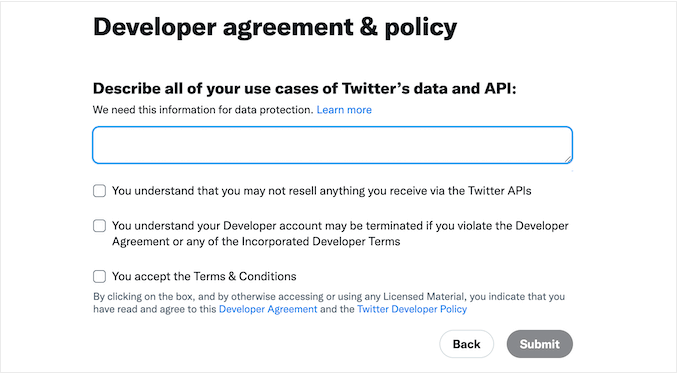
You can now type in some information about how you plan to use the Twitter API. It’s a good idea to provide as much detail as possible, as Twitter will review this information and may delete your account if they don’t understand how you are using their API.
After that, read the terms and conditions. If you are happy to continue, go ahead and click on the ‘Submit’ button.
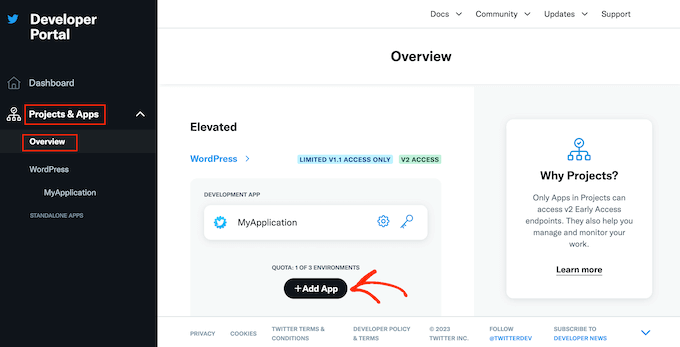
You will now see the Developer Portal. In the left-hand menu, click to expand the ‘Projects & Apps’ section. Then, select ‘Overview.’
You can now go ahead and click on ‘Add App.’
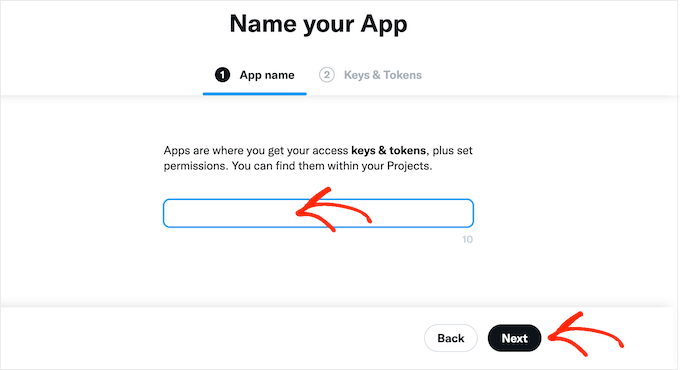
After that, just type in the name you want to use for your Twitter app. This is just for your reference, so you can use anything you want.
With that done, click on the ‘Next’ button.
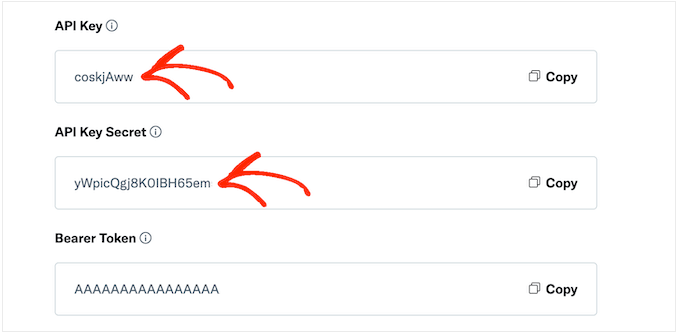
Twitter will now show an API key and API Secret. This is the only time you will see this information, so make a note of it somewhere safe.
We recommend adding the key and secret to a password manager for extra security.
Step 2: Add Custom Code to Your WordPress Website
The easiest way to add the Twitter follower count to your site is by using PHP code.
For security reasons, WordPress doesn’t allow you to add PHP code directly to your pages and posts, but it does allow shortcodes. This means you can create a custom shortcode and then link it to your PHP code.
The easiest way to add custom shortcodes in WordPress is by using WPCode. This plugin allows you to create as many shortcodes as you want and then link them to different sections of PHP code.
The first thing you need to do is install and activate the free WPCode plugin. For more details, see our step-by-step guide on how to install a WordPress plugin.
Upon activation, head over to Code Snippets » Add Snippet.
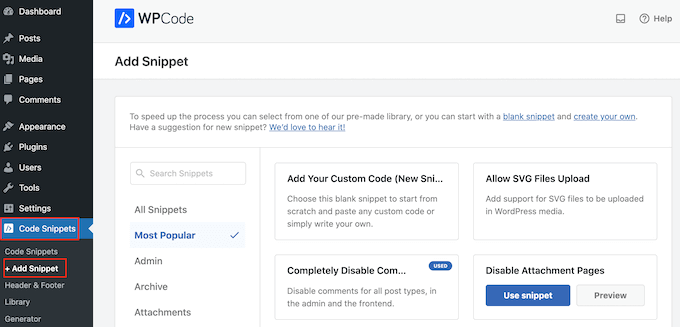
Here, you will see all the ready-made snippets you can add to your website. These include snippets that allow you to completely disable WordPress comments, upload files that WordPress doesn’t support by default, and more.
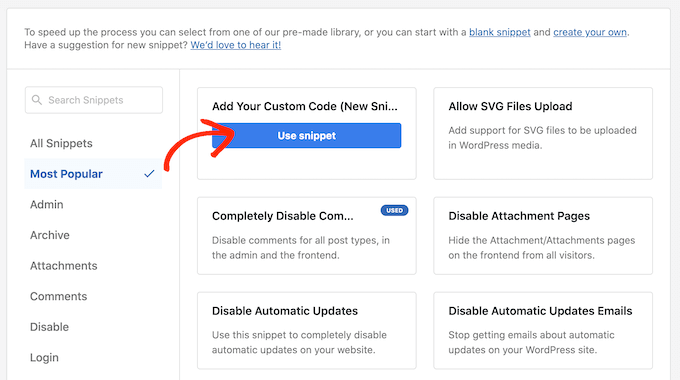
Since you are creating a new snippet, hover your mouse over ‘Add Your Custom Code.’ Then, just click on ‘Use snippet.’
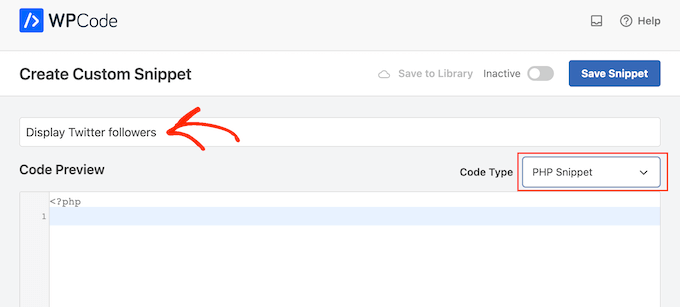
To start, type in a title for the custom code snippet. This can be anything that helps you identify the snippet in the WordPress dashboard.
After that, you need to open the ‘Code Type’ dropdown and select ‘PHP Snippet.’
In the code editor, simply paste the following PHP code:
function getTwitterFollowers($screenName = 'wpbeginner')
{
    // some variables
    $consumerKey = 'YOUR_CONSUMER_KEY';
    $consumerSecret = 'YOUR_CONSUMER_SECRET';
    $token = get_option('cfTwitterToken');

    // get follower count from cache
    $numberOfFollowers = get_transient('cfTwitterFollowers');

    // cache version does not exist or expired
    if (false === $numberOfFollowers) {
        // getting new auth bearer only if we don't have one
        if(!$token) {
            // preparing credentials
            $credentials = $consumerKey . ':' . $consumerSecret;
            $toSend = base64_encode($credentials);

            // http post arguments
            $args = array(
                'method' => 'POST',
                'httpversion' => '1.1',
                'blocking' => true,
                'headers' => array(
                    'Authorization' => 'Basic ' . $toSend,
                    'Content-Type' => 'application/x-www-form-urlencoded;charset=UTF-8'
                ),
                'body' => array( 'grant_type' => 'client_credentials' )
            );

            add_filter('https_ssl_verify', '__return_false');
            $response = wp_remote_post('https://api.twitter.com/oauth2/token', $args);

            $keys = json_decode(wp_remote_retrieve_body($response));

            if($keys) {
                // saving token to wp_options table
                update_option('cfTwitterToken', $keys->access_token);
                $token = $keys->access_token;
            }
        }
        // we have bearer token wether we obtained it from API or from options
        $args = array(
            'httpversion' => '1.1',
            'blocking' => true,
            'headers' => array(
                'Authorization' => "Bearer $token"
            )
        );

        add_filter('https_ssl_verify', '__return_false');
        $api_url = "https://api.twitter.com/1.1/users/show.json?screen_name=$screenName";
        $response = wp_remote_get($api_url, $args);

        if (!is_wp_error($response)) {
            $followers = json_decode(wp_remote_retrieve_body($response));
            $numberOfFollowers = $followers->followers_count;
        } else {
            // get old value and break
            $numberOfFollowers = get_option('cfNumberOfFollowers');
            // uncomment below to debug
            //die($response->get_error_message());
        }

        // cache for an hour
        set_transient('cfTwitterFollowers', $numberOfFollowers, 1*60*60);
        update_option('cfNumberOfFollowers', $numberOfFollowers);
    }

    return $numberOfFollowers;
}

echo getTwitterFollowers(); ?>
In the code above, make sure you replace the following placeholders with your own API key and API secret:
    $consumerKey = 'YOUR_CONSUMER_KEY';
    $consumerSecret = 'YOUR_CONSUMER_SECRET';
You will also need to replace ‘wpbeginner’ with the Twitter account that you want to use. This can be any Twitter account, including accounts that you don’t own:
function getTwitterFollowers($screenName = 'wpbeginner')
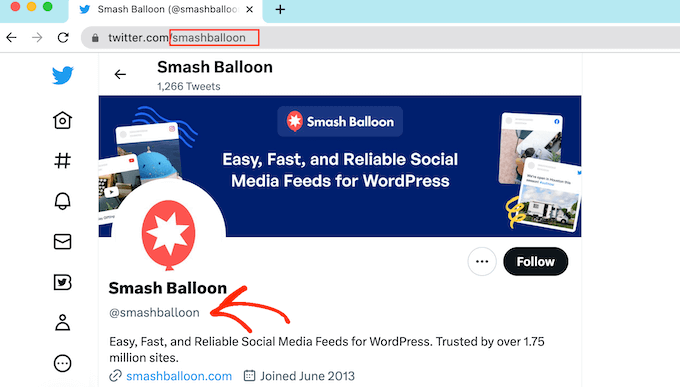
To get the Twitter username, simply open the Twitter profile in a new tab. You will find the username in the URL and in the profile header:
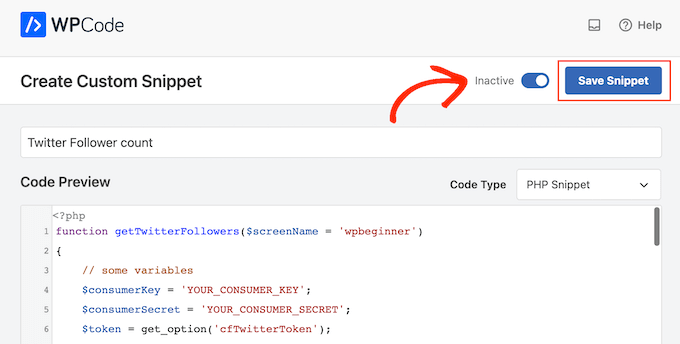
With that done, switch back to the WordPress dashboard. Here, simply click on the ‘Inactive’ toggle so that it changes to ‘Active.’
You can then go ahead and click on the ‘Save snippet’ button.
With that done, scroll to the ‘Insertion’ section.
WPCode can automatically add your code to different locations, such as after every post, front end only, or admin only. To get the shortcode, simply click on the ‘Shortcode’ button.
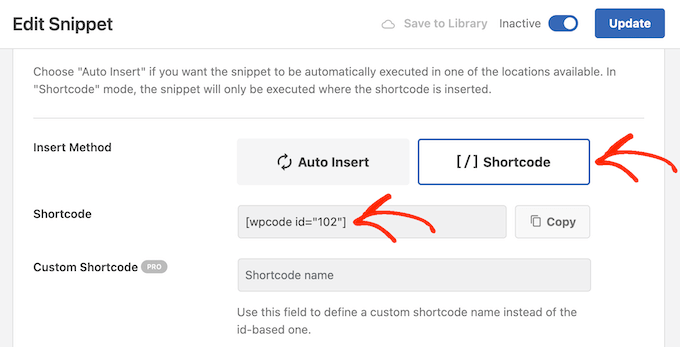
You can now use the shortcode to add social proof to any page or post.
In the block editor, simply click on the ‘+’ button and type in ‘Shortcode.’ When it appears, select the Shortcode block to add it to the page or post.
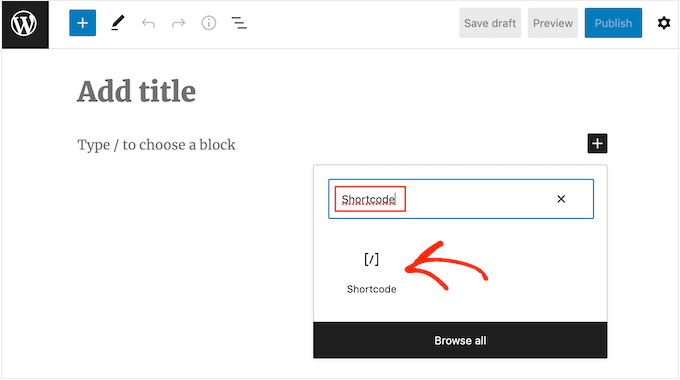
You can now add the shortcode to the block.
Just be aware that the shortcode simply shows the total follower count, so you will typically want to add some text explaining what the number means.
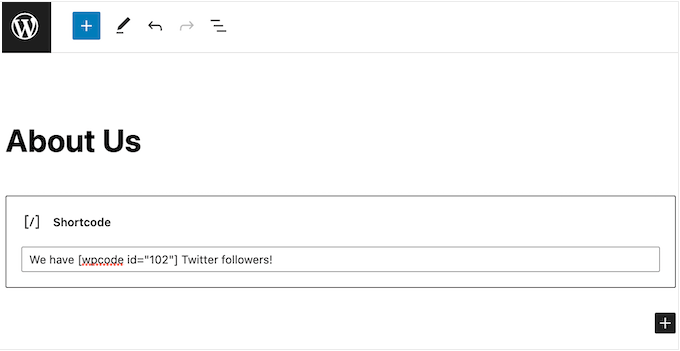
For more information on how to place the shortcode, please see our guide on how to add a shortcode in WordPress.
When you are happy with how the page is set up, you can make the follower count live by clicking on either the ‘Update’ or ‘Publish’ button.
Now if you visit your WordPress website, you will see the follower count live.
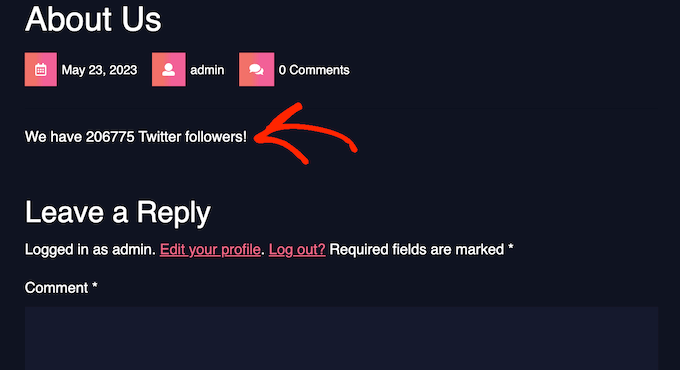
We hope this tutorial helped you learn how to display your Twitter followers count as text in WordPress. You may also want to learn how to create a custom Instagram photo feed in WordPress or check out our expert picks for the best Twitter plugins for WordPress.
If you liked this article, then please subscribe to our YouTube Channel for WordPress video tutorials. You can also find us on Twitter and Facebook.





Syed Balkhi says
Hey WPBeginner readers,
Did you know you can win exciting prizes by commenting on WPBeginner?
Every month, our top blog commenters will win HUGE rewards, including premium WordPress plugin licenses and cash prizes.
You can get more details about the contest from here.
Start sharing your thoughts below to stand a chance to win!
Jiří Vaněk says
I’ve also set up a Twitter account for my website to increase its reach. It might be nice to use this article and display the numbers in the posts. Perhaps, as part of marketing, it might encourage some readers to also join as followers. It could enhance the integration with social media and improve website traffic.
venky says
Hi used the same code in my site..but its not showing the follower counter of the twitter pages
pls help me out ..
Noraly says
update: after having one last look I saw I hadn’t activated the access token. So now it does show up, only way at the bottom of my sidebar. How do I move it up to a more logical place? Preferably within the text widget at the top, so I can include it with all my other social media links. Thank you!
Noraly says
Hi all, hope you are still monitoring comments, since it’s an older article. I have copied the code in functions.php, replaced the key and secret (left the ‘ ‘ intact, was I meant to do that?). Then I copied the other bit in sidebar.php. Replaced the yourscreenname with my twittername. This doesn’t make it show up in the sidebar though. Should I do something with a text widget in the sidebar, where I want it to show up? Just putting the last line of code in a sidebarwidget doesn’t seem to be the trick. Would appreciate your help. Thanks!
WPBeginner Staff says
Yes with a few changes you can use it with any PHP application.
Jitendra says
Can i use it in other PHP application? I mean any other application which is not WP.
arun says
It is not working for me.
I have added that code into sidebar template , then i replaced consumer key and secret key with screen name. Still it is not working
This is my page url
WPBeginner Support says
Arun it seems like you resolved the issue, when we visited your webpage it was showing the correct twitter follower count in plain text.
Admin
Nic Granleese says
Hi,
Can you tell me if this code works for multiple twitter users.
I’m trying to make a table with different users on a site with their respective twitter follow count.
When I tried it seems to display only one twitter user’s count, which I assume is because user one get’s cached, and then the second, third, and n users just display the same result.
Nic
WPBeginner Support says
Yes you got that right.
Admin
Thomas says
I’ve got the same problem.
When I ask for the follower count of three different accounts and display it on a page, it displays the same number three times. The number it displays is the exact follower count of the first account.
Do you know how to fix this? :/
Thanks in advance.
Thomas
Julian Lara says
Its possible to get a comma in the number like 140,029. Because actually show like 140029.
rayuribe says
works great!
but…
It is possible add the result of this script to this other >
http://lineshjose.com/blog/how-to-display-facebook-fans-count-as-text-in-wordpress-site/
and show the total? (facebook_fans+twitter_fans=total_fans)
jahirul says
Would you please share the code of follower count of yours? the function and the activation code, please.
Nazar says
This doesn’t work for me.
I’ve replaced $consumerKey and $consumerSecret as well as made the Access level to “Read and write” but nothing is happening
irfan says
Hey hi,
Such a great post.
I have ask a question for you I use twiiter user link (https://twitter.com/screen_name) when i use this link show followers its that possible?
Any one,
Thank Advance
Alvin says
Hello,
we get this error
Fatal error: Call to undefined function get_option() in line 17
line 17 is this
$token = get_option(‘cfTwitterToken’);
Matt says
Hi,
Dreamweaver tells me this line is invalid:
$api_url = “https://api.twitter.com/1.1/users/show.json?screen_name=$screenName“;
So I’ve updated it to:
$api_url = ‘https://api.twitter.com/1.1/users/show.json?screen_name=$screenName’;
But the twitter count just says 0 (I have over 1,200).
Any suggestions?
Thanks!
Matt
Malcom Miles says
Wrapped this tutorial along with the “WordPress Site Specific Plugin” tutorial and worked like a charm.
Many thanks! :3
jahirul says
would you give me the code or the link of your plugin please.
Tyler says
I’ve tried doing this atleast 10 times and can’t get it to work. Is it up-to-date?
Editorial Staff says
Yes this code was recently updated, and it works fine for us.
Admin
jahirul says
Does it work in localhost with net connection?
Zulhilmi Zainudin says
How about to display Facebook Fans & Google+ Followers in text?
Chandra says
Thanks for this code. I used this in my site but after sometime, I tested with an addition of follower but that count is not being updated. It still shows old count. Is something missing ? Thanks.
Chandra says
Ah, it updated after an hour or so…
regnar says
A little demo would be great.
Editorial Staff says
It will show the count as text. For example: if you have 100 followers, then it will output 100. Not sure what you expected in the demo.
Admin