


Do you want to display the most accurate comment count in WordPress?
Your WordPress site may have comments that are pending moderation, spam, trackbacks, and pings. This makes it difficult to show the exact comment count on your site.
In this article, we will show you how to easily display the most accurate comment count on your WordPress website.

Why Display an Accurate Comment Count in WordPress?
Comments allow readers to engage with you and other visitors. This can help create a sense of community and keep people coming back to your website. With that being said, you will want to do everything you can to get more comments on your WordPress posts.
You can allow users to subscribe to comments, finish each post with a question to try and generate discussion, and more. Another option is to display an accurate comment count.
A high comment count will make visitors want to join in the conversation. It’s also a form of social proof, as readers may visit your posts just to see why so many people are commenting.
There’s no default way to show an accurate comment count in WordPress, especially if your site gets lots of trackbacks and pings. Comment spam can also make it difficult to display an exact comment count.
With that being said, let’s see how you can display an accurate comment count on your WordPress website using free plugins. Simply use the quick links below to jump straight to the method you want to use:
Method 1: Using Simple Blog Stats (Quick and Easy)
The easiest way to show an accurate comment count is by using Simple Blog Stats. This plugin shows the total number of approved comments and comments in moderation. However, it doesn’t include pings and trackbacks in its count.
Many websites turn off trackbacks and pingbacks to block spam comments in WordPress, so this may not be a big problem for your website. However, if you want to include trackbacks and pings in your comment count, then we recommend using method 2 instead.
To get started, you need to install and activate the Simple Blog Stats plugin. For more details, see our step-by-step guide on how to install a WordPress plugin.
Upon activation, you can see all the plugin’s shortcodes by going to the Settings » Simple Blog Stats page.
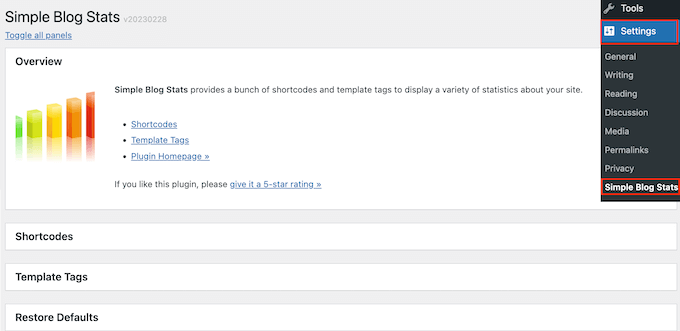
Here, simply click to expand the ‘Shortcodes’ section.
To display the total count of all approved comments on your WordPress blog, simply use the following shortcode: [sbs_approved]
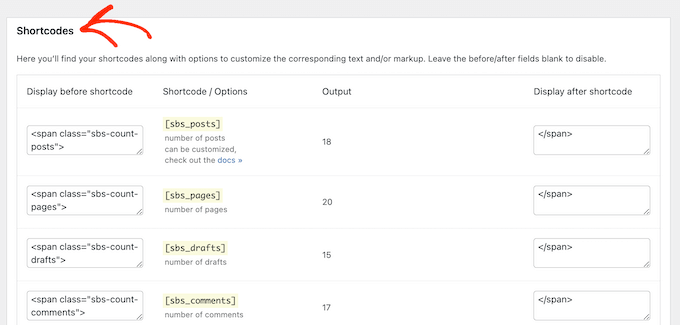
If you want to show the total number of approved comments plus comments that are still in the WordPress comment moderation queue, then you can use [sbs_comments] instead.
For more information on how to place the shortcode, please see our guide on how to add a shortcode in WordPress.
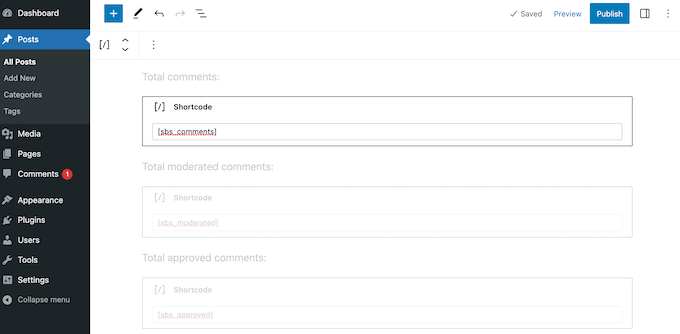
After adding the shortcode, you can visit your WordPress website to see the total comment count live.
Method 2: Using a Custom Shortcode (Includes Pings, Trackbacks, and Unapproved Comments)
If you want to include pingbacks and trackbacks in the total comment count, then you will need to add custom code to your website.
Often, tutorials ask you to add custom code snippets to your theme’s functions.php file. However, we don’t recommend this method because a small mistake in your code could cause a number of common WordPress errors. Or worse, break your site entirely.
That’s why we recommend using WPCode. It is the easiest and safest way to add custom code in WordPress without editing any WordPress theme files.
The first thing you need to do is install and activate the free WPCode plugin on your website. For more details, see our step-by-step guide on how to install a WordPress plugin.
Upon activation, you need to go to Code Snippets » Add Snippet.
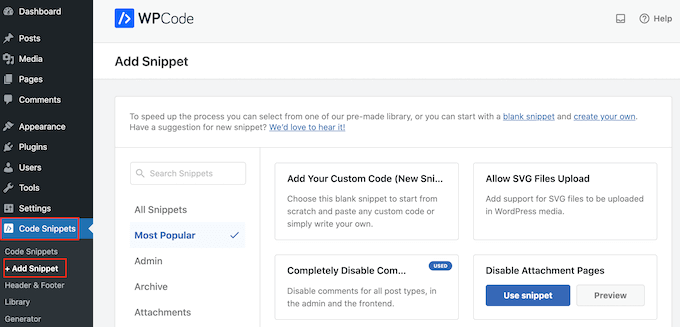
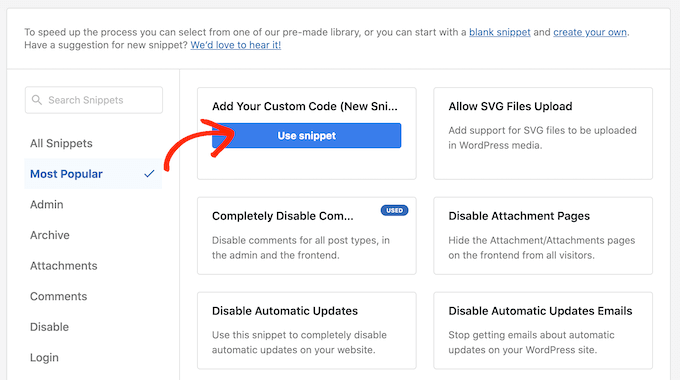
Here, you will see all of WPCode’s ready-made snippets that you can add to your site.
We are going to create a custom shortcode that allows you to add an accurate comment count to any page, post, or widget-ready area. To get started, hover your mouse over ‘Add Your Custom Code’ and then click ‘Use snippet.’
To start, you need to enter a title for the custom code snippet. This can be anything that helps you identify the snippet in your WordPress dashboard.
After that, just open the ‘Code Type’ dropdown and choose ‘PHP Snippet.’
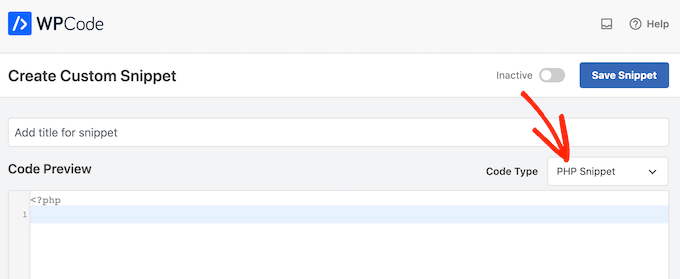
Once you have done that, simply paste the following snippet into the code editor:
function wpbeginner_comment_count() {

function comment_count( $count ) {
    if ( ! is_admin() ) {
        $comments_by_type = &separate_comments(get_comments('status=approve'));
        return count($comments_by_type['comment']);
    } else {
        return $count;
    }
}
add_filter('get_comments_number', 'comment_count', 0);

$actual_comment_count = get_comments_number();

return $actual_comment_count;

}

add_shortcode('actual_comment_count', 'wpbeginner_comment_count');
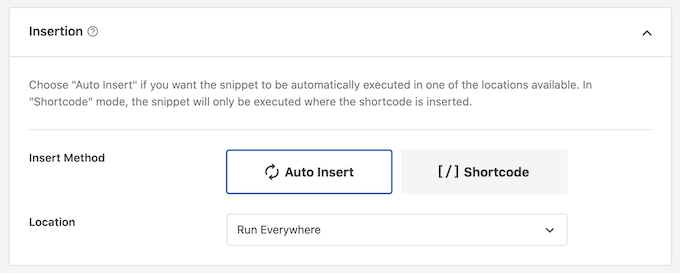
Below the code box, you will see insertion options.
To create a shortcode that you can use on any page, post, or widget-ready area, you must open the ‘Location’ dropdown menu and then click on ‘Run Everywhere.’
After that, scroll to the top of the screen and click on ‘Inactive’ so it changes to ‘Active.’
With that done, simply click on ‘Save snippet’ to make the snippet live on your website.
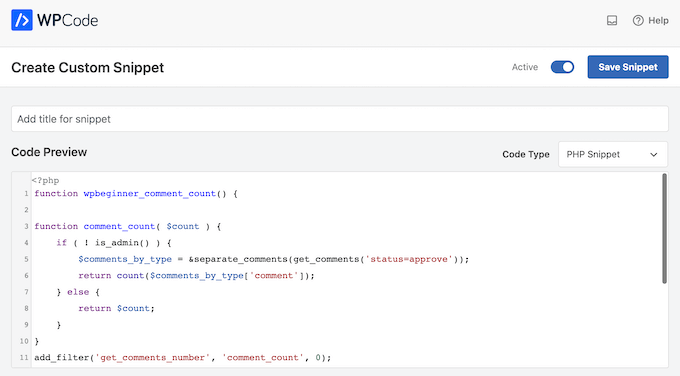
You now have a shortcode that you can use to show the total number of comments, including trackbacks, pings, and unapproved comments.
Simply add the [actual_comment_count] shortcode anywhere you want to show the comment count. For more information on how to place the shortcode, please see our guide on how to add a shortcode in WordPress.
Showing Comment Count for a Specific WordPress Post
Do you want to show the comment count for a single post or page?
You can simply add the following PHP code snippet to WPCode following the same process described above:
function wpbeginner_post_comment_count() {

function comment_count( $count ) {
    if ( ! is_admin() ) {
global $post;
        $comments_by_type = &separate_comments(get_comments('status=approve&post_id='. $post->ID ));
        return count($comments_by_type['comment']);
    } else {
        return $count;
    }
}
add_filter('get_comments_number', 'comment_count', 0);

$actual_comment_count = get_comments_number();

return $actual_comment_count;

}

add_shortcode('post_comment_count', 'wpbeginner_post_comment_count');
This creates a [post_comment_count] shortcode that you can add to any page or post.
We hope this article helped you learn how to easily display the most accurate comment count in WordPress. You may also want to read our guide on how to increase your blog traffic or see our expert picks for the best contact form plugins for WordPress.
If you liked this article, then please subscribe to our YouTube Channel for WordPress video tutorials. You can also find us on Twitter and Facebook.





Syed Balkhi says
Hey WPBeginner readers,
Did you know you can win exciting prizes by commenting on WPBeginner?
Every month, our top blog commenters will win HUGE rewards, including premium WordPress plugin licenses and cash prizes.
You can get more details about the contest from here.
Start sharing your thoughts below to stand a chance to win!
WPBeginner Support says
Glad you liked our recommendations, for your concern on plugins we would recommend taking a look at our post below that goes over why using plugins is not an issue
https://www.wpbeginner.com/opinion/how-many-wordpress-plugins-should-you-install-on-your-site/
Admin
mohadese esmaeeli says
Hello, good day! I think having a comment counter is a very good idea to achieve a more effective categorization of user opinions. In my opinion, the second method is more practical and better since it does not require installing any plugins. I really liked the idea.
Chris says
Hi,
on my website it only works in Gutenberg block “shortcode” not in “paragraph”. Am I doing something wrong?
insitedesignlab says
You guys always have the best tutorials. I searched Google for this because my site was prominently displaying inflated comment counts and found exactly what I was looking for!
Thanks again!
imranansari says
This code is helpful.
I have paste this code in function.php and call this function in my template
<?php echo comment_count(); ?>
Thanks.
Ezuca says
I have been searching the web for this solution. Plugins are available but I’m not into it. I tried your code and it works! Thanks a lot.
Tricyclic Antidepressants says
Very interesting article and very good blog. Very much interested to know)
I will add this blog to RSS Reader
Wordpress Developer says
I was looking similar a wordpress plugin. This code very useful for me. Thank you.