


At WPBeginner, we’re always searching for smarter ways to improve navigation so our readers can easily find exactly what they are looking for. A smooth browsing experience keeps users engaged and coming back for more.
Luckily, WordPress offers a straightforward solution by allowing you to organize your posts with categories and subcategories. Showing subcategories directly on your category pages can significantly boost the user experience and streamline navigation throughout your site.
In this article, we’ll walk you through how to display subcategories on category pages in WordPress. We’ll provide you with the necessary code snippets and step-by-step instructions to make your website navigation better than ever. Let’s get started!

Why Display Subcategories on Category Pages?
When you write posts for your WordPress website, you can optimize for search engines and improve site navigation by categorizing content properly. This will bring more traffic to your site and allow visitors to find the content they are looking for more easily.
On some websites, it makes sense to use subcategories to simplify the site’s structure.
For example, you might have a top-level (parent) category called Sports. You can then have subcategories under Sports called NFL, NBA, and MLB.
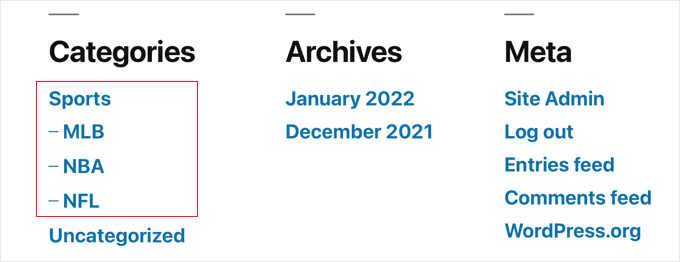
When your visitors click on the Sports category, they will see every post in the Sports category and its subcategories. However, they won’t see the list of subcategories. That makes it difficult to filter down to just the NFL or NBA posts.
Displaying a list of subcategories on your category pages can improve site navigation. That’s particularly true if you decide to hide subcategories in your website’s category widget.
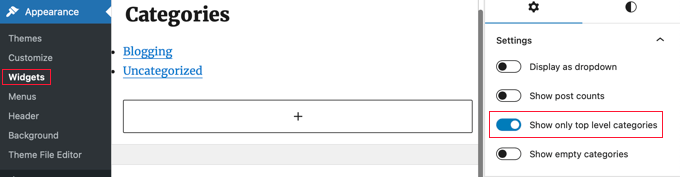
Then, for example, visitors to your site can easily move from all Sports posts to just NFL. Better still, you can continue to display the same subcategories on the NFL page so they can easily switch from NFL to NBA.
That being said, let’s look at how to display subcategories on category pages in WordPress.
How to Display Subcategories on Category Pages in WordPress
To display subcategories on your category archive pages, you’ll need to add code to your theme files. If you need help adding code to your site, then refer to our beginner’s guide on how to paste snippets from the web into WordPress.
The first thing you need to do is go inside your theme’s folder and look for your category archive file called category.php.
If you don’t see that file, then you will have to create it. Simply duplicate archive.php and name it category.php.
Note: If your theme doesn’t include category.php or archive.php, then you are probably using a WordPress theme framework and will have to create category.php manually. A good starting point for learning how to create archive files is our guide on how to create custom archive pages in WordPress.
Now, simply add the following code to category.php just before the loop:
<?php
if (is_category()) {
    $this_category = get_category($cat);
    }
    ?>
    <?php
    if($this_category->category_parent)
    $this_category = wp_list_categories('orderby=id&show_count=0
    &title_li=&use_desc_for_title=1&child_of='.$this_category->category_parent.
    "&echo=0"); else
    $this_category = wp_list_categories('orderby=id&depth=1&show_count=0
    &title_li=&use_desc_for_title=1&child_of='.$this_category->cat_ID.
    "&echo=0");
    if ($this_category) { ?>

<ul>
<?php echo $this_category; ?>

</ul>

<?php } ?>
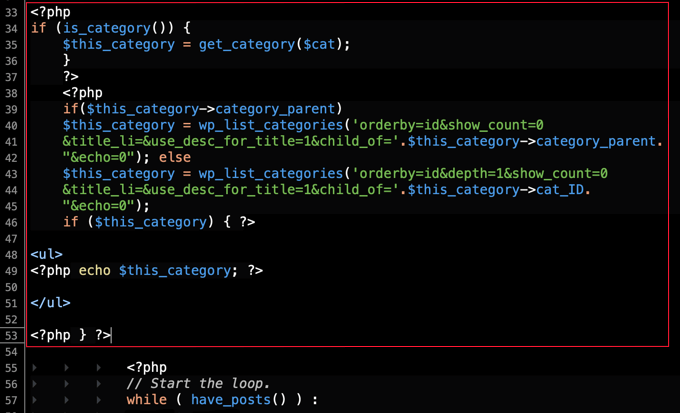
Now when you visit a category page, you will see a list of subcategories.
On our demo site, the Sports category page shows links to the NFL, NBA, and MLB subcategories.

When you click on the NFL link, you are taken to the NFL subcategory page.
Here you can still see the links to the Sports subcategories, so you can easily switch between the different types of sports. This can really simplify navigation on your site.

Expert Guides on Categories and Subcategories in WordPress
We hope this tutorial helped you learn how to display subcategories on category pages in WordPress. You may also want to see some other guides related to displaying categories and subcategories in WordPress:
- How to Hide or Style Your Subcategories in WordPress
- How to Style Individual Categories Differently in WordPress
- How to Display Only Child Category in Your WordPress Post Loop
- How to Add Categories and Subcategories in WordPress
- How to Include Category and Subcategory in WordPress URLs
- How to Display Category Descriptions in WordPress
- How to Properly Rename Categories in WordPress (Beginner’s Guide)
- How to Rename the Uncategorized Category in WordPress
- How to Create Category Templates in WordPress
- Categories vs Tags – SEO Best Practices for Sorting Your Content
If you liked this article, then please subscribe to our YouTube Channel for WordPress video tutorials. You can also find us on Twitter and Facebook.


George G.
Hello,
I use a theme which does not contain the category.php file. Categories and posts are shown throush a archive.php in which file is located into a plugin framework that comes together with this theme.
WPBeginner Support
You would want to check with the support for your specific theme for their custom framework. The other option would be to create a child theme if your theme didn’t use a plugin framework.
https://www.wpbeginner.com/wp-themes/how-to-create-a-wordpress-child-theme-video/
Admin
Nelda
This is a problem many people run into when they don’t look closely at what their theme provides. I would recommend choosing a different theme and this time look for categories with layers, tags, modifiable menus, block editor, and mobile responsive. Many exist for free that provide these basic functions. It is much easier to move forward and continue to enhance your site using a theme that is supportive of the flexibility you seek, rather than tweak a theme that doesn’t meet your needs out of the box. You will be tweaking continuously in the future, and that is not fun, trust me!!
This site has posts about responsive themes and the features they provide and after you choose a better theme, here is the link to swap it out. It is a very simple process.
https://www.wpbeginner.com/beginners-guide/how-to-properly-change-a-wordpress-theme/
Jameel Evans
I pasted this code into my category.php file, but when I go to mysite.com/category it’s not showing. Any suggestions?
WPBeginner Support
You would want to ensure the code is before the loop in your category.php and if it it placed there correctly then you would want to check with the support for your specific theme to see if they have something that would override the usual display.
Admin
Sarah
I inserted this code via the Code Snippets plugin, which has worked successfully with inserting other code, but now I have what I found out is called the ‘white screen of death’! Even on my website page ending in /wp-admin.
Does anyone know how to fix this when I can’t see my admin dashboard?
Em
open up the file directory and delete the plugin, it would get rid of the issue
Ahmad
this code does not work that exactly I want, I want a proper arrangement of categories like navigation.
Parent category
Grandchild 1
Grandchild 2
subchild 1
sibling categories
Jagdev
Hello,
How can we use this for custom post taxonomy created ?
I want to list the main categories first then sub-categories and sub etc.. untill reach upto post pages?
Can we change this code for custom post categories?
Thanks
Don
Hi!
How exactly should the code be inserted?
WPBeginner Support
Hi Don,
Depends on where you want to display subcategories. Please see our beginner’s guide on how to copy and paste code in WordPress.
Admin
Pradeep PL
But, Not to hide Parent Category, when I click on subcategory page. I want to show all the subcategory in Parent category as well as in subcategory also.
Sveinung Berntsen
Thanks for this great post. I have managed to make a filter for my category page with this code. But I would like to have a link to show all posts in the main category; if you clicked on one of the subcategory filter links, and want to go back to see all posts for the main category. Kind of like this:
All (20) Subcategory 1 (12) Subcategory 2 (5). Subcategory 3 (3)
Is that possible? And how can I get the number as a part of the link?
Julie-Ann
Hi
I don’t know anything about coding. I would really like to add subcategories to my wordpress blog so that I can organise my content better. Where do I paste this code to make it work? What exactly will happen. I would like to understand this a bit more please if you are able to assist.
WPBeginner Support
If you just want to add sub category, then you can go to Posts » Categories page to add new sub categories. See our guide on how to add categories and subcategories in WordPress.
Admin
Eliyas Ahmed
how to hide parent under categorie.
Gustavo Fernandez
Thanks for the post..
This works for woocommerce?
Thanks
Amanda
I know this is an old post but it is exactly what I am after for a current project.
Is there anyway to have an image show up with the category.
I have used this plugin in the past to add an image to a category – Categories Images
<?php if( function_exists('z_taxonomy_image') AND get_option('z_taxonomy_image'.$cat_id)” ) z_taxonomy_image($cat_id); ?>
I am just not sure how to implement it with your code.
Lambodar
Hi,
Thanks for the code.
I have Category Structure like:
Main Category: Home Improvement
Child Category: Roofing
Grand Category: Gutters
On this page: I want to show all child categories, which is fine it displays all.
On this page: I want to show all grand child categories, but it show all child categories.
On this page: I want to show nothing, as this is the last
Pls let me know how to fix it.
I used your code like this:
category_parent)
$this_category = wp_list_categories(‘orderby=id&show_count=0&hide_empty=0&title_li=&use_desc_for_title=1&child_of=’.$this_category->category_parent.
“&echo=0”); else
$this_category = wp_list_categories(‘orderby=id&depth=1&show_count=0&hide_empty=0&title_li=&use_desc_for_title=1&child_of=’.$this_category->cat_ID.
“&echo=0”);
if ($this_category) { ?>
sajib
Apnake thanks.
Jay
Call me stupid but where do we put this code, in header.php, index.php. functions.php?
FYI I have a page where they click an image in the main page and it takes them (currently) to a main category.
my goal is when they click the image it takes them to a page listing the sub cats for the cat, this will allow sorting of the posts!
Smith
is it possible to display posts on category pages as subcategory wise using this.
Example :
** Main Category Page **
** Sub category #1 **
– Post #1
– Post #2
** Subcategory #2 **
– Post #3
– Post #4
Zee
Did You get any clue on this? I needed this too
Asim Khan
hi did you find any solution to show categories plz reply me
Prafulla Kumar Sahu
Hey, Have you got any solution to this ??
Gerd Casper
Need this too.
Is anyone able to give a tip?
Monique
Since wp 4.0 I get the following error if debug is true:
Notice: get_all_category_ids is niet meer in gebruik sinds versie4.0! Gebruik in plaats daarvan get_terms(). in
This is the dutch error, in english it says it is depreceated. How can the code be adjusted so it works with the new standard?
vce2pdf.com
Does this link directly to the sub categories as well?
carole
Exactly what I needed except I had to add &hide_empty=0.
Joe Librizzi
Thanks for this, but changing orderby argument doesn’t seem to be having any impact on the actual displayed order. Has anyone else had a similar issue? Any solutions?
Katia
Thank you for this helpful post.
I need to exclude some of the categories , so those will not show . How can I do that?
Catalin
Hello
I need some help with the script above. I have a Category list of countries like USA, UK, Italy, France etc. and each country it will have cities as sub categories.
This script works great, when i click on Italy the cities sub categories appear in the side bar, however when a click on page or inside a post the cities disappear and it show only the country in the side bar.
How can I modify so when i click over a post inside the cities remain and when i click on a page like About or Home the cities to disappear? Also I use Hueman theme and i will need the cities to appear in the header menu. How much do you charge for that? E-mail me at kid_punky @ yahoo.com
sourabh nigam
i am using jigoshop plugin for e-eCommerce clothing website
in the jigoshop category add
MAN
WOMAN
BOYS
OTHER
it has also sub category
i want to display main category in sidebar and when click on category then sub category should be display;
Mitul
thanks great post, this tricks work but I have question..I want display sub category like your https://www.wpbeginner.com/deals/ category page. please tell me how can I add css and make sections page like your deal page.
WPBeginner Support
Mitul, for CSS you can view it in the source, feel free to play with it. You can use conditional tags in your template to show your sub categories differently or you can create a new template for the subcategory.
Admin
pustiu314p
Hi,
I use your code with success, and thanls for that.
I have a little trouble: I removed “depth=”1″ from code but the main category does not appear in sidebar. only subcategories.
How can I display both the parent category and subcategories?
Thank you.
Editorial Staff
depth=1 is meant to keep only child categories (not grand-child categories).
Admin
Pustiu314p
oh ok, so is any way to display grand-child categories?
rob_mod
Hi. Will this work with WordPress 3.3.1?
Also, this question might seem silly, but I want to double check:
This code will allow subcategories specific to the category page you’re on to appear in the sidebar, correct? Phrased another way: I’m on the homepage. I click on the main navigation which says “Illinois.” That takes me to a (category) archive page for Illinois, that has a sidebar. In that sidebar is: Chicago, Evanston, Skokie (subcategories). Now, If clicked on “New York” in the main navigation, I’d go to a (category) archive page for New York, and in the right hand column for that page would be: NYC, Albany, Buffalo, Rochester.
Am I correct, or am I misunderstanding the application?
Thanks so much!
VandeMataram
comment is not posted correctly … so putting it again:
Main-Category
Sub-category-1, Sub-category-2, Sub-category-3, Sub-category-4, Sub-category-5,
Sub-category-6, Sub-category-7, and so on ………….
VandeMataram
I want to show list of sub-categories in main category archive page, for example:
<Main Category>
<sub-category-1>, <sub-category-2>, <sub-category-3>, <sub-category-4>, <sub-category-5>, <sub-category-6>, and so on …
I have copied the same code provided in this article, but it’s not working … nothing is displaying in category page.
Please help.
robolist
Hi there, I am hoping there is a fix for what i am trying to do as i cant seem to find a solution anywhere.
what i have is several sub-categories under a main category. but the second tier categories are not child categories of the main. only the sub categories under the second tier are child. but i still want to contain the loop of those categories on the main category, but essentially it will never have a post nor a child. I managed to find the filter to display a loop of the categories below it, but the page only appears if there is one post in that category…
LOL, this all sound rather complicated when i say it out loud haha… I hope you get what i am talking about.
In short i want to have the category page displayed even without and posts under it. I am using a custom theme and template files for each category.
Hope someone has the answer.
Cheers
wpbeginner
@robolist What’s the point of having a category with no post under it? It seems like it shouldn’t even be there. Perhaps you want to elaborate, so we can see what you are doing with that category. Maybe an alternative route should be taken.
robolist
@wpbeginner thanks for getting back so fast
ok so the reason is because i dont want the main category to appear in the URL structure. although the final URL for the post will be different. The main category will be something like ‘destinations’ then under that will have countries. with each country having a child city then posts under the city. so the main menu will display ‘destinations’ with a loop of all posts under that. then under that in the sub menu will be the country then city. with both country and city containing a loop of its respective posts.so by the time you get to the city landing page i dont want the URL to be ‘.com/destinations/country/city/ ‘ i want it to be ‘.com/country/city/’
You see my dilemma?
wpbeginner
@robolist It seems like there is a better way.Wouldn’t it make more sense to eliminate destination category altogether. Create a page called Destinations – use custom page template to have it output all categories that WordPress has using wp_list_categories() function. Now you will still have the urls like .com/country/city/And when the user goes on a page like .com/destinations/ << They can still see all the countries listed there. Does that make sense? If it doesn’t, then maybe we don’t understand what you are trying to do.
robolist
@wpbeginner that does sound better and makes sense… But i am not familiar with the wp_list_categories() function, although i have seen it around. This could be the one. thanks so much for your help, i will go and give that a try thanks so much…
thanks also for all your amazing tutorials on this site…
wpbeginner
@robolist wp_list_categories() is a very simple and powerful function. http://codex.wordpress.org/Template_Tags/wp_list_categoriesIt will let you display your categories anywhere in a custom page template. https://www.wpbeginner.com/wp-themes/how-to-create-a-custom-page-in-wordpress/ So create a custom page template. In the template area paste the codewp_list_categories(); Make sure to set child=0 if you don’t want to show your cities in there. As I presume, you will only want to display the countries there. Then once a user clicks on a country, they go and see all the cities. Style it to your liking and there you have it.
robolist
@wpbeginner excellent thanks so much
robolist
@wpbeginner
hey guys, thanks so much for your advice last night, it worked a treat :). I am however stuck on the permalink structure now and would be very grateful if you and any tips for me again
My final post is now at the end of a three tier category structure, ‘continent/country/city/post/’ (destinations as you recommended is now a page). But for the final URL of the post i dont want it to be four deep and would prefer it to only be three deep. so the permalink that i would like is country/city/post/… Is there anyway i can remove the top level parent category from the permalink structure? at the moment i have it set up like this ‘/%category%/%postname%-%post_id%/’ But it automatically grabs all parent categories. , Do i have to again make the top category a page or is there a better way round this? Many thanks in advance for your help
Cheers
wpbeginner
@robolist You can write some permalink rewrite rules, but that is a bit harder than making the top category a page. Easy solution: make continent a page.Hard solution: rewrite permalink rule.Honestly, do you need continents? most folks don’t really look by North America or South America… They just look for countries…
robolist
@wpbeginner Thanks for getting back to me.
Well having the continents does help to organise the blog as it will get pretty big eventually, its more like regions really, not exactly continents, which is why I’d prefer to include them . I would love to learn how to do the rewrite rule because that way i wont have to be constantly adding extra category IDs to the region pages every time a new city/country is added. The way i have it set with the destinations is perfect because i will never add any more regions so i never have to touch that page again,:) as it stands there are 9 regions thats it., but countries and cities will be added over time
i dont suppose you could point me in the right direction for the rewrite? I would be ever so grateful
Many thanks for all your help so far
wpbeginner
@robolist Rewrite requires writing custom codes and which is something we charge for. You can look at google for your guide or look in the WordPress core if you like tackling code.
robolist
@wpbeginner I would love to hire you guys but just dont have a budget for that :(, plus i would love to learn how to do it myself. but thanks so much for all the help you have given me on this. if i do fail at my attempt then i will just go for the simple way out and create pages for the regions. thanks again
sdiggles
Did you ever get this? I am trying to accomplish the same thing right now. Only show subcategories on category pages if there are subcategories. That “No categories” stuff is killing me.
robolist
@sdiggles i think i am after the same… did you find a solution?
Seosphere
Hi ! sorry for my english.
I would like to use your code, but not on the sidebar. When i click on a main category, i would like to find on the nav. bar the sub menu instead to have the main menu.
Sorry but i m not a developper, where do i have to paste your code ?
In category.php ?
Thank you
giriayoga
thanks you for your information
Aleksandr
The code is not finished.
«…
if ($this_category) {
//There is must be a code
//to show the list of subcategories.
}?>
…»
Something like that:
if ($this_category) {
printf( $this_category );
}
P.S. working on «Twenty Ten» 3.0.1
tes
testing with v 3.0 doesnot work.. buggy
Emily
I’ve heard that this code no longer works since the WP upgrade. I also got a parse error.
Editorial Staff
Where did you hear this?
Admin
Rachel
Hi,
This code is exactly what I need, only I want to use it in the actual category.php content section, not in the sidebar. Anyway, I pasted it in and I get a parse error. Is there something missing at the end of the code snippet?
Thanks.
-Rachel
Editorial Staff
So many things can matter. Where exactly did you place it… please contact us via our contact form for help.
Admin
David
Rachel, did you get this figured out? I’m getting the same error.
Karl B
This is a great starting point for me as I had been searching high and low for this.
I wondered if there was a way to elaborate on this and allow say, 1 post title and excerpt then 4 more titles from each subcategory, displayed in a div.
I have been trying to find a way to do this for months but have never found anyone able to assist. I even offered a small payment but no-one came forward
Thanks if anyone can offer any advice
Karl
Editorial Staff
We can help you if you contact via email. There is a way to do it that can be explained either via email, or we can do it for you for a small payment
Admin
Jerry
I’m getting a “Parse error: syntax error, unexpected ‘='” error from this?
Ideas?
Editorial Staff
Try it now It should work. The code just converted the quotes into curly quotes.
Admin
Jacqueline
Hi, thanks so much for this code and I have it working on my template. How would I prevent this entire code from running if a category has NO children? If there are no children, it creates an empty list and prints the text “No Categories.” Here’s how I had it setup with Yoast’s code:
cat_ID) != “”) { ?>
Subcategories:
cat_ID);?>
If there were no subcategories, nothing would show up. Your code is better, but I need it to only show up ONLY if there are subcategories. How would I achieve this? Thanks for any suggestions.
Victor
Thanks for posting this. I got my posts displaying fine, but had forgotten about the sub cats…it makes more sense this way.
Nick
Hi,
I’m trying to accomplish this in the sidebar, only instead of links, I want to list recent posts in subcategories.
and of course, this would occur in all category and subcategory pages, as well as single posts.
Don’t know if this is possible. But, I’ve been looking around like crazy, and not being a programmer isn’t helping either.
Editorial Staff
Here try this post and use Hack #4 (Display Recent Posts from Specific Categories)
Admin
FAQPAL
Excellent post, thanks for the snippet.