


Are you looking for a WordPress theme cheat sheet to quickly modify your theme or create a new custom theme? WordPress comes with many built-in template tags that you can use to get a head start. In this article, we will share a WordPress theme cheat sheet for beginners.
Before Getting Started
WordPress comes with a powerful templating engine that allows theme developers to create beautiful designs for WordPress powered websites. There are both premium and free WordPress themes that you can install on your website.
Each WordPress theme comes with a number of customization options. These options allow you to change colors, add header images, setup navigation menus, and more.
However, you are still limited to what features your theme supports. Sometimes you may want to make slight changes to your WordPress theme that require some coding. To do that, you will need to know some basic PHP, HTML, and CSS.
First thing you would want to do is to familiarize yourself with how WordPress works behind the scenes and WordPress theme templates.
After that there are some best practices you may want to follow. For example, creating a child theme instead of making your changes directly into your theme files.
You can also practice on your theme by installing WordPress on your computer.
That being said, let’s dive into our WordPress theme cheat sheet for beginners.
Basic WordPress Theme Templates
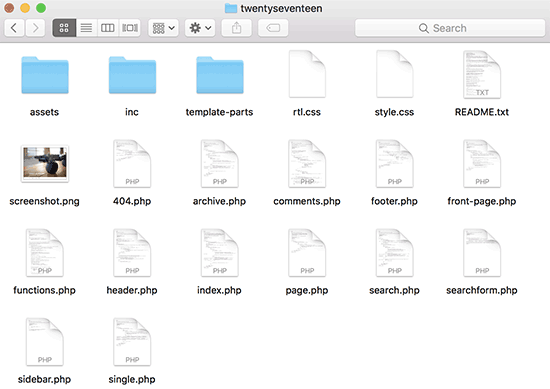
Each WordPress theme is made up of different files called templates. All WordPress theme must have a stylesheet and an index file, but usually they come up with a lot of other files.
Below is the list of basic files that every theme has:
- style.css
- header.php
- index.php
- sidebar.php
- footer.php
- single.php
- page.php
- comments.php
- 404.php
- functions.php
- archive.php
- searchform.php
- search.php
If you are building your own theme, then you can start with one of the WordPress starter themes. These themes come with ready to use WordPress template files and CSS that gives you a framework to build upon.
Template Tags in Header
WordPress comes with a lot of handy functions that can be used to output different things throughout your theme. These functions are called template tags.
First and probably the most important function that is required in all standard compliant WordPress themes is called wp_head, and it looks like this:
<?php wp_head(); ?>
This code fetches all the important HTML WordPress needs to add in the <head> section of every page on your website. It is also essential for many WordPress plugins to work properly on your website.
Following is a list of template tags that you will commonly find and use in your theme’s header.php file. However, they can also be used elsewhere on your theme when you need them.
// Title of the Blog, or Blog Name
<?php bloginfo('name'); ?>

// Title of a Specific Page
<?php wp_title(); ?>

// Exact URL for the site
<?php bloginfo('url'); ?>

// Site's Description
<?php bloginfo('description'); ?>

// Location of Site’s Theme File
<?php bloginfo('template_url'); ?>

// Link to the Style.css location
<?php bloginfo('stylesheet_url'); ?>

// RSS Feed URL for the site
<?php bloginfo('rss2_url'); ?>

// Pingback URL for the site
<?php bloginfo('pingback_url'); ?>

// WordPress version number
<?php bloginfo('version'); ?>
Template Tags Used in Other Theme Files
Now let’s take a look at some other commonly used template tags and what they do.
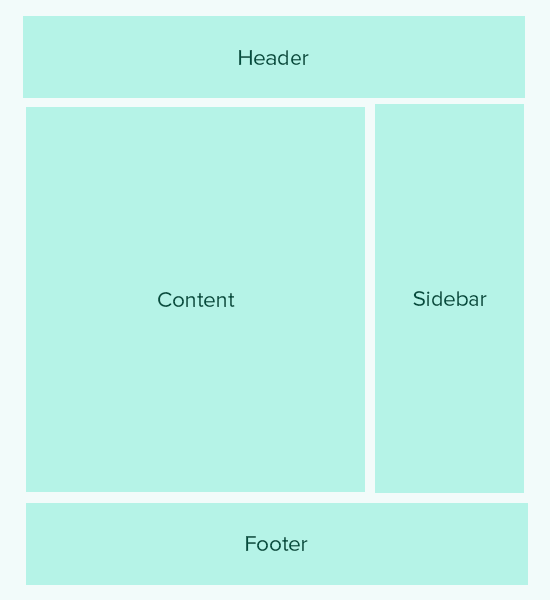
Following template tags are used to call and include other templates. For example, your theme’s index.php file will use them to include header, footer, content, comments, and sidebar templates.
//Displays Header.php file content
<?php get_header(); ?>

// Displays Footer.php file content
<?php get_footer(); ?>

// Displays Sidebar.php file content
<?php get_sidebar(); ?>

// Displays Comment.php file content
<?php comments_template(); ?>
Following template tags are used inside the WordPress loop to display content, excerpt, and meta data from your posts.
// Displays the Content of the Post
<?php the_content(); ?>

// Displays the excerpt that is used in Posts
<?php the_excerpt(); ?>

// Title of the Specific Post
<?php the_title(); ?>

// Link of the Specific Post
<?php the_permalink() ?>

// Category of a Specific Post
<?php the_category(', ') ?>

// Author of the Specific Post
<?php the_author(); ?>

//ID of a Specific Post
<?php the_ID(); ?>

// Edit link for a Post
// Oonly visible to logged in users with editing privileges
<?php edit_post_link(); ?>

// URL of the next page
<?php next_post_link(' %link ') ?>

// URL of the previous page
<?php previous_post_link('%link') ?>
WordPress themes come with widget-ready areas called Sidebars. These are locations in your theme files where users can drag and drop WordPress widgets. Often a theme has multiple locations where users can add widgets.
However, most commonly these widget areas are located in the right or left sidebar of the theme layout. To learn more, see our guide on how to add dynamic widget ready sidebars in your WordPress theme.
Here is the code used to display a sidebar in your theme.
<?php
if ( ! is_active_sidebar( 'sidebar-1' ) ) {
	return;
}
?>

<aside id="secondary" class="widget-area" role="complementary">
	<?php dynamic_sidebar( 'sidebar-1' ); ?>
</aside><!-- #secondary -->
You will need to replace sidebar-1 with the name defined by your theme for that particular widget-ready area or the sidebar.
Template Tags to Display Navigation Menus
WordPress comes with a powerful menu management system that allows users to create navigation menus for their website. A WordPress theme can have more than one navigation menu location.
See our guide on how to create your own custom navigation menus in a WordPress theme.
Following is the code that will be used in your theme to display a navigation menu.
<?php
wp_nav_menu( array(
    'theme_location' => 'my-custom-menu',
    'container_class' => 'custom-menu-class' ) );
?>
Theme location depends on the name your theme used to register the navigation menu. The CSS container class can be called anything that you like. It will surround your navigation menu, so that you can style it accordingly.
Miscellaneous Template Tags
Following are some of the tags that you’ll commonly use throughout your WordPress theme.
// Displays the date current post was written
<?php echo get_the_date(); ?>

// Displays the last time a post was modified
get_the_modified_time

// Displays the last modified time for a post
<?php echo the_modified_time('F d, Y'); ?>

// Displays post thumbnail or featured image
<?php the_post_thumbnail( ); ?>

// Displays monthly archives
<?php wp_get_archives( ); ?>

// Displays the list of categories
<?php wp_list_categories(); ?>

// Displays the gravatar of a user from email address
// 32 pixels is the size, you can change that if you need
<?php echo get_avatar( 'email@example.com', 32 ); ?>

// Displays gravatar of the current post's author
<?php echo get_avatar( get_the_author_meta( 'ID' ), 32 ); ?>
Conditional Tags in WordPress Themes
Conditional tags are functions that return results in True or False. These conditional tags can be used throughout your theme or plugin to see if certain conditions are met and then do something accordingly.
For example, if the current post has a featured image or not. If it doesn’t have a featured image, then you can show a default featured image instead.
<?php
if ( has_post_thumbnail() ) {
    the_post_thumbnail();
}
else {
    echo '<img src="' . get_bloginfo( 'stylesheet_directory' )
        . '/images/thumbnail-default.jpg" />';
}
?>
Following are a few more conditional tags that you can use.
// Checks if a single post is being displayed
is_single()

// Checks if a page is being displayed
is_page()

// Checks if the main blog page is displayed
is_home()

// Checks if a static front page is displayed
is_front_page()

// Checks if current viewer is logged in
is_user_logged_in()
There are many more conditional tags that you can use. The full list of conditional tags can be found in the WordPress codex page about conditional tags.
The WordPress Loop
The Loop or the WordPress loop is the code used to fetch and display posts in WordPress. Many WordPress template tags may only work inside the loop as they are associated with the post or post_type objects.
Following is an example of a simple WordPress loop.
<?php

// checks if there are any posts that match the query
if (have_posts()) :

  // If there are posts matching the query then start the loop
  while ( have_posts() ) : the_post();

    // the code between the while loop will be repeated for each post
    ?>

    <h2 id="post-<?php the_ID(); ?>"><a href="<?php the_permalink() ?>" rel="bookmark" title="Permanent Link to <?php the_title(); ?>"><?php the_title(); ?></a></h2>

    <p class="date-author">Posted: <?php the_date(); ?> by <?php the_author(); ?></p>

    <?php the_content(); ?>

    <p class="postmetadata">Filed in: <?php the_category(); ?> | Tagged: <?php the_tags(); ?> | <a href="<?php comments_link(); ?>" title="Leave a comment">Comments</a></p>

    <?php

    // Stop the loop when all posts are displayed
 endwhile;

// If no posts were found
else :
?>
<p>Sorry no posts matched your criteria.</p>
<?php
endif;
?>
To learn more about the loop check out What is a Loop in WordPress (Infographic).
We hope this article helps you as the basic WordPress theme cheat sheet for beginners. You may also want to see our list of the most useful tricks for the WordPress functions file.
If you liked this article, then please subscribe to our YouTube Channel for WordPress video tutorials. You can also find us on Twitter and Facebook.




Mrteesurez
Great post, infact this is one of the post that explained templates tags for me clearly and categorized based on usage and functions.
The basic WordPress files you shared are also helpful in starting my own theme. It is essential to understand these templates tags and basic files in order to edit or create a custom theme.
Thanks for this, I am looking forward to seeing this type of posts.
Fajri
nice tutorial
Sometimes we really need to edit the contents of some of the PHP files above, especially if there are customizations that are not provided by the theme.
for simple code insertion, one plugin that helps a lot is WPCode Lite
Mrteesurez
I agree with you. It’s true that customizing PHP files is sometimes necessary for unique requirements not covered by the theme. WPCode has been a lifesaver for me in these situations. It allows for simple code insertions without the hassle of directly editing theme files, making it easier and safer to implement custom tweaks. I used it on almost all my websites because it is very useful.
Marco
This is great article.
But is it still relevant in 2022 with Gutenberg block editor?
WPBeginner your the best!
WPBeginner Support
What we share in this article is still currently relevant.
Admin
Fajri
Hey bro
Yes, that’s right, this tutorial is still relevant to the current version of WordPress, including if your website uses a block editor or even the classic editor.
you have to try it friend
Henry Obilor
I would love to ask when creating a new theme. Can I create my own header.php and use a premium theme footer.php?
Mixing yours with already built template. Will it work?
WPBeginner Support
That would heavily depend on the content of the footer.php and how you have your theme coded. If you have the footer then the best method would be to test on a local installation.
Admin
Biplob
It’s awesome thing. it’s very useful
Zaki
This is certainly not for beginners. I am afraid I will end up with messing up my website. Coding part is completely unclear. I would appreciate if you can some great screenshots to illustrate “How to add a custom page”.
Sanam
Bro where to paste that code in functions.php
WPBeginner Support
At the bottom. If you have ?> tag as the last line then you need to paste code before that line.
Admin
Shahbaz Ahmed Bhatti
Very Nice and Goooood Work Keep it up, Very goood information for Basic
Solomon
Thanks very much, i really appreciate.
Pali Madra
Thanks for the great tutorial. I recommend the tutorial to anyone trying to learn WordPress.
Keep up the good work!
Ben
Thanks for a very helpful article. Just want I have been looking for.
Thanks.
Ben
madalinignisca
what is – Site’s Description
I think it is
madalinignisca
what is “<?php bloginfo(%u2019description%u2019); ?> – Site’s Description” ? I think it is “<?php bloginfo(‘description’); ?>”
mirzayasir4
That’s great useful cheet sheet when you are doing editing in themes. Thanks
John
Fantastic, I’ve been looking for an easy Wordpress cheatsheet for a while, thanks for doing this, makes life a lot easier and I can get a bit more creative. Wordpress has such a lot of power under the hood.
mark
this is gr8 for beginner
Russell Poulter
This is SO bookmarked!
Thanks.
asif eminov
Thanks this details.
Ersatzknochen
Yeah, very useful. Thank you.
Delighted
Thank you for the Codes in Header.php part, Very easy to understand and VERY useful! thank you for this.
SleepY
Wow….thats what i was looking for since days.
thanks a lot !
Victor Duwon Jackson
This is great, Thanks.
Manoj
Great info! bookmarked
Obed Ward
Excellent WP theme cheat sheet, going to bookmark it (and of course tweet it). Thanks!
Naeem Noor
Very Useful, just printed it.
Blog2Life
These shortcodes are just what I was looking for to start work on some new themes.. thanks for the post and keep up the good work!
Hami
Yes exactly. This post has solved out and let us (beginners) start working instantly on new ideas
A.D.K.
This is very useful thanks.
Jon Rawlins
Retweeted this for you. Just about to get a blog setup for myself, so this site has been very useful.
Angad Sodhi
Aah! Bookmarking this right away..
Referring the default theme for these small details is now history!
Thank you people.
DaveK
Cool, Thanks for sharing, consider it tweeted