


It’s incredibly frustrating to share your latest WordPress post on Facebook, only to see it pull the wrong thumbnail image. We’ve been there, and we know how a random, out-of-context image can undermine all your hard work.
This common issue doesn’t just look unprofessional; it can seriously hurt your post’s engagement and click-through rate. After troubleshooting this for years across our own websites, we’ve learned exactly why it happens.
The good news is that the fix is usually simple. It often comes down to a conflict with a caching plugin or a missing setting that tells Facebook which image to use.
In this guide, we’ll show you the step-by-step methods we use to solve the incorrect thumbnail problem for good.
Why Is Facebook Not Picking Up the Thumbnail Image?
This problem usually happens because your page has multiple images, and you haven’t explicitly told Facebook which one to use.
Without a specific instruction (called an Open Graph tag), Facebook tries to guess. It often picks the largest or first image it finds, which may not be the one you intended as your thumbnail.
Facebook’s thumbnail problems usually happen when your website has several images that could be shared on Facebook, but the one you want to show is smaller than the others. Facebook tends to grab the bigger image instead of the one you picked.
Facebook uses Open Graph tags (or ‘og’ tags) to identify which images to show. While popular WordPress plugins like All in One SEO (AIOSEO) and Yoast SEO automatically add these tags to your site, sometimes things can still go wrong.
We’ve found that caching plugins, Content Delivery Networks (CDN), or missing image tags can all cause thumbnail problems.
What makes this particularly tricky is that Facebook’s debugging tool doesn’t give clear error messages when something goes wrong.
However, after years of troubleshooting this issue for our WPBeginner readers, we’ve developed several reliable solutions that work across different WordPress setups. Let’s walk through these fixes step by step to get your Facebook thumbnails working correctly.
Choosing Your Facebook Thumbnail With AIOSEO
One way you can show the thumbnail you want is with the free AIOSEO plugin. It is the best WordPress SEO plugin on the market, trusted by over 3 million WordPress websites.
It works by adding the proper Open Graph (og:image) tags to your page’s code, telling Facebook exactly which image to display.
We will show you how to do this with the free version of AIOSEO. If you want to unlock more SEO features and get more traffic to your WordPress site, then you should check out AIOSEO Pro. See our full AIOSEO review for more details.
First, you need to install and activate AIOSEO. Here’s our full guide on how to install a WordPress plugin.
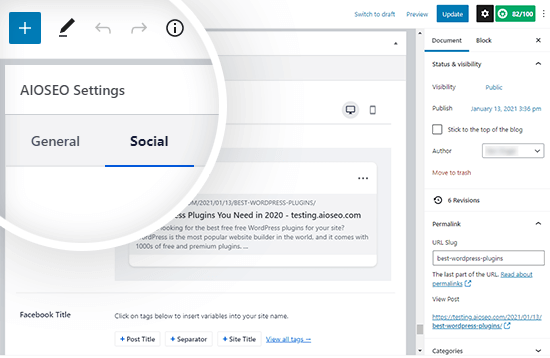
After you have installed the plugin, you can easily change the Facebook thumbnail when writing a post. Just scroll down to the AIOSEO Settings meta box below the post editor and then click on the ‘Social’ tab.
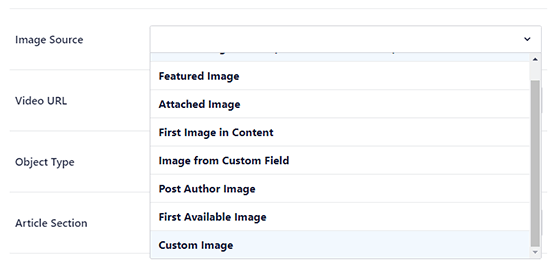
A little further down the page, you will see an ‘Image Source’ dropdown where you can select the thumbnail image for Facebook.
For example, you can use your featured image or upload a custom one instead.
AIOSEO also shows you a live preview of how your post will look when shared on Facebook, so you can confirm the thumbnail looks right before you publish.
Once you add your Facebook thumbnail image there, you need to update your post. This will fix the issue in most cases.
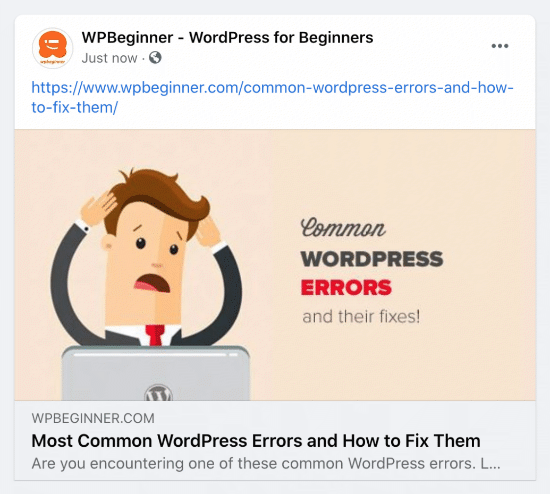
Here’s what our post looks like when shared on Facebook:
Pro Tip: If this doesn’t work, then make sure you have cleared your WordPress cache and refreshed the post in the Facebook debug tool, as mentioned below in this article.
Choosing Your Facebook Thumbnail With Yoast SEO Plugin
The Yoast SEO plugin also comes with the ability to add a custom Facebook thumbnail to each post or page.
Simply install and activate the Yoast SEO Plugin. For more details, see our step-by-step guide on how to install a WordPress plugin.
Once the plugin is active, you can set a custom Facebook thumbnail for any post or page you’re editing.
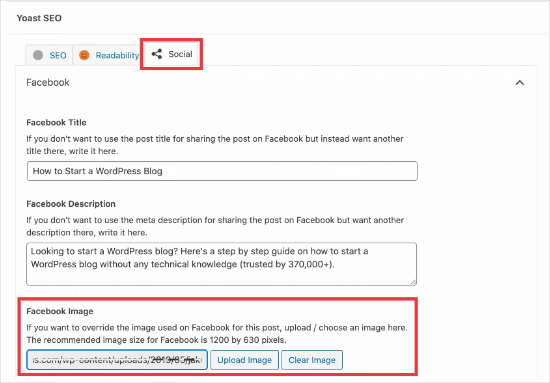
When writing a post, scroll down to the Yoast SEO meta box below the post editor and then click on the social tab. There, you will see a button to upload a thumbnail image for Facebook.
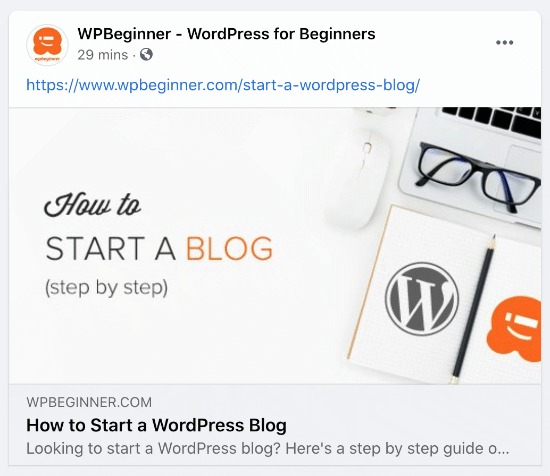
Here’s what the Facebook thumbnail looks like for our How to Start a Blog article:
Using the Facebook Sharing Debugger to Clear the Cache
If you’ve set the correct thumbnail in your SEO plugin but Facebook is still showing the old image, the problem is almost always caching. Just like your website has a cache, Facebook keeps its own cache of your content. You’ll need to clear both to fix the issue.
First, you need to make sure that you clear the page cache in WordPress.
After that, you need to reset the Facebook cache using their debug tool.
The Facebook Sharing Debugger is the easiest way to troubleshoot these issues. Simply copy the URL of your WordPress post and paste it into the tool.
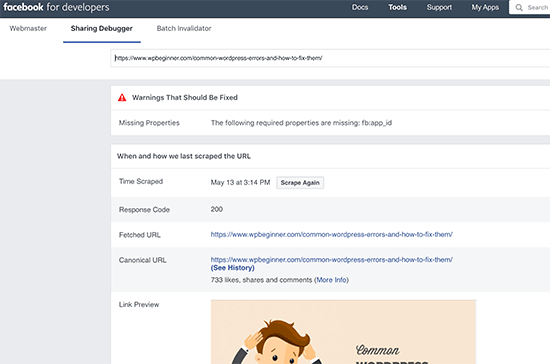
Next, click the ‘Scrape Again’ button. This tells Facebook to revisit your URL and look for the latest information, including your newly specified thumbnail image. Sometimes you may need to click it a second time for the update to appear.
Video Tutorial
Frequently Asked Questions (FAQs)
Here are answers to some of the most common questions our readers ask about fixing Facebook thumbnail issues in WordPress.
1. Why does Facebook sometimes pick the wrong thumbnail image?
This usually happens when your page has multiple images and Facebook’s crawler selects one that is larger than your intended featured image. It can also be caused by caching plugins or missing Open Graph (og:image) tags that tell Facebook which image to use.
2. What are the best dimensions for a Facebook thumbnail?
As of 2026, Facebook recommends using images that are at least 1200 x 630 pixels. Maintaining an aspect ratio of 1.91:1 helps ensure your image displays correctly without any awkward cropping.
3. I updated my image, but Facebook still shows the old one. How do I fix it?
This is a classic caching problem. First, clear the cache on your WordPress site. After that, use the Facebook Sharing Debugger tool to ‘Scrape Again’, which forces Facebook to fetch the new version of your page and its updated thumbnail.
4. Can I set a default Facebook image for my entire WordPress site?
Yes, you can set a site-wide fallback image that appears whenever a post or page doesn’t have a specific thumbnail assigned.
In AIOSEO, go to All in One SEO » Social Networks and upload your default image in the Facebook settings. This makes sure your site always shares a branded image, even on pages where you haven’t set a custom thumbnail.
Additional Resources on Using Social Media in WordPress
We hope this article helped you resolve the Facebook incorrect thumbnail issue in WordPress. You may also want to see some other guides related to using social media in WordPress:
- The Complete Social Media Cheat Sheet for WordPress (Updated)
- How to Add Your Social Media Feeds to WordPress (Step by Step)
- How to Schedule WordPress Posts for Social Media with Buffer
- How to Add Social Media Icons in Your WordPress Sidebar
- How to Add Social Media Icons to WordPress Menus (Easy Way)
- How to Display Social Media Followers Count in WordPress
- How to Display Author’s Twitter and Facebook on the Profile Page
- Best Social Media Plugins for WordPress
- Best Social Media Monitoring Tools For WordPress Users
If you liked this article, then please subscribe to our YouTube Channel for WordPress video tutorials. You can also find us on Twitter and Facebook.


Mrteesurez
Thanks for this helpful post! I’ve actually encountered the incorrect thumbnail issue on Facebook myself, and it was really frustrating, especially when I was trying to share my posts to my page. I haven’t found a perfect solution yet, but after reading this, I’m definitely going to try fixing it with AIOSEO. I’ve heard great things about its integration with social media, and it seems like a solid approach to ensure the right image is pulled every time. It’s reassuring to know there are tools out there that can help tackle these common issues.
kzain
I’ve faced the frustration of incorrect Facebook thumbnails for my blog posts, and your step-by-step guide is incredibly helpful. I’m curious, though, do these fixes also apply to other social media platforms, or is there a different approach for each one? Thanks for making these tech issues easier to tackle!
WPBeginner Comments
While this solution may help in some cases, in others a specific fix will be needed.
Dayo Olobayo
I use the AIOSEO plugin to easily set the thumbnail for my articles on both Facebook and Twitter and it has been working for me flawlessly. The plugin really lives up to its name (All in One).
Jiří Vaněk
I also encountered a similar problem once and the solution was to remove mixed content where part of the site was http and part was https. Then the previews on Facebook were also displayed incorrectly.
Sam
Brilliant advise, worked straight away, thank you!!!
WPBeginner Support
Glad our guide was helpful!
Admin
Blue
Hello I’m quite confused. I can’t find the Social Meta feature. I go to feature manager, and all it does is tell me I need the Pro version. Did they put all features behind a paywall?
WPBeginner Support
You would want to check in the individual posts at the bottom as that would be where you find this feature.
Admin
Becka
I did all these things. Still doesn’t work. I can set the preferred image on all pages except my homepage. It always shows up as my site icon. Maybe I should dump AIOSEO and use a different one?
WPBeginner Support
For specifically your homepage you can find where to edit that under All in One SEO > Search Appearance. We would still recommend All in One SEO
Admin
Chanin
Hi, I’m using Yeost SEO. I’ve been doing all the steps from adding the picture specific in the Yeost Facebook setting to Facebook debugging. The thumbnail still shows the logo of my website instead of the image and descriptions.
WPBeginner Support
The most common issue you would want to check would be that your site’s cache has cleared.
Admin
Jill Hasty
My problem is not being able to set it…my problem is that I want it to default to using the feature image in my social media posts. It used to do that but now something has changed and it doesn’t do it anymore.
We’re often posting from sea via email so manually setting the image is not an option.
WPBeginner Support
If it is not using the featured image by default then you would likely want to check with the support for your SEO plugin to see if there is an issue with the plugin itself. You should also have the option to select the featured image as an image already uploaded to your site’s media library without needing to upload it again.
Admin
Meghan Short
Hi, so I’m having a problem when sharing just my URL on Facebook. I was hoping it would show my header or logo image but it’s sharing my last blog upload image. Is there a way to fix that??
WPBeginner Support
In the general SEO settings for the plugin you are using, you should be able to set the image for your main site.
Admin
Pam Molnar
Thank you so much for this article! I was so annoyed that I couldn’t get it to work right but your directions were simple and worked perfectly! Now on to check out more of your posts.
WPBeginner Support
Glad our guide was helpful
Admin
Josephine Koumettou
Thank you so much for the detailed article! I tried the debugger and the All-In-One SEO suggestion but neither works
The weird thing is that when I share my blog post on my personal Facebook profile the thumbnail shows just fine, but when I share on my Facebook page (i.e. my business FB page), I keep getting my site’s logo instead of the post photo… Any ideas? Thank you so much
WPBeginner Support
Sadly, you may need to run the debug tool on the link to force Facebook to clear their cache of that specific post.
Admin
Olidur Rahman
Recently im facing this message when i start to write a blog post “The editor has encountered an unexpected error”
Please suggest me any solution about this topic…
WPBeginner Support
You would want to start by going through the recommendations in our article below:
https://www.wpbeginner.com/beginners-guide/beginners-guide-to-troubleshooting-wordpress-errors-step-by-step/
Admin
Khizerulla Khan
Hi, I am a beginner and I want to know how would I add a option for customer’s like login with Google, login with Facebook and all these extra logging in options other then signing up and doing lengthy process. Please help me
WPBeginner Support
For what it sounds like you’re wanting, you would want to take a look at our article below:
https://www.wpbeginner.com/plugins/how-to-add-login-with-facebook-in-wordpress/
Admin
Ellen Baker Dubois
Hey thanks guys! The FB debugging tool worked!
WPBeginner Support
Glad our recommendation could help
Admin
Kayla
I have Wordpress but on Facebook my url thumbnail is my old picture and description. Where on Wordpress can you change this? Facebook it’s old however if I send my url over message it’s my new logo but no description I have tried Yost it didn’t work for me what can I do?? I have also debuted Facebook
WPBeginner Support
Have you used the debug tool? It sounds like Facebook make have cached the wrong image and needs to clear the cache.
Admin
Abdurraheem
Please my link has not been displaying Thumbnail on WhatsApp but working fine on Facebook. I actually changed my theme recently and would like to know if there is anything I can do to ensure the thumbnail starts displaying on WhatsApp.
WPBeginner Support
If you have Yoast’s plugin active then you would want to reach out to the plugin’s support and let them know the image is not displaying.
Admin
Cathy
I bet I have a new one for you. I have a relatively new site (5 posts) and any post I try to share to Facebook brings up a preview for a CNN article. I have no idea why. If you click on it, it does take you to my post but the preview will always show the same CNN post.
I have tried the debugger with no luck. I disabled all my plugins and then tried it again thinking maybe a plugin was making my site wonky but no luck.
Any ideas?
WPBeginner Support
Have you tried manually setting an image using an SEO plugin like Yoast and then running the debugger?
Admin
Cathy
Yes, but it still redirects to the CNN post.
WPBeginner Support
If it is redirecting to CNN and you didn’t write about it you may want to check with your host that there aren’t any redirects set up in your htaccess and you may want to try the theme checker plugin in step 4 of our article here: https://www.wpbeginner.com/beginners-guide/beginners-step-step-guide-fixing-hacked-wordpress-site/
MA
I’m wondering if I should upload the actual size of the Facebook image 1200 x 630 px to my blog or scale it down on my laptop to the right size for my blog content container and then upload it to my blog? What’s best?
Thanks!
WPBeginner Support
We would normally recommend adding the best image for your theme to your site
Admin
MA
So for Facebook scale the images down to a 1.91 to 1 ratio (to match my blog container width) and when someone shares it on my blog post it should still come out Ok on Facebook even though it’s not 1200 x 628? Facebook should just zoom it up right?
WPBeginner Support
Facebook should try to adjust and if not, most SEO plugins have an option to upload an image specifically for Facebook or other sharing platforms for those to use.
Hope
mar 1st, 2019
– Facebook post:
in ‘insights’ choose Posts, select the post to edit, Upper right hand 3 dots click, choose ‘refresh share attachment’. this restored the wp image that was just a grey block. great.
WPBeginner Support
Thanks for sharing what solved the issue for you
Admin
Paige Knight
Is there any updated advise on this? I use SEO Yoast Premium and have set the correct photo for the Facebook link preview but Facebook is still choosing the incorrect photo that is completely irrelevant to the post.
Carlos Alzate
Thanks soooo much!!! Dude, you are great! Greetings from Colombia
Rosio
So sadly my blog was set up under All in One Seo not Yoast. When I tell All in One which image to display as a thumbnail in the social meta section, Facebook shows the default image instead. Any help with the All In One Seo Plugin is greatly appreciated.
Ellen Dubois
This solved my problem!! I used Fb debugger and copied the URL for the photo it said it could not find. Then went to my dashboard and double clicked the photo and inserted the alternate title copied from the debugger! Et voila! Thanks guys!
Claude Gelinas
There seems to be an incompatibility between WordPress’ Photon image caching engine and Facebook.
If the go:image meta tag points to your server and the images are served through Photo, that’s where Facebook is incapable of retrieving the images.
Google Plus never has that sort of problem.
In my view, the problem comes from Facebook.
Vera Schäfer
Thank you so much! I was having a hard time trying to force Facebook Debugger to show my image, as I always do but today it simply wasn’t happening. I use Yoast for years but never occurred to me to follow setting instructions like you helped me today.
Gideon
thanks to you people this issues has been giving me a sleepless night after reading this post and i follow the procedure everything was like a dream…. thanks
Tliffany Clarkson
Is there a way to fix this problem without having to manually use the facebook debugger for every single post? I have hundreds of posts and all are showing the wrong pic. Help would be greatly appreciated!
WPBeginner Support
Hi Tiffany,
The best way to do this is still using the Yoast SEO plugin’s social tab to manually set Facebook thumbnail when you are writing the article.
Admin
Kyle Andrew
This worked perfectly for me and I didn’t even know that Yoast, which I have installed on my site could do this. After using the facebook debug tool to ‘force a refresh’ everything is good to go! Thank you very much.
Zadock
I have tried all the methods for but all is in vain. My problem with Facebook thumbnail started 24 hours ago and right now am confused
Mrs Ismail
Dear author, i followed all the steps but none of these worked for me. In my case when I click on what facebook crawler see on your page. The new window open with nothing in it. I’m using a Wordpress SEO plugin and I also set featured image in Yoast SEO. but not worked. Please help. It’s very important for me.
Arrunadayy
I am facing an issue that any image which I share any link be it Facebook, Twitter, LinkedIn it does not pick any image at all. I am not able to understand why it happens and what could be the solution. If you have any solution, please help me out.
Roy Ghosh
How to solve this incorrect thumbnail issue for WhatsApp sharing
Amit Bajaj
Hi
I have recently started facing a weird problem while posting on my Facebook Page. Earlier, when posting a link from my website, I was able to change the image that Facebook automatically pulled from that respective website link.
The earlier process was like this:
1. Put link on a new facebook post
2. FB automatically pulls the featured image from my wordpress post
3. I uploaded a new image
4. Removed the featured image
5. Published the post with an image of my choice.
Now, everything is going fine except step no.4. I am no longer able to remove the automatically pulled featured image. So instead of a single, large image I am getting stuck with a two image carousel.
I have 2 FB pages and this problem is only happening on one of the pages.
Can anyone guide me as to how this problem can be overcome??
Thank you in advance..
Daniel
I have the same issue! I can neither upload new images nor remove featured images – does anyone have a solution?
Kind regards
Dana
I am having the same problem. There are 2 default pictures, I upload another one which I want to appear, but in a few seconds my uploaded picture disappears. Does anyone have a solution? Facebook debugger did not solve anything.
Khalid
I am facing same problem too since 5 or 6 days on my all pages. Now we can’t change the post title and description too. I search a lot on internet about it, but i can’t find anything about it even it’s not mentioned in facebook help section. I think facebook have applied some changes. If you find any solution please let me know.
Mobius Prolix
I’ve not heard of a ACTUAL fix yet. Just a bunch of crap telling you to fix Facebooks problems. Works for some and doesn’t for the rest. For now, we are in the incompetent hands of Facebook Staff.
Kristin
Same problem happening for us!
Yolanda
I’m hoping someone might be able to help me. I am having real trouble sharing to Facebook (but only in my last 2 posts). When I share it does not show a title or an image.
I went to Facbook Debugger and this is the result:
This is my article:
i tried the fixes above in Yoast – but it doesn’t help. Any ideas what I can do based on the feedback form Facebook? THANK YOU.
Matthew
If you are having weird issues like this, a lot of times it could be that multiple plugins OR the theme you are using are conflicting with each other in trying to establish og: (open graph) tags.
I had a very similar issue and it was my theme. I had to disable it’s OG stuff and then yoast worked perfectly.
taylor
I’m also having this issue, and use Yoast and WP. However, I think it is actually a Facebook issue; Facebook allows me to upload another photo to use, and I can use the second photo if I want to set up a post with carousel images, but I can’t deselect the auto-pulled photo and use only the uploaded photo. I have found that by manually adding in on yoast the specific photo I want used on facebook to the article itself, this works — but only this method works for me now. What a pain!
Nathan
Yoast worked for me as well.
Awesome article!
Edward
You idea worked perfectly for me. Thanks
Abdur-razzaq
Thumbnails are not coming up when i want to share post on Facebook. It shows an empty box with no image. Kindly help out please, am confused and frustrated already. You can check it out at Thank You
Chrissy
So I just downloaded the Yoast plugin for a client and it looks like they have removed the open graph feature from their free plugin – which is a shame! You can add pictures on specific pages and posts, but you used to be able to add a specific image for the home page.
WPBeginner Support
Hi Chrissy,
You can still do that. Please see our how to install and setup Yoast SEO plugin article. Check out Step 3, which shows how to enable advanced settings pages. After that, follow step 8 to add a specific image for the homepage.
Admin
Tony
FANTASTIC! This is what I was also looking for. The ONE tab that isn’t activated. Really appreciate the articles and Step 3 and 8 suggestion!
Amanda
This a great article, helped me a lot with this issue regarding the thumbnails within facebook, moreover the plugin SEO Wordpress by Yoast include very usefull tools to improve the content in the blog.
Thank you so much!
Nicole
Oh thank you SO MUCH for this. I recently deactivated the “Publicize” setting in my Jetpack plugin because it was causing issues on the landing page for my newly-launched eBook (plus Publicize hadn’t been working properly for weeks, so I didn’t think I needed it). But then when I went to share my latest post today on Facebook I came up against this issue. I can only assume it’s because no more Publicize. But your Yoast tip worked perfectly for me. Thank you!
Sharon Stiles
Facebook doesn’t like small images. I think the minimum it will show automatically is 200 x 200 pixels but it prefers larger ones. This is a problem I regularly have because I usually use smaller pictures to keep load times down.
Katie
This is a great article. Thank you so much. Tried various debugging methods to fix my image problems. Yoast SEO has been the only method that has worked.
UgoChukwu
My issue is not really with facebook, or my site, but I myself. As I was developing my site and creating some test posts, I used one particular image as thumbnail, some are without feature image, in that case, it will take the one I used as default image in All In One SEO plugin. Now am done with production, Make some necessary changes on the image, but the firts one has already been registered on facebook cache that further sharing of those posts will call up the old image.
I have been able to debug some posts and pages on facebook using debug tool, but the posts and pages are too much for me to be debuging them one by one.
Is there a way I can debug the whole site at once?
Jessica Lauren Vine
You’re amazing. Thanks so much for the help! Got it sorted.
Aziz
When I share my website like wpbeginner.com on my facebook wall, not showing any thumbnail and description. any tutorial for fix this issues? Thanks
Jose
Great stuff! Thank you for that
Avishai
Hello everyone,
I have a problem sharing my posts on facebook from my wordpress site.
When I share it to facebook I get some wierd Japaneese picture.
I’ve checked solutions online but none of them worked for me. here is a list of what i’ve done:
deactivated all the plugins to see that there is no conflict
downloaded the following plugins (downloaded and activated one at a time of course):
Facebook Thumb Fixer
ultimate-social-media-plus
mashsharer
open-graph-protocol-framework
wp-facebook-open-graph-protocol
facebook Plugin
simple-facebook-og-image
Facebook Open Graph, Google+ and Twitter Card Tags
All in one SEO
Yoast Seo (Enabled the facebook button)
*removed cache from the browser
*tried the facebook developer including fetching again.
* tried to paste the link directly to facebook
* tried to put feature image (there are pictures also in the media library)
* tried to share a brand new post, same results
*Uploaded the picture with their desired dimentions of 1200*630
Again and again im getting the message that og:image og:title and are missing
Please help if you can, i dont know what to do anymore.
WPBeginner Support
Hi Avishai,
Try deactivating and deleting all plugins. Delete all themes and then download a fresh copy of Twenty Sixteen or Twenty Seventeen default theme. Upload the default theme to your site. Use Facebook developer tools to see if you are still getting the Japanese title and image.
Thoroughly check your WordPress folders and files to see if there is any suspicious file.
Admin
Patricia Johnson
I truly appreciate this information. I couldn’t figure out what was going on..
Jacqi
I’m having a problem I cant resolve. When I share my post to social media, the text all shows up with no problem but my thumbnail picture never shows up. I dont even get a wrong picture or a gray box where a picture should be. I only get the text. Ive tried adding open graph plugins, Ive tried debugging on facebook which grabs everything except the picture, Ive tried loading a picture into the SEO plugin to fall back on, Ive spent hours google searching for solutions. Everything on my sight appears to work fine except this one thing and nothing Ive tried works. Help!
Jacob
For the last three days I am having trouble with sharing my new posts on FB. The thumb image refuses to show up and I cannot figure out why – mostly because I am a newbie!. However, I am able to share older posts correctly eg and not the a new post
Spent most of the last three days reading through all the existing information on this subject but I am yet to find a fix.
Would appreciate any good suggestions to solve this. Thanks.
Jacob
For the last few days I have been unable to share my new posts on FB with the thumbnail image. However, I am able to share some of my older posts correctly. I have tried just about everything but there is no remedy. Any tips on what could be wrong? I am using the Yoast Plugin.
Thanks.