


Would you like to display a different header, footer, or sidebar for each category on your WordPress website?
You usually see the same header, footer, and sidebar displayed throughout your site. However, you might sometimes want to show different information, colors, or widgets for certain categories.
In this article, we will show you how to easily add a custom header, footer, or sidebar for each WordPress category.
Why Add Custom Header, Footer, or Sidebar for Each Category?
When you set up your WordPress website, you most likely customize the header, footer, and sidebar so your visitors can learn about you and your website and find the content they are interested in quickly and easily.
For most themes, your header, sidebar, and footer templates look the same on all of your posts, pages, categories, and archive pages. Their location and appearance depend on the theme.
But there may be times that you wish to display different a different header, footer, or sidebar on your site. For example, you may wish to display a different sidebar for each custom post and page in WordPress.
Or you may wish to change the look of your website for certain categories by showing a custom header, footer, or sidebar. For example, you could display recent posts from that specific category in a custom sidebar.
With that being said, let’s take a look at how to easily add a custom header, footer, or sidebar for each category in your WordPress blog. We will cover three methods:
- Method 1: Adding Custom Sidebars for Each Category Using a Plugin
- Method 2: Adding Custom Header or Footer for Each Category Using a Theme Builder
- Method 3: Adding Custom Header, Footer, or Sidebar for Each Category Using Code
Method 1: Adding Custom Sidebars for Each Category Using a Plugin
This method is best if you are already happy with your web design and only want to change the website’s sidebars and nothing else. It is also easy for beginners to do.
The first thing you need to do is install and activate the Easy Custom Sidebars plugin. For more details, see our step-by-step guide on how to install a WordPress plugin.
Note: You may notice that this plugin hasn’t been tested with the latest WordPress versions. That said, we have used this plugin ourselves, and it worked fine on our end.
To learn more about using outdated plugins, you can read our guide on whether you should install plugins not tested with your WordPress version. If you find a better, more updated alternative, let us know in the comments below.
Upon activation, you need to visit the Appearance » Sidebar Replacements page to create a custom sidebar.
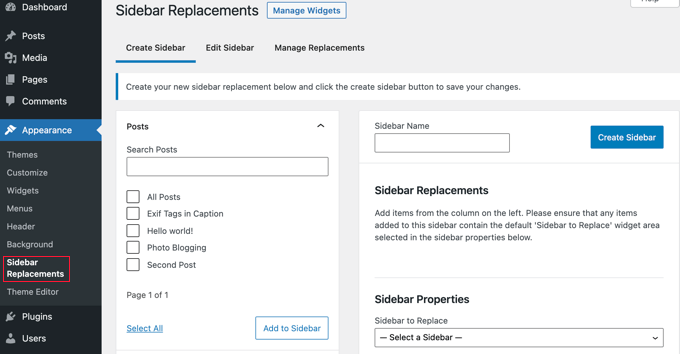
First, you need to enter a name for the new sidebar. For this tutorial, we will call it ‘Blogging’ because we want to display it for the Blogging category.
After that, you should select which sidebar will be replaced by your custom sidebar.
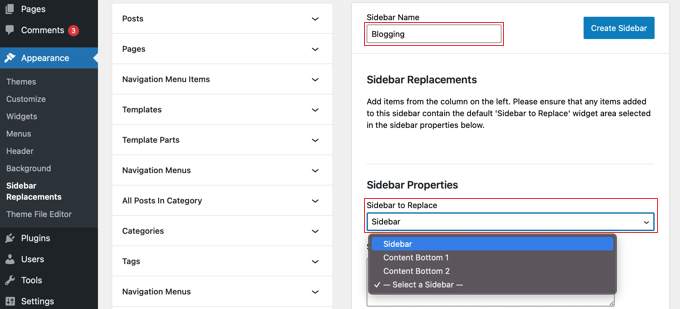
Next, you’ll need to select when the custom sidebar will be displayed. You will see your different pages, posts, categories, and tags listed in the left column of the screen.
You need to click the arrow next to Categories and then check the box for the Blogging category. After that, you need to click the ‘Add to Sidebar’ button.
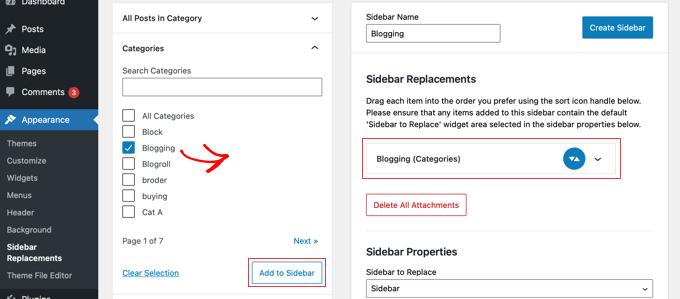
You’ll notice the Blogging category now appears in the Sidebar Replacements section, and the sidebar will now be shown with that category. If you like, you can add multiple categories, and the sidebar will be added to all of them.
You should now click the ‘Create Sidebar’ button to create your first custom sidebar.
Your next job will be to add WordPress widgets to the sidebar widget area. You can learn how by following our guide to learn how to add WordPress sidebar widgets.
Easy Custom Sidebar allows you to create as many custom sidebars as you like and assign each sidebar to different category pages on your WordPress site.
Method 2: Adding Custom Header or Footer for Each Category Using a Theme Builder
This method is best if you want to have total control over your sidebars, headers, and footers on every page to give your website a unique design.
To do that, we recommend using SeedProd.
SeedProd is the best WordPress theme and page builder plugin that allows you to easily create a custom WordPress theme without writing any code. This includes creating headers, footers, and everything else needed for an attractive WordPress theme.
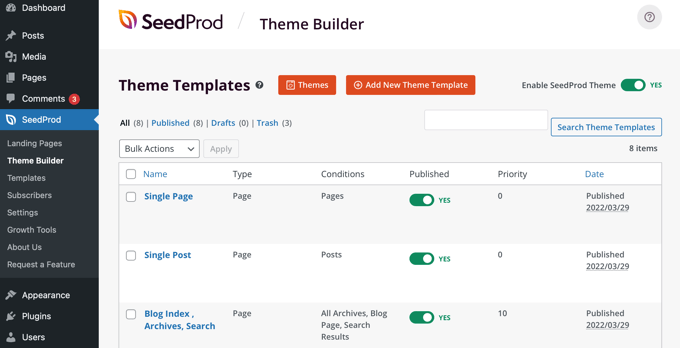
You can learn how to quickly create a WordPress theme by following our guide on how to easily create a custom WordPress theme without any code.
Once you’ve done this, SeedProd makes it simple to create custom headers and footers and set up rules so that they are only displayed under certain circumstances, such as when you are viewing a specific category.
To start with, we will create a custom footer. You can create a new footer by clicking the orange ‘Add New Theme Template’ button at the top of the page. This will bring up a screen where you can create a new theme template, such as a footer.
You should start by giving the template a name. For this tutorial, we will call it ‘Footer – Blogging’. After that, you need to select ‘Footer’ from the Type dropdown menu and then select a priority. This determines which footer is displayed if multiple footers match the current page.
The footer with the largest priority will be displayed. Since the default footer has a priority of 0, we’ll give this footer a priority of 1 to make sure it is displayed on matching pages.
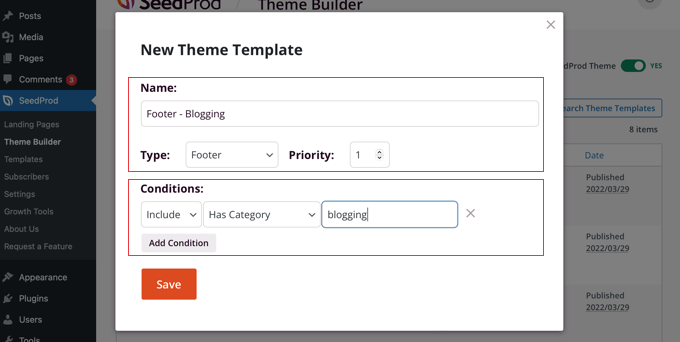
After that, you’ll need to set up the conditions when the footer will be visible. In our case, we want it to be displayed with the Blogging category.
To do that, you should make sure the first Conditions setting is ‘Include’, then select ‘Has Category’ from the dropdown in the middle. Finally, you need to type ‘blogging’ into the last field and then click the ‘Save’ button to store your settings.
There’s another way to create a custom footer. Instead of creating one from scratch, you can simply duplicate the original footer by clicking its ‘Duplicate’ link. We’ll do that for this tutorial.

This will create an exact copy of the current footer that you can customize. Next, you’ll need to click the ‘Edit Conditions’ link under the new item and then choose a name and conditions as when creating a new template above.
Now, it’s time to customize the new footer. Simply click on its name, and it will be opened in SeedProd’s drag-and-drop editor.
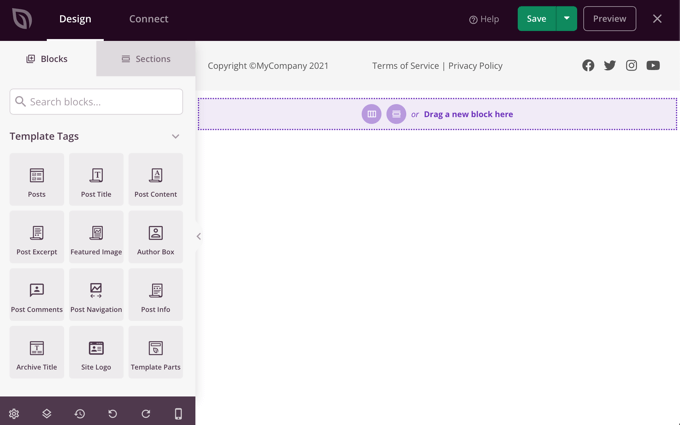
SeedProd makes it easy to add new blocks to your footer. You can also click on an existing block to edit its color, text, and other options.
For this tutorial, we will simply change the background color to green.
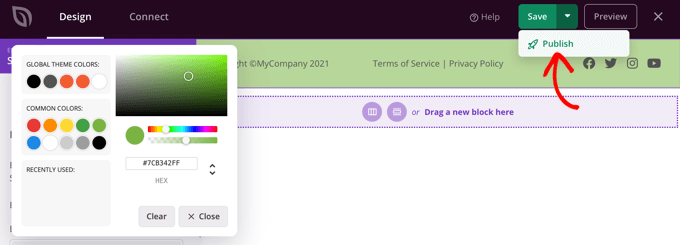
Once you are happy with your custom footer, make sure you click the down arrow next to ‘Save’ and then click ‘Publish’. This will store your changes and push the footer live.
Congratulations! Your new footer will be displayed when viewing the Blogging category archive page and also when viewing posts in the Blogging category.
Here’s how it looks when viewing a post in the Blogging category.
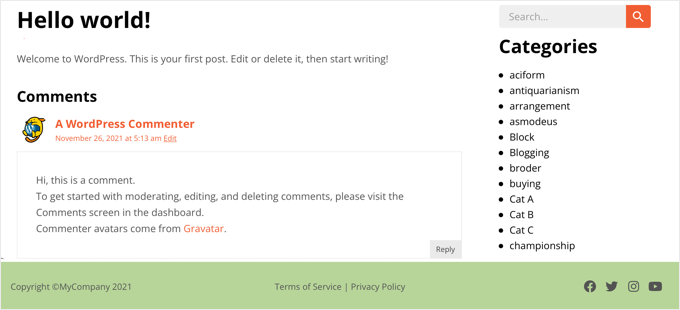
Now that you’ve created a custom footer, you can repeat the steps to create a custom header that is only displayed for specific categories.
Method 3: Adding Custom Header, Footer, or Sidebar for Each Category Using Code
If you are familiar with code, then you can use this method to display a custom header, footer, or sidebar on certain category archive pages and posts that belong to a particular category. This method just deals with PHP, so you won’t need to use HTML or CSS.
To do this, you’ll need to add code snippets to your theme files. If you haven’t done this before, then see our guide on how to copy and paste code in WordPress.
You may also like to see our post on how to add custom code to headers and footers.
Note: If you’re new to adding code, then we strongly recommend backing up your website and/or using a staging environment to prevent any errors from affecting your live site.
Adding Custom Header for Each Category Using Code
To add a custom header to posts in a certain category, such as ‘Blogging’, you will need to open your theme’s single.php file and replace the normal header code with this one:
<?php if (in_category('Blogging')) {
get_header('blogging');
} else {
get_header();
} ?>
This code tells WordPress that if someone views a post in the ‘Blogging’ category, then it needs to display a file called header-blogging.php if it exists. If it does not exist, or the post is not in the ‘Blogging’ category, then WordPress will display the default header file.
Make sure you change ‘Blogging’ on Line 1 to the name of your category and ‘blogging’ on Line 2 to the name of your custom header.
If you wish to display the custom footer on multiple categories, or if you have multiple custom headers, then you can use something like this:
<?php if (in_category(array('Blogging', 'Photography'))) {
get_header('blogging');
} elseif (in_category('News'))) {
get_header('news');
} else {
get_header();
} ?>
This will display the header-blogging.php custom header on posts in either the ‘Blogging’ or ‘Photography’ categories. It will also display the header-news.php header for all posts in the ‘News’ category. For all other posts, it will display the default header.php header.
So far, we are only displaying a custom header when viewing posts in certain categories. You may also wish to display the custom header when looking at the category archive page.
To do that, you will need to modify your theme’s category.php file. If your theme doesn’t have that file, then you can create your own category template or edit your theme’s archive.php or index.php file instead.
You will need to open the file and replace your normal header code with this one. Notice that the first line is slightly different from the code we used above:
<?php if (is_category('Blogging')) {
get_header('blogging');
} else {
get_header();
} ?>
Note: The ‘in_category()’ function checks to see if a post is in a certain category. The ‘is_category()’ function checks to see if you are looking at a certain category archive.
Adding Custom Footer for Each Category Using Code
Displaying a custom footer for certain categories is similar. To get a separate footer for each category, you need to edit your theme’s single.php page template and replace the footer code with the following:
<?php if (in_category('Blogging')) {
get_footer('blogging');
} else {
get_footer();
} ?>
Make sure you change the code to use the name of your category and custom footer.
You should also modify your theme’s category.php file, replacing the footer code with this snippet. Again, make sure you include the names of the category and the custom footer you wish to use:
<?php if (is_category('Blogging')) {
get_footer('blogging');
} else {
get_footer();
} ?>
You should refer to ‘Adding Custom Header for Each Category Using Code’ above if you need more details.
Adding Custom Sidebar for Each Category Using Code
You can also use the same method to display a custom sidebar for certain categories. You need to edit your theme’s single.php template and then replace the sidebar code with this:
<?php if (in_category('Blogging')) {
get_sidebar('blogging');
} else {
get_sidebar();
} ?>
You will need to edit the code snippet with the names of the category and custom sidebar you wish to use.
You’ll also need to modify your theme’s category.php template, replacing its sidebar code with the following:
<?php if (is_category('Blogging')) {
get_sidebar('blogging');
} else {
get_sidebar();
} ?>
If you need more details, then take a look at ‘Adding Custom Header for Each Category Using Code’ above.
Expert Guides to Customize Your WordPress Header, Footer, and Sidebar
Do you want to optimize your header, footer, and sidebars and make them more useful for your readers? If so, then check out these handy tutorials:
- How to Add Social Media Icons in Your WordPress Sidebar
- How to Create a Sticky Floating Sidebar Widget in WordPress
- How to Add a Button in Your WordPress Header Menu
- Checklist: Things to Add to the Footer on Your WordPress Site
- Best WordPress Footer Design Examples (+ Best Practices)
We hope this tutorial helped you learn how to easily add a custom header, footer, or sidebar for each category in WordPress. You may also want to learn how to make money online blogging with WordPress or check out our list of common WordPress errors and how to fix them.
If you liked this article, then please subscribe to our YouTube Channel for WordPress video tutorials. You can also find us on Twitter and Facebook.





Syed Balkhi says
Hey WPBeginner readers,
Did you know you can win exciting prizes by commenting on WPBeginner?
Every month, our top blog commenters will win HUGE rewards, including premium WordPress plugin licenses and cash prizes.
You can get more details about the contest from here.
Start sharing your thoughts below to stand a chance to win!
Dave B says
I’ve tried to implement a different footer on the static home page with the following code, but it doesn’t work….
Can you help please?
}
Johann says
Hi all,
This is a great trick, but one of my client asked if we can can adapt this to WooCommerce?
I tried but unsuccessful…
Can you tell me how would you implement this to WooCommerce archive-product.php template?
Gabrielle says
Hi, what can i do if i want to have custom headers, sidebars and footers to be saved in subfolders, like:
sidebar-cars in folder sidebars/sidebar-cars.php
John says
But how do I do this for each category?
Ivan Jaquez says
Hello and thanks for this great article. What about each category linking to an external url and not just the homepage? For example: Dog training category’s header linked to an external site. Thanks in advanced
Carol Dunlop says
You must have been reading my mind! I just spoke with a client who wants a different footer on one certain page and this looks like it is going to work perfectly. Thanks for the awesome info.
Stuart Mackey says
Thanks! I use categories for my business Site to denote the major “service categories” of video production I offer to my clients. This should allow me to have an intro describing the type of video and its function; marketing, testimonial, etc.
hamed.oveysi says
I want a custom header for several category pages. Your code works with one category. How to do it?
David says
what if i just want a different sidebar than the home page, in other words all categories would have the same sidebar but the home page would have a different sidebar, also how would I be able to edit the different sidebars in the widgets panel?
thanks for this post btw easiest one I found so far.
Editorial Staff says
If you just want a different sidebar on the homepage, use the conditional tag if is_home or is_frontpage (depending on how you are creating a custom homepage), and then include a different sidebar file.
Admin
Mike says
On a related note – you can create a custom sidebar for each individual page or post using the Graceful Sidebar Plugin. To use this you simply edit your post as normal and specify the sidebar widget title and content in the custom edit fields provided by this plugin.
DaveK says
WPBeginner does it again! I was looking for ages for a solution to add a different sidebar to different categories, and this worked a treat. Thanks
Ljuboja says
Does this trick do the same with pages?
Tnx !
Editorial Staff says
For pages, you just use the custom page templates.
Admin
dains says
Actually, a custom page template is a great place to implement this solution. A built-in WP function to tell it to use a custom header, sidebar or footer? Sign me up.
Since you’re using conditional tags for this solution (is_category), you should be able to use the ones for pages (http://codex.wordpress.org/Conditional_Tags#A_PAGE_Page) in a custom page template. I am planning a custom front page assigned via the admin section, so I’ll be trying it out with is_front_page instead of is_category.
Great
sven says
hi, thanks for a a great tutorial, this is just what i was looking for. i now have a custom sidebar for one of my categories, and as I kept the dynamic sidebar code I thought I would be able to add widgets to it. It however does not show up in the widget editor. how do i get it so I can add widgets to my category specific sidebar?
Editorial Staff says
Follow this tutorial.
Admin
shravan says
Thank you so much for this post. This really bailed me out of big trouble. I looked for plugins to do this job for me but couldn’t find any. I was so glad to find the solution on this post.
Now I can create different headers for different categories.
Thanks again and keep up the good work.
Delighted Programer says
ohhh this is what i have been looking for!!! Have been trying to figure out how to display a section with advertisements related to categories in wordpress and here it is!!!
thank you HEAPS!
Wellwisher007 says
improve the spelling of programer to programmer
wrerm says
I recently purchased a WP Book and designed a wesbsite using WP and this is very useful. Thanks!
Jason Pelker says
Is there a way to change the sidebar/header on a single post, depending on the post’s category?
Editorial Staff says
Yes it is possible. You will have to use this tutorial about creating custom single post templates in WordPress.
Admin