


Bluehost is one of the biggest web hosting companies in the world and an official WordPress-recommended hosting provider. Bluehost offers a wide variety of hosting plans for beginners and medium to large businesses with 24/7 customer support. See the complete Bluehost review by our experts to find out if Bluehost is the right choice for you.
In this comprehensive Bluehost review, we’ll test their claims with a rigorous, thorough analysis using industry-standard benchmarking tools.
The following are the areas we’ll look into:
- Speed 🚀: How fast will your website load with Bluehost? We will test their speed and server response time to assess that.
- Performance 📈: How does Bluehost perform under traffic spikes? We’ll test that by performing the stress test and see how well it performs with high traffic.
- Reliability 🎯: Will your website be available 24/7/365 without any downtime?
- Customer Support ☎️: Can you count on Bluehost’s customer support when you immediately need help with your website?
- Features 🛠️: Do they offer all the features you’ll need to build your website?
- Pricing 💳: Do they have the best pricing in the industry? Are there any Bluehost deals that can save you money?
This is our complete Bluehost review, and we’ll analyze the pros and cons of using Bluehost in depth.
If you don’t want to read the full review, here is the quick scorecard of Bluehost with our verdict right below it:
| Bluehost Review Summary | |
|---|---|
| Performance grade | A+ |
| Average load time | 770 ms |
| Average response time | 140 ms |
| Free domain | Yes |
| Free SSL | Yes |
| 1-click WordPress | Yes |
| Support | Phone / Live Chat / Knowledge base |
| Start with Bluehost | |
Bottom line: In our Bluehost review, we found them to be reliable, fast, affordable, and with friendly 24/7 hosting support.
That’s why we’ve chosen to recommend Bluehost as one of the best WordPress hosting companies.
Now, let’s dive into our detailed review so that you can make your own decision.
About Bluehost
First, let’s take a look at the company itself.
Bluehost started in 1996 and steadily grew to become one of the largest web hosting companies in the world. It now powers more than 2 million websites worldwide.

Bluehost has a long-standing relationship with the WordPress community. They have been an official WordPress.org recommended web host since 2006.
They pride themselves on their 24/7 support, great hosting infrastructure, and support for free and open-source software like WordPress.
Pros and Cons of Bluehost
All the best web hosting services have their pros and cons. Some you can live with, and some you cannot ignore.
After testing Bluehost, we learned the following pros and cons that users should consider.
Pros of Bluehost ✅
First, let’s take a look at the advantages that make Bluehost the top choice:
- Pricing: Their hosting plans are well within the budget of most users, particularly those just starting.
- Reliability: They power a large number of websites with minimum downtime.
- No hidden charges: There are no hidden fees when signing up for your account.
- Free domain: You get a free domain name for the first year when you sign up.
- Free CDN + SSL: For each website, you get a free SSL certificate and free Cloudflare CDN to block malware and improve security.
- Money Back Guarantee: They offer a 30-day money-back guarantee on all plans.
Cons of Bluehost ❌
As we mentioned earlier, every hosting company has downsides. The following are some disadvantages of choosing Bluehost as your host:
- Higher domain renewal price: Their free domain renewal price is higher than average.
- Upselling Addons: They have an aggressive upsell process during signup. But you can easily uncheck SiteLock and all other add-ons if you don’t need them.
Bluehost Performance Tests
The most important performance metric to look for is speed. It affects user experience on your site and your WordPress SEO rankings.
Studies show that a 1-second drop in website speed can decrease conversion rate by 7%, and a 3-second delay can cost you 50% of your traffic.
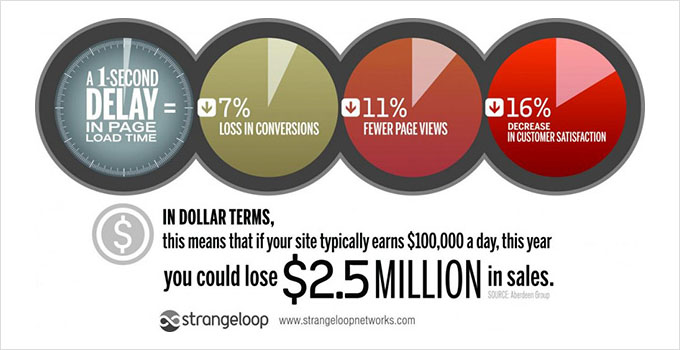
Let’s see how fast your website will load on Bluehost.
Bluehost Speed Test Results
For a faster website, you will need to choose a fast website hosting company. Keeping this in mind, we created a test site to see how fast Bluehost really is.
Our test site was created using WordPress with a default WordPress theme. We imported dummy content for theme development, which also includes images. Then, we used GTMetrix to test the website speed.
Here are our test results:

As you can see, our test site loads in less than a second (770ms to be precise). This result is remarkable because our website wasn’t using any caching plugins or speed optimization tips.
Bluehost Stress Test Result
The speed test alone isn’t enough because this test site didn’t have a large amount of traffic.
To test how Bluehost servers would respond to increased traffic, we sent virtual users (VU) to our test site using K6 by Grafana Labs.
We used it to gradually increase the number of visitors to 50 to see how the server would handle increased requests from multiple connections at once.
Here is a screenshot of our results:
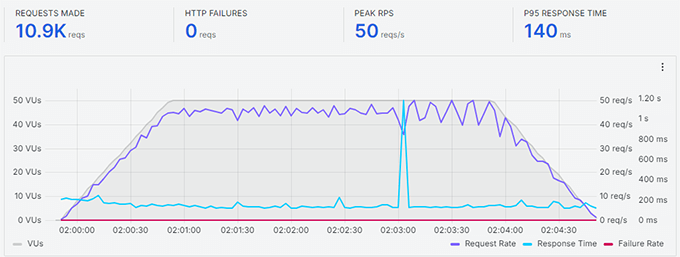
The gray line is the number of active virtual users on the site, and the green line is the server response time.
As you can see, the server load remained stable throughout the test, even at peak traffic.
This test indicates that if you are looking for a really fast website, Bluehost may be a perfect fit.
It is also important to note that we didn’t record any failures or downtime during our testing.
Bluehost Uptime
Many hosting companies promise a 99.99% uptime guarantee. We set up an uptime monitoring alert for our test account.
See the screenshot below for a detailed look at Bluehost server uptime:

Bluehost Server Response Time
When you test a live website using tools like GTMetrix or Pingdom, you see how everything on your website loads. This includes images, too, which take much longer to load than plain text.
To get a more accurate server response time, we used another tool called Bitcatcha. It allows you to test server response time without loading any data.
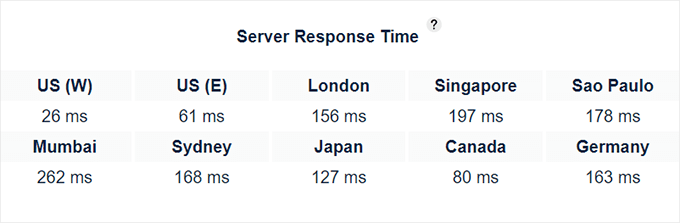
As you can see, the Bluehost server in the US performed under a fraction of a second. The response was a bit higher in other locations, but still under a second.
If your website’s target audience is in the United States, this would benefit it. However, if more of your users come from other parts of the world, you can change your server location.
Bluehost Hosting Plans and Features
Bluehost offers a variety of hosting plans for all budgets and sizes. This includes shared hosting, VPS, dedicated server, cloud hosting, WooCommerce hosting, managed WordPress hosting, and more.
Let’s take a look at Bluehost plans and their features:
- WordPress / Shared Web Hosting: Shared hosting is the perfect way to start a new website with low traffic volume. In a shared hosting environment, your website shares server resources with other websites.
- WooCommerce Hosting: WooCommerce is the most popular eCommerce plugin for WordPress. It allows you to easily start an online store with WordPress. WooCommerce hosting offers you all the essential features to kickstart your e-commerce store.
- VPS (Virtual Private Server) Hosting: An upgrade to shared WordPress hosting, VPS hosting allows you to use virtual dedicated resources in a shared environment.
- Cloud Hosting: Bluehost offers a premium managed WordPress hosting experience. It offers premium CDN for performance boost, premium WAF with advanced security, automatic updates, and real-time uptime monitoring.
- Dedicated hosting server: A Bluehost dedicated hosting server for your website means you will have all the resources of the dedicated server to yourself. The downside is that you will have to manage the server on your own.
All Bluehost plans allow you to install WordPress with 1-click.
All plans come with an easy-to-use hosting control panel where you can manage your hosting, create databases, and more.
Bluehost has a custom control panel that is easier for beginners to use. It also uses a customized version of the cPanel hosting dashboard for more advanced options.
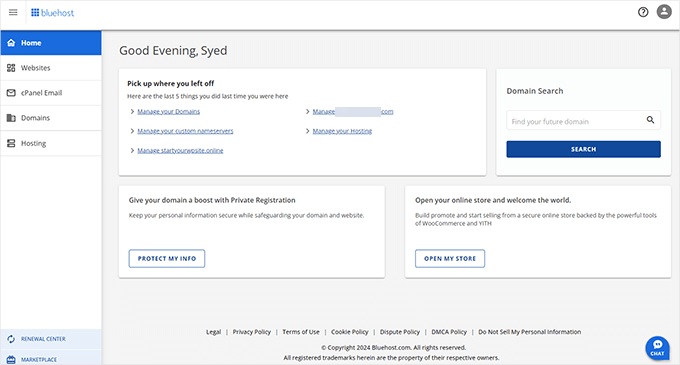
Breakdown of Bluehost’s Shared WordPress Hosting Plans
Bluehost offers a shared hosting package suitable for starter websites.
Their shared plan is available at three levels, each with a different introductory price.
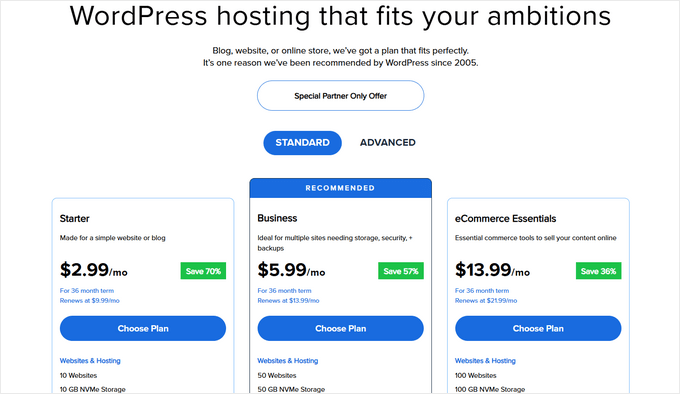
Let’s take a look at Bluehost pricing and what’s included in each plan.
- Starter: The Starter plan allows you to host 10 websites. It hosts one domain, 10GB SSD storage, 5 email accounts with 100 MB storage for each account. For the first term, you’ll pay $2.99 per month. When you renew the account, you’ll have to pay $9.99 per month.
- Business: The Business plan includes 50 websites with 50 GB of storage space. You also get unlimited cPanel email accounts. The price for the first term starts from $5.99 per month. When you renew the account, you’ll have to pay $13.99 per month.
- eCommerce Essentials: This plan is suitable for online stores and includes premium WooCommerce add-ons, which save users hundreds of dollars. It starts from $13.99 per month and renews at $21.99 per month after the introductory offer ends.
All plans include a free domain name for the first year, free SSL, and 24/7 live chat support.
All plans also include malware scanning, 1-click staging, free CDN (Cloudflare with Argo routing), DDoS protection, and more.
All plans (except Starter) also include free domain privacy for the first year.
If you are just starting your website, then you can select any of these plans. Upgrading to a higher plan is easy, so you can start small and scale up when needed.
Bluehost Customer Support and Service
We all need help occasionally. It is really important that you choose a web hosting company that offers help and support when you need it.
Bluehost maintains a huge library of articles, step-by-step guides, and video tutorials as part of its extensive knowledge base. This is a huge help for beginners, and a simple search can quickly resolve the most common issues.
However, sometimes, you may need to talk to an individual to get more help.
Bluehost provides a 24/7 support system where you can talk to their support team representatives using live chat or phone support. This is helpful when you need quick assistance from technical support staff, and you know they are just one click away.

One thing that is missing is the ticket-based support system. Bluehost recently decided to eliminate ticket-based support and focus on the personal approach of live chat support and phone-based support.
However, some users may still miss the ticket-based support system, which is particularly good if your issue cannot be resolved in one live chat or phone session.
Conclusion: Is Bluehost the Right Choice for You?
After reading this review, you might be wondering if Bluehost is the right choice for your website.
Bluehost is often ranked the #1 web hosting provider by many websites. They offer a wide range of hosting options with tons of features that help you easily build your website.
All their plans include expert 24/7 support from knowledgeable staff.
Most importantly, they offer affordable starter plans that fit any budget.
If you are starting, then you cannot go wrong signing up for a Bluehost shared hosting plan. It’s easy on your pocket and comes with all the right tools. As your site grows, you can easily upgrade your hosting plan accordingly.
Ready to start your website with Bluehost? Click here to select your Bluehost plan.
Bluehost Coupon
WPBeginner users can get up to 70% off Bluehost WordPress hosting using our exclusive Bluehost coupon code. It also includes a free domain coupon and a free SSL certificate.
You need to click on our Bluehost discounted link, and the Bluehost coupon code for the maximum discount will be applied automatically.
Our users get a discount on all Bluehost pricing plans. Starts at $2.99/mo.
Insider Tip: Visit Bluehost.com using our discount link and get 70% off Bluehost WordPress hosting + a Bluehost free domain coupon, a free SSL certificate, free CDN, and a 30-day money-back guarantee.
For more details, check out our Bluehost discount deal.
FAQs About Bluehost Hosting
In this detailed Bluehost review, we have tried to cover all the aspects of their hosting services. The following are some of the most frequently asked questions about Bluehost that we hear from our users.
1. Can I make an online store using WooCommerce on Bluehost?
Yes, you can. In fact, Bluehost is one of the best WooCommerce hosting service providers. Their starter plan is perfect for starting an online store.
However, keep in mind that you’ll need to upgrade as your store starts getting more traffic. Hopefully, by that time, you’ll be making enough money to justify the upgrade costs.
2. Is Bluehost good for beginners?
Yes. Bluehost is good for beginners, bloggers, and small businesses. They are often ranked as the most beginner-friendly by industry experts. They automatically install WordPress for you when you sign up. They also have an easy-to-use control panel that allows you to manage your hosting account by yourself.
There is plenty of help available with detailed guides, video tutorials, and articles. You also have 24/7 access to their expert, user-friendly support via live chat and phone.
3. Can Bluehost handle high traffic?
Their shared plans are suitable for starter websites and small businesses. In our stress test, it was able to handle 50 virtual users without any slowdown.
These plans can handle reasonable and sudden traffic spikes. However, they are still quite limited in terms of server resources. If you are expecting high traffic, then you’ll need to upgrade your hosting plan.
4. Why use Bluehost for WordPress?
Bluehost is one of the largest hosting companies in the world and an officially recommended WordPress hosting provider. They have been supporting the WordPress community for a very long time and know WordPress very well.
Their platform is highly optimized for WordPress websites and engineered to run WordPress at peak performance. They also have WordPress engineers on their team, so you know your website is in safe hands.
5. Do I need a credit card to sign up with Bluehost?
Bluehost accepts credit cards, but you can choose to show more payment options during checkout and select PayPal as your payment method if you wish.
6. Is Bluehost better than GoDaddy?
Bluehost is better than GoDaddy because we believe Bluehost’s support is better. The Bluehost My Sites dashboard and overall onboarding experience are a lot more beginner-friendly. Not to mention, Bluehost web hosting offers better pricing for small businesses.
7. How does Bluehost compare with SiteGround and HostGator?
When comparing Bluehost alternatives, such as SiteGround and HostGator, there are several pros and cons you should be aware of.
Bluehost offers more value for the price when compared to SiteGround. Their plans start at $2.99 per month and include a free domain, whereas SiteGround plans start at $4.99 and do not include any free domain.
On the other hand, the SiteGround platform comes with better speed and security features. For more details, see our comparison of Bluehost vs SiteGround vs WP Engine.
Bluehost and HostGator are pretty similar in terms of hosting CPU resources, functionality, site migration tools, pricing, and more. Bluehost alternatives like Hostinger, InMotion Hosting, or DreamHost offer comparable services. We find Bluehost’s user experience to be slightly better, as they’ve invested heavily in their WordPress website builder platform.
8. Where are Bluehost servers located?
Bluehost operates its own in-house data center in Utah, in the western United States. It is a massive 50,000-square-foot facility that serves as its primary data center.
9. What Bluehost plan should I get?
If you are starting out a brand new website, blog, or online store, then we recommend starting with their basic plan. It is good enough for a starter website, and you can always upgrade later.
Ready to start your website with Bluehost? Click here to select your Bluehost plan.
John Braun
Terrible hosting. I’ve used over a dozen different hosting services. Blue host is not one that I would recommend. I had them on an old host monster account that got switched to Blue host. I have not been happy at all with their up time. They do answer the phone. But all you’re going to get is a run around if there’s any type of a problem on you this is not the type of customer service that you want, believe me.
Amy R.
It has taken a full YEAR to get my domain transferred fully to Bluehost! But that is not the worst of the story. From the minute it was transferred I was told the website would be up and running – MULTIPLE TIMES IN CHAT this was repeated. But oh wait there is an error in the transfer. But wait that means you need to hire a professional. But wait that means we have to rewrite everything. I am now into Bluehost for a total of $532.91 and guess what I have. Your right NOTHING!! Not a website not a domain not anything! And they will not refund any of the money despite doing nothing and nothing working! RUN AWAY
Eric C
Do not use Bluehost: I have had nothing but hacked sites for the last few years, Blue Host is getting hacked all the time or something else is going on. Finally, I just canceled my plan because lost over 20 websites because it was better than dealing them Bluehost’s crazy hacked service. I have sites hosted on WP Engine, Flywheel, Siteground and even ionos and never had a site hacked, never mind all of them at the same time. I have also been a customer for at least 8 years, not to mention my clients hosting accounts that I encouraged them to setup.
Jim
Basically bluehost lost my website. My server had some sort of data loss. The backups have data loss too. Everything I’ve been working on for years is just gone. The worst part is they just charged me $347 two weeks ago for the year. And they will not refund me. They added all kinds of things I didn’t even know I ordered. Horrible.
Joe Dun
I’ve had consistently bad experiences with them. My main complaint is that they sign you up for “free” trails without your permission. Then, if you don’t catch their email that the free trial is over, they will start billing you. And to make sure they can do that again in the future, they won’t let you remove your credit card info.
Danny
I’ve been with Bluehost for over 20 years. They are now just a money hungry and provide the worst service. One of my clients we downgraded her package because she didn’t need all of the extras. You can’t just ‘downgrade’. They make you setup a separate package, move your files, etc. and they try to get you to pay them $150 to do it for you. Well, when I asked them to redirect my domain names, they deleted my files, screwed up my Google Workspace somehow so my site was down for over a day and the email for my client’s business was down for over a day. They refused to compensate her for this even though it was their inept employee who messed it all up.
Time to find a new vendor for my site and my clients’ sites for the future. What a shame. They once were great but now have overcomplicated everything to make an extra buck or two.
raymond guszak
I wanted to migrate my websites from GoDaddy and purchased a WP plan from Bluehost.
I started to have problems on the second day !!! I could not log in to my account on the second day after I enabled 2-factor authentication. I had to use the provided key in case I didn’t receive the code via email. I spent 2 hours chatting with support staff, and they claim it was resolved, (not).
I tried to add user(s) via the invite function but they either didn’t receive the invite emails or were unable to log in after creating an ID/PW.
I canceled my hosting plan.
Too many problems out of the gate.
Nandhu
Most trustable Hosting service in India , Its very fast and secure.