


Do you want to display popular posts based on their views in WordPress?
By showing your most popular WordPress blog posts, you can help readers find your best and most valuable content. Plus, it can encourage them to stay longer on your website.
In this article, we’ll show you how to display your popular posts by views in WordPress.

Why Display Popular Posts by Views in WordPress?
When users see your most popular WordPress blog posts, they can discover what content their fellow readers like the most. This way, they can check those articles out and join in on the conversation.
What’s more, displaying your most popular content in WordPress can boost your social proof. It’s like telling new users that, “Hey, other people have found these posts really helpful, and you might too!”
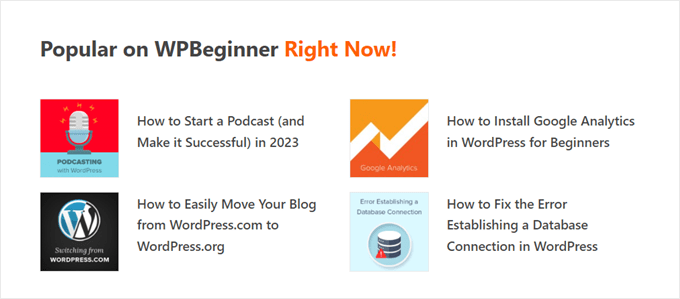
Finally, showing your trending blog posts can make people stay longer on your website and explore more of your content.
The more your user engagement increases, the more Google thinks your content is good and important. In turn, your site can rank higher. Plus, this gives readers more time to convert, like signing up for your newsletter.
Unfortunately, WordPress doesn’t have a built-in feature or block to display your most popular posts by page views. In this guide, we will show you how to do exactly that with a plugin and with code.
Just click on one of the quick links below to jump straight to your preferred method:
Video Tutorial
If you prefer written instructions, then just keep reading.
Method 1: Display Popular WordPress Posts by Views With MonsterInsights
The easiest way to display popular posts by views in WordPress is with a plugin. There are actually many WordPress popular post plugins available, but in our opinion, the best choice is MonsterInsights.

Used by 3 million+ websites worldwide, MonsterInsights is the best Google Analytics plugin for WordPress. While its main functionality is analytics, it also has a user-friendly feature to show your most popular posts.
First things first, you will need to install the MonsterInsights plugin and connect it to your Google Analytics account. For more details, see our step-by-step guide on how to install Google Analytics in WordPress for beginners.
Note: While a free version of MonsterInsights is available, we will be using the Pro version since it includes the popular posts feature.
Choose a Popular Posts Widget Theme
Once you’ve activated and set up the plugin, go to Insights » Popular Posts from the WordPress dashboard. Then, click the ‘Popular Posts Widget’ menu item.
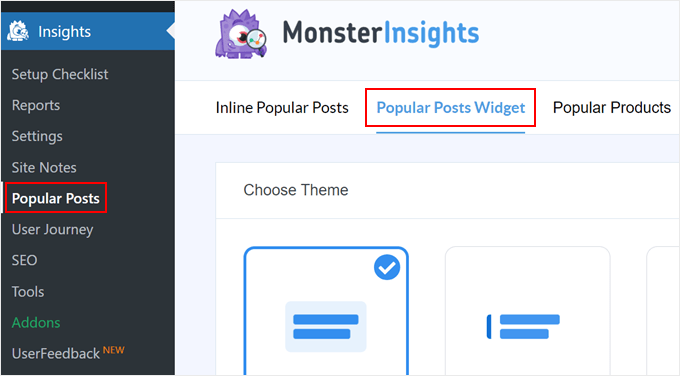
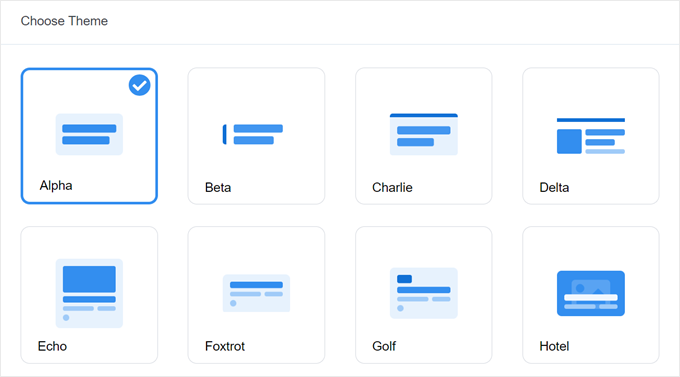
Scrolling down, you will need to select a theme to display the popular posts widget. There are various options.
Some include a featured image for the post, while some are more minimal-looking.
If you want to see what the theme looks like before making your choice, just move down the page to the Theme Preview section.
You can also preview the theme in a Wide or Narrow format. With the Wide format, you’ll see your posts listed under the page or post content, whereas the Narrow format displays the posts on the right side of it, like a sidebar.

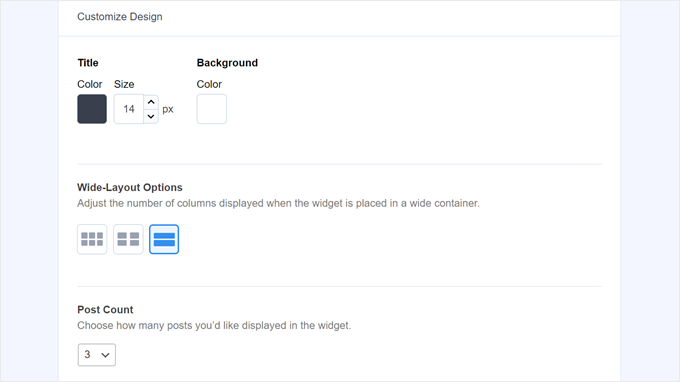
Next, let’s scroll down to the ‘Customize Design’ section. Here, you can modify the theme’s colors, font size, layout, and post count to display.
The customization options here may vary depending on the theme you use. So, be sure to explore the different themes to see which one suits you best.
Configure the Popular Posts Widget Behavior
Once you’ve configured the theme’s design, you must go to the Behavior section. This is where you will control how the popular posts widget will appear on your WordPress website.
In the Widget Styling settings, you can choose to use the design that you’ve made above or opt to not style the widget at all. With the second option, the widget will follow your WordPress website theme’s CSS.
Then, you can choose how the widget should choose your most popular posts. Here, pick ‘Curated.’
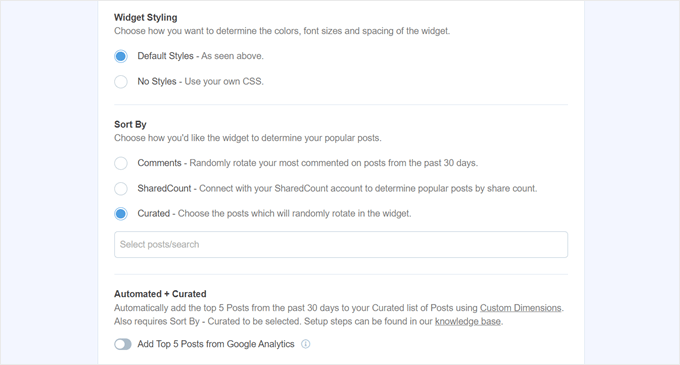
What you have to do next is enable the ‘Add Top 5 Posts from Google Analytics’ option below. But before doing that, you will need the MonsterInsights Dimensions Add-On and to add Post type as a new custom dimension.
This will let MonsterInsights choose the most popular posts based on Google Analytics data.
To do this, you have to download the MonsterInsights Dimensions Add-on and install it as a plugin in WordPress. For step-by-step instructions, check out our guide on how to install a WordPress plugin.
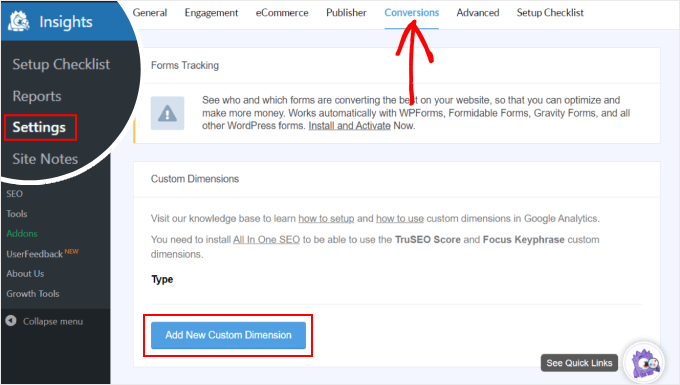
Next, go to Insights » Settings and switch to the ‘Conversions’ tab. After that, click ‘Add New Custom Dimension.’
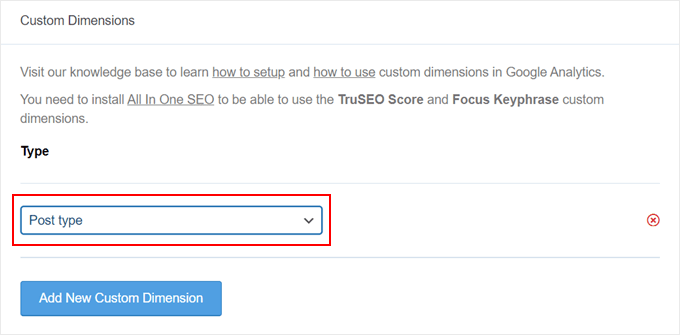
Once you’ve done that, select ‘Post type’ in the dropdown menu.
This will enable MonsterInsights to track the performance of your blog posts and other custom post types.
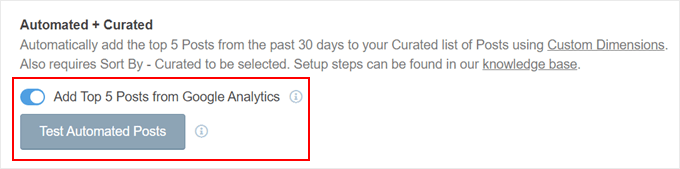
Now, just return to Insights » Popular Posts and go to ‘Popular Posts Widget.’
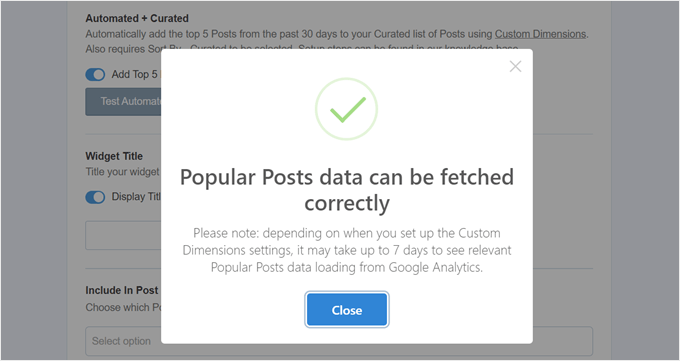
Simply activate the ‘Add Top 5 Posts from Google Analytics’ toggle button. Then, click ‘Test Automated Posts’ to see if the setup was successful.
If yes, then you will see a success message popup.
It should say: ‘Popular Posts data can be fetched correctly. Please note: depending on when you set up the Custom Dimensions settings, it may take up to 7 days to see relevant Popular Posts data loading from Google Analytics.’
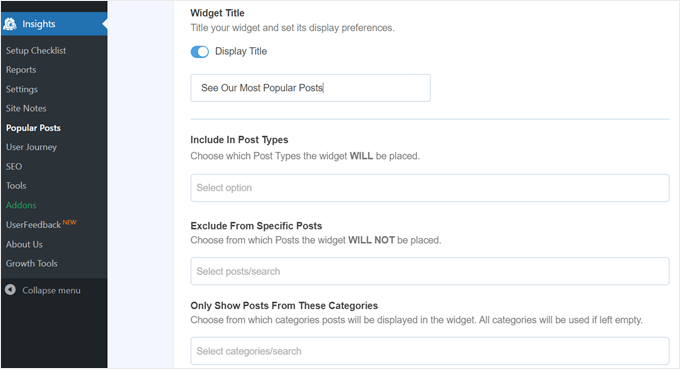
Moving on to the next steps, you can now add a title that will appear above the widget. It can be something like ‘Check Out Our Most Popular Posts’ or anything similar.
Below that, you can choose whether the widget should be displayed in all post types, be excluded from specific posts, and/or appear in certain post categories only.
These settings are useful if you have custom post types other than blog posts and feel like the popular posts widget will look irrelevant there.
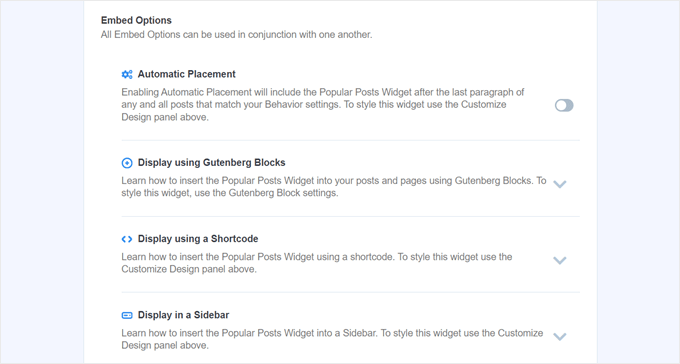
One of the last steps is to embed the popular posts widget. There are several options: placing it automatically, using a Gutenberg block, adding it as a sidebar widget, or using a shortcode.
Let’s go through each option one by one.
Embed the Popular Posts Widget Automatically
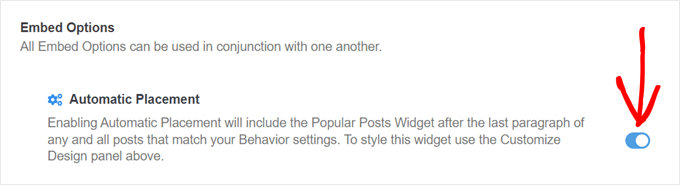
Automatic Placement is recommended if you want the widget to show up on all the posts that match the Behavior settings you’ve set previously.
For this, all you have to do is activate the Automatic Placement button.
The downside with this option is that you cannot adjust the widget’s design based on what looks best on the post or page. If you need this type of functionality, then you can try the next method.
Embed the Popular Posts Block to a Page or Post
If you want to have more control over how the widget looks on a page or post, then this method is for you.
First, go to the block editor of the post or page where you want the widget to be. After that, click the ‘+’ add block button anywhere in the editor and look for the Popular Posts block.
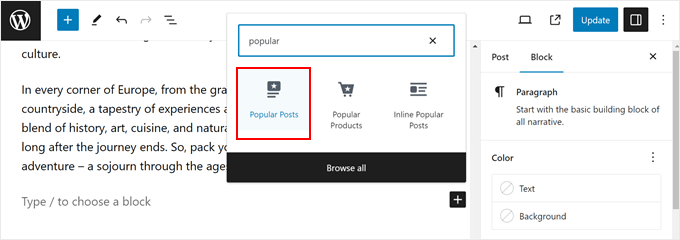
In the Block settings panel, you will see that there are options to change the widget’s theme, font size, colors, title, layout, and post count.
These settings are similar to the ones we’ve seen in the MonsterInsights plugin.
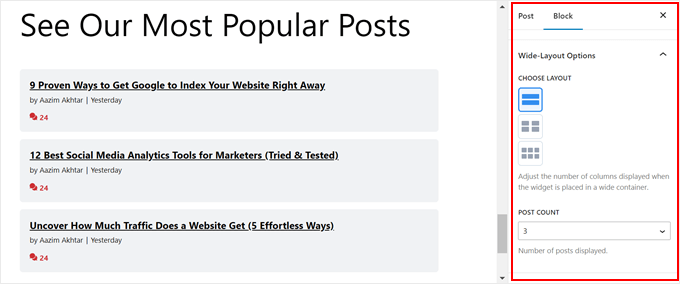
The only difference is you can’t change which posts get chosen in the widget.
That said, in the Behavior Settings, it is possible to only show posts from certain categories. This way, you can make the popular post choices more tailored to your needs.
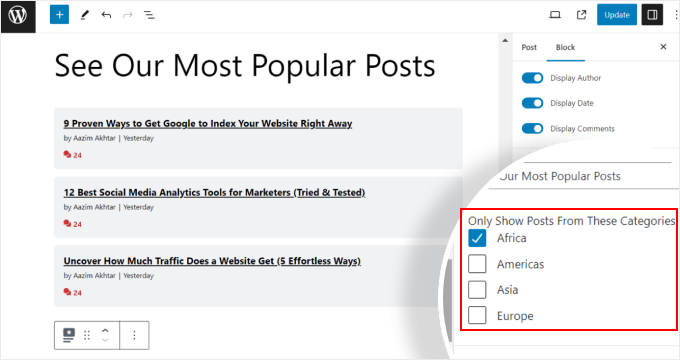
Once you are happy with the block settings, just click the ‘Update’ button in the post and page editor.
Here’s what the Popular Posts block looks like on our test website:

Embed the Popular Posts Widget into a Sidebar
If you are using a non-block WordPress theme that has a widget-ready sidebar area, then you can add the Popular Posts widget to it.
All you have to do is go to Appearance » Widgets. Then, click the ‘+’ add widget button in the Sidebar area and look for the Popular Posts – MonsterInsights widget.
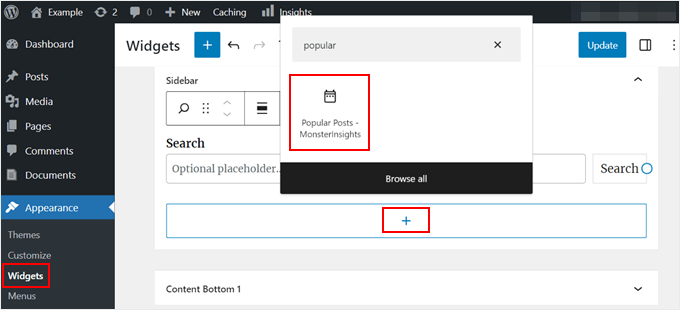
Like in the previous method, the widget includes similar settings to customize your theme’s appearance.
What’s different is that the interface is slightly trickier to use. As you change the settings, you can’t see what the widget actually looks like. You will have to click on a different widget or another area to preview it.
If you are happy with how the widget looks, just click ‘Update’ in the top right corner.
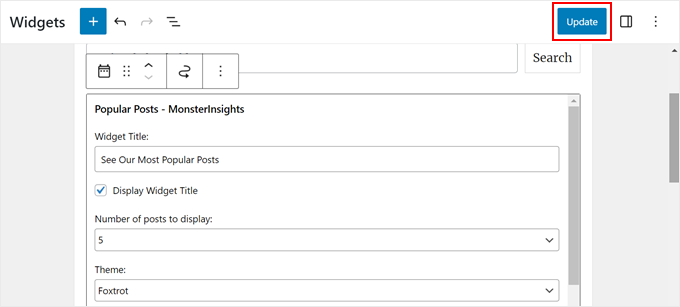
Make sure to go to your website to check if the sidebar looks right.
Here’s what ours looks like:

Embed the Popular Posts Widget With a Shortcode
The last option is to use a shortcode. This method is recommended if the above options don’t work for your specific use case.
In the Popular Posts Widget tab, scroll all the way down to the ‘Embed Options’ section. Then, choose ‘Display using a Shortcode’ and click the ‘Copy Shortcode’ button.
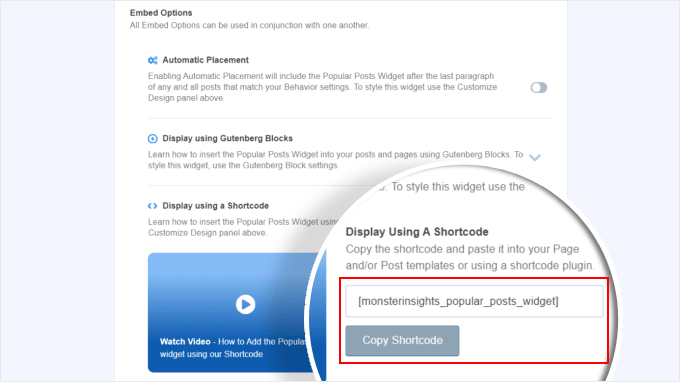
After that, simply place the shortcode wherever you like. For more information, check out our guide on how to add shortcodes in WordPress.
Method 2: Display Popular WordPress Posts by Views With Code
The MonsterInsights method is the easiest way to display your most popular and best content by views in WordPress. But if you are comfortable with coding, then you can also use code to show your most popular WordPress posts.
For this method, we recommend using a code snippets plugin like WPCode, which is what we will use in this guide.
WPCode makes it safe to insert custom code without directly interacting with your WordPress files. Plus, since this method requires using multiple code snippets, the plugin will make managing and tracking them all much easier.
First, you need to install WPCode in WordPress. A free version of WPCode is available, but we will use the Pro version, as it comes with the features we need to insert the code in the right locations.
For a step-by-step installation guide, read our article on how to install a WordPress plugin.
Add WordPress Post Views Counter Function
Upon the plugin’s activation, you need to go to Code Snippets » + Add Snippet from the dashboard. Then, hover over ‘Add Your Custom Code (New Snippet)’ and click ‘Use snippet.’
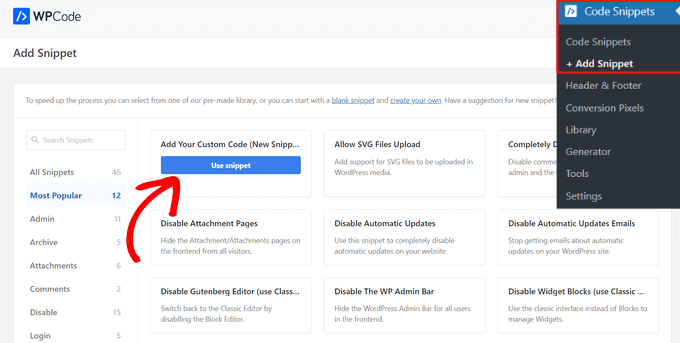
Now, you are inside the WPCode code snippet editor. Before inserting any code, go ahead and add a title for the snippet.
For this first code, you can name it something like ‘WordPress Post Views Counter Function.’ This is because this first code’s purpose is to create a function for counting post views in WordPress.
Next, change the Code Type to ‘PHP Snippet.’ Note that every code snippet you will have to add from this article is in PHP.
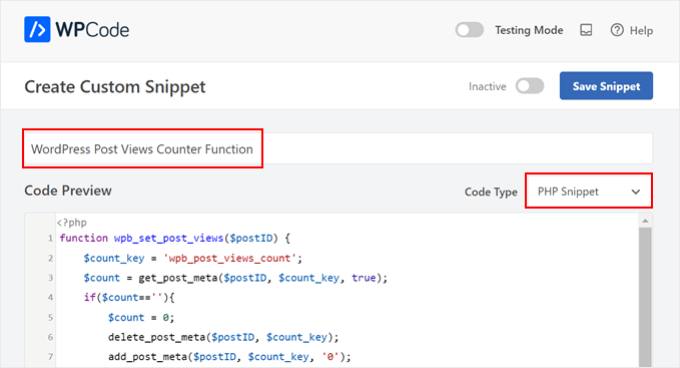
After that, you can copy and paste the following code below:
function wpb_set_post_views($postID) {
    $count_key = 'wpb_post_views_count';
    $count = get_post_meta($postID, $count_key, true);
    if($count==''){
        $count = 0;
        delete_post_meta($postID, $count_key);
        add_post_meta($postID, $count_key, '0');
    }else{
        $count++;
        update_post_meta($postID, $count_key, $count);
    }
}
//Get rid of prefetching to keep the count accurate
remove_action( 'wp_head', 'adjacent_posts_rel_link_wp_head', 10, 0);
Now, just scroll down to the ‘Insertion’ section and select ‘Auto Insert’ for the Insert Method and ‘Run Everywhere’ for the Location. This works the same as inserting the code into your theme’s functions.php file.
After that, navigate to the top right side of the page and make the code active.
Then, click ‘Save Snippet.’
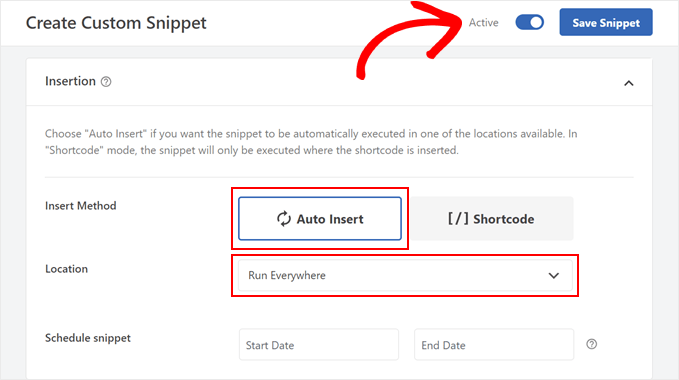
At this stage, you need to add another new custom code snippet. You can name this one ‘Track Post Views Function Call.’
This code will call the function above and activate it on your single post pages.
Once you’ve done that, copy and paste the following snippet:
wpb_set_post_views(get_the_ID());
What’s different about this code snippet is you will choose the location ‘Insert After Post’ because it’s supposed to run on your single post pages.
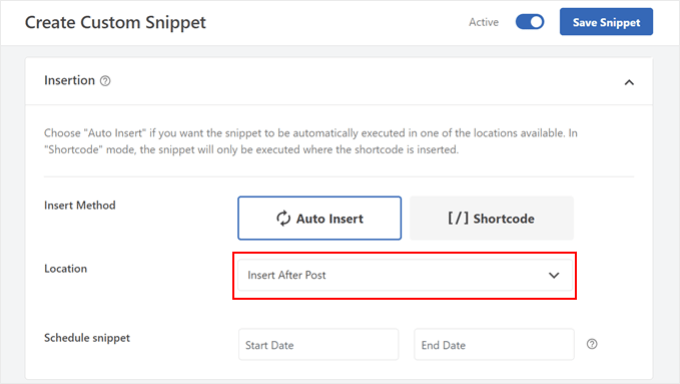
When you are done, just make the code active and save it.
Insert WordPress Post Views Tracking Hook
Now, you need to add a new code snippet that checks if the current page is a single post. If so, it will call the WordPress Post Views Counter Function to track and update the post’s view count.
This way, every time a user visits the post, its view count will get updated.
Let’s name this snippet ‘WordPress Post Views Tracking Hook.’ Then, insert the following lines of code:
function wpb_track_post_views ($post_id) {
    if ( !is_single() ) return;
    if ( empty ( $post_id) ) {
        global $post;
        $post_id = $post->ID;
    }
    wpb_set_post_views($post_id);
}
add_action( 'wp_head', 'wpb_track_post_views');
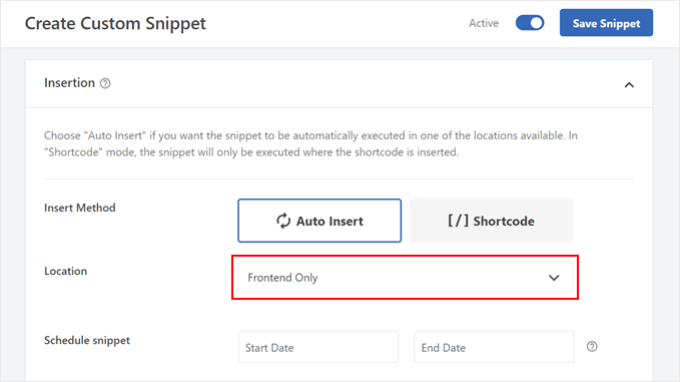
You can choose the insert method as ‘Auto Insert’ and the location as ‘Frontend Only.’
Same with the previous steps, just go ahead and activate the code and save the snippet.
Note: If you are using a caching plugin, then this technique may not work by default. You could use the fragment caching feature that’s offered by some caching plugins like W3 Total Cache to make it work.
Add Functions to Retrieve Post Views Count and Display Most Popular Posts With View Counts
We are now in the final steps of this guide. You need to add a code snippet that retrieves and formats the number of views for a given WordPress post. This will come in handy later when displaying the list of most viewed posts.
You can name this code as ‘Retrieve Post Views Count Function’ and set the location to ‘Run Everywhere.’
Here is the code snippet:
function wpb_get_post_views($postID){
    $count_key = 'wpb_post_views_count';
    $count = get_post_meta($postID, $count_key, true);
    if($count==''){
        delete_post_meta($postID, $count_key);
        add_post_meta($postID, $count_key, '0');
        return "0 View";
    }
    return $count.' Views';
}
Again, be sure to make the code active in WPCode and save it after.
Once you’ve done that, create a new code snippet again and name it ‘Display Most Popular Posts with View Counts.’ This is the code that will show your most popular posts at the bottom of your blog posts.
In the Code Preview box, insert the following snippet:
// Customize the query parameters as needed
$popularpost = new WP_Query( array(
    'posts_per_page' => 3,         // Feel free to adjust the number of posts to display
    'meta_key' => 'wpb_post_views_count',
    'orderby' => 'meta_value_num',
    'order' => 'DESC'
));
?>

<div class="popular-posts">
    <h2>See Our Most Popular Posts</h2> <!-- Feel free to customize the title -->
    <ul>

    <?php while ( $popularpost->have_posts() ) : $popularpost->the_post(); ?>
        <li>
            <a href="<?php the_permalink(); ?>"><?php the_title(); ?></a>
            - <?php echo wpb_get_post_views(get_the_ID()); ?>
        </li>
    <?php endwhile; ?>

    </ul>
</div>

<?php wp_reset_postdata();
As noted in the code, feel free to adjust the number of posts to display and customize the title for this section.
In the WPCode Insertion section, make sure to select ‘Insert After Post’ for the Location. Then, just make the code active and save the snippet.
All that’s left to do now is visit one of your blog posts and see if the code works. Here is what the most popular posts by views section look like on our test WordPress blog:

Expert Tip: To see if your code works without permanently changing your site, you can try WPCode’s Testing Mode.
This feature lets you add your codes like normal and only you can see what they look like on the front end. On the other side, your users will interact with your website as normal.
We hope this article helped you learn how to display popular posts by views in WordPress. You may also want to check out our article on how to display popular products in WooCommerce and our beginner’s guide to WordPress custom fields.
If you liked this article, then please subscribe to our YouTube Channel for WordPress video tutorials. You can also find us on Twitter and Facebook.





Syed Balkhi says
Hey WPBeginner readers,
Did you know you can win exciting prizes by commenting on WPBeginner?
Every month, our top blog commenters will win HUGE rewards, including premium WordPress plugin licenses and cash prizes.
You can get more details about the contest from here.
Start sharing your thoughts below to stand a chance to win!
Bigdragon13th says
Hello,
I’ve using this code for months and it’s work greats! That’s until I start using W3 Total Cache and this code stop count views for me.
I’m struck at where do I need to put the mfunc to let the code work with cache. Can you point that out?
FYI, I put all the code in a site-specific plugin.
AJ says
Hell this is great! How would I display the view count outside of the post loop like in the sidebar?
leslie says
hello, I have some problem on how setting up like when the login user won’t include on the count while viewing any pages?? how to do that.. please need some help on these. thanks
Sarah says
Hey there, thanks for this. REALLY helpful!! Would you know how to apply a time range to this code? For example to show the most popular posts in the last day, week or month etc? I know there are plugins for this but I would like to do it without one
Dale Knight says
Great!
Denis says
Hello,
thanks for this nice tutorial. It works on my page!
– how can I exclude robots and spiders that hit my posts?
– May be I can set a timer of 10 seconds. after that the count should rise. So the people who only click thourgh the posts are not counted.
Cheers,
Denis
Sarah says
You have no idea how much time you saved me. Thank you, works perfectly!
Clay Hickman says
Thanks for the tip. Will use.
Jenni B says
Hello – thanks so much for this! I noticed the question regarding the W3TC workaround, but have a slightly different question: does that still apply if I’m hooking into wp_head from functions.php, and if so, how exactly do I implement it there? Thank you!
rafi says
this is really easy and very helpful! thanks man!
Kosmos says
Hello, thanks for this snippet.
I have a problem, the orderby don’t work. I have five posts :
– Post 1 : 85 views
– Post 2 : 35 views
– Post 3 : 165 views
– Post 4 : 1 view
– Post 5 : 1 view
When i displayed it the order was : 1, 2, 4, 5 and 3
Do you have an idea please ?
Raj says
It might be integer type issue ..
Iftekhar says
following your article I am using post view count in my site since 6 months. It was working fine, but recently I am having problem with this. If a visitor view a post the count is increasing by 1 but the problem is the count is increasing in all other posts. I have w3 total installed and I m using mfunc according to your article. Please help me if you have any idea about this issue… Thanks.
WPBeginner Support says
Iftekhar can you check what happens when you turn off w3 total cache?
Admin
Iftekhar says
The problem seems to w3. Post view count is OK since deactivated. But I want to use both of them
ivan says
Hello,
I am wanting to switch from using the plugin because it doesn’t support the polylang language (the author’s not getting back to me and I don’t really know if it’s possible to filter functions for the plugin..)
Two questions:
– I examined the code a bit and I’m not sure if this code starts counting posts from when it’s implemented? Or does it somehow retrieve where the post counts are currently?
– The current code on this website uses the get_posts() function so it creates an args array instead of using WP_Query(). Is this the same thing? I’m guessing not. And if it isn’t is the code below correct to get the array? I tried implementing this but it didn’t seem to work.
$args = array( ‘meta_key’ => ‘wpb_post_views_count’, ‘orderby’ => ‘meta_value_num’, ‘order’ => ‘DESC’,’numberposts’ => 6, ‘post_status’=>”publish”,’post_type’=>”post”,’lang’ => ‘en’);
thanks!
Tomas says
This approach is very basic. If you want to count clicks from the same user (same IP) only every 5 minutes or 10 minutes etc. you need to have a separate table for that and before adding a new row in db you need to check the ip and time. If there is a record saved 3 minutes ago, the click is not added. Otherwise, it is added. Also this aproach allows you to create custom list of most viewed articles in 7 dyas, month, all time etc. Or even by category, user etc. (if you store appropriate values in appropriate table columns.
boson says
i am trying .. when you say put code wpb_set_post_views(get_the_ID()); inside of single post loop, does that mean use this code inside of the theme single.php anywhere?
thank you for your help
WPBeginner Support says
No it means paste the code inside the loop between
1-click Use in WordPress
and
<?php endwhile; else: ?> <p><?php _e('Sorry, no posts matched your criteria.'); ?></p> <?php endif; ?>1-click Use in WordPress
Admin
Cory Dobson says
Is there a way of restricting when the post views are collected from? For example, I am looking to display the posts with the most views in the last 24 hours, how would you do something like that using this code?
Great post by the way, really helpful!
igor says
how can I paginate the results.
10 results by page lets say
Mark says
What if your single-xxxx.php doesn’t use the loop but custom fields. How can I use this code if I don’t use the loop?
WPBeginner Support says
single-xyz.php means that file is used for a single post with xyz slug. You can still add the last code snippet in your template just where you think that the template ends displaying content.
Admin
quocminh86 says
comment policy,
Dusan says
I’m confused as to where to put the mfunc code?
WPBeginner Support says
If you are using W3 Total Cache then you can add this code just before wpb_get_post_views(get_the_ID()); in your templates where you want to display the popular posts. The purpose of this code is to allow W3 Total Cache to dynamically display popular posts and not cache it.
Admin
Waqas Munir says
Dear, i am really confused about that… I am trying to add this to my blog, but I have no experience in all this.
WPBeginner Support says
Then perhaps you should try using WordPress Popular Posts plugin instead.
Admin
Aleksander says
What about using update_post_meta function instead of delete_post_meta and add_post_meta ?
George says
Thanks for this post! Really really good.
I’ve two question:
1. Is there any possibility to count just one visit for each IP adress? How?.
2. Can i show the most popular posts by a specific period of time? For example, most visited posts this month, or the most popular posts from 1 of may to 1 of june…
Thank you!
Igor Gumush says
thanks , working great
shishir umrao says
Hi,
This code is working but whenever i reload the page , it is adding “2” to the total page count. For example if page count is 14 and after reloading total page count is 16 … can anyone guess where’s the problem ?
Shishir Umrao
Editorial Staff says
Its happening because the function is loading twice somehow.
Admin
shishir umrao says
Yeah. I figured out this piece of code was responsible for this.
Nick says
Very useful post, I managed to make my Tag pages to order posts by a custom field value similar to post view count, however, I ave pagination on my tag pages and it keeps showing the same top ranking posts on all pages, even after I have removed this code:
‘posts_per_page’ => 4,
How do I fix the pagination so it show other posts on subsequent Tag pages?
Chris says
How did you manage to make your Tag pages order posts by a custom field value similar to post view count?
It looks like the popular posts plugin only takes categories as a parameter.
Mike says
Thanks for the very detailed instructions. Will using this to display the most popular posts cause a lot of additional server load if a site has significant traffic? Some of the WP plugins for this sort of thing tend to have this problem.
Editorial Staff says
How much is significant traffic? We’re using it on WPBeginner.
Admin
Ryan Karpeles says
Uh, awesome! Just awesome. THANK YOU for this!!! Works perfectly!
Lowell says
I’m still learning this stuff so pardon my ignorance.
How do you allow the user to choose between queries like they do on codecanyon when they allow you to sort by price, sales, date etc.?
Thanks so much.
saeed says
How can I change number of popular posts that display?
Editorial Staff says
Change the posts_per_page to whatever number you like.
Admin
Adam Davies says
Thank you so much for this. Life saver and a great tip that I definitely will be using more often.
Md. Ariful Islam says
Hey, Really , Many Many thanks for this useful tips. I am highly glad to you.
Ar Ya says
Hi , that’s great !
But ‘orderby’ => ‘wpb_post_views_count meta_value_num’ not working.
please use : ‘orderby’ => ‘meta_value_num’
thnx
nick says
Thanks, it works for me, just with one important exception – popular posts are not as links, just their titles. How can I fix this, please?
Preston says
I added this code in the manner described in the article and upon activation, I saw this….
The plugin generated 2 characters of unexpected output during activation. If you notice “headers already sent” messages, problems with syndication feeds or other issues, try deactivating or removing this plugin.
Preston says
Fixed. I did two things:
1. Switched my permalink structure to a custom structure /%category%/%postname%/
2. Check through all of my pages for extra spaces.
One of them worked.
…go figure
Preston
Jose Vega says
Hi, I think it´s necesary add – wp_reset_query(); – at the end of the query to destroys the previous query used on a custom Loop.
I hope It helps somebody.
Jon Edwards says
I have this working to 95% using a custom WP Query to display popular posts from each category.
The only bit not working for me is the order – mine won’t display in descending order of views.
Cameron says
Thanks for the post! This really helped.
I’m not sure if anyone else ran into this issue, but when you set up the arguments for WP_Query, you have orderby => ‘wpb_post_views_count’. This was a problem for me because I wasn’t sure how it was ordering my posts. In the codex it says that if your using numbers they will only sort by the first digit. To fix this, you can simply replace the ‘wpb_post_views_count’ with ‘meta_value_num’. This basically will tell the query to reach inside the post’s meta value and probably cast it to an integer before it sorts. Hope this helps anyone running into the same issues.
Overall, it works great! I have the 4 most popular posts in a slider on the home page. Thanks again!
Editorial Staff says
Good suggestion. Updated the article with this.
Admin
efishinsea says
Hi. Your code sample up top is *not * updated.
Instead of this:
‘orderby’ => ‘wpb_post_views_count meta_value_num’
you should have this as suggested :
‘orderby’ => ‘meta_value_num’
if you want to sort by “Most to Least”
Minh says
Why it only shows posts which have count view < 100?
Editorial Staff says
If you are using a caching plugin, then it doesn’t always update.
Admin
George says
Thanks for the tutorial. How do you exclude current posts from displaying?
Kris says
This looks great on my home page but it seem to want to display on my single.php or anywhere else on my site. I tried creating a sidebar-single.php and inserting the code but still no luck. Any idea why it wouldn’t work on other areas my theme?
Kris says
i got it working. Thanks for this.
Anderson says
Dont work, its show randomic posts :S and i use post_type = > ‘post-type-name’
Mody says
This usually happens when meta key wpb_post_views_count is not available for posts, make sure you add the function that tracks views within wp while loop, otherwise it will keep showing random posts.
– Mody
Bent says
Hello,
I’m using your code for track post view in the wordpress theme.
function wpb_get_post_views($postID){
$count_key = ‘wpb_post_views_count’;
$count = get_post_meta($postID, $count_key, true);
if($count==”){
delete_post_meta($postID, $count_key);
add_post_meta($postID, $count_key, ‘0’);
return “0 View”;
}
return $count.’ Views’;
}
The problem is that when I use W3 Total Cache the track view is not working right.
Is there a way in the W3 Total Cache’s Options to put ignore only on this function, but in the same time I want the code to work with W3 Total Cache?
Thank you!
Editorial Staff says
Read the article again. We have already covered this “Fragmented Caching”.
Vaibhav says
Hello
i followed your tutorials and have done exactly what u said.
i also added ur snippet
php query_posts(‘meta_key=post_views_count&orderby=meta_value_num&order=DESC’);
in index.php
i am facing a little error,
i am using infinite scrolling
when i put this snippet in index.php
the infinite scroll instead of loading next set of post
loads the same sets of post
For better Understanding u can check it live here
blog.newgags,com
Henry says
For some reason my post views are incrementing by 2 on each page refresh. What could be happening there?
Henry says
I do apologise. I had added the tracker to both the WP header and also to the single post body. Very stupid on my part :}
Nice tutorial, very easy to follow.
Brandon says
First of all thanks for this post. Second I have been using this script for a few days now and for some reason it started out fine and now it is not displaying the most viewed posts, I don’t see any rhyme or reason to what posts are now being displayed. The last I checked the post that it is displaying at the top has 8 page views. I know there are posts with 25+ recorded page views. I would like to figure this out. Can you possibly point me in the right direction. I followed this post word for word. The post views are being recorded properly.
Editorial Staff says
Not sure what could be going wrong. The WP_Query is suppose to list the posts with the highest counts first.
Admin
Einar Ólafsson says
Hi. This works grade up until the view count gets over 999. All post with more view counts than 999 are not displayed, the query never post them. The latest post is the one with exactly 999 and the rest are under that. I have over 100 post that have more than thousand and are not being included.
Editorial Staff says
Interesting. We have posts with over 10k views and it seems to be working just fine.
Admin
Martinbeasnunez says
Guys you rockkk
Quick question:
If i have add a custom post type in your code ?
(popular post from especific custom post type)
Regards (:
Editorial Staff says
This should work with CPTs as well.
Admin
Artem Russakovskii says
This is a good basic tutorial, but be warned: it’s not going to work if you use caching strategies that bypass PHP (like wp-supercache, W3TC, nginx/varnish, etc). The only way to count those would be via Javascript or log parsing.
Editorial Staff says
Hey Artem, Thanks for dropping by. Actually using W3 Total Cache, you can use fragment caching and it works just fine. Going to update the article for those who are using the caching plugin.
Admin
Artem Russakovskii says
Interesting. However, I run nginx in front of W3TC, and it does a whole lot of its own caching, so it’s always safer/more reliable to use an AJAX approach. Nice info on the fragment caching though, I had no idea W3TC had it.
Ramon Fincken says
Why use
//To keep the count accurate, lets get rid of prefetching
remove_action( ‘wp_head’, ‘adjacent_posts_rel_link_wp_head’, 10, 0); ?
if you can use the main loop or the footer ?
Editorial Staff says
Some browsers prefetch the rel links with the next value. So technically when a user views one post, it can act as if they had viewed both posts. This will cause inaccurate count. If you like inflated views, then don’t take it off.
Admin
Nino Blasco says
Great article! Explanation useful and easy to understand.
Thank you.
Connor Crosby says
Yay! A tutorial that doesn’t require a plugin!
Editorial Staff says
Yeah we try to balance things out for our audience. This was requested by the users, and we were using it on our own site.
Admin
Zach says
Please stop saying stuff like this. Plugins aren’t bad, it’s articles like this that make them look bad. Enough articles have come out over the past few weeks to fully explain this – it’s getting a little embarrassing.
Editorial Staff says
How would you suggest titling future posts instead? DIY prefix? These are different then just using a pre-made plugin. Also, if you read the article, there is no where in our article that we say “plugins are bad”. We clearly state that the only reason why coded this was to get more customization. It is up to a user to take either stance. Some can think that plugins are bad… whereas others like yourself can think that we are saying that plugins are bad…
Zach says
I don’t think any type of prefix is needed. It’s one of the great/scary things about WordPress. You COULD put this code in your theme, but then begs the argument about needing to either, 1) Loose those customizations when you change your theme, or 2) have the knowledge to properly pull those over to another theme.
A lot of the users here are beginners (hence the point of this site), so many will just copy/paste what you give them. WP Beginner is obviously a fantastic resource (reason why I follow you on Twitter), but you have a responsibility to not put a false notion about how plugins/themes work.
Correct, you don’t flat out say, “Plugins are bad, put this in your theme instead!”, but the original commenter to the thread I replied to, said, “Yay! A tutorial that doesn’t require a plugin!” – so even though you didn’t say it, that’s how it was taken.
I’d suggest doing was Pippin does for his plugins – he has a simple starter plugin he uses for all of his tutorials. Why not create a blank “Starter Plugin” download, with just the basics, so others can download and put their customizations in there instead? Reference it in each article you do and it takes out some of the confusion. Thanks.
Editorial Staff says
We have been following Otto’s advice on site-specific plugin for quite some time. It is probably similar to what Pippin does. If you read this article, site-specific plugin is hyperlinked. It is in most other articles as well. That article shows users the importance of site-specific plugin and advise users to not put everything in functions.php file. At the bottom of that article, the sample “starter plugin” is there for anyone to start with.
codekipple says
In fairness this tutorial helped me out. I wanted a simple solution for popular posts after trying some of the plugins and not being able to fully control the markup. This tutorial helped me quickly implement some popular posts functionality into my own plugin.
So i agree that using pre-built plugins is not a bad thing, but at times tutorials like this are useful to take control and build out a plugin that works the way you need it to instead of fighting against an already built plugin.
Pippin says
As Zach said, please stop using “without a plugin”. Sure, it’s cool to see how to code this yourself but there is literally no difference between this code and the code in a plugin. You could place this code into a plugin and it would function identically to placing it in your theme.
Ruben says
If you say there’s no difference, you have no idea what you’re talking about. Lets say your are working on a site and don’t have access to the plugins directory, making a solution that works “without using a plugin” would be a viable alternative.
As for the title, semantically the title should reflect the content of the post and could be “How to Display Popular Posts by Views in WordPress with or without a Plugin”.
However, taking SEO in to consideration, lets say he would like this post to reach a specific audience, for example, people who don’t want to or can’t use a plugin, the title would probably be best as is.
Gautam Doddamani says
i am using genesis child theme..can u tell me which all functions and codes to use..i am sorry i am a noob to genesis…
Editorial Staff says
For child theme users, the wp_head solution would work to track post views. Not sure what else you meant.
Admin
Gautam Doddamani says
is it true? as artim told, does this code become unresponsive when we use a caching plugin?? for example i currently use W3 total cache and i want to use this method to build my custom popular post by views widget…i read this kind of post on wpsnipp.com and the users suggested it does not work when we enable caching plugins…reply soon…
Editorial Staff says
Read the comment reply to Artem. You can use fragment caching to make it work just fine.