


Do you want to set a default fallback image for WordPress post thumbnails? Featured images also known as post thumbnails are very useful in engaging users and making your articles more noticeable on social media. In this article, we will show you how to set a default fallback image for WordPress post thumbnails.
Why You Need a Default Fallback WordPress Post Thumbnail?
Post thumbnails or featured images is a WordPress theme feature which allows you to associate an image with your blog post or article. Depending on your theme, this image is then used on homepage, archives, or sidebar widgets.
Some WordPress themes display post thumbnail and excerpt of an article on the homepage in a grid layout. If you forget to add a post thumbnail for an article, then it will appear without a thumbnail, and your layout will look broken.
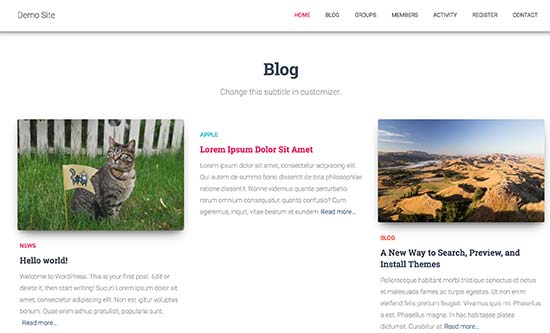
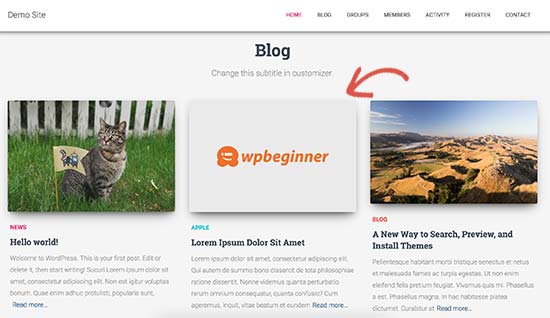
By adding a fallback image, you can set a branded image to be used when no post thumbnail is found. This allows you to make sure that all your articles have a post thumbnail.
Another way to deal with this problem is using the Require Featured Image plugin. It makes it mandatory for all authors to add a featured image to their articles before publishing.
Having said that, let’s take a look at how to easily set a default fallback image for WordPress post thumbnails.
Method 1: Set Default Fallback Image for Post Thumbnails Using Plugin
This method is easier and recommended for all users.
First thing you need to do is install and activate the Default Featured Image plugin. For more details, see our step by step guide on how to install a WordPress plugin.
Upon activation, you need to visit the Settings » Media page to configure plugin settings.
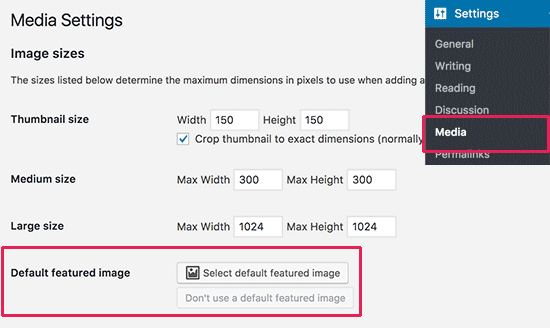
On this page, you need click on the ‘Select default featured image’ button to upload or select the image you would like to use as your fallback post thumbnail.
Don’t forget to click on the save changes button after selecting your featured image.
You can now visit your website to see it in action. The plugin will automatically start showing your default fallback image as post thumbnail for articles that do not have a featured image set.
Method 2: Add Fallback Image as Post Thumbnail Manually
This method requires you to add code to your WordPress theme files. If you haven’t done this before, then please take a look at our guide on how to copy and paste code in WordPress.
First, you need to create an image that you want to use as the default image. Next, you need to upload it to your theme’s images folder using a FTP client.
Your theme’s images folder is located inside /wp-content/themes/yur-theme/ folder. If it doesn’t have the images folder, then you need to create it.
After you have uploaded the image to your website, the next step is to tell WordPress to look for this image when a post doesn’t have its own post thumbnail.
Your WordPress theme displays post thumbnails in various places. You need to look for the_post_thumbnail() function in theme files. Typically, you’ll find it in archive.php, single.php, or content templates.
Next, you need to add the following code where you want to display post thumbnail.
<?php if ( has_post_thumbnail() ) {
the_post_thumbnail();
} else { ?>
<img src="<?php bloginfo('template_directory'); ?>/images/default-image.jpg" alt="<?php the_title(); ?>" />
<?php } ?>
Don’t forget to replace default-image.jpg with your own image file name.
That’s all, you can now visit your website to see it in action.
Method 3: Use First Image in an Article as Post Thumbnail
This method also requires you to add code to your WordPress theme files.
First, you need to add this code to your theme’s functions.php file or a site-specific plugin.
//function to call first uploaded image in functions file
function main_image() {
$files = get_children('post_parent='.get_the_ID().'&post_type=attachment
&post_mime_type=image&order=desc');
  if($files) :
    $keys = array_reverse(array_keys($files));
    $j=0;
    $num = $keys[$j];
    $image=wp_get_attachment_image($num, 'large', true);
    $imagepieces = explode('"', $image);
    $imagepath = $imagepieces[1];
    $main=wp_get_attachment_url($num);
        $template=get_template_directory();
        $the_title=get_the_title();
    print "<img src='$main' alt='$the_title' class='frame' />";
  endif;
}
This code simply outputs the first image added to an article. Now we need to display this output in your theme.
To do that, you will need to edit the theme files where post_thumbnail(); function is used. Replace it with the following code.
<?php if (  (function_exists('has_post_thumbnail')) && (has_post_thumbnail())  ) {
  echo get_the_post_thumbnail($post->ID);
} else {
   echo main_image();
} ?>
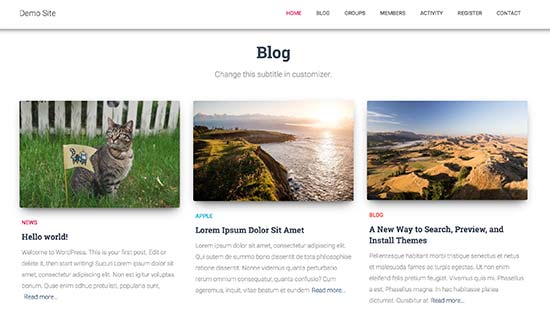
You can now visit your website to see it in action.
We hope this article helped you set default fallback image for WordPress post thumbnails. You may also want to see best featured image plugins and tutorials for WordPress.
If you liked this article, then please subscribe to our YouTube Channel for WordPress video tutorials. You can also find us on Twitter and Facebook.





Syed Balkhi says
Hey WPBeginner readers,
Did you know you can win exciting prizes by commenting on WPBeginner?
Every month, our top blog commenters will win HUGE rewards, including premium WordPress plugin licenses and cash prizes.
You can get more details about the contest from here.
Start sharing your thoughts below to stand a chance to win!
Muhammed says
How do you set up dafault thumbnail for posts that have thumbnails already but the images no longer exist on your server? And these posts are up to 1,000, which were created years ago. And these broken images make your site look messy.
WPBeginner Support says
Instead of setting a default featured image in that situation, we would recommend taking a look at our guide below to find the broken images:
https://www.wpbeginner.com/plugins/how-to-fix-broken-links-in-wordpress-with-broken-link-checker/
Admin
Jacques says
Hi!
I would like to add a default feature image only to my RSS feeds. Is it possible and how?
Thanks!
Andre Kish says
Brilliant stuff – as always – you’ve saved me a ton of time again – THANK YOU!!
Andre
Matus says
Great. Just what I needed.
Hum says
Hi,
I tried to implement above code in my site with Sahifa theme (it doesn’t have default fallback thumbnail, I guess). However I am not success yet. I just want to display default image if post has no image. Here is the code in template:
<a href="” title=”” rel=”bookmark”>
Where and what code should I add to above to meet my requirement?
Many thanks in advance.
Andrei Filonov says
Unfortunately adding condition “has_post_image” may be tricky when plugins are used for “latest” or “related” posts, as we don’t want to mess up plugin code
In this case we can add a custom filter to load custom default image when the_post_thumbnail is called:
You can use it as a starting point and expand if you want custom default images for different post types or categories.
JAVAD says
hi i use auto-post-thumbnail to create auto thumbnail
now i want if i enable show excerpt in my theme , first image or featured image shown on above the post in index.php
Siddharth says
Great! It is easy to understand now. I have seen different preference of feature images in many different themes but your blog post made sense.
Laura P. says
How can I tweak this function for adding a specific image (example.jpg) as the default image for post type: topic? Basically, I’m trying to set a default image for bbpress topic pages.
Thanks!
L
Jose Salazar says
Hi!
Im adding the First Post Image as the Default Fallback, but would like to display attachment image ONLY if size in pixels is between 460×350 and 700×525. Is that possible? Any suggestions?
Thanks in advance!
Dee says
Hi Jose, How did you get the first image to show up? I removed the echo thumbnail and else statements and only have echo main image but it’s still showing the manual featured image. Thanks
Paal Joachim Romdahl says
Hey
Could someone update the above code but this time to be added into the functions.php file?
Perhaps even add on to how to define various category post images.
Thank you!
Nestor Cheese says
Works great, thanks! The thing, though. is that the default thumbnail links automatically to the post but if you add a featured image, it doesn’t link. Has anyone resolved this?
Chandra says
Is this possible to display as slider from the single post uploaded images…
wfriley says
I pasted the code into the functions.php file and checked my site to make sure nothing went haywire. For some reason my posts are now ending up on my static home page. I removed the code but it did not correct the problem. Any chance you might know a fix for that? I tried recreating the home page but the same thing happens.
Alexandre Michel says
Hi, looks like it’s working but in my single post page the default image does not show up. It returns blank code. Would you happen to know why?
Mitch Larouche says
How can I do an if statement where if there is no FEATURE or no MEDIA image then show google ad? This works but I want to add and IF for when I add a media image also. So if there is NO media image or feature image INCLUDE the adsense…php ad.
?php if( has_post_thumbnail() ) { ?>
?php } else { ?>
?php include(‘adsense_singlepost_top_square.php’) ?>
?php }
Can’t see to figure out how to include the media file from the post?
Dennis says
How can i add a default image for woocommerce products?
Chetan Patel says
Hello I have Wallpapers site on wordpress. I have little problem with images. Google Indexing my thumbnail instead of full size images. I want to index only full size image. Any way to do this. ?? please help ,me.
Doop says
This is great except if you upload an image to a post and then decide to delete it, it will still be attached to the post.
darkpollo says
Will this work with external images too? Or only with the ones hosted on the same domain?
Thank you
Byron says
Hi,
I’m tying to set a default image for one of my custom post types. I’ve not been able to do this and have tried many of the plugin on the WP repository… Default featured image sets a featured image to All post types even Ubermenu.
I need to limit this to one post type. Do you have any suggestions for me please?
WPBeginner Support says
Byron, does the custom post type you want to set the default thumbnail for has featured image support? If yes then using this code in your theme template should display the default post thumbnail.
<?php if ( has_post_thumbnail() ) { the_post_thumbnail(); } else { ?> <img src="<?php bloginfo('template_directory'); ?>/images/default-image.jpg" alt="<?php the_title(); ?>" /> <?php } ?>1-click Use in WordPress
Admin
Paul says
Okay, that didn’t work…! The a href tag messed it up. How do I show you code?
<a href="" title="" >
Try that!
Paul says
Oh dear, Let me know how I can show code and I’ll show you what I mean! Thanks, Paul
WPBeginner Support says
try wrapping it in
[php] [/php] or [html][/html]Admin
Alejandro says
Excellent solution. Now, how I can use this to assign to a specific category and taking ramdom images from a folder?
<img src="/images/default-image.jpg” alt=”” />
Thank you a lot!
WPBeginner Support says
This requires a more complicated solution. First you would want to set an image for each category and upload them to a specific folder probably using category slug as the image file names. Then you need to get the category slug for each post and use it as the fallback image URL.
Admin
Konstantin says
I am having a small problem, when calling the image, it only shows the full image, not the ones I try to specify (small, medium, thumbnail, etc).
Did anything change in wp3.7+? The images are there, and are being created, but they wont display
Thiago says
Thank you!!
Arthur Okonkwo says
please is there a plugin that can do this, cos i don’t want to mess with with my code.
WPBeginner Support says
We have not tried it yet but you can give Default Featured Image a try. Let us know how it works out for you.
Admin
Mahmod A. Issa says
You can keep a backup of your file in case you may mess up with your code, but this way is a good way to keep a default image to a client!
Susan Clifton says
Will this work with a custom post type? I’m building a Portfolio theme. Your tutorials are always so helpful. I don’t really know PHP but I’m comfortable with messing with it.
Editorial Staff says
Yes this should work just fine.
Admin
Tania says
Is there a way to show a default “image not available” image when the source image src is empty ?
I’m promoting amazon products in my blog (using API) but most of the products do not have image. By providing a default “image not available” image, I can help my visitors to understand that the sellers do not provide any image.
I prefer html, css or javascript solution.
thanks and sorry about my english
Editorial Staff says
The second option should work for you then. Just upload the image that says image not available.
Admin
Waheed Akhtar says
Hi Balkhi,
I have some old posts where post thumbnail is not defined. Also may be for some posts there’s no image uploaded (did it manually through FTP and linked in the post). The result is I don’t see any featured thumbnail for the post.
Is there a way we can grab the first image, resize it (e.g. 200 x 200) and show as featured image?
Thanks.
Editorial Staff says
Waheed, what you are looking for is a bit tricky. You would have to parse the src element in each image tag, and make local copies of those. I do remember someone mentioning this plugin a while ago:
http://wordpress.org/extend/plugins/add-linked-images-to-gallery-v01/ << Note: it hasn't been updated in a while. However, it is worth a try. -Syed
Admin
Amin says
Thanks for this post. I’ve been searching for days to find a way to have an automatic default featured image. This saved me so much time! Thanks a lot.
Amin says
You can also try the Default Thumbnail Plus plugin. Works very well, and no coding necessary!
James says
I’ve tried to merge both options but failed.
How would you Check for Thumbnail, but if none then check for First Post Image, but then if none then post Default Branded Image?
Rory says
Hi, have you found a way to do this? I’m still on the hunt for an answer, thanks.
Editorial Staff says
Try this:
function get_fbimage() { if ((function_exists('has_post_thumbnail')) && (has_post_thumbnail())) { $src = wp_get_attachment_image_src( get_post_thumbnail_id($post->ID), '', '' ); $fbimage = $src[0]; } else { global $post, $posts; $fbimage = ''; $output = preg_match_all('/<img.+src=[\'"]([^\'"]+)[\'"].*>/i', $post->post_content, $matches); $fbimage = $matches [1] [0]; } if(empty($fbimage)) { $fbimage = //Define Default URL HEre; } return $fbimage; }1-click Use in WordPress
Admin
Vanessa K says
Hi :), great tutorial. I’m a somewhat beginner for a lot of wordpress code. I tried to follow this tutorial for setting up the fall back image a few months ago and failed :p but was able to successfully implement it just now. Yay me! haha. However I would really like to set it up in the way James mentioned…
“How would you Check for Thumbnail, but if none then check for First Post Image, but then if none then post Default Branded Image?”
Posting the code you offered in response to his request is only showing up with syntax errors for me in my functions file :/. I’m sure it’s me and not the code :p but any suggestions? Thanks! And Happy Thanksgiving!
jfwebdesignstud says
wp_get_attachment_image_src( get_post_thumbnail_id( $post->ID ), ‘full’ );
can this be used somehow with this for including pinterest featured image
wpbeginner says
@jfwebdesignstud You can most certainly specify your thumbnail as the image for Pinterest.
CharlesUibel says
Yes But I don’t want to just display the fallback image, I want to assign the image to permanently be the featured image.
wpbeginner says
@CharlesUibel http://wordpress.org/extend/plugins/default-post-thumbnails/ << This plugin can do it for you
masoudgolchin says
great tutorial , thanks !
DirTek says
Great tutorial, mate. Been useful for my “related posts” section. Cheers!
leitseitenmacher says
how do you create a real fall back thumbnail?
with the solution a post rhumbnail is shown but therefore not registerate in the backend.
any solution
wpbeginner says
@leitseitenmacher The whole idea of a fallback is to show when nothing is selected at the thumbnails area in the backend… so NO you will not be able to see it in the backend….
leitseitenmacher says
@wpbeginner
well i allready noticed that.
but the question was: is it possible in wordpress to register a standard post thumbnail via php code so you can see it in the backend?
leitseitenmacher says
@wpbeginner
don’t believe the hype.
it#s possible as always check out this remarkable plugin.
http://wordpress.org/extend/plugins/default-post-thumbnails/
wpbeginner says
@leitseitenmacher Great find. Again, there is no HYPE that we are trying to create. It is impossible to keep track of what exists in the plugin sphere of WordPress because there are thousands.Just tested out that plugin… It doesn’t register those thumbnails in the database of each post. It is just hooking and giving you a visual display of what you selected in the plugins setting.
If that is what you want, then sure.
The article above accomplishes exactly the same thing without going the extra lengths of visually displaying. In most sites the fallback is usually the site logo. So you don’t really need to see it. But we will do a writeup on the plugin you found. Thanks for the suggestion
gal1982 says
Excellent solutions, i was looking for that for a while
Is there a way to change the resize the image?
I have tried for example:
$image=wp_get_attachment_image($num, ‘medium’);
But it doesn’t effects the image size. any idea?
Shakir says
I have same question. Size attribute does not affect.
Editorial Staff says
You have to use Regenerate Thumbnails and add new image sizes.
Admin
milohuang says
Nice tutorial. Have test the first method but it did not seem to work. Check the HTML and the default thumb does not exist (no img tag was found). However, if I use the Default Post Thumbnail plugin, it works. Any help? Running 3.2 locally. Thank you!
sebastianjthomas says
Great! But how do you set the main_image size without CSS (which stretches the image)
wp_smith says
Hello,
I have written a plugin, <a href=”http://wpsmith.net/go/genesis-featured-images”>Genesis Featured Images</a>, that will do this for the <a href=”http://wpsmith.net/go/genesis”>Genesis Framework</a>. I’d love to hear your thoughts!?
sleepingsun says
Hello !
Thanks a lot for this useful tip. How would I make the same function to work in RSS feeds please ? If a post thumbnail has been set : use it, otherwise : use the first image attached to the post.
Any help would be much appreciated !
Ayman Aboulnasr says
Thank you very much for the tutorial. I was actually thinking about this trick for a few days now.