


When you find the perfect domain name for your new idea and get to the checkout page, it’s easy to feel surprised by unexpected fees and add-ons.
After registering hundreds of domains for our own projects, we know where these fees hide and which ones you can skip.
In this guide, we’ll show you what a domain name really costs, which upsells are worth paying for, and how to avoid hidden fees so you can register your domain without any surprises.
TL;DR: A new .com domain usually costs $10 to $15 for the first year, and $18 to $23 a year to renew. Cloudflare is the exception, at about $10.50 every year. You can get a domain name for free for the first year with most WordPress hosting plans, which is the most affordable way to start a site.
Here is what we cover in this guide:
- How Much Does a New Domain Name Cost?
- Hidden Costs of a Domain Name
- What You Will Actually See at Checkout
- What Affects the Price of a Domain Name?
- How Much Does a Premium Domain Name Cost?
- How to Estimate the Value of a Premium Domain Name
- How Much Does an Expired Domain Name Cost?
- How to Buy a Domain Name Not Listed for Sale
- Doing Your Homework Before Buying a Domain Name
- Frequently Asked Questions About Domain Name Costs
- Additional Resources
How Much Does a New Domain Name Cost?
A new .com domain usually costs $10 to $15 for the first year, and $18 to $23 a year to renew. Cloudflare is the exception, at about $10.50 every year. Prices for other extensions also differ from one registrar to the next.
Here is what a new .com costs at each registrar, based on US prices we checked on 14 October 2026:
| Domain Registrar | First Year Pricing | Annual Renewal | Privacy Protection | Money Back |
|---|---|---|---|---|
| Cloudflare | $10.46 | $10.46 | Free | No |
| Domain.com | $5 | $22.99 | Free for 1 month, then $3.99/month | 3 days |
| GoDaddy | $0.01 with a 3-year purchase | $22.99 | Free basic | 5 days |
| Namecheap | $10.98 on sale ($14.98 regular) | $18.48 | Free for life | 5 days, not guaranteed |
| Network Solutions | $9.79 with coupon ($11.99 list price) | $22.99 | Free for 1 month, then $3.99/month | 3 days, not guaranteed |
Note: Verisign (A larger domain registry service provider) will raise the .com wholesale price on 1 November 2026. This means .com prices at every registrar will be slightly higher than the ones above.
Here is our verdict on each registrar:
Cloudflare
Cloudflare is our top pick if you want to buy a domain on its own. It sells domains at cost, which means you pay what the registry charges plus the $0.20 ICANN fee, with no markup.
A .com costs $10.46, and the renewal price is the same. Cloudflare also turns on privacy protection automatically, for free.
In our experience, Cloudflare is also the easiest registrar to manage. There are no upsells at checkout, and every setting is in one clean dashboard.
The bigger benefit comes when you connect the domain to your website. A new Cloudflare domain starts with no DNS records, and you need to add an A record that points it to your web host. Your hosting company gives you the IP address for this record.
When you add that record, you can also turn on Cloudflare’s proxy. This one setting puts your site behind Cloudflare’s free CDN, SSL certificate and DDoS protection.
At other registrars, you would first have to move your domain’s nameservers to Cloudflare and wait for the change to take effect. Cloudflare also offers one-click DNSSEC, even on the free plan.
Pros:
- Sells domains at cost, with no markup on renewals.
- Free privacy protection.
- No upsells at checkout.
- Free CDN, SSL and DDoS protection with one proxy setting on your DNS record.
- One-click DNSSEC.
Cons:
- Your domain must use Cloudflare’s nameservers while Cloudflare is your registrar. You can still use any web host by pointing your DNS records to it.
- Cloudflare has no email hosting, only free email forwarding.
Domain.com
Domain.com is the right choice if you are new to websites and want a dashboard that is simple to manage. A new .com costs $5 for the first year and $22.99 a year to renew.
Pros:
- A simple dashboard that is easy for beginners to manage.
- A low $5 price for the first year.
Cons:
- Privacy protection is free only for the first month, and then it costs $3.99 a month.
- The cart offers Google Workspace, an AI pack, a Domain Security Bundle and Domain Expiration Protection, and you have to decline each one.
- The renewal price is more than four times the first-year price.
GoDaddy
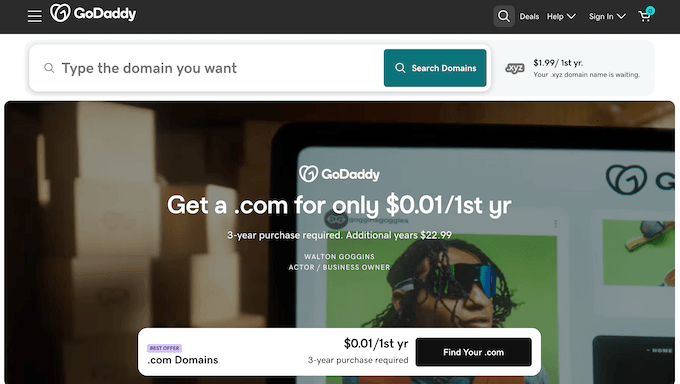
Our main concern with GoDaddy is aggressive upselling. The .com price on its site is $0.01, but only if you buy 3 years at once, and each extra year costs $22.99.
This means a ‘one cent’ domain costs $45.99 upfront. If you buy one year instead, GoDaddy charges $12.99 for the first year and $22.99 a year after that. During checkout, GoDaddy also offers paid Domain Protection, business email and website products, and you have to decline each one.
Pros:
- Basic privacy protection is free.
- New registrations can be refunded within 5 days.
Cons:
- The $0.01 price needs a 3-year purchase, so you pay $45.99 upfront.
- Renewals cost $22.99 a year.
- Checkout offers several paid add-ons, and you have to decline each one.
Namecheap
Namecheap suits you if you want a lower renewal price and free privacy, but would rather not move your nameservers to Cloudflare. A new .com costs $10.98 for the first year on sale ($14.98 regular price) and $18.48 a year to renew.
Pros:
- Free privacy protection for as long as you keep the domain.
- The lowest renewal price in our table after Cloudflare.
- No privacy upsell to decline at checkout.
Cons:
- The $10.98 sale price covers the first year only.
- An add-on page before checkout offers extra services you don’t need.
- Refunds within 5 days are not guaranteed, and you need to give Namecheap a valid reason.
Network Solutions
Network Solutions is one of the oldest domain registrars, and it makes sense if you want to prepay several years with our coupon. With the NAMEBOY code, a new .com costs $9.79 instead of the $11.99 list price, and it renews at $22.99 a year.
Pros:
- Our coupon lowers the first-year price to $9.79.
- You can prepay for several years at once.
Cons:
- Renewals cost $22.99 a year.
- Privacy protection is free for the first month, then costs $3.99 a month.
- The checkout has an upsell on almost every screen.
Apart from domain registrars, many WordPress hosting companies, such as Bluehost, Hostinger and DreamHost, include a free domain name for the first year with their yearly hosting plans.
Since you need both a domain name and web hosting to make a website, this is often the cheapest way to start. For our top picks, see our guide to the best WordPress hosting.
After the first year, the domain renews at the host’s standard rate. If you would rather buy the domain on its own, then we recommend Cloudflare.
Here is what the most common extensions cost for the first year:
| Extension | Typical First-Year Price | Best For |
|---|---|---|
| .com | $10–15/year | Most websites, and the most trusted |
| .net | $10–15/year | Good .com alternative |
| .org | $9–15/year | Nonprofits and communities |
| .io | $30–60/year | Tech startups |
| .co | $25–35/year | Short, memorable alternative |
| .shop / .store | $3–30/year | eCommerce sites |
Prices for other top-level domains (TLDs), such as .info, .blog and .biz, vary by registrar.
There are also ccTLDs (country code top-level domains) like .co.uk, .de, .ca, and more. Many cost more than .com, and they are the right choice if your business targets one country.
If you are still deciding on a name, then the easiest way to search is by using our Business Name Generator tool or the Nameboy domain name generator.
Hidden Costs of a Domain Name
Beyond the registration fee, most registrars add hidden costs and optional add-ons during checkout or renewal.
Yearly Renewals
You need to renew your domain every year. As long as you keep your registration active, you’ll keep full ownership and control over your website’s address.
We always recommend turning on auto-renew for your domains so you never lose them by accident. It’s free and stops someone else from registering your website address if your registration lapses.
Some domain registrars advertise $0.99 first-year deals and then charge a much higher rate at renewal. Before buying, always check the standard annual rate so you aren’t surprised by a large increase next year.
WHOIS and Domain Privacy
WHOIS is the public directory of domain ownership records. Without privacy protection, it can show your name, email address and phone number to anyone, which leads to spam emails and sales calls.
Domain privacy protection hides these details from the public record, and several registrars include it free.
Business Email Accounts (Email Domains)
At checkout, you will see an offer to buy a professional email address like [email protected]. Skip it, because most web hosting plans include a free business email address.
If you want a more powerful option, then buy directly from Google Workspace or Microsoft Office 365 so you are not locked into a registrar.
Pro Tip: Secure Domain Discounts for Multiple Years
The 3-to-5-year total shows the real cost of a domain, because that is where the renewal rate outweighs any first-year deal.
Some registrars, like Network Solutions, allow you to pre-pay for multiple years upfront. With our coupon, this locks in a discounted price for several years at once.
You can use our Network Solutions coupon with the code NAMEBOY to apply the discount to a multi-year registration rather than just the first year.
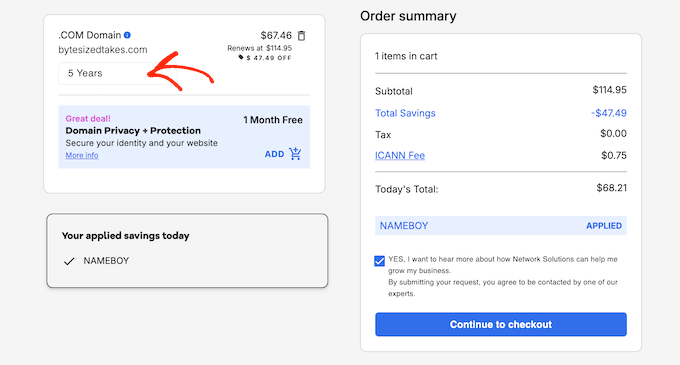
Pre-paying also locks in today’s price, so a price increase like the November 2026 .com increase does not affect you until the term ends.
Here is what a standard .com domain costs over 3 and 5 years at each registrar, using the prices we checked on 14 October 2026 (domain only):
| Registrar | 3-Year Total | 5-Year Total |
|---|---|---|
| Cloudflare | $31.38 | $52.30 |
| Namecheap | $47.94 | $84.90 |
| GoDaddy | $45.99 | $91.97 |
| Domain.com | $50.98 | $96.96 |
| Network Solutions | $57.97 | $103.95 |
| Network Solutions with NAMEBOY, prepaid | $34.93 | $67.46 |
The table shows two things. The cheapest first-year price often ends up costing the most over five years, and prepaying at Network Solutions with our coupon cuts the five-year cost from $103.95 to $67.46.
Cloudflare is still cheaper over the same period, at $52.30. Prepaying is about locking in a price and skipping yearly renewals, not finding the lowest total.
These totals assume renewal prices stay the same, which is the risk that pre-paying protects you against.
What You Will Actually See at Checkout
Most unexpected domain costs come from checkout. Almost every registrar adds optional extras between your search results and the payment page, and some pre-select them in your cart.
Here is what each registrar offers at checkout, and which extras to keep. Check the prices against your own cart before paying.
Cloudflare
Cloudflare has the simplest checkout of any registrar we have used. It sells domains at cost, with no markup and no upsells, and WHOIS privacy is free. For .com, the renewal price is the same as the first year.
The trade-off is that your domain must use Cloudflare’s nameservers while Cloudflare is your registrar. Nameservers are the servers that direct your domain to your website. You can still use any web host by pointing your DNS records to it.
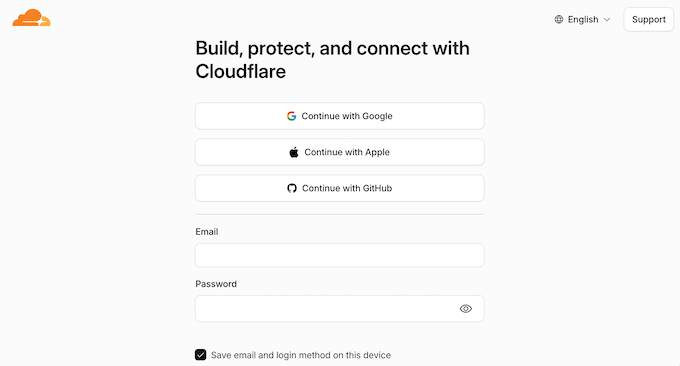
Starting at cloudflare.com, create a free account if you do not already have one. Registration happens inside your account, so there is no public checkout to work through.
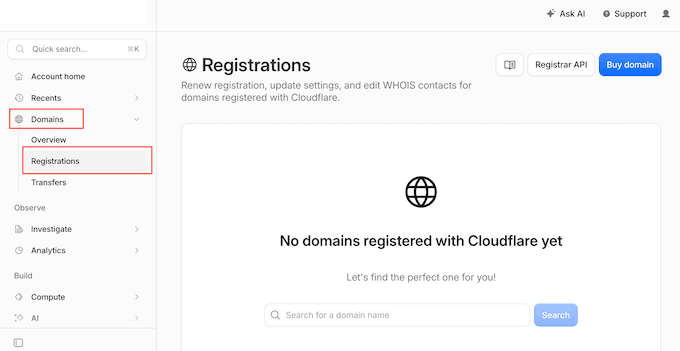
From the dashboard, go to Domains » Registrations.
Next, search for your domain name and check the price shown. It is the registry cost plus the fixed ICANN fee, with nothing added on top.
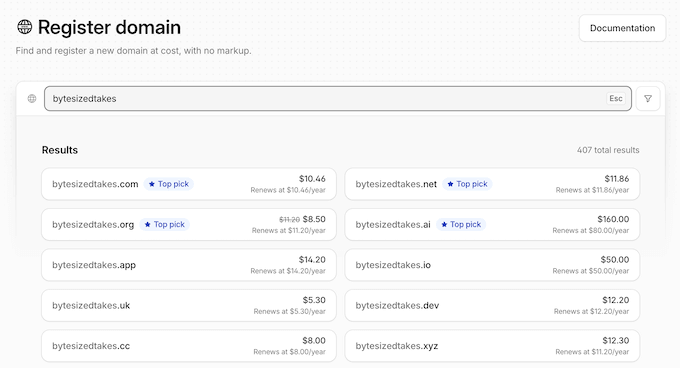
After that, complete the registration. There are no add-ons to decline, and privacy is applied automatically.
Once your domain is registered, open it in your dashboard and go to DNS » Records. Select ‘Add record’, choose the A record type, and enter the IP address from your web host.
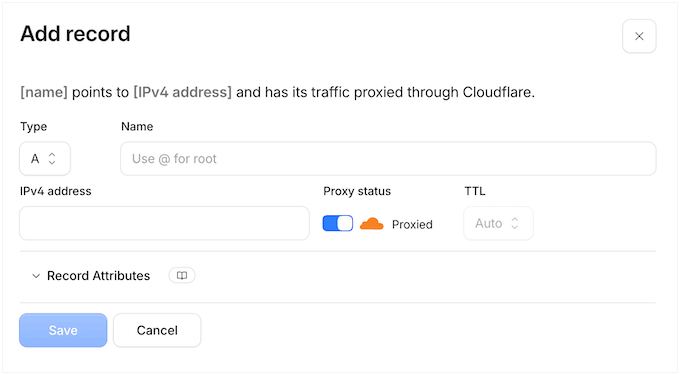
The ‘Proxy status’ switch on this form is the setting that turns on Cloudflare’s free CDN, SSL certificate and DDoS protection.
Tip: If you turn on Cloudflare’s proxy for a WordPress site, go to SSL/TLS and set the mode to Full (strict). The Flexible mode can send your site into a redirect loop, which shows up as the too many redirects error.
Domain.com
Domain.com advertises .com registrations starting at $5 for the first year, bundled with a free month of domain privacy and professional email.
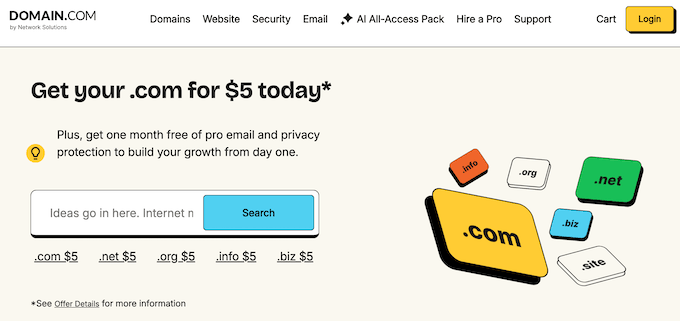
Starting at the Domain.com homepage, type your desired domain into the search box and select ‘Search’. Both the $5 offer and the free-month bundle are advertised on this page.
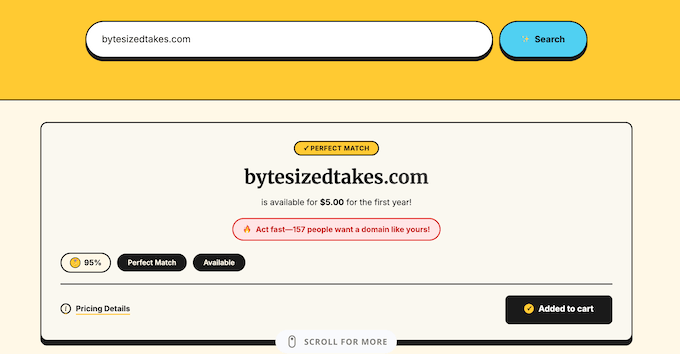
On the results page, add the exact domain you want and skip the alternative extensions listed underneath it.
The bundled privacy and email offer appears at the add-on step. However, a free trial converts into a paid subscription as soon as the month ends.
If you take the free month, then set a reminder a few days before it ends so you can cancel before the first charge.
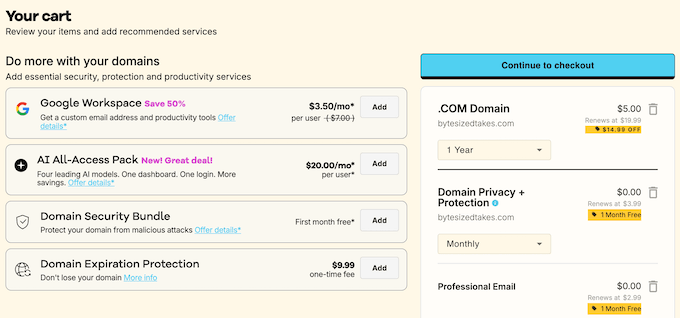
After that, open the cart and remove any extra extensions or services that were added for you. Before paying, check what the domain renews at since the $5 offer covers the first year only.
GoDaddy
GoDaddy now includes basic WHOIS privacy free with eligible registrations, so you do not need to pay anything to keep your name and address out of the public record.
Starting at the GoDaddy homepage, type your desired domain name into the search box and run the search. GoDaddy adds the .com version of your name to the cart straight away.
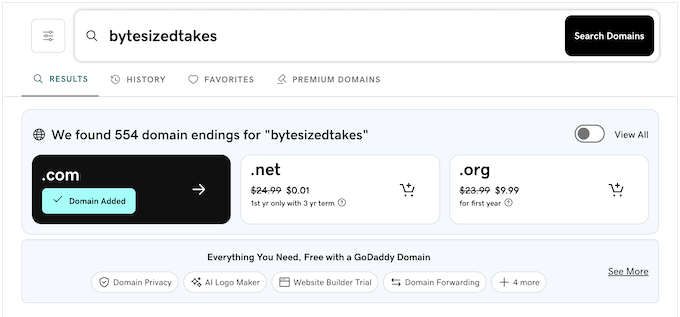
On the results page, check that the .com shows ‘Domain Added’.
GoDaddy also suggests alternative extensions here, such as the .net and .org versions of your name.
Next, GoDaddy opens a Customize page with Full Domain Protection added, which protects your domain against unauthorized transfers and changes.
It is switched on by default and costs $12.99 for the first year, then $14.99.
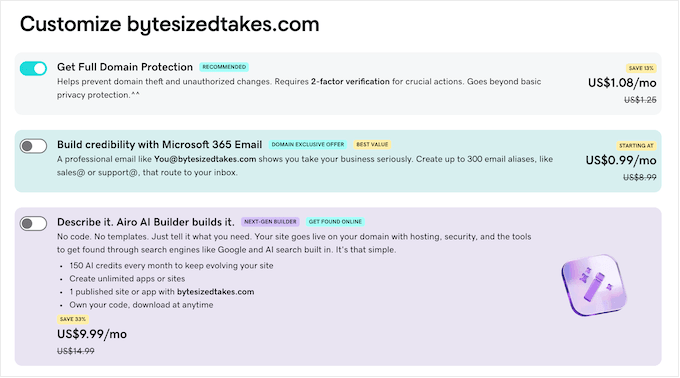
On the same page, GoDaddy offers a professional email account and its Airo AI website builder. Skip both, because most web hosts include email at no extra cost.
When we tested it, the cart defaulted to 1 year at $12.99 and still included Full Domain Protection, for a subtotal of $25.98.
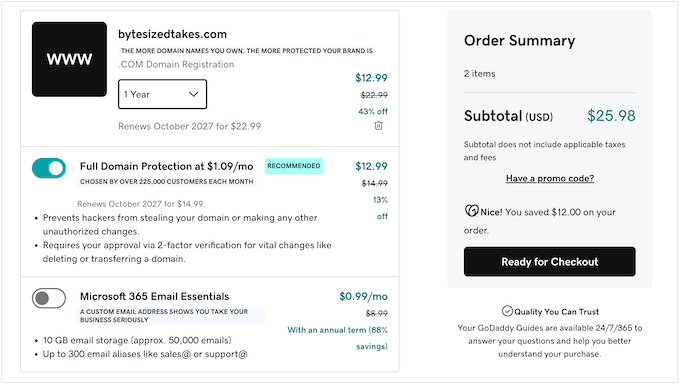
Before entering any payment details, confirm the only paid line in your cart is the domain name itself. You can remove everything else at this point.
Namecheap
Namecheap includes domain privacy for free for as long as you keep the domain registered. There is no privacy upsell to decline here, which is why we like it as a standalone registrar.
Starting at the Namecheap homepage, type your ideal domain name into the search box and run the search.
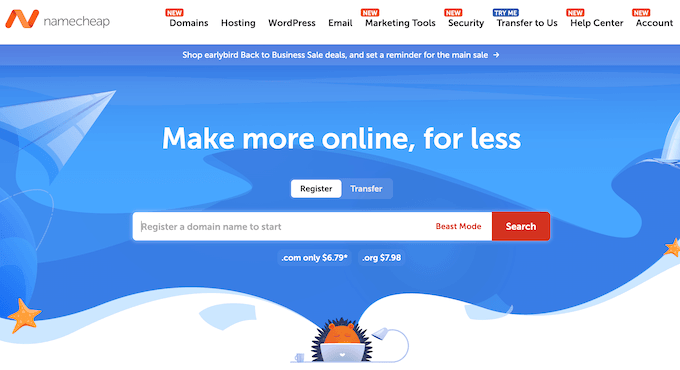
The results page shows two figures against your domain, a discounted first-year price and the higher standard rate. The renewal rate is the one that matters, because you pay it every year after the first.
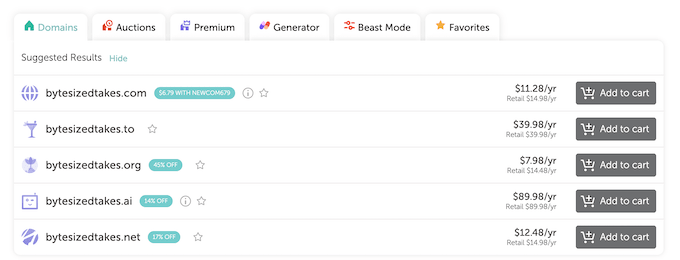
Once you are happy with the price, select ‘Add to cart’ on the exact domain you want, then open your cart.
Namecheap shows an add-on page before checkout. Because privacy is already included, you can skip the extra services offered here.
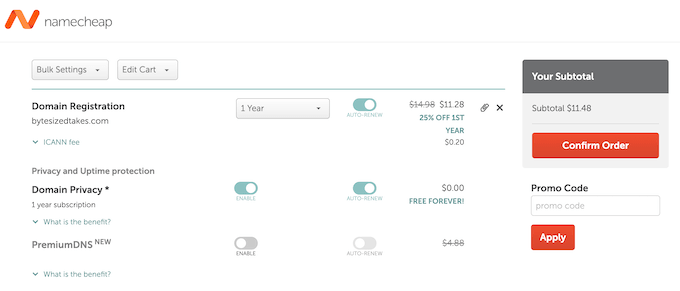
Finally, check the registration length and continue. Namecheap asks you to sign in before it will take any payment details.
Network Solutions
Network Solutions has the busiest checkout of the group, with something to turn down on almost every screen.
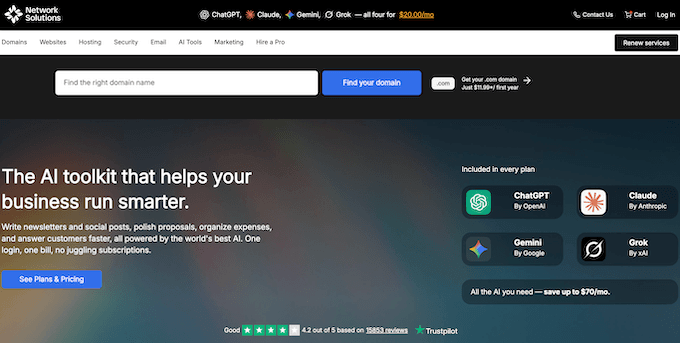
Starting at the Network Solutions homepage, search for your domain.
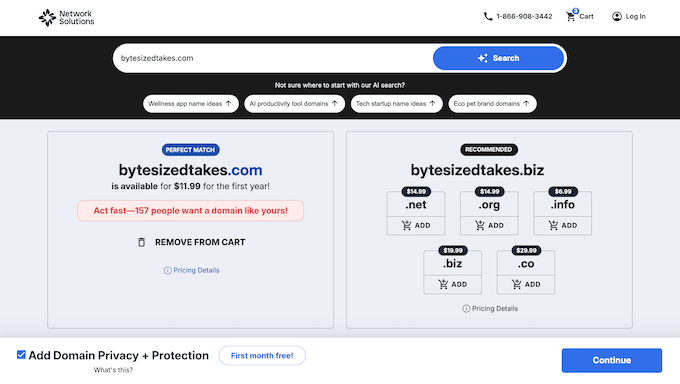
Network Solutions then automatically adds your searched domain to the cart, before you have agreed to anything.
Network Solutions also ticks a privacy add-on by default on the very first page of checkout. The first month is free, and then it costs $3.99 per month.
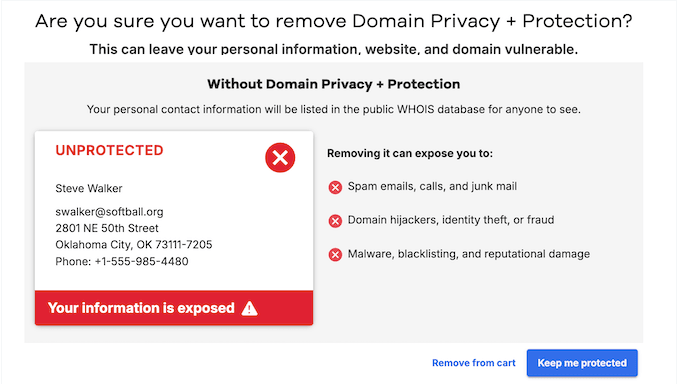
If you deselect this checkbox, you’ll see a red ‘Unprotected’ warning that makes declining feel riskier than it is.
Choosing ‘Unprotected’ only declines the paid privacy add-on. Your contact details go in the public WHOIS directory, but your website is no less secure, so you can click ‘Remove from cart’.
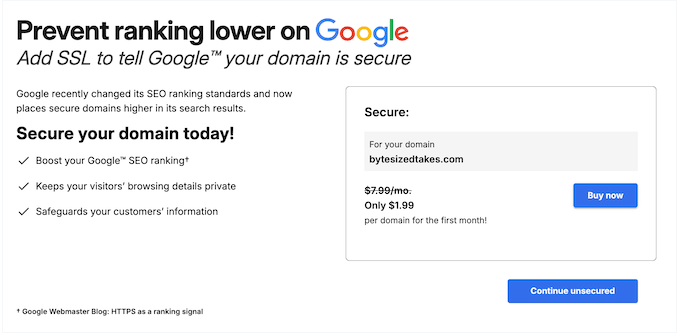
Further into checkout, Network Solutions offers a Secure Sockets Layer (SSL) certificate with a warning that an unsecured domain will rank lower on Google.
Decline it. HTTPS is a small ranking signal, and most web hosts include a free SSL certificate.
Along the way, decline any hosting, website builder or email products you are offered. You don’t need any of these to register your domain.
Finally, check the registration length, apply the NAMEBOY coupon code, and enter your payment details to purchase your domain name.
Which Add-Ons to Keep and Which to Decline
Use this checklist at checkout:
| Checkout Add-On | Our Verdict | Why |
|---|---|---|
| Auto-renew | Keep | It is free, and it stops you from losing the domain by forgetting to renew. |
| Domain privacy protection | Keep, but do not overpay | Worth having, though several registrars include it free. Do not pay for it if your registrar offers it at no cost. |
| Business email | Decline | Most hosting plans include email, and Google Workspace or Microsoft 365 is a better long-term option. |
| Web security, site backup, or malware scan | Decline | These protect a website, not a domain. At this stage, you haven’t even built your website. |
| SSL certificate | Decline | Most web hosts include one free through Let’s Encrypt. |
| Extra domain extensions | Decline | For a new website, registering .net and .org versions of your name rarely pays off. |
| Website builder or hosting trial | Decline | Take your time to choose a web host deliberately rather than picking one on an impulse during checkout. |
Declining every paid add-on at checkout is the best choice for a new site. You can add any of them later if your site needs them.
Also check the registration length. Several registrars default to two or more years, which raises the total before you reach the payment step.
These hidden fees and domain cost explanations are primarily for new domains that are available to register.
What about premium domains or domains that you buy from other people? Let’s take a look at the premium domain costs in detail.
What Affects the Price of a Domain Name?
Four things set the price of a domain name.
Domain Extension (TLD)
The extension is the biggest pricing factor. Expect $10 to $15 for a .com in the first year and $18 to $23 a year to renew, or about $10.50 every year at Cloudflare.
Newer extensions like .io cost $30 to $60 per year.
We always recommend .com when possible, because it is the most widely trusted extension and the easiest to remember.
Your Domain Registrar
Registrars charge different prices for the same domain. Most offer a first-year discount and then renew at a much higher rate, so always check the renewal price before you register.
Domain Availability
Brand-new domains always start at standard annual rates, but premium domain names carry hefty upfront price tags because someone else already owns them or the registry reserved them.
If no one else wants an expired domain, then you can register it at the standard rate.
Registration Length
Most registrars let you register a domain for 1 to 10 years upfront. Registering for several years locks in today’s price and protects you from future price increases.
How Much Does a Premium Domain Name Cost?
Premium domain names are short, brandable names that someone has already registered. Domain investors register many of them to resell at a profit.
Premium domains cost anywhere from a few hundred to many thousands of dollars, depending on the name’s length, uniqueness and brand potential.
The top sales reach millions. Here are the most expensive publicly reported domain sales:
- AI.com – $70 million (reported in February 2026)
- Insurance.com – $35.6 million
- PrivateJet.com – $30.18 million
- Voice.com – $30 million
- Hotels.com – $11 million
- Fb.com – $8.5 million
- Business.com – $7.5 million
Buy premium domains only from reputable marketplaces so the transfer is safe. See our guide on the best places to buy a premium domain name.
How to Estimate the Value of a Premium Domain Name
Most asking prices for premium domains are far above what the seller will accept.
Do some research and make a counteroffer. The investor only makes money when the domain sells.
To find a fair price, look at what similar names sell for on marketplaces like BuyDomains, Sedo or Flippa.
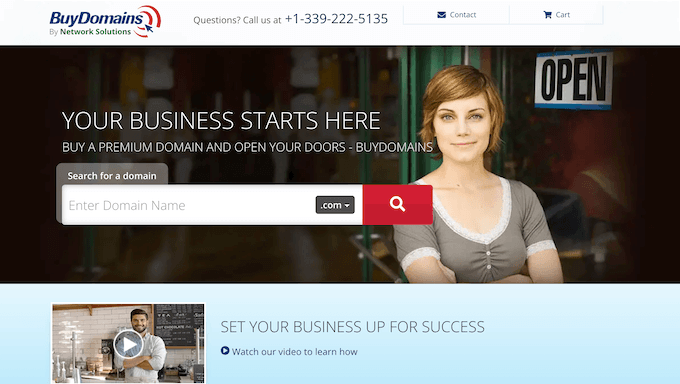
If the domain has a listed price, then start by offering 50 to 75% of it.
Note: Ignore automated domain value tools. Their estimates are too inaccurate to base an offer on.
If you can’t say what the name is worth to your business, then move on to another option.
How Much Does an Expired Domain Name Cost?
Thousands of domain names expire every day, because their owners chose not to renew them or forgot to.
Some of them are good, brandable names. Here are two places to find them.
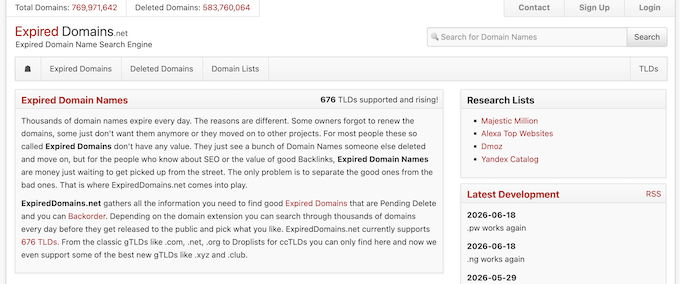
ExpiredDomains is a search engine dedicated to expired domain names. Its interface is dated, but it has a large and constantly updated index of domain names.
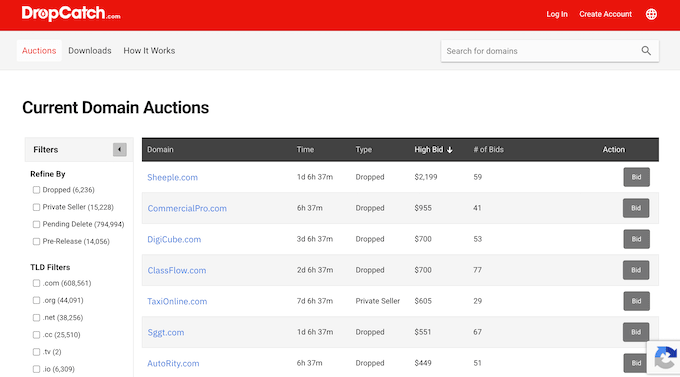
DropCatch is an auction marketplace that allows you to follow expired and soon-to-be-released domain names. It displays real-time bids for each listing, which helps you determine a realistic budget.
Note: You need to check for domain abuse and other problems before buying a used, pre-registered, or expired domain name (more on this later).
Cost of Expired Domain Names
Once an expired domain is released, you can register an expired domain name at your registrar’s standard yearly rate.
However, if a domain name is going to expire soon, you can use a domain backorder service. This allows you to place an advance order for the domain name, so you have priority if it becomes available.
If there is no other advance order for that domain name, then your order will succeed.
Backorder services charge a one-time fee of $25 to $99, separate from the price of the domain.
How to Buy a Domain Name Not Listed for Sale
You can still buy a domain that is registered but not listed for sale, if the owner is willing to sell.
Contact the owner directly to make an offer. If the domain has a website, then use its contact form.
Alternatively, you can use the Whois search to find the domain owner’s contact information and send them a message to express your interest.
Some owners are saving the name for a future project and will refuse to sell. Others will ask a high price before agreeing to transfer it. Remember, you are buying someone’s business idea, so you must be respectful and realistic about the value.
If you have a business idea, then register the domain now, even if you are not 100% sure about the idea. Otherwise, someone else can register it first. At about $10 to $20 a year, we consider it a cheap form of insurance.
Doing Your Homework Before Buying a Domain Name
A brand-new domain needs no checks. A domain that someone owned before needs the five checks below.
Some of these domain names violate copyright or trademarks, or were used to spread malware or spam.
1. Check For Trademark
First, ensure that the domain name is not a registered trademark of an existing business.
According to ICANN rules, if a domain name violates a company’s registered trademark, then that company can claim the domain name or ask you to take it down.
You can search the United States Patent and Trademark Office database to check for existing trademarks. Enter your domain name in the search box to see if it returns any matches.
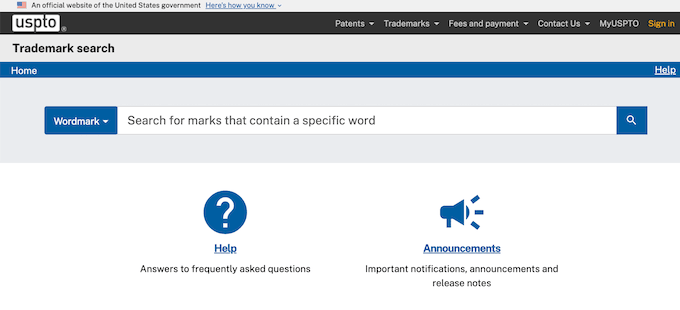
2. Check Past Domain Name Usage
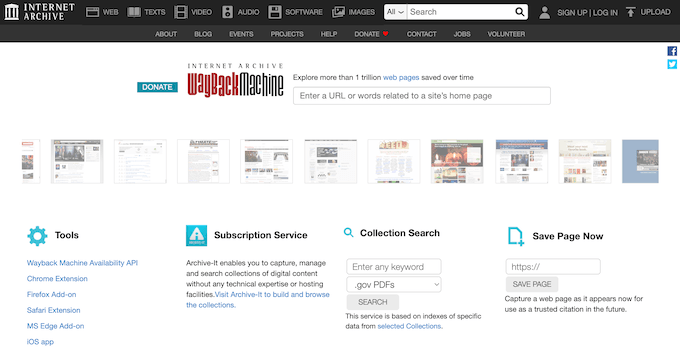
Next, check what kind of websites used the domain in the past.
You can do this using the Wayback Machine. It is a massive historical archive of the Internet, with snapshots of websites archived regularly.
3. Check Historical Whois Records
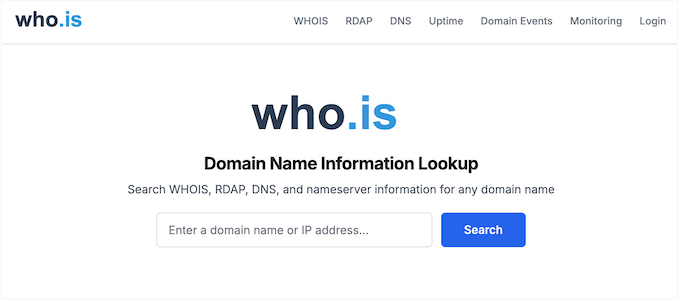
Whois tools provide you with historical whois records for all types of domain names. This helps you see when a domain name was created, last renewed, DNS changes were made, and other historical data.
4. Run a Domain Health Check Test
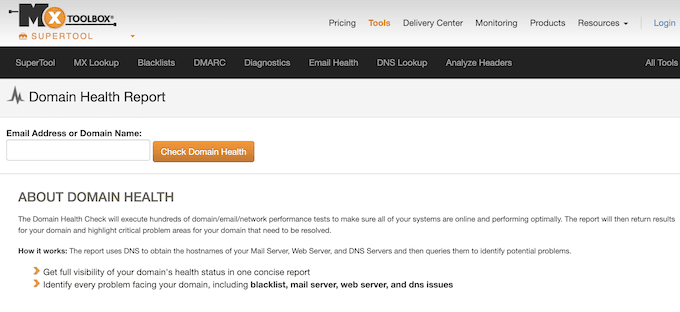
Finally, you need to make sure that the domain is not used to send spam, launch Distributed Denial of Service (DDoS) attacks, or spread malware.
You can use MxToolBox’s domain health tool to check for any potential security issues.
5. Check Social Media Handle Availability
Last, check whether the matching social media handles are available on Facebook, Instagram and X (formerly Twitter).
If someone else already uses your brand name on social media, then people searching for you will find their account instead of yours.
Frequently Asked Questions About Domain Name Costs
How much does a domain name cost per year?
Expect $10 to $15 for a .com in the first year and $18 to $23 a year to renew, or about $10.50 every year at Cloudflare. Always check the renewal rate before you register.
Newer extensions such as .io or .co cost more, and premium domains are priced separately by their current owner.
Are domain names free? Can I get a domain name for free?
Not on their own, but you can get a domain name for free for the first year with a web hosting plan.
Hosting companies like Bluehost, Hostinger, HostGator, DreamHost, GreenGeeks and others offer free domains with their web hosting packages.
After the first year, the domain renews at the host’s standard rate.
Is it worth paying for a domain name?
For any site you want people to take seriously, yes. Expect $10 to $15 for a .com in the first year and $18 to $23 a year to renew, or about $10.50 every year at Cloudflare.
Even at renewal prices, your own domain name is one of the cheapest parts of running a website, and it is the part you own and control.
A free subdomain from a website builder, such as yoursite.example.com, belongs to that platform rather than to you. If you ever move, then you lose the address, the traffic, and the email addresses built on it.
Paid add-ons at checkout are a separate matter, and you can decline most of them. Our checkout walkthrough above covers which ones to keep.
Can I buy a domain name forever (permanently)?
No, you cannot buy a domain name permanently. Domain name prices are for annual registrations, meaning you must renew them yearly.
However, you can pre-pay for up to 10 years, which guarantees that you will have the domain name for 10 years.
Which is the best domain name registrar?
We believe Cloudflare is the best domain registrar for most people. It sells domains at cost, renews at the same price, and includes free privacy.
If you want to pay for several years upfront, then our Network Solutions coupon is a good option.
If you also need web hosting, then a free domain from a host like Bluehost is the cheaper choice for the first year.
You can always transfer your domain name to another popular domain name registrar if you’re not happy with your existing provider.
Keep in mind that ICANN places a mandatory 60-day lock on newly registered domains, so you can’t transfer a brand-new domain immediately. ICANN’s board approved a change in June 2026 that will shorten this lock to 30 days, but it is not in effect yet.
Also, some registrars require you to pay for an additional year of registration when transferring a domain.
Do I need both a domain name and web hosting to build a website?
You need both a domain name and web hosting to build a website. A domain name is your website’s address on the internet, whereas web hosting is where your website files are stored.
For more details, see our guide on the difference between domain name vs. web hosting.
How much does a domain name cost on Wix vs. WordPress?
Hosted website builder platforms sell hosting and the domain together, so the domain price depends on your plan.
For example, Wix domains cost $6–$45 but are free if you choose the annual plan, which costs $17/month.
WordPress.com domains cost around $18/year, but they are included for free with the annual Personal plan, which costs $4/month (when billed annually).
But if you use a self-hosted WordPress platform, then many hosting companies, such as Bluehost, Hostinger and DreamHost, include a free domain name for the first year with their yearly plans.
For more details, see the difference between WordPress.com vs. self-hosted WordPress.org.
Additional Resources
We hope this guide helped you understand the real cost of a domain name. For your next steps, you may also want to check out these related articles:
- The Best Domain Name Registrars (Compared) – A detailed comparison to help you choose the right registrar for your needs.
- How Much Does It Really Cost to Build a WordPress Website? – See how domain costs fit into the overall budget for building your site.
- How to Register a Domain Name – Our step-by-step guide on the registration process and how to get a free domain.
If you liked this article, then please subscribe to our YouTube Channel for WordPress video tutorials. You can also find us on Twitter and Facebook.


Jiří Vaněk
A very good article about domains in general and their prices. I read it mainly because I was interested in the theoretical value of my domain if I wanted to sell it. Domain prices often reach astronomical heights, especially when they are auctioned. It’s great that you not only explained the main topic but also covered hidden costs and what WHOIS is. WHOIS is great when you’re looking for the owner of a domain to potentially contact them. Thanks for some new information.
Dennis Muthomi
My jaw drop when I read Insurance.com went for 15 million!!!
It’s clear that people who registered these generic domains early on could make a fortune years later from companies seeking to purchase them for their brand value.
Jiří Vaněk
Exactly. In the early days of the internet, when most domains were still available, it was very easy to register one after another and make enormous profits from them. Here in the Czech Republic, there’s even a movie about a man who made tens of millions this way. It was a great time for those who saw and seized the opportunity. The price of domains today can be astronomical if they hold huge potential to attract people. And it’s usually simple words, just like “insurance.”
Andrew May
Thanks, really clear explanation
WPBeginner Support
You’re welcome
Admin
Candace
Great information. The content you covered is going to help me get things up and running very soon!
WPBeginner Support
Glad our guide was helpful
Admin
Nidhi
Great article really helped me when I was buying my domain name and this article helped me to figure out the things very clearly.
WPBeginner Support
Glad our article was able to assist
Admin
Abdulfatai
Great guide which preemptively answers loads of newbie questions
WPBeginner Support
Thank you, glad you liked our guide
Admin
Dawn Andrews
The article was very informative as I was completely clueless before reading it! Thank you for giving me insight, understanding and most of all: direction.
WPBeginner Support
You’re welcome, glad our guide could help
Admin