


Do you want to make a separate RSS feed for each custom post type on your WordPress website?
Custom post types allow website owners to add their own unique content types. These post types can have similar features to posts or pages, including an RSS feed.
In this article, we will show you how to easily make a separate RSS feed for custom post types in WordPress.

Creating Separate RSS Feeds for Custom Post Types in WordPress
By default, WordPress generates several RSS feeds for your website.
For instance, all your recent blog posts appear in your site’s main RSS feed. This feed can be accessed by adding /feed/ to your domain name like this:
https://example.com/feed/
What most beginners don’t know is that WordPress generates separate RSS feeds for different archive pages of their websites.
For instance, it has separate RSS feeds for categories, tags, authors, and custom post types.
Let’s say you have a custom post type called movies on your website. You can view all content created in that post type by visiting the post type archive page:
https://example.com/movies

To view the RSS feed, you only need to add /feed/ next to the custom post type archive URL.
https://example.com/movies/feed/
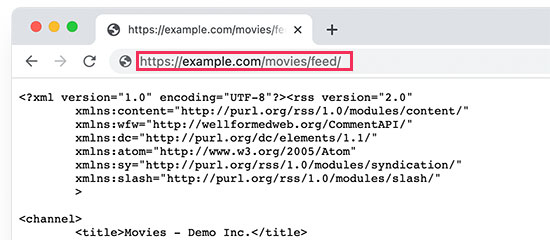
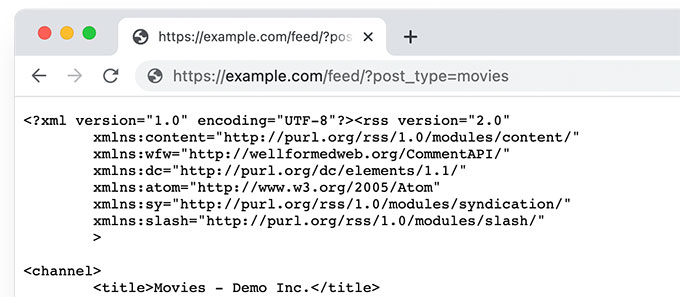
Alternatively, you can view the feed by adding the post type parameter to your main WordPress RSS feed. For example:
https://example.com/feed/?post_type=movies
This URL will then only fetch the custom post type called movies.
Add a Link to The Custom Post Type RSS Feed
Now that you know how to access the RSS feeds for any custom post type on your WordPress website, you can use that URL to create links to your custom post type feeds.
For instance, you may want to display an icon or a plain text link on the custom post type archive page so that your visitors can easily subscribe to those posts.
1. Add a Link to Custom Post Type RSS Feed in Block Themes
If you are using a block theme with full site editing support, then here is how you will add the link.
First, you need to add a custom code snippet to your WordPress website using the WPCode plugin.
Note: There is also a free version of WPCode that you can use to add this code snippet.
First, you need to install and activate the WPCode plugin and then go to the Code Snippets » + Add New Snippet page.
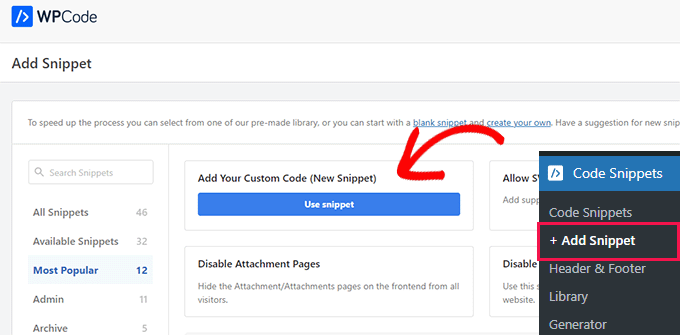
From here, click on the ‘Use Snippet’ button below the ‘Add Your Custom Code (New Snippet) option.
On the next screen, provide a name for your code snippet. This could be anything that helps you identify the snippet. After that, choose ‘PHP Snippet’ under the Code Type.
Finally, add the following code into the Code Preview box:
    if (is_post_type_archive('movies')) {
            $post_type = get_queried_object();
            // Get RSS Feed URL
            $rss_feed_url = get_post_type_archive_feed_link($post_type->name);
            // Output the shortcode content
            return '<p>Subscribe to <a href="' . esc_url($rss_feed_url) . '">' . $post_type->label . '</a></p>';
        }
    }
// Register the shortcode
add_shortcode('custom_post_type_rss_link', 'custom_post_type_rss_link_shortcode');
Don’t forget to replace ‘movies’ with the name of your own custom post type.
Here is how it would look as a snippet in the WPCode plugin:
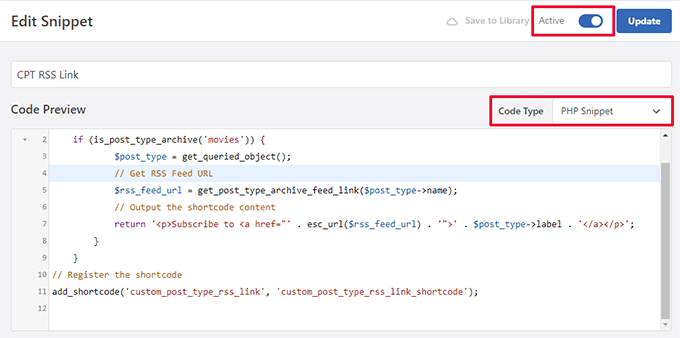
Now turn on the ‘Active’ switch and ‘Save/Update’ your snippet.
This code automatically detects if a user views the specific custom post type archive page and then displays a link to subscribe.
It then creates a shortcode that you can use in your block theme or widgets to display the link.
Next, you need to visit the Appearance » Editor page to launch the site editor. After that, choose the Templates » Archive option from the left menu.
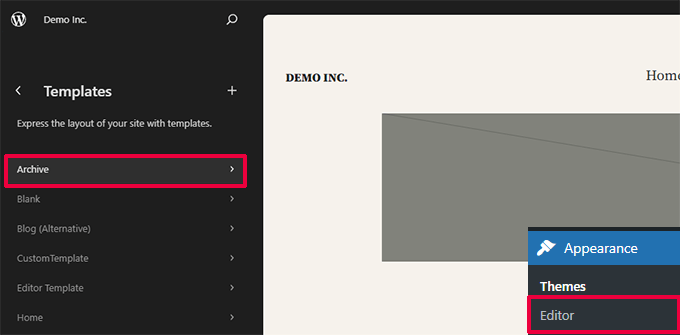
Next, add the Shortcode block where you want to display the RSS feed link.
Ideally, you would want to show it at the top just below the Archive Name.
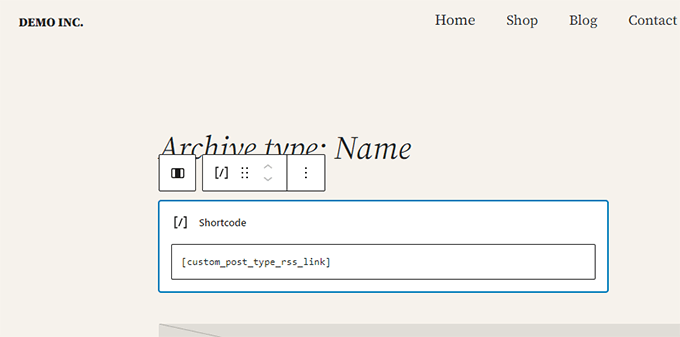
Inside the Shortcode block, you need to add the following shortcode:
[custom_post_type_rss_link]
After that, don’t forget to save your changes.
You can now visit your custom post type archive page to view the RSS feed link in action.

2. Add a Link to Custom Post Type RSS Feed in Classic Themes
The easiest way to do this is by creating a separate template for your custom post type in your WordPress theme.
Connect to your WordPress website using an FTP client and navigate to the /wp-content/themes/your-current-theme/ folder.
Now, if your custom post type is called movies, then you can create an archive-{post_type}.php file in your WordPress theme folder.
After that, you can simply copy the contents from your theme’s archive.php template and start customizing your new template.
You can simply add a plain HTML link to your post type archive feed using the following code:
<p><strong>Subscribe to: <a href="https://example.com/movies/feed/">Movies</a></strong></p>
Don’t forget to change the URL to your post type feed URL.
Now, the problem with this code is that you will have to create a new template file just for that particular post type.
This next method will allow you to dynamically generate the post type RSS feed link for all your archive pages.
Simply add the following code to your theme’s archive.php template file.
<?php if ( is_post_type_archive() ) {
$post_type = get_post_type( get_queried_object_id() );?>
				<p><strong>Subscribe to: <a href="<?php echo get_post_type_archive_link( $post_type  ); ?>feed/"><?php post_type_archive_title(); ?></a></strong></p>
<?php } ?>
This code will simply add a link below the post type’s archive page title, encouraging users to subscribe to this particular content type.

Bonus Tip: Add Custom Post Type to Your Main RSS Feed
Custom post type RSS feeds are not easily discoverable by feed readers, and most of your users may find your site’s RSS feed more easily.
This means that users subscribed to your main RSS feed will miss out on the content you publish in your custom post type.
You can easily fix this by adding content from your custom post type to appear in your site’s main RSS feed.
To do that, you will need to add a custom code snippet to your WordPress blog. We recommend using WPCode to add custom code snippets in WordPress.
First, you need to install and activate the free WPCode plugin. For more details, see our article on how to install a WordPress plugin.
Once the plugin is activated, visit the Code Snippets » + Add Snippet page from the WordPress admin sidebar.
From here, you need to click the ‘Use Snippet’ button under the ‘Add Your Custom Code (New Snippet)’ option.
You will now be directed to the ‘Create Custom Snippet’ page, where you can start by typing a name for your code snippet.
This name won’t be displayed anywhere and is just used for identification purposes.
Next, choose the ‘PHP Snippet’ option from the ‘Code Type’ dropdown menu on the right.
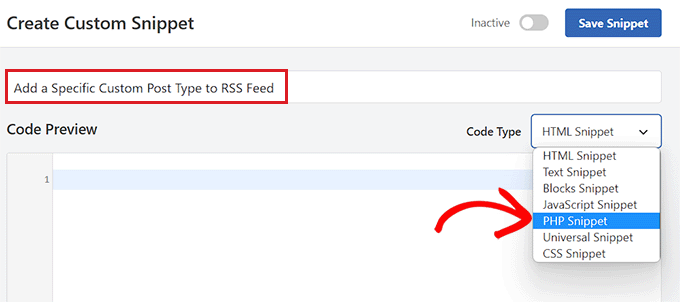
After that, you are ready to add your custom code snippet.
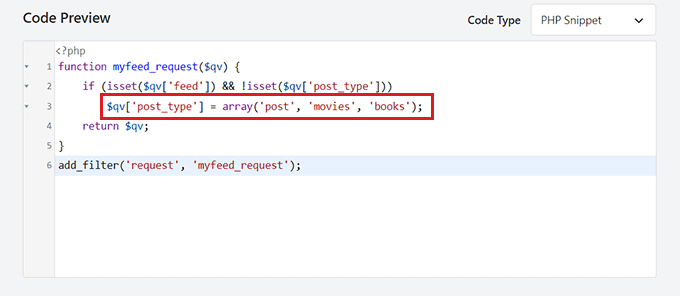
Simply copy and paste the following code into the Code Preview box:
function myfeed_request($qv) {
    if (isset($qv['feed']) && !isset($qv['post_type']))
        $qv['post_type'] = array('post', 'movies', 'books');
    return $qv;
}
add_filter('request', 'myfeed_request');
After adding the code, type the name of the custom post type next to where ‘[‘post_type’]’ is written in the code. In our example, we have ‘post’, ‘movies’, and ‘books’.
This custom post type will be added to your main WordPress RSS feed.
Next, you need to scroll back to the top of the page and toggle the ‘Inactive’ switch to ‘Active’.
Finally, don’t forget to click the ‘Save Snippet’ button to save and execute the code on your WordPress website.
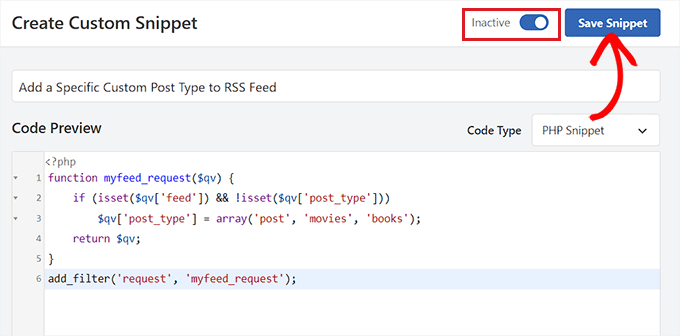
That’s all, your custom post type content will now be added to your site’s main RSS feed.
We hope this article helped you learn how to create a separate RSS feed for custom post types in WordPress. You may also want to see our tutorial on optimizing your WordPress RSS feeds and our expert picks for the best WordPress RSS plugins.
If you liked this article, then please subscribe to our YouTube Channel for WordPress video tutorials. You can also find us on Twitter and Facebook.




Syed Balkhi says
Hey WPBeginner readers,
Did you know you can win exciting prizes by commenting on WPBeginner?
Every month, our top blog commenters will win HUGE rewards, including premium WordPress plugin licenses and cash prizes.
You can get more details about the contest from here.
Start sharing your thoughts below to stand a chance to win!
Buddika Wijerathena says
Is there way to create RSS feed for single page ?
Ex – example.com/single-post-type/single-post-name
How to create RSS for this ?
WPBeginner Support says
RSS feeds are for listing multiple posts, the RSS would include a link to the post itself. We would not recommend creating a specific RSS feed for one post or page.
Admin
Milan says
Hey, and do you know any rss wordpress plugin for visitors ? As big new companies have own RSS creator to put rss on some freelancer sites, I want to it same, but not with post but with custom post types….do you know some RSS plugin ?
Tori says
It still doesn’t work for me – I’m trying to display an RSS Feed for the content on this page –
and displays the RSS feed for all of my posts. Any thoughts?
WPBeginner Support says
Hi Tori,
Pages are not included in an RSS feed. The URL you are using would work if you had a custom post type with that particular name.
Admin
Tori says
Thank you for the response. I’m sorry for the confusion as it looks like my links didn’t appear. The posts that appear on that page are custom posts (it’s like the blog roll but for custom posts), but the method to do the RSS feed didn’t work for me. Any thoughts or suggestions?
WPBeginner Support says
Hey Tori,
If you are certain that the posts belong to a custom post type, then you need to find out the name used by the custom post type. You can do that by clicking on the custom post type menu item in your WordPress admin sidebar. Clicking on it will take you to an admin page listing all the posts in that post type. Now if you look into the browser address bar you will see something like this:
http://www.example.com/wp-admin/edit.php?post_type=your_post_typeThe part that appears after the post_type= is your custom post type name. Now you need to use this to reach the RSS feed URL for that custom post type.
http://www.example.com/feed/?post_type=your_post_typeHope this helps.
Tori says
Thank you for the response. When I do that, I see this error message — any thoughts?
______
This page contains the following errors:
error on line 2 at column 1: Extra content at the end of the document
Below is a rendering of the page up to the first error.
WPBeginner Support says
Hey Tori,
Please see our guide on how to fix RSS feed Errors.
Admin
Cédric Charles says
Hi and thanks for this !
I would like to add custom fields for my custom post type feed (not for the regular posts, only for my custom post type).
How could I do that ?
Thanks a lot !
Toni says
Great tip! I almost made it from scratch! thank you!
erika says
Thank you a lot! your website helped me so much
mike says
I’ve gotten this to work but it limits the posts in the rss feed to 10 when I feedburn it. Is there any way to create a full rss feed for custom post types without limiting the quantity of posts it pulls in?
Editorial Staff says
Main feed normally displays the most recent posts. If a user tries to pull your feed using their feed reader, it will pull all older posts as well.
Admin
Andrew says
Hi there. Could you tell me how to create a feed for all post types, so someone can signup to a single RSS feed for all posts on the site, regardless of which post type they are in?
Editorial Staff says
You can combine custom post types in your main RSS feed.
https://www.wpbeginner.com/wp-tutorials/how-to-add-custom-post-types-to-your-main-wordpress-rss-feed/
Admin
Rems says
THANK YOU VERY MUCH, i was looking for this info for 2 hours. Glad i found your info. Fu…. taxonomy, where were you?!! aahhh!
Work so fine now
gabearnold says
Thanks! This is simple and a nice tip I didn’t know.
AlexAmelines says
it works for me and I love you for it. I created a link to each pos type I’ve got, but in the RSS reader they are all called the same, any way I can affect the title of the feed to reflect the post type?
Alan says
If I am using a slug re-write for the taxonomy that wouldn’t make a difference and be causing the problem would it? I’ve tried both ways and it doesn’t work either way, with the actual registered taxonomy title or the slug.
Alan says
No plugins. But I haven’t been able to figure out how to url my taxonomies with my custom post types like…
http://www.mysite.com/custompost/taxonomy/taxonmyterm
It’s just…
http://www.mysite.com/taxonomy/taxonomyterm
Would this have an effect?
Alan says
That doesn’t seem to work with the taxonomies.
Editorial Staff says
In our example if you notice, the genre is a taxonomy and it should work.
Admin
Alan says
Yeah, I replaced that with my own taxonomy followed by an equal sign and then one of my taxonomy terms, but it still just displayed the custom post type’s feed.
Alan says
It actually redirects back to the content post type’s feed url.
Editorial Staff says
Are you using any plugin to redirect this? Because this should not be happening…
Alan says
No plugins. But I haven’t been able to figure out how to url my taxonomies with my custom post types like…
http://www.mysite.com/custompost/taxonomy/taxonmyterm
It’s just…
http://www.mysite.com/taxonomy/taxonomyterm
Would this have an effect?
Aldi says
I can’t seem to make that work. It only takes me back to the custom post type archive page again.
Btw, I use Custom Post Permalinks plugin to allow custom post type permalinks and archive pages. Could that have created the issue??
Cheers!
Aldi says
Oops, sorry.. it was my theme’s problem. I had an action call to redirect anything that is related to custom post types, thus the redirection of the feeds. But got it fixed now.