


Do you want to display the number of archive months displayed in WordPress?
If you have been blogging for years, you will notice that your archives list will become too long.
In this article, we will show you how to limit the number of archive months displayed in WordPress.
Video Tutorial
If you don’t like the video or need more instructions, then continue reading.
Method 1. Limit Number of Archive Months with Plugin
This method is easier and it is recommended for all users.
The first thing you need to do is install and activate the Collapsing Archives plugin. For more details, see our step by step guide on how to install a WordPress plugin.
Upon activation, you need to visit Appearance » Widgets page and add the Collapsing Archives widget to your sidebar.
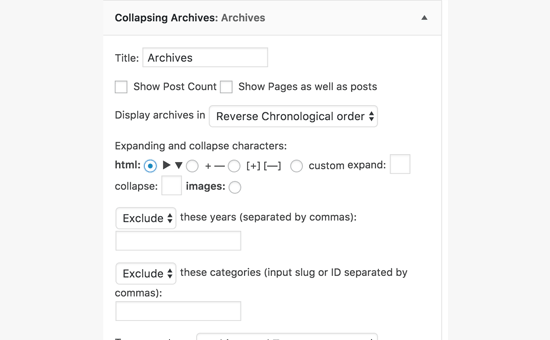
The widget menu will expand to show its settings.
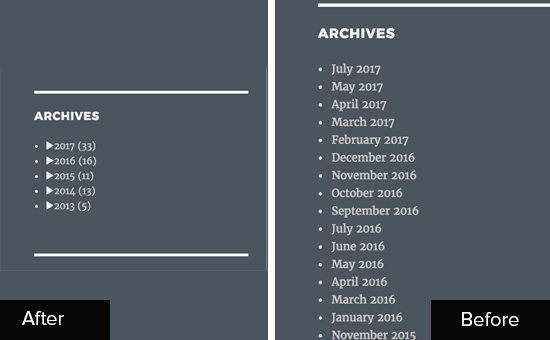
The Collapsing Archives widget uses JavaScript to collapse your archive links into collapsible yearly links. Your users can click on years to expand them to view monthly archives. You can even make monthly archives collapsible and allow users to see post titles underneath.
Review the widget settings to suit your needs and then click on the ‘Save’ button to store your settings.
You can now visit your website to see the widget in action.
Method 2. Replace Default Archives with Compact Archives
This method provides a cleaner alternative to the default archives widget by beautifully displaying them in a compact more presentable way.
First, you need to install and activate the Compact Archives plugin. For more details, see our step by step guide on how to install a WordPress plugin.
Upon activation, you need to visit Appearance » Widgets page and add the ‘Compact Archives’ widget to your sidebar.
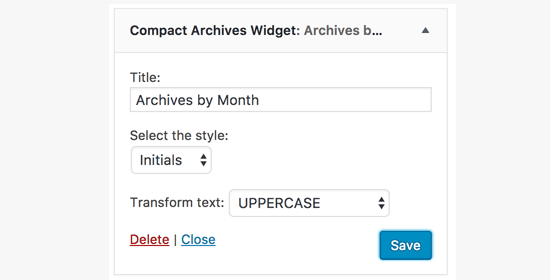
Compact Archives plugin comes in three styles. You can choose from block, initials, or numeric.
Don’t forget to click on the ‘Save’ button to store your widget settings.
You can now visit your website to see the compact archives in action.
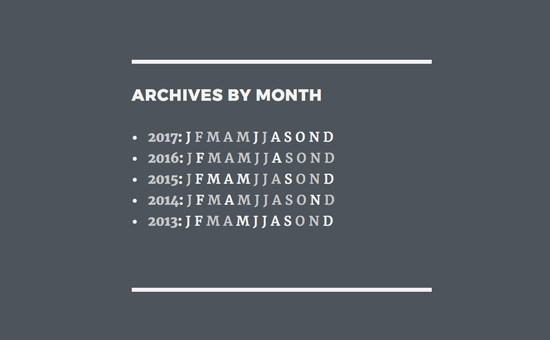
You can also use Compact Archives plugin to create a custom archives page on your site.
For more details see our guide on how to create compact archives in WordPress.
Method 3. Manually Limit Number of Archive Months in WordPress
This method requires you to add code to your WordPress theme files. If you haven’t done this before, then take a look at our guide on how to copy and paste code in WordPress.
You will need to add the following code to your theme’s functions.php file or a code snippets plugin.
// Function to get archives list with limited months
function wpb_limit_archives() {

$my_archives = wp_get_archives(array(
    'type'=>'monthly',
    'limit'=>6,
    'echo'=>0
));

return $my_archives;

}

// Create a shortcode
add_shortcode('wpb_custom_archives', 'wpb_limit_archives');

// Enable shortcode execution in text widget
add_filter('widget_text', 'do_shortcode');
We recommending adding code using WPCode, the best WordPress code snippets plugin. It allows you to safely add custom code in WordPress, without editing your functions.php file.
The first thing you need to do is install and activate the free WPCode plugin. If you need help, see this guide on how to install a WordPress plugin.
Once you’ve activated the plugin, go to Code Snippets » + Add Snippet from the WordPress dashboard.
Then, hover your mouse over the ‘Add Your Custom Code (New Snippet)’ option and click the ‘Use snippet’ button.
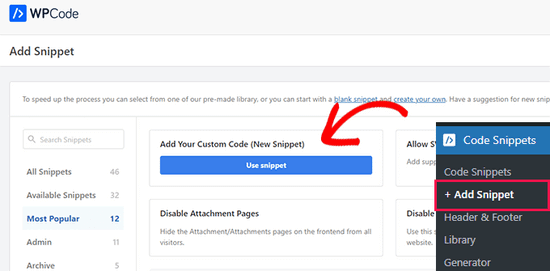
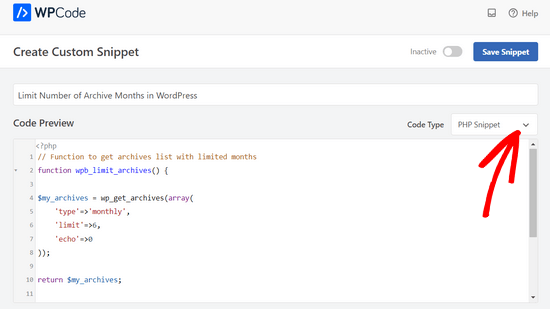
From here, you can add a title for your snippet, which can be anything to help you remember what the code is for.
Next, paste the code from above into the ‘Code Preview’ box and select ‘PHP Snippet’ as the code type from the dropdown menu.
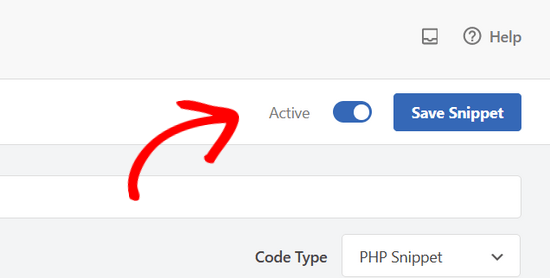
After that, simply toggle the switch from ‘Inactive’ to ‘Active’ and click the ‘Save Snippet’ button.
This code fetches the archives list and limits it to past 6 months only. It then creates a shortcode and enables shortcode in text widgets.
You can now go to Appearance » Widgets page and add a ‘Text’ widget to your sidebar. Switch to the text mode and add your shortcode like this:
<ul>
[wpb_custom_archives]
</ul>
Don’t forget to save your widget settings.
You can now visit your website to see your custom archives list in action.
That’s all, we hope this article helped you learn how to limit the number of archive months displayed in WordPress. You may also want to see our list of these most useful tricks for the WordPress functions file and our expert picks of the best drag and drop WordPress page builders.
If you liked this article, then please subscribe to our YouTube Channel for WordPress video tutorials. You can also find us on Twitter and Facebook.





Syed Balkhi says
Hey WPBeginner readers,
Did you know you can win exciting prizes by commenting on WPBeginner?
Every month, our top blog commenters will win HUGE rewards, including premium WordPress plugin licenses and cash prizes.
You can get more details about the contest from here.
Start sharing your thoughts below to stand a chance to win!
Jenny says
I used this code and it worked perfectly.
But the problem is that whenever I select a month, it takes me to the homepage.
WPBeginner Support says
It would depend on the method you are using. If you are using a plugin then you would want to reach out using the plugin’s support forum
Admin
kd says
hello, I would like to know how to remove the bullet points from the archive list.
Gaz says
Hi,
I would like to ask how can I show the amount of posts next to the month in the archive list in the footer?
Example:
May 2018 (5)
I put the above code on the site however I would like to show how many posts have been published each month as well.
Thanks
Gaz
Gaelyn says
Seems rather stupid to have to add plugins to stop something I didn’t ask for in the first place. How about just on/off. No reason to load all the archives.
Salvatore says
just add: ‘show_post_count’=>1 after ‘echo’=>0,
Stegemüller says
Hi there,
I simply love your site! I have been using WP for 10 years, but finally I am beginning to learn how to go backend and manipulate. Great fun and very useful.
To day I followed your advise about limiting the number of archives, and I used “Method 3. Manually Limit Number of Archive Months in WordPress” – It works great.
I just have one question: Is it possible to make the first letter a capital letter? I.e.: January not january, February not february and so on.
WPBeginner Support says
Hi Stegemüller,
By default, it should display month names starting with capital letter. If you are using WordPress in another language, then it is possible that localization files has month names in small letters. If you can confirm and report it, then translators would be able to fix that.
As a temporary fix you can use CSS. Wrap your shortcode around a div
<div class="capsfix">[wpb_custom_archives]</div>Then add this custom CSS:
.capsfix li {text-transform:capitalize;
}
Admin