


Did you know that WordPress comes with a built-in theme and plugin editor? This plain code editor allows you to edit your theme and plugin files directly from the WordPress dashboard.
While this may sound really helpful, we’ve seen how opening up the ability to directly edit files like this can lead to issues such as breaking your site. It can even introduce potential security issues when combined with other vulnerabilities.
In this article, we will show you how to disable theme and plugin editors from the WordPress admin area, and explain why it’s a smart idea.
Why Disable Theme and Plugin Editors in WordPress?
WordPress comes with a built-in code editor which allows you to edit WordPress theme and plugin files directly from the admin area.
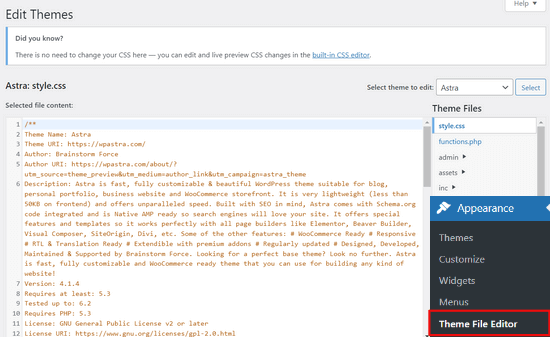
The theme editor is located at Appearance » Theme File Editor page. By default, it will show your currently active theme’s files.
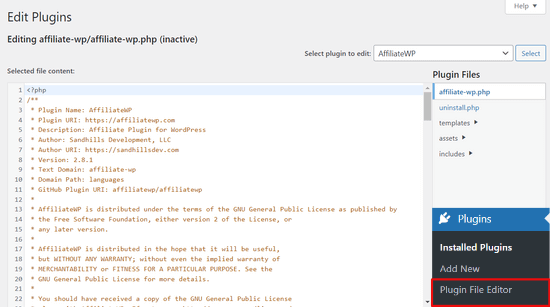
Similarly, the plugin editor can be seen at Plugins » Plugin File Editor page.
By default, it will show you one of the installed plugins from your site that comes up first in the alphabetical order.
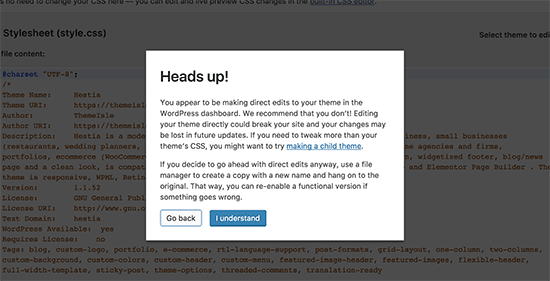
If you visit the theme or plugin editor page for the first time, WordPress will warn you that using the editor can break your website.
In WordPress 4.9, theme and plugin editors were upgraded to protect users from accidentally breaking their website. In most cases, WordPress will run a quick syntax check before saving your changes, and it will block the save if it detects a fatal error.
However, this is not guaranteed and some code may still slip through and you would end up losing access to the WordPress admin area.
The biggest problem with the built-in file editor is that it gives full access to add any kind of code to your website.
If a hacker broke into your WordPress admin area, then they can use the built-in editor to gain access to all your WordPress data. Hackers can also use it to distribute malware or launch DDoS attacks from your WordPress website.
To improve WordPress security, we recommend removing the built-in file editors completely.
That being said, let’s see how to easily disable theme and plugin editors in WordPress.
How to Disable Theme and Plugin Editors in WordPress
Disabling theme and plugin editors in WordPress is quite easy. But, it requires adding code in WordPress. If you haven’t done that before, see our guide on pasting snippets from the web into WordPress.
You’ll need to add this line of code to your theme’s functions.php file, a site-specific plugin, or by using a code snippet plugin.
define( 'DISALLOW_FILE_EDIT', true );
We recommend using the WPCode plugin because it’s free, easy to use, and won’t break your website if anything goes wrong.
Note: There’s also a premium version of WPCode that comes with advanced features like code revisions, automatic conversion pixels, scheduled snippets, and more.
First, you’ll need to install and activate the free WPCode plugin. For detailed instructions, see our guide on how to install a WordPress plugin.
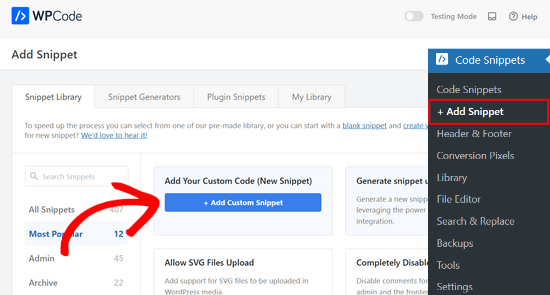
Once the plugin is activated, go to Code Snippets » Add Snippet from your WordPress dashboard.
Then, hover your mouse over the ‘Add Your Custom Code (New Snippet)’ option and click the ‘+ Add Custom Snippet’ button.
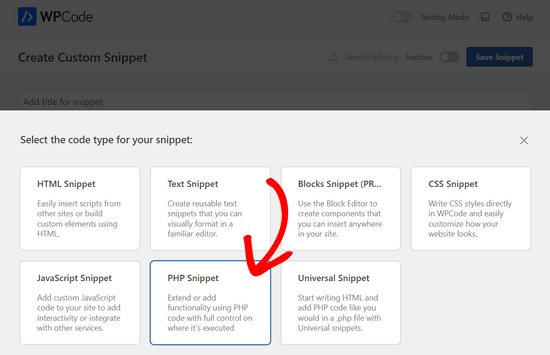
Next, you’ll be prompted to choose the code type for your snippet. Select the ‘PHP Snippet’ option.
After that, you can add a title for your snippet and paste the code from above into the ‘Code Preview’ box.
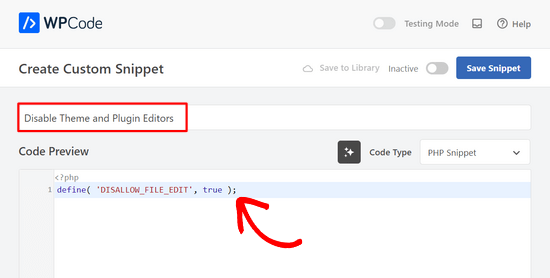
Lastly, simply toggle the switch from ‘Inactive’ to ‘Active’ and click on the ‘Save Snippet’ button.
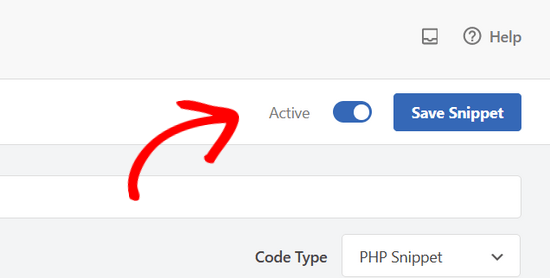
That’s all, plugin and theme editors will now disappear from themes and plugins menus in the WordPress admin area.
As an alternative, you can also edit your wp-config.php file and paste the code from above just before the line that says ‘That’s all, stop editing! Happy publishing’ :
Then, save your changes and upload the file back to your website.
If you don’t want to edit the files directly, then you can install the Sucuri WordPress plugin which offers the 1-click hardening feature.
The WPCode method is the faster, more lightweight option since it just adds one line of code, while Sucuri’s hardening feature is better if you want file-editing protection along with broader site security features like malware scanning and a firewall.
Proper Way to Edit WordPress Theme and Plugin Files
Many users actually use WordPress theme and plugin editors to look up the code, add custom CSS, or edit code in their child themes.
If you only want to add custom CSS to your theme, then you can do so by using the theme customizer located under Appearance » Customize.
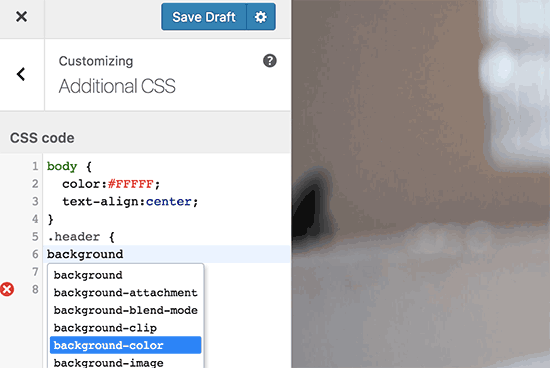
For more details, see our guide on how to add custom CSS in WordPress without breaking your site.
If you want to look up the code in a plugin, then you can do so by using an FTP client.
For better file management and syntax highlighting, you can use one of these code editors for editing WordPress files on your computer.
Last but not least, you can also create a custom WordPress theme without writing any code.
We hope this article helped you learn how to easily disable theme and plugin editors from WordPress admin panel. You may also want to see our ultimate guide to improving WordPress performance and speed or our expert picks of the best web design software.
If you liked this article, then please subscribe to our YouTube Channel for WordPress video tutorials. You can also find us on Twitter and Facebook.




Moinuddin Waheed
For security purposes and for keeping the plugins and themes work as they are supposed to, this is a must tweak to do.
most of my clients are of non tech backgrounds and they don’t do such stuff but not allowing to make such changes at the first place is a wise idea.
Thanks a ton for this easy step guide.
Jiří Vaněk
Thanks for the tutorial. I used the wp-config.php file and it works great. Especially for customer sites, this option seems very good to me, so that they don’t modify the codes of the site and also in terms of security.
In the end, I chose the wp-config file mainly so that this function could not be simply turned off from the administration, where it didn’t make any sense to me.
WPBeginner Support
Makes sense
Admin
Bob Putnak
This wont accomplish anything these days.
1) Using the CODE SNIPPETS solution, if the hacker has access to the admin panel, they will simply go to the CODE SNIPPETS panel and DISABLE the snippet.
2) Likewise, if you added it to the wp-config file, I cant see any reason why someone with access to the Admin panel could not simply INSTALL the CODE SNIPPETS plugin, activate it, then set a rule for:
define( ‘DISALLOW_FILE_EDIT’, true );
Seems to me that if the hacker has access to the admin panel, there is absolutely no solution to this problem.
If you disagree, please explain why. My login seems 100% sound.
WPBeginner Support
If someone has admin level access to your site then they could look to add a plugin to bypass the issue. There are other user roles that have access to these sections of your site but not the ability to add plugins and this can help protect you from a non-admin who has this level of access from getting into your files.
Admin
Robin Hood
Thanks for sharing this post. Helpful and Informative.
WPBeginner Support
You’re welcome, glad our content could be helpful
Admin
isabella
Hello there! I have the opposite problem I need to add a CSS code in the editor BUT the editor disappeared.
Do you have any suggestions?
thanks a lot
cheers
Mike Sawyer
Thank you for all the tips and helpful advice. This is the go to for me in case I get stuck. Thanks.
Raj
Unfortunately this isn’t working for me, I have updated the wp-config.php file but the editor option is still there in my wp dashboard, can you suggest me something?
Dave
Hi Raj,
I had the same issue, but was able to fix it. Not sure if this is your same issue, but I realized that when copy/pasting from an internet post, sometimes the single/double quotation marks (‘ ‘) or (” “) may be a curly quote vs. a straight quote. Try deleting the single quotes, and retyping them.
Hope this helps!
-Dave
William Marques
Is it possible disable save option for all? I want show control panel for my clients, but I do not want that they save the changes.
Bella
A trillion thank you’s!!
This tiny piece of code has rocked my world!
How have I not come across you in the past??
Keep smiling – Bella
Jimit Shah
hi
I want to disable paste command ( through mouse and ctr+v)in my php file in theme editor. So that i can write code not copy any code from outside.I want to give access manual code writing . please help me
Raja Dileep Kumar
define(‘DISALLOW_FILE_EDIT’, true); this function will work on themes/functions.php if i paste the code in wordpress
Pramod Kumar
It works, Thanks.
John McNamara
Hi there just wondering if anyone found a way to get around this without access as we have paid $1800 for some to set up a Website that is just a theme with out any changes made to it and wants to be paid more to unlock the editor for us
Please help!!
WPBeginner Support
If you have FTP access, or access to the hosting control panel, then you can easily edit the wp-config.php file and remove the code:
1-click Use in WordPress
Admin
Graham Peckham
Hi, well I was hacked yesterday by someone who installed MonsterInsights plugin to my web site, BUT, the line of code you suggest was already installed on wp-config.
So any suggestions for stopping these
Cheers
WPBeginner Support
Hi Graham,
If you suspect that your website may be hacked, then please see our guide on recovering a hacked WordPress site. You may also want to follow our complete WordPress security guide to protect your website in the future.
Prasath
define( ‘DISALLOW_FILE_EDIT’, true );
This one disable the editor for complete pages. I need to disable only for home page and for particular user(for Ex: Editor) . Coz I used page builder. My clients are not intrested to look over that..
Can any one help me ….
Mark Corder
I can also confirm that this works when the line is added to a Site-Specific Plugin – which you’ll also find the recipe for here on WPBeginner…
… so Thanks to you folks for all of it!
Melissa
Hey there! My cheeky developer has done this to me and I need access… is there a way to “undo” this clever trick without having FTP access?
I am also a developer and able to edit the files without any issues, but my contracted developer wants to charge me to access the code… so I am hoping I can jump in somehow!
Mel
Al Klein
Did you contract for ‘all deliverables’? If so, have him deliver the FTP password – it’s a deliverable. (It’s a contract, so it can be enforced by a court. You may not be able to sue for specific action, but you can sue for whatever it will cost to have another developer create a new site that’s exactly like the old one [which will probably bankrupt your existing developer – so it will make him prone to turn everything over to you].)
If you didn’t have ‘all deliverables’ included in the contract, or don’t have a signed contract, consider it a cheap legal lesson. (Law school costs a lot more.)
Bill
Great tip.
Is there a way to disable a specific editor (for example Elementor) for a specific post (page) type while still allowing access to the classic editor?
I hope this can be done in the child functions file.
Suresh Khanal
while reading this post I was wondering why would anyone need to hide the editor link in the WordPress Admin because it is only the administrators who gain access to those links and if they do not get permission to do the things the required, what’s the use? anywhere realize that is good with it helpful when you are setting up blogs for you clients. Thanks for the good tips.
Mark Corder
This is an excellent tip – and it worked fine for me adding the line to the functions.php file in my twentytwelve-child-theme’s folder. I still see options for customizing the theme (header, background, etc.) – but the “editor” links are now gone. (I had to press CTRL-R to force a page reload to make them disappear.)
I always try to remove everything from the backend that a client really shouldn’t be messing with, and those plugin & theme editors are just inviting disaster! It’s wonderful to be able to remove them with a single line of code…
I really appreciate these tips that edit child-theme functions and files to accomplish something rather than just recommending another plugin – though I realize this departs a bit from the “beginner” stuff.
And if you haven’t had this request a thousand times already, I’d love to see you folks open a “WPAdvanced” site for us hard-core folks!
Editorial Staff
Thanks for the feedback Mark. Yes, we have gotten the request for WPAdvanced in the past. For now our focus is to continue to improve WPBeginner (we’re still not there yet).
-Syed
Admin
Gray Ayer
A problem encountered with this technique is that it also prevents anyone from upgrading the outdated plugins. Any ideas on that, besides disabling the addition to the wp-config file, upgrading, then restoring the hardened security?
Editorial Staff
That’s interesting. We have this code running on our site, and we can do 1-click upgrades.
Admin
joanpique
Hi, thanks for the tip, yes, it works on functions.php file.
But this code turn me off my theme options page :(…, is there any other code that only hide editors or something to put in the options page for avoid hidding?
Renan Santos
All you have to do is open your wp-config.php file and paste the code!
Devin Walker
99% of my clients are non-technical