


Do you want to show your post thumbnails in your WordPress RSS feeds?
RSS feeds help you promote your content in directories, feed readers, and other applications that use RSS feeds. However, the sad truth is that your blog posts featured images will not show up in your RSS feeds.
In this article, we will show you how you can add post thumbnails to your WordPress RSS feeds.
What is WordPress RSS Feed?
RSS, or Really Simple Syndication, allows users and applications to receive regular updates from a website or a blog in a web feed.
RSS feeds help you get updates from your chosen websites without having to visit them manually. It helps save time, and you get to see the latest content in your email, feed readers, and other devices.
If you have a WordPress blog, then RSS feeds can help you promote your content and drive traffic to your blog. You can make new articles easily discoverable for readers and keep them coming back to your site for fresh content.
However, the problem with WordPress RSS feeds is that they don’t show your blog posts’ featured images.
Adding post thumbnails helps you customize the RSS feed. It also helps enhance the feed and provide a better user experience.
That said, let’s take a look at how you can add post thumbnails to WordPress RSS feeds. We’ll show you two ways to do this, including using a WordPress plugin and adding a simple function to your theme files.
Adding Post Thumbnail to RSS Feeds Using a Plugin (Easy Way)
The easiest way to show featured images in the RSS feed is by using the Featured Images in RSS for Mailchimp & More plugin.
It’s a free WordPress plugin that helps you add images to your RSS feed so that they’ll display in your RSS email campaigns and anywhere else your RSS feed is used.
First, you’ll need to install and activate the plugin. If you need help, then please see our guide on how to install a WordPress plugin.
Upon activation, you can head over to Featured Images in RSS from your WordPress dashboard.
The plugin lets you change the RSS image size, alignment, text padding, and choose if you want to make the images clickable.
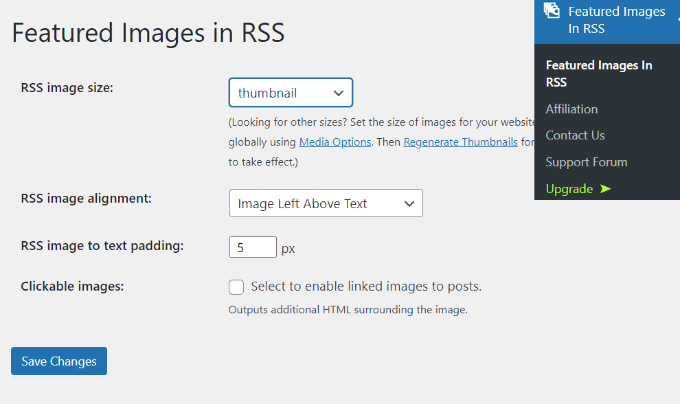
When you’ve made your desired changes, don’t forget to click the ‘Save Changes’ button.
Manually Add Post Thumbnail to RSS Feeds (Coding Required)
Another way you can display post thumbnails in WordPress RSS feeds is by adding a code snippet to your theme’s function.php file.
We don’t recommend directly editing the functions.php file though, because the slightest mistake can break your WordPress site. Instead, an easier way of adding code is by using the WPCode plugin.
With WPCode, you can safely add code snippets in WordPress without any errors. Plus, it allows you to keep your custom code even if you update or change your WordPress theme.
The free version of WPCode comes with everything you need to add custom code in WordPress, including a library of ready-made code snippets. WPCode Pro includes advanced features like code revisions, scheduled snippets, conversion pixels, and more.
First, you’ll need to install and activate the WPCode plugin. You can follow our tutorial on how to install a WordPress plugin.
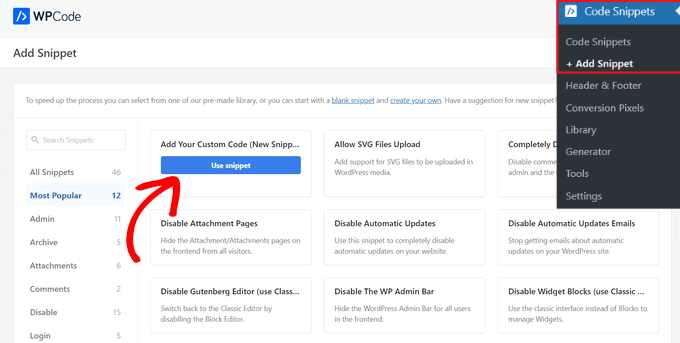
Once the plugin is active, you can go to Code Snippets » + Add Snippet from the WordPress dashboard. Then, go to the ‘Add Your Custom Code (New Snippet)’ option and click on the ‘Use snippet’ button.
After that, you have to copy the following code:
function rss_post_thumbnail($content) {
global $post;
if(has_post_thumbnail($post->ID)) {
$content = '<p>' . get_the_post_thumbnail($post->ID) .
'</p>' . get_the_content();
}
return $content;
}
add_filter('the_excerpt_rss', 'rss_post_thumbnail');
add_filter('the_content_feed', 'rss_post_thumbnail');
Next, go ahead and give your snippet a title. Then, paste the code that you copied earlier into the ‘Code Preview’ box.
Don’t forget to select ‘PHP Snippet’ as the code type from the drop-down list on the right.
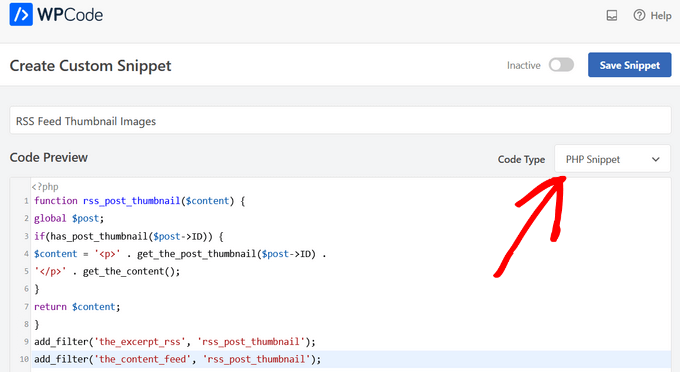
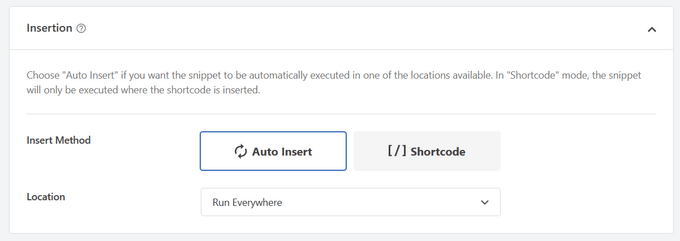
Then, scroll down to the ‘Insertion’ section.
For this snippet, you’ll want to leave the ‘Auto Insert’ option selected to automatically insert and execute the code snippet on your site.
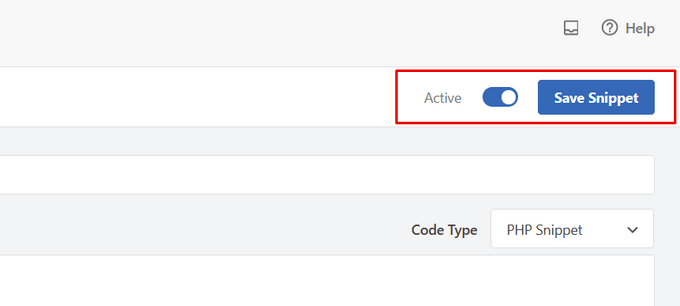
Finally, toggle the switch from ‘Inactive’ to ‘Active.’
Then, don’t forget to hit the ‘Save Snippet’ button.
You can follow our tutorial on how to easily add custom code in WordPress for more details.
For more tips on adding featured images to your blog posts, you can see our guide on how to add post thumbnails in WordPress.
We hope this article helped you learn how to add post thumbnails to your WordPress RSS feeds. You can also go through our guide on the best free business name generator and how to choose the best website builder.
If you liked this article, then please subscribe to our YouTube Channel for WordPress video tutorials. You can also find us on Twitter and Facebook.




Syed Balkhi says
Hey WPBeginner readers,
Did you know you can win exciting prizes by commenting on WPBeginner?
Every month, our top blog commenters will win HUGE rewards, including premium WordPress plugin licenses and cash prizes.
You can get more details about the contest from here.
Start sharing your thoughts below to stand a chance to win!
Jennifer says
Hello,
When I added this code to my functions.php, it changed the length of the description. Now all the blog post content is showing in the RSS feed. Before it was cut off. Is there a way to limit the description to a max of 300 words?
Thank you
WPBeginner Support says
For what you are wanting you would want to change get_the_content to get_the_excerpt and that should allow it to display with the excerpt
Admin
M. Shukla says
First of all let me thank you guys for various tutorials that have helped me over the time to fix several issues.
I am just looking for a simple implementation.
I just want my WordPress Category Feed e.g. wpbeginner.com/category/wp-tutorials/feed to have post featured image.
So that under category/news/feed my articles show featured images in Google News Publishers sections.
WPBeginner Support says
The method from our guide above should allow you to add images to your RSS feeds. The plugin has a paid plan if you wanted to specifically exclude other categories.
Admin
Jana says
This does not work. Unfortunately, when executed it displays the full post content and the full-size featured image instead of the excerpt.
WPBeginner Support says
From your statement it does work. It adds the post thumbnail which is what this tutorial is about, you would want to change the get_the_content to get_the_excerpt to show the excerpt and not the full content.
Admin
marisa says
So how do you modify the function if you are using an ACF for your main custom thumbnail instead of the wordpress thumbnail?
Dani Serrano says
Hi all,
I have 4 CPT in my site.
Added all of them in my feed following: https://www.wpbeginner.com/wp-tutorials/how-to-add-custom-post-types-to-your-main-wordpress-rss-feed/
But now I want to add the thumbnail as content into feed.
Do you know how I can do it?
That I need is similar to this post content but for all CPTs.
Thanks and Regards,
Dani
wasim says
Sir. I am using the RSS feeds of other websites to pick the news but it doesn’t show the feature images just only show the link. Will this code or plugin work for me?? I tried both but nothing happened. Thanks.
And please suggest me what should I do
SoNyne says
So this just adds the image to the content. Not really desired for my needs. How can I add a new field so that I can use get_thumbnail when using the fetch_feed method in WordPress?
Araujo, Luiz says
Hello, how can I apply this filter in a custom rss
I have the following rss created
add_action(‘init’, ‘customRSS’);
function customRSS(){
add_feed(‘feedname’, ‘customRSSFunc’);
}
function customRSSFunc(){
get_template_part(‘rss’, ‘feedname’);
}
Great job
Steffi says
I pasted the code in WP functions now, my side is crashed. White screen. Can not log in. HELPPP!!!!
WPBeginner Support says
You will need to connect to your website using an FTP client. Then locate the functions.php file (you will find it in /wp-content/themes/your-theme-folder/), edit the file using a plain text editor like Notepad. Undo the changes you made earlier. Finally, save the file and upload it back.
You may also want to see our WordPress troubleshooting guide.
Admin
Bolkya Resha says
I tried same for my site but rss feed not showing images,plz help
WPBeginner Support says
RSS feed is an XML file. Usually when you are viewing an XML file in a browser it will only show you the code and will not execute the markup. You need to check your feed into a feed reader like Feedly.
Admin
Natalie says
Is it possible to use this function with the WP RSS WIdget? I need to imports POSTs with thumbnails to another site.
Suresh Khanal says
It was really a headache to see the RSS-to-email campaigns without no images because the RSS feed did not have the necessary tag to pull images from. Anyway, changed the functions.php file and now MailChimp can pull the required components and now the emails look beautiful.
However, still the images in RSS feed look really big and wish to resize them to a suitable size. Needs to search more and find a solution for this.
Elodie says
Thank you it crashed my site!
Jeremy R. Hammond says
This accomplished getting the thumbnail included in the feed, but created two other problems:
1) My feed now shows the full content instead of just the summary.
2) The feed is also capturing my featured image from the content (the full image, not just the thumbnail) and this shortcode:
[caption id="attachment_24496" align="aligncenter"width="739"]Caption Text[/caption]
I assume there’s a way to correct both of these problems. Can anyone assist?
Gretchen Louise says
Thank you so much for this code! Any suggestions for editing it so that the post thumbnail is a link to the post itself?
Keifer Moore says
I tried to implement this and received “Parse error: syntax error, unexpected ‘<' in /home/content/98/8201898/html/wp-content/themes/twentyfourteen/functions.php on line 526"
I can't access wp-admin or the rss feed. I've tried making new wp-config.php files and nothing's working. Could someone help?
Salvatore Capolupo says
Great help, thank you
I Plank says
thanx a lot. it works
Benjamin says
Hi whoever wrote this post. Thanks at first, but when using this code, my feed displays the image in FULL SIZE, not as a thumbnail. What would you recommend to define a size?
vijay saklani says
Hi,
i am new to wordpress. can you suggest me how can i use this one to show rss fedd with thumbs. here is my code:
get_item_quantity( 10 );
// Build an array of all the items, starting with element 0 (first element).
$rss_items = $rss->get_items( 0, $maxitems );
endif;
?>
<a href="get_permalink() ); ?>”
title=”get_date(‘j F Y | g:i a’) ); ?>”>
get_title($content,) ); ?>
get_description() ); ?>
and add the describe function in function.php of theme. but not working.
Help me!!!!
Thnaks
François says
Hello,
Thanks you for sharing this!
I’d like to know if this is possible (and how) to use this script to display author image in rss feed? Is there a way to do this ?
Thanks
François
Kama says
Why we need check has_post_thumbnail()?
get_the_post_thumbnail() return empty string if it couldn’t get thumbnail. Also, no need to define global $post. Filters calling from inside the loop.
And why we call get_the_content(), is it nessesary?
This code will enaugh:
—
function rss_post_thumbnail( $content ){
$img = get_the_post_thumbnail( null, array(100, 80), array( ‘align’ => ‘left’, ‘style’ => ‘margin-right:15px;’ ) );
$content = $img . $content;
return $content;
}
add_filter( ‘the_excerpt_rss’, ‘rss_post_thumbnail’ );
add_filter( ‘the_content_feed’, ‘rss_post_thumbnail’ );
—
Sorry for my english. It’s not my native.
Abhay Singh says
Hello sir, I have added code on functions.php but thumbnail not showing
Brett Bumeter says
Trying this with the genesis magazine theme, no luck. The article is getting a wee bit dated. I was wondering if something might have changed in wordpress since this was originally written, or if maybe I’m just missing something. Been a while since I wondered down the rabbit hole chasing feed code
/** Add thumbnail to Magazine theme feed*/
function rss_post_thumbnail($content) {
global $post;
if(has_post_thumbnail($post->ID)) {
$content = ” . ‘ID).'”>’. get_the_post_thumbnail($post->ID).’‘ .
” . /* full content option get_the_content() */get_the_excerpt();/*exercpt option */
}
return $content;
}
add_filter(‘the_excerpt_rss’, ‘rss_post_thumbnail’);
add_filter(‘the_content_feed’, ‘rss_post_thumbnail’);
Editorial Staff says
Just tested the code from the article on a custom genesis child theme. It works fine. It won’t work with the default WordPress feed that firefox shows. But if you go to the atom feed, then it will work. If you are using a feedburner or another app, it should work.
Admin
Nick Aster says
Ok…. wait a minute.
Looks like this forces my RSS feed to be full content. Is that the case?
More importantly, it looks like all this does is slap the tumbnail at the beginning of the content in the RSS feed. Am I missing something here?
Editorial Staff says
Yes, it does make the feed full content. You can change get_the_content() to get_the_excerpt().
Yes, the point is to add the featured thumbnail in RSS. In most cases, that is added before the post. You can style the paragraph tag however you like. Add a float:left; or anything that you want.
Admin
shen says
10x .. it’s work perfectly
eribowo says
is this working for RSS reader wordpress widget…?? i looking for way to insert thumbnails image in rss widget..anyone..?
laksh says
Hi i tried this but it gives error Fatal error: Call to undefined function add_filter() in wp-includes/functions.php on line 33 . please help me to solve this porblem. thanx in advance.
AndyiBM says
This works great, except that when there is a thumbnail present, the feed always repeats the post title within the content text (or excerpt text, as I’m using), which looks a little redundant. For posts without a thumbnail, the title is not repeated. Is there any way of removing this extra title text? It has no surrounding tags, so I can’t hide it using CSS.
Piotr Sajnog says
Is there anyway to align post thumbnails to the left of the entry in RSS feed?
Editorial Staff says
Yes, add styling to it. Change the Paragraph tag into a Div and tell it to float left with some margin.
Admin
AzzePis says
I think it’s better if you change code:
$content=”.get_the_post_thumbnail($post->ID).”.$content;
to maintain the original content.
Meg says
so what would the final code – all of it – look like?
Non-coder who wants a thumbnail in her blog feed.
Editorial Staff says
The code in the article is the final code that you need… ofcourse if your theme doesn’t have thumbnail enabled, then you will need more.
Admin
Cosmin says
How would you make the post thumbnail link from RSS to the post?
I don’t get along with PHP, any help is appreciated
Editorial Staff says
You would modify the function a little bit. Add this php code in the link tag: the_permalink($post->ID)
Admin
Jake says
This is really something! I would love to add something like this to Inside the Webb, I’ll have to mess around with some code and see what I can do.