


Many WordPress beginners are unaware that they can install WordPress in other languages quite easily.
WordPress is fully translated into more than 65 languages and can be used in your native language.
In this article, we will show you how to install WordPress in other languages. We will also talk about translating WordPress and making multilingual websites.
Since this is a comprehensive step-by-step tutorial, feel free to use the navigation links below to get to the appropriate section:
- Getting Started With WordPress in Other Languages
- Choosing a Language During WordPress Installation
- Changing Language in WordPress
- Manually Installing WordPress Translation Files For Other Languages
- Using an English Admin Interface in Multilingual WordPress
- Creating a Multilingual WordPress Website
- Help Translate WordPress in Your Language
To make it easy, we have created a video tutorial on how to install WordPress in other languages that you can watch below.
However, if you just want to follow text instructions, you can follow our step-by-step tutorial on how to install WordPress in other languages.
Getting Started With WordPress in Other Languages
To start a blog, the first thing you will need is to get WordPress hosting.
We recommend using Bluehost. They are one of the largest WordPress hosting providers in the world. They are also an officially recommended WordPress hosting provider.
After signing up with a WordPress host, the next step is to install WordPress. We have a complete step-by-step tutorial on how to install WordPress properly.
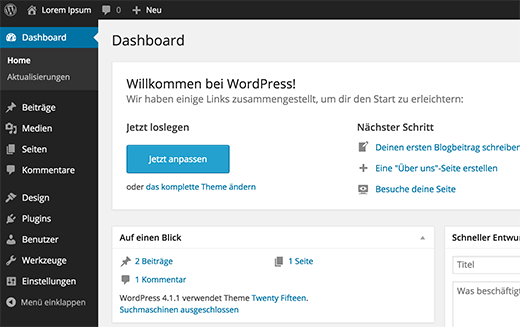
Choosing a Language During WordPress Installation
WordPress allows you to choose the language during the installation.
It’ll show you the list of languages to choose from, and you can simply click to select your language to continue installation.
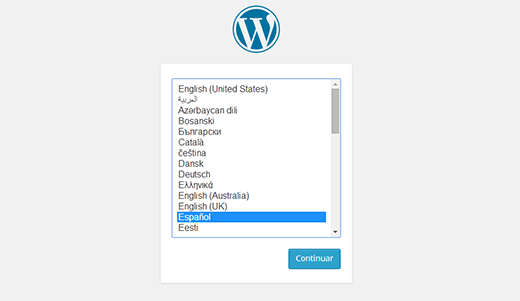
This is particularly useful if you need installation instructions in your local language.
However, if you didn’t select the language during your WordPress install process, you can change it at any time under WordPress settings.
Changing Language in WordPress
WordPress makes it super-easy to change the language on your website.
Simply go to the Settings » General page in your WordPress dashboard and scroll down to the bottom of the page. There, you will see the option to select Site Language.
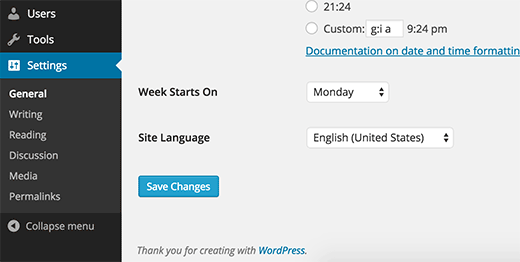
While WordPress has translations for over 162 languages, you will be only able to see languages that are fully translated (65).
If you do not see your language in the list, this does not mean that it is not available or that you can not use it.
We’ll show you how to manually install language packs in WordPress.
Manually Installing WordPress Translation Files For Other Languages
WordPress uses a gettext system for translations (localization and internationalization).
Volunteer users from around the world use a main .pot template file to translate WordPress into their languages. This results in two files for each language: Portable Object format file with .po extension and Machine Object file with .mo extension.
You will need a .mo file for your language.
Go to the WordPress translation teams page to see if a WordPress translation is available for your language.
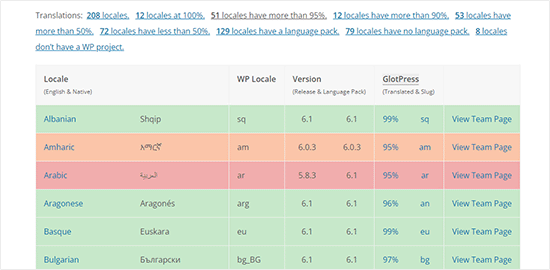
Next, click on the ‘View Team Page’ next to your language to continue.
On the next page, you’ll see the team’s progress and translation status. Go ahead and click on the ‘Download Language pack’ button to continue.
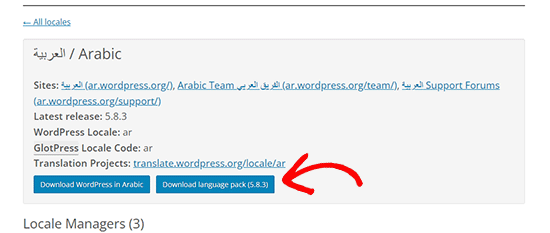
Your browser will then download a zip file to your computer.
You need to extract the zip file, and inside it, you’ll find the WordPress translation files for your language.
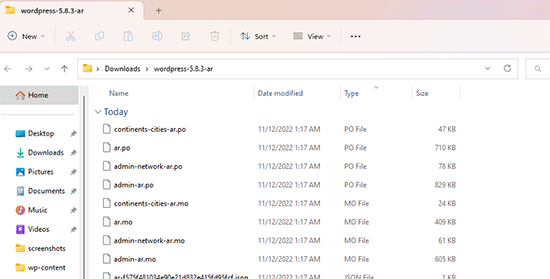
After downloading and unzipping the language pack on your computer, you will need to connect to your website using an FTP client.
Once connected, upload the language files to /wp-content/languages folder.
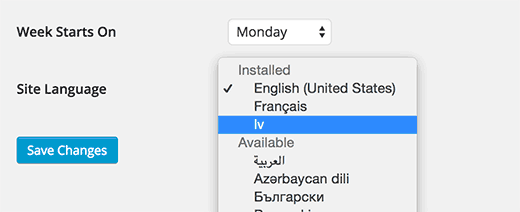
After you are done uploading the file, return to the WordPress admin area. Go to Settings » General page and scroll down to the Site Language option.
You can now select the language you just uploaded because it will appear under installed languages.
Using an English Admin Interface in Multilingual WordPress
Sometimes, you may want to use WordPress in a different language while keeping the admin interface in English.
This is particularly helpful if you have admins who are not familiar with other installed languages or if you give access to developers.
All you need to do is visit the Users » Profile page and scroll down to the ‘Language’ option. From here, you can select the language you want to use for the WordPress admin area.
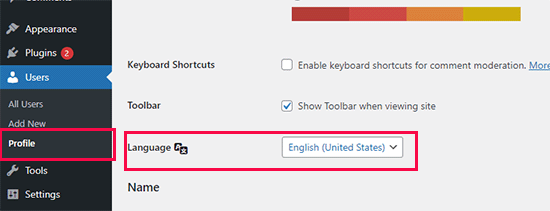
Don’t forget to click the ‘Save Changes’ button to store your settings.
This change only affects the user account selected or signed in.
Other users can also log in to their account and go to their profile change to choose a different language if needed.
Creating a Multilingual WordPress Website
WordPress can be used in different languages, but creating content in multiple languages is not easily manageable by default.
Luckily, there are several plugins that allow you to easily create and manage multilingual WordPress sites. These plugins will enable you to create content in multiple languages and make it easier for your website visitors to switch languages.
We recommend using the WPML (WordPress Multi Language) plugin. This paid plugin is used by thousands of websites from all over the world to create user-friendly multilingual websites with WordPress.
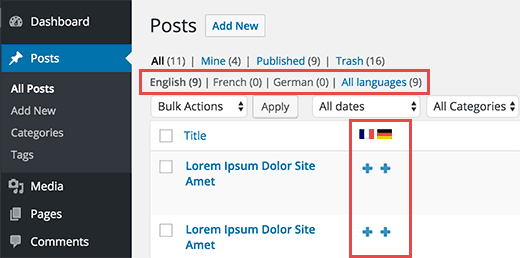
See our guide on how to create a WordPress multilingual site, where we show you the top multilingual plugins and how to use them to create your multilingual website.
Help Translate WordPress in Your Language
If you did not find an available translation for WordPress in your language, then perhaps you can help create one.
WordPress is an open-source software that is completely volunteer-driven. See: Why is WordPress free, and how does it make money?
This means that all available translations that you see right now are created by volunteer users from around the world (just like you). Check out the Translating WordPress website for more information on how you can contribute.
We hope that this article helped you install WordPress in other languages. You may also want to take a look at our list of essential WordPress plugins for all websites and our guide on how to translate a WordPress plugin into your language.
If you liked this article, then please subscribe to our YouTube Channel for WordPress video tutorials. You can also find us on Twitter and Facebook.





Syed Balkhi says
Hey WPBeginner readers,
Did you know you can win exciting prizes by commenting on WPBeginner?
Every month, our top blog commenters will win HUGE rewards, including premium WordPress plugin licenses and cash prizes.
You can get more details about the contest from here.
Start sharing your thoughts below to stand a chance to win!
Alexa says
I am trying to install a multi language plug-in on my word press page, I was looking for a drop down box option where users could select the translation they would like for the entire site. I have downloaded polylang and other multi language plug-ins and followed wp tutorials to assist in setting it up but i havent had success with setting it up to work properly on the web page. Can you maybe give me any information or tips to help me get it set up correctly.
Ali says
Hi
When my customers want to register to my wordpress site, they can’t use their current language in username text box and unfortunately they must just use English language in username text box. Could you guide me how can I change this case?
Thanks
Pagio says
Hi there,
The link to your guide “on creating multilingual WordPress site with Polylang” isn’t working.
It takes me to “How to Create a Multilingual WordPress Site with WPML” page.
WPBeginner Support says
Hey Pagio,
Thank you for notifying us. We have fixed the link.
Admin
Mark Klinefelter says
I use gtranslate off of the wp.org plugin page. It is free. Excellent translations. I speak fluent Spanish and the translation is excellent. I use it as a widget and pages where I do not have a sidebar I throw the shortcode in wherever i want the language selector to be located. Give it a try. It translates EVERYTHING: menu, header, footer, all content, all everything.
Robin Gray says
I’m translating instructions into German (and subsequently into French) for someone working in the social media field who uses WordPress. Where can I find English-German and English-French glossaries of typical WordPress dashboard expressions?
junaid shahid says
thanks for your support admin but it’s not work
as you said define(‘WPLANG’,’ur_PK’);
please check the domain and suggets me whats to do for RTL
Regards
Junaid Shahid
WPBeginner Support says
Does your WordPress theme supports RTL? Please contact your theme developer and ask them how to add RTL support.
Admin
junaid shahid says
it’s sahifa wordpress theme and support RTL in arabic but there is no option of urdu
junaid shahid says
i want to create my website based on urdu language, international code of urdu is ur so the given code is some like this define (‘WPLANG’, ‘ur’);
but i do not effect the website, actually i want to change the website from RTL so what i do now
regards:
WPBeginner Support says
Try this line:
define(‘WPLANG’,’ur_PK’);
Admin
Prabhakar Shelke says
Hi,
I have developed my website in bydefault english language. Now I need to change the bydefault language as a French. and admin should be in english only. How could I do this. Could you please suggest the solution for it or suggest any plug in which working like this…
Many Many Thanks…
WPBeginner Support says
Please see: how to use english WordPress admin on a multilingual WordPress site
Admin
Sameh says
How can I keep the admin page in English and convert the site to a right to left language (Arabic)?
WPBeginner Support says
You can try a plugin like English WordPress Admin.
Admin
Jack Praker says
Is the description of “Manually Installing WordPress Translation Files For Other Languages” still valid? Isn’t the ‘WPLANG’-string in the new version of WP deprecated? – Same with the WP Native Dashboard plugin, which seems outdated.
Perhaps you will find time to update how to install translations files? It is an important issue and people like need such information.
Ajay Singh says
is there any plugin for multilanguage site English and Hindi??
WPBeginner Support says
See our tutorial on how to easily create a multilingual WordPress site.
Admin
Chana says
Hi, where are those folders? Sorry about this stupid question… [/wp-content/languages/ OR /wp-includes/languages/ folder]
WPBeginner Staff says
Please see our guide on how to find and translate a translation ready WordPress theme.
Manuel Echeverry says
yea it worked, tank you alot!
Manuel Echeverry says
now that i have installed Spanish pack how do i translate to Spanish the parts of my theme (Crangasi) that are in English?
sanjiv kumar says
I have a question: i want to know that my site difault language on system in german and same site open in phone by default language is english .how can i do ?
WPBeginner Staff says
Yes you can. We will try to cover this in an upcoming tutorial. Thanks.
Smiley says
Thank you very much on your tutorial ….
I have a question : I want to know if I can translate the front page and keep my admin page in English , especially for my RTL , like arabic
Sameh says
Hello Smiley,
Did you figure out a way to maintain the admin page in English while converitng the site to RTL?
I’d like to do the same.
Arifur Rahman says
Thanks for the tutorial. I was searching for this tutorial for a long time and today I got it. I am grateful to you.
Piet says
Good tutorial and I think it is very important that people understand how it is done manually.
For people that don’t have a lot of time or just cannot be bothered, there is an alternative method to localize your WordPress install by using the plugin WordPress Language (by the same developers as WPML – http://wordpress.org/plugins/wordpress-language/)
Leo says
Thanks so much, this cannot be more helpful!
Mathew Porter says
Nice article, might be able to deploy this for a wp project we did that is being handed over to a french distributer. thanks.
Faiz Alam says
wow!! its great to see, how to install wp in other language…
galaxyes says
I want to keep the WP admin in English, but show a lang=”ES” in the code, because the content is in Spanish. How can I change that in the whole site?
Kris says
Nice tut.
DSchragg says
This is great for translating the backend, but what about the front?
I’ve used WPML in the past and was wondering if there were any better options out there…?
Piet says
Important to keep in mind that if you want to use WPML that you do NOT need a localized WordPress install ever.
WPML needs the default (US English) WordPress install.
Chaim says
Thank you very much for this post, it was very helpful.
Can you please publish a post about how to translate WordPress themes to a right-to-left language? If it is too complicated, can you please write some guide lines?
Thank you very much,
chaim
Zimbrul says
Didn’t know about this method. I use another one instead.
I use the WordPress install zip file in the language I desire (mostly Romanian) and the whole installation is in Romanian. Now, I’ve got the whole site in Romanian but I cannot stand the admin area so I use “Admin in English” plugin to convert the Dashboard in English, the language of choice for me when using the Dashboard.
Obviously, I use the manual install of the WordPress as I can set up the database and the password to my liking (and I think any blogger should know at any time how to install WordPress manually).