


Keeping your blog updated with fresh content takes real time, and most site owners are already stretched thin managing everything else.
Allowing users to submit posts is a fantastic way to grow your content library and build an active community without writing every single word yourself.
At WPBeginner, we have managed multi-author sites for more than 16 years and tested countless submission workflows. We know the best methods to accept user content while keeping your site secure and organized.
In this article, we will show you how to allow users to submit posts to your WordPress site using three easy methods.
TL;DR: In a hurry? Here are the 3 ways covered in this guide:
- WPForms (Pro): Build a front-end post submission form. Users never need backend access.
- User Submitted Posts (Free): Add a basic submission form using a free plugin and a shortcode.
- WordPress User Registration: Let users register and submit posts from the admin area. It works, but it exposes your backend.
Why Allow Users to Submit Posts on Your WordPress Site?
User-generated content is very useful in attracting new website visitors and growing your business.
You can allow users to submit guest posts, add images to your gallery, or create new business listings in your business directory.
This way, you’ll get more content for your WordPress blog and cover different topics in your niche. It also helps increase your readership and gain different perspectives on important topics.
With user-generated content, you can even create a community and give them a platform to share their views and ideas. Adding high-quality content to your WordPress website can also improve your search engine rankings.
Let’s look at the three ways to allow users to submit posts on your WordPress site without writing any code. You can use the links below to pick a method of your choice:
- Method 1: Front-end WordPress Post Submissions With WPForms
- Method 2: Accept User-Generated Content with User Submitted Posts Plugin
- Method 3: Allowing Users to Register and Submit Posts in WordPress
- Bonus: Style Your User Post Submission Form With WPForms
- Video Tutorial
- Frequently Asked Questions About User-Submitted Posts
- Additional Resources
Method 1: Front-end WordPress Post Submissions With WPForms
If you want your users to submit posts from the front end of your WordPress website without visiting the admin area, then this method is for you.
You will need WPForms, which, in our opinion, is the best WordPress contact form plugin on the market. It makes it super easy to create forms using a drag-and-drop builder.
In fact, we use WPForms on the WPBeginner site for all our contact form needs. Plus, we have tested and evaluated it thoroughly in lots of other contexts. We have found that it offers 2,100+ premade templates and complete spam protection.
It also integrates with popular payment gateways. This can be helpful if you plan to charge users for post submissions. To learn more about the plugin, see our complete WPForms review.
To get started, you need to install and activate the WPForms plugin. For detailed instructions, see our step-by-step guide on how to install a WordPress plugin.
Note: WPForms also has a free version. However, you’ll need the pro plan of the plugin to unlock the Post Submissions addon.
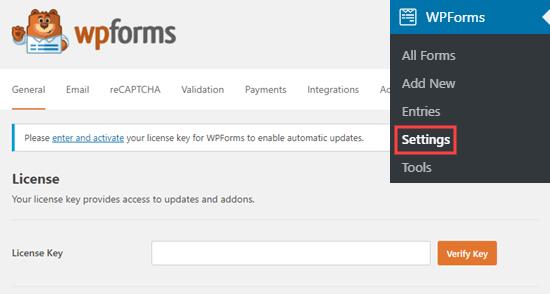
Upon activation, visit the WPForms » Settings page from the WordPress admin sidebar to enter your license key.
You can get this information from your account on the WPForms website. Once you’ve entered the key, click the ‘Verify Key’ button.
After verification, head over to the WPForms » Addons page from the WordPress dashboard.
From here, scroll down to ‘Post submissions addon’ and click on the ‘Install Addon’ button.
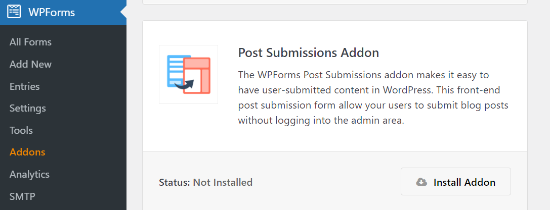
WPForms will now install and activate the Post Submissions addon for you. You will see the Status as active when it’s installed.
Now, you are ready to create a post-submission form on your website.
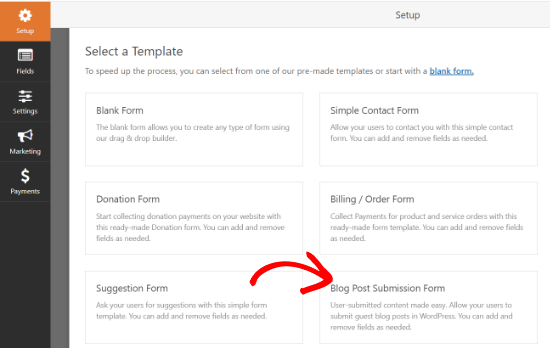
To start, simply go to the WPForms » Add New page from the admin area. This will take you to the ‘Select a Template’ page, where you need to provide a name for your form.
After that, simply choose the ‘Blog Post Submission Form’ template from the list.
WPForms will now launch the template in its form builder. Here, you will notice a form preview in the right corner of the screen and field options in the left column.
You can now easily add new fields from the panel on your left, remove existing fields, and rearrange their order using the drag-and-drop builder.
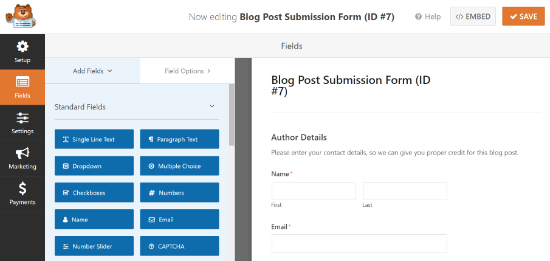
WPForms lets your users select post categories, add featured images, post excerpts, and even add custom fields.
You can also edit form fields by clicking on them. This will give you options to rename a field, change its format, add a description, edit its size, enable conditional logic, and more.
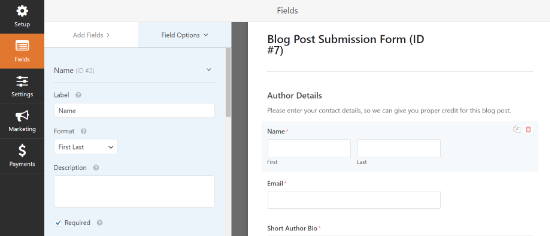
Once you are satisfied with the form, click on the ‘Settings’ tab in the left menu.
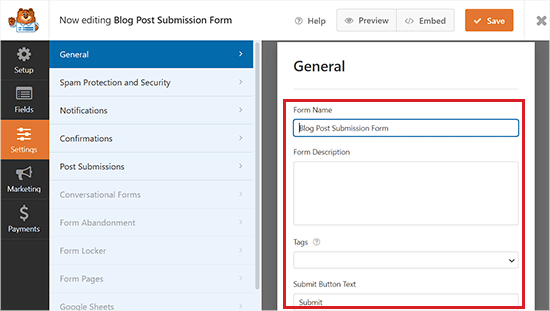
Now, from the ‘General’ settings tab, you can rename your form, add a description, edit the text of the submit button, enable dynamic fields, enable AJAX form submission, and more.
You can also toggle on the ‘Disable storing entry information in WordPress’ switch. This stops form entries from cluttering your database, but don’t worry, the actual blog post will still be created and saved in your WordPress Posts section.
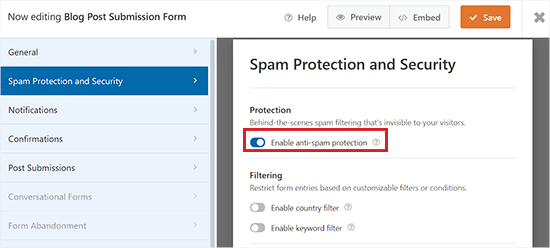
After that, switch to the ‘Spam Protection and Security’ tab from the left column.
By default, WPForms will enable the option of anti-spam protection. This is because it helps prevent people from submitting spam blog posts.
However, you can disable this option by toggling the ‘Enable anti-spam protection’ switch to inactive. Keep in mind that we do not recommend disabling spam protection in your forms.
You can also integrate your form with popular spam protection services like Akismet, reCAPTCHA, and Cloudflare Turnstile to further secure your form entries.
For detailed instructions, please see our tutorial on how to block contact form spam in WordPress.
Next, you can go to the ‘Notifications’ tab and edit the email on which you’ll receive a notification when someone submits a form.
WPForms will use your admin email as default.
However, you can change that to any other email, and if you’d like to receive notifications on multiple emails, then simply separate them using a comma.
For more details, please see our tutorial on how to send confirmation emails after WordPress form submission.
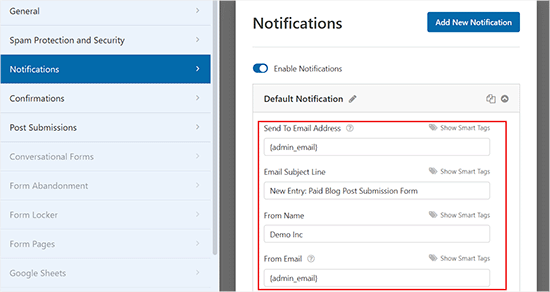
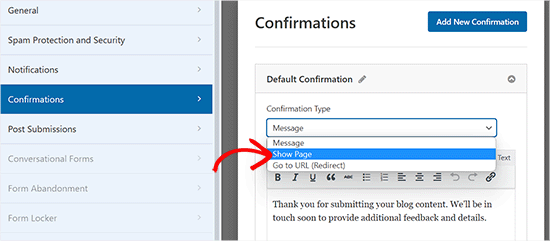
After that, go to the ‘Confirmations’ tab to set up a message your users will see when they submit a form.
You can show a message, display a page, or redirect users to a specific URL using the ‘Confirmation Type’ dropdown menu.
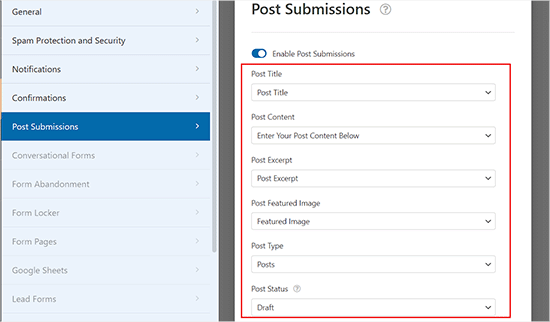
Next, switch to the ‘Post Submissions’ tab. On this screen, you must match the fields from your form to the corresponding post fields in WordPress.
For example, make sure the ‘Post Title’ dropdown is set to your form’s ‘Post Title’ field, and map ‘Featured Image’ to your file upload field.
By default, user-submitted posts will be saved as ‘Drafts’ pending review. However, you can also change the post type and allow users to submit content to your custom post types.
After that, don’t forget to click on the ‘Save’ button in the top right corner of the screen to save your form.
Now, you can click the close button (x) to exit the form builder and add the form to your website.
Add the Blog Post Submission Form to Your Website
First, you need to open up an existing or new page/post where you want to add the blog post submission form.
Once you’re there, click the ‘Add Block’ (+) button at the top left corner of the screen to open the block menu.
From here, locate and add the WPForms block to the page/post.
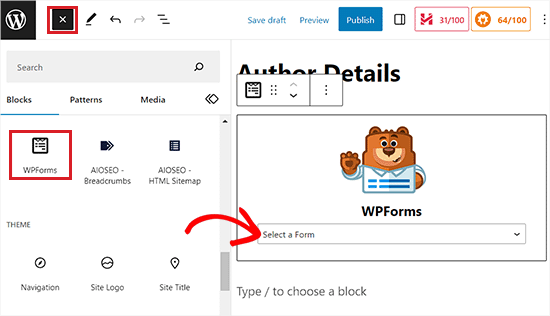
Next, you can select your post submission form from the dropdown in the WPForms block.
Now, save or publish your page, and then visit your website to see the post submission form in action.
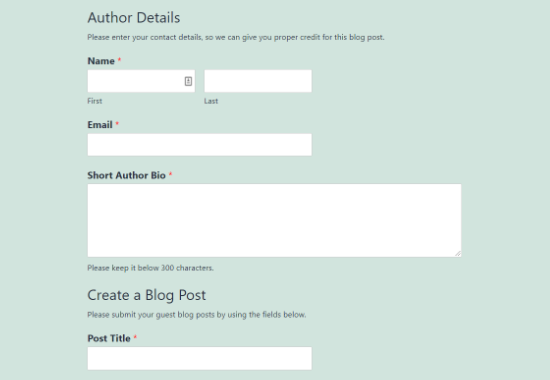
Method 2: Accept User-Generated Content with User Submitted Posts Plugin
If you are looking for a free way to add a blog submission form to your website, then this method is for you.
First, you need to install and activate the User Submitted Posts plugin. For more details, see our beginner’s guide on how to install a WordPress plugin.
Upon activation, head over to the Settings » User Submitted Posts page from the WordPress admin area and expand the ‘Plugin Settings’ tab.
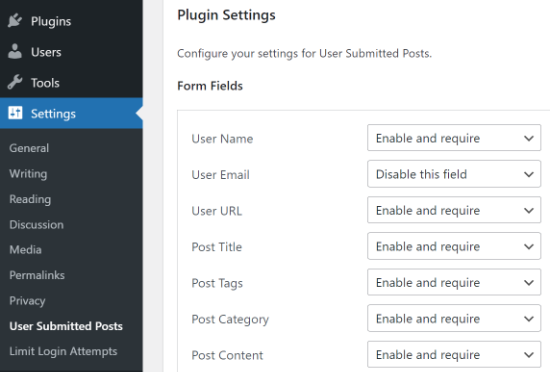
From here, you can select the fields you want to display on the post-submission form and hide any field you don’t want users to see.
You can also choose a default author for all user-submitted content. However, we recommend that you create a new guest user on your WordPress site and assign all user-submitted posts to that user.
You can also allow users to upload images and set a limit on the number of images and maximum image size. You can even set a user-uploaded image as the featured image.
After reviewing all plugin settings, click on the ‘Save Settings’ button to store your changes.
You are now ready to add the user-submitted posts form to your website.
Add the User-Submitted Posts Form to Your Website
First, open up an existing or new page where you want to add the user-submitted posts form in the block editor.
Once you’re there, click the ‘Add Block’ (+) button in the top left corner and then add the Shortcode block to the page.
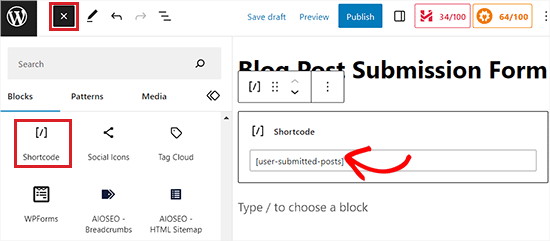
After that, add the following shortcode into the block:
[user-submitted-posts]
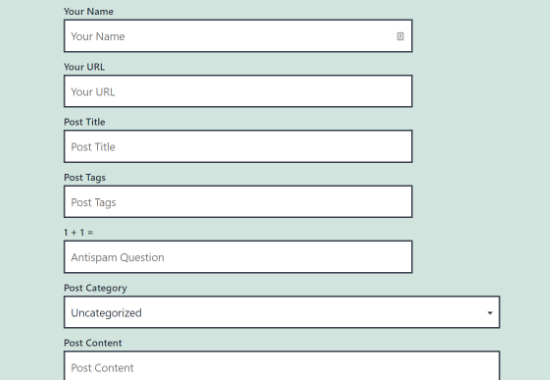
You can now save or publish your page and visit it to see your user-submitted posts form in action.
Method 3: Allowing Users to Register and Submit Posts in WordPress
WordPress comes with built-in user roles and capabilities that allow you to run a multi-author WordPress site.
You can allow users to register on your site and create content using the WordPress admin interface with limited capabilities.
First, you need to enable user registration on your WordPress site.
To do this, visit the Settings » General page from the admin sidebar and check the ‘Anyone can register’ option next to the Membership label.
After that, choose ‘Contributor’ or ‘Author’ as the default user role. We recommend choosing Contributor because these users cannot publish posts without your approval. If you choose Author, they can publish content directly, skipping your review.
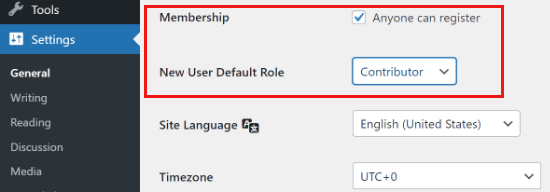
Finally, don’t forget to click on the ‘Save Changes’ button to store your changes.
Users can now register on your WordPress site by visiting the WordPress login and registration pages. You can even create a custom user registration form in WordPress.
Once registered, users will be able to log in to your WordPress site and submit posts as authors.
Problems with this method:
Many beginners find this method a bit difficult for different reasons.
For example, if you are using two-step authentication on your WordPress site, then your users may find it difficult to log in.
Many websites password-protect the WordPress admin directory. Allowing users to register and use the WordPress admin area means you will have to share that password with them.
Registered users with author roles can see what other posts you have on your website.
Giving backend access is also not completely secure. Malicious users could potentially upload harmful files or fill your website with spam content if you aren’t careful.
To prevent this from happening, you may want to see our ultimate WordPress security guide.
If these issues bother you, you can use methods #1 or #2 to allow users to submit WordPress posts without logging in to the admin area.
How to review and publish user-submitted posts: All 3 methods above save submissions as Pending Review or Drafts by default. To publish, go to Posts » All Posts, filter by “Pending Review,” read and edit the post as needed, then click Publish. Nothing goes live without your approval unless you explicitly change the default post status.
Expert Tip: No matter which method you choose, always enable spam protection on your submission form. WPForms has built-in anti-spam protection enabled by default. For the User Submitted Posts plugin, you can add Google reCAPTCHA via the plugin settings. Without spam protection, bots can flood your site with junk submissions.
Bonus: Style Your User Post Submission Form With WPForms
With WPForms, you can also style your form so that it can attract more users and encourage them to submit posts or images on your website.
You can even customize the form according to your brand design to improve user experience and build trust among your audience.
To style your post submission form, you should first visit the WPForms » Settings page. Ensure that the ‘Use Modern Markup’ option is checked (this is usually enabled by default on new installations).
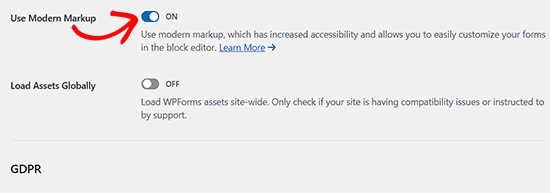
After that, click the ‘Save Settings’ button to store your changes.
Next, visit the post or page where you have added your post submission form and open the block panel on the right side of the screen.
Here, you will see different options to change the field styles, sizes, and colors for your form. You can also change the background color of the form fields from the right.
Once you are done, don’t forget to click the ‘Update’ or ‘Publish’ button to store your settings.
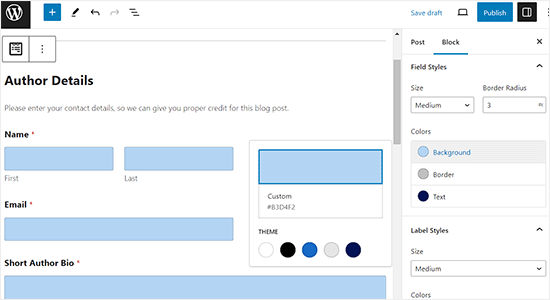
For more detailed instructions, you can see our tutorial on how to customize and style your WordPress forms.
Video Tutorial
If you’d rather learn by watching, then check out our video tutorial:
Frequently Asked Questions About User-Submitted Posts
At WPBeginner, we often hear questions from readers who want to accept guest posts or user content. Here are the answers to some of the most common questions.
1. Do I have to approve posts before they appear on my site?
Yes, absolutely. By default, both WPForms and the User Submitted Posts plugin save new entries as ‘Pending Review’ or ‘Draft’. This gives you full control. You can read, edit, and approve the content before it goes live on your website.
2. Can users upload images with their articles?
Yes. You can add a file upload field to your submission form. This allows users to attach a featured image or other photos. You can even set limits on file size and file type to save server space.
3. Do users need to register or log in to submit a post?
No, they do not. If you use Method 1 (WPForms) or Method 2 (User Submitted Posts), anyone can submit content without creating an account. This is often safer because you don’t have to give strangers access to your WordPress admin area.
4. Can I charge users a fee to submit a post?
Yes, you can. If you are building a niche directory or a job board, you might want to charge for listings. WPForms integrates with payment gateways like Stripe and PayPal, so you can accept payments directly through your submission form.
5. Is allowing user submissions safe for my website?
It is generally safe if you use a frontend form. This keeps users away from your site’s backend settings. We also recommend using spam protection tools like Akismet or Cloudflare Turnstile to block bot submissions.
Additional Resources
We hope this article helped you learn how to allow users to submit posts to your WordPress site. You may also want to see these additional resources:
- How to Block Contact Form Spam in WordPress
- How to Allow Users to Upload Images in WordPress
- Beginner’s Guide to WordPress User Roles and Permissions
- Ultimate Guide to Creating a WordPress Membership Site
- How to Improve Your Editorial Workflow in Multi-Author WordPress Blogs
If you liked this article, then please subscribe to our YouTube Channel for WordPress video tutorials. You can also find us on Twitter and Facebook.




Ronen
thanks mate, that was very very helpful guide…
WPBeginner Support
You’re welcome, glad our guide was helpful!
Admin
Sarah
hi,
Thank you for taking the time to make the tutorial.
One question …
Running an affiliate site, we use a defined layout for posts.
Is it possible for submitted posts to use such a pre-defined template?
This would save a ton of time not having to reformat submission
Many Thanks
WPBeginner Support
It would depend on how your specific layout is designed for if that would be an option or not.
Admin
Kazim
Does user can edit his/her post after submission??
chibuzo
please how can i get other users comment and reply to another post made by another user in my website using the plugin.
WPBeginner Support
If the post is live on your site it should allow your users the same comment settings as other posts on your site.
Admin
Dr. Abhijit Gupta
Hello,
I am looking for a WP plugin that will actually help visitors to submit their post or article to be published on my website. This could be product launch or some information anyone would want to share on my website. But these contents will be published to relevant category upon admin verification and it will look like regular post. Will this plugin help?
WPBeginner Support
To do what you’re wanting, you would follow this guide and instead of adding the form to a page, you would add the WPForms widget to where you want the form in your widgets area
Admin
neha jain
thanks for this useful post
WPBeginner Support
You’re welcome
Admin
Nitin Kapoor
Please Help!
Wordpress plugin : – Want customer to submit review by clicking the button “Submit Review” and want to showcase random 10 reviews on my Home Page.
It it has stars rating that will be big plus.
WPBeginner Support
Hi Nitin,
Please see our guide on how to create reviews site in WordPress.
Admin
Manu
Hello,
I would like to allow users to submit posts from backend but limit the number. Do you know if they are a solution in order to limit it (for example with paid memberships pro) ?
Thanks in advance,
Manu
Olajide olabisi
Thanks so much for this wonderful post.
But please can u recommend a theme/plugins that will allow users to upload an image and choose the category the image falls in and how they can also add location .. please help
James Lee
nice answers!
I am actually making a website that allow registered members to upload their wedding & travel photos. can anyone recommend me any themes or plugins to do so??
Its like instagram and everybody has their own account/page to view the images.
Lekizo
you can go with Peepso or Buddy Press plugin
Johnpaul Onwueme
I use the admin area to accept guest post, I am going to change it to a plugin.
Thanks
john
i also want this type of thing please tell me ?
Morris Ilagan
how can i accept the user submitted posts?
Syazani
Hi,
I want to know about the second method, is there a way to make the content field appear larger, without the user having to make it larger himself.
I mean some user may don’t know how to do that and even with an instruction provided it might be unclear. Thanks
JASSIM
Hi there,
thanks for this great article as usual from WP beginner,
i am facing question regarding bbPress – now when members try to add topic they can do it without any visual editors appear in thier browsers,
i need to let them create topics via WP dashbaord so they can be easily to customize thier topic and add media if needed.
2- how to restric specific forum in bbpress for specific members who only can add topics while other users can only replay.
Thanks
miracle ofodi
please, at the moment, i have followed your instructions, still my front end post does not submit to the site automatically, it still has to be published by the admin, what should i do? please help.
Mushiii hussain
Wpbeginner Thanks for great helping Platform i am biggest visitor from many years and i did many blogs from you tips thanks you so much for this
Well, I want to know about submit link form? like i want to make website like Delicious or youmob etc where users can add there links like a bookmarking website so please let me know which Plugin i can use for that
Thanks
Regard
Ayo
I have an issue which i hope gets resolved soon! I have people submitting articles however we have an editor who edits before we post them. So therefore we do not need the actual writer to upload the article. We prefer to do it ourselves but still want to add the writer as the contributor with bio and picture without giving them the full “Contributors” rights in word press. How can we add the informaiton without sending out an email to the writer?
WPBeginner Support
Hi Ayo,
You can create a custom user role in WordPress with specific permissions.
Admin
Alesh001
how can i create a link on my write up so that the reader can easily click on it to know more on that site. Thanks
Virgilio Sanchez
Hi I’m working with an app, for promote cars sales , and I need people upload their offers, they only will post a foto and description of their car. What plugin can I use for it. Thanks
Babafemi
Urgent sir, please help , I have a custom plugin for charity donation connected to local gateway. I will like all users to submit form without registering. i currently have these settings but its not working:
form action='”.get_admin_url().”admin-post.php’ method=’post’
The form above is supposed to call :
add_menu_page( ‘Confirm’, ”,’read’, ‘iswform/webpay_confirm.php’, ”, ”, 6 );
This is only working for loggedin users, please how can I make it work for ALL users.
Thanks
Marissa
Great post! Just wanted to thank you for your comment
on my recent blog post! Appreciated!
Steve
Hi is there any way that you can update this vid and screenshots for 2016 as the dashboard walk through and screenshots looks nothing like the video now so doesn’t help much. Thanks
Mike Berra
It does not appear on my blog the same as your image on top. Am I doing something wrong? Here is the link to my page
Thanks for your help
MB
WPBeginner Support
It seems like your theme CSS is affecting the form. Please contact your theme developer for support.
Admin
Kay
Please can someone who is knowledgeable about WP, tell me how i can redirect authors to a payment page when they click publish. I am thinking if i allow all default users to register as Authors, i want them to be able to get a feel of using WP and after they have composed new post, and they are ready to publish, to redirect them to my payment page when they click “PUBLISH”.
alexh
Hi I am trying to build a multi-step form where the user can add as many steps as they like on the fly. Each step would have its own heading, description and set of images. Can you provide some tips on how to do this?
Thanks in advance!
Kelly
Is there a way to set up the User Submitted Video uploads to work with registered users? Also, could these registered users edit the videos they’ve uploaded?
Any help would be appreciated.
Thanks.
Elsie
Hi there
I have been looking for a widget that allows me to create a page where my readers can submit their favourite baby photos to a guest page. I believe I have found what I am looking for!
Could I please make one suggestion? Your information is excellent and thorough – however, I do think the video is too fast for a newbie to follow. You need to slow it down and add a little more explanation about what you are doing. I’ve had to watch it a few times to really make sure I do the right thing.
Thank you and I’ll be back to get some more tips. This is a top site!
Regards
Elsie
Michelle
Did you figure this out? I too want to have users submit photos daily with a little description on a fitness accountability page.
Mark
Same exact situation for me… I want users to be able to do this too: annotated photos on my home improvement site. Can anyone point specifically to well vetted and secure WP plugins? Many thanks!
rajat
after creating a new page how i add it on my website ????
chfakht
so how can i let user to add their own product in my e-commerce site using this plugin
thanks
Debadi Roy
If some one post a duplicate content than what to do for that.
So you just give him your Email and get a Doc. file from his/her and verify first and than submit it on your own website
Gene
My blog theme allows featured photos. I’m using the “User Submitted Posts” plugin but when someone uploads a photo(s) along with their post I haven’t been able to locate it (them). All that I am seeing is the pending post in my Post file. I’ve also been checking my Media files and my email but there are no photos being sent there either. Where should I be looking?
Matt
Hey there everybody, I’m looking for something extremely simple that i can’t find anywhere. I need to allow users to add content to pages only, not in the form of posts. I want them to be able to go to a specific page i have with content and allow them to add to the content using a form submission and let it add to the page under the current content.
Anyone know where to find something like that?
Attiq Haroon
there should be a reCaptcha authentication in User submitted posts plugin. The default “Challenge Question” spam protection is simply not enough.
WPBeginner Staff
No you are at the right place. The only major change since this article was first published is that WordPress admin interface is changed. However, you will find most widgets, settings, and menus exactly as we have shown in the video.
Emily
Hello,
I’ve been looking through your post, and I think that the settings have changed fairly recently, meaning that these instructions don’t help very much. Do you have a walkthrough available for this? If I’m simply looking in the wrong place, please let me know
Thanks
Luc
hi there, trying to figure where and how to allow this in a multisite network, when i go to general on of my sites in the MU network i dont c the button ” anyone can register” where i can allow people to post in the blog !, any ideas how to do that, this site in the network is also bb press enabled btw,
looking forward for a reply,
kind regards
Luc
guest
So I’ve created the form… Once the user submits a post from the form, where do they go to view it? How do i make a list of all the different posts by people?
WPBeginner Staff
You will find them in your posts with the status Pending Review
Paul
Hi. Where do I moderate from? I can’t seem to find the area where user submitted content awaits my yay or nay. Thanks
Mike Mike
I would like to ask you that does it work well with hide my wp plugin? Now I upload images via user submitted plug in but I couldn’t find the images. So where could I find it? please kindly give me any solution..Thanks.. Mike Mike
yash
Thanks for the above information. But is there anyway which can allows users yo post an entire galley or more than 1 pictures in one step?
WPBeginner Staff
Yes you can do this by creating a custom user role. Checkout our guide on adding or removing capabilities to user roles in WordPress. Once you have created a user role with your desired capabilities. You can then go to Settings and under Any One Can Register field, select your custom user role as the default role.
ForumWebUser Sir
hello,
But the problem that I see is that using a form outside the admin pages even an anonymous user will be able to use it. Are you telling me that if I dont automatically assign all user submitted posts to a specific user, the post will fail to anonymous users? Is that it?
Because if not, I believe anonymous users will be able to post.
And I dont want anonymous users to be able to post.
thank you,
fwu
ForumWebUser Sir
hello,
I understood the two ways to empower users to post. One is to automatically give users the role to be able to do it, and then the user uses the admin page to post. The other is to enable a post page so that any user can post.
What about a middle term? Only a register user may be able to post, but this user should have only the subscriber role and not use the admin page, so that the post should be made using a psot page created with any of the cited plugins.
I believe that what Im trying to achieve should be more easily to accomplish, but dont have sure.
any help on this?
ps: another requirement: any post must be approved before be posted.
thank you,
fwu
Arosh Khan
Can i change the page or can i make a new form Where to show the submitted posts instead of showing it to the default wordpress recent page?
Jason
Do I need a plugin if I want to add a “new post” button and an “update by email” button that will direct visitors to where they can register or log in, if they haven’t already done so?
WPBeginner Support
You can just add a link to register/login page and use CSS to style those links as buttons.
Admin
younes
hi…
i created a custom theme …
after install User Submitted Posts plugin, its rich text editor not show…
but in other theme show
(please look bottom of home page in my web site )
my site address : http://www.w3-farsi.com
pls help me
WPBeginner Support
Younes it seems like someother plugin or some functionality in your WordPress theme is causing a conflict with user submitted posts plugin. Please test by switching to a default theme and by deactivating all plugins except user submitted posts. If it starts working correctly, then turn on your plugins one by one until you find the one that is causing the conflict. If no plugin is causing the conflict, then switch to your current theme. This way you can troubleshoot the issue. Let us know if this resolves your issue.
Admin
younes
hi…
tanx for answer…
I’ve disabled all plugins except user submitted post… and switch to defult theme… the plugin fully working and then swich my theme but dont work…
i think my theme functionality is incomplate….
can i send my theme to your email for troubleshoot that.
please help me…
Manish
Hello,
Is there any WP plugin which allow user to register as author and Post airtcle from frontend.What i need is no other user can see post of another expect admin and post should appear on website only after admin approve post.
david
Hi, I’m in the process of setting up a wordpress site for people to publish natural cures that worked for them (in the form of a post) , and make those posts accessible to others that are looking for a cure. One of the requirements is that only the author of the post (and the site admin) can edit their content, but other users of the site can view and comment on the post.
I would like adding/editing a post to be a user friendly experience where the author just has to register/login to add/edit a post – without having to access the admin area.
I would also like to collect the post content in a mysql table. Is this possible? Or can you suggest another way I do this?
Thanks for your help
David
WPBeginner Support
We think that the methods described above should work for you. All your posts are already stored in a MySQL table for posts in your WordPress database. You can export just a single table using phpMyAdmin and then import it in a different database or as a different table.
Admin
Meret
Hi,
Thanks for the article. I’m working on a project and wish for people to post their experience on my blog. Therefore I do not want to invest too much money for now. Can I use Contact Form 7 instead? Or perhaps another reliable free plug-in?
Thank you.
WPBeginner Support
user submitted posts is a free plugin.
Admin
Meret
Yes, it is Thank you. And it works fine. Now I am trying to find a way to make some adjustments such as language & css. Wish me luck!
kamal
hi i m beginner of word press, i want a user to post in my site, according to i follow all steps but in between short code , that means after option for image uploads , my wordpress showing short code and template tag its final option anf after than restore and save settings option there. i need a user to post on my site..
Grzegorz
Why featured image doesn’t display in post? How to fix it?
WPBeginner Support
Does your theme supports featured images? make sure you have the_post_thumbnail() template tag in your theme’s single.php or relevant template file. If this does not help, then please contact the plugin support.
Admin