


Do you want to learn about the difference between posts and pages?
By default, WordPress comes with two different content types: posts and pages. Although they look similar in the WordPress dashboard, they serve different purposes for your website.
In this article, we will explain the difference between posts vs. pages in WordPress.
Here is what we will discuss in our article:
What Are Posts in WordPress?
Posts are used to create blog content, articles, and other content listed on your blog page. They are shown in reverse chronological order so that the newest content (your latest posts) is shown at the top of the list.
If you are using WordPress as a blog, then you’ll likely end up using posts for the majority of your website content.
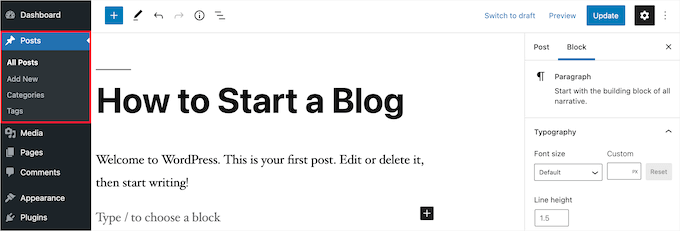
You can add and edit your WordPress posts by clicking the ‘Posts’ menu option in your dashboard. Here is what the WordPress post editor looks like.
Since posts are listed with the most recent posts at the top, your posts are meant to be timely. Your older posts are archived based on month and year.
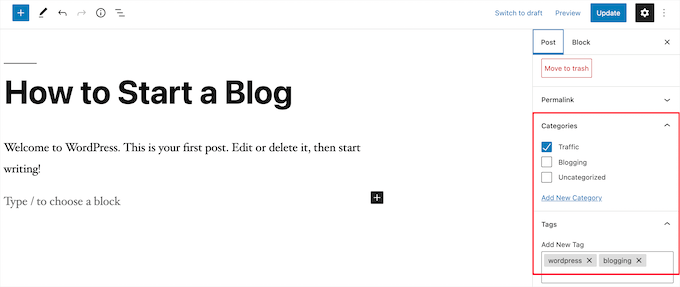
As the posts get older, your visitors must dig deeper to find them. You have the option to organize your posts based on categories and tags, which are WordPress’s taxonomy system.
If you have a lot of content, then you can add a search form to make it easy for your visitors to find the content they are looking for. For more details, see our guide on how to create a custom WordPress search form.
You can easily share your new WordPress blog entries with your readers to help you get more traffic. For example, you can create an email newsletter, send automatic RSS feed emails, send push notification messages, and more.
For more details, see our guide on how to share your blog posts with readers.
The timely nature of blog posts also makes them great for sharing on social media. You can use social media plugins to allow your users to share your posts across popular social media networks.
Blog posts also encourage conversations. They have a built-in comment feature that allows users to comment on a particular topic. By default, comments, pingbacks, and trackbacks are enabled.
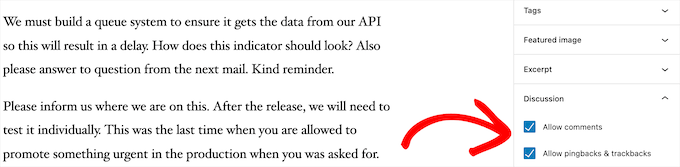
After the main article content, there’s the comments section. Usually, WordPress will disable comments on your pages.
You can go to Settings » Discussion to turn off comments on older posts if you like.
WordPress posts also display post metadata. This information is listed after the blog post title on individual posts and your blog page.
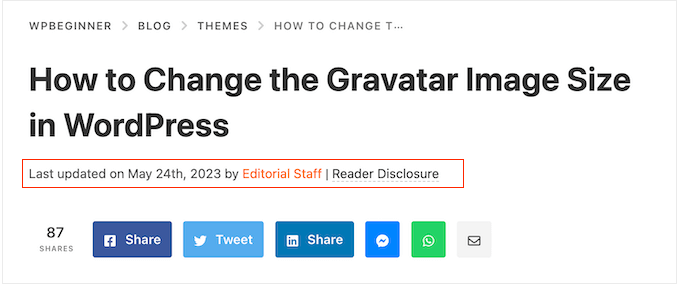
It usually shows the publication date, author name, categories, tags, and more. You can completely customize your post meta information. For more details, see our guide on how to display blog post metadata in WordPress themes.
Now that you know what WordPress posts are, let’s take a look at pages and how they are different.
What Are Pages in WordPress?
Pages are static “one-off” type of content like your About page, privacy policy, contact page, and more. While the WordPress database stores the published date of the page, pages are timeless entities.
For example, your About page doesn’t have an expiration date. Sure, you can go back and update it, but chances are you will not have About page 2012, About page 2013, and so on.
We have all kinds of static pages on WPBeginner, like our homepage, start here page, About page, contact page, archive page, and custom pages like our free business tools page.
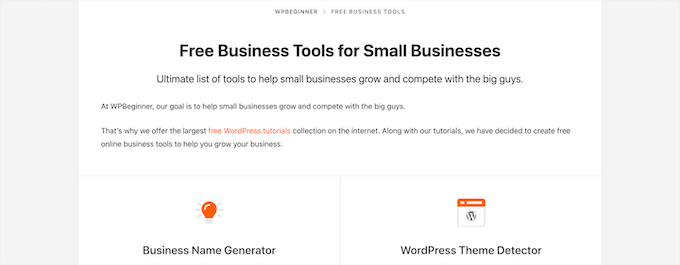
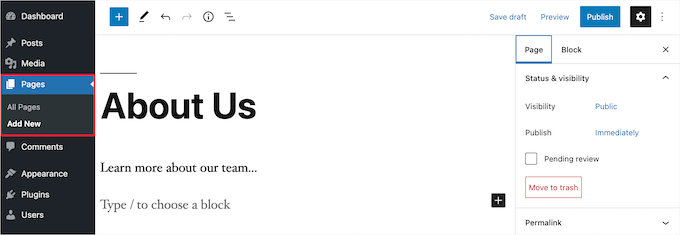
You can add and edit pages in your WordPress admin panel by clicking on the ‘Pages’ menu option.
Here’s what the page editor screen looks like.
Pages aren’t meant to be social, so they usually don’t have social sharing buttons. For example, you probably don’t want visitors to share your privacy policy page on Twitter.
Pages also don’t include comments. You don’t want users to comment on your contact form or terms of service page. There is an option to enable comments. However, it’s disabled by default for your WordPress pages.
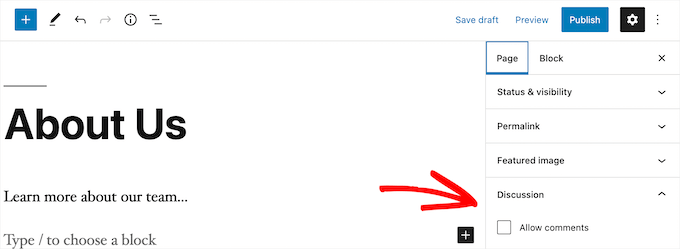
Unlike posts, pages are hierarchical by nature. For example, you can have subpages or child pages within a page.
You can easily turn a page into a subpage by choosing a parent page from the ‘Page Attributes’ section when editing a page.
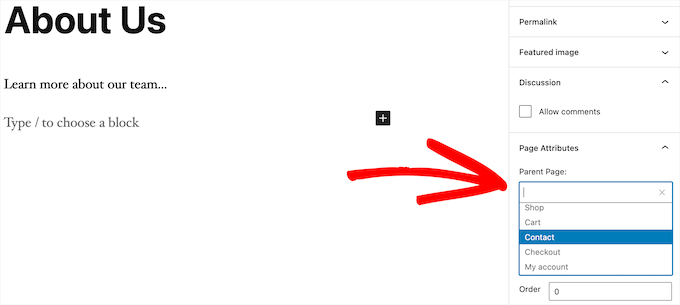
Plus, you can create completely custom WordPress pages with the help of a drag-and-drop WordPress page builder plugin.
This lets you use different page layouts than the default option provided by WordPress.
For more details, see our guide on how to create a custom page in WordPress.
WordPress Pages vs. Posts (Key Differences)
A post is meant for content that you regularly publish, like blog posts and news articles. Meanwhile, a page is intended for static content that is not updated as frequently, like a homepage, an About page, a contact page, and so on.
Here are other key differences between posts vs. pages in WordPress:
- Posts are timely, and pages are timeless.
- Posts are meant to be shared on social media, and pages are not.
- You can use categories and tags to organize posts, while pages are hierarchical and organized as child and parent pages.
- Posts have an author and published date, while pages do not.
The differences we listed above may have exceptions. You can use WordPress plugins to extend the functionality of both content types.
Despite these differences, there are some similarities between pages and posts in WordPress.
First, they are both used for publishing content. You can add text, images, videos, forms, and more to both posts and pages. There is support for featured images on both pages and posts.
You can build a WordPress website without ever using posts or the blogging features of WordPress. You can also make a small business website with pages and a separate blog section for your news, announcements, and other articles.
Posts vs. Pages: Frequently Asked Questions (FAQs)
Following are some of the most frequently asked questions we’ve heard from our users about posts vs. pages and how to properly use them in WordPress.
How many posts and/or pages can I have in WordPress?
You can have as many posts and/or pages as you want. There is no limit on the number of posts or pages that can be created.
Are there any SEO advantages to posts vs. pages?
Not entirely. In general, search engines like evergreen content that is organized and up-to-date. There are also tools like AIOSEO to help you optimize both blog posts and pages so that they can both rank on search engine results pages.
All in all, we recommend focusing your efforts on making your website user-friendly and valuable for your target audience. To learn more, see our ultimate WordPress SEO guide for beginners.
Is adding pages similar to adding posts in WordPress?
Yes. The menu to add pages and posts in WordPress may be separate, but the process of creating a new post and page is similar.
For pages, you can go to Pages » Add New in the WordPress admin area. Meanwhile, you can create a new post by going to Posts » Add New. Either way, you will then be directed to the Gutenberg editor to start adding your content blocks.
Which pages should I create on my website or blog?
It depends on what kind of blog or WordPress site you are making. However, you may want to see our list of important pages for all websites.
Can I switch posts to pages and vice versa?
Many beginners accidentally add content to posts when they want to create pages. Similarly, some new bloggers may end up saving blog posts as pages.
If you are just starting, you can easily fix that using the Post Type Switcher plugin. For more details, see our guide on how to switch post types in WordPress.
Are there other content types in WordPress besides posts and pages?
Yes, there are. These other default content types include attachments, revisions, and navigation menus. However, they aren’t used the same as posts and pages.
WordPress also allows you to create your own custom post types. This feature is used by plugins to create additional content types in WordPress.
For example, if you run an online store using WooCommerce, then you’ll see a ‘Products’ post type in your WordPress admin area.
For more details, see our step-by-step guide on how to create custom post types in WordPress.
We hope this article helped you learn the difference between pages and posts in WordPress and how to use them. You may also want to see our WordPress tutorials on how to optimize your blog posts for SEO like a pro and the best WordPress hosting.
If you liked this article, then please subscribe to our YouTube Channel for WordPress video tutorials. You can also find us on Twitter and Facebook.





Syed Balkhi says
Hey WPBeginner readers,
Did you know you can win exciting prizes by commenting on WPBeginner?
Every month, our top blog commenters will win HUGE rewards, including premium WordPress plugin licenses and cash prizes.
You can get more details about the contest from here.
Start sharing your thoughts below to stand a chance to win!
Ian says
I believe I am correct in saying that you use pages here?
Surely most websites supporting a business or running as a business would be pages?
For a news site I can understand posts – but should these all be in one root folder or divided into years?
Do having years, just shout WordPress to anyone browsing?
WPBeginner Support says
We use posts for most of our content on this site and have a few pages. You do not need to worry about placing the posts into folders as posts are automatically set in chronological order.
Admin
Paul says
I am blessed to have stumbled upon your site when I was searching for WordPress help. This is an excellent resource. Thank you.
WPBeginner Support says
You’re welcome, glad our guides have been helpful!
Admin
Ashok Singh says
Hello, I have created multiple pages but whenever I am writing any post it shows on my home page as a recent post but I also want visible the same post on another page. How can i do it ?
WPBeginner Support says
To show recent posts, you would want to take a look at our article below!
https://wpbeginner.com/wp-tutorials/how-to-display-recent-posts-in-wordpress/
Admin
Dev Patel says
So with a worpress post, I can create as many blogs/articles I want that will be available to be viewed to the public without having to purchase new domains?
WPBeginner Support says
Yes, there is not a cost to create a post on WordPress unless you have enough posts that you are running out of server space on your hosting provider in which case you would want to look to upgrade your hosting
Admin
Bhavana says
Thanks for making it so easy to understand. Great Post.
WPBeginner Support says
You’re welcome! Glad you found our post helpful!
Admin
Arun says
Hi,
I have a website that provides users some tools like json to xml convertor, random name generator etc. so is it good to have them inside a page or posts?
WPBeginner Support says
For static content and tools like that, we would normally recommend placing them on a page.
Admin
Gill says
Thank you for the great information….
WPBeginner Support says
You’re welcome!
Admin
Simy Khera says
hey, I have a question that for blogging what is needed a post or page ? and do ever website who have about us is a page or it can be a blog too?
WPBeginner Support says
Most blogs use posts instead of pages for most of their content and for a majority of sites the about us would be a page but there’s nothing wrong with testing if having it as a post works for your site.
Admin
Tuomas says
Hello,
Thank you for this guide. I have made such “mistake” on our business website that I have created my blog archive just as a normal page and same with our blog posts: pages instead of posts. As changing this would demand a lot of work, I’m probably not going to change this. Would you happen to know, how I can create an RSS feed for pages instead of posts?
WPBeginner Support says
To make swapping easier, you may want to try the recommended plugin in our article below:
https://www.wpbeginner.com/plugins/how-to-convert-post-types/
We do not have a recommended method for RSS for pages at the moment.
Admin
Lalit Singh Chauhan says
Great Information.
I am using newspaper theme and for some reason my Page posts are totally different than the default blog posts template. What could be the reason?
WPBeginner Support says
Your theme may have specific styling for the different pages/posts. You would want to check with your theme’s support to see if that is the reason.
Admin
Martin says
Great article. I just started out and have the latest update.
But I don’t seem to get it working as I want.
WPBeginner Support says
For site specific support we would ask that you reach out to us using our contact form as your question would require asking additional information that would not fit our comment policy.
Thanks
Admin
Vinit says
How can I change footer on Post? Footer on my website pages is coming different then the Blog Post. Please help.
WPBeginner Support says
That would be determined by your specific theme. If you reach out to your theme’s support they should be able to assist.
Admin
Melchi says
Can I use pages as a posts.
And also can I use pages as a blog post.
WPBeginner Support says
While you can, using posts would give you more tools for your content to be found by your users.
Admin
Nicolas says
What about where a page is generally the same but your content may vary 100s of times (Like recipees or products in a shop like Amazon for example) It’s not a static page and yet it’s not a post, it’s something in between
WPBeginner Support says
It sounds like you mean custom post types which we cover in our glossary here: https://www.wpbeginner.com/glossary/post-types/
Admin
Spenser says
Great stuff. Just starting out with WP and this is exactly what I need. Many useful links to other, equally useful, posts (or are they pages? – only kidding). Really useful site – I have emailed myself the URL. Many thanks – please keep up the good work.
PS – never left comments on a WP site before – so interested in seeing how this works.
WPBeginner Support says
Glad you like our content
Admin
dimarifi says
Thanks for this helpfull guid.
But I have a question, for exemple this webpage : https://www.wpbeginner.com/category/beginners-guide/ its post or page?
Thanks
WPBeginner Support says
That is an archive page, we’ve linked directly to the category and it is showing the archive for beginners guides which is styled the same as our posts page.
Admin
Acha Mercy says
thanks for clarifying me on this
WPBeginner Support says
You’re welcome
Admin
Mjkoroma says
Hello, will I be able to use a website as both a blog and a ‘website’ simultaneously?
I mean, if I would use pages and posts on a website, simultaneously…
WPBeginner Support says
You can certainly use those features together. We have an article that should help clear up some confusion here: https://www.wpbeginner.com/beginners-guide/what-is-a-blog-and-how-is-it-different-from-a-website-explained/
Admin
Billy says
PRODUCT PAGE: POSTS OR PAGES?
WPBeginner Support says
That varies from one plugin to another, it is normally a page listing a custom post type if I understand what you’re asking correctly.
Admin
joljols says
I was wondering if the articles on wpbeginner are posts or pages as they have a page-like url but most features of a blog post. Also, many of the articles are often updated over time to keep the contents of the article up to date. How do you deal with those updates and making sure readers know about them? The reason I am asking is because I am also writing a list of articles with coding tips/tutorials and am wondering if I should write them as posts or pages on my wordpress site. I hope you can give me advice!
WPBeginner Support says
Hi,
We use posts to publish most of our articles.
Admin
Charles says
Doesn’t that mean, we should always use Pages if we want a unique design for the mega content we are going to create?
Otherwise, post seems to have a lot of limitation of how the overall content visual to be structured.
Stephanie says
I have to translate my content across multiple languages – so my current blog is being housed in pages vs posts. If I move my blog over to posts – can i translate that out?
WPBeginner Support says
Hi Stephanie,
You can translate your WordPress content by using a WordPress multilingual plugin.
Admin
Bruce says
Hello and thanks for the great site. I’ve been running some WP sites for a few years and I always come to WPBeginner for quality and concise information.
The sites I’ve built have been fine with static pages but one client (my wife) wants to add a blog to her martial arts site.
How do we make something that looks like the blog page on this site?
I understand how to create the post, and can add it to a menu, but do not know how to make a page with the chronological list of posts.
Is this a feature of the specific theme? I am using Genesis and Responsive.
Thanks again, I’m sure there’s an obvious solution that I’m overlooking.
WPBeginner Support says
Hi Bruce,
Please see our guide on how to create a separate page for blog posts in WordPress.
Admin
Cherian says
I’m not sure i was doing wrong. Please help.
On my website, im publishing the same topic as Post and page (So two URLs has same topic, 1 page and 1 posts).
Any issues on that? or do i need to remove one of them? Thanks.
Denish Callos says
Hi,
I have been using wordpress for web development for a while now. I am starting a new tutorial site in wordpress. I am confused in writing tutorials as pages or posts. Number of tutorials wil be huge. So should i publish tutorials as posts or pages.(please suggest me on this). And how do i include category name in permalink of pages
Suggestions will be highly appreciated.
Many Thanks
Riana says
I have a smiliar question. Waiting for this to be answered.
Seems like no one has answered you yet so I’ll make my own decision based on the article.
I would like each of my tutorials to be shared on social media and accept comments which would lead me to posts instead of pages.
However, my tutorials cover many different themes and I feel like having a category list to the side with 5 billion different links will be a bit much. I also don’t like that they will be time and date stamped because they really aren’t blog posts but permanent pages on my site that most likely will never be changed or replicated.
I guess I’ll just suck it up and go with posts.
Pogo says
I say definitely use posts, and I’m almost certain that you can fill pages with certain types of posts to categorize them using the hierarchy of pages.
Zachary says
Use a custom post type. Setup a custom post type for your Tutorials, specifically. That is the best setup, as it is clean and keeps your blog posts sepearate. Pages are absolutely inferior in this use case, and most use cases. A good plugin for this is CPT UI (free). That mixed with Advanced Custom Fields offers an incredible amount of customization and efficiency if used correctly.
As for the many category issue. I recommend reading some guides on categories/tags. Ideally, your categories should be few and broad, while your tags are many. With ACF you can create new “category” type lists if needed, often not needed though.
You can also depend on sub-categories a lot. Having very broad parent categories, with their many child categories beneath. Show the user only the child categories for their selected main category and they won’t have a large list to deal with. When they see the initial tutorial page you show them the parent categories only. There are many ways of achieving a user-friendly design through this.
Susan Cunningham says
I’m building a website with more or less timeless content. Definitely not a blog with dates, etc.. So I could dispense with Posts altogether? I have put Pages on the top running menu bar. Each Page will have a bunch of sub-pages and those can have sub-pages (grandchild pages?). Which will also dictate the URLs, right? From the reply to the previous question, I gather the downside to that is that Pages can’t be labeled with categories? Downside of using Posts,however, is that they can’t be grouped and sub-grouped under a Page?
In the past few days I’ve been wondering if those general content descriptors on the menu bar should be categories instead of Pages. This reply to the previous question seems to point in that direction: “Another way to do that is by creating templates for your categories.” But no … I’m going to have a mammoth informational/magazine type site and that would extremely limit the number of categories, seems to me. Maybe that wouldn’t matter if the number of tags was kept limited, however.
I’m not totally new to WordPress, since I use Wordpess.com for a simple personal portfolio type site. So category name(s) will appear–usually on the top left corner–of a post. But they won’t appear at all on a Page?
Whew! Sorry to sound so confusing. (Well, obviously, I’m confused!). Can you just answer the first question: Can I dispense with Posts altogether? What are the disadvantages and advantages of that?
I can’t be the first person with this question in mind. Thanks!
WPBeginner Support says
Hi Susan,
You can dispense posts altogether and use pages with child pages to organize your site’s structure. You can add categories and tags to pages, if you want.
Admin
Terry Yarham says
From my static home page, there are blog post categories in the menu across the top. Can I pin content to the top of the category archive page? Regular pinning isn’t working for that.
I have a lifestyle blog for my city. When someone goes to a category from the top menu (food, drink, shopping, etc.) I want them to see a short description (that will always be at the top), then see the blog posts that fall into that category as they scroll down.
Is there a way to do that? I’m using the Bento theme.
I’m game to change the categories across the top to pages so the content I want to always be seen would be there, but would I be able to get the posts to show up underneath?
Thanks for any help I can get.
WPBeginner Support says
Hey Terry,
There are multiple ways to do that. For example, you can add the content you want to be displayed as category descriptions. Another way to do that is by creating templates for your categories. You can add them by simply naming the file category-{category-slug}.php like category-news.php.
Admin
Julie Gilmer says
I’m trying to organize a blog of my trips with pages for each day and pictures associated with those pages. Is this possible in WordPress?
WPBeginner Support says
Hey Julie,
Yes. In fact many travel writers use WordPress to share their journeys with photos, galleries, videos, text, and more. Check out our guide on how to start a WordPress blog for step by step instructions on how to get started.
Admin
Mathew says
Thanks I have just been cleared!
Civali says
I confess I´m pretty confused about it. I actually don´t know deal with categories in a post.
WPBeginner Support says
Hi Civali,
Please take a look at our guide on the difference between categories and tags. It will help you understand how to use categories for your posts.
Admin
Bastian says
I wonder how to organize content like episode guides for a TV show (that has been broadcasted years ago) with a kind of scientific interpretation of it. I think it’s very much timeless content, since it’s no actual show anymore and I don’t want to have comments on it. It should be the definitive article on the net to the subject.
So, should I write my big episode guide with plot and interpretation as a page and just put a post on my blog like “new episode guide for show – episode x season y” with a link to the page?
I have to admit it was hard to decide against a wiki because I don’t think I have timely content. But a blog seems to be more like a reflection of my personal opinion and more conversational and entertaining than a “dry” wiki text.
WPBeginner Support says
Hi Bastian,
There are plenty of ways to organize this in WordPress. For example, you can Use categories for each season, and create a new post for each episode in that season.
You can use tags to assign different characters, topics, and themes that came up during that particular episode.
You can also create a custom post type.
Admin
Bastian says
Thank you very much. Sounds interesting.
Somehow I think it just doesn’t feel right to use pages for articles. All the fine features like widgets, sharing etc. have to be added through plugins while posts have it all embedded. ATM I tend to use posts, because it just feels right. It feels like the way, WordPress should be used.
What I like on Pages in a strange way is, that all these distractions like widgets, sharing etc. are missing. The content area is wider (in my current theme), so for now: I start using posts but not sure if it will always stay this way. I will just have an open mind and keep experimenting. Time will tell.
Sam Victor says
Hi all,
I just understand the difference between the page and posts.
Thanks buddy.
Mark Cross says
As a beginner this little tutorial was helpful. I was getting into a default blog when trying to create a website. I hope to get to the point of moving in-between the website, dashboard, preview, publish and other tools that word press offers. So time to start learning.
forhad says
Every post must be in a page but a page contain many article.
sarath says
Please how did you enter meta keywords in a site used in wordpress
Rita says
Can I have pages that display different posts on one blog?
I mean to have one page with News (updated daily) and one page Articles (updated weekly). Is it possible to do it on WordPress.
Should I create a custom post type?
Monjur says
Thanks for an awesome article … all of my confusion about post Vs page has been removed by this one article.
Alexander Okpara says
Please I want to inquire on how to make different Blog pages for different posts
Shraddha Shakya says
hello !
I am new to wordpress and recently I have started ablog for celebrity gossips. I have written all the contents in pages and then linked it with the post in homepage.I dont want post to be shown in homepage .So I posted a post and then linked them with pages .But the problem is my pages arenot showing up in google.Only posts are shown .
So , is it that pages arenot shown in google??
My page is half a month old , so that maybe a reason for google to not show up but then a post which was just 1 day old showed up .So it worried me .
So inorder to show up in google , which one is better , pages or post ?
Pankaj Choudhary says
please check your front page code and wp reading setting choice a static page in reading setting of wordpress.
Subhendu says
What is the difference between COMMENT AND POST in WordPress?Please help.
Roy Randolph says
A Comment is the discussion thread that you can (if you wish) have for a page or a post. In other words you are commenting on a Blog “Post” for an example. Basically the same thing you are doing now, you are commenting by asking a question. Hope that helps.
Ray Foucher says
I’m new to WP, have just started a WP site and have a top menu link “Articles” which will link to a page listing all my articles (static content) with short descriptions of each and links to an individual page for each article.
The person hosting my site insists posts are the way to go rather than pages. I am used to using HTML for other sites and have no problem with building the links. I like the idea of being able to have my own descriptions and order for the articles list and fail to see the advantages of posts for this. Any insights?
If I used posts I belief I could assign them to an articles category to keep them together but could I then arrange them in my preferred order and write or change my own descriptions?
janz says
I have started to write on Pages. How do I link one page to the next in chronological order on each Page published? For example, in posts, there is a link to the previous and the next post. I cannot find this in Pages. Can you help please?
WPBeginner Support says
Please take a look at our guide on the difference between posts vs pages in WordPress.
You may also want to check out our guide on the difference between self hosted WordPress.org vs free WordPress.com blog.
Admin
neil henderson says
hi, i am developing a holiday site and using wordpress. i am having property style pages and then also looking at having category pages (hotels, cottages, campsites). i have been considering the following format:
property pages as custom post types
category pages with ability to insert category lists (so can format a little more)
i was just wondering as seo is absolutely critical for this project to work would i be better to do the property pages as “pages” and if so is it possible to add any kind of taxonomy to a page so that i can pull them through to a category page?
thanks
neil
akhil raj shrivastava says
hi all
Any one please attention in my index,php i have a menu, a banner , after that slogan , slogan some content regarding site and three content regarding read more, and a footer option , problem is this . any how read content is not published, or not shown in index.php my i created read more in post option.
any one understand this
where i m wrong,
Rados says
Please be so kind to help me invert the order of appearance of new sections in a page – I want new sections to appear on top, not on the bottom of the page. Many thanks in advance!
Ian Player says
Thanks for a very interesting article. It would be *really* helpful too to hear the reasons as to why you chose to write this article as a Post rather than a Page. Thanks!
Mikey says
What a great point! This is very much timeless or “evergreen” content.
I suppose the main reason for publishing it as a Post is that the author wants us to share it! As I have just done on Twitter.
John Morris says
If I read the article correctly you wanted to receive comments and posts enable that more easily than pages. Also this content may change as new releases alter functionality. Just a thought
Pat says
This is a useful and very clear post. But it doesn’t address the one issue about posts and pages that is really confusing me, as a WP newbie. If I wish to add products to a WP site, should they be added as Pages or Posts? In my case, the Products in question are books by various authors. If I list them as Posts then website visitors can use Categories to filter them by Author. However I cannot see how to add Author photo and biographical info to the same result page. And if I list then as Pages (so that I can have a section with Author photo and biographical note, etc, I cannot see how to generate and filter (through Categories) the results so that X Author’s page will show only X author’s books. I have even tried a number of dedicated book and ecommerce themes, but none of them seems to provide for what I thought would be a basic ingredient. Am I missing something? Thanks in any case for the good work!
WPBeginner Support says
You may want to check our guide on Why do you need a custom post type or taxonomy in WordPress.
Admin
Prash says
how to apper recent posts on top ???
SHRADDHANSHU SHEKHAR says
Write a post> see SETTING in bottom, press IMMEDIATELY and decide on which date & time you want to show your post is published. then publish. latest post is shown on top.
Randa says
now I guess that I’m commenting now on a post not a page !!!
WPBeginner Support says
Yes.
Admin
Patricia says
Awesome! Short and to the point. I spent all night going through the blog support site with no answers… only to have this clearly explained in a less than 2 minute video!
WPBeginner Support says
Glad to help. Thanks for the feedback.
Admin