


Seeing your hard work filed under ‘Uncategorized’ can quickly make your brand-new WordPress blog look unprofessional. It is a frustrating little detail that leaves many beginners feeling stuck.
We completely understand the annoyance. When we first launched WPBeginner, we quickly realized this default label made our content look messy, so we fixed it right away.
The great news is that changing this setting is incredibly easy. You can clean up your site’s structure in just a few clicks.
In this guide, we will show you exactly how to rename the Uncategorized category or set a better default option.
What Is the Default Category in WordPress?
Categories and tags are the two default taxonomies that come with every new WordPress install. They are used to group your posts together in different ways.
Your WordPress posts must be filed under at least one category. If you forget to categorize your post, then it is automatically filed under your default category.
On a new WordPress website, this default category is called ‘Uncategorized’.
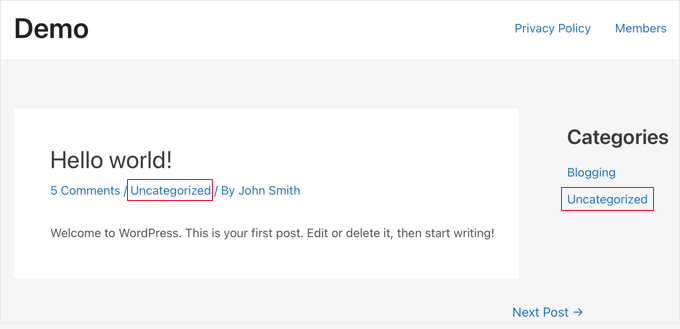
Usually, you can just go to Posts » Categories and delete a category. However, because WordPress requires every post to have at least one category, you can’t delete the default category until you assign a new one to take its place.
There are two ways to solve this issue. You can either rename the WordPress default category from Uncategorized to something more meaningful, or you can set a new default category.
We will cover both methods in this tutorial. Generally, renaming is the fastest method for brand-new sites, while setting a new default is better if you already have a category structure set up. You can use the quick links below to jump to the method you want to use:
Renaming the Uncategorized Category in WordPress
To rename the default category, you need to visit the Posts » Categories page in the WordPress admin dashboard.
Next, you should hover your mouse over the Uncategorized category and click the ‘Edit’ link.
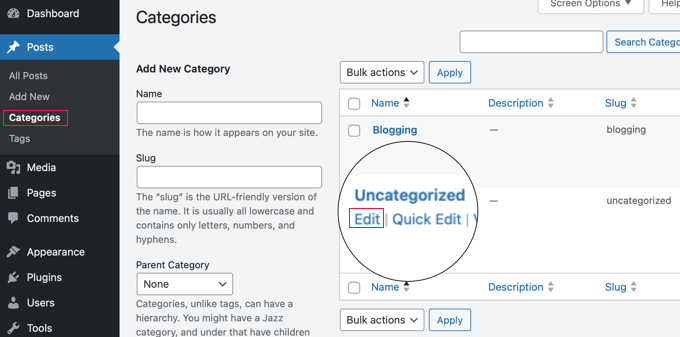
This will bring you to the Edit Category screen.
On this screen, you can change the category’s ‘Name’ and its URL ‘Slug‘ in the corresponding fields.
After that, make sure you click the ‘Update’ link at the bottom of the page.
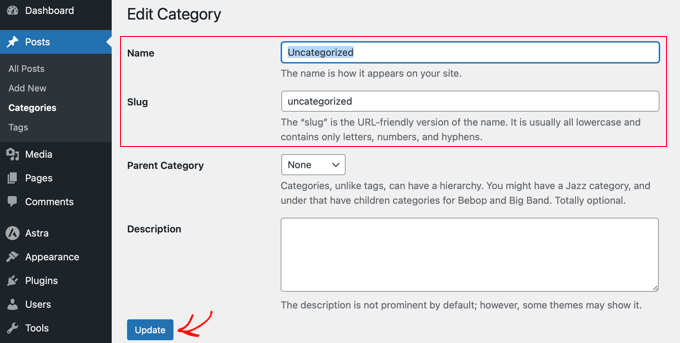
Changing the slug will also change the category page’s URL. Now, if you have a new website that is not live or indexed by search engines, then that won’t cause a problem.
However, if your WordPress site is live, then changing the URL slug will result in 404 errors when search engines or actual users try to visit the old category using the original URL.
Don’t worry. We will show you how to set up redirects later in this article.
Changing the Default Category in WordPress
You can also easily change the default category in WordPress. First, make sure you have at least one category other than uncategorized available.
If you don’t already have a specific category that you would like to use as default, then you need to go to Posts » Categories and create a new category.
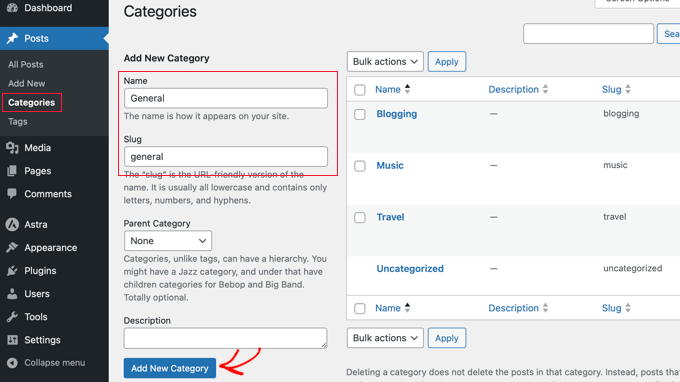
Now, you will need to navigate to the Settings » Writing page. The first option on the page allows you to set a default post category.
Simply use the dropdown menu to select the default category you would like to use.
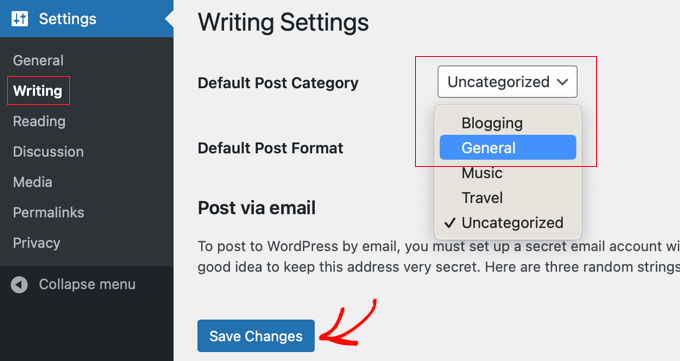
Don’t forget to click the ‘Save Changes’ button to store your settings.
WordPress will now use the category you selected as the default category. If you forget to assign a category to a post, then it will be filed under this default category.
When you change your default category setting, your existing posts will remain in ‘Uncategorized.’ However, if you delete the ‘Uncategorized’ category entirely, WordPress will automatically move all those orphaned posts into your new default category. This saves you the hassle of moving them manually.
If you prefer to keep the ‘Uncategorized’ category active but want to reassign the posts, you can edit them manually. For a large number of posts, check out our guide on how to bulk-move posts to categories and tags in WordPress.
Redirecting the Old Uncategorized URL
If your site was live when you renamed the Uncategorized category slug or deleted it, then users and search engines will see a 404 page for the old URL. This is bad for both SEO and user experience since visitors will see an error page instead of the content they are looking for.
Tip: If you just launched your WordPress blog and search engines haven’t indexed it yet, you don’t need to worry about 404 errors and can safely skip this step!
The good news is that you can easily fix that and redirect users to your new category URL or the renamed URL.
First, you need to install and configure the All in One SEO (AIOSEO) plugin. For more information, please see our step-by-step guide on how to set up All in One SEO correctly.
Note: You will need AIOSEO Pro to use the redirection manager. There is also a free version of AIOSEO, but it doesn’t include this feature.
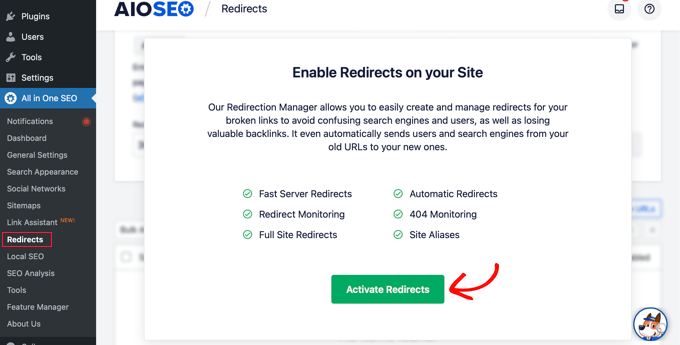
Once the plugin is active, you will need to go to All in One SEO » Redirects in your WordPress dashboard and then click the ‘Activate Redirects’ button.
Next, you can set up your redirect.
In the ‘Source URL’ field, you’ll add the relative URL path of your old category. For most WordPress sites using default settings, this is /category/uncategorized/. If you have modified your permalink settings to remove the category base, make sure to enter the exact path your site uses.
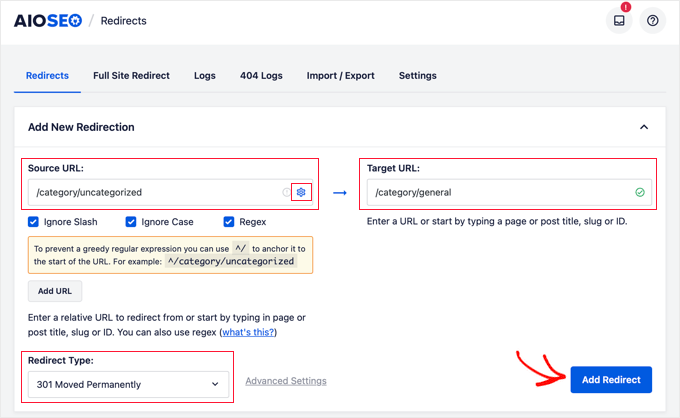
Then, in the ‘Target URL’ field, enter the new path for the category. For example, if your new category slug is ‘general,’ you would enter /category/general/.
Finally, make sure the ‘Redirect Type’ is set to ‘301 Moved Permanently’ and click the ‘Add Redirect’ button to save your changes.
That’s all. Now, visitors going to your old Uncategorized category URL will be redirected to the new URL.
Frequently Asked Questions
Here are the answers to some of the most common questions we get about managing the default category in WordPress.
1. What should I rename the Uncategorized category to?
You can rename it to something that makes more sense for your website. Popular choices include ‘General,’ ‘Blog,’ ‘Announcements,’ or ‘Other News.’
2. Can I just delete the Uncategorized category?
You cannot delete the default category. You must first go to Settings » Writing and assign a new category as the default. After you do that, you will be able to delete the old ‘Uncategorized’ category.
3. What happens to my old posts after I change the default category?
If you simply change the default category setting, existing posts will stay in ‘Uncategorized.’ However, if you delete the ‘Uncategorized’ category completely, WordPress will automatically reassign those orphaned posts to your new default category.
4. Do I need to set up a redirect after renaming the category?
Yes, if your site is already live, you should set up a 301 redirect. Renaming the category slug changes its URL. A redirect ensures that anyone visiting the old URL is sent to the new one, preventing 404 errors for both users and search engines.
Additional Resources About WordPress Categories
We hope this guide helped you learn how to rename the Uncategorized category as well as how to set a new default category in WordPress. You may also want to see some other guides on how to make the most out of categories in WordPress:
- How to Add Categories and Subcategories in WordPress
- How to Add Categories and Tags for WordPress Pages
- How to Add Categories to a Custom Post Type in WordPress
- How to Properly Rename Categories in WordPress (Beginner’s Guide)
- How to Properly Change, Move, and Delete WordPress Categories
If you liked this article, then please subscribe to our YouTube Channel for WordPress video tutorials. You can also find us on Twitter and Facebook.


Jiří Vaněk
Hooray. I finally learned how to change the description of this category. I have a website in a language other than English, and occasionally, I forgot to assign an article to a category. Of course, I didn’t notice it immediately, but after a few days. Until then, there was an unsightly category in a foreign language on the website. Now, I can easily personalize it since I know how, and I don’t have to worry about it ruining the website’s feel if I forget the category again.
THANKGOD JONATHAN
This is more than tutorial for me. It is an advice. I have always don’t like the default uncategoriea category on my blog. Unfortunately, I din’t have this idea. Thank you so much for writing this post.
WPBeginner Support
Glad our guide was helpful
Admin
Regina
I have a newer, recently live website. I still have the “uncategorized” default category, but I do NOT have any post in this category yet (it is still empty).
Will a 404 error occur if I rename my empty uncategorized category?
WPBeginner Support
It should not if you have no content in it or links to it.
Admin
Yogesh Mhaske
i want to create one website which contains some static page and just one customer information form page. so i need to create any category for it. Please let me know i am not getting anything.
WPBeginner Support
Hi Yogesh,
No, you don’t. For more details see our articles on categories vs tags.
Admin
Horeen
Here are the steps you will need to take to rename the uncategorized category in WordPress:
First, login to your WordPress dashboard and navigate to Posts > Categories. on this page you should see the option to add a new category to the left and a list of the categories you have already set up on the right.
Umesh
Thank you for sharing, never knew it was so easy. Magic…:-)
Munna Hossain
Nice sharing. I am looking for how to change or rename uncategorized category in WordPress. I have already renamed Uncategorized category in mu site by using your article. Especially your video was more helpful. Thanks for sharing such an important article.
Lisa Lee
Hmmm… Only one tag shows up in WP admin and it isn’t the uncategorized one…. Annoying.
WPBeginner Support
Please see our guide on the difference between categories and tags.
Admin
Jen
Thank you. Never knew i could change the default category.
thilak
Thank you for sharing…..
Keely
Another great post ..
Just wondering why you need to do a redirect if there’s nothing posted in the category?
WPBeginner Support
Those old category links may have been indexed by search engines. Redirecting them will allow search engines to find new category, it will also help users coming from search engines and other sources that may have directly linked old category URL.
Admin
Blanche Russell
I think somewhere on this confusing journey I have changed “uncategorized” to “blogging”, as that seems to show up on all my posts unless I change to a more descriptive word. Is this OK to replace “uncategorized”? Thanks. I struggle.
WPBeginner Support
Yes it is ok to change Uncategorized. However, if you feel that the category you choose for the default category is not right for all your articles, then you can edit those articles and assign them some other category.
Admin
Adrienne
Better to use “General” then “Other” that way it’s general content under your brand.
Steven Alig
Good point. I never really did like the term “uncategorized”.
I tend to change it to “Miscellaneous”. This covers all of the bases when a post just doesn’t fit into one of our structured categories.
Scott Sampson
haha nice tip. This is one of the first things I do when I install wordpress, although I usually change it to “random” rather than “other”