


Use our SearchWP coupon to get 50% off SearchWP, the #1 WordPress search plugin on the market. Just follow our instructions below to redeem the SearchWP coupon code and get the maximum discount.
Editor’s Note: You just need to click on our SearchWP coupon link to get the 50% discount on the SearchWP Pro plugin. No need to enter a SearchWP coupon code! 🎉
First, you need to click on our SearchWP.com discount link. Then, click on the ‘Get SearchWP Now’ button.

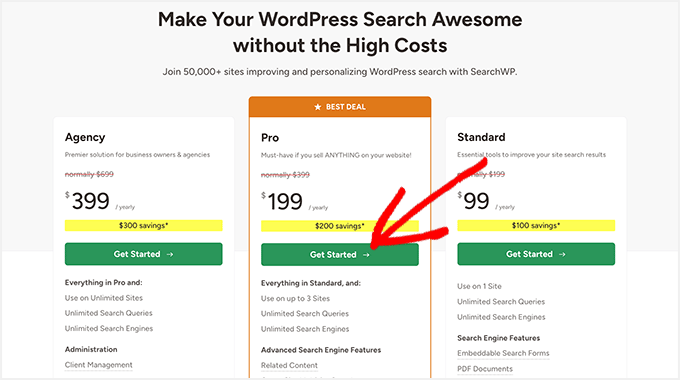
This will take you to the SearchWP pricing page. It comes with 3 pricing plans: Standard, Pro, and Agency.
We recommend the SearchWP Pro plan.
It lets you install the SearchWP plugin on up to 3 sites. Plus, it comes with advanced search features, including related content, multisite search, eCommerce product search, and more.
The SearchWP Pro plan also integrates with third-party services like translation plugins, donation plugins, and so on.
Click on the ‘Get Started’ button to continue.
This will take you to the checkout page.
You can review your selected plan and order summary on the right side of the screen. It also automatically applies the discount to your total amount.
🟢 REMINDER: Since you clicked on our SearchWP coupon link, the 50% discount is applied to all SearchWP plans automatically. No SearchWP coupon code needed.
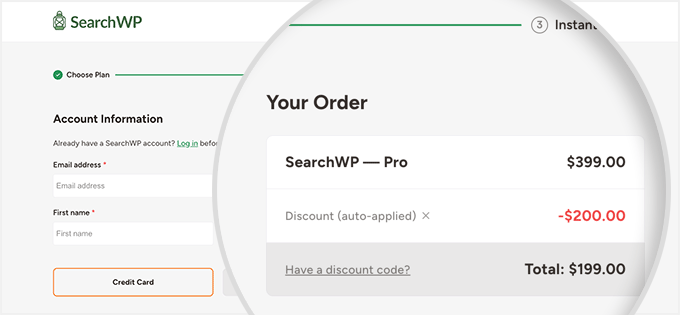
On the left side, you need to add your account information. This includes your email address, phone number, and name.
Just below that, select a payment method and carefully enter your full payment details.
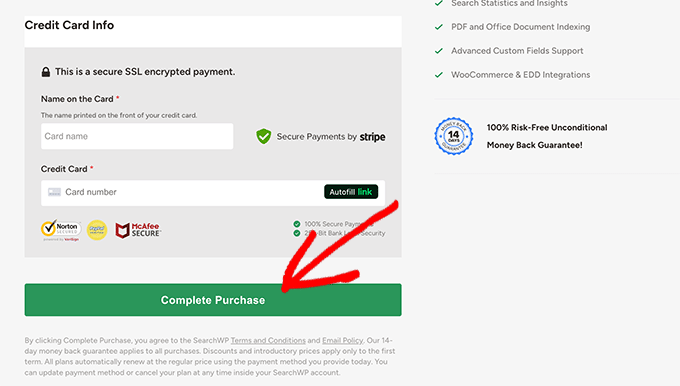
Next, you need to click on the ‘Complete Purchase’ button to successfully buy the SearchWP plugin.
Now, you can add a search bar to your WordPress site and take full control of what to show to your users.
WordPress Plugin Coupons
Here are some other recommended WordPress plugin coupon codes that you should check out:
| WordPress Plugin | Coupon Code |
|---|---|
| SeedProd Coupon | 60% OFF |
| WPForms Coupon | 50% OFF |
| AIOSEO Coupon | 50% OFF |
| WP Mail SMTP Coupon | $50 OFF [EXCLUSIVE] |
| WPConsent Coupon | 50% OFF |
We hope you found our SearchWP coupon code to be helpful. At WPBeginner, we work hard to negotiate exclusive discounts for our users.
Please check out other WordPress coupons and deals.


