


Your domain name is one of the most important decisions you’ll make when starting a website. It’s the address people use to find your brand online, and it’s the foundation of your business’s web presence.
After helping millions of beginners launch their sites, we’ve developed a simple, proven process for picking the right name.
A great domain does more than give you an address. It builds credibility, helps you stand out, and boosts your search rankings.
We put together this guide to show you how to choose the best domain name. These 14 tips and tools will help you find a memorable, brandable name that grows with your business.
Quick Tip: Here’s how to register a domain name and get it for FREE. Need help with name ideas? Try out our business name generator.
14 Tips for Choosing the Best Domain Name
One of the most important tasks when starting a blog is choosing a domain name. This can feel stressful because you don’t want to make a mistake.
To make the process easier, here is our simple 14-step framework that you can use to pick the best domain for your website.
- Stick with .com
- Use Keywords in Your Domain Name Search
- Keep Your Domain Name Short
- Make Your Domain Name Easy to Pronounce and Spell
- 5. Keep It Unique and Brandable
- Avoid Hyphens in Domain Name
- Avoid Double Letters
- Leave Room to Expand
- Research Your Domain Name
- Use Domain Name Generators for Clever Ideas
- Act Quickly Before Someone Else Takes It
- Check Social Media Handle Availability
- Consider a Premium or Pre-Owned Domain
- Protect Your Domain with Privacy
- Best Places to Buy a Domain Name
- Free Domain Registration With Web Hosting
- Most Popular Domain Registrars
- Frequently Asked Questions About Choosing a Domain Name
- Additional Resources
Common Mistakes to Avoid: Don’t use hyphens, double letters, numbers, or overly long and niche-specific names. The tips below explain each mistake and what to do instead.
Let’s take a look at these tips one by one with more details.
1. Stick with .com
There are plenty of new domain name extensions available today, from the original .com, .net, and .org TLDs (top-level domains) to niche extensions like .pizza, .photography, .biz, and even .blog.
We always recommend choosing a .com domain name. It is still the most established and credible extension on the web.
Dot-com domains are the most memorable, especially for users who aren’t as tech-savvy. Most visitors automatically type “.com” at the end of every domain without thinking about it.
For instance, if your site is jane.photography and a user accidentally types jane.photography.com, their browser will show a “site not found” error. You’ve lost that visitor for good.
Most smartphone keyboards also have a built-in .com button, making it even easier for users to type a .com address quickly.
There are also regional TLDs called ccTLDs (country code top-level domains). For example, .co.uk is used in the United Kingdom, and .de is used in Germany.
Using a country-level domain can help you rank better in local search results for that specific country. A London bakery with a .co.uk domain may attract more local customers than one using .com.
If you plan to serve a global audience, though, the universal recognition of a .com is almost always the better choice.
2. Use Keywords in Your Domain Name Search
Keywords play an important role in a domain name. Including a relevant keyword tells search engines what your WordPress website is about and can give you a slight edge in search results.
While having a keyword in your domain can help, it’s important to balance this with brandability. A unique, memorable brand name is often more valuable for long-term SEO success than a keyword-stuffed domain.
Think of how Amazon.com became a stronger brand than a generic name like BuyBooksOnline.com. The branded name is easier to remember, share, and build a reputation around.
Finding a good domain name with target keywords that aren’t already taken is hard. You’ll need to be creative and combine keywords with other words to make your domain stand out.
To get new keyword ideas, use WPBeginner’s free Keyword Generator. It instantly generates 300+ related keywords based on your main topic.
Doing keyword research when brainstorming domain ideas helps you find a name that’s both brandable and easier to rank for in search results.
3. Keep Your Domain Name Short
While keywords are important, don’t go overboard with domain length. A short domain name is easier to spell, share, and remember.
We recommend keeping your domain name under 15 characters. Longer domains are harder for visitors to remember and type correctly.
Users are also more likely to make typos with longer domain names, which can lead to lost traffic. Someone who misspells your domain will land on a blank page or a competitor’s site.
Think about the domains you use every day. Most popular websites have short, punchy names: Google, Apple, Amazon, X. Short names are simple to type and easy to recall.
Short names are also better for business cards, email addresses, social media profiles, and word-of-mouth sharing. If someone can’t type your domain from memory, you’re losing potential visitors every day.
4. Make Your Domain Name Easy to Pronounce and Spell
You should be able to easily share your domain name both when speaking and in writing. You never know when someone will ask for your website address in person or over the phone.
A simple test: say your domain name out loud to someone who has never seen it written. If they ask you to spell it, that’s a warning sign.
Names with unusual spellings, made-up letter combinations, or tricky sounds create friction. Every time a visitor has to stop and think about how to spell your domain, you risk losing them.
If you plan to use your domain name to create a professional business email address, this is especially important. A clear, easy-to-spell name builds trust with customers from their very first interaction.
5. Keep It Unique and Brandable
Your domain name must be unique so that you stand out in your readers’ minds. Research other blogs in your niche and find out what domain names they are using before committing to yours.
You don’t want to accidentally use a trademarked name or get accused of copying another blogger. A similar name can also split your brand recognition and confuse your audience.
Brandable domain names are unique, catchy, and memorable. “Amazon.com” is a much more brandable name than “BuyBooksOnline.com” because it’s distinctive and doesn’t limit the company to one product category.
To create a brandable name, look for words that are short, evocative, and easy to say. Invented words like Google, Spotify, and Etsy have become some of the most valuable brand names on the planet.
A brandable name also gives you more flexibility as your business grows. You can expand into new areas without the domain holding you back.
6. Avoid Hyphens in Domain Name
Never create a domain name with hyphens. Because hyphens are frequently used by spam sites, users can be wary of hyphenated domains.
Hyphenated domains are also harder to share verbally. If you tell someone your site is “my-blog.com,” they may not remember the hyphen and type “myblog.com” instead, landing on a completely different site.
If you choose a hyphenated domain because the name you want is already taken, your users will likely end up at your competitor’s site when they forget to type the hyphen.
In short, hyphens add friction and reduce trust. There is almost never a good reason to include one in your domain name.
7. Avoid Double Letters
Domains with double letters increase your chances of losing traffic to typos. Users who mistype a double letter will land on a different site or on a blank page.
For example, a domain like Presssetup.com will be more prone to typos because of the three consecutive “s” letters in the middle. Most users will accidentally write Presetup.com instead.
Typos are also a trust issue. If a visitor mistypes your domain and lands on a spammy website, they may associate that bad experience with your brand without ever realizing their mistake.
Avoiding double letters makes your domain easier to type, easier to share, and more brandable overall.
8. Leave Room to Expand
It’s smart to choose a domain name related to your niche because it gives visitors a sense of what your website is about. But avoid limiting your long-term options too much.
For example, a florist might choose orchidblog.com, but then want to start writing about other flowers besides orchids. A niche-specific domain can make it harder to attract readers interested in other topics.
Think about where your brand might go in two or three years. A food blogger today might want to branch into cooking classes, recipe books, or kitchen products down the road.
Properly moving your site to a new domain can be a frustrating process, and it can cost you search rankings if you don’t do it right. Picking a flexible domain name from the start protects your long-term SEO investment.
9. Research Your Domain Name
Before you register a domain name, find out if there is already a registered business using the same name. Failing to check can lead to legal problems and expensive rebranding down the road.
You can perform a trademark search to see if a similar or identical name is already protected. Note that this database covers the United States only.
If you’re based outside the US, check your own country’s trademark registry as well.
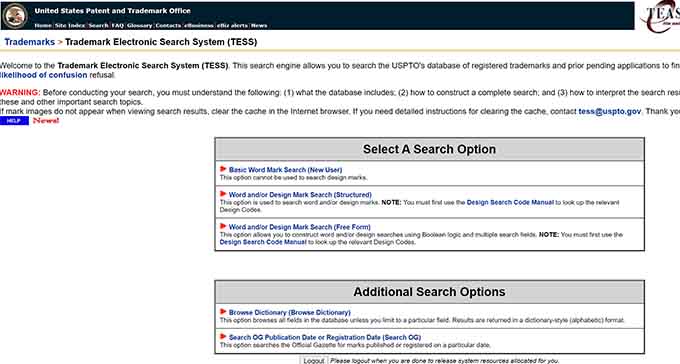
Also do a Google search for your domain idea and check name availability on major social media platforms like Instagram, X (Twitter), Facebook, YouTube, and TikTok.
A matching or very similar name can cause confusion, split your brand recognition, and even lead to legal action. Finding out early saves you time, money, and rebranding headaches.
Once your site is up and running, learn more about how to trademark and copyright your website name and logo to protect your brand going forward.
10. Use Domain Name Generators for Clever Ideas
There are more than 350 million registered domain names globally. This leads many people to say that all the good ones are already taken.
Searching for domain names manually can be very time-consuming. Domain name generators save you hours by automatically searching your keywords and returning hundreds of available ideas.
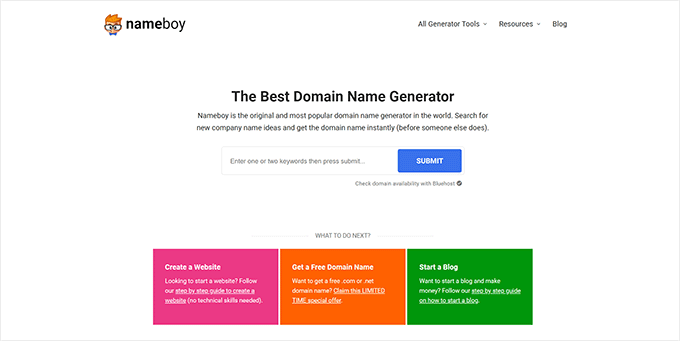
We recommend using Nameboy, which is one of the most popular domain name generator tools online. Enter a keyword and it returns available domain combinations instantly.
You can also use WPBeginner’s free Business Name Generator tool or IsItWP’s domain generator to find more domain name ideas.
AI-powered domain generators are also worth trying. These tools combine words in creative ways you might not think of on your own, and they can suggest brandable names based on the style or tone you describe.
See our full list of the best free domain name generators to explore even more options.
11. Act Quickly Before Someone Else Takes It
Each day, thousands of new domain names are registered from all parts of the world. If you’ve found a domain name you like, don’t wait too long.
Domain names are like real estate. Domain investors actively look for good, brandable names to register and resell at a profit. If you don’t act fast, someone else may register your domain idea before you do.
Since domain names are relatively cheap, we always recommend acting fast. Most domains cost less than $15 per year to register.
If you change your mind later, you can simply let the domain expire. But if you don’t register it now and someone snaps it up, getting it back could cost hundreds or even thousands of dollars.
12. Check Social Media Handle Availability
Before you register your domain, check whether the same name is available as a social media handle. Brand consistency across your website and social profiles makes it easier for people to find and recognize you online.
If your domain is mybrand.com, you’ll want @mybrand (or something close) on Instagram, X, YouTube, TikTok, and Facebook. Mismatched handles make it harder to build a unified online presence.
Free tools like Namechk and KnowEm let you check handle availability across dozens of platforms at once. You simply type your desired name and see where it’s taken and where it’s available.
If your exact name is already taken on one or two platforms, look for a consistent variation. Adding a word like “official,” “HQ,” or your category (like “mybrandblog”) can work well.
Checking social handles before you register your domain prevents you from locking in a name only to discover the matching social accounts are already taken by someone else.
13. Consider a Premium or Pre-Owned Domain
If the perfect .com domain name is taken, you don’t always have to settle for a compromise. Premium and pre-owned domains are worth considering.
A premium domain is a previously registered domain name that is now for sale. These domains may come with built-in search authority, existing backlinks, and a name that’s already easy to brand.
You can find premium domains for sale on marketplaces like GoDaddy Auctions, Sedo, and Afternic. Prices range from a few hundred dollars for lesser-known names to millions for highly sought-after ones.
Before buying a pre-owned domain, check its history using the Wayback Machine. Look at what kind of site previously lived on the domain.
Check for any signs it was used for spam or low-quality content before you commit.
A clean domain history means you inherit the authority without the baggage. A domain with a spam history can hurt your search rankings before you’ve even published a single page.
14. Protect Your Domain with Privacy
When you register a domain name, your personal contact information is stored in the public WHOIS database. This includes your name, email address, phone number, and physical address, all of which anyone can look up for free.
Domain privacy, also called WHOIS protection, replaces your personal details with generic registrar information in that public database. This keeps your identity private without affecting how your website works.
Without domain privacy, you’re likely to receive spam emails, telemarketing calls, and phishing attempts from people who scrape the WHOIS database for contact information.
Most domain registrars now offer domain privacy protection, and many include it for free. When registering your domain, look for a privacy or WHOIS protection option and enable it before completing your purchase.
It’s a small step that protects your personal information and helps keep your inbox clean from day one.
Best Places to Buy a Domain Name
There are hundreds of domain registrars on the web. Choose carefully because moving your domain later can be a hassle.
Just like with web hosting, pricing for domain registrations typically ranges from $9 to $24 per year. You can even get one for free.
Let’s take a look at how you can easily buy a domain name.
Free Domain Registration With Web Hosting
Most web hosting companies also offer domain registration as a service. Some offer free domain registration with new hosting accounts.
If you’re starting a new website, this is a smart way to save money. You need hosting anyway, so getting a free domain bundled in makes a lot of sense.
Below are hosting companies offering our users over 60% off web hosting, a free SSL certificate, and a free domain name:
Bluehost is one of the oldest and largest web hosting brands. They are an official WordPress-recommended hosting provider.
Hostinger, DreamHost, and HostGator also offer a free domain name with web hosting.
Keep in mind that most hosts offer free domain registration for the first year only. After that, your domain will renew at the standard rate, usually around $14 per year.
A lot of users take advantage of the free domain for the first year because they need hosting anyway. Why not get it for free?
Most Popular Domain Registrars
If you want to register a domain name without purchasing hosting, you can do that through a standalone domain name registrar.
Network Solutions is one of the best domain registrars on the market. They offer all top-level domain names with a smart search feature, premium domains, and all the tools you need to manage your names.
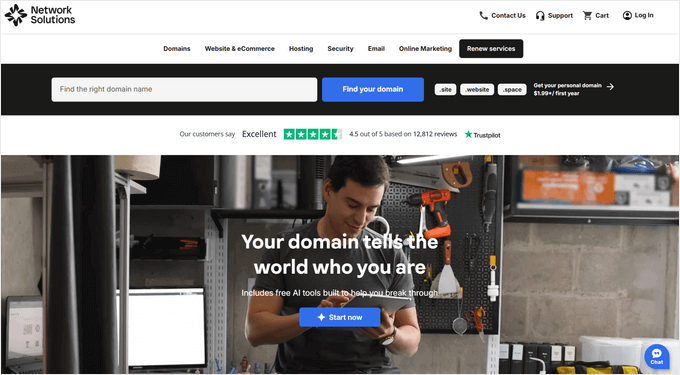
Plus, Network Solutions is offering WPBeginner readers a special discount. Visit our Network Solutions coupon page for the latest deal.
GoDaddy is the largest domain registrar in the world, managing tens of millions of domain names for customers worldwide.
They also offer web hosting plans. If you use our GoDaddy coupon code, you can get a free domain name.
Related: The best GoDaddy alternatives that are cheaper and more reliable.
Now that you know how to choose the best domain name, you’re ready to take the next step. Use the tips above to narrow down your options, then act quickly to register your favorite before someone else does.
Frequently Asked Questions About Choosing a Domain Name
Over the years, we’ve helped thousands of beginners start their websites. Here are the answers to some of the most common questions we get about picking the right domain name.
1. How much does a domain name cost?
A new domain name typically costs between $9 and $24 per year. The price can vary based on the domain extension (.com, .org, etc.) and the registrar you choose.
Keep in mind that this is an annual fee you’ll need to pay to keep the domain registered.
2. Can I get a domain name for free?
Yes, you can. Many web hosting companies, such as Bluehost and Hostinger, offer a free domain name for the first year as part of their hosting packages.
This is a great option if you’re building a new website, since you’ll need hosting anyway.
3. What should I do if my desired .com domain is taken?
If your first choice is taken, don’t worry. You can try adding a small, relevant word (like a verb) to it, or use a domain name generator for fresh ideas.
While other extensions exist, we strongly recommend finding a creative alternative that lets you stick with a .com.
4. Does my domain name affect SEO?
Yes, it does. A domain that includes a keyword related to your topic gives search engines a helpful signal about what your site covers.
A short, memorable, and easy-to-spell domain is also better for branding and user experience, which indirectly helps your SEO.
5. Should I register my domain and hosting with the same company?
You can, and it’s often convenient for beginners. Registering with your host means fewer accounts to manage, and many hosts include a free domain for the first year.
If you switch hosting providers later, you can keep your domain at the original registrar and update the nameservers to point to your new host.
6. What is domain privacy, and do I need it?
Domain privacy (also called WHOIS protection) hides your personal contact information from the public WHOIS database. Without it, your name, email, phone number, and address are visible to anyone who looks up your domain.
Most registrars offer it for free or at a low cost, and we recommend enabling it at registration.
Additional Resources
Now that you have a plan for choosing the perfect domain, you might find these other guides helpful as you continue building your website.
- How to Start a WordPress Blog: Our ultimate guide walks you through everything, step by step.
- How to Check Domain Name Availability: Learn about easy tools to quickly see if your domain idea is available.
- Best Domain Name Generators: A roundup of the best tools for generating even more domain name ideas.
- Best Places to Find Premium Domains for Sale: See our expert picks for finding valuable, pre-owned domain names.
- WordPress and Blogging Coupons: Find the best deals on other web tools and services to help you save money.
If you liked this article, then please subscribe to our YouTube Channel for WordPress video tutorials. You can also find us on Twitter and Facebook.



Dennis Muthomi
About point #8: Leave Room to Expand – I know many new website owners don’t realize how their content and business focus will evolve over time. I myself started a blog with a domain like that was exact match to my niche and I could not pivot to other topics.
Its good that you have included that. I have couple of friends who are interested with getting a domain name and launch a website – I am sharing this guide to them so that they know how it goes.
Jiří Vaněk
I would also like to ask about the alias. I have a domain for my own portfolio as myname.tld. I have wordpress on the blog subdomain and I write about everything that interests me. Does it make any sense to buy a second domain with a better name for what I’m blogging about and use it as an alias? I would treat it with a 301 redirect because of the duplication. But I’m more interested in whether a second domain as an alias can help in SEO?
WPBeginner Support
There is no guarantee that it will be better for SEO to use an alias domain to point to your main domain. You would need to manually test to see if that would work for you if you wanted to use it but we recommend most sites focus on one domain rather than trying to have multiple domains point to one site.
Admin
Mrteesurez
I am very much interested in this topic of choosing a right domain.
My points:
1. You said ‘buybooksonline.com’ is not brandable as ‘Amazon.com’. But you said we should include keywords in domain whereas ‘Amazon’ does not contain any key words.
2. Brandable domain is hard to rank with in the beginning while niche related domain (the one that contains keywords) are easily get traction.
3. One can just combine keywords with his brand name and come up with a brandable domain with keyword.
WPBeginner Support
1. Amazon had specific goals with its domain name and it was set up in a different SEO landscape than current sites.
2. Not always, you would still need to rely on users looking at your site which is why a brandable domain name normally ranks better in our experience
3. You can certainly do that, there is nothing wrong with trying that.
Admin
Peter Iriogbe
I’ve heard that using the .com extension is popular because it’s well-known. However, other extensions are good too. The choice of extension depends on the type of website you want. For instance, .com is great for commercial sites, .org for non-profits, and .biz for business. Your site’s purpose determines the best extension.
It’s important to note, as the author mentioned, that Google doesn’t rank a site based on its extension or including keywords in the domain. Instead, Google values quality content that helps users. That’s just my little opinion. Thanks!
WPBeginner Support
We still recommend using .com as the extension for any site when possible
Admin
Ahmed Omar
I was struggling lately with the name of my second website which was annoying to me.
I could figure few solutions from the tips mentioned above which were helpful to me to take my decision
Thank you
WPBeginner Support
You’re welcome, glad our guide was helpful
Admin
Geraldine (Geri) Kay
Wow, this is just what I have needed to stop procrastinating, especially since I am 2 months short of 82 years. Hoping others will enjoy my poems on so many topics, as much as I have enjoyed writing them, thru the years.
WPBeginner Support
Glad our list was helpful and we hope you enjoy your site once you start it!
Admin
Mark Tyler
It helps me a lot thanks for sharing this valuable information
WPBeginner Support
You’re welcome!
Admin
Khaled Alhadary
Thank you very much for detailed and useful comments, I have a question please in regards to choosing my domain name… does it make a difference in SEO if my keyword(s) is at the beginning or the end of my domain name? does it make any difference with SEO algorithms?
WPBeginner Support
The order of your keyword would not make a difference.
Admin
Emee
This is a great roundup of reminders, thank you! One thing I would also suggest, is to look carefully at “hidden words” inside your domain name, that you may have not thought of, that are spelled inside the domain. Some can actually be embarrassing.
WPBeginner Support
Thanks for sharing that recommendation
Admin
Irfan Khan
Thank You Brother, thanks for this detailed information on choosing a good domain.
Speaking honestly, I was unaware of that trademark search. Thank you for mentioning that point. I will research all my existing domains as you suggested.
Thank you again for the information.
WPBeginner Support
Glad you found our content helpful
Admin
Kelie
Why buy a domain at a site like godaddy, etc when you get a free domain when you start from any of the site builders?
WPBeginner Support
It’s a personal preference question and sometimes you can get renewal deals or offers from different registrars
Admin
Ms C.C.
This article was right on time! It was extremely helpful and had all the information I needed. Easy to follow, links were accurate and useful.
WPBeginner Support
Glad you found our article helpful
Admin
Jennifer
Thanks for these tips. Is it possible to start working on developing your site BEFORE selecting the domain name? I want to make sure I pick the right name so I’m giving it some time to percolate in my brain before making a decision, but I’d like to go ahead and get started on designing my site. Is this possible? Most options I see force you to select the domain name before moving forward.
Also, just FYI, you have a typo in number 10
WPBeginner Support
Thank you for letting us know. To start testing and creating a site before choosing a domain, we would recommend installing WordPress locally following our guide below:
https://www.wpbeginner.com/how-to-install-wordpress/#installlocal
Admin
Larry Nichols
Extremely impressed with the information that you provided in this article, I gained the needed information that I was looking for from this article. I appreciate you making this information available to those sincerely looking for the correct and reliable information.
WPBeginner Support
Glad you found our article helpful
Admin
Shams
how to hide main domain title name from subdomain WordPress title in google search. I have just created a subdomain for my site and Yoast SEO. I am sure everything and I doubled checked everything. But my when I google my subdomain my main domain title is showing next to the post, plz any can help me with this issue?
WPBeginner Support
That would normally be determined by your theme’s styling, if you reach out to your theme’s support they should be able to let you know if there is an option to remove that.
Admin
Adam White
Thanks for the information & tips about how one can choose a perfect domain name according to the niche the website will be about, it was great to read all the tips and they are very useful. Keep sharing and posting.
WPBeginner Support
You’re welcome
Admin
Anita
Suppose you want to affiliate with another company. How do you go about creating a domain or sub-domain name?
WPBeginner Support
It would depend on the specific hosting provider for how to create subdomains for your domain
Admin
Sarah Piché
I just finished my PhD and have looked at various grad students, postdocs and academics websites and was wondering if simply using your name as domain name was a good idea? Provided of course that you remove hyphens, accents, etc.
WPBeginner Support
If you wanted it to be a personal site you certainly could do that
Admin
suvo
Great Post Thanks for Shearing. i Read your Blog every day.Please write more about this topics.
WPBeginner Support
Thank you
Admin
Omolara
Thanks WPB for this post, it was really helpful.
WPBeginner Support
Glad our post was helpful
Admin
Jerry Peres
Hello! Firstly, thanks for sharing this blog. No doubt I have already read many such blogs but this one is special in many ways for me. I like all top domain hosting and domain providing companies you have discussed here. Definitely, many other also like your blog.
Paige Za'nay
Thank you for the information and keep up the great work you do.
Jerome K
This was very informative, and very much appreciated so I shared to my LinkedIn profile. Keep up the great work and research you do.
Manjinder Kaur
Thanks
Bob O’Brien
Very informative site thank you.
Question: Does it matter if the main subject word is not at the beginning of the
domain name.
Shubhaji Satyaranjan
It’s really useful for beginners like me. Thank you very much for your support
ROHIT SHARMA
Thanks a lot this article give me the best idea to select the Best Domain Name.
Michelle
This article is very helpful. Thank You. Now I understand how to pick a domain name. But, unfortunately, every short two-word domain name in a .com I have thought of for my niche is already taken. And the ones I thought of that are available I don’t like. I will keep racking my brain until I figure it out!
David
if my name.com has gone is using .blog, .site or .online a good alternative? Like to know how and if they would rank well
JaDonnia B.
Is a .net domain equally as detrimental to SEO? The .com sites are very limited. Some registrars will provide suggestions when the chosen name is already taken. What then? Hyphens, underscores, and symbols are suggested as options.
Biresh Kumar
Very interesting for beginners.
Ali A Mubarak
So, wpbeginner.com was made based on its niche right, which is Wordpress. SO if this website posts about Blogger then it will be untrusted by the readers. That’s what you mean?
Lieven Decroos
What about using figures in the email addrerss , f.ex twoexample, or 2example?
WPBeginner Support
Hey Lieven,
You will have to inform users whether it has digits or alphabate. Like whether its two or 2 in your domain name.
Admin
Ilyas Tarar
Thank you WPBeginner editorial staff for this nice little guide. After reading this, I can safely direct my blog readers to this page for further guidance on domain name selection.
Jay Castillo
Thanks to your recommendation for Siteground (I made sure I used your link), I just finished moving my blog to their cloud hosting. I’m so glad I’m now with them.
I also got my free domain name and I’m happy I followed most of your tips here. It was actually very difficult to find a short but brandable domain name with keywords.
By the way, for those thinking of getting a free domain with Siteground, you should specify a new domain during initial signup. My mistake was I specified my existing blog during signup and I could no longer find a way to get the free domain.
I then contacted support and they made an exception and registered a new domain for me anyway… nice!
By the way, is the domain name in Siteground free for life as long as you stay with them, or only for a year?
WPBeginner Support
Hi Jay,
The domain is free as long as you host your site with SiteGround. However, if you decide to move your site to a different host in the future, then you can transfer your domain registration.
Admin
Vinit Patil
Hello Sir Very Helpful Post,
Does having a free domain with .tk extension matter inSEO Rankings ??
WPBeginner Support
Most likely it will badly affect your SEO.
Admin