


Do you want to disable the WordPress admin bar for all users except administrators?
By default, you can easily disable the WordPress admin bar for individual users. However, this can take time if you have lots of registered users on your site.
In this article, we will show you how to easily disable the WordPress admin bar for all users except administrators.
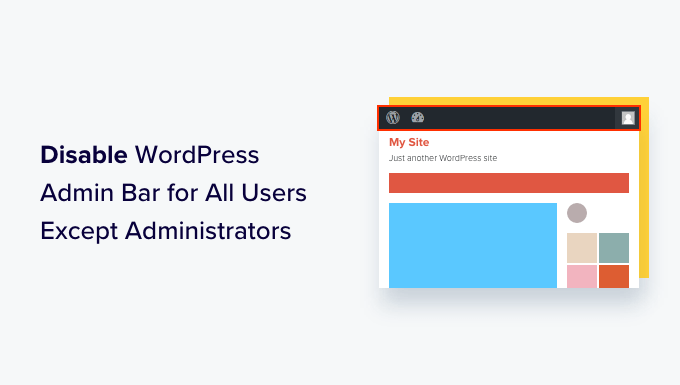
What Is the WordPress Admin Bar?
By default, WordPress shows an admin bar at the top of the screen for all logged-in users. When you are logged into your account, you can see this toolbar in the WordPress admin area and all other pages.
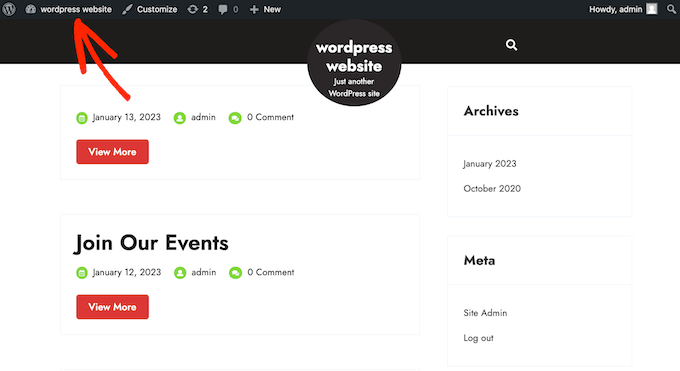
The WordPress admin toolbar has useful shortcuts to different backend areas of WordPress, and these shortcuts change based on a user’s role and permissions in WordPress.
However, the admin bar can be distracting when you are looking at the front end of your website.
It may also affect your website’s design and user experience. This can be a problem if you are building or managing a WordPress site for a third party, as it stops them from seeing what their website really looks like.
Luckily, there are multiple ways to disable the admin bar for all users except administrators. Simply use the quick links below to jump to the method you want to use:
Video Tutorial
If you prefer written instructions, then just keep reading.
Method 1: Disable the WordPress Admin Bar for Individual Users
You can disable the admin bar for specific users by simply editing their user profile. This is a quick and easy method if you just need to remove the bar for a small number of people. However, if you run a membership site with a lot of users, then we recommend choosing a different method.
To remove the admin bar manually, simply go to the Users » All Users page in the WordPress admin dashboard. Then hover your mouse over the user who doesn’t need the admin bar, and click on ‘Edit’ when it appears.
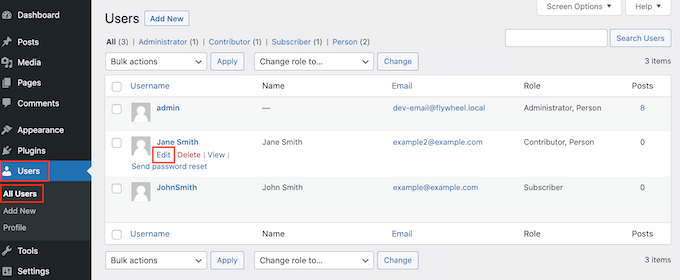
This will bring open that user’s profile.
From here, uncheck the box next to the ‘Show toolbar when viewing site’ option.
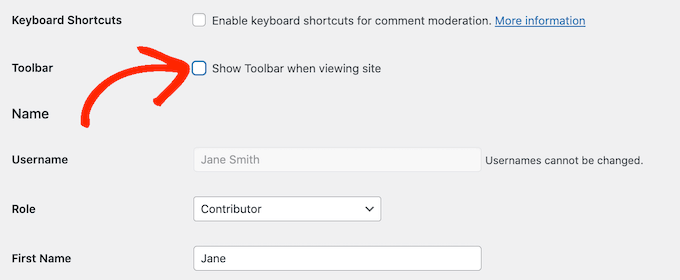
After that, scroll to the bottom of the screen and click on ‘Update User’ to save your changes. This will disable the admin bar for that specific person only.
To hide the toolbar for more users, simply follow the same process described above.
Method 2: Disable Admin Bar for All Users Except Admins (Recommended)
If you need to hide the admin bar for lots of different people, then changing each user’s settings manually would take a lot of time and effort.
For that reason, we recommend disabling the admin bar by adding code to the functions.php file, which is a WordPress theme file. If you haven’t done this before, then check out our guide on how to copy and paste code snippets in WordPress.
Some guides will tell you to edit the theme files manually, but this can cause common WordPress errors and may even completely break your website.
For that reason, we recommend using WPCode. It is the best code snippet plugin and makes it easy to add custom code in WordPress without putting your site at risk.
First, you will need to install and activate the free WPCode plugin. For more information, see our step-by-step guide on how to install a WordPress plugin.
Once the plugin is activated, go to Code Snippets » Add Snippet.
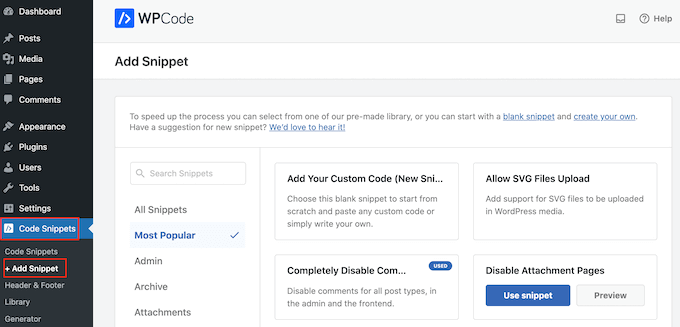
Here, you will see all the pre-made snippets you can add to your site. This includes a snippet that allows you to completely disable comments, upload file types that WordPress doesn’t usually support, disable attachment pages, and much more.
On the next screen, you need to hover your mouse over the ‘Add Your Custom Code (New Snippet)’ option and click the ‘Use snippet’ button when it appears.
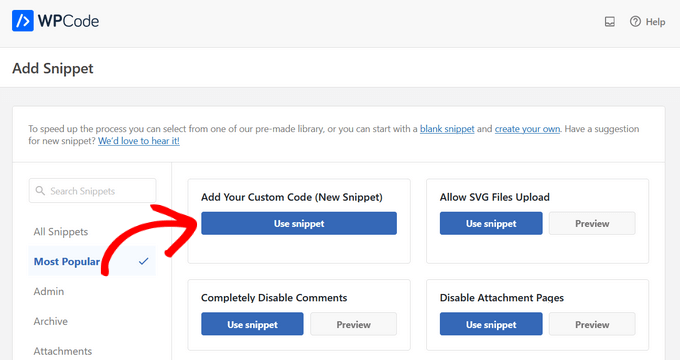
On the next screen, type in a title for the code snippet. This is just for your reference, so you can use anything you want.
Then, open the ‘Code Type’ dropdown and choose ‘PHP Snippet’.
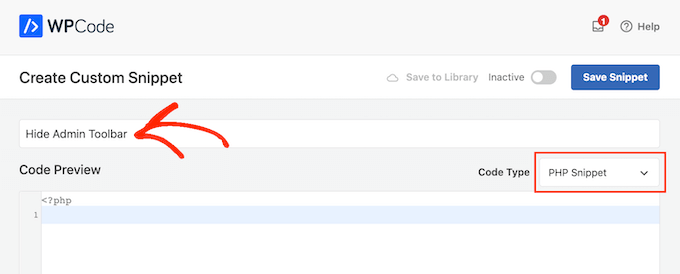
With that done, simply paste the following code to the editor:
add_action('after_setup_theme', 'remove_admin_bar');
function remove_admin_bar() {
if (!current_user_can('administrator') && !is_admin()) {
  show_admin_bar(false);
}
}
This code identifies any non-admin users who are not currently looking at the admin dashboard. For these users, it disables the WordPress admin bar.
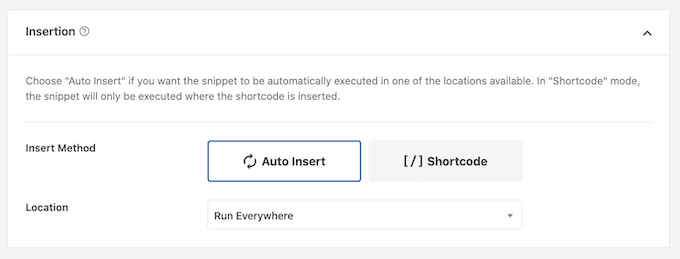
After that, scroll down the page to the ‘Insertion’ section. Here, you can keep the default’ Auto Insert’ method to make sure the code runs everywhere.
Finally, scroll to the top of the screen and click on the ‘Inactive’ slider so that it shows ‘Active.’
Then, just click the ‘Save Snippet’ or ‘Update’ button to make the code snippet live.
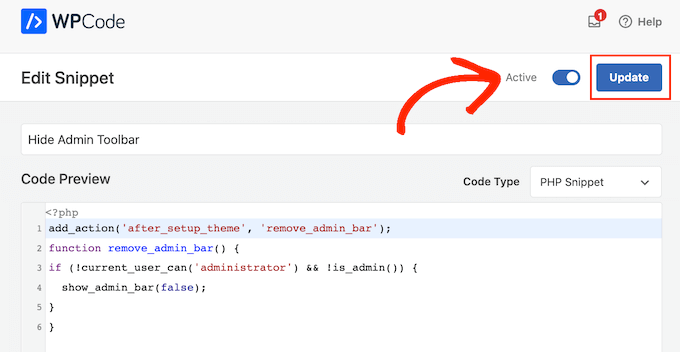
That’s it! Just remember to check your WordPress website to make sure everything is working fine.
Method 3: Disable WordPress Admin Bar for All Users Except Admins (No Code Required)
If you don’t want to add code to your website, then you can hide the admin bar using a plugin. Hide Admin Bar Based on User Roles lets you remove the toolbar based on different user roles, so this is a good choice if you want to disable the bar for all members, WooCommerce customers, or some other user role.
First, you need to install and activate the Hide Admin Bar Based on User Roles plugin. For more details, see our step-by-step guide on how to install a WordPress plugin.
Upon activation, you need to go to the Settings » Hide Admin Bar Settings page. From here, check the boxes next to the user roles where you want to disable the admin bar.
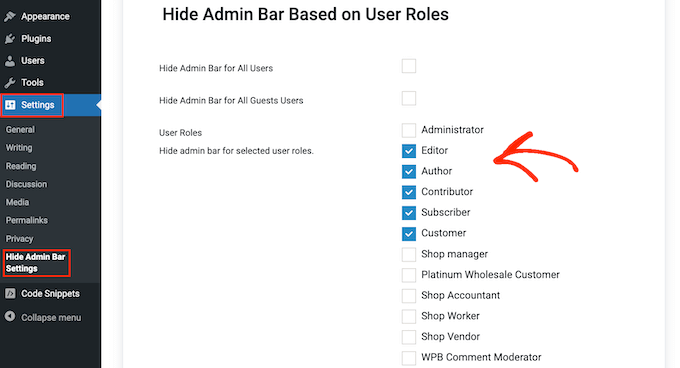
With that done, simply click on ‘Save Changes’ to store your settings.
Method 4: Disable Admin Bar for All Users (Including Admins)
Do you want to disable the admin bar for all users, including site admins?
You can do this by adding some code that disables the admin bar for everyone who is viewing your site’s public pages. This means the admin bar will only appear when you are in the WordPress dashboard area.
To make things simple, WPCode has the exact code snippet you need in its built-in Snippet Library. Simply go to Code Snippets » Library.
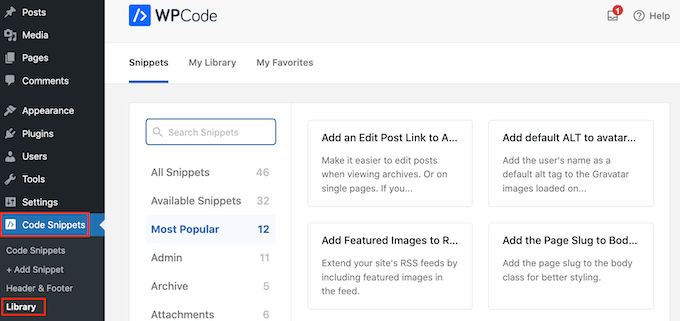
Here, search for ‘Disable The WP Admin Bar’.
When the right snippet shows up, just click on its ‘Use Snippet’ button.
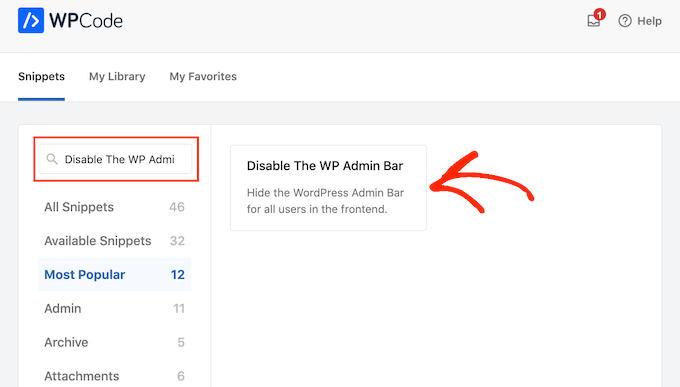
The plugin will automatically add the code to your site, give the code a descriptive title, choose the correct insertion method, and even add tags to help you identify the snippet.
Here’s what the code looks like:
/* Disable WordPress Admin Bar for all users */
add_filter( 'show_admin_bar', '__return_false' );
Now, all you need to do is toggle the switch from ‘Inactive’ to ‘Active’ and then click on ‘Update’.
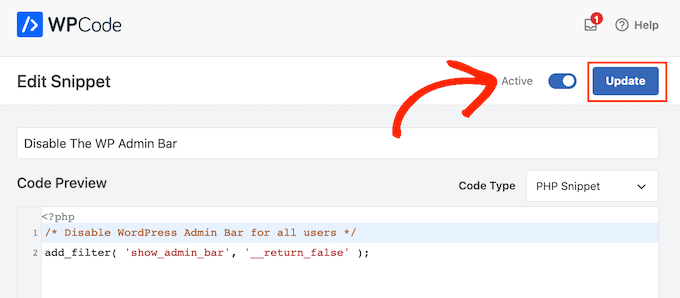
Now, if you visit your website’s front end while logged into your WordPress account, the admin bar will disappear.
We hope this article helped you learn how to disable the WordPress admin bar for all users except administrators. You may also want to see our ultimate WordPress security guide and our comparison of the best WordPress page builders for creating custom page layouts without any code.
If you liked this article, then please subscribe to our YouTube Channel for WordPress video tutorials. You can also find us on Twitter and Facebook.




Syed Balkhi says
Hey WPBeginner readers,
Did you know you can win exciting prizes by commenting on WPBeginner?
Every month, our top blog commenters will win HUGE rewards, including premium WordPress plugin licenses and cash prizes.
You can get more details about the contest from here.
Start sharing your thoughts below to stand a chance to win!
Hajjalah says
I have a Question and Answer plugin on my blog which automatically adds admin bar for all users whenever i make an update on it. I am glad that WPCode has completely disabled this annoying feature. Thanks WPBeginner for the helpful article.
WPBeginner Support says
You’re welcome!
Admin
Moinuddin Waheed says
This is very needed to hide the admin bar to all the user’s except the administrator.
I have thought of doing this multiple times over specially when I was running news website and I had many authors and contributors.
Showing them admin bar is not only unnecessary but annoying too.
Really appreciate for the steps to get rid of this admin bar and keep it for only the administrator.
Amos Showole says
Wow… This is great, you solved an issue I faced with on one of my WordPress website that BuddyPress was installed on….
WPBeginner Support says
Happy to hear our guide was helpful!
Admin
Hussam H says
Thank you and bless you.
WPBeginner Support says
You’re welcome!
Admin
Paul says
Using the after_setup_theme hook doesn’t always work. Try this instead:
function remove_admin_bar( $value ) {
return ( current_user_can( ‘administrator’ ) ) ? $value : false;
}
add_filter( ‘show_admin_bar’ , ‘remove_admin_bar’);
Matthew D Henderson says
Thank you for providing four different ways to do this. Perfect
WPBeginner Support says
Glad you found our recommendations helpful
Admin
Joey says
What would be the code if I want to add Editor and Admin to show the Admin bar..
if (!current_user_can(‘administrator’) && !is_admin())…
if (!current_user_can(‘editor’) && !is_editor())…
would it be if (!current_user_can(‘administrator’) && !is_admin() || !current_user_can(‘editor’) && !is_editor())
would this work?
WPBeginner Support says
For what you are wanting, you would want to remove: && !is_editor()
Then it should work how you are wanting.
Admin
Basia says
Hi,
I hide admin bar with plugin You recommend, but when subscriber log in he can still click on “view my profile” and see wp dashboard. Can I disable that?
WPBeginner Support says
You can redirect users after login using the method from our guide below:
https://www.wpbeginner.com/plugins/how-to-redirect-users-after-successful-login-in-wordpress/
Admin
Deewinc says
Thanks for the article but method 3 doesn’t work.
WPBeginner Support says
If method 3 is not working for you, we would recommend trying one of the other methods to test.
Admin
Dipesh Vedak says
what if theme upgrades?
WPBeginner Support says
If you created a site-specific plugin it would remain.
Admin
Brandon Porter says
Worked like a charm. Thank you!
WPBeginner Support says
You’re welcome, glad our guide was helpful
Admin
Bryan E Jackson says
Doesn’t seem to work for my Divi Theme
WPBeginner Support says
You may want to try clearing your cache for the most common reason for the change not being visible.
Admin
Paul says
What exactly does this disable? I still see an admin bar and I have access to menu options when I go to example.com/wp-admin when i’m logged into a subscriber account.
WPBeginner Support says
You would want to ensure the code was properly added for the most likely cause of the admin bar not being hidden otherwise, you could also have a plugin that would be overriding this code.
Admin
Jürgen says
Thanks. Just what I needed
WPBeginner Support says
Glad our guide was helpful
Admin
khaoula says
Thanks a lot ,but what to do if the user wants to logout ?
WPBeginner Support says
You can add a logout link to your menu for one option, we have a guide on how to do that below.
https://www.wpbeginner.com/wp-tutorials/how-to-add-the-wordpress-logout-link-to-navigation-menu/
Admin
Kaetech says
Thanks a lot. Just what I needed. It worked.
WPBeginner Support says
You’re welcome, glad our guide was helpful
Admin
Marc Korden says
Cannot add the admin code in my theme:
Communication with the site not possible to check for errors, the PHP adjustment has been reversed. The PHP file change needs to be changed in another way, for example using SFTP.
WPBeginner Support says
That message means that WordPress was not able to check the code for errors and you would need to use an FTP tool to add the code. We have a guide you can follow below:
https://www.wpbeginner.com/beginners-guide/how-to-use-ftp-to-upload-files-to-wordpress-for-beginners/
Admin
Jailson Pacagnan Santana says
Thanks! God bless you
WPBeginner Support says
You’re welcome, glad our guide was helpful
Admin
Ciao says
Where should i exactly insert the code, at the beginning, at the end of funcions.php? thx
WPBeginner Support says
We normally recommend at the end so it is easy to find and remove if needed
Admin
Agha Mubasher says
Hello there…!
First of all i simply love the work wpbeginner, as you always bring forward the simplest solutions to our wordpress issues. Your website and Youtube channel has always been helpful for me. Thumbs Up for that..
I had issue with hiding the admin bar for the subscribers only. Now after applying your code in the function.php it is hidden for my editors also.
Is there any way that my editors also can see the admin bar and only it should be hidden from the subscribers..!!
WPBeginner Support says
For that, you would need to target another permission that your editor has instead of what we are targeting such as edit_others_posts
Admin
Felix says
Thank you very much.
WPBeginner Support says
You’re welcome
Admin
Dana Jewel says
Thank you! This snippet has been really, really helpful.
WPBeginner Support says
You’re welcome, glad our guide could be helpful
Admin
Faris says
Great Help, It worked like a charm!
Thank You so much.
WPBeginner Support says
You’re welcome
Admin
Jesaja says
On my website it says:
“Unable to communicate back with site to check for fatal errors, so the PHP change was reverted. You will need to upload your PHP file change by some other means, such as by using SFTP.”
What to do now?
WPBeginner Support says
It means the new WordPress safety features prevented you from editing the file, you would need to download and edit your theme’s files using FTP: https://www.wpbeginner.com/beginners-guide/how-to-use-ftp-to-upload-files-to-wordpress-for-beginners/
Admin
Jesaja says
Oh.. can’t I just put it in the Custom CSS area?
WPBeginner Support says
No, this is PHP not CSS so it wouldn’t go into there.
TaiRon says
It does work like a chame, your code is perfect but I have to change in file manager directly.
Thanks.
WPBeginner Support says
You’re welcome, glad our guide could help
Admin
Bongani says
Thanks , very useful tutorial
WPBeginner Support says
You’re welcome
Admin
Mike says
Thank you!
WPBeginner Support says
You’re welcome
Admin
Jim says
Can this code be altered to allow the WordPress Admin bar for Admins AND moderators, but hide it for everyone else?
Thanks!
WPBeginner Support says
You would need to add another && !current_user_can(”) inside the parentheses with the name of the role you are wanting it to appear on or use the plugin adminimize from our article: https://www.wpbeginner.com/wp-tutorials/what-everybody-ought-to-know-about-the-wordpress-admin-bar/
Admin
Andreas says
If a user knows the URL structure of WordPress he can easily browser to /wp-admin/ and there the admin toolbar will be visible. Also, the easiest way is to deactivate it in the user setting if you have a small number of users.
Adam Pressman says
Doesn’t work. Well, to be fair, works when you first use it but then something happens and it doesn’t anymore. nothing is overwriting the functions.php and the code is there but usually after the first login, logout cycle a subsequent login will see the admin bar return.
prashanth says
It works but user cannot logout. How to logout?
Cesar says
I have created a social media site using several plugins and everything works fine but for one issue. Pages are successfully restricted and redirected (Buddypress pages, blogs, etc) for non-logged in users.
However the main issue I am having is that non-logged in users can still have access to blog posts and user profile pages via widgets placed on side bar and footer and I cannot seem to find a solution anywhere.
Any ideas on the matter, plugins or code that I can insert in the child theme?
I have been looking for a solution for over a day and all there is there is how to restrict pages and partial content but nothing works on the widget links, they keep going thru the restrictions in place.
Thanks
WPBeginner Support says
Hey Cesar,
There are several widgets and plugins that allow you to hide widgets from non-logged in users. However, if non-logged in users know the URL, then they would still be able to access those URLs directly. You need to review your plugin settings and see if you can find the option to hide profile pages from non-logged in users.
Admin
Shabz says
This code or several others that I tried from the comments isn’t working. I’m trying to remove that dumb silver/black wordpress tab above my menu that shows up for all of my website’s users. How do I remove that? Please help
Humberto Buitrago says
Is there any plugin we can use instead code?
Thanks in advanced!
Jack Hernandez says
As mentioned in the article, you included a way for users to edit their profiles through the front end without the admin bar. How did you accomplish that.
Thanks
Paritosh Negi says
Thank you so much! <3 it works well
Chouchouda says
Hello, some issue , i have done everything but can’t hide toolbar for owner user in frontend , but can do this for admin user , incredible.
I’m using search& go theme wordpress , Thank for your help.
Alex says
Hello,
Code needs a little updating. This is the code I would use to redirect by role.
/*Hide admin bar for certain roles*/
function hide_admin_bar() {
if(is_user_logged_in() ) {
$current_user = wp_get_current_user();
if ( in_array( ‘subscriber’, (array) $current_user->roles ) ) {
add_filter(‘show_admin_bar’, ‘__return_false’);
}
}
}
Hope this helps.
Brandon says
Thanks for this updated code, Alex. Simple and works great.
Put it in child theme functions.php and forget about it.
Yuki Zain says
Thanks, Alex but I’m editing a bit
/*Hide admin bar for certain roles*/
if(is_user_logged_in() ) {
$current_user = wp_get_current_user();
if ( in_array( ‘subscriber’, (array) $current_user->roles ) ) {
add_filter(‘show_admin_bar’, ‘__return_false’);
}
}
randalf says
Very nice but what do I do if I have two roles as a result of bbpress plugin.. That is registered users have the subscriber role in whole site and participant role in bbpress.
Please help
Scott says
Hi,
I inserted your code to remove the Admin bar from my membership site. Unfortunately it also removed it from me, the Admin (even thought I used your first option above). I am using the Tesseract Pro theme. Do you have any suggestions? Thanks
Inder Singh says
Dear Sir,
I have 2 admin user and i want to show admin bar for first user and remove admin bar for second user in wordpress.
How can i do it.
Thanks for support.
SG says
I tried using this and I got that code Parse error: syntax error, unexpected ‘}’ in /home/content/76/10323476/html/wp-content/themes/digitalscience-apex/functions.php on line 168 and I can’t get my site back even after deleting it.
Krzysiek Dróżdż says
Well, I wouldn’t use current_user_can for that… Codex says, that you can use it for role checking, but in the code you can find:
* While checking against particular roles in place of a capability is supported
* in part, this practice is discouraged as it may produce unreliable results.
So… Much better and secure way to do this is:
$user = wp_get_current_user();
if ( ! in_array( ‘administrator’, (array) $user->roles ) ) {
…
}
Rajdeep dey says
This code not working on my website… Did any one have any other solutions for hiding admin bar.
Lyndal Sirit says
i used it and it crashed my site, trying desperately to fix it now, i took the code back out and updated but I am getting an Error: Parse error: syntax error, unexpected ‘3’ (T_LNUMBER) in /home/lyndalspirit/public_html/wp-content/themes/primer/functions.php on line 516
WPBeginner Support says
Hi Lyndal,
Some times when users copy code from websites like WPBeginner, they also copy the line numbers which they are not supposed to copy. When they paste this code in their functions.php file it causes an error.
You need to connect to your site using an FTP client. Locate your functions.php go to the code you added and remove it. Save your changes.
Admin
SG says
Even after deleting it, my site is coming back HELP!
Chris says
This worked fine for me as-is, i stripped out the line numbers and stuck it at the end of my theme functions.php – instant success. thanks so much.
WPBeginner Support says
Hey Chris,
Glad you found it useful. Don’t forget to join us on Twitter for more WordPress tips and tutorials.
Admin
Job says
The Code works like charm. Thanks.
eli says
if(!current_user_can(‘administrator’)) {
add_filter(‘show_admin_bar’, ‘__return_false’);
}
Gordon Cockburn says
How do I remove an individual ex member from access to members only area of website
WPBeginner Support says
Login to your WordPress admin area using an Administrator account. Click on the Users menu item from the admin sidebar. This will show you a list of users registered on your WordPress site. Locate the user you wish to remove. Click on the Delete link below the username of the person you want to remove.
Admin
Jguiss says
Didn’t worked for me…
It’s worked with that : add_filter(‘show_admin_bar’, ‘__return_false’);
JGUISS says
JGUISS
Didn’t worked for me…
It’s worked with that : add_filter(‘show_admin_bar’, ‘__return_false’);
how does the code look like with this added I’m not familiar enough with php to add it in
The Little Binger says
Hello!
Thank you so much for being such a great help! I installed this code on the function file but it does not seem to work. I loaded my page on a different browser but the Log In bar is still there. Why is that? I also read your article about adding codes to the PHP file.
I hope you could help me out on this. Thanks!!
Vic says
Hi! First of all, thanks for these codes, it’s very helpful, provided I considered myself not a first timer anymore who remember to add after the codes!

I locked myself at the first time trying to add the php coding in my functions.php file as well, thanks to the “expert” web developer who didn’t show the full set of codes for a function. And thanks to your “what to do when you are locked out of WordPress admin area” site, I found out why I was locked out in the first place! But it took me a downtime of 3 days to figure out how to use the FTP, which at the end failed to function, but my webhost Helpdesk suggested me to use the File Manager in their Control Panel instead! Luckily it works! Lessons learnt the hard way, but worth it..
Just a kind suggestion, since this site was supposed meant for “WPBeginner”, I think all of the WP users beginner would appreciate if full set of codes are provided, rather than every other person “shouting” in the comment section that “The codes didn’t work, and locked me out”, and then you have to advise them to read a full length of another tutorial how to unlock their website, even though yes, you wish to teach us “How to fish” instead of “Fish for us” every time!
Anyway, thanks again and appreciate your efforts here in guiding us, the WP Beginners!
WPBeginner Support says
Thanks for the feedback. We try to make code easy to paste and use. However, usually there is already code in your functions.php file, which may affect the end result. We are glad you found your way out.
Admin