


Do you want to change the category base prefix in WordPress?
By default, WordPress automatically adds /category/ as a prefix to URLs for all category pages. However, you can easily change the category base prefix or completely remove it.
In this article, we will show you how to change the category base prefix in WordPress.
What is Category Base Prefix? Should You Change It?
Each category on your WordPress site gets its own page and RSS feed. You can view all posts filed under a category by visiting that category archive page.
By default, WordPress adds ‘category’ as a base prefix to URLs for category pages. This helps differentiate pages and posts from category and tag archives.
For example, if you have a category called ‘News’ then its URL will look like this:
http://example.com/category/news/
Similarly, WordPress also adds tag prefixes to URLs for tag archives.
http://example.com/tag/iphone/
This SEO-friendly URL structure helps users and search engines understand what kind of page they are visiting.
Most websites don’t need to change the base prefix at all. However, if you are creating a niche site where you would like to use a different word or phrase for your categories, then you can change the category base prefix to reflect that.
Changing Category Base Prefix in WordPress
Changing the category base prefix is quite simple in WordPress.
You need to visit the Settings » Permalinks page from your WordPress dashboard and scroll down to the ‘Optional’ section.
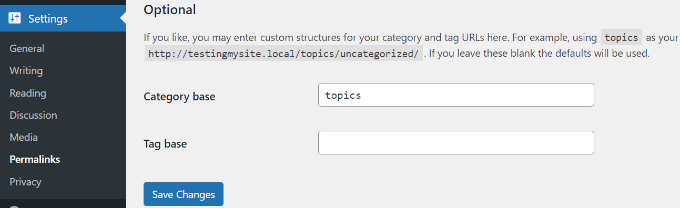
In the ‘Category base’ field, you can enter the prefix you would like to use next to the category base option. You can also change the tag base prefix if you want.
For example, you can add ‘topics’ as the new prefix. In this case, your category URLs will look like this:
http://example.com/topics/news/
Don’t forget to click on the ‘Save Changes’ button to store your settings.
Removing Category Base Prefix from URLs
Many of our users have asked us about removing the category base prefix from WordPress URLs altogether. This will change your category URLs to look like this:
http://example.com/news/
This is not a good idea, and we recommend that you do not remove category base prefix.
The category base prefix helps both users and search engines distinguish between posts/pages and categories. Removing the prefix makes your URLs ambiguous, which is not good for user experience or WordPress SEO.
You may also run into technical issues with various WordPress plugins. For example, if you have a category and a page with the same name or when you are using %postname% as your URL structure for single posts, then your site will experience an infinite redirect loop causing the pages to never load.
However, if you still want to do this, then you can use the All in One SEO (AIOSEO) plugin.

It is the best SEO plugin for WordPress and makes it super easy to optimize your website for search engines. Plus, it gives you an option to strip the category base prefix with a click of a button.
For this tutorial, we’ll use the AIOSEO Pro license because it includes the feature to remove category base and other powerful options like the redirection manager and link assistant. There’s also a free version of AIOSEO that you can use.
First, you’ll need to install and activate the AIOSEO plugin. For more details, please see our guide on how to install a WordPress plugin.
Upon activation, you’ll see the AIOSEO setup wizard. Simply click the ‘Let’s Get Started’ button. You can see our guide on how to setup All in One SEO for WordPress for more information.

Next, you can head over to All in One SEO Search » Appearance from your WordPress admin panel and click on the ‘Taxonomies’ tab.
After that, go to the Categories section and switch to the ‘Advanced’ tab. From here, simply click the toggle to Yes for ‘Remove Category Base Prefix’ option.
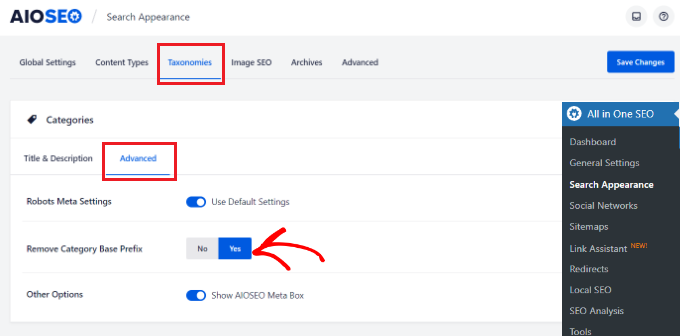
Don’t forget to click the ‘Save Changes’ button when you’re done.
Setting Up Redirects After Changing Category Base Prefix
If you are changing or removing the category base prefix on a new WordPress website, then you don’t need to do anything. However, if you are doing this on an existing website, then users visiting the old category page will see a 404 error.
To fix this, you will need to set up a redirect to make sure both search engines and regular visitors are properly redirected to the correct category page on your site.
The easiest way of setting up redirection in WordPress is by using the All in One SEO (AIOSEO) plugin.
To start, you can go to All in One SEO » Redirects from the WordPress admin panel and then click the ‘Activate Redirects’ button.
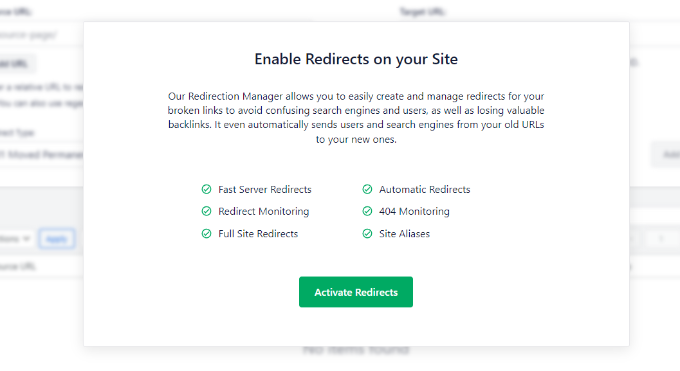
Once it’s active, you can go to the ‘Redirects’ tab to setup redirection.
Simply enter the URL you want to redirect under the ‘Source URL’ field and the new location for the link under the ‘Target URL’ field.
As for the Redirct Type, you can select ‘301 Moved Permanently’ from the dropdown menu. This will permanently move your old category pages to the new destination.
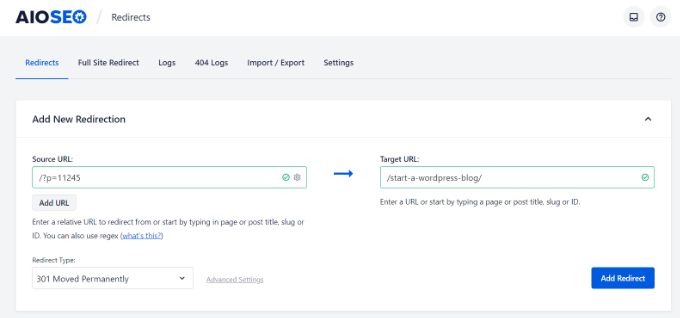
Don’t forget to click the ‘Add Redirect’ button when you’re done.
For more details, please see our beginners guide to creating 301 redirects in WordPress.
Now all your users and search engines will be redirected to the correct URLs using your new category prefix.
We hope this article helped you learn how to change the category base prefix in WordPress. You may also want to see our list of most wanted WordPress tips, tricks, and hacks and how to start an online store.
If you liked this article, then please subscribe to our YouTube Channel for WordPress video tutorials. You can also find us on Twitter and Facebook.



Syed Balkhi says
Hey WPBeginner readers,
Did you know you can win exciting prizes by commenting on WPBeginner?
Every month, our top blog commenters will win HUGE rewards, including premium WordPress plugin licenses and cash prizes.
You can get more details about the contest from here.
Start sharing your thoughts below to stand a chance to win!
Afaq Ahmad Khan says
When i set “Category base” with “%category%” in permalink it works fine but all other posts and page going in 404.
I have to set “Category base” with “%category%”. How can it be achieve?
Aasif Ganaie says
I want to change “category” base in “news” as well as “tag” into “topic” on a WordPress website. Will this method work in Yoast redirects as I don’t want to use a separate plugin?
Meghan says
Instead of having URL.com/tag.. I want to change it to URL.com/category/tag but I can’t seem to do this. Can you easily explain how to achieve this?
Paul Minors says
Hi there. Great article. I’m looking at doing something similar, but I’m not changing the category or tag base. I’m changing the base of “portfolio” pages. There isn’t an option to edit the case in the permalink settings. Is there another way to edit bases in my wordpress files?
Karunakar says
How to add a custom text to tag url slug?
For example:
my tag_base is “beginner”
my tag is: “wp”
Then normally url becomes: example.com/beginner/wp
Here I want to add text “help” to the slug of tag “wp” to make url as:
example.com/beginner/wp-help
I don’t want to go with a single tag slug edit. I want to append “-help” to all existed tags slugs and upcoming tags.
How can i do it?
Please help.
Thank you.
spezially says
Hi ,
what’s the easiest way if I wanted to have my general post page + all the posts that refer to the general post category bring up a prefix (ex.: news.example.com . news.example.com/single-post )
?
so far the only solution I can think of is a 301 redirect in htaccess but I’m looking for something smoother….
Conal Stubbs says
I’ve found a somewhat odd way of removing the category part.
Just to explain, I’m creating a portfolio site with a category called ‘blog’ for blogposts / latest news and one called ‘work’ for completed design projects. Obviously the desired effect is to have the url as example.co.uk/blog (or work) rather than example.co.uk/category/blog, which looks just a bit naff I’m sure you’ll agree.
By simply putting a full stop in the category base entry field WordPress seems to ignore this requirement in the url and creates the leaner, cleaner version that was wanted.
Has anyone else seen this before? Do they know of any issues with it? I’m just getting to grips with WordPress having taught myself HTML, CSS and PHP, so I’ve only tried it on a local setup and with the twenty eleven theme.
WPBeginner Support says
This is an interesting approach. Did you consider using category archive templates, like category-blog.php and category-work.php? After using these templates you can use WordPress seo plugin to remove category slug from url and you will get your blog posts on example.com/blog and Work posts on example.com/work.
Admin
ashley says
perfect. thanks!
dinesh kumar says
it’s working but only one category not all category
i am use another category page will get a 404 (not found) error when trying to access the page again.
please update here
I want url overwriter
Santiago says
In this blog did you have problems? I can see that you remove the category base and looks pretty good. Could tell us how you do this?
WPBeginner Support says
If you are using WordPress SEO you can go to SEO » Permalinks check the box that says Strip the category base (usually /category/) from the category URL.
Admin
iAn says
I updated my WordPress SEO Plugin today and I got this message:
“The feature for stripping the category base will be removed in version 1.6 of WordPress SEO. We suggest using FV Top Level Categories if you insist on keeping this but do know that the feature is very error prone and not that important for your SEO.”
I guess you are using such feature too.
I worry that I will lose ranking if I “unstrip” the category in the URL. Any suggestion for this?
Arup Ghosh says
Thanks to SEO plugins like yoast, they have added an option for this on their current version.
gnuboss says
Thanks for the info, this is a quick and simple, although often overlooked way to sort the category and tag base issues out..
To entirely remove the Category base I used to use a plugin called WP No Category Base which worked well, but can cause problems when you have a page and category with the same name – E.g. Page = Hosting (domain.com/hosting/) and a Category = Hosting (domain.com/hosting/) – but using .html suffix may help — but there are bound to be implications.
web design cheltenham says
I always like to use the .html suffix as well as changing the prefix – thanks for sharing – a simple but effective technique!
Name Removed [TOS Violation] says
If you want to do this, you should probably do this right when you begin your blog.
Otherwise, search engines which have indexed your
example.com/tags/some-tag
page will get a 404 (not found) error when trying to access the page again.
Some SEO plugins handle this case and give a 302 (redirect) status when you change a permalink, but I’m not sure about tag URLs.
Nimit Kashyap says
I didn’t know that it was so easy to change.