


Do you want to add a points system in WordPress to increase user engagement?
Adding a points system can effectively improve user participation and help create brand loyalty among customers.
In this article, we will show you how to easily add a points system in WordPress to ignite user engagement.

Why Add a Points System in WordPress?
Adding a points system in WordPress can encourage your users to take specific actions on your WordPress website in exchange for earning points.
For instance, you can reward your customers with points upon user registration, purchasing a product, leaving a comment, submitting a post, or as part of a loyalty program.
Upon achieving a specific number of points, you can then offer gift coupons and discounts to your customers. This can be a great way to increase user engagement, build brand loyalty, and increase conversions in your WooCommerce store.
Plus, if you run a membership community, then you can also offer users a membership level upgrade or other perks once they have earned enough reward points.
That being said, let’s see how you can easily add a points system in WordPress to increase user engagement.
How to Add a Points System in WordPress
First, you will need to install and activate the myCred plugin. It’s a great points and rewards plugin for WordPress and WooCommerce.
If you need help, please see our beginner’s guide on how to install a WordPress plugin.
Step 1: Configure the Plugin Settings
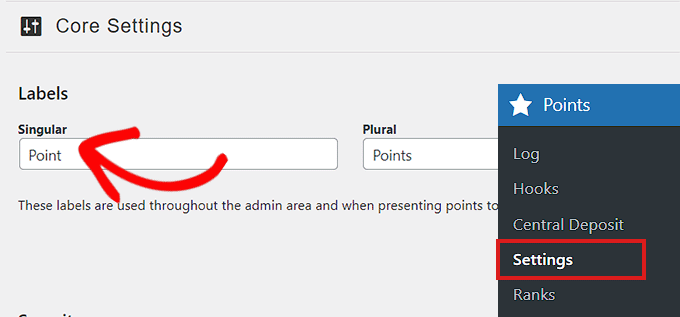
Upon activation, you will be directed to the Points » Settings page, where you need to click on the ‘Core Settings’ tab to expand it.
You can then start by choosing a label for the points. You can simply call them points or pick some other creative name that you prefer.
For example, you might call them coins, brownies, jewels, tokens, loyalty points, or anything else that works for your audience.
Simply add a ‘Singular’ and ‘Plural’ label.
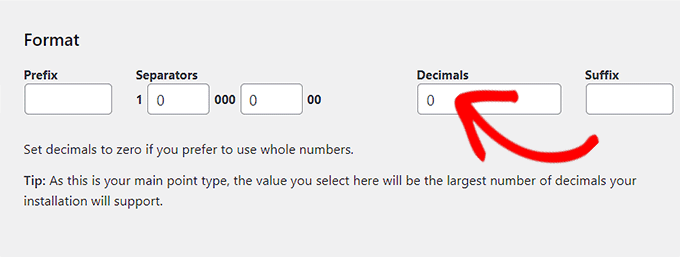
After that, you have to choose a format for your rewards system.
For instance, if you don’t want to reward whole numbers as points, then you must type the number’ 0′ into the ‘Decimals’ and ‘Separators’ boxes.
Next, you can scroll down to change the ‘Point Type Image’ by clicking on the ‘Change Image’ button.
This will launch the media library, where you can choose an image that will represent your points.
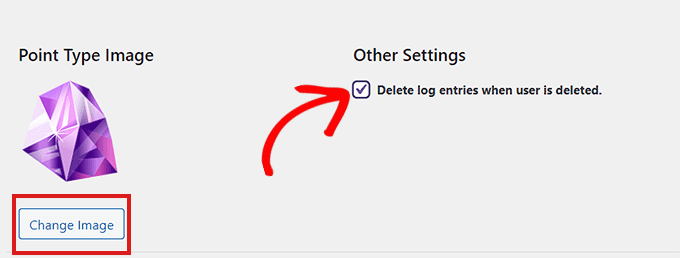
Next to the image, simply check the box under the ‘Other Settings’ heading if you want the log entries of a deleted user to be automatically removed.
Don’t forget to click on the ‘Update Settings’ button to save your changes.
You can use default options for other plugin settings because they are configured to work with most websites.
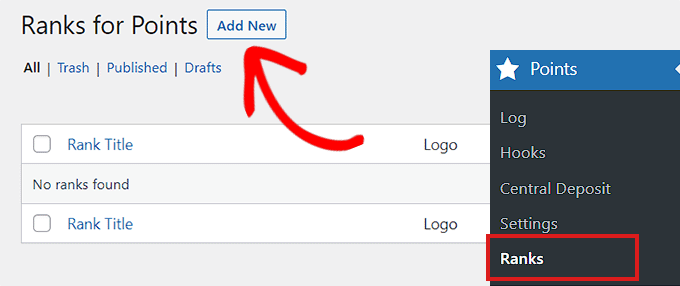
After that, you need to visit the Points » Ranks page from the WordPress admin sidebar, where you must click on the ‘Add New’ button to start adding ranks for your points system.
These will be the ranks awarded to your users upon achieving a certain number of points.
Here, you can start by adding a rank title.
After that, enter the number of points required to achieve that rank into the ‘Minimum Balance Requirement’ and ‘Maximum Balance Requirement’ boxes.
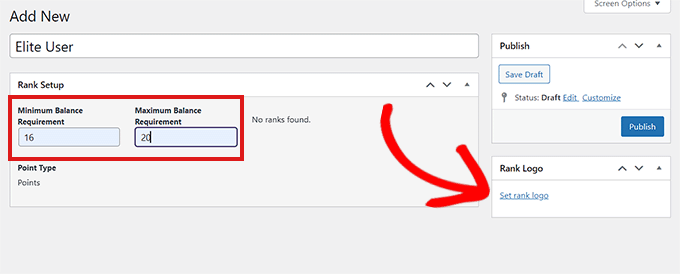
You can even set a rank logo by clicking on the ‘Set Rank Logo’ link, which will open up the media library.
Once you are done, don’t forget to click on the ‘Publish’ button.
Repeat the process to add more ranks as needed. The plugin will now start tracking user rewards points on your website.
Step 2: Set Hooks for the Points System
It’s now time to set the hooks for the points system. First, you need to visit the Points » Hooks page from the WordPress dashboard.
A hook is basically an interaction that a user performs on your website, such as viewing content on your WordPress blog. The plugin then tracks those interactions to reward users with points.
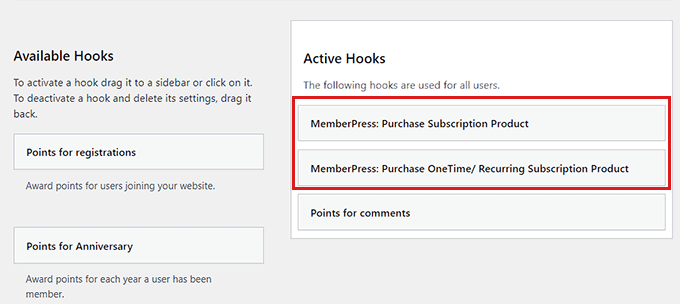
Here, you will see a list of all the available hooks. Add a hook for the activity you want to reward by simply clicking on it and dragging it to the ‘Active Hooks’ column.
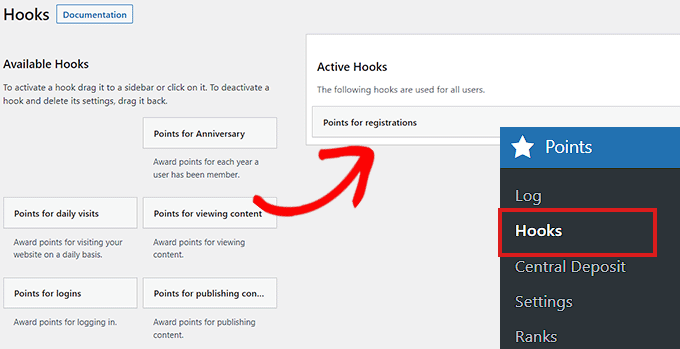
Next, you need to click on the ‘Active Hooks’ tab to expand and configure its settings.
You can now choose how many points to reward for each activity and type the number into the ‘Points’ box.
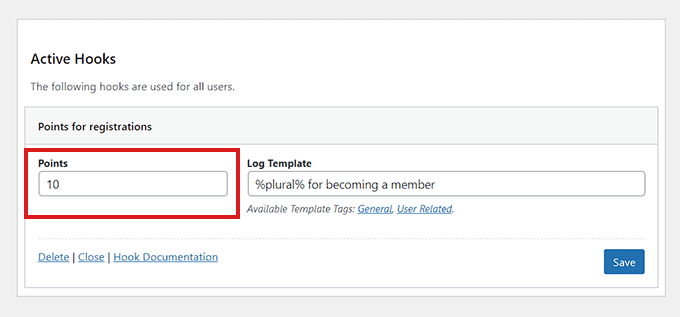
Once you are done, don’t forget to click the ‘Save’ button to store your hook settings.
You can also download some of the free add-ons offered by myCred and then award points to your users upon using those third-party products, including MemberPress, LearnDash, and more.
For example, if you download the myCred-MemberPress addon, it will allow you to reward points to users when they sign up for a membership through MemberPress.
To do this, just visit the myCred » Add-ons page from the WordPress sidebar and switch to the ‘Free Addons’ tab.
From here, click on the ‘View’ button under the myCred-MemberPress Integration addon.
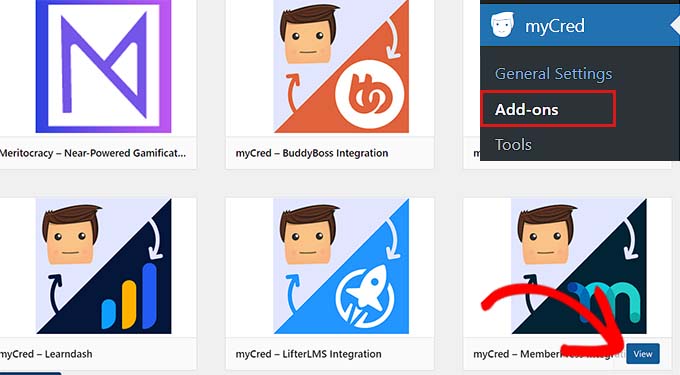
This will direct you to the WordPress.org plugins page. From here, you can install and activate the addon. For details, see our step-by-step guide on how to install a WordPress plugin.
Once you have activated the addon, you will now see MemberPress hooks available on the ‘Hooks’ page.
You can now drag these hooks to the ‘Active Hooks’ column to start rewarding points to customers upon using MemberPress.
Step 3: Visit the Log Page
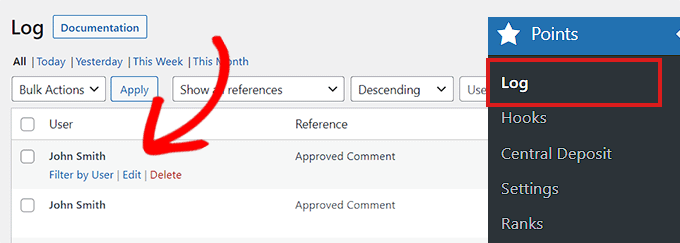
You can track the points log by going to the Points » Log page from the admin area, where all the log entries will be stored.
Here, you can view all of the points earned by different customers and how they earned them.
Simply click the ‘Edit’ link below a username to open the ‘Edit Log Entry’ popup.
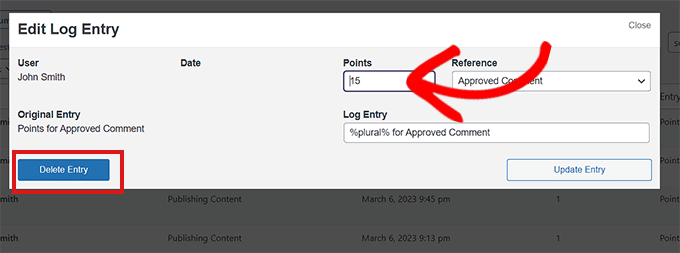
Once you are there, you can change the points earned for an activity and click the ‘Update Entry’ button to save your changes.
You can even delete a point entry by clicking the ‘Delete Entry’ button.
Showing User Points on Your WordPress Site
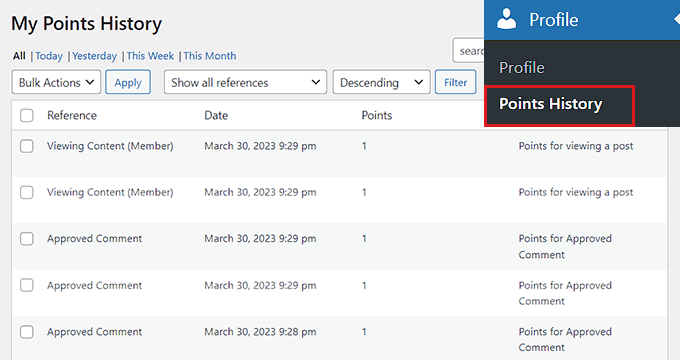
Users will be able to see the points they have earned by logging in to their WordPress accounts.
All they will need to do is visit the Profile » Points History page from the WordPress dashboard.
Here, all the points they have earned will be displayed.
Add Points System as a Widget
You can also show your users how many points they have collected on the website front-end by adding a Points System widget to your sidebar. Keep in mind that the points collected by other users won’t be displayed, and visitors will only be able to view their own points.
To do this, visit the Appearance » Widgets page from the admin sidebar.
From here, you need to click on the ‘+’ button in the top-left corner of the screen.
Next, find and add the Total Points block to the sidebar.
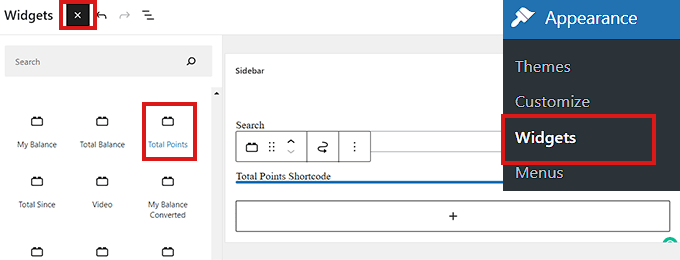
You can configure the block settings in the right column.
Once you are done, don’t forget to click the ‘Update’ button to store your settings.
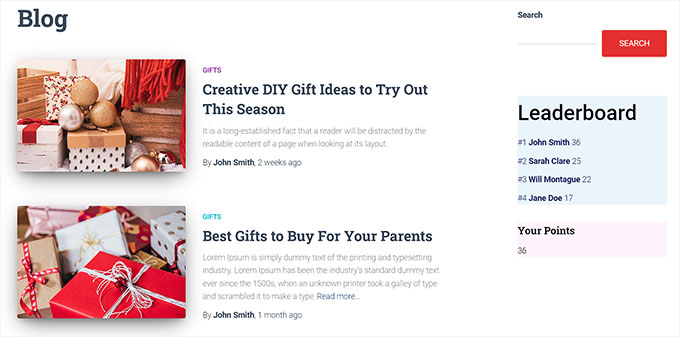
This is what the Points System widget looked like on our demo website.
Add Points System in the Full Site Editor
If you are using a block-based theme, then you may not see the Widgets screen. In that case, you will need to use the full site editor to display the leaderboard and individual user points.
First, visit the Appearance » Editor page from the admin sidebar.
Once the site editor has been launched, click on the +’ button in the top-left corner of the screen.
Next, search for and add the Total Points block to any place you like on the website.
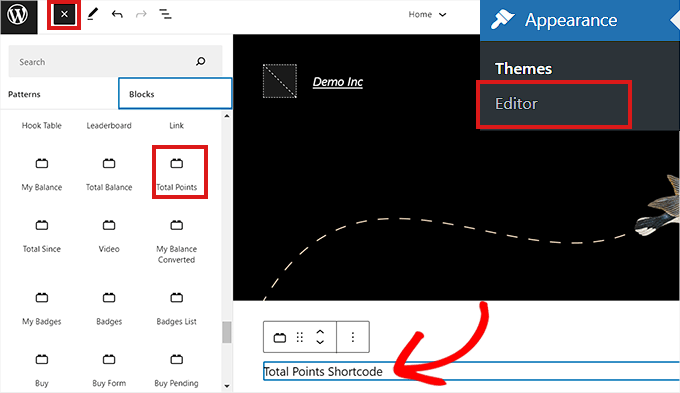
Once you are done, don’t forget to click the ‘Update’ button at the top.
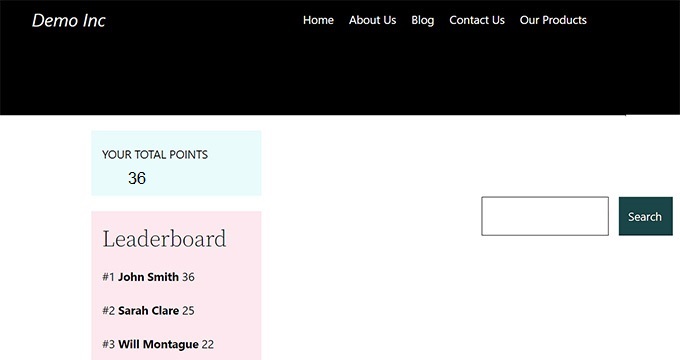
This is how the points system looked on our demo website.
Add Points System to a Page or Post
You can also show user points on a specific page or post. For this tutorial, we will be creating a new page for the points system.
First, visit the Pages » Add New screen from the admin sidebar. This will launch the block editor, where you can start by adding a title for your page.
Next, you need to click the ‘+’ button in the top-left corner and search for the Total Points block.
Upon finding it, drag and drop the block onto the page.
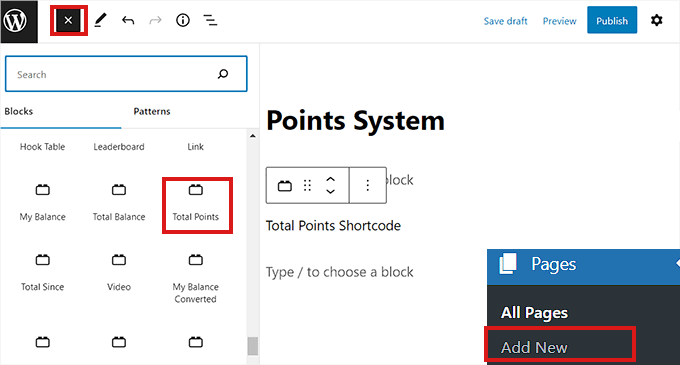
You can also configure the block settings in the right column. Finally, don’t forget to click on the ‘Publish’ button to store your changes.
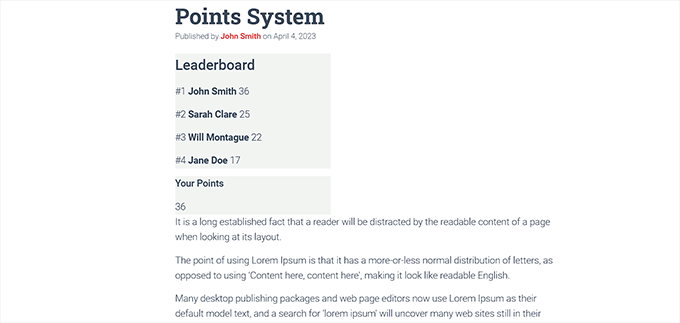
This is how the points system looked on our website.
Bonus: Add a Simple User Ranking System for WordPress Comments
If you don’t want to add a fleshed-out ranking system but still want to boost engagement, then you can create a simple ranking system for WordPress comments.
For example, you can award badges to the top commenters, feature interesting comments at the top of the section, or add an upvote/downvote system. This way, you won’t have to create a whole points system for your website, and you can still attract more visitors.
To do this, you will need Thrive Comments which is the best WordPress comments plugin on the market.
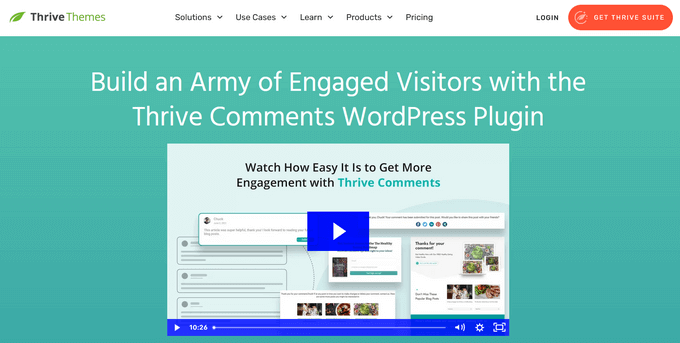
First, visit the Thrive Themes website and create an account. After that, download the product manager plugin.
Next, visit your WordPress dashboard and install and activate the Thrive Product Manager. For details, see our step-by-step guide on how to install a WordPress plugin.
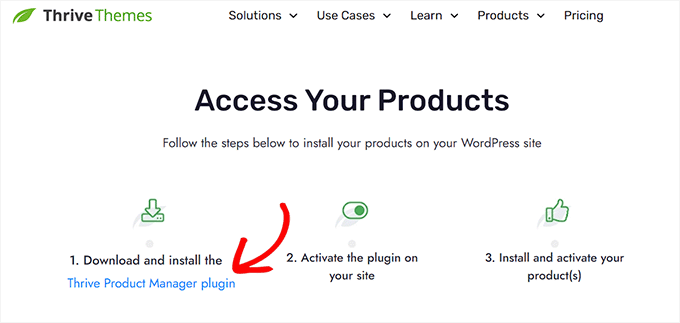
Upon activation, visit the Product Manager tab from the WordPress dashboard and log in to your account.
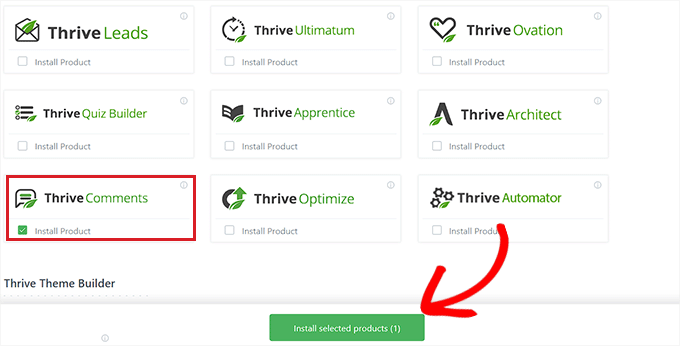
Then, select Thrive Comments from the list and click the ‘Install selected products’ button.
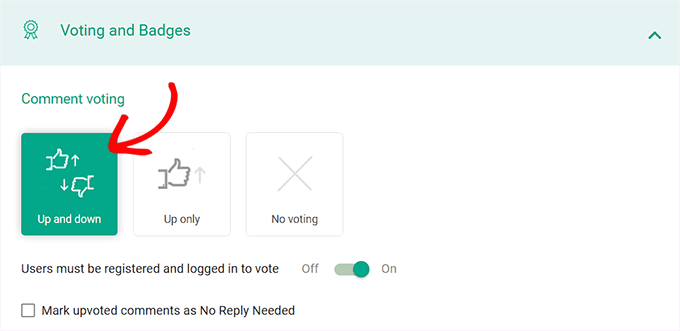
Once you have done that, head over to the Thrive Dashboard » Thrive Comments page from the admin sidebar and expand the ‘Voting and Badges’ section.
From here, you can add like/dislike functionality to your comments by selecting the ‘Up and down’ option. This will add the thumbs up/thumbs down icons with the comments.
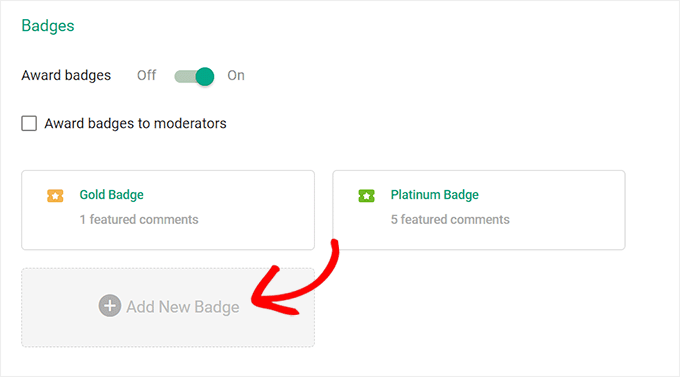
You can then toggle the Award Badges’ switch to ‘On’ and then click the ‘Add New Badge’ Button.
This will open a prompt on the screen where you can add a name for the badge and choose when to award it according to your liking. You can create as many badges for the commentators as you like.
Once you are done, your changes will be saved automatically. You have now successfully added a ranking system for comments to boost engagement on your site.
For more information, you can see our tutorial on how to add a simple ranking system to WordPress comments.
We hope this article helped you add a points system in WordPress to ignite user engagement. You may also want to check out our list of best WordPress email marketing services and our ultimate WordPress SEO guide to improve your search rankings.
If you liked this article, then please subscribe to our YouTube Channel for WordPress video tutorials. You can also find us on Twitter and Facebook.




Syed Balkhi says
Hey WPBeginner readers,
Did you know you can win exciting prizes by commenting on WPBeginner?
Every month, our top blog commenters will win HUGE rewards, including premium WordPress plugin licenses and cash prizes.
You can get more details about the contest from here.
Start sharing your thoughts below to stand a chance to win!
Tkbrownz says
Please I installed this plugin but i finding difficult to reset user earning points.
Because if user requested he/She earning will be there the same instead to reduce.
Please admin i need your assistance to this issue please.
How do i reset or reduce user earn points when ever he/She request for payment?
Thanks am waiting for your response.
WPBeginner Support says
You would want to reach out to the plugin’s support for if that is a built-in option for the plugin.
Admin
Salah eddin lamnayra says
Thank you for this great article like every one in you’re website.
I have a simple question can we use this plugin in woocommerce give buyers point every time they buy from us
Thanks
WPBeginner Support says
Glad you like our article
Admin
Frank says
But the point can’t show on users dashboard, I need a plugin that will credit user for completing tasks and also shows it on their dashboard thanks
WPBeginner Support says
You would want to reach out to the support for the plugin to see if there is a recommended method for adding the points to a user’s profile page.
Admin
Promise says
Thanks
WPBeginner Support says
Glad our article was helpful
Admin
Baba says
How to encash points?
Hasif Ahmed says
Thank You For Helping me.
satyajit says
Hi,
I’m looking for a plugin,where registered users upon submiting a link to a section in dashboard on my website,they will be rewarded with certain points ,which keeps increasing on submitting links to the dashboard daily.
Atif Bangash says
how to resent activity counter for any particular user?
Atif Bangash says
i mean Reset the activity counter for one user
Christian Palmquist says
Very awesome article.
Helped me set up a points system well and my visitors are really enjoying it.
Raul says
How to hook on facebook share ?
Alex says
How does this compare with “Achievements for WordPress” and “BadgeOS” ? And is there a way to let users spend their points on buying emotes, enter giveaways or giving virtual gifts to other users?
Hyyan Abo Fakhrer says
Very nice article , thank you for sharing