


If you’ve added several items to your WordPress menu and some refuse to save, or worse, disappear entirely, you’ve likely hit your server’s max_input_vars limit. This setting caps how many input fields PHP accepts in a single request, and menu items can quickly push you over that limit.
WordPress fixed the underlying bug in version 4.5.3. If you’re still running into this issue, it’s usually caused by a theme, plugin, or page builder pushing you over your server’s limit.
In this article, we’ll show you how to fix the custom menu items limit in WordPress.
What Causes the Menu Items Limit
The custom menu items limit in WordPress is usually caused by your server’s PHP max_input_vars setting. This setting controls how many form fields PHP can accept when you save a WordPress menu. Most servers set it to 1,000 by default.
Each menu item uses multiple form fields, including the label, URL, target, CSS classes, and more. As your menu grows, the total number of fields can eventually exceed this limit. When that happens, PHP may stop processing some of the fields when you save the menu, causing some items to disappear.
If you’re still seeing this error today, your theme, page builder, or a plugin may be adding extra fields to the menu form or changing how the menu is saved. You may see a message such as “PHP max input vars must be at least 5000.”
If some menu items have disappeared, don’t re-save the menu just yet. Doing so could overwrite the menu with the missing items. Fix the input variable limit first, then return to the menu and restore any missing items.
With that said, let’s walk you through how to fix the custom menu items limit in WordPress. Here’s everything we’ll cover in this article:
Step 1: Update WordPress and Check Your Current Limit
First, make sure WordPress is running the latest version. This alone resolves the classic version of this bug.
Go to Dashboard » Updates and install any pending core updates.
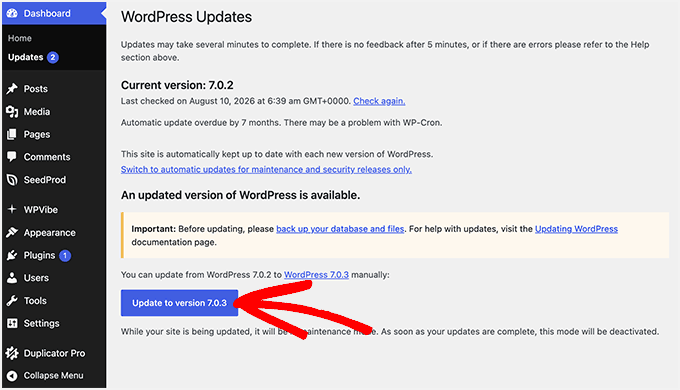
Next, check what your server’s max_input_vars is currently set to.
Go to Tools » Site Health » Info, then open the ‘Server’ section. You’ll see max_input_vars listed with its current value.
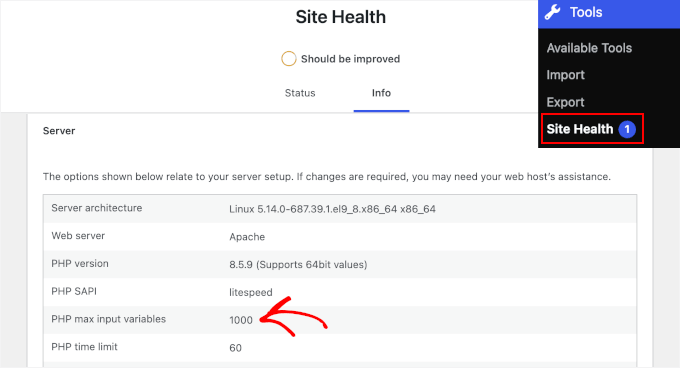
If it’s below 1,000, or your theme or plugin specifically calls for a higher number, you’ll need to raise it using one of the methods below.
Method 1: Raise the Limit in Your Hosting Panel
Many WordPress hosts let you change PHP settings without touching any files. On hosts using cPanel, this is done through the MultiPHP INI Editor.
First, log in to cPanel and navigate to Software » MultiPHP INI Editor.
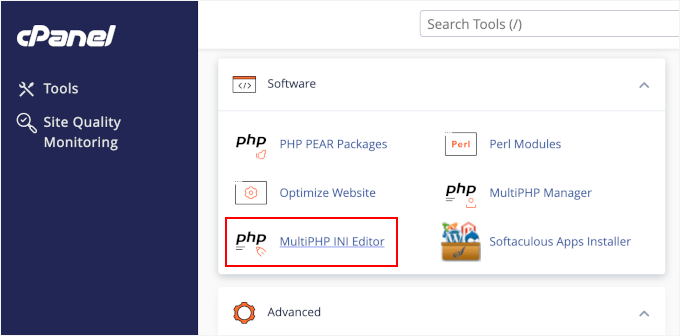
Next, select your domain from the dropdown and then find ‘max_input_vars’ and set it to ‘5000.’ Click ‘Apply.’
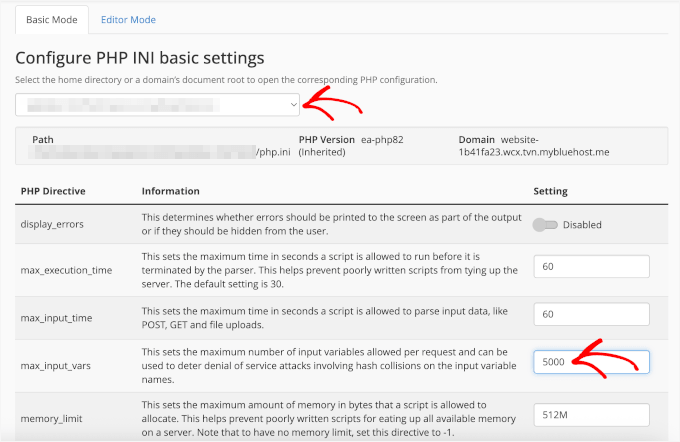
If your host doesn’t use cPanel, look for a ‘PHP Settings’ or ‘PHP Configuration’ screen in your hosting dashboard. Most managed WordPress hosts offer something similar.
Method 2: Edit Your .user.ini or php.ini File
💡 Important: Editing .user.ini or php.ini can affect your entire website. It’s a good idea to create a full WordPress backup before making changes.
If your hosting provider doesn’t offer a PHP settings panel, you can increase the max_input_vars limit by editing a PHP configuration file.
Most shared hosts use a .user.ini file, which you can usually find in your WordPress root folder. Some server setups use php.ini instead.
Open the appropriate file with your hosting file manager or an FTP client and add:
max_input_vars = 5000Save the file and upload it back to the same location if necessary. Do note that changes to .user.ini typically take a few minutes to take effect.
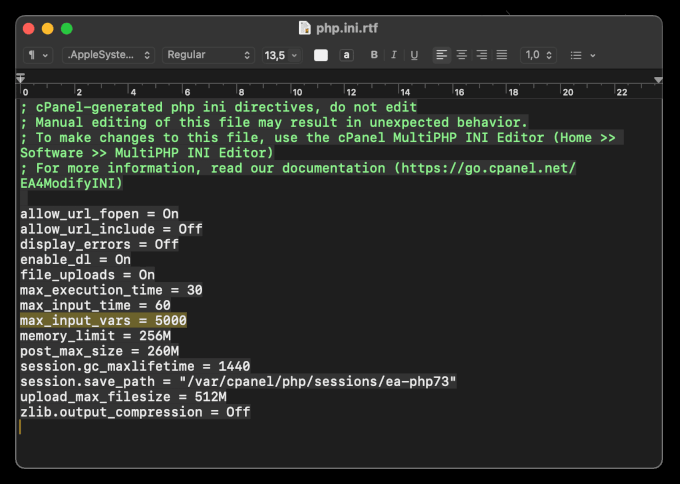
Not sure which file to edit or where to find it? See our guide on where is php.ini in WordPress for host-by-host instructions.
Method 3: Edit Your .htaccess File
💡 Important: A syntax error in .htaccess can take your entire site offline with a 500 Internal Server Error. Back up your site before editing this file.
If your site runs on an Apache server, you can also increase the max_input_vars limit through your .htaccess file. This server configuration file is usually located in your WordPress root directory.
Open the .htaccess file with your hosting file manager or an FTP client and add:
php_value max_input_vars 5000
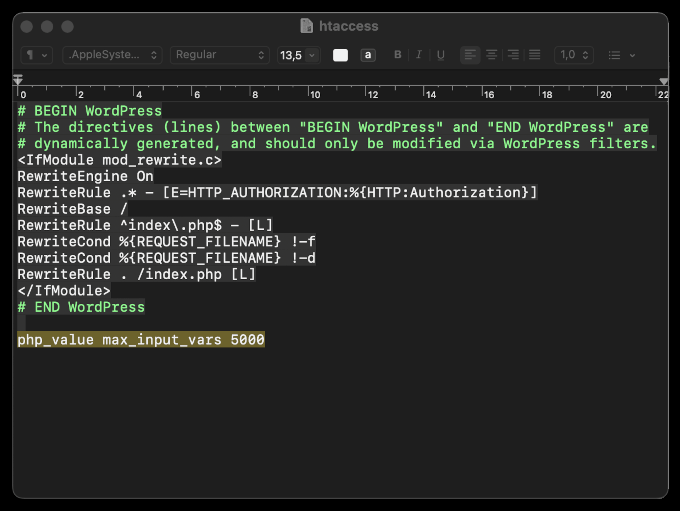
Save the file and check your WordPress menu again.
Keep in mind that this method is Apache-only. If your site goes down after saving, remove the line you just added and try one of the other methods instead.
Can’t see your .htaccess file? See our complete guide on how to find your .htaccess file.
Method 4: Ask Your Hosting Provider
If none of the above are accessible to you, most hosts will make this change for you. You can copy and paste this message to their support team:
Hi, could you please raise the
max_input_varsPHP setting to 5000 for my site? I’m running into a WordPress menu-saving issue caused by the current limit. Thank you!
If you’re shopping around for a host that gives you more direct control over PHP settings, see our guide to the best WordPress hosting.
Verify the Fix
Once you’ve increased the max_input_vars limit, it’s a good idea to verify that the new value is active before rebuilding your menu.
Simply head back to Tools » Site Health » Info » Server and confirm max_input_vars now shows 5000 (or your new value).
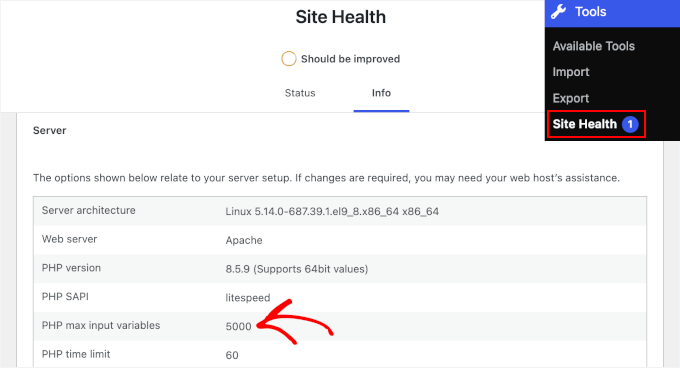
Then, you can go to Appearance » Menus, rebuild any missing items, and save. Your full menu should now save without dropping anything.
Still Not Saving? Other Things to Check
- Deactivate your plugins one by one, resaving the menu after each, to find one that’s conflicting.
- If you’re using a block theme, note that the Site Editor’s Navigation block stores menu data differently and isn’t affected by this limit at all.
- Managing a very large menu (100+ items)? Our guides on how to add a navigation menu in WordPress and our mega menu tutorial cover approaches built for bigger menus.
We hope this guide has helped you fix the custom menu items limit in WordPress. Next, you might want to check out our guides on troubleshooting WordPress errors or boosting WordPress performance.




Tamim
Hey! I am unsing shared hosting Hosting. That’s why I don’t have root access for editing the phpi.ni file. How can I solve the problem?
WPBeginner Support
Hi Tamim,
You can ask your hosting provider to do that for you.
Admin
Satya
I’ve access to the PHP.ini file and updated as you have mentioned but it’s not working.
I’m not sure why what should I do?
Maheshwaran
Hi
Appearance -> Menu ->while click-> redirecting to -> 404 page
I have added some Main menus and Categories in my website. after some time i couldn’t open menu to modify or delete anything. my website is redirecting to 404 page. I tried many codes but nothing works. Please assist me
Toni
I ran into the same problem…but I’m on localhost…so have nobody to ask for help! (Windows 10/XAMPP/WP4.8). New to WP, don’t even know where to find php.ini! My “quick fix” was to remove some less important sub-menu items. But I want to put them all back. Checked out memory-bump mentioned above, but its old. Might not work on WP4.8. Not worth the risk!
Nush
Hi.
Thank you for the great information. I finally solved the issue on the GoDaddy hosting by creating a ph5.ini file in the Webroot with the following information:
memory_limit = 256M;
max_execution_time = 300;
max_input_vars = 3000;
solved problem after customer service reset the database, something I could not do. Hope this helps.
Anton
Hi, thank you for this
I run and had this problem. I had long menu and some day it decreased to 50 lines only. Theme support sent to this topic. I’d tried all options, but only one works for me even with out contacting with hosting support.
I’ve added “php_value max_input_vars 5000” (without quotes) to my .htaccess file before “#end of wordpress” line and it solved the problem.
Teodoz
Thank you Anton! The process with the .htaccess file saved my website! TY
Ajay Damraliya
Thanks bro i was facing the same problem now its fixed.
Ramachandran
Hi Team,
I am using Hostgator with Multidomain SSL.
I checked the settings and don’t know where and how to do.
I added php.ini file with the code max_input_vars=9000; and still I am not able to add menu items on the main menu.
Anyone help me. Much appreciated.
Best regards,
-Rams
Ramachandran
I set up wordPress Multisite using Multidomain SSL.
Dann
I’m having this issue right now, I contacted the hosts whom say they can’t / won’t increase to 5000 vars because it is a shared server, is there any other solution? is it possible to have two navigation menu’s on the same page, would this solve the problem, or would it simply continue.
Thanks in advance, any help would be much appreciated
sdkmendis
Awesome. I have same issue prolong times without clue. Ask so many peoples . Just today I fixed my problem. hostGator no need to call centre representative. We can do it our own. Realy help full No words to thanx
Rajit
What is the max limit we can set for this? I seem to have exhausted the 5000 limit as well.
Rajit
In fact I have exhausted 8000 limit
Renee
Mahalo nui loa (thank you very much)!
This worked for a client’s site that is at Bluehost, shared hosting:
1. Cpanel > File Manager
2. public_html > wp-admin
3. Click “New File” > name it php.ini (if you don’t have this file already)
4. Click php.ini > click “edit” > click “edit” again
5. Paste: max_input_vars=5000; > Save > DONE
vipin
Not working
Anjan Phukan
Hi Renee, you saved me. Thank you so much.
Tan
That work in my case! You are my angel! Fantatis share. I have had this problem for 2 day. Thank you so much!
Kelli
Renee – this worked for my client also. Thank you! They are hosted with hostgator.
Hasan
I tried,
in .htaccess file:
php_value max_input_vars 5000
in php.ini file:
max_input_vars=5000;
upload_max_filesize = 70M;
post_max_size = 128M;
upload_tmp_dir = 70M;
max_input_vars = 3000;
memory_limit = 256M;
in .user.ini file:
max_input_vars=3000;
and also test by placing php.ini & .user.ini in wp-admin and out of wp-admin, nothing works for me,
by adding in .htaccess wp admin page shows blank (white).
my hosting is
any help appriciated. TIA
Lou Comunale
I use GoDaddy and the php.ini fix did not work at all for me. Godaddy doesn’t even recognize that page or code as valid.
Getting help from the Godaddy people they provided me a workaround.
I created a page in my html folder .user.ini (dot-user-dot-ini). On that page I added the code:
max_input_vars = 3000
Seems to work so far.
Akut Wibowo
created a page in my html folder .user.ini (dot-user-dot-ini) -> did you mean create a FILE in your PUBLIC_HTML folder?
Please confirm as I have same problem here in godaddy server also.
And I can’t contacted them for a weeks.
I dont know why it is so hard to contact godaddy.
Gabriel
Akut I also use Godaddy.
I found my php.ini file in file manager – public_html folder NOT in the php.admin nor did I have to create the php.ini file.
Godaddy seems to think it is a WP issue, and I got the run around on that particular issue.
They directed me to increase my file size limit. (Not the same fix) .
Ken
This solution was the only one that worked on 1and1 hosting platform:
I created a page in my html folder .user.ini (dot-user-dot-ini). On that page I added the code:
max_input_vars = 3000
Hunor
Thank you! This worked for me as well (though it is not hosted by goDaddy).
Thank you
Thank you, this worked for me.
Anjan Phukan
Lou, it worked for me. Thank you so much.
Brock Reinhart
Lou, that first glance (and first test) that seems to have worked perfectly– thank you!
Will update if I run into any more issues.
Jay Patal
I have face a Problem to add a sub menu in wordpress site it will convert to coustom link .
pls help me resolve this error
chandani
Thanks…. work perfectly.
mahesh
just remove wordpress ; and go for magento best solution its worked for me after try 2 months i got the best solution
WajhuAllah Arif Hussain
On Ubuntu VPS i was able to fix it by uncommenting and setting higher values as below.
max_input_nesting_levels = 500
max_input_vars = 5000
But anyways thanks as it provided a way towards the solution
Sumon
Thanks, that worked for me too.
tanveer
i love u man!
your this solution also solved another problem of mine! the problem was
“After saving the menu on the “Edit Menu” tab the “Menu Settings -> Theme Location” would not retain the check and on the “Manage Locations” tab the menu location would be dropped.”
Jony
Hi man,
I’m runing wordpress multisite and i’have some problem with adding more custom fields to my site, i tried everything that didn’t help and i saw your answer about increasing the max_input_nesting_levels = 500. I’m trying to increase that value on VPS with Ubuntu 16.04 in the PHP.Ini file but with no success. the info.php still shows max_input_nesting_levels = 64. I appreciate if you can tell me how did you increase this value, whether it was through PHP.ini file or through htaccess file?
BR,
Alejandro
Thanks a lot, it wordked for my very long menu!!
Mino Taur
HostGator Friends – Same Issue & This Solved it:
1. Cpanel > File Manager
2. public_html > wp-admin
3. Click “New File” > name it php.ini (if you don’t have this file already)
4. Click php.ini > click “edit” > click “edit” again
5. Paste: max_input_vars=5000; > Save > DONE
Yannis
Really great fix. Thanks!
Rajit
Hi,
My site is hosted on godaddy. I created php.ini in wp-admin and pasted the one line max_input_vars=5000;
Still couldn’t add more menus.
Sangam KR
Thanks for the suggestions. I followed your suggestion and added the php.ini file with max_input_vars=5000; and it solved my problem. Thanks once again
Lori
1 – Make a text file
2 – Put this in there ” max_input_vars=5000; ” (without the quotes
3 – Save as php.ini
4 – FTP into the public_html > wp-admin
PERFECT
Thank you!!!
Anita
Thank You, You saved my site! This worked for me perfectly!
Hello Mino
Same problem on my website
My site hosted on HostGator. I added file php.ini in /wp-admin but this is not working for me. Please help me.
Kimberly Potts
I’m having this issue as well. I was directed to this site by a tech at Studio Press. I have a shared hosting account with Host Gator. They have upped my max_input_vars to 7000, because I wasn’t getting anywhere with 3000 or 5000. I did create a php.ini with your recommendations in my wp-admin. Still no luck. Do I need to delete the php.ini in my public folder, since I created one in the wp-admin? I’m trying so hard to resolve this. Many thanks.
bedir
ALEX you are hero man. I have read many things for solution. THANKS
Muhammad Khizer Khan
Thank you so much Alex, Really thankful to you.
vijay lathiya
Thanks for tips
after increasing max_input_vars in php.ini its working.
gezginrocker
Because I’m on shared hosting, putting the php.ini on root folder didn’t work for me. But putting it in wp-admin folder worked. I think this is because nav-menus.php file is in wp-admin folder.
Gadget
Hi People, … yes I too came up against this menu issue/problem … and may I say YIKES!!! At somewhere between the 50 and 100 page mark, the last item I put on the menu was being kicked off, and/or falling off the main menu navigation! What?!!!
Noobs, and other geeks alike, know this about that (problem) … and I am only speaking for my own case, though I do so in the hope that someone who experiences the same nightmare may benefit … so here we go.
With ‘shared hosting’ using HostGator … there will be no ‘suhosin’ which is apparently a patch/program etcetera for scripting errors with php designed to protect ‘servers’ according to a HostGator Rep, … now, notwithstanding this detail, we continue … what was important in my case, … that I finally got my HostGator person, person #3 to understand, through all my babble about the problem, was, the part about the ‘max_input_vars = 3000’.
My HostGator Rep put me on hold, investigated the issue, and determined that the ‘max_input_vars = 3000’ had to be put in the php.ini file, … that only HostGator has access to, … not the php.ini file that is in my/our ‘home’ or ‘root’ directory, that I/we all have access to, via our accounts with HostGator or other hosting providers, by using the CPanel as we often call this access point.
This php.ini file is, in no way accessible via the internet by me, or us, as account holders with hosting account access, capiche? Good, and good to know.
Now, what I did, was take what Alex, right below this post said to do, and I put these lines of text/code into a php.ini file that I then put in my public_html file area, inside of my ‘wp-admin’ folder, for the domain I was working with. For a time, I thought that this ‘fix’ was working, then today, I was adding more pages and ‘oh joy’ the main menu navigation items were falling off the line, crikey!!
Back into the problem I went, re- reviewed this whole post and the ‘Coretrac Ticket’ thread, which is a tad over my head, but still, I was diligent and determined. And then back into the breach with the HostGator people for pow-wow #2, completed that call and had to go back in, with person #3 who was the charm.
Lastly, what I learned is that, what the ‘max_input_vars = 3000’ is referring to is how many pages your installation/domain/WordPress can have, the ‘3000’ means pages. My HostGator Rep plugged in 5000 pages.
So, I added two new test pages on the spot with him still on the phone and we report ‘joy’! Yay! I too should now be able to add pages to my heart’s content! May you also experience WordPress JOY!
Cheers,
Gadget
Netman
Issue was solved with php.ini file in wp-admin folder with following line on HostGator shared hosting account.
max_input_vars = 9000;
Thanks
Alex
Create a php.ini file but not in root! ( public_html )
in “wp-admin” folder then add:
max_input_vars = 3000;
I also have :
upload_max_filesize = 70M;
post_max_size = 128M;
upload_tmp_dir = 70M;
max_input_vars = 3000;
memory_limit = 256M;
Jay
This worked for me, so easy to do too.
Thank You!
Diego
Alex, I cant do it..
JoAnne
THANK YOU! THANK YOU! THANK YOU! I have been trying to find a solution to fix this for HOURS!!! This did it! Thanks!
Maninderpreet Singh
THANKSS
Brian
Thanks!!!
AMGil
Thank you Alex, I tried so many solutions found online and this was the only one that worked. Lifesaver!!
Deborah
I can’t access any of the wordpress edit after I do this, should I erase the other php.ini file?
prateek rathore
Thanks Alex,
I have mad lots of googling for the issue and finally i got the solution you provided.
Kimberly Potts
I FINALLY have a solution. After trying all of the suggestions, the tech at Host Gator added the max_input_vars=5000; to the root directory. BINGO! It works now. :))
Finally
I second that.
Jeffrey de Jongh
Hi Thanks for this great tip! I had the same issue with UberMenu. Now I’ve added php_value max_input_vars 5000 to my .htaccess file and it solved the problem.
Alanna
I’ve tried a few things without any luck. I had my host make these PHP config changes. I also activated the Memory Bump plugin and then removed it as suggested by some others.
My theme (Twenty Ten) supports only one menu. I am able to create another menu and make changes there without a problem. I have a live site so I’m a little limited in terms of the amount of experimenting I can do.
Any other ideas? I’ll try anything at this point.
Bhavin
Thank you so much Mat.This worked Perfect…
Matt
Matt’s suggestion worked for me too, as I do not run suhosin.
added:
max_input_vars = 5000
to my php.ini file
valente
Hello, I placed a Php.ini file in wp-admin with max_input_vars = 5000
but it did not work, does this php file need to be in another directory as well?
thank you
WPBeginner Support
make sure that you have named the file php.ini and not Php.ini
Admin
Bart
I have the same problem, and the Memory Bump Plugin didn’t solve it.
I contacted my hosting provider, and they said I don’t yet have a php.ini file and that I have to create it, or WP has to create it for me……
How do I do this?
WPBeginner Support
Bart if your webserver is running php scripts, then it certainly has a php.ini file which your web host can configure if they want to.
Admin
Zek
Seems that a simple fix would be for the WP ajax functionality to evaluate the number of items in the list and break it into multiple sequential requests instead of one big request.
It’s weird to me that the wordpress team didn’t think of this ahead of time but I guess the platform is so robust that they simply have too much on their plate. I may end up doing it myself, but of course I’ll have to do it in a way that won’t get overwritten by future updates. What a pain!
Larry
I am in same situation as Mat Lipe. I was having problems because my server does not have suhosin installed. I was able to fix the problem by adding the directive that Mat posted to my php.ini file. Thanks.
Selma
I just hit the same problem and after days of emailing back and forth with the we hosting support, it’s finally been resolved!
They did the following changes:
They added max_input_vars = 5000 in php.ini
That’s it, and now it works like a charm and I’m adding pages to my hearts content.
Piyush
Hi SELMA,
Your Solution is work for Me
Thanks!!!!!!!!!!
Piyush
Mat Lipe
Hello,
My server is not running suhosin so I was able to fix this issue by adding this to my php.ini file and restarting my server.
max_input_vars = 5000
Hope this helps anyone else out there with the same issue
Nix
This worked, thanks!
Elyashiv
Excellent!! work for me/
Thanks!!
Luyen Dao
Thanks Mat! I was going nuts trying to add suhosin then realized i don’t even have it setup!
Michael
Wow! Thank you so much Matt. This works awesome!!!
Dale
Thanks for this.
I experienced this quite a while back and thought it had something to do with the memory allocation.
I eventually was able to add more menus after activating the Memory Bump Plugin ( http://wordpress.org/extend/plugins/memory-bump/ ) from WordPressdotorg
I deactivated the plugin afterwards.
Was quick and easy without messing with any code.