


WordPress 3.0 introduces a new feature called custom backgrounds for WordPress themes. This feature will give the user an ability to add custom backgrounds to their site which will give their blogs/sites a unique touch. Even though this feature is added to the core, it will only be activated if your theme supports it. In this article, we will show you how you can enable Custom Background in WordPress themes for WordPress 3.0.
Note: This article is intermediate level article focused specially for theme designers.
Update: the code used in the video add_custom_background is depracated. Look at the code below in this article.
Video:
Text-tutorial
Simply open your functions.php file and add the following line:
add_theme_support('custom-background');
Then under appearance you should be able to see an option for Custom backgrounds.
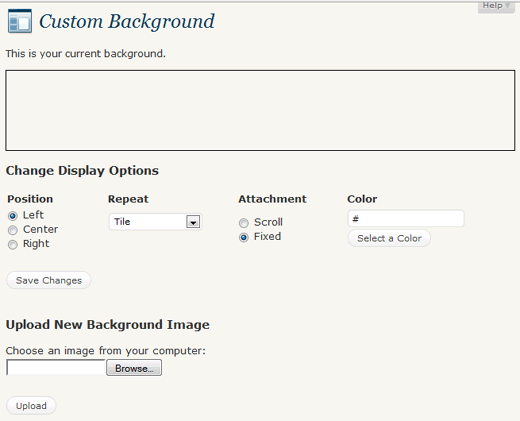
The default twenty ten theme for WordPress 3.0 already has this feature enabled in it.



Syed Balkhi says
Hey WPBeginner readers,
Did you know you can win exciting prizes by commenting on WPBeginner?
Every month, our top blog commenters will win HUGE rewards, including premium WordPress plugin licenses and cash prizes.
You can get more details about the contest from here.
Start sharing your thoughts below to stand a chance to win!
bb says
Thank you Syed, this tweak just save me some thousand naira! Cheers.
Stepan Vich says
Hi, Is there the possibility to add some field settings via add_settings_field function ??
Michael says
This has been depricated. Here’s the new code:
add_theme_support(‘custom-background’);
Editorial Staff says
Thanks Michael. Updated the article.
Admin
Editorial Staff says
Very certain that you can use custom fields to change the background on each post / page if you want.
Admin
Abhimanyu says
There seems to be a problem. Just as I select the image file and click upload, it refreshes the page with no result. The ‘color’ thing works. And, I have tried many browsers.
Any help? Can we do it manually? As in, by some codes?
Editorial Staff says
Do it manually via CSS codes.
Admin
The Raptor says
Thank you for this. Implementing it wa actually much more simple than I initially thought
John says
What is the default size for wordpress backgrounds? i.e. what size should images be for them to fit properly in the background.
Editorial Staff says
The best image is the one that can be repeated, so you keep the page load time small. WordPress will only show the background image that fits the screen resolution of the user.
Admin
chartinael says
My custom background section doesn’t have the display options. I installed 3.01 virgin.
aleksander says
Same situation here:
Fatal error: Call to undefined function add_custom_background() in /mnt/data/www/sinya/aleksander.hu/i.aleksander.hu/wp-content/themes/stylize/functions.php on line 34
what to do?
haven’t upgrade yet to 3.0.0
Editorial Staff says
You MUST upgrade to 3.0 before you add this.
Admin
Lane says
Hey I did what you said but i got this message
Fatal error: Call to undefined function add_custom_background() in /home/patina/ilovepatina.com/wordpress/wp-content/themes/default/functions.php on line 2
And now it won’t let me sign in at all to even go into the admin.
Any advice? I need help bad…
Editorial Staff says
Did you upgrade to WordPress 3.0?
Admin
Ed says
Hey… that was cool. After my first comment, I am taken to a different page with more information about your website and commenting… how did you make that happen? Plugin?
I’d love to know more.
Editorial Staff says
Its a plugin in our Recommended Plugins list. Go to our homepage and look there.
Admin
Ed says
It is important to note that for this to work within a theme, you must add the wp_head() after your theme stylesheet link in the theme header. This new function adds blocks with the added color/background from within the wp_head() section, and if you call your stylesheet after the wp_head(), your stylesheet will override the custom background function.
I am torn, as I tend to call my stylesheet after the wp_head() call so that I can override styles added by plugins. May need to make a separate stylesheet for plugin overrides to be called later in the header.
Pete says
Do you know how we do the custom header image as well?
Editorial Staff says
Hey Pete,
Check out our newest article about Custom Header Image Panel in WordPress
Admin
gifer says
hey thanks,btw is there any demo of it ?
Editorial Staff says
The new twenty-ten theme is the best demo example.
Admin
Pete says
So how does WordPress know how to change the background? What if my current theme already has some background css attributes? Which one over-rides the other?
Editorial Staff says
Your current theme would have to be made compatible with this feature. This is article is for theme designers who are creating themes and want to get WordPress 3.0 features in it. You would have to add the function for body class. If WordPress see that someone has updated the Custom Backgrounds page in the admin panel, then it will be prioritized. Otherwise the default background that you specify in the css file prevails.
Admin
Dustin Goerndt says
Radical! I wonder, can these be done per post or page?
Editorial Staff says
With the default function NO. For that you are better of using a plugin (several exist). The way this function works is it adds styling to the overall body class, so it will be the same for the entire site.
Admin